PWA 不含 M3U XMLTV、Embedded MPV、下载管理器和 Electron 远程控制等功能;TMDB 元数据需自备 API key;LG webOS 和 Samsung Tizen 客户端为实验性,需在开发者模式下自行构建安装。

iptvnator
4grayMIT活跃维护跨平台 IPTV 播放器,支持 m3u/m3u8 播放列表、收藏、节目单和回看,在桌面和 ChromeOS 上都能用。
:tv: Cross-platform IPTV player application with multiple features, such as support of m3u and m3u8 playlists, favorites, TV guide, TV archive/catchup and more.
v0.25.0发布于 2026-11-08 15:30 UTC7,691star +58 / 7 天1,053fork同步于 2026-11-10 11:32 UTC
docker compose -f docker/docker-compose.yml up --build -d 硬件要求按 README 说明
README 未说明具体硬件要求;桌面端支持 macOS(Apple Silicon/Intel)、Windows、Linux,另有浏览器 PWA 及实验性 LG webOS、Samsung Tizen、Fire TV/Android TV 客户端。
支持 Apple Silicon有 Docker 镜像
跨平台开源 IPTV 播放器,统一管理 M3U、Xtream Codes 和 Stalker 源,看直播、电影和剧集
跨平台 IPTV 播放器,支持 m3u/m3u8 播放列表、收藏、节目单和回看,在桌面和 ChromeOS 上都能用。
核心能力
- 聚合本地或远程 M3U/M3U8、Xtream Codes、Stalker 门户源
- 支持 XMLTV 节目单、多频道 EPG 和桌面端回看
- 内置网页播放器,可调用外部 MPV/VLC/IINA
- 记录观看历史与续播位置,支持收藏和稍后观看下载
- 提供 Docker 自托管 PWA 和手机遥控桌面播放器
容易踩的坑
内容由模型根据 README 生成,可能不完整或不准确,以官方文档为准。看原文 README
- v0.25.0Release v0.25.0最新正式版2026-11-08 · 2026-11-08 15:30 UTC
IPTVnator 0.25 brings a shared library you can host from desktop, a redesigned browsing experience, and a PIN for selected categories.
- Shared library. Start a server in Settings → Server. With home-network access enabled, another device can open the library in a browser using an access code. Desktop and browser clients can opt into favorites, Recently Viewed and supported watch progress separately.
- Cinematic browsing. The redesigned dashboard and movie and series pages make it easier to see what's on and pick up the right episode. Settings has search and a dedicated Appearance page for Cream, Mocha, Night Owl and Black OLED.
- Parental lock. Hide selected M3U groups, Xtream categories and Stalker genres until you enter a PIN.
- Playback and Live TV. Redesigned controls, an Up Next card for series, and provider programme guides in the browser for Xtream and Stalker.
- Experimental TV apps. Separate installation paths are available for LG webOS, Samsung Tizen, Fire TV and Android TV. See the TV setup guides.
The changelog records 63 feature entries, 221 fixes and 32 performance improvements. During the development period, 47 GitHub issues were closed as completed.
Full changelog · Release blog and screenshots · Desktop server setup
IPTVnator 0.25 screenshot
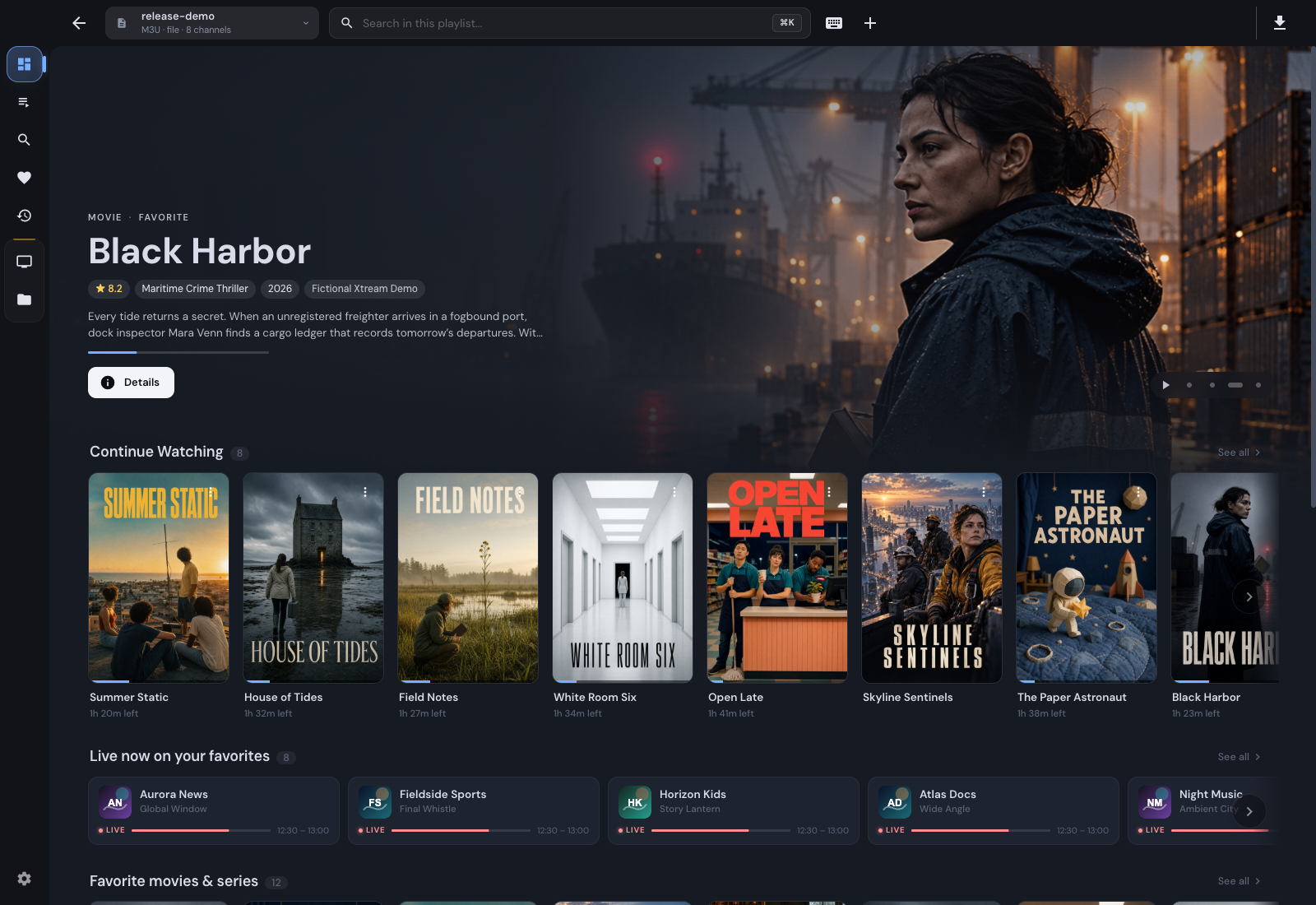
Experimental TV builds
Built from the IPTVnator v0.25.0 source. The TV apps keep their own version numbers and are installed separately from the desktop app.
- LG webOS 0.1.25: IPK · Developer Mode installation
- Android TV / Fire TV 0.1.0: APK · Sideloading guide
- Samsung Tizen 0.1.25: Build and sign for your TV
Thank you
Thank you to @ange-primiterra, @Blackspirits, @dajiaohuang, @Evilander, @gswaroop-g1, @htibcsike, @iacsha, @janvitos, @katemarkson, @ksign-prog, @mahmutyum, @marcpbailey, @RamjotSingh, @riccardomengoli, @robot-iraq, @saltimbanco, @simonhagger, @vbelynets, @Youssefhikal93, @Zatenbir for the ideas, support, and work that went into this release.
Thanks also to everyone who reported issues, tested builds, and shared feedback.
A special thank you to everyone who sponsored IPTVnator or made a donation. Your support helps keep the project going.
- v0.24.0Release v0.242026-09-24 · 2026-09-24 06:58 UTC
查看更新说明
Highlights
Programme guide, rebuilt
The M3U programme guide now follows your playlist's own channels and order, with groups and favorites one click away. Keep the player above the grid while you browse, click a channel to switch, or double-click to switch and close. Open the guide with G, hide channels without EPG and choose compact or comfortable rows. (#1560, closes #171)
Browse channels and episodes without leaving fullscreen
Press C or use the left edge of the video to open a searchable channel list. Series get season tabs and an episode list with artwork and watch progress too. With the default shared controls, switching channels, episodes or alternative movie sources keeps the player fullscreen. (#1519, #1620, #1509, closes #48)
See what is playing while it plays
The stream-info overlay shows resolution, frame rates, bitrates, audio details, buffer and dropped frames when the player can report them. Available in the built-in web players and experimental frame-copy Embedded MPV; unavailable values stay hidden. (#1578)
Nightly channel
Get builds from each merge through Settings → About → Update channel, or download them from the nightly repository. Stable remains the default.
27 features · 54 fixes · 1 performance improvement — including local XMLTV files, Xtream catch-up downloads, automatic reconnects for embedded MPV, season artwork and recovery for sources missing after an older upgrade.
Read the 📝 release story on the blog, the full CHANGELOG, or the changes since v0.23.0.
Before updating, back up your playlists and important data. Desktop startup applies database updates and clears outdated metadata matches; allow the preparation screen to finish and avoid downgrading an upgraded profile.
Thanks
Thank you to @Bpl5966 for MPV reconnects and extra options (#1515), @mark-jardine for the EPG time offset (#1489), and @larsemig for stream information (#1578).
Thank you also to @thejdubb02 for the original zoom-persistence, Turkish-search and Xtream EPG-refresh fixes (#1613, #1612, #1610). This work was incorporated and extended in #1617, #1640 and #1647, with his co-authorship preserved.
A warm thank-you to everyone who reported issues, tested builds, helped in the Telegram community, or supported development. 💙
❤️ If IPTVnator is useful to you, you can help keep it moving through GitHub Sponsors or Ko-fi
Features
- collections — A live channel you watch from Fav
- v0.23.0Release v0.23.02026-08-30 · 2026-08-30 08:43 UTC
查看更新说明
Highlights
Download manager with offline library
Downloads now separate active transfers from a grouped offline library, move missing files to Needs attention with Download again, and open movies and series in focused offline details with saved metadata. Series show only local episodes; View in portal returns to provider playback when the source can be recovered. Completed-file checks stay responsive on slow or unavailable storage. (#1313)
New player controls by default
The new player controls are now the default for the built-in web players — one consistent bar with quality selection, external subtitles, subtitle delay and styling, speed, and picture-in-picture. They are touch-friendly too: tapping the video shows or hides the controls instead of pausing, and narrow players get a two-row layout. Prefer the old look? Switch back in Settings > Playback. (#1485, closes #1408)
Alternative sources for movies
Movies that exist in several of your playlists now show a "Sources" chip on the detail page. Switch playlist mid-film and playback continues from the same timecode, pin a preferred source per movie, and when a stream dies the error screen offers the alternatives instead of a dead end. Optional auto-switching is off by default. (#1286)
Catalogs scroll without pages
Xtream movie, series, and live catalogs now load continuously as you scroll instead of flipping through pages — more items appear automatically as you near the bottom, and taller windows fill themselves on open. Opening a title and going back returns you to the exact spot in the list. In-category search and the in-portal search results follow the same continuous style. (#1392)
46 features · 76 fixes · 4 performance wins in this release — the full story is in the 📝 release notes on the blog and in the CHANGELOG.
- dashboard — Continue Watching cards on the dashboard now open the detail page on click, just like movie cards — no more accidental episode playback. Resuming the saved episode moved to a new ⋮ menu on each card, next to "Mark as Watched" and "Remove from history". (#1469, closes #1441)
- dashboard — Dashboard source cards now warn when a portal subscription is about to lapse: an amber "Expires in N d" chip appears within a week of the expiry date, and an "Expired" chip once it has passed. Xtream expirations come from the same cached status check the playlist switcher uses; Stalker portals reuse the account info saved at import. (#1342)
- dashboard — The dashboard gains a "Because you watched" rail: TMDB recommendations seeded from your recently watched movies and series, showing only titles that actually exist in your imported libraries. It appears once at least five matches are found, can be turned off under Settings → Dashboard, and requires the TMDB metadata opt-in (desktop app only). (#1419)
- deps — Linux desktops with client-side decoration support now show native rounded corners on the IPTVnator window. Desktop builds now run on Electron 43. (#1414)
- downloads — The download manager got a visual cleanup: "Ready to w
- v0.22.0Release v0.22.02026-07-05 · 2026-07-05 14:33 UTC
查看更新说明
v0.22 is one of the biggest IPTVnator releases so far. The embedded MPV player expands from macOS to Windows and Linux, detail pages for movies and series got a full redesign, and the app can now enrich your VOD & series content with TMDB metadata — posters, cast, trailers and more. On top of that: a built-in desktop updater, global search across all your sources, and a reworked live EPG timeline.
✨ Highlights
- Embedded MPV player now available on Windows and Linux (experimental)
- TMDB metadata enrichment (opt-in): plots, cast, trailers, similar titles, actor pages
- Redesigned VOD & series detail pages with a browse ↔ watch layout and season tabs
- Desktop auto-updater — the app now updates itself from GitHub releases
- Global search across all sources, including M3U playlists
- Live EPG panel reworked into a timeline with an optional vertical list view
- Catch-up/archive playback improvements for Xtream
- Custom title bar with window controls on Windows and Linux
- Extensive Electron security hardening
🎬 Embedded MPV Player — now on Windows & Linux (Experimental)
The embedded MPV player introduced for macOS in v0.21 is now available on all three platforms:
- Windows: libmpv rendering directly inside the app window (bundled, no extra install)
- Linux: playback via the system
mpvplayer embedded into the app window (X11/XWayland; requiresmpvon PATH) - Series navigation (next/previous episode) inside the embedded player
- Switch to embedded MPV directly from the command palette
- Stability hardening across the board: EOF detection, safer polling, better error visibility, and the display no longer goes to sleep during playback
The macOS embedded player also received a round of fixes and polish based on v0.21 feedback.
🎞️ TMDB Metadata Enrichment (opt-in)
Movie and series detail pages for Xtream and Stalker portals can now be enriched with TMDB data:
- Plot, genres, ratings, director and cast with photos, artwork and YouTube trailers
- "Similar" rail: TMDB recommendations matched against your catalog — across all your portals
- Trending on the dashboard: a TMDB-powered trending rail with enriched hero artwork
- Real episode names, descriptions and stills for each season
- Actor pages: click any cast member to see their bio and filmography, linked back to your catalog or portal search
- Localized to your app language (falls back to the original language when a translation is missing), cached locally
Enrichment is off by default and requires a personal TMDB API key (free registration at themoviedb.org). Enter your key and enable the feature under Settings → Metadata (TMDB) — titles are sent to TMDB for matching.
📺 Redesigned Movie & Series Detail Pages
Detail pages now have two states:
- Browse: hero section with poster, metadata and actions, episodes below
- Watch: the hero collapses, the inline player takes the full content width, and details move below the episodes
- Season tabs with smart auto-selection (jumps to the season you're watching or resuming)
- Grid/list toggle for episodes, remembered across sessions
Escor "Close player" returns to browse without losing your place
🔄 Desktop Auto-Updater
- IPTVnator now checks GitHub releases and can update itself — no more manual downloads
- Release notes for the current version are shown in the settings
- Fixed a crash in the packaged updater (#1103)
🔎 Global Search
- New workspace-wide search across all your sources — Xtream, Stalker and M3U playlists
- Fixed live search (Ctrl+F) opening the wrong channel or category
🗓️ EPG & Catch-up
- Live EPG panel reworked into a horizontal **t
- v0.21.0Release v0.21.02026-05-06 · 2026-05-06 20:36 UTC
查看更新说明
v0.21 focuses on quality-of-life improvements, performance, and playback experience improvements across the app.
This release also introduces one of the most requested features for macOS users: an experimental embedded MPV player built directly into the app — no additional installation required.
✨ Highlights
- Experimental embedded MPV player for macOS
- Toggleable Live TV sidebar and EPG panel
- Improved command palette
- Better Recently Viewed & Favorites experience
- Performance and loading time improvements
- Multiple Xtream, Stalker, and M3U fixes
🍎 macOS Embedded MPV Player (Experimental)
[macOS only]
IPTVnator now includes an experimental embedded MPV player directly inside the app.
No additional software required — just install and use IPTVnator.
This is an early experimental version and feedback is very welcome.
🧭 Layout & Navigation
- Toggleable sidebar panel for Live TV channels for a more focused viewing experience
- Toggle/collapse EPG panel
⚡ Command Palette Improvements
- Change player directly from command palette
- Added section with 5 recently used actions
⭐ Favorites & Recently Viewed
- Fixed issue where Live TV items appeared favorited by default
- Channels can now be favorited directly from Recently Viewed
- Remove individual channels from Recently Viewed via context menu
- Renamed "GLOBAL Favorites" to simply "Favorites"
📺 Playback & Playlist Management
- Fixed MPV/VLC custom path fallback handling
- Added manual refresh for playlists added from filesystem
- Fixed playlist refresh handling for file-based playlists
📦 Module Improvements
M3U
- Cover size setting (XL / L / M)
- Sorting for “All Channels”:
- by name
- by original playlist order
- Improved channel drag & drop ghost styling
Xtream
- Better unavailable portal handling
- Added clear button to playlist form
- Fixed search when no category is selected
Stalker
- Fixed “14 items” issue
🎨 UI & UX Improvements
- Improved category count badge styling
- Improved “No results found” screen styling
🚀 Performance & Internal Improvements
- Performance improvements to reduce loading times
- Database WAL improvements
- Favorites lookup optimizations
- Refactored settings component
- Additional facade/internal refactors
🌍 Localization
- Added missing translation strings for all supported languages
🛠 Other Fixes & Improvements
- Fixed loading screen issues in download manager
- Fixed reset Recently Viewed for M3U module
⬇️ Download
GitHub Releases:
https://github.com/4gray/iptvnator/releases
💙 Support the project
If you like IPTVnator and want to support further development:
- GitHub Sponsors: https://github.com/sponsors/4gray
- Ko-fi: https://ko-fi.com/4gray
🙏 Huge thanks to everyone who donated and supported the project,
as well as contributors and all the people who tested the app,
provided feedback, reported issues, and shared ideas on how to improve it.Full Changelog: https://github.com/4gray/iptvnator/compare/v0.20.0...v0.21.0
用户点评
登录用户的真实使用记录,可按版本和硬件筛选共 0 条
还没有人点评。第一个说出真实体验的人最有价值。
IPTVnator
A free, open-source IPTV player for macOS, Windows, Linux and the browser. Bring your M3U playlists, Xtream Codes account or Stalker portal to watch live TV, browse movies and series, and pick up where you left off.
Download · Website · Getting started · Gallery




[!IMPORTANT] IPTVnator is a player: it does not provide or sell subscriptions, channels, playlists or other media. Screenshots show demonstration content. Download only from the official website or GitHub Releases. Learn about unofficial websites.
Download
Get the latest stable desktop release from the download page or GitHub Releases.
| macOS | Windows | Linux |
|---|---|---|
| Apple Silicon / Intel | Installer / portable | AppImage, deb, rpm and more |
For package-manager commands, experimental Linux Embedded MPV support and nightly builds, see Installation.
Features
- Your sources together: local or remote M3U/M3U8 playlists, Xtream Codes, and Stalker / Ministra portals.
- Live TV: channel groups, search and favorites; XMLTV guide, multi-channel EPG and catch-up on desktop.
- Movies and series: posters, seasons, watch history and resume positions; optional TMDB metadata with your own API key.
- Playback options: built-in web players, external MPV/VLC/IINA and experimental Embedded MPV on desktop.
- Watch later: desktop downloads for movies and episodes, plus continue-watching and favorites across sources.
- Make it yours: light and dark themes, 21 language options, keyboard
shortcuts and a command palette (
Ctrl/Cmd+K). - Use your screen: desktop apps, a self-hosted PWA and a phone remote for the desktop player.
Full feature list and platform limits · Keyboard shortcuts · All screenshots
Self-hosted PWA
Run the browser app and its backend together with Docker:
docker compose -f docker/docker-compose.yml up --build -d
Open http://localhost:4333. No separate backend container is needed. You can also run a server from the desktop app. Connected clients can share sources. Favorites, Recently Viewed and supported watch progress each have their own synchronization opt-in.
The PWA does not include M3U XMLTV, Embedded MPV, managed external-player launching, the download manager or Electron remote-control features. See Docker setup and client connections for configuration, reverse proxies, playback troubleshooting and platform limits.
Smart TV
LG webOS and Samsung Tizen
LG webOS and Samsung Tizen share a dedicated, experimental TV client for M3U, Xtream Codes and Stalker / Ministra sources. It requires a compatible IPTVnator web backend. Build and install the package for your TV in Developer Mode.
Add sources from your phone by scanning a QR code, or connect the TV to your self-hosted IPTVnator source library. Favorites, history and resume positions currently stay on the TV.
See the TV README for compatibility, phone setup, source synchronization and screenshots.
Fire TV / Android TV shell (experimental)
The Android shell bundles the same PWA used in the browser with an embedded backend. It's designed primarily for Fire TV Stick and Android TV devices with a D-pad remote. You can try it on tablets. Compact phone screens still need layout work.
The Build TV shell APK workflow can publish a GitHub release, marked as a
pre-release by default. For APK builds, installation and remote controls, see
the Android shell guide.
Enigma2 receivers
Dreaminator is a standalone IPTV plugin and browser-based playlist manager for Enigma2 receivers. Organize channels in a browser and watch with the receiver's remote. Tested on the Dreambox DM520 and Vu+ Uno 4K SE.
Dreaminator on GitHub · Dreaminator on the IPTVnator blog
Help and development
- User guides — sources, EPG, playback, downloads and updates.
- Troubleshooting — macOS and Linux startup fixes.
- Build and develop — Node/pnpm setup, local Electron/PWA runs and diagnostics.
- Developer and agent documentation — subsystem contracts; AGENTS.md and the agent workflow cover contribution rules.
- Report a bug or join Telegram / Bluesky.
Support the project
Support development through GitHub Sponsors, Ko-fi, or a star on GitHub.

License and trademark
The source code is MIT licensed. The IPTVnator name and logo are unregistered trademarks of the project owner and are not covered by that license. Forks and redistributions, including app-store submissions, must use a different name and their own icon. See TRADEMARK.md.
iptv
iptv-org·TypeScript
收集全球公开可用的 IPTV 频道,整理成 M3U 播放列表,方便直接导入播放器观看各地直播电视。
IPTV+4IPTV / 直播
143708+2478.6k2026-11-10 00:10 UTC

Tvlist-awesome-m3u-m3u8
imDazui
汇总可用的 IPTV 直播源和 M3U/M3U8 播放列表,方便在 Kodi 等播放器里直接导入看电视直播。
直播源+4IPTV / 直播
30373+203.5k2025-11-14 10:50 UTC

live
fanmingming·JavaScript
提供可直连访问的电视和广播台标图标库,以及配套的 EPG、M3U 转换工具,解决 IPTV 播放列表缺少台标和节目单的问题。
IPTV+4IPTV / 直播
28807+134.2k2026-11-10 08:23 UTC

iptv-api
Guovin·Python
自动采集、校验并测速 IPTV 直播源,生成可直接播放的 M3U/TXT/API 结果,支持自定义频道、IPv4/IPv6 与 Docker、Actions 多端部署。
IPTV+4IPTV / 直播
26045+367.7k3.1.02026-10-14 01:21 UTC