AdGuardMiniForMac

AdguardTeam活跃维护

macOS 上的 Safari 广告拦截扩展,基于 AdGuard 规则过滤网页广告和跟踪脚本,轻量省资源。

AdGuard Mini for macOS

v3.0.0发布于 2026-11-02 12:08 UTC1,191star +2 / 7 天83fork同步于 2026-11-10 05:55 UTC

怎么上手

README 里没有找到可直接复制的安装命令

README 里没有找到可直接复制的安装命令,请到 README 或官方文档查看安装方式。

硬件要求

README 没有说明硬件要求。

下载:源码 zip·GitHub Releases(安装包)本站不镜像安装包

项目说明

这个项目的说明还在生成中,先参考下面「最近发版」和 README。

最近发版

5 个版本v3.0.0
  1. v3.0.03.0.0最新正式版2026-11-02 · 2026-11-02 12:08 UTC

    AdGuard Mini for Mac v3.0 focuses on performance, a cleaner interface, and accessibility. It also brings an early, experimental version of System-wide protection, which blocks ads and trackers in apps beyond Safari.

    Less RAM, more speed

    We’ve been listening to your feedback on app performance, and decided a deeper change under the hood was in order. AdGuard Mini’s interface now runs on WKWebView, a built-in macOS component powered by WebKit, the same engine Safari is built on.

    AdGuard Mini for Mac now loads much faster and uses less RAM and CPU, which also helps reduce occasional overheating.

    Customizable stories

    You can now choose which stories appear in the app tray. Click Hide on any story you no longer want to see.
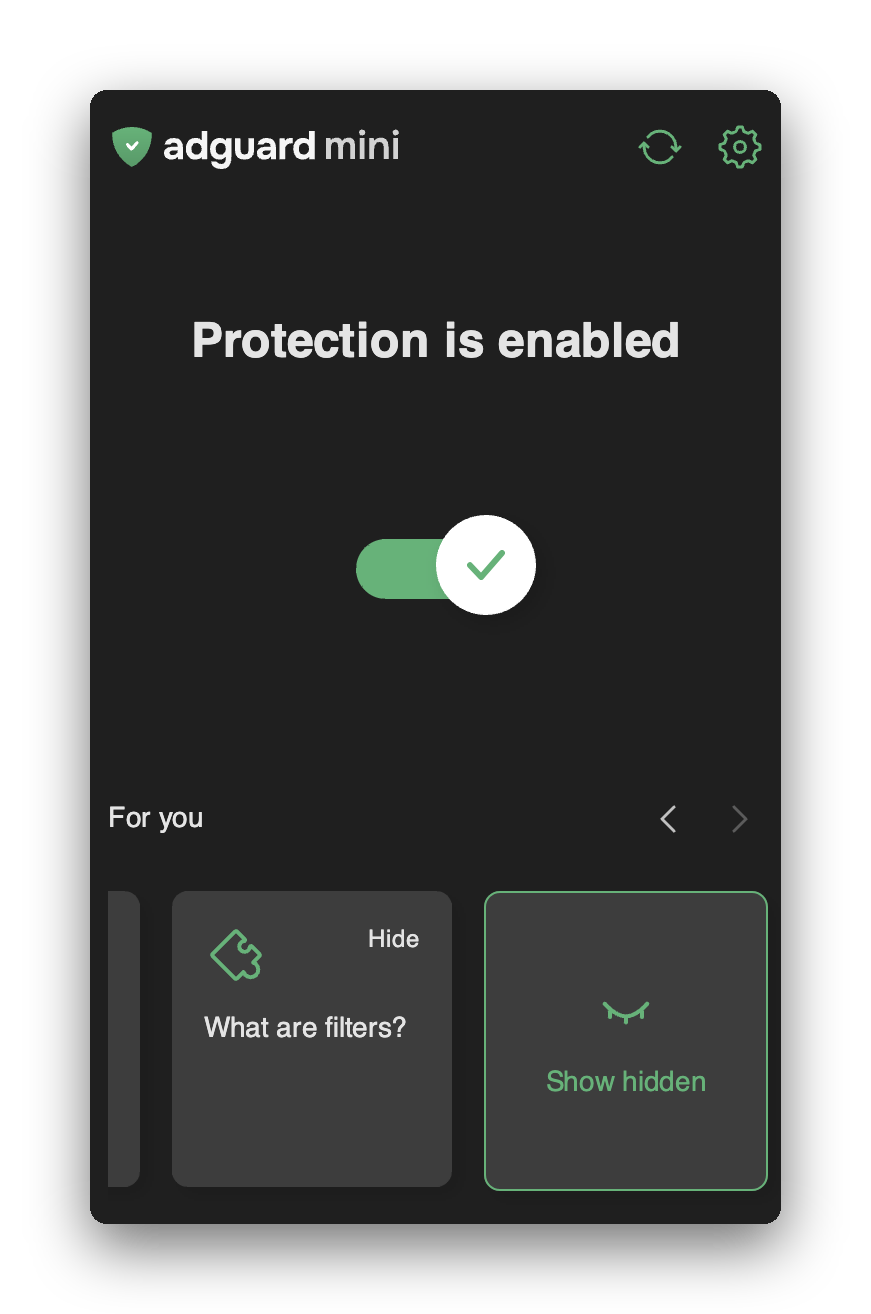
    Hide a story

    Basic VoiceOver support

    We’re working on adding full VoiceOver support across all AdGuard Mini for Mac elements in future releases. But we didn’t want to make you wait for all of it at once — that’s why we’re rolling out VoiceOver support in stages. This release already lets VoiceOver read headings and interactive elements aloud, with more accessibility support on the way.

    System-wide protection (experimental)

    Last year, Apple introduced its first URL-level system filtering API with built-in privacy. AdGuard Mini is among the first consumer apps to use it. With System-wide protection, AdGuard Mini can block ads and trackers not just in Safari, but in other apps on your Mac too. It is available to users with an AdGuard license on macOS 26 and later.

    Apple’s filtering API uses Private Information Retrieval (PIR), so AdGuard never sees the URLs or domains you visit.

    System-wide protection is an experimental feature, and it may not work for everyone yet due to an unresolved bug on Apple’s side.

    For example, it currently does not work correctly on macOS 27.2. Once it is stable for everyone, we’ll make it a core part of AdGuard Mini.

    System-wide protection is hidden by default in the release version. To show it, go to Settings → Miscellaneous and turn on Show System-wide protection (Experimental). The beta version always shows it.
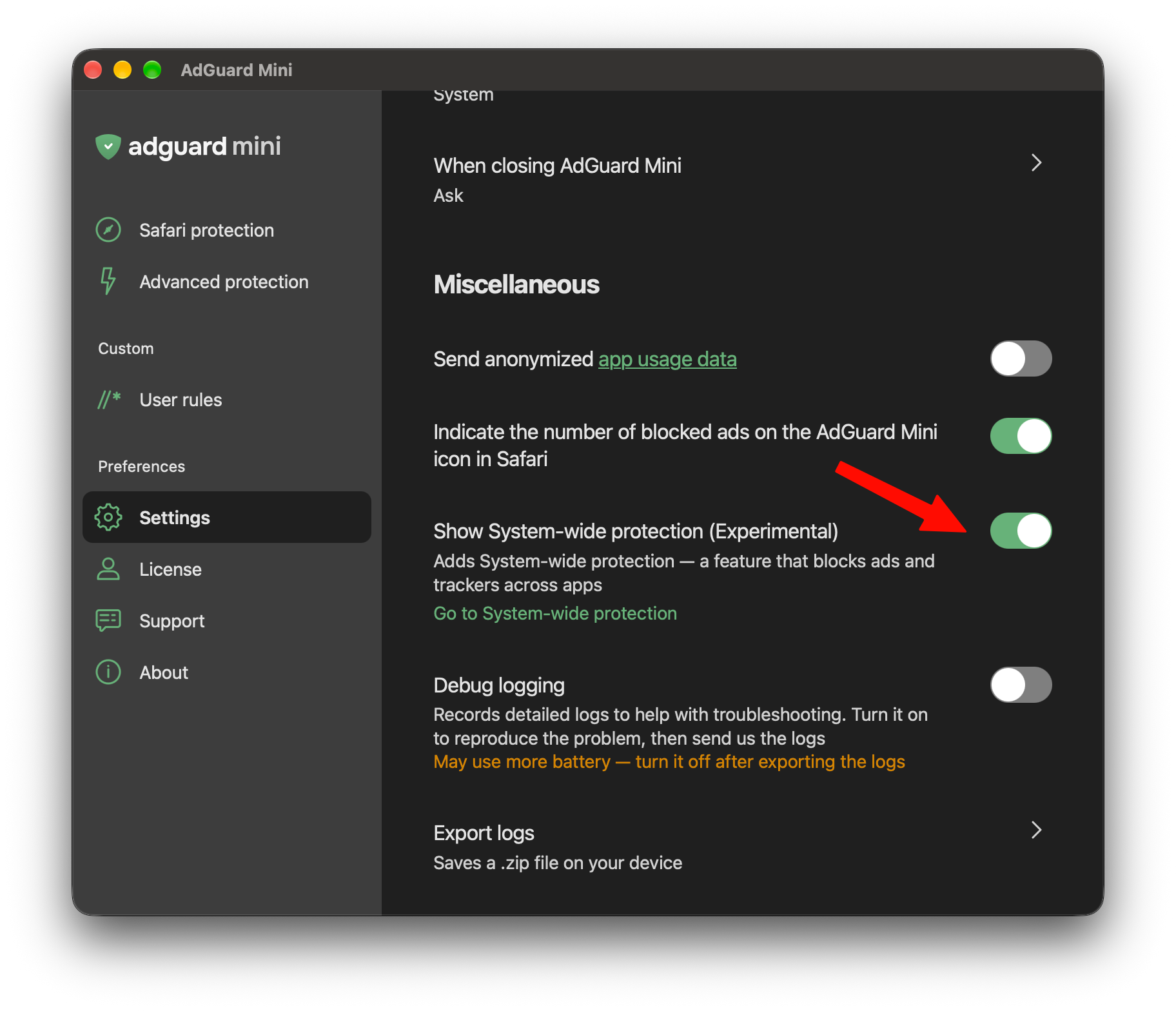
    Show system-wide protection

    How to set up System-wide protection

    Once the toggle is on, go to Advanced protection → System-wide protection and switch it on.
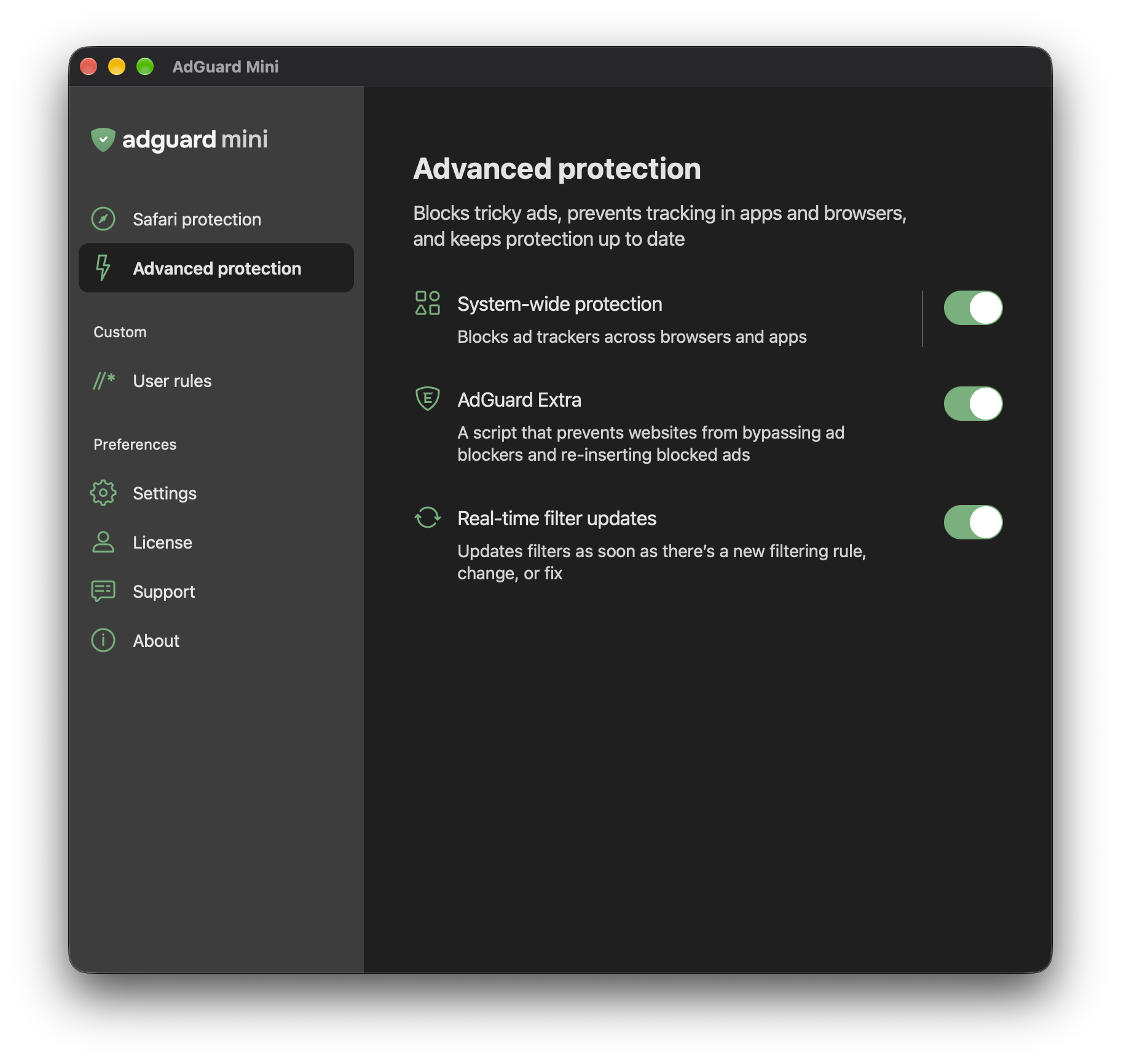
    System-wide protection

    You can then choose between three levels of protection:

    Essential — blocks ads and trackers Safe — blocks ads, trackers, and phishing Family — blocks ads, trackers, phishing, and adult content
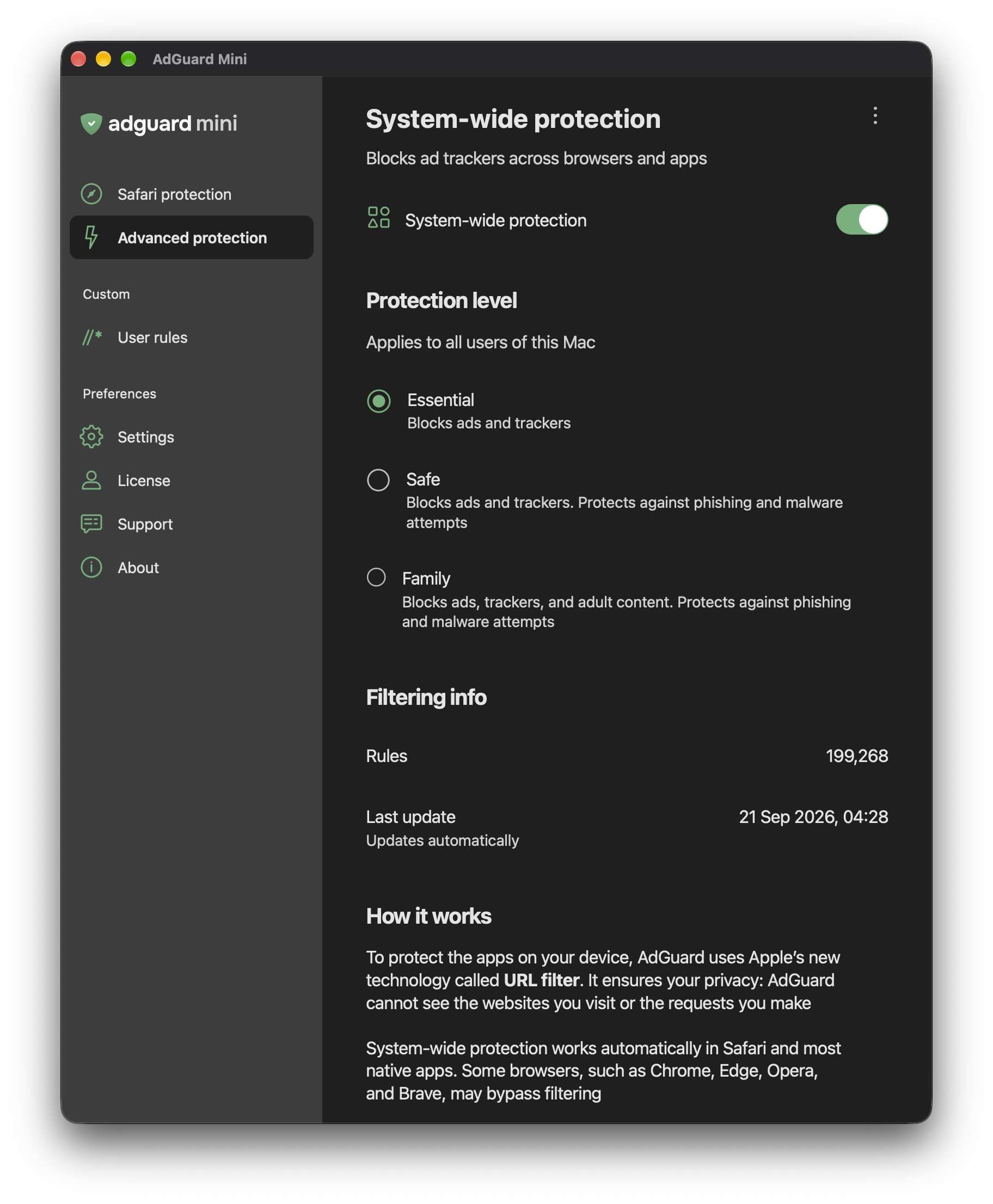
    Three levels of protection

    The extent of coverage depends on each app’s own API, so some apps may not be filtered. System-wide protection is currently available only for the first account you set up on your Mac, with the User ID of 501.

    For more detailed instructions on how to set up System-wide protection, go to our Knowledge Base.

    Changelog

    Improvements

  2. v3.0.0-rc.13.0.0 RCpre-release2026-11-02 · 2026-11-02 11:34 UTC
    查看更新说明

    AdGuard Mini for Mac v3.0 focuses on performance, a cleaner interface, and accessibility. It also brings an early, experimental version of System-wide protection, which blocks ads and trackers in apps beyond Safari.

    Less RAM, more speed

    We’ve been listening to your feedback on app performance, and decided a deeper change under the hood was in order. AdGuard Mini’s interface now runs on WKWebView, a built-in macOS component powered by WebKit, the same engine Safari is built on.

    AdGuard Mini for Mac now loads much faster and uses less RAM and CPU, which also helps reduce occasional overheating.

    Customizable stories

    You can now choose which stories appear in the app tray. Click Hide on any story you no longer want to see.

    Hide a story

    Basic VoiceOver support

    We’re working on adding full VoiceOver support across all AdGuard Mini for Mac elements in future releases. But we didn’t want to make you wait for all of it at once — that’s why we’re rolling out VoiceOver support in stages. This release already lets VoiceOver read headings and interactive elements aloud, with more accessibility support on the way.

    System-wide protection (experimental)

    Last year, Apple introduced its first URL-level system filtering API with built-in privacy. AdGuard Mini is among the first consumer apps to use it. With System-wide protection, AdGuard Mini can block ads and trackers not just in Safari, but in other apps on your Mac too. It is available to users with an AdGuard license on macOS 26 and later.

    Apple’s filtering API uses Private Information Retrieval (PIR), so AdGuard never sees the URLs or domains you visit.

    System-wide protection is an experimental feature, and it may not work for everyone yet due to an unresolved bug on Apple’s side.

    For example, it currently does not work correctly on macOS 27.2. Once it is stable for everyone, we’ll make it a core part of AdGuard Mini.

    System-wide protection is hidden by default in the release version. To show it, go to Settings → Miscellaneous and turn on Show System-wide protection (Experimental). The beta version always shows it.

    Show system-wide protection

    How to set up System-wide protection

    Once the toggle is on, go to Advanced protection → System-wide protection and switch it on.

    System-wide protection

    You can then choose between three levels of protection:

    Essential — blocks ads and trackers Safe — blocks ads, trackers, and phishing Family — blocks ads, trackers, phishing, and adult content

    Three levels of protection

    The extent of coverage depends on each app’s own API, so some apps may not be filtered. System-wide protection is currently available only for the first account you set up on your Mac, with the User ID of 501.

    For more detailed instructions on how to set up System-wide protection, go to our Knowledge Base.

    Changelog

    Improvements

  3. v3.0.0-beta.13.0.0 betapre-release2026-09-23 · 2026-09-23 18:08 UTC
    查看更新说明

    AdGuard Mini for Mac started out as a Safari-focused ad blocker. Now we’ve taken a big step forward. This beta brings System-wide protection, blocking ads and trackers not just in Safari, but in other apps on your Mac too. The feature is available for users with an AdGuard license on macOS 26 and later.

    We’ve also greatly improved performance, helping to reduce occasional overheating and high CPU usage. As part of this update, we moved AdGuard Mini for Mac to WebView.

    One more thing: we’ve refined how stories appear in the app tray. Now you can choose which stories to show.

    System-wide protection

    Last year, Apple introduced its first official system filtering API. AdGuard Mini is among the first consumer apps to use it. What does this mean in practice?

    System-wide protection

    For the first time ever, AdGuard Mini can block ads and trackers not just in Safari, but in other apps on your Mac. There are three levels of protection:

    Essential — blocks ads and trackers Safe — blocks ads, trackers, and phishing Family — blocks ads, trackers, phishing, and adult content

    Three levels of protection

    You’ll find System-wide protection under Advanced protection in the AdGuard Mini app. To enable it, toggle the switch on.

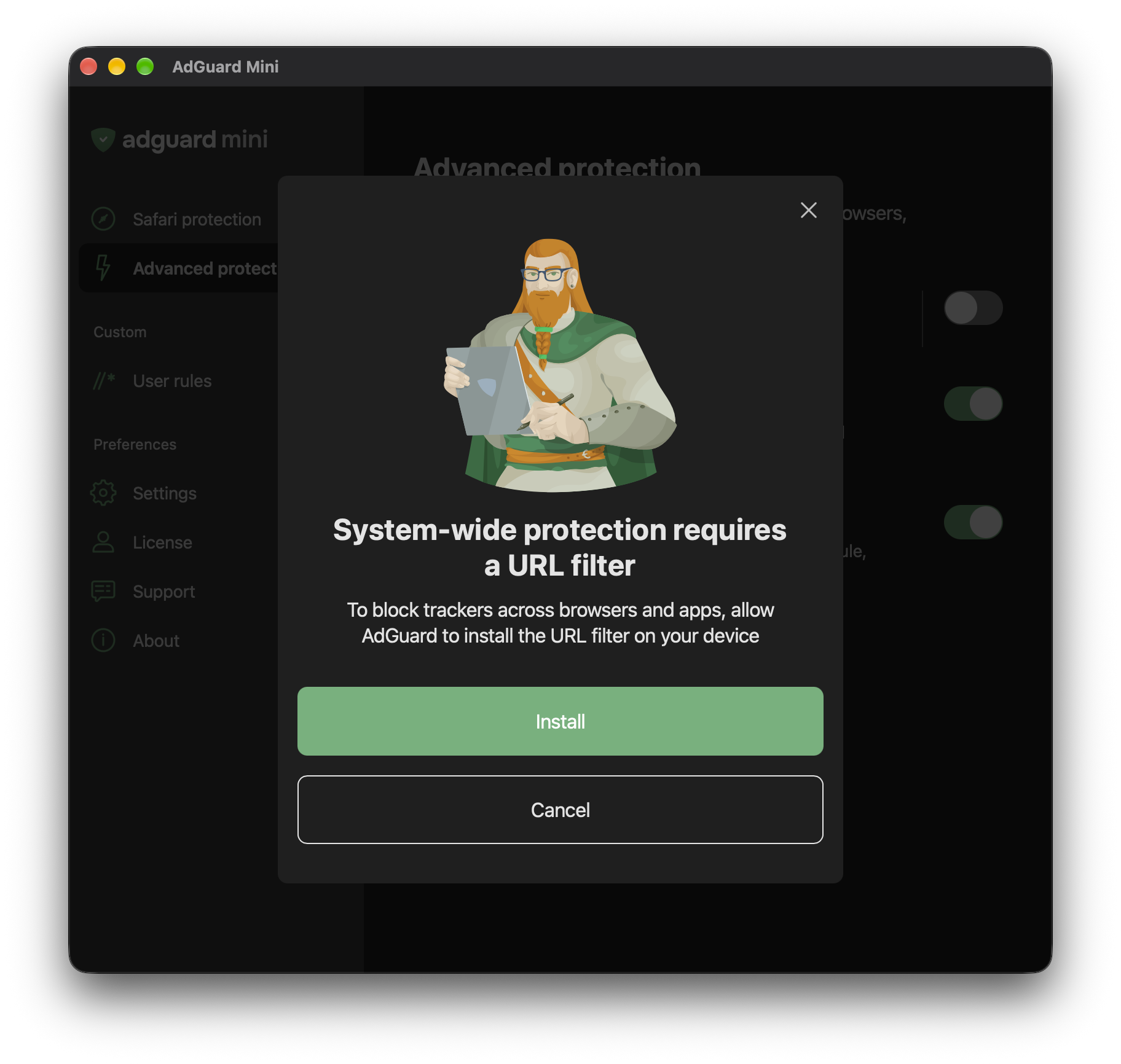
    When you first enable System-wide protection, you’ll get a request to install URL Filter on your computer. Click Install, after which the system can ask for your Touch ID or passcode. This is standard macOS behavior when adding a filter configuration. AdGuard does not see or store any of this data.

    System-wide protection requires a URL filter

    Note: The extent of coverage depends on each app’s own API, so some apps may not be filtered. System-wide protection is currently available only for the first account you set up on your Mac, with the User ID of 501.

    One more important thing: Apple’s filtering API uses the Private Information Retrieval (PIR) technology. PIR uses advanced cryptographic protocols that allow a client to retrieve data from a server without the server learning which specific item was requested.

    In simpler terms, this means that even with System-wide protection on, your browsing and app data stay anonymous. We simply do not have access to it.

    Customizable stories

    We’ve added an option to hide stories if you want to customize AdGuard Mini for Mac’s tray. Click Hide on any story you no longer want to see.

    Hide a story

    Less RAM, more speed

    We’ve been listening to your feedback on app performance, and decided a deeper change under the hood was in order — we switched to WebView. The app now loads much faster while using less RAM and CPU.

    Basic VoiceOver support

    We’re working on adding full VoiceOver support across all AdGuard Mini for Mac elements in future releases. But we didn’t want to make you wait for all of it at once — that’s why we’re rolling out VoiceOver support in stages. This beta already lets VoiceOver read headings and interactive elements aloud, with more accessibility support on the way.

    Changelog

    Improvements

    • Added URL Filter support #1203
    • Added an option to hide story cards in the app’s tray menu #1179
    • Switched AdGuard Mini UI to WebView to improve performance #1212

    Fixes

  4. v2.3.0.1091-release2.3.02026-08-03 · 2026-08-03 10:54 UTC
    查看更新说明

    If filtering doesn’t work as expected or something in your setup is missing, you shouldn’t have to guess what went wrong.

    In this release, we’ve added configuration checks and improved diagnostics. The app can now warn you about settings or system conditions that may prevent it from working properly — and suggest what to do next.

    Configuration checks

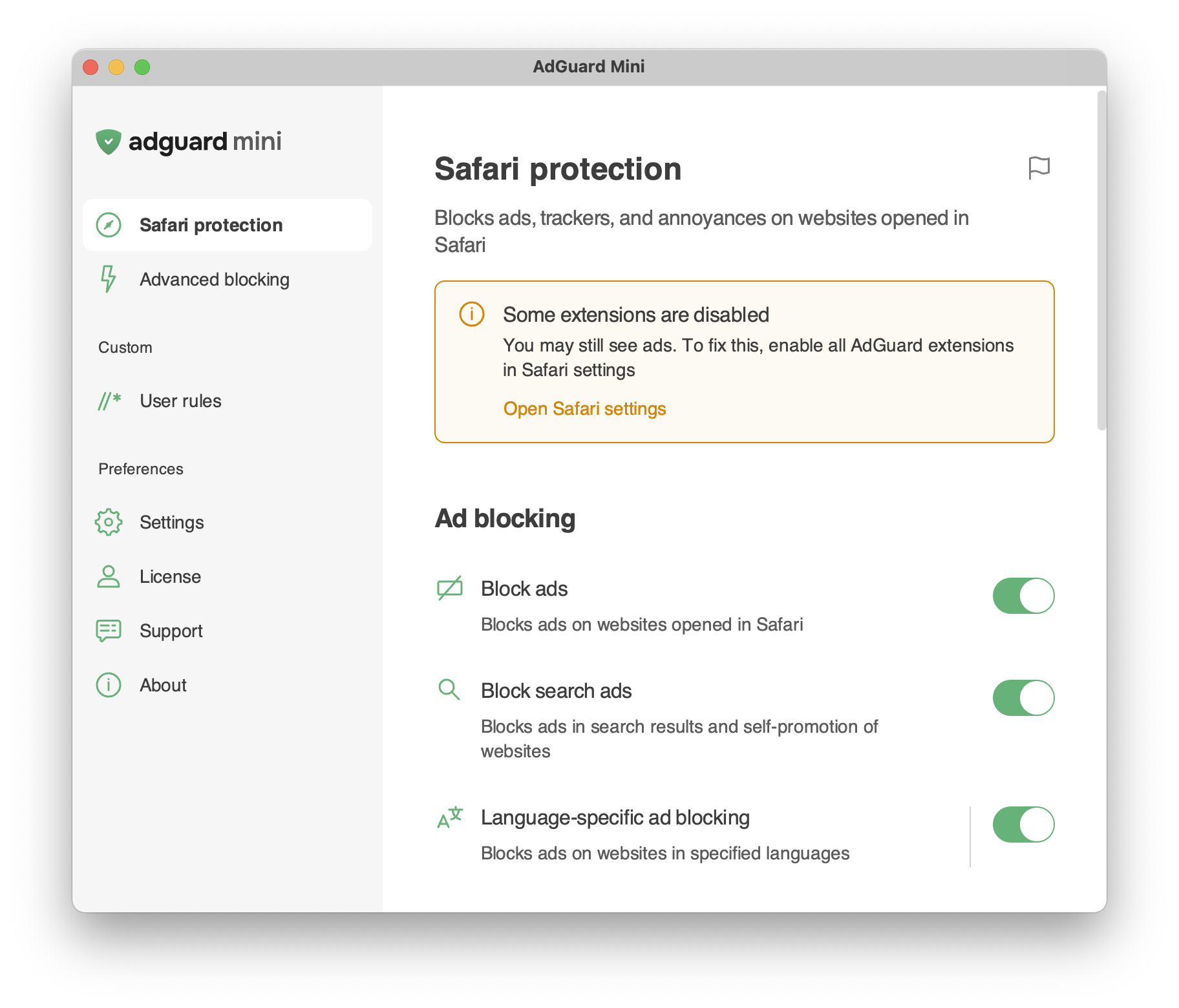
    AdGuard Mini now checks your setup and alerts you if something may interfere with filtering or app stability. These alerts appear in both the Safari popup and the tray menu, so you can notice them without opening settings.

    There are two types of alerts: critical and standard.

    Critical alerts are highlighted in orange. They point to issues that may prevent AdGuard Mini from working properly, such as missing permissions or disabled system settings. To fix the issue, click the action button in the alert and follow the instructions.

    Orange alert

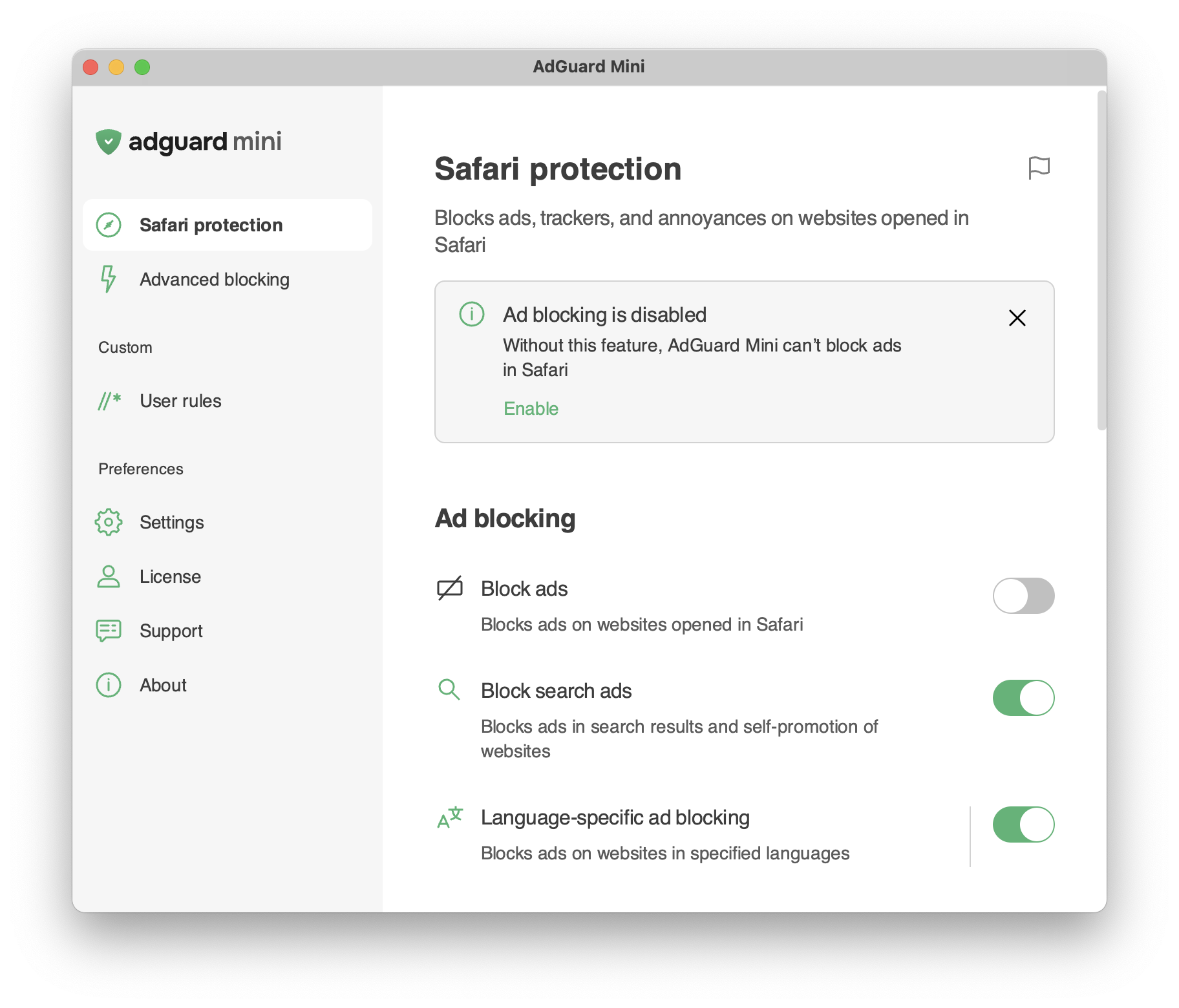
    Standard alerts are grey. They point to less urgent issues that don’t necessarily prevent the app from working, but may affect the protection level. You can close these alerts, but we recommend following the suggested steps to keep AdGuard Mini working at its best.

    Grey alert

    Other changes

    Some users reported high CPU or memory usage, especially on older Macs, including models with Intel processors. Others ran into filtering problems after system migration or configuration changes. The new diagnostics help the app detect these cases faster and make troubleshooting easier for both users and our support team.

    Changelog

    Fixes

    • Extreme overheating on tracker-heavy websites #1200
    • The filter update notification appears again after checking for updates #1193
    • Excessive background wake-ups #1192
    • Rule editor doesn’t save its window position and size #1159

    Sciter (UI engine)

    • Updated Sciter to v6.0.3.18

    How to install AdGuard Mini

  5. v2.3.0.1091-beta2.3.0 beta 2pre-release2026-07-30 · 2026-07-30 12:43 UTC
    查看更新说明

    Every little fix matters. We took care of a few bugs here and there — nothing dramatic, but the app is better for it.

    How to install AdGuard Mini beta

用户点评

登录用户的真实使用记录,可按版本和硬件筛选
共 0 条

    还没有人点评。第一个说出真实体验的人最有价值。

    README 原文

    未翻译

    AdGuard Mini (formerly AdGuard for Safari) is the same open-source Safari extension — but redesigned, faster, and with advanced features. On top of core ad-blocking power, advanced features are now available as an optional in-app purchase.

    AdGuard Mini keeps all kinds of ads away from your Safari browser. It removes all visual clutter, such as banners, popups, and autoplay videos, so only the important content stays. AdGuard Mini also protects your privacy by blocking trackers to prevent unnecessary data collection.

    With AdGuard Mini you can manage ad blocking directly from Safari – pause protection, allowlist websites, block elements manually, and report issues.

    Key features

    • Block all kinds of ads in Safari: banners, video ads, popups, autoplay videos, and overlays
    • Stop trackers and analytics beacons to protect your privacy
    • Eliminate annoyances: cookie notices, social widgets, assistant windows and sticky bars
    • Control everything from the Safari toolbar
    • Select and block manually any element on a page
    • Choose from popular filter lists or add your own
    • Create custom filtering rules with an advanced rule editor

    Advanced features

    • System-wide protection to block ads in supported browsers and apps on your Mac, not just Safari
    • Real-time filter updates for precise ad blocking
    • AdGuard Extra to handle anti-adblock scripts and complex cases
    • Advanced custom filters to add any filters you wish

    Advanced features can be unlocked by an AdGuard Ad Blocker license, which can be obtained on our website or through in-app purchase.

    For ad blocking beyond Safari — there is full-fledged AdGuard for Mac

    With all of the above being said, there is a solution that is even more effective than AdGuard Mini extension — AdGuard for Mac. It’s an app that:

    • provides better filtering quality in some cases (due to the lack of browser API restrictions)
    • is not limited regarding the number of filtering rules

    You can try it out for free.

    Contribution

    How to report an issue

    To report an issue or submit a feature request, go to the Issues section of this repository and click New issue there.

    Note: for filter-related issues (missed ads, false positives, etc.) click the AdGuard Mini icon in Safari’s toolbar menu and select Report an issue, or go to ⚙️→ Support → Report incorrect blocking in the AdGuard Mini app. Alternatively, use our reporting tool.

    Translating AdGuard

    If you want to help with AdGuard translations, please learn more about translating our products here.

    Other options

    Here is a dedicated page for those who are willing to contribute.

    How to become a beta tester

    You can use TestFlight to participate in the AdGuard Mini for Mac beta-testing program. All necessary information on this topic can be found on the dedicated page.

    Technical documentation for developers

    See DEVELOPMENT.md