需按浏览器分别从对应商店安装,不能通用一个包;MV3 与 MV2 权限机制不同,host_permissions 与 userScripts 仅 MV3 使用;预渲染请求处理需 Chromium 106+,低版本仅支持其余功能。

从浏览器商店安装:Chrome 用 https://agrd.io/extension_chrome,Firefox 用 https://agrd.io/extension_firefox 硬件要求按 README 说明
README 未说明;作为浏览器扩展运行于 Chrome、Firefox、Opera、Edge 等浏览器,无显存或 GPU 要求。最低版本:Chromium MV2 79、MV3 121,Firefox 78,Firefox Mobile 113,Opera 67,Edge Chromium MV2 80、MV3 121。
免费开源的浏览器广告拦截扩展,屏蔽各类广告与追踪器并强化隐私保护
浏览器广告拦截扩展,支持 Chrome、Firefox 等主流浏览器,过滤广告和跟踪脚本,保护隐私。
核心能力
- 拦截网页上各类广告与追踪器
- 阻止网站构建用户影子画像
- 支持手动选取并屏蔽页面元素
- 内置推荐过滤规则开箱即用
- 同时支持 Manifest V2 与 V3
容易踩的坑
内容由模型根据 README 生成,可能不完整或不准确,以官方文档为准。看原文 README
- v5.5.4-beta.475.5.4 Betapre-release2026-11-09 · 2026-11-09 17:10 UTC
查看更新说明
The extension now runs more smoothly thanks to this minor update, which fixes a number of bugs.
- v5.5.3.32026-09-30 · 2026-09-30 15:48 UTC
查看更新说明
In this release we’ve added AdGuard’s Manifest V3 (MV3) Browser Extension to Microsoft Edge.
As of now, Manifest V2 (MV2) ad blockers no longer appear in Edge Add-ons search results. This is part of Microsoft’s policy on moving away from MV2 extensions, which the company announced in August.
But this doesn’t mean AdGuard is leaving the store. This is where our MV3 version comes in.
What changes with MV3
With MV2, the extension sees each network request in real time and decides what to block. This changes with MV3: the browser receives a prebuilt ruleset and applies it itself.
This means the number of active rules is limited in MV3, some traditional filtering rules cannot be converted exactly, and most filter updates now ship with the extension itself, so updates can take longer.
For most people, everyday filtering stays close to MV2. Still, the browser now handles more of the decision-making, and keeping behavior close to our MV2 version takes more work. But we’re up for it.
Setting up
To use custom filters and user rules, turn on Allow user scripts for the AdGuard Browser Extension in Edge. Here’s how to do that:
Open edge://extensions, or click Extensions → Manage extensions Find AdGuard and click Details Turn on Allow User Scripts
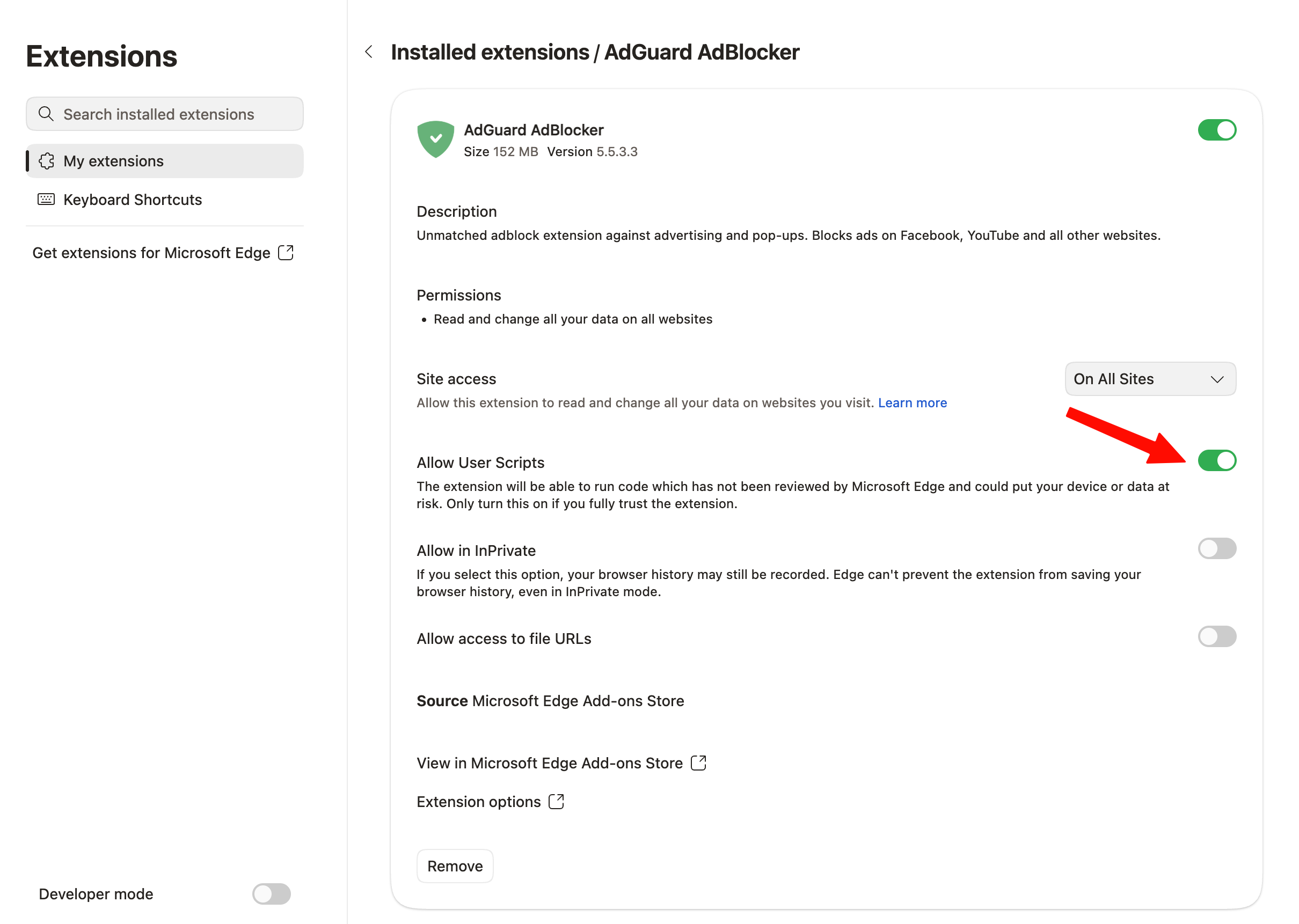
This will allow the MV3 extension to work as intended.
Changelog
Improvements
- Added AdGuard MV3 Extension to Microsoft Edge
Changed
- Updated [@adguard/dnr-converter] to v2.0.0.
- Updated [@adguard/dnr-rulesets] to v6.0.0.
- Updated [@adguard/tswebextension] to v6.0.0.
How to install MV3 stable:
How to install MV3 beta:
How to install MV2 stable:
- v5.5.3.0-betapre-release2026-09-23 · 2026-09-23 15:37 UTC
这个版本没有写更新说明。
- v5.5.2.35.5.2.3最新正式版2026-08-26 · 2026-08-26 09:37 UTC
The extension now runs more smoothly thanks to this minor update, which fixes a number of bugs.
Changelog
Fixes
- User rules in editor view is empty after update #3598
- Unanchored $urltransform patterns do not match query strings in MV3 #3600
- "$removeparam for all query parameters" blocks whole site #3602
How to install MV3 stable:
How to install MV3 beta:
How to install MV2 stable:
- v5.5.2.3-beta5.5.2.3 betapre-release2026-08-26 · 2026-08-26 09:04 UTC
查看更新说明
The extension now runs more smoothly thanks to this minor update, which fixes a number of bugs.
Changelog
Fixes
- User rules in editor view is empty after update #3598
- Unanchored $urltransform patterns do not match query strings in MV3 #3600
- "$removeparam for all query parameters" blocks whole site #3602
How to install beta:
用户点评
登录用户的真实使用记录,可按版本和硬件筛选共 0 条
还没有人点评。第一个说出真实体验的人最有价值。
AdGuard is a fast and lightweight ad blocking browser extension that effectively blocks all types of ads and trackers on all web pages. We focus on advanced privacy protection features to not just block known trackers, but prevent web sites from building your shadow profile. Unlike its standalone counterparts (AdGuard for Windows, Mac), the browser extension is completely free and open source. You can learn more about the difference here.
AdGuard does not collect any information about you, and does not participate in any acceptable ads program. The only source of income we have is selling premium versions of our software, and we intend to keep it that way.
- Installation
- Contribution
- Development
- Deployment
- Getting Started
- Permissions
- Auto-publish builds
- Versioning Schema
- Minimum supported browser versions
- Documentation
Installation
Chrome and Chromium-based browsers
Install from the Chrome Web Store.
Firefox
Install from the Mozilla Add-ons website.
Opera
Install from the Opera Add-ons store.
Microsoft Edge
Install from the Microsoft Store.
Contribution
We are blessed to have a community that does not only love AdGuard, but also gives back. A lot of people volunteer in various ways to make other users' experience with AdGuard better, and you can join them!
We, on our part, can only be happy to reward the most active members of the community. So, what can you do?
Translating AdGuard
If you want to help with AdGuard translations, please learn more about translating our products here.
Testing AdGuard
You can get a beta version of AdGuard Browser Extension for any browser. All necessary information on this topic can be found on a dedicated page on our website.
Reporting issues
GitHub can be used to report a bug or to submit a feature request. To do so, go to this page and click the New issue button.
[!NOTE] For the filter-related issues (missed ads, false positives etc.) use our reporting tool.
Other options
Here is a dedicated page for those who are willing to contribute.
Getting Started
After installing the extension from your browser's store:
- Click the AdGuard icon in the browser toolbar to open the popup. Ad blocking is enabled by default with a recommended set of filter lists.
- Toggle protection on or off for the current website using the main switch in the popup.
- Open settings by clicking the gear icon in the popup to access the full options page.
- Use the Assistant by clicking the AdGuard icon, then selecting "Block ads manually" to visually pick and block unwanted page elements.
The extension works out of the box with sensible defaults.
Permissions required
Common permissions for all browsers and manifest versions
tabs- required to get the URL of the options page tabwebRequest- required to apply cosmetic rules, detect and remove tracking cookies, and count blocked resourcescookies- required to delete cookies from requests or change their lifetimecontextMenus- required to create a context menustorage- required to save user settings, user rules, and custom filtersunlimitedStorage- required to save large filter listswebNavigation- required to catch the moment for injecting scriptletsprivacy- allows access to browser privacy settings; required in Firefox, optional in Chrome/Edge/Opera
Permissions for MV2 only
<all_urls>- grants access to all websites to apply content scripts and filtering ruleswebRequestBlocking- required to block or modify HTTP requests synchronously
Permissions for MV3 only
host_permissions- grants access to all websites (MV3 uses this instead of<all_urls>)userScripts- required to let the user subscribe to custom filter lists and evaluate rules from these listsscripting- required to inject the assistant script into pagesdeclarativeNetRequest- required to block, redirect, and modify URL requestsdeclarativeNetRequestFeedback- required to create a log of the blocked, redirected, or modified URL requests
Auto-publish builds
Due to the transition from MV2 to MV3, we cannot update our filters remotely. To keep the filters as fresh as possible, we have configured automated tasks in our CI plans. These tasks will build a new version of the extension with only the updated @adguard/dnr-rulesets package, which contains new static rulesets.
Auto-update cycle
We have set up an automated update cycle that regularly syncs with fresh releases from the @adguard/dnr-rulesets npm package. The update frequency is configured in our CI build schedule. This ensures our extension stays up-to-date with the latest filter rules.
To deploy new releases as soon as possible, we have implemented all the steps outlined in Chrome's Skip Review documentation. This allows us to publish updates to the Chrome Web Store without waiting for the full review cycle.
Review modes
Auto-builds are published with one of two review modes:
- Other days — the Chrome package gets only a declarative-rulesets update
(the declarative rulesets of every MV3 target are still refreshed), so it is
eligible for the expedited (skip review) publishing and is submitted with
expedited=true(the Edge package still refreshes its local script rules, see Edge submission). The store comparison still runs, but it allows only the safe rule resources the expedited mode may change. - Mondays and Thursdays — these builds collect the filter fixes made since
the previous full update, so they perform a full resources update (including
local script rules) and are submitted for the standard review
(
expedited=false). Before such a build is published, the auto-build compares it with the extension currently in the Chrome Web Store and skips the CWS publish if any file outside the builtfilters/directory changed. This guarantees that a manually reviewed submission never ships unexpected code changes. The check ignores the CWS_metadata/folder, the expectedversionbump made by the build, and theupdate_urlfield CWS adds to the publishedmanifest.json.
When the comparison finds changes outside the allowed scope, the auto-build skips the CWS publish for the affected channel instead of failing the build. The build itself is valid, and the Edge submission is not bound by the Chrome Web Store skip-review restrictions, so it is still submitted to Edge (see Edge submission). The run is still reported as failed, because the Chrome Web Store keeps serving the previous build until a standard-review submission ships the changes; see the recovery notes in DEPLOYMENT.md.
A failed expedited publish is never escalated to the standard review automatically: if the expedited submission fails, the build may contain changes that must not be published without the regular release process. Since the Chrome Web Store sometimes answers HTTP 502 on the publish call after the upload already succeeded, the auto-build verifies the store state after such a failure and tells the outcomes apart: the failure was benign when the store holds the build, real when it does not, and a check error when the store state cannot be determined (e.g. expired credentials or an API outage).
Skip review restrictions
However, there is an important restriction when using the "skip review" option: we cannot update the extension with skip review if it contains changes to filtering script rules. This is because all script rules are collected during build time into a file called local_script_rules.js (for safe use them with the scripting API).
Therefore, any updates that include changes to script rules will require the full review cycle in the Chrome Web Store as usual.
Build process
These automated tasks will run all necessary checks: unit tests, translation checks, and linter. After that, they will update resources, including filters and local script rules, create a build, and run integration tests to ensure the update is safe.
Finally, the new version of the extension will be published to the Chrome Web Store, and the Edge MV3 release build will be submitted to Edge Add-ons.
Edge submission
Edge Add-ons reviews every submission and has no skip-review mode, so the auto-build submits the Edge MV3 release build on every run. Edge is not bound by the Chrome Web Store skip-review restriction either, so the auto-build refreshes the Edge local script rules (local_script_rules.js, see Skip review restrictions) and the filter translations (filters_i18n.json) on every run, including the expedited days, and the Edge package always ships the JS rules matching the current declarative rulesets. The Edge submission is not gated by the CWS scope check either: a build that the Chrome Web Store cannot take without a full review is still submitted to Edge, which reviews every submission. The Edge API has no endpoint that reports the review state: an upload only replaces the draft, and a publish while a submission is in review is refused with InProgressSubmission. The auto-build passes skip-if-in-progress: true, so such a run reports the submission as skipped (state=skipped) instead of failing; every other failure still fails the job. The scheduled auto-build is the only job that submits to Edge: manual releases upload the package as a draft (publish: false), and the submission is made from Partner Center. Edge has a single store listing; there is no Edge beta channel.
Versioning Schema
The release version (git tag) and the store-facing build number are kept separate:
- Git tag / release version — semver, produced by the release tooling:
v5.6.0for a release;v5.6.0-beta.7for a beta.
- Manifest / store build number — 4 integers,
major.minor.patch.build(each0-65535, no letters and no+), required by the browser stores:5.6.0.7. It is also used in the CHANGELOG heading (## [5.6.0.7-beta]).
The package.json version carries the build number and the DNR rulesets patch:
major.minor.patch+build.buildTag.dnrRulesetsVersion
- major.minor.patch: Standard semantic versioning for the extension codebase.
- build: The monotonic build number, used as the fourth part of the
manifest version (e.g.,
7in5.6.0.7). By default,prepare-releaseconsumes the next value frombuild[0]inpackage.json. An optional override can allocate a higher build when another release branch has a higher counter. A beta is taggedv5.6.0-beta.7with manifest5.6.0.7, and a release prepared after that beta is taggedv5.6.0with manifest5.6.0.8. - buildTag: A literal delimiter indicating that the next component is the DNR rulesets version.
- dnrRulesetsVersion: The patch version of the DNR rulesets, which includes the build date for those rulesets.
Example: preparing v5.6.0-beta.7 sets package.json to
5.6.0+7.build.20261020120000, builds manifest 5.6.0.7, and adds the
## [5.6.0.7-beta] CHANGELOG heading.
Filter-only auto-builds (pnpm increment) bump only the build counter: they
create no tag and do not change major.minor.patch. Historical 4-component tags
are left as they are and are not migrated to the semver form.
Minimum supported browser versions
The extension supports both Manifest V2 (MV2) and Manifest V3 (MV3) platforms. MV3 is the newer extension platform required by Chrome and other Chromium-based browsers going forward.
| Browser | Version |
|---|---|
| Chromium-based browsers MV2 | ✅ 79 |
| Chromium-based browsers MV3 | ✅ 121 |
| Firefox | ✅ 78 |
| Firefox Mobile | ✅ 113 |
| Opera | ✅ 67 |
| Opera MV3 | ✅ 107 |
| Edge Chromium MV2 | ✅ 80 |
| Edge Chromium MV3 | ✅ 121 |
| Edge Legacy | ❌ |
Note: Prerender request handling requires Chromium 106+. The extension still supports Chromium 79+ for all other functionality.
Documentation
- Development — development setup and build instructions
- Changelog — version history
- LLM agent rules — guidance for AI coding assistants

uBlock
gorhill·JavaScript
一款高效轻量的浏览器广告与追踪拦截扩展,支持 Chromium 和 Firefox,占用资源少、过滤速度快,能显著减少网页广告和隐私追踪。
广告拦截+4DNS / 广告拦截
69228+954.4k1.76.02026-11-09 20:27 UTC
pi-hole
pi-hole·Shell
把树莓派变成全网 DNS 级广告拦截器,在域名解析阶段直接屏蔽广告和追踪域名,无需给每台设备装插件。
广告拦截+4DNS / 广告拦截
61745+443.4kv6.52026-11-07 10:54 UTC
cleanyourtv
Gathin23·Python
通过 Wi-Fi 远程精简 Android TV 和 Google TV 的预装软件,并换成类似 Apple TV 的简洁主界面,顺带拦截广告、保护隐私。
电视去预装+4DNS / 广告拦截
55713+22497.2kv3.4.02026-11-10 06:18 UTC

AdGuardHome
AdguardTeam·TypeScript
自建全网广告与追踪器拦截 DNS 服务,在路由器或服务器上部署后,所有设备无需装插件即可过滤广告和隐私追踪。
DNS 服务器+4DNS / 广告拦截
38311+892.6kv0.107.802026-11-09 16:08 UTC