必须自备 Atlas Cloud API key,否则无法调用任何生成模型;本地需先装 ffmpeg/ffprobe 和 Pillow,否则字幕与水印叠加会失败;模型 ID 会变动,脚本运行前会拉取线上模型列表,旧 ID 可能失效。
vox-director
Alisa0808MIT活跃维护输入一个主题就能自动生成 Vox 风格的拼贴解说视频,从脚本、素材到 ffmpeg 合成全流程跑通,适合做科普短视频。
Turn one topic into a finished Vox-style paper-collage explainer/ad video — automated end to end on Atlas Cloud + ffmpeg. An agent skill.
暂无版本2,672star372fork同步于 2026-11-07 07:30 UTC
git clone https://github.com/Alisa0808/vox-director.git ~/.claude/skills/vox-director
export ATLASCLOUD_API_KEY="sk-..." 硬件要求按 README 说明
README 未说明本地显存或 GPU 要求;生成全部走 Atlas Cloud API,本地只需 ffmpeg/ffprobe 和 Python 3 + Pillow 做字幕水印叠加。
输入一句话主题,自动生成 Vox 风格纸拼贴解说视频的 agent skill
输入一个主题就能自动生成 Vox 风格的拼贴解说视频,从脚本、素材到 ffmpeg 合成全流程跑通,适合做科普短视频。
核心能力
- 按 beats.json 驱动分镜,先出 beat map 供人工确认
- 同一分镜渲染 3~4 套主题做风格对比,肉眼选型
- 每拍生成拼贴海报,再用图生视频模型加动效
- 支持 A-roll 真人视频重绘、C-roll 单图贴纸、数字主持人
- ffmpeg 拼接、旁白下压背景乐、烧录字幕与水印
容易踩的坑
内容由模型根据 README 生成,可能不完整或不准确,以官方文档为准。看原文 README
暂无 release 数据(可能没有发版,或尚未同步)。
用户点评
登录用户的真实使用记录,可按版本和硬件筛选共 0 条
还没有人点评。第一个说出真实体验的人最有价值。
🎬 Vox Director
Turn one topic into a finished Vox-style paper-collage explainer / ad video — script, collage keyframes, motion, voice-over, music and captions, all automated.
An agent skill that runs end to end on the Atlas Cloud API + local ffmpeg, usable by any coding agent (Claude Code, Codex, etc.). You give it a one-line topic; it gives you an mp4.


https://github.com/user-attachments/assets/ed08d230-7bcb-4b48-a17d-23c079208f9f
▶ "The evolution of Chinese civilization" · 30s
What it is
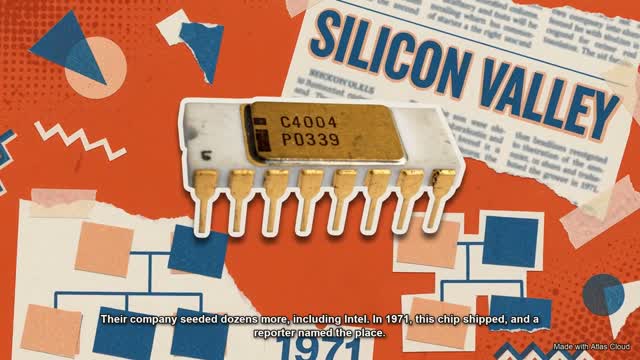
The look is the modern editorial paper-collage popularized by Vox explainers: hand-cut paper cut-outs, torn edges, tape, halftone dots, newspaper clippings, bold flat color per beat, big cut-out headlines — brought to life with motion, a narrator, music and captions.
How it works
One topic flows through one script per stage, all driven by a single beats.json per project:
topic
  │
  ├─ 1. beat map        pick a narrative arc → write beats.json      ◀── GATE 1: you approve the beat map
  ├─ 2. style bake-off  render the same beat in 3–4 themes           ◀── GATE 2: you pick the look by eye
  ├─ 3. keyframes       one collage poster per beat  (nano-banana-2)
  ├─ 4. motion          animate each poster          (gemini-omni-flash i2v)
  ├─ 5. voice + music   one narrator (xai/tts) + BGM (minimax/music)
  ├─ 6. assemble        ffmpeg: concat, duck music under VO, burn captions + watermark
  └─ final.mp4
That flow is B-roll — a topic in, everything generated. Two more input modalities, plus a presenter mode, reuse the same engine:
- A-roll — you already have a talking-head video. It is ASR-segmented into beats and re-styled into the collage look, keeping the real face, lip-sync and gestures frame-for-frame (
gemini-omni-flash/video-edit, auto-retrying onseedance-2.0/reference-to-video). - C-roll — you have one still photo (a selfie, a product shot). The subject is cut out as a photographic sticker — never redrawn — and each beat's poster is generated around it (
nano-banana-2/edit). The narration can be cloned into the subject's own voice. - Host — one image of a presenter. Selected beats cut to a digital presenter who speaks the narration, lip-synced, inside the collage world (16:9 and 9:16; position and size adjustable). The presenter and the world are generated as two plates and keyed together (
seedance-2.0/reference-to-video+gemini-omni-flash/image-to-video).
Two ideas make or break the result, and the skill is built around both:
- The look is born in the image step. Each beat is a finished collage poster. All the collage DNA (torn paper, cut-outs, halftone, headline text) lives in that image — if the poster isn't a rich collage, nothing downstream saves it.
- The motion is added after. By default an AI video model animates the whole poster (the "living poster" path). For dramatic piece-by-piece assembly, an optional local keyframe engine cuts the poster into parts and drives them frame-by-frame (no content filters, pixel-exact — great for real people).
Two human decision gates keep you in control (approve the beat map; pick the style); everything else is automated.
Models (verified on Atlas Cloud)
| Job | Model |
|---|---|
| Keyframe / collage poster | google/nano-banana-2/text-to-image |
| Animate (non-real content) | google/gemini-omni-flash/image-to-video |
| Animate (real people / brands) | kwaivgi/kling-video-o3-pro/image-to-video |
| Re-style a talking-head (A-roll) | google/gemini-omni-flash/video-edit |
| Anchor a photo in the collage (C-roll) | google/nano-banana-2/edit |
| Presenter on camera (Host) | bytedance/seedance-2.0/reference-to-video + google/gemini-omni-flash/image-to-video |
| Narration | xai/tts-v1 |
| Narration in a real person's voice | bytedance/seed-audio-1.0 (voice cloning) |
| Music | minimax/music-2.6 |
| Cut out an element (advanced path) | youchuan/v8.1/remove-background |
Model IDs drift — the skill fetches the live list from GET https://api.atlascloud.ai/api/v1/models before running.
Install
This is an agent skill — it works with any coding agent that can read a workflow and run scripts (Claude Code, Codex, …). Claude Code auto-discovers it as a skill; other agents read AGENTS.md → SKILL.md.
Option A — from this repo:
git clone https://github.com/Alisa0808/vox-director.git ~/.claude/skills/vox-director
Option B — from the packaged skill: download vox-director.skill and install it via your Claude skills UI.
Then set your Atlas Cloud API key (get one at atlascloud.ai/console/api-keys):
export ATLASCLOUD_API_KEY="sk-..."
Quick start
Just ask your coding agent, with the skill installed:
"Make me a Vox-style collage video introducing Mexican street food — English, 16:9, 15 seconds."
The agent will draft a beat map for your approval, run a style bake-off for you to pick from, then generate keyframes → motion → voice → music and assemble out/<project>/final.mp4.
Requirements
- A coding agent — Claude Code, Codex, or similar
- Atlas Cloud API key
- ffmpeg + ffprobe (
brew install ffmpeg) - Python 3 with Pillow (
pip install pillow) — for caption/watermark overlays
What's in the box
SKILL.md              the skill (English) — the workflow the agent follows
SKILL.zh.md           the same skill in Chinese
AGENTS.md             entry point for non-Claude agents (Codex, …)
references/           the creative engine
  prompt-guide.md       the LOOK layer — prompt structures, vocab & 9 theme presets
  beat-layer.md         14 narrative arcs + hook/pacing + shot patterns
  voices.md             xai/tts voice roster — pick a voice_id per language/tone
  models-and-gotchas.md every API / ffmpeg gotcha, already solved
  local-engine.md       the advanced element-level motion engine
scripts/              one script per pipeline stage
examples/             ready-to-run beats.json examples
assets/               the showcase film
Credits
Built by @alisaqqt — follow for more agent-skill experiments.
Inspired by the collage-ad workflows of Stav Zilber, rom1trs and Higgsfield, and by Vox's explainer visual language.
Built end to end on Atlas Cloud — one prompt, one film.
License
MIT © 2026 Alisa Qian
Open-Sora
hpcaitech·Python
开源视频生成模型,用高效架构和训练方案降低高质量视频制作门槛,让普通开发者也能训练和部署文生视频模型。
视频生成+4视频生成硬核
29922+33.1kv1.32026-04-09 01:52 UTC

Wan2.1
Wan-Video·Python
开源的大规模视频生成模型,支持高质量文生视频,为 AIGC 视频创作提供可用的生成能力。
视频生成+4视频生成进阶
17415+134.0k2026-03-05 09:38 UTC
FramePack
lllyasviel·Python
让视频扩散模型在普通显卡上也能跑起来,通过帧打包技术大幅降低显存占用,实现实用的长视频生成。
视频生成+4视频生成进阶
17352+71.7kwindows2025-10-16 01:28 UTC
CogVideo
zai-org·Python
开源文生视频和图生视频模型,CogVideoX 支持从文本或图片生成视频,适合搭建视频生成推理服务。
视频生成+4视频生成进阶
13193+71.4kv1.02025-11-04 11:19 UTC