CEmu 不提供 OS 或引导程序,必须自备从真实计算器导出的 ROM;自行编译需按 wiki 安装 Qt 等构建依赖;开发版(nightly)不包含更新检查功能。
CEmu
CE-Programming活跃维护面向 TI-84 Plus CE / TI-83 Premium CE 图形计算器的第三方模拟器,提供调试器等开发者功能,方便在电脑上运行和测试计算器程序。
Third-party TI-84 Plus CE / TI-83 Premium CE emulator, focused on developer features
v2.0发布于 2024-09-05 22:54 UTC1,335star94fork同步于 2026-11-10 11:48 UTC
从 https://github.com/CE-Programming/CEmu/releases 下载稳定版,或使用 nightly 预发布构建;自行编译见 wiki 的 Building CEmu 页面 硬件要求按 README 说明
README 未说明具体硬件要求;原生支持 Windows、macOS、Linux,核心用 C、GUI 用 Qt 编写。
第三方 TI-84 Plus CE 计算器模拟器,面向开发者提供调试与脚本能力
面向 TI-84 Plus CE / TI-83 Premium CE 图形计算器的第三方模拟器,提供调试器等开发者功能,方便在电脑上运行和测试计算器程序。
核心能力
- 内置 ROM 导出向导,从自己的计算器提取 ROM
- 支持读写执行断点、监视点与 eZ80 反汇编
- 提供内存、端口、定时器、CPU 寄存器查看编辑器
- 支持 Lua 脚本、条件断点与确定性输入/TAS 辅助
- 支持 USB 模拟传输、屏幕录制与模拟状态存档
容易踩的坑
内容由模型根据 README 生成,可能不完整或不准确,以官方文档为准。看原文 README
- v2.0v2.0: Major core and GUI improvements + new features最新正式版2024-09-05 · 2024-09-05 22:54 UTC
After many years and around 450 commits, it's finally here... CEmu is more accurate and more powerful than ever before :)
Downloads:
- Windows (64-bit): Qt6 (recommended for Win10+) ; Qt5 (Win7+)
- Windows (32-bit): Qt5 (for older PCs)
- macOS (64-bit): Qt6 arm / Qt6 intel ; Qt5 intel (12.7+)
- Linux (64-bit, glibc 2.29+): Qt6 shared libs ; Qt6 static libs
All binaries are provided by our CI (GitHub Actions). Packages for various Linux distros are available from OBS.
What changed
Note that this summary is a mixed bag of new features since the latest release, as well as fixes to things added since then, as a lot of you were (rightfully) using nightly builds.
Core:
- Support for real host->emu transfers (USB emulation), by @jacobly0. i.e. you can now transfer Apps and OSes normally
- Support for rev M+ hardware (excluding Python coprocessor), by @jacobly0 and @calc84maniac.
- Major LCD emulation improvements, by @calc84maniac.
- Major watchdog timer rewrite based on hardware research, by @calc84maniac.
- Prepare future Python-related features, by @jacobly0 and @calc84maniac (SPI, UART...)
- Big endian support, by @calc84maniac
- Make keypress emulation thread-safe, by @calc84maniac
- Lots of other misc. fixes and improvements (timing, accuracy, performance, rst/trap edge cases...)
GUI:
- Proper dark mode support (be sure to use Qt6 builds)
- Improved display of emulation speed and screen refresh rate
- Screenshots/recordings now have correct screen brightness
- Fix fullscreen mode when using multiple monitors
- Add upscale method and fullscreen aspect ratio settings
- Add vertical printing to Keypress History
- Add calculator skins for newer models, and some new color variants
- Add some debugging features for TI-Basic (step-by-step execution, live variable preview etc.)
- Fix name of a few OS variables in some cases (some were labeled
Ans, formula lists support...) - Fix crash upon trying to export natural keymap (you can't)
- Fix byte display order in disassembler for index bit instructions
- Fix R register in debugger.
- Deduplicate imported equates in the debugger
- Add/improve variable content preview (tivars_lib_cpp updates)
- Add disassembler option for tabs between the opcode and operands
- Fix "Pause emulation" preventing CEmu from closing
- Add SmartPad keymap (for use with the calc app)
- Add
screenshotIPC command/option - macOS: fix screenshot drag'n'drop
- Add
--resetCLI option to clear the config - New/improved translations by @Stephan-P (NL), @wolfarmoon (ES), @Jerry23011+@LifeEmu (CN)
- Better version update check
- Lots of various fixes
CI / Build:
@calc84maniac and @adriweb have been improving the build system and CI workflows:
- Move the CI to GitHub actions (now provide builds for all three OSes)
- macOS: native builds available for both Intel and Apple Silicon
- macOS: the builds ar
- nightlyCEmu nightly (auto-updating binaries)pre-release2023-01-13 · 2023-01-13 13:53 UTC
查看更新说明
Warning This is where all the latest development happens! (build is from the master branch) Only use this if you want the bleeding edge (but still probably stable) or encounter any bugs as they might be squashed here.
Downloads
- Windows 10/11: Intel 64-bit / arm 64-bit
- macOS 12+: arm ; intel
- Linux (x64, glibc 2.29+): static ; dynamic
Builds are provided by our CI (GitHub Actions) directly.
- v1.3v1.3: lots of fixes, improvements, and additions!2019-06-22 · 2019-06-22 15:28 UTC
查看更新说明
Warning This stable release is rather old now, but CEmu is far from dead, we just don't make releases often - if you want to try the latest features, check out the nightly!
Here's the long-awaited release, filled with new somewhat-minor features, improvements, and bugfixes! Fun fact: did you know that we recently went over 211 commits? 🤓
Note that v1.3 should be last release before any new major one (planned to be v2.0 with source-level debugging, for C and TI-Basic code, no kidding!)
Additions
- New "natural" keymap (accents, symbols etc. from your computer)
- Custom keymap support (choose your own keybindings)
- New simple and light GUI in SDL
- New core "run API" making deterministic execution possible
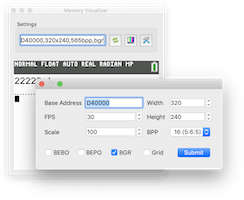
- New grid option and config GUI for memory visualizers (#308)
- Visual indicator of console/dock output (#313)
- New command-line options:
- Full-screen modes (
--fullscreen) - Program to launch (
--launch)
- Full-screen modes (
GUI and core improvements
- The core loop is now faster
- Better Flash emulation (more modes handled, improved protections)
- Allow changing of clock rate
- Table widgets are now draggable
- Reset the calc if the flash wait states are 0
- Better LCD state saving and restoring and improved event handling
- Cleaned-up core codestyle and made it C89-compatible
- Improved recent variables view
- Overhauled break/watch/port (reordering, ranges support...)

Other improvements
- Autotester inside the emu thread and deterministic (#178)
- Various performance and stability improvements
- Use the new value for the maximum appvar size in the dumper
- On MacBook Pro machines with Touch Bar, display some shortcuts
- Updated tivars_lib from upstream:
- Code cleanup and potential crash fixes
- More format checks
- Only reindent tokenized variables
- Fix appvar preview in hex (#312)
- Support Python AppVars format


Bug fixes
- Fix held keys detection on boot
- Fix actual FPS display
- Fix drawing of off LCD
- Fix screen breakage when resetting calculator
- Fix address clicking in memory visualizers (#308)
- Fix breakage caused by showing too many errors simultaneously (#317)
- Hack around a libpng-apng bug (1-row frames)
- Disable launch button while an autotest is running
- Fix forgotten prettification of protected-programs in the viewer
- Avoid creating useless temp files when clicking the screen
Build-related improvements
- Qt version updated (5.12, 5.13)
- Fix some missing icon resources
- Fix Emscripten build and runtime
- More travis cleanup and minor improvements
- Linux builds on OBS are now available for even more distributions and versions! (Note that this will be the last release supporting versions having "old" Qt)
- v1.2v1.2: a few fixes and minor additions2018-12-10 · 2018-12-10 19:25 UTC
查看更新说明
Additions
- You can now toggle highlighting/wrapping/formatting in the variable previewer
- Support for the "temporary equation" var format has been added to the var list/previewer (#287)
- RAM can now be imported/exported as well
- New button to directly take a screenshot into the clipboard (#291)
- You can now drag'n'drop from the LCD to somewhere else to export a screenshot (#290)
- Core: implemented SPI write memory.
GUI improvements
- The variable list's previewer uses @jacobly0's TI-like font
- The scroll position is kept as much as possible in the variable previewer
- Much better handling of touch-enabled laptop displays (#282)
- The keypad history window is now a dock, solving some minor issues (#301)
- On macOS, if you build with Qt 5.12+, Xcode 10 and a 10.14 SDK, dark mode is supported (watch out)
Other improvements
- Core: better random-read performance (unmapped areas...)
- TI-Bundle support has been fully reworked to be much simpler
- The autotester can now handle the new libs group format
- The autotester, when in debug mode, dumps memory upon failure
- Misc. GUI code cleanup
Bug fixes
- Added some missing tokens to the TI-Basic syntax highlighter
- Cleaned up threading code and fixed race condition causing random emulation perma-freezes
- Fixed docks possibly growing/moving a bit after reopening CEmu (#288)
Build-related improvements
- For Windows, the MSVC builds (AppVeyor) now use Qt 5.11, and MinGW builds (Jacobly) Qt 5.12
- For macOS, builds now use Qt 5.12
- Travis and AppVeyor CI build processes got simplified and are now faster
- Linux builds on OBS now also have binaries for Fedora 29 and Ubuntu 18.10
- v1.1.1v1.1.1: minor update check fix + typo2018-09-01 · 2018-09-01 20:35 UTC
查看更新说明
Whoops, there was an issue on some Windows builds regarding update checking, sorry!
(Also, a typo was fixed in the welcome message)


用户点评
登录用户的真实使用记录,可按版本和硬件筛选共 0 条
还没有人点评。第一个说出真实体验的人最有价值。
CEmu 


CEmu is a third-party TI-84 Plus CE / TI-83 Premium CE calculator emulator, focused on developer features.
CEmu works natively on Windows, macOS, and Linux. For performance and portability, the core is programmed in C and its customizable GUI in C++ with Qt.
Note: CEmu is not a TI product nor is it TI-endorsed/affiliated. If you need an official TI CE emulator, TI-SmartView™ CE is for you.
Downloads
Official stable releases are available here: https://github.com/CE-Programming/CEmu/releases
Development builds are available on the auto-updating "nightly" pre-release.
Note that Release builds have an update checking feature, which is disabled in development builds.
Features
Standard features
- Built-in ROM dump wizard. CEmu does not rely on downloading an OS from TI's website nor does it have a custom boot/loader: a ROM from your own calculator is required. CEmu makes it very easy to get it.
- Accurate and fast emulation (you can also customize the speed and even toggle throttling)
- Resizable calculator screen
- "Always-on-top" window option
- Screen capture, copy, and drag'n'drop (PNG)
- Screen recording (animated PNG)
- USB emulation for transfers (including for Apps and OSes)
- USB emulation for flash drive images and external devices (via libusb)
- Customizable keybindings with multiple presets
- Keypress recording and history
- Full screen modes (F11 key)
- Emulation states for efficient saving / restoring
- CE skins (colors like the real devices)
- Available in English, French, Spanish, Dutch, and Chinese
Developer features
- Main options available via CLI arguments
- IPC features when launching several CEmu processes
- Choice of ASIC / HW revision emulation (A, pre-I, M+...)
- Import/Export RAM, ROM, images...
- Custom display refresh rate, FPS indicator
- Custom emulation speed/throttling
- Rich text console for easier logging/debugging
- Code stepping, jumping...
- R/W/X breakpoints, watchpoints
- eZ80 disassembler (with equates support)
- Port monitor/editor
- General Timer monitor/editor
- Memory viewer/editor
- CPU state/registers viewer/editor
- LCD state/parameters viewer/editor
- Advanced LCD parameters emulation (gamma, response time, ...)
- Tracking of flash cache misses and average access time
- Memory visualizer (as fully customizable virtual LCDs)
- Stack viewer
- OP1-7 viewer
- FP and OP stacks viewer/editor
- Variable Allocation Table (VAT) viewer
- Variable list with preview and program launcher
- TI-Basic program viewer with syntax-highlight and reformatting
- TI-Basic program debugger with line-by-line stepping
- Recent files list with ability to quickly resend
- Cycle counter for benchmarking/profiling
- Emulation of DMA and SPI (for optimal accuracy)
- Misc. emulation (backlight, battery...)
- "Autotester" (automated unit testing, light scripting)
- Lua scripting with a script manager, autoload and CLI support, events, conditional breakpoints, zdis bindings, and deterministic-input/TAS helpers
How to build
You can find information for building CEmu yourself from the source on this wiki page.
If you encounter any problems, feel free to open an issue!
Getting Help
You can join us on the CE Programming Discord server in the #cemu-emulator channel: Discord Chat Link.
If you prefer IRC, the chat is also bridged to the EFNet #cemu-dev channel (you can use a web client like IRCCloud, if you don't want to use a local application).
Depending on how active the channel is you might not get a response.
In that case, post your questions here, and we will get back to you as soon as possible.
Contributing
You're welcome to report any bugs you may encounter, in addition to any feature requests you may have. If you want to help, tell us, or send patches / pull requests!
If you'd like to contribute code, please consider using Artistic Style with the settings specified in the .astylerc file to format your code. Qt Creator can format code with Artistic Style with minimal setup.
We also welcome more translations. Qt Linguist is a great tool for that (here's a tutorial).
License
CEmu is licensed under the GPLv3.
Acknowledgements: Some CEmu parts are, directly, modified, or inspired, from z80e, Firebird, libtifiles, tivars_lib_cpp, KDMacTouchBar, and FatCow's "Farm-Fresh Web Icons".
Lua scripting uses Sol2.
The complete licensing information is available in the LICENSE file.

shadPS4
shadps4-emu·C++
用 C++ 编写的 PlayStation 4 模拟器,支持 Windows、Linux、macOS 和 FreeBSD,让玩家能在电脑上运行 PS4 游戏。
PS4模拟器+4模拟器
34107+232.9kv.0.21.02026-11-10 10:57 UTC
v86
copy·JavaScript
在浏览器里跑完整 x86 PC 的模拟器,带 x86 到 WebAssembly 的 JIT 编译器,可直接启动 Linux 等系统。
x86 模拟器+3模拟器
23670+31.9klatest2026-10-30 21:48 UTC

ish
ish-app·C
在 iOS 设备上跑起 Linux shell 的模拟器,靠用户态 x86 模拟执行命令行工具,让 iPhone/iPad 也能用上熟悉的 Linux 命令环境。
iOS 模拟器+4模拟器
20697+141.6kbuilds/8132026-11-07 00:46 UTC
rpcs3
RPCS3·C++
跨平台的 PlayStation 3 模拟器与调试器,用 C++ 编写,支持 OpenGL 和 Vulkan 渲染,让玩家能在 PC 上运行 PS3 游戏并调试。
PS3模拟器+4模拟器
20384+172.6kv0.0.432026-11-10 08:33 UTC