部分功能需要自行配置 API 凭据或额外下载模型;本地模型需先装好 Ollama 或 LM Studio 等后端;社区主题需确认支持当前版本,v1 主题在 v2 界面需适配。

cherry-studio
CherryHQAGPL-3.0活跃维护把多家大模型、AI Agent 和 MCP 工具整合到一个桌面工作台里,方便日常对话、调用工具和提升生产力。
Your AI workspace for models, agents, and productivity.
v2.1.10发布于 2026-10-31 15:17 UTC53,393star +84 / 7 天5,200fork同步于 2026-11-10 11:19 UTC
从 https://cherryai.com/download 下载对应平台安装包安装 硬件要求按 README 说明
README 未说明具体硬件要求;作为 Windows、macOS、Linux 桌面客户端运行,本地模型需通过 Ollama 或 LM Studio 自行部署,显存需求取决于所选模型。
跨平台 AI 桌面工作台,把多模型对话、Agent、知识库和图像生成集中到一个客户端
把多家大模型、AI Agent 和 MCP 工具整合到一个桌面工作台里,方便日常对话、调用工具和提升生产力。
核心能力
- 接入 OpenAI、Anthropic、Gemini 等云服务,也可用 Ollama、LM Studio 跑本地模型
- 创建带独立指令、工作区、模型和工具权限的 Agent,支持文件与命令操作
- 通过 Skills 和 MCP 服务器扩展 Agent 能力,并支持定时任务
- 从文件、文件夹和网页构建本地知识库,供对话与 Agent 检索使用
- 支持多模型同会话对比回答、Markdown/Mermaid 渲染和对话导出
容易踩的坑
内容由模型根据 README 生成,可能不完整或不准确,以官方文档为准。看原文 README
- v2.1.10最新正式版2026-10-31 · 2026-10-31 15:17 UTC
Downloads (v2.1.10)
Platform Architecture Download Windows x64 Installer · Portable Windows arm64 Installer · Portable macOS Apple silicon (arm64) DMG · ZIP macOS Intel (x64) DMG · ZIP Linux x64 AppImage · DEB · RPM Linux arm64 AppImage · DEB · RPM Cherry Studio 2.1.10 - File Comments, Touch Reorder, and Update Timeline
✨ New Features
- [Agent Files] Comment on files for the agent. In a text file, hover a line and click '+' (or drag across several lines) to write a comment. In Word, Excel, PDF and PowerPoint files, pick a part and click Comment. Each comment is added to the message as a chip with its location.
- [Updates] View skipped stable-version release notes in a collapsible timeline; single-version updates show their notes directly. Markdown footnote navigation now works correctly with backlinks.
- [Proxy] Test proxy connection in General Settings before saving, with support for PAC proxy/direct fallback reporting.
- [Touch] Reorder lists by pressing and holding a row. Buttons inside a row no longer start a drag. Selection Assistant settings now show enabled and disabled actions in one list separated by a divider.
🐛 Bug Fixes
- [Chat] The message list no longer jumps back to the first message while scrolling a conversation that contains code blocks.
- [Agents] Existing conversations resume correctly after moving the data directory, preserving their history.
- [Local Dictation] Fix local speech recognition silently losing the second half of long utterances.
- [Streaming] Fix missing or duplicated response text when stream replay overlaps incoming output.
- [Composer] Option descriptions in question panels are no longer truncated.
- [Right Panel] The browser sidebar no longer opens unexpectedly when creating or switching Agent tasks.
- [Code Block] Diagram preview toolbars are no longer clipped. Mermaid, Graphviz, SVG, LaTeX, and ECharts previews blend into the message background.
- [Knowledge] File conversion progress starts from 0% and updates immediately instead of every 5 seconds.
- [Conversation List] Recent conversations no longer sort to the bottom after midnight.
- [MiMo] Fix MiMo models returning “Unsupported model” errors.
⚡ Performance
- [Code Blocks] Reduce unnecessary rendering work while scrolling conversations with code blocks.
What's Changed
- fix(move-to-trash): refuse pr
- v2.1.92026-10-30 · 2026-10-30 16:56 UTC
查看更新说明
Downloads (v2.1.9)
Platform Architecture Download Windows x64 Installer · Portable Windows arm64 Installer · Portable macOS Apple silicon (arm64) DMG · ZIP macOS Intel (x64) DMG · ZIP Linux x64 AppImage · DEB · RPM Linux arm64 AppImage · DEB · RPM Cherry Studio 2.1.9 - Diagrams, File Pane, and Provider Updates
✨ New Features
- [Diagrams] Mermaid diagrams now render with a faster engine in the background, match the app's light/dark theme, and open as previews from .mmd/.mermaid files.
- [Agent Files] Open files in tabs with a breadcrumb, resize the tree, and configure autosave, indent, and word wrap in pane settings. Right-click to attach files or folders as context.
- [Agents] Archive all conversations of an Agent in one action, with a confirmation showing the count. Delete conversation branches from the Branch Management panel.
- [Web Search] Add Desearch and SearchApi as web search providers.
- [Providers] Add QwenCloud with chat, image, reasoning controls and native web search. Rebrand DashScope to Qwen AI Platform with updated endpoints and icons. Add Anthropic prompt caching support for Vercel AI Gateway.
- [Code Theme] New default “Cherry” code theme blends into the app background in light and dark mode.
- [Thinking] Edit a message's reasoning content directly in the assistant message editor.
- [Permissions] Enabling Full Access now shows a scope confirmation before taking effect.
- [Tabs] The active conversation tab has a clearer selected outline and slightly bolder title.
- [Notes] Open a newly saved note directly from the export success toast.
🐛 Bug Fixes
- [Tooltips] Fixed tooltips being cut off at the edge of dialogs, such as the help tooltips in the Selection Assistant custom action dialog.
- [Chat] Long silent reasoning phases no longer abort after 30 minutes; the idle bound is now 120 minutes. Fixed misleading error when an assistant's model no longer exists after an update.
- [Tabs] Show the conversation name and assistant icon on tabs again. New tabs open next to the active tab; the plus button appends at the end.
- [Navigation] Unified sidebar and tab selection style with clearer contrast in light and dark themes.
- [Notes] Fixed a freeze when typing a diagram code block. New diagram blocks open in edit mode.
- [Knowledge] Fixed rebuilds resetting chunking rules, imports timing out while waiting, interrupted conversions
- v2.1.82026-10-26 · 2026-10-26 08:56 UTC
查看更新说明
Downloads (v2.1.8)
Platform Architecture Download Windows x64 Installer · Portable Windows arm64 Installer · Portable macOS Apple silicon (arm64) DMG · ZIP macOS Intel (x64) DMG · ZIP Linux x64 AppImage · DEB · RPM Linux arm64 AppImage · DEB · RPM Cherry Studio 2.1.8 - Editing, Voice, and Integration Updates
✨ New Features
- [File Editing] Isolate drafts across notes, skills and artifacts, retain failed edits for retry, and support up to 8 MiB text editing and previews.
- [Language] Add Italian (it-IT) UI support with full translations and emoji picker.
- [Voice] Hold the mouse button in a text input to start dictation, release to transcribe.
- [Voice] Streaming speech synthesis with real-time audio playback.
- [Web Search] Add Tencent Yuanbao Search as a built-in provider.
- [Scheduled Tasks] Create and manage scheduled tasks through an agent chat with an interactive task card.
- [Screenshot] Copy the capture to clipboard while keeping the overlay open.
- [Selection] Select text anywhere to automatically copy it and show a quick-quote toolbar.
- [Composer] File and link tokens align with the text line, show per-type file icons, and load favicons while editing.
- [RTF] Preview Rich Text Format files as formatted documents.
- [Feishu] Configure whether the bot only replies to @mentions in group chats.
- [Remote Access] Set a custom hostname, IP or port for pairing invitations.
- [Assistant] Remember the “Also archive related topics” choice for future archives.
🐛 Bug Fixes
- [Notes] Fix note content being overwritten when switching between cached notes.
- [Skills] Show localized error messages when a ZIP or folder is missing SKILL.md, without leaking temporary paths.
- [Chat] Expand long user messages by default; keep follow-up queues independent of read receipts.
- [Proxy] Match short wildcard IP bypass rules like 192.168.* on Windows.
- [Claude Code] Keep the 1M context budget when routing through the internal gateway.
- [Tab Bar] Closing the last tab opens the Launchpad instead of quitting the app.
- [File Preview] Preserve reading state when refreshing files; fix line spacing for Word documents.
- [Sidebar] Selected entries use neutral filled icons in both light and dark themes.
- [Chat Layout] Isolate list-group expansion state per window.
- [Paintings] Cap loading grid density to prevent performance issues.
- [MCP] Keep literal # ch
- v2.1.72026-10-19 · 2026-10-19 02:06 UTC
查看更新说明
Downloads (v2.1.7)
Platform Architecture Download Windows x64 Installer · Portable Windows arm64 Installer · Portable macOS Apple silicon (arm64) DMG · ZIP macOS Intel (x64) DMG · ZIP Linux x64 AppImage · DEB · RPM Linux arm64 AppImage · DEB · RPM Cherry Studio 2.1.7 - Voice, Cloud, and Model Updates
✨ New Features
- [Voice] Add Kokoro Chinese-English TTS with 103 voices for Windows x64, Linux and macOS, and Qwen3-TTS for Apple Silicon. Download models from Settings > Local Models before first use.
- [Voice] Show live audio spectra in speech playback and dictation controls. Restore the microphone after empty dictation.
- [Voice] Add local FunASR speech transcription on Windows, Linux and macOS.
- [Cherry Cloud] Add subscription plan and quota usage visibility to the Global edition, with limited-time-free and exhausted-quota descriptions for managed models.
- [Cherry Cloud] Add a compact anchored sidebar account menu. Avatar and nickname open Personal Information settings; Appearance and Login stay in the menu.
- [Cherry Cloud] Preserve login during temporary connection or refresh failures.
- [Automation] Orchestrate Browser and Computer Use through persistent JavaScript with clearer execution feedback.
- [Knowledge Base] Drag knowledge bases between groups and reorder groups; cycle item columns through ascending, descending and default ordering.
- [Image] Add GPT-Image-2 aspect ratio presets for 16:9, 9:16, 16:10, and 4K output.
- [Models] Add Gemini 4 Argon support with thinking levels and automatic long-output continuation.
- [Models] Add Muse Spark Open model recognition with multimodal capabilities and reasoning controls.
- [Search] Add DuckDuckGo as a free keyword web search provider. No API key required.
- [Tools] Tool results now preview image links and display clickable web links.
- [Errors] Show actionable error notifications with readable diagnoses, expandable details, and recovery actions for conversations, provider checks, and MCP failures.
- [Chat] Queued follow-up messages start collapsed. Click the header to expand or collapse.
- [Chat] Hover over conversations to see full name, activity time, and workspace details.
- [Notes] Search code-block languages by name.
🐛 Bug Fixes
- [Attachments] Fix unrecognized-extension text files (e.g., .lrmx) not being read as text.
- [OCR] Identify which OCR path failed when sending images
- v2.1.62026-10-11 · 2026-10-11 06:59 UTC
查看更新说明
Downloads (v2.1.6)
Platform Architecture Download Windows x64 Installer · Portable Windows arm64 Installer · Portable macOS Apple silicon (arm64) DMG · ZIP macOS Intel (x64) DMG · ZIP Linux x64 AppImage · DEB · RPM Linux arm64 AppImage · DEB · RPM Cherry Studio 2.1.6 - Bug Fixes and Provider Updates
🐛 Bug Fixes
- [Search] Fix searches for programming languages with hash symbols (e.g., C#, F#) not matching messages.
- [Backup] Fix restore failing on Windows when browser storage is locked by the current session. Restore progress now stays monotonic, failed attempts are reported with retry guidance, and orphaned restore files are cleaned up.
- [Errors] Stop misreporting client-refusal errors as "invalid API key" — now shows the correct permission guidance instead of sending users to regenerate working keys.
- [Chat] Context-usage token counts now follow the selected interface language and update when it changes.
What's Changed
- fix(scheduled-tasks): match run-log date searches to displayed timestamps by @xiajiahang in https://github.com/CherryHQ/cherry-studio/pull/21442
- hotfix(release): fix draft verification credentials by @kangfenmao in https://github.com/CherryHQ/cherry-studio/pull/21459
- fix(selection-assistant): preserve window dragging after scrolling by @WhiteZeek in https://github.com/CherryHQ/cherry-studio/pull/21467
- chore(release): sync v2.1.5 metadata by @kangfenmao in https://github.com/CherryHQ/cherry-studio/pull/21471
- fix(provider): retire legacy Tencent TI and Hunyuan providers by @ousugo in https://github.com/CherryHQ/cherry-studio/pull/21474
- fix(context-usage): format token counts with the interface language by @kangfenmao in https://github.com/CherryHQ/cherry-studio/pull/21480
- fix(shared): stop reporting client refusals as invalid API keys by @ggbdpq in https://github.com/CherryHQ/cherry-studio/pull/21486
- fix(message-parent): reject self and cross-topic parents by @focus-zyw in https://github.com/CherryHQ/cherry-studio/pull/21466
- fix(backup-restore): isolate sessions and clean failed restores by @kangfenmao in https://github.com/CherryHQ/cherry-studio/pull/21385
- fix(search): anchor heading strip regex to line starts by @HHHSL in https://github.com/CherryHQ/cherry-studio/pull/21472
New Contributors
- @xiajiahang made their first contribution in https://github.com/CherryHQ/cherry-studio/
用户点评
登录用户的真实使用记录,可按版本和硬件筛选共 0 条
还没有人点评。第一个说出真实体验的人最有价值。










🍒 Cherry Studio
Cherry Studio is an AI workstation for Windows, macOS, and Linux. Chat with multiple models, work with agents, build knowledge bases, create images, and automate everyday tasks in one place.
Download Desktop · Getting Started
📱 Cherry Studio Mobile is now available for iOS and Android! Download · GitHub repository.
👏 Join Telegram Group|Discord | QQ Group(575014769)
❤️ Like Cherry Studio? Give it a star 🌟 or Sponsor to support the development!
🌠 Screenshots
Agents — work with files, tools, and multi-step tasks.

Conversations — explore ideas with your models and assistants.

Model providers — configure services, API keys, and models in one place.

Knowledge bases — organize sources for retrieval and agent workflows.

Image creation — turn prompts into images and refine your work.

🌟 Key Features
Agents & Automation
- 🤖 Create agents with their own instructions, workspaces, models, and tool permissions.
- 🛠️ Work with files, run commands, and use browser and computer automation tools.
- 🔌 Extend capabilities with Skills and MCP (Model Context Protocol) servers.
- ⏰ Run scheduled tasks and connect agents to messaging platforms through Channels.
Models & Conversations
- ☁️ Connect OpenAI, Anthropic, Gemini, and other cloud providers, or add custom compatible services.
- 💻 Use local models through Ollama and LM Studio.
- 💬 Customize assistants and compare responses from multiple models in one conversation.
- 📝 Read and share rich responses with Markdown, code highlighting, formulas, Mermaid charts, and conversation exports.
Knowledge & Documents
- 📚 Build local knowledge bases from files, folders, and web pages, then use them in conversations and agents.
- 📄 Process PDF, Office documents, images, and text, with OCR and document processing options.
- ✍️ Organize ideas in Markdown notes and manage attachments and generated files in the file library.
Creative & Everyday Tools
- 🎨 Generate and edit images with supported image models.
- 🔤 Translate text and documents, and use quick translation from other apps.
- 🔍 Search the web, read pages, and find content across your conversations and knowledge bases.
- 🧩 Open web-based tools through Mini Apps, or use the API Gateway to connect other applications to your configured models.
Voice & Workspace
- 🎙️ Dictate messages and listen to responses with speech recognition and text-to-speech options, including local models.
- 🪟 Work across tabs and detached windows, with window pinning, Quick Assistant, and text selection tools.
- 🌈 Customize your workspace with light and dark themes, layouts, and custom CSS.
- 💾 Keep conversation history and knowledge bases on your device, with local and WebDAV backup options.
Model and tool availability depends on your provider, operating system, and configuration. Some features require API credentials, downloaded models, additional dependencies, or system permissions. See the user documentation for setup.
📝 Roadmap
Follow upcoming work on our project board and GitHub Issues. See Releases for features and fixes already shipped.
Share ideas and discuss priorities in GitHub Discussions.
🌈 Theme
- Theme Gallery: https://cherrycss.com
- Aero Theme: https://github.com/hakadao/CherryStudio-Aero
- PaperMaterial Theme: https://github.com/rainoffallingstar/CherryStudio-PaperMaterial
- Claude dynamic-style: https://github.com/bjl101501/CherryStudio-Claudestyle-dynamic
- Maple Neon Theme: https://github.com/Cle2ment/maple_neon
Check each community theme's supported Cherry Studio version before installing. Themes written for v1 need adaptation for the v2 interface.
Contributions of compatible themes are welcome.
🤝 Contributing
Contributions of code, bug reports, documentation, translations, product ideas, and community support are welcome. Browse good first issues to find a place to start.
Getting Started
- Read the Contributing Guide and Development Guide.
- Fork the repository and create a focused branch from
main. - Validate your changes, sign and sign off your commits, and open a pull request targeting
mainusing the repository template.
See the Branching Strategy for branch and release conventions.
🏢 Enterprise Edition
Cherry Studio Enterprise Edition brings centralized model management, shared knowledge bases, employee access controls, and private deployment options to teams and organizations.
Visit the Enterprise website for current capabilities and deployment information. For purchasing, pricing, or a demo, contact [email protected].
🔗 Related Projects
-
Cherry Studio Mobile: The mobile version of Cherry Studio for iOS and Android.
-
Cherry Studio Website: The official website and user documentation.
-
new-api: The next-generation LLM gateway and AI asset management system supports multiple languages.
-
one-api: LLM API management and distribution system supporting mainstream models like OpenAI, Azure, and Anthropic. Features a unified API interface, suitable for key management and secondary distribution.
-
Poe: A platform for exploring AI models and community-created bots.
-
ublacklist: Blocks specific sites from appearing in Google search results
🚀 Contributors
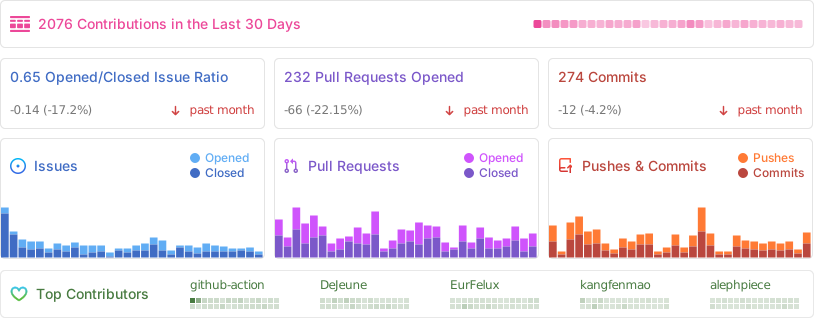
📊 GitHub Stats
⭐️ Star History
📜 License
The Cherry Studio Community Edition is governed by the standard GNU Affero General Public License v3.0 (AGPL-3.0), available at https://www.gnu.org/licenses/agpl-3.0.html.
Use of the Cherry Studio Community Edition for commercial purposes is permitted, subject to full compliance with the terms and conditions of the AGPL-3.0 license.
Should you require a commercial license that provides an exemption from the AGPL-3.0 requirements, please contact us at [email protected].