至少要先配置一个 provider 账号才能使用,双代理工作流还需要配置第二个 provider;本地模型需自行配置 Ollama 或 LocalAI;更新已有安装后需重新加载 VS Code;项目仍处于 beta 阶段,用于正式项目前应查看其就绪状态文档。
Mysti
DeepMystApache-2.0活跃维护VS Code 里的多智能体编程插件,让 Claude Code 和 OpenAI Codex 在头脑风暴模式下协作、辩论方案,最终综合出最优的代码实现思路。
AI coding dream team of agents for VS Code. Claude Code + openai Codex collaborate in brainstorm mode, debate solutions, and synthesize the best approach for your code.
v2.0.2-beta.3发布于 2026-11-07 20:13 UTC1,155star55fork同步于 2026-11-10 11:50 UTC
从 VSIX 安装:在命令面板执行 Extensions: Install from VSIX,选择下载的 mysti-2.0.1-beta.2.vsix;或从 VS Code Marketplace 安装。 硬件要求按 README 说明
README 未说明显存或 GPU 要求;需要 VS Code 1.86 或更新版本,以及 Windows、macOS 或 Linux 上的受信任本地工作区。本地模型可通过配置 Ollama 或 LocalAI 使用。
VS Code 扩展,让 Claude Code、Codex 等多个编码代理在同一会话里协作、互审与辩论
VS Code 里的多智能体编程插件,让 Claude Code 和 OpenAI Codex 在头脑风暴模式下协作、辩论方案,最终综合出最优的代码实现思路。
核心能力
- 用 @claude @codex 在同一条消息里向多个代理提问,各自独立作答
- 支持先由一个代理完成任务,再把结果作为上下文交给另一个代理评审
- 提供 Brainstorm 模式让代理辩论方案并综合出最佳做法
- 用 Canvas 做可视化迭代,用文件提及、选中代码、诊断和 Git 上下文喂料
- 内置 16 个 provider 适配器,各代理保留自己的模型与账号设置
容易踩的坑
内容由模型根据 README 生成,可能不完整或不准确,以官方文档为准。看原文 README
- v2.0.2-beta.3Mysti 2.0.2 · Beta 3最新正式版2026-11-07 · 2026-11-07 20:13 UTC
Mysti 2.0.2 · Beta 3
Claude's answers no longer look like they never arrived.
Beta 3 is a small patch to Beta 2. If you use Claude Code in Mysti, update: on Beta 2 a reply could sit as an empty bubble for up to half a minute before any text appeared.
Full changelog · Production-readiness checklist
What changed
Claude replies show progress again
Current Claude models (Sonnet 5, Opus 5.5) keep their reasoning private. While they think, Claude Code streams thinking events with no text in them. Beta 2 treated the first of those as the start of the answer: it removed the waiting indicator and showed an empty reply bubble until the first word arrived. At the maximum effort level that took around 20–25 seconds even for "hi", so it was easy to press Stop on an answer that was on its way.
Mysti now keeps the waiting indicator until there is something to show. Thinking that does carry text is still displayed as before.
Also in this build
- Windows: CLI lookup settles on the system lookup's first complete match
instead of waiting for every match on
PATH. - Streaming: long answers measure scroll position once per frame, so fast output stays smooth.
Install
Install or update from the VS Code Marketplace (pre-release channel), or download the VSIX from the GitHub release and run Extensions: Install from VSIX…. Conversations and settings carry over from Beta 2; there is no data-format change.
Mysti remains beta. Known gaps are listed in production readiness.
- Windows: CLI lookup settles on the system lookup's first complete match
instead of waiting for every match on
- v2.0.1-beta.2Mysti 2.0.1 · Beta 22026-11-05 · 2026-11-05 11:52 UTC
查看更新说明
Mysti 2.0.1 · Beta 2
More reliable conversations, clearer recovery, and a documented path to stable.
Watch the complete feature tour · 3 minutes 19 seconds
https://github.com/user-attachments/assets/edb4beb3-08e1-4790-be3a-6550b2afd227
Captioned interface demonstrations with clearly labelled sample data.
- Stop and recover: OpenCode Stop now cleans up owned shell descendants that run in separate process groups. A bounded native macOS test confirmed cancellation and a successful follow-up request.
- Keep context with its conversation: stronger ownership for drafts, attachments, queued messages, history and second opinions; exact file mentions and bounded reads.
- Windows update checks: npm-backed CLI checks use the selected installation without shell interpolation.
- Review before acting: prompt deep links show the task before adding it to the composer. Shared imports default to declining, MCP tools cannot inherit trusted built-in permissions from similar names, and coordinator reads exclude Git configs that can contain credentials.
- Updated dependencies: patched runtime dependencies and regenerated sanitizer/diagram assets. The qualified runtime audit reports zero advisories; development-tool exceptions remain documented.
- See the workflows: 15 short feature recordings cover setup, providers, context, collaboration, Brainstorm, Stop, history, Canvas, visual reports and connected context. Scenes use clearly labelled sample data.
Explore all 15 playable feature demos · Read the full changelog · Validation and scope
The release also includes a standalone readiness/checklist Markdown file and a ZIP of the complete feature recordings.
Install
Download mysti-2.0.1-beta.2.vsix from this release, then choose Extensions → ⋯ → Install from VSIX and reload VS Code. Requires VS Code 1.86 or newer and a trusted local workspace. Provider accounts, CLI credentials and usage charges remain separate from Mysti.
Keep the previous VSIX and a backup of your workspace and VS Code profile/storage. Test downgrades in a separate profile until storage compatibility is established.
Qualification
- Source:
c2a8adc82f18e499b01086b619abf3dc132ebe01 - Hosted source/runtime/package checks: 42015789933
- Additional editor integration (manual qualification): 42015802365
- Required pull-request checks: CI and editor integration, both passed on the same source for PR #79.
- Published artifact:
mysti-2.0.1-beta.2.vsix, downloaded from the passing CI run and not rebuilt. - SHA-256:
83e10710c5badaa4c2dbe339fedf0cd9c1e3e898e1e683a61241a1ec9a5d8dfc(also attached asSHA256SUMS.txt). - Automated platform results: windows-latest: 17720 passed / 95 skipped; ubuntu-latest: 17810 passed / 6 skipped; macos-latest: 17815 passed / 1 skipped. Skip reasons and phase counts are retained in
QUALIFICATION.json. All six source/packaged editor jobs passed 11 tests each. - Registry publication:
Not published to Marketplace or Open VSX; publisher credentials are not configured. GitHub publication alone does not update Marketplace or Open VSX.
The initial hosted runs failed and prompted fixture and Windows npm-probe corrections. Their failures and corrections remain recorded in validation. The final runs above qualify the released sour
- v2.0.0-beta.1Mysti 2.0 BETApre-release2026-10-03 · 2026-10-03 16:32 UTC
查看更新说明
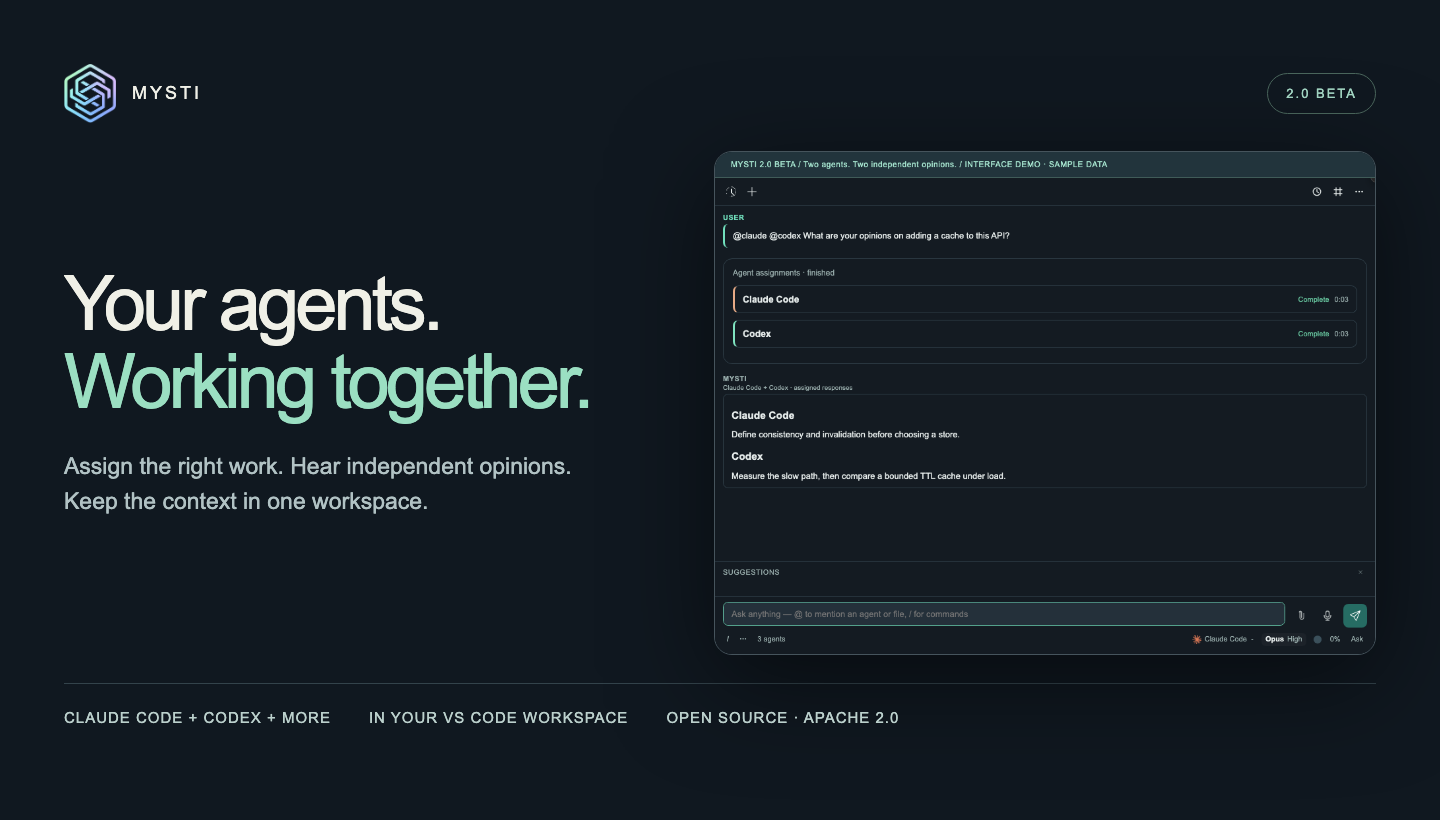
Your agents. Working together. Mysti 2.0 BETA brings independent opinions, explicit agent assignments, connected tools, and proactive project context into one VS Code workspace.
Install from Marketplace · Download the beta VSIX · Watch the 66-second tour
Agents with their own assignments
Ask for independent opinions:
@claude @codex Review this design for failure modesOr make the next task depend on the first:
@claude Write the parser, then @codex review it for edge casesIndependent read-only assignments can run concurrently. Explicit then handoffs pass the completed result to the next agent; a failed dependency blocks that handoff. Work that may modify the shared workspace runs sequentially. Each participant has attributed output, progress, tool activity, and visible failures.

What’s in 2.0 BETA
- Second opinion: send the original question to another configured agent from a completed answer’s receipt.
- Brainstorm: choose two agents and a discussion strategy, then inspect their analyses and synthesis.
- 16 provider adapters, plus Mysti: Claude Code, Codex, Gemini, Copilot, Cline, Cursor, OpenClaw, OpenCode, Qwen, Hermes, Continue, Kimi, Ollama, LocalAI, OpenRouter, and MiniMax. Capabilities and authentication differ by provider.
- Connected tools: authorize apps and MCP servers through DeepMyst’s Composio and Smithery catalogs, with opt-in access for supported local CLIs.
- Proactive inbox: watch local Git changes or explicitly selected GitHub/Slack resources. Review source evidence before starting a task and opt into VS Code notifications.
- Visual workflows: Canvas and Visual Test for working with visual artifacts and inspecting a running app.
- Composer controls: synchronized model, effort, and supported Ultracode settings; slash commands, provider setup/upgrade actions, and editor-backed dictation.
- Project continuity: personas, skills, roles, conversation history, context compaction, and checkpoints for supported local changes.
Explore all eight animated demos · Provider setup · Proactive setup
Reliability fixes
Explicit multi-agent requests now dispatch every tagged provider instead of folding the work into the selected agent. Quiet participants have their own waiting status, and sequential assignments show the current and next steps. Second opinion excludes the actual respondent, MiniMax appears in the composer picker, and Brainstorm clears its working state on completion or error.
This release also includes the accumulated provider, installer, onboarding, localization, and compatibility work since 0.4.0.
Install
Choose Switch to Pre-Release Version on Mysti’s Marketplace entry, or download the VSIX below and use Extensions → ⋯ → Install from VSIX. Reload VS Code after upgrading.
Requires VS Code 1.86 or newer and a trusted workspace. Start with one configured provider. CLI credentials and provider usage charges remain separate; the Mysti coordinator and connected features use a DeepMyst account.
GitHub tag:
v2.0.0-beta.1· VSIX version:2.0.0· Channel: pre-release · License: Apache-2.0.Validation and beta limits
The attached
- v0.4.02026-03-11 · 2026-03-11 19:33 UTC
查看更新说明
What's New
4 New Providers (12 Total)
- OpenCode: Multi-backend agent (Anthropic, OpenAI, Google, Groq) — closes #25
- Qwen Code: Alibaba's AI coding CLI with deep reasoning
- Ollama: Local LLM inference, privacy-first — closes #24
- LocalAI: Self-hosted AI models — closes #24
18 Brainstorm & @-Mention Stability Fixes
- Silence-based timeout — agents aborted after 90s of no output (no more infinite waits)
- Auth pre-check — validates provider authentication before brainstorm starts
- Synthesis fallback — UI shows "retrying with [agent]..." when primary synthesis fails
- Oscillation detection — catches flip-flopping discussion positions
- Convergence regex broadening — handles varied score phrasings in Delphi mode
- Duplicate agent guard — prevents selecting the same agent twice
- Cancel propagation — stops all sub-processes immediately on cancel
- Sub-agent question timeout — auto-skips after 5 minutes if user doesn't respond
- Max 5 mentions per message — prevents resource exhaustion
- Refined mention parsing — tighter regex, path boundary matching, agent validation
- File resolution warnings — user notified when file mentions can't be read
- Retry process cleanup — cancels previous attempt before retrying
Bug Fixes
- Windows: Fixed
spawn EINVALerror with auto shell mode — closes #14 - Codex: Brainstorm now respects
mysti.codexPathsetting — closes #26 - Mentions: Full-path file mention matching (
@src/utils.tsnow works) - Mentions: Invalid agents no longer produce misleading "CLI not installed" errors
- Brainstorm: Empty contributions no longer cause false convergence
- Brainstorm: Text similarity no longer drops meaningful short words like "not"
Test Infrastructure
- 360 automated tests via vitest
- Mock provider infrastructure for brainstorm and mention testing
- Per-provider test suites (buildCliArgs, parseStreamLine, permissions)
New Settings
Setting Default Description mysti.opencodePathopencodePath to OpenCode CLI mysti.opencodeModel`` Custom OpenCode model mysti.qwenCodePathqwenPath to Qwen Code CLI mysti.qwenCodeModel`` Custom Qwen model mysti.ollamaPathollamaPath to Ollama CLI mysti.ollamaModel`` Custom Ollama model mysti.localaiPathlocalaiPath to LocalAI CLI mysti.localaiModel`` Custom LocalAI model mysti.useShellForClifalseRun CLIs with shell (auto-enabled on Windows) Closes
- #14 (spawn EINVAL on Windows)
- #24 (Ollama + LocalAI support)
- #25 (OpenCode support)
- #26 (Codex codexPath in brainstorm)
Full Changelog: https://github.com/DeepMyst/Mysti/compare/v0.3.1...v0.4.0
- v0.3.12026-02-18 · 2026-02-18 13:31 UTC
查看更新说明
Mysti v0.3.1
What's New in v0.3.0 / v0.3.1
This is the first published GitHub release for Mysti — covering all features through v0.3.1.
3 New Providers (7 total)
- Cursor — Full integration with Cursor's headless AI agent CLI (6 models including Claude Sonnet 4, GPT-5, o3)
- OpenClaw — Dual-transport provider with WebSocket Gateway and CLI fallback
- Manus (Experimental) — HTTP API-based provider for Manus AI
Autonomous Mode
AI works independently with configurable safety controls — SafetyClassifier with three safety levels, MemoryManager that learns preferences, goal-based and task-queue continuation modes, and audit logging.
@-Mention System
Route tasks to specific providers with
@agentmentions, attach file context with@file, with heuristic-based task generation, auto-retry, and dependency tracking.Brainstorm Team Reasoning (5 Strategies)
- Quick — Direct synthesis
- Debate — Critic vs Defender
- Red-Team — Proposer vs Challenger
- Perspectives — Risk-Analyst vs Innovator
- Delphi — Facilitator vs Refiner
- Convergence detection, parallel discussion, round markers, role badges
Context Compaction
Smart conversation compaction to prevent context overflow — native CLI strategy for Claude (
/compact), client-side summarization for others, per-panel token tracking with threshold-based triggering.Slash Command System
Centralized command registry organized by sections — context, model, customize, commands, settings, support. Provider-specific commands like
/compact,/thinking,/profile,/plan-act.Per-Panel Session Isolation
Each webview panel has fully independent state, provider sessions, context, and process management.
Agent Lifecycle Management
Session lifecycle with configurable idle timeout (default 1 hour), cross-platform process tree tracking, and graceful shutdown.
v0.3.1 Fixes
- Security: Exclude
.claude/and.envfrom git and vsix package - Contributor: Merged Patrick Fu's custom model configuration contribution
Installation
Download
mysti-0.3.1.vsixand install via:code --install-extension mysti-0.3.1.vsixOr install from the VS Code Marketplace.
Contributors
- @patrick-fu — Custom model configuration & provider settings
用户点评
登录用户的真实使用记录,可按版本和硬件筛选共 0 条
还没有人点评。第一个说出真实体验的人最有价值。
https://github.com/user-attachments/assets/114f70b4-d52a-4d9b-9b42-c18acdc974e4
https://github.com/user-attachments/assets/b1a6b569-2be6-4ba9-8e37-e3dcdf9de626

Mysti
Your coding agents. One shared workflow.
Bring Claude Code, Codex and other coding agents together inside VS Code. Ask for independent opinions, hand completed work to another agent, and keep the context, progress and answers in one conversation.
Start with one agent. Add a reviewer when the work needs another perspective. Use Canvas for visual iteration and Brainstorm for decisions that deserve a deeper discussion.
Download the tested Beta 2 VSIX → · Install from Marketplace · See what's new




Current GitHub release: 2.0.1 · Beta 2. For the Marketplace version, check the listing. Mysti remains beta; review the verified status and remaining work when choosing it for your project.
Why Mysti · See it work · Get started · Workflows · Features · Providers · FAQ
Why Mysti
A coding task often needs more than one kind of thinking: understand the code, propose a change, challenge the approach, then review the result. Mysti gives those steps a place to work together.
- Compare independent answers. Address several agents in one message and see who said what, with separate progress and results.
- Make the handoff explicit. Ask one agent to finish a task, then have another review it with the completed result as context.
- Bring the code into the conversation. Use file mentions, selected code, diagnostics and Git context instead of repeatedly copying the same material.
- Keep your preferred tools. Choose among 16 provider adapters, or use the Mysti coordinator. Each provider keeps its own model, account and capability settings.
- Follow the work in your editor. Move between conversation history, agent activity, visual artifacts and relevant connected context.
See it work
Watch the 3-minute, 18-second narrated tour: follow Maya through a week with her agents: setup, provider choice, agent handoffs, Brainstorm, access controls, history, Canvas and connected tools.
https://github.com/user-attachments/assets/33aca1be-8fc2-4e0f-957a-153952289a85
Explore all 15 feature demos → · Tour chapters · Download the original recordings
The tour uses clearly labelled sample data in the shipped interface. Provider accounts and live-service behavior are documented separately.
Get started
You need VS Code 1.86 or newer, a trusted local workspace on Windows, macOS or Linux, and one configured provider. A second provider is optional for everyday chat and needed for workflows that involve two agents.
1. Install Mysti
For the reviewed 2.0.1 Beta 2 build, download the VSIX, open the Command Palette, choose Extensions: Install from VSIX, and select the downloaded file. Reload VS Code after updating an existing installation.
You can also install the version currently available on the VS Code Marketplace. The GitHub release includes the exact beta package, checksums and validation record.
2. Connect one agent
Open Mysti: Open Chat from the Command Palette or click Mysti in the Activity Bar. Choose a provider and follow its setup card to check installation, sign-in and model availability.
Use your existing Claude Code, Codex or another supported provider account. For local models, configure Ollama or LocalAI. The Mysti coordinator supports DeepMyst sign-in or a configured direct OpenRouter key. Provider setup →
3. Give it a focused first task
Add a file or selected code through Add to Mysti Context, then ask:
Explain how this code works and identify the most useful test to add next.
Once Claude Code and Codex are configured, try an independent review:
@claude @codex Review this code for edge cases. Explain your findings separately.
Choose an access mode supported by the selected provider, inspect its response and requested actions, then iterate. You can use Mysti in the sidebar or open a larger chat tab.
Full setup guide · Troubleshooting · Provider compatibility
Put your agents to work
Get two independent perspectives
@claude @codex What are your opinions on adding a cache to this API?
Each named agent receives the question and has its own answer. Independent read-only assignments can run concurrently. A failed or unavailable participant stays visible, so you can assess the results you actually received.

Design, implement, then review
@claude Design a retry policy, then @codex review it for edge cases
The second agent waits for the first and receives its completed result. A failed prerequisite blocks the dependent step. Use the same pattern for implementation followed by review; work that may write to the shared workspace runs serially.

Sample-data demonstration. See the captioned walkthrough.
Give each agent a focused role
@claude:critic @codex:reviewer Assess this proposal
Catalog roles shape each agent's perspective and access. You can also assign separate questions in one message:
@claude review the authentication design; @codex assess performance
Bring the right context
@src/api.ts @claude @codex Review this API
@problems @claude Explain these diagnostics
@git @codex Review the current changes
Use the file picker to select the intended file, or add it through Context. For explicit multi-agent assignments, use Context or file mentions; composer attachments are not currently forwarded to those collaborators.
Explore a decision with Brainstorm
Choose two configured agents and a discussion strategy: Quick, Debate, Red Team, Perspectives or Delphi. Follow their analyses, discussion and final synthesis when a question benefits from more than separate answers.
Agent assignment guide · Brainstorm strategies · Personas, skills and roles
More than a chat window
| Your workflow | What Mysti brings |
|---|---|
| Understand and change code | Streaming responses, provider-specific model and effort controls, file context, diagnostics and Git summaries. |
| Get a second opinion | Send the original question to another agent from a completed answer, or ask several agents explicitly. |
| Make a decision | Brainstorm strategies for independent analysis, debate, challenge and synthesis. |
| Explore a visual design | Canvas artifacts with live previews, device formats and theme controls alongside your conversation. |
| Inspect a running app | Visual Test brings screenshots, findings and reports together. Browser setup may be required. |
| Return to earlier work | Conversation history, forks, context compaction and checkpoints for supported local code changes. |
| Apply your team's practices | Built-in and custom personas, reusable skills and catalog roles for the task at hand. |
| Speak a draft | Dictation through supported VS Code voice commands; review the text before sending. |
| Work with connected tools | Configure supported apps and tools through your DeepMyst account and choose the connections available to the work. |
| Notice relevant changes | Proactive watches for local Git activity or supported connected GitHub/Slack sources, with source-linked evidence to review. |
Visual work, close to the code
Use Canvas to explore an artifact's presentation and Visual Test to inspect a running application. They are separate workflows: a rendered design and a browser report answer different questions.

Watch Canvas and Visual Test · Full feature guide
Relevant context before you start
The Proactive inbox lets you review observed repository changes and related connected-source evidence before starting a task. Local Git watches run while the editor is open; configured cloud responsibilities run through DeepMyst. Monitoring is read-only and does not authorize an agent to act. Set up Proactive →
Bring your preferred agents
Mysti includes 16 provider adapters plus the Mysti coordinator. Start with the tools you already use, then configure others when a task calls for them.
| Provider family | Available adapters |
|---|---|
| Coding agents | Claude Code · OpenAI Codex · Google Gemini CLI · GitHub Copilot CLI · Cline · Cursor |
| Additional coding tools | OpenClaw · OpenCode · Qwen Code · Hermes · Continue · Kimi Code |
| Local and API endpoints | Ollama · LocalAI · OpenRouter · MiniMax |
| Mysti coordinator | DeepMyst gateway or a configured direct OpenRouter key, with supported tools and agent delegation |
Each adapter has its own setup and capabilities. Models, subscriptions, attachments, approvals and available controls depend on the selected provider and account. Ollama and LocalAI display tool proposals rather than executing them through those adapters. Inclusion in the catalog does not mean every provider/version/account combination has completed native acceptance testing.
Choose and configure a provider →
Context, permissions and recovery
- Choose what you share. Add workspace files, selected text, diagnostics, Git context or supported attachments. Each chat panel keeps its own context.
- Inspect the requested work. Follow attributed tool activity and use the access and approval modes supported by your provider. Agent tags do not grant extra authority.
- Stop and refocus. Cancel an active request, inspect its outcome and send a focused follow-up. Stop is not an undo operation for completed external actions.
- Return to an earlier point. Branch a conversation or use checkpoints to recover supported local code changes. Keep normal version control and backups for your project.
Prompts and supplied context go to the configured provider. Connected DeepMyst features use your account and selected connections. Mysti's telemetry integrates with VS Code's telemetry setting; local-model chat does not make every connected feature offline. See the provider approval contracts, feature guide and security policy.
What's new in Beta 2
This release focuses on reliable context, cancellation and recovery:
- OpenCode Stop cleanup: owned shell descendants in separate process groups are included in cancellation, with bounded native macOS verification.
- Conversation ownership: stronger handling for drafts, attachments, queued messages, history and second opinions.
- Windows CLI updates: selected npm-backed installations are checked without shell interpolation.
- Safer entry points: prompt deep links are reviewed before insertion, shared imports default to declining, and sensitive Git configuration is excluded from coordinator reads.
- A reviewable release: a qualified VSIX, checksums, test evidence, 15 feature recordings and a portable release checklist.
Release notes · Changelog · Validation · Remaining work toward stable
Frequently asked questions
One configured provider is enough for regular chat. Workflows involving two agents need both configured. Direct CLI and endpoint providers use their own credentials; DeepMyst sign-in is used for the gateway and connected DeepMyst features. The Mysti coordinator also supports a configured direct OpenRouter key.
No. Mysti is an Apache-2.0 open-source extension. Provider subscriptions, model access, API charges and any DeepMyst account requirements are separate. Each participating provider may incur its own usage when you run a multi-agent task.
Yes. Configure Ollama or LocalAI with a running server and an available model. These adapters support chat and display proposed tool calls; they do not execute those proposals. Other configured providers and connected features may use remote services.
Independent read-only assignments can overlap. Work that may change the shared workspace runs serially. An explicit then makes the next assignment wait for a successful result from the preceding one. This is an in-conversation workflow, with the provider's applicable access controls.
Installation, authentication, model entitlement and transport capability are separate requirements. Check the provider's setup card and any upgrade guidance. Some adapters cannot enforce every access mode. Use the compatibility guide to choose a supported combination.
Mysti 2.0.1 remains beta. The release includes automated source, browser, runtime, package and editor validation; full native provider/account coverage, broader recovery and upgrade acceptance, and long-duration testing remain incomplete. The readiness report lists the evidence, open work and reusable release gates.
Documentation
Documentation home · Visual walkthroughs · Troubleshooting · Backup and recovery · Privacy
| Start building | Go deeper |
|---|---|
| Getting started — installation, first task and troubleshooting | Feature guide — chat, context, controls and settings |
| Provider setup — accounts, models and capability differences | Personas and skills — reusable practices and custom guidance |
| Agent assignments — tags, roles, parallel opinions and handoffs | Proactive — watches, evidence and coverage |
| Brainstorm — discussion strategies and synthesis | Architecture — host, webview, routing and providers |
| Demo gallery — 15 focused feature walkthroughs | Production readiness — status and release checklist |
Reference: Settings · Commands and shortcuts. For agents: AGENTS.md · llms.txt · Machine-readable documentation map.
Translations: العربية · 中文 · 日本語 · 한국어 · Español · Português · Deutsch · Français · Türkçe · Русский. Community translations may describe an earlier release; this README is the current Beta 2 reference.
Build with us
Useful contributions include reproducible bugs, native-provider compatibility checks, accessible UI improvements and tested documentation corrections. Include your Mysti, VS Code, OS and provider versions in a bug report, with private context removed.
Use the Node version in .nvmrc, then:
npm ci
npm run typecheck
npm test
npm run watch
Press F5 to launch the extension development host. See CONTRIBUTING.md for the development workflow, browser checks and provider contracts.
Report a bug · Discuss an idea · Explore the roadmap
Contributors
Thanks to everyone who has helped make Mysti better!
Join the community through the contribution guide.
Ready to try it?
Choose one agent and start with a real task from your project. Add another perspective when you need it.
Download Beta 2 → · Open the Marketplace listing · Follow the setup guide
License
Apache License 2.0. Built by DeepMyst and the Mysti community. Provider names and trademarks belong to their respective owners.