仓库提交已暂停,后续开发转为私下进行;免费版对录屏、截图、按需优化和快捷指令每会话限 5 次;依赖 pngquant、jpegoptim、gifsicle、ffmpeg、libvips、gifski、ghostscript 等开源工具做优化

从 https://files.lowtechguys.com/releases/Clop.dmg 下载安装包并安装 硬件要求按 README 说明
仅支持 macOS,需 Apple Silicon 才能使用媒体引擎做省电视频编码;README 未提及显存或 CPU 运行要求。
支持 Apple Silicon
macOS 剪贴板优化器,复制即压缩图片视频 PDF,粘贴更小发送更快
macOS 剪贴板优化工具,自动压缩复制进来的图片和视频,用 pngquant、jpegoptim、gifsicle 等工具减小体积,省磁盘和带宽。
核心能力
- 复制图片到剪贴板时自动压缩到最小体积
- 停止录屏后自动优化视频并生成浮动缩略图
- 用 Apple Silicon 媒体引擎编码视频以省电
- 支持快捷键按比例或指定尺寸缩小图片视频
- 通过 macOS 快捷指令把优化接入自动化流程
容易踩的坑
内容由模型根据 README 生成,可能不完整或不准确,以官方文档为准。看原文 README
- v3.6.7最新正式版2026-11-04 · 2026-11-04 09:35 UTC
Features
- HDR / SDR selector on the results of HDR photos and videos
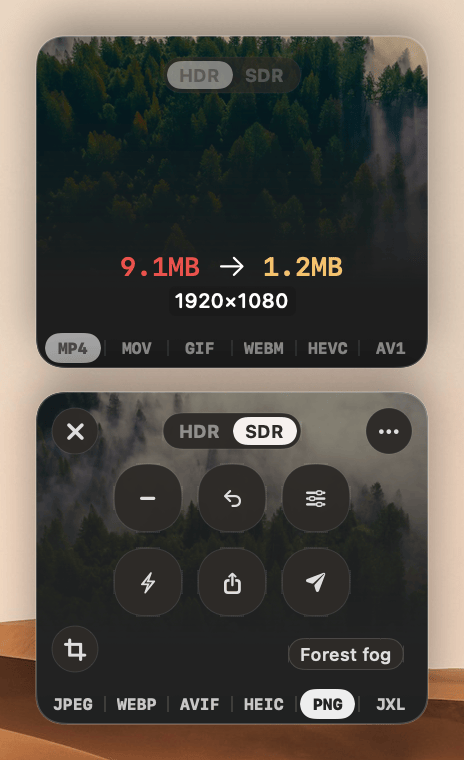
- Convert HDR to SDR in the right-click menu works on HDR videos too
Fixes
- Fixed a possible freeze when dropping files from a slow drive or iCloud on the drop zone or a preset zone
- Fixed a possible freeze when optimising hundreds of files with the results in compact layout
- Converting an iPhone HDR video to GIF no longer gives washed-out colours
- Optimising or downscaling an HDR PNG no longer gives a washed-out image
- Changing the compression after cropping an image in the crop window no longer shrinks the crop
- The
clop convertandclop pipeline runcommands no longer refuse JPEG XL and BMP files - Downscaling a rotated PNG converted from a photo no longer gives a sideways, cropped image
Improvements
- JPEG XL conversions of photos and app windows are faster
- Converting 4K videos to GIF is about twice as fast
- v3.6.62026-11-01 · 2026-11-01 17:13 UTC
查看更新说明
Features
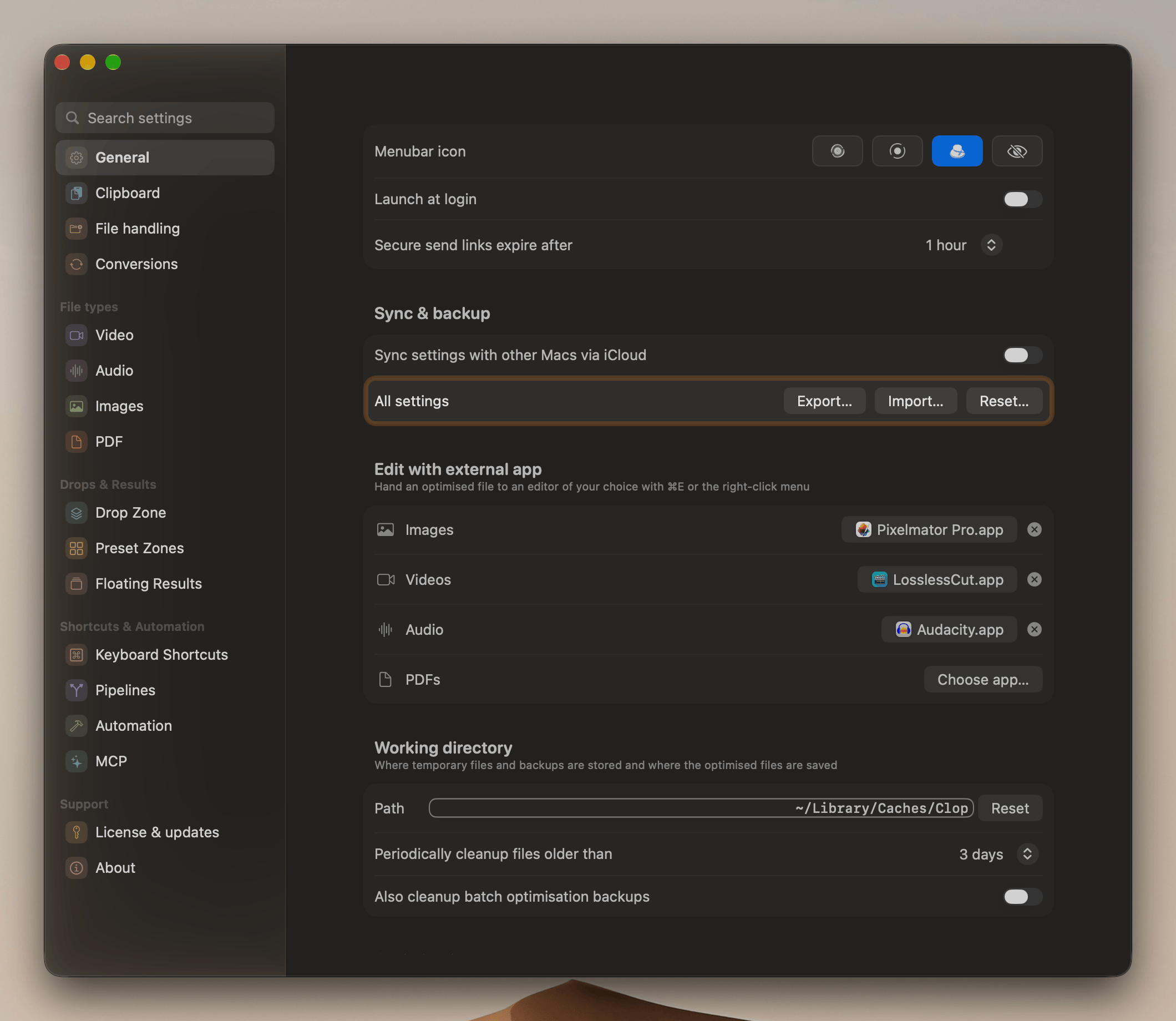
- Export, import and reset all settings
Fixes
- Fixed a possible freeze when the drive of a watched folder stops responding
- Watched folders on other drives keep working while one drive isn't responding
- Fixed a possible freeze when optimising, converting or running a pipeline on files from a slow drive
- Fixed a possible freeze while watching folders, when macOS restarts its file event service
- Fixed a possible freeze when converting a JPEG with damaged EXIF data to AVIF
- Optimising a video no longer drops its subtitle tracks
- PNGs that mark one colour as transparent keep their transparency when converted to AVIF
Improvements
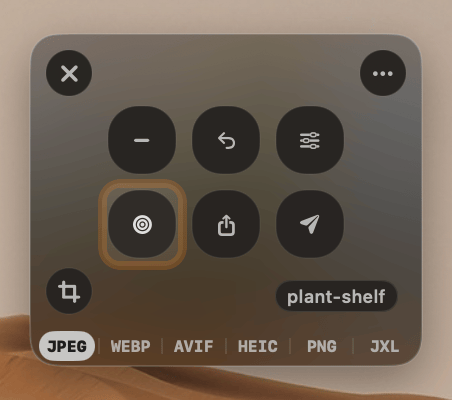
- Fit under size button on the result card by default
- The Mac doesn't go to idle sleep while a video or PDF is being optimised
- JPEG XL conversions of photos and app windows are smaller
- v3.6.52026-10-31 · 2026-10-31 12:19 UTC
查看更新说明
Features
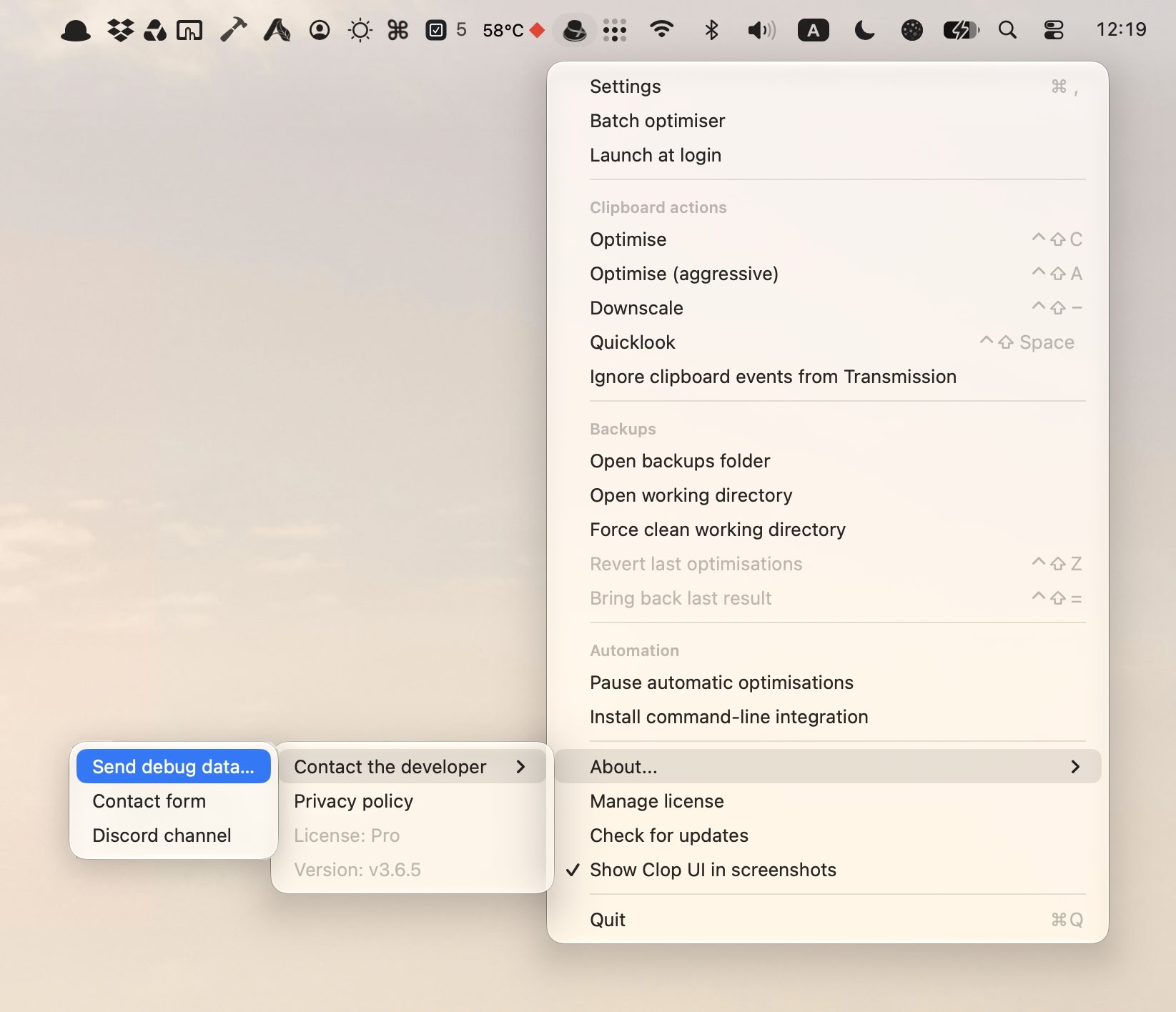
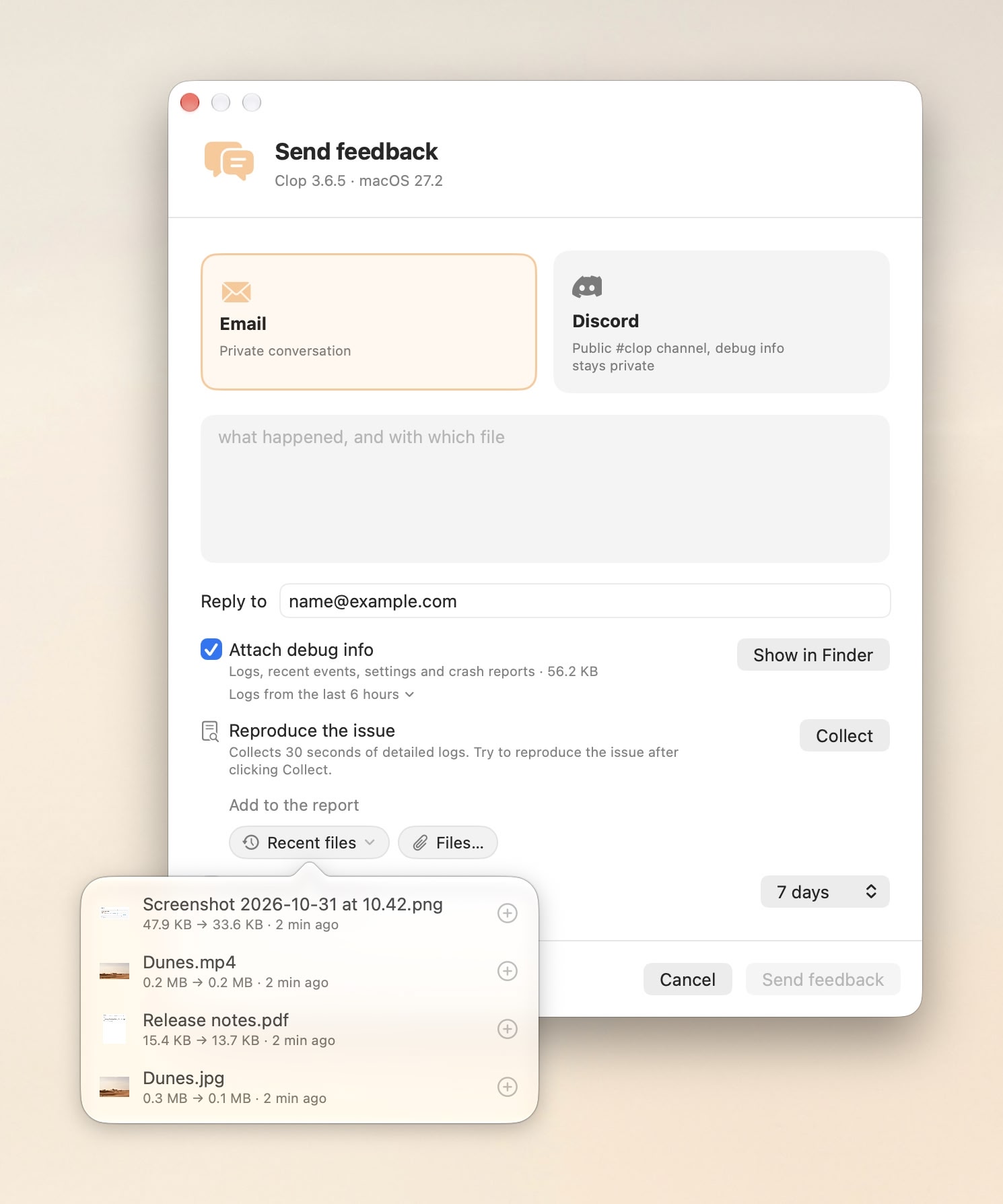
- Feedback window for reporting a problem by email or Discord, with debug info attached
Open it from Contact the developer in the menu bar menu or Settings > About, or with the clop.lowtechguys.com/feedback link or the
clop://feedbackURL
Fixes
- Fixed a possible crash when dropping files on the drop zone, mostly on macOS 13 with photos from Photos or attachments from Mail
- Fixed a possible freeze when an already optimised PDF sits on a slow or unreachable drive
- Fixed a possible freeze while the Convert image to… shortcut action converts a large image
- The output path of the Convert image to… shortcut action and of
clop convert -f … --outputno longer fails with Could not create output directory - A drop or a watched file no longer fails with nothing on screen when its output folder can't be created
- Pipeline step locations like
converted/%fsave next to the original file instead of failing - The
clop optimisecommand no longer replaces the original file when--behaviourissamefolderorspecificfolder
Improvements
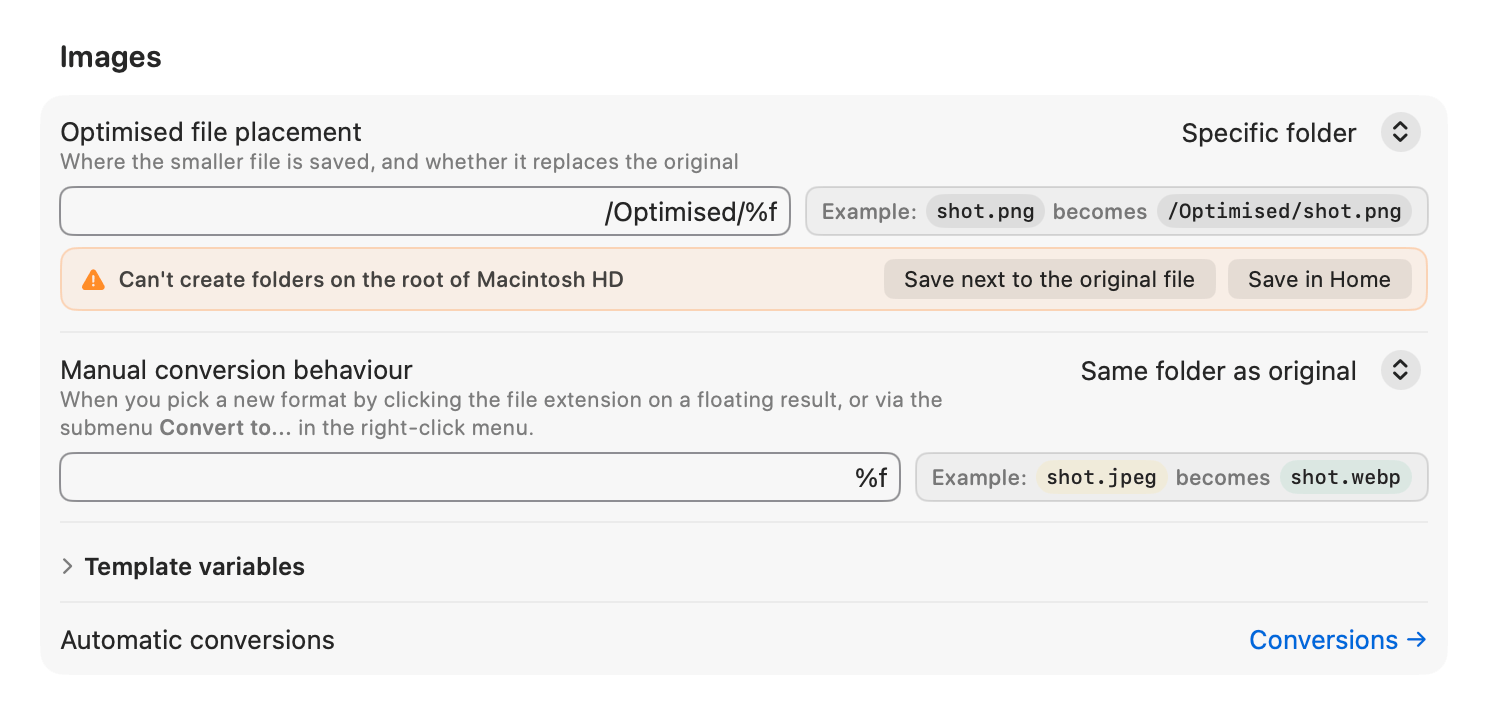
- Folder templates that Clop can't write to, like
/Optimised/%f, get a warning under the field and buttons for a template that works
- Feedback window for reporting a problem by email or Discord, with debug info attached
- v3.6.42026-10-29 · 2026-10-29 15:34 UTC
查看更新说明
Features
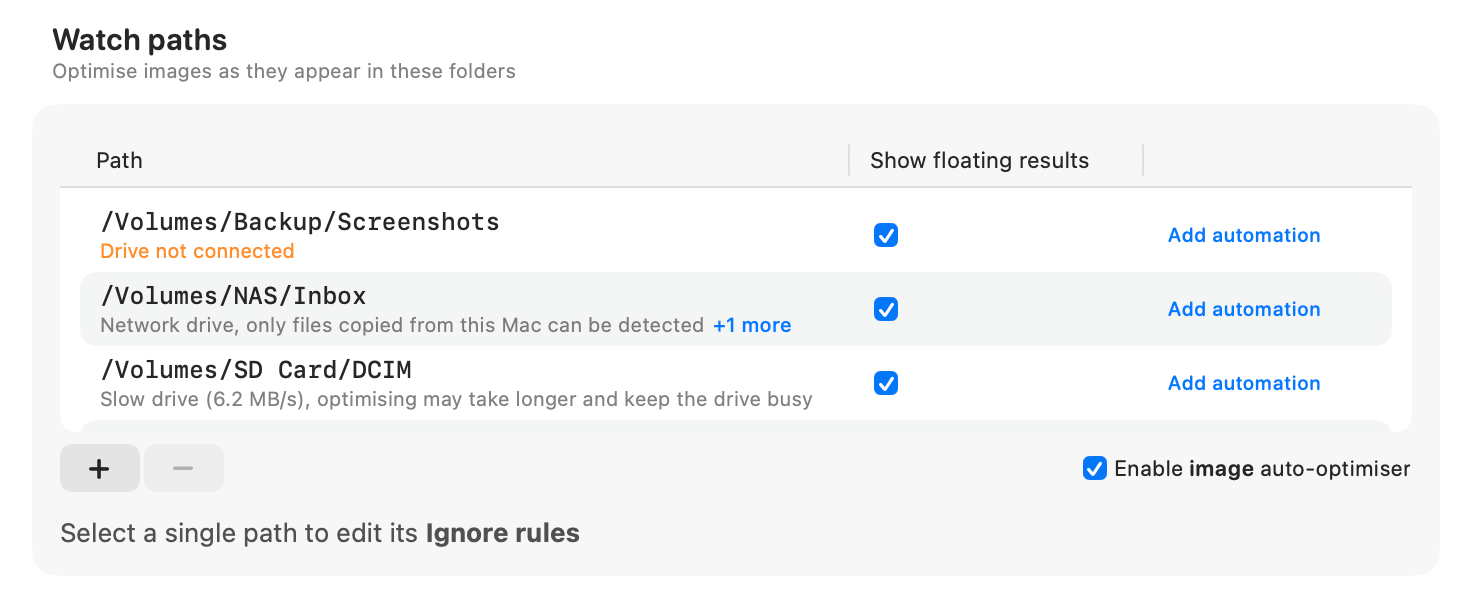
- Drive warnings in the watch path table for slow, network and read-only drives
Fixes
- Watch paths on an external drive no longer stop working when the drive is connected after Clop starts
- Fixed a possible freeze when starting to optimise a file on a slow or unreachable volume
- Fixed a possible freeze when selecting a watch path on a slow or unreachable drive
- The
clop settings set <key> -/pathcommand removes the folder from a list setting, instead of printing the help
- v3.6.32026-10-25 · 2026-10-25 14:36 UTC
查看更新说明
Features
- Also cleanup batch optimisation backups: the periodic cleanup deletes them too, instead of keeping them until you do
Fixes
- Fixed a possible freeze when optimising a video, stopping a result or opening the right-click menu, with files on a slow or unreachable volume
- Fixed a possible freeze when optimising or previewing the clipboard while the pasteboard server is slow to answer
- A batch optimisation's output folder gets the compressed files, not copies of the originals, when optimised files are set to Same folder as original or Specific folder
- Cropping, downscaling and watermarking a photo keep its camera, date and location tags when Strip EXIF Metadata is off
用户点评
登录用户的真实使用记录,可按版本和硬件筛选共 0 条
还没有人点评。第一个说出真实体验的人最有价值。
[!WARNING] Commits to this repo have been paused because of blatant stealing. Work will continue privately.
Optimise images as soon as you copy them
As long as the Clop app is running, every time you copy an image to your clipboard, Clop will optimise it to the smallest possible size.
The optimised image will have minimal to zero loss in quality, and will be ready to paste in any app.
Screen recordings as small as screenshots
Sending screen recordings becomes 10x faster with Clop. The app will optimise the video as soon as you stop recording.
The video will be available as a floating thumbnail, ready for you to drag and drop in any app.
Clop can use Apple Silicon's dedicated Media Engine chip for battery-efficient video encoding without using the CPU.
Downscale in a pinch
Get images and videos ready for sharing by scaling them down to any resolution.
Use handy hotkeys or the floating buttons to downscale the image or video and get an even smaller file size.
- - downscales incrementally from 90% until 10% of the original resolution
- 1..9 are for downscaling to specific sizes
Power user features
1. On-demand optimisation
Press Ctrl-Shift-C to manually optimise the current clipboard.
The action works on images, video files, paths, URLs, even base64 encoded images.
For more aggressive optimisation, Ctrl-Shift-A is also available.
2. Compatible formats
Clop automatically converts less compatible formats like HEIC, tiff, mov to formats understood by most devices.
The conversion is fully configurable from the app settings.
Original files are kept in a backup folder which can be accessed from the app menu.
3. macOS Shortcuts
Integrate Clop optimisation in your workflows through native macOS Shortcuts.
- Downscale and optimise images that you email weekly
- Download optimised images directly into your slideshow
- ..and so on
Free vs Pro
Free version features are free forever.
After the 14-day trial, the app will continue to work with the free features.
| Feature | Clop Pro | Free version |
|---|---|---|
| Clipboard optimisation | ✅ | ✅ |
| Downscale images | ✅ | ✅ |
| Optimise screen recordings | ✅ | 5 per session |
| Optimise screenshot files | ✅ | 5 per session |
| On-demand optimisation | ✅ | 5 per session |
| Shortcuts support | ✅ | 5 per session |
Technical details
Clop uses the following open source tools for optimising files, images and videos:
pngquantfor PNGjpegoptimfor JPEGgifsiclefor GIFffmpegfor videoslibvipsfor resizing imagesgifskifor converting videos to GIFsghostscriptfor optimising PDFs
It may also use libvips for resizing images if it is installed on your system.
The app is licensed under GPLv3.
What's up with the hat?
Clop is the Romanian word for a traditional straw hat with a high crown and raised conical brim, worn more as an adorment in days of celebration.
We thought "Clipboard Optimizer" sounds a bit too technical and doesn't roll off the tongue as easily. We're Romanian ourselves and we thought it might be a good idea to keep the memory of our traditions from dying completely, with whatever little we can do.
Contact
For questions you can contact us through the contact form or we can do troubleshooting on Discord if an async discussion would take too much.
CopyQ
hluk·C++
跨平台剪贴板管理器,能保存历史记录、搜索和编辑内容,还支持脚本自动化,解决复制粘贴内容容易丢失、难以复用的问题。
剪贴板管理+4剪贴板 / 启动器
12627+18630v17.0.02026-11-09 20:39 UTC

Clipy
Clipy·Swift
macOS 上的剪贴板历史管理工具,能记录复制过的内容并快速检索、粘贴,弥补系统剪贴板只能存一条的限制。
剪贴板管理+3剪贴板 / 启动器
8969+68431.4.12026-11-10 08:22 UTC

EcoPaste
EcoPasteHub·Rust
跨平台剪贴板管理工具,支持 Windows、macOS 和 Linux,帮你保存和检索复制过的历史内容,告别反复复制粘贴。
剪贴板管理+4剪贴板 / 启动器
7574+5411v1.1.02026-08-13 00:29 UTC
Ditto
sabrogden·C
Windows 剪贴板增强工具,把每次复制的内容存进数据库,之后随时翻出来重新粘贴,不用再反复复制。
剪贴板管理+3剪贴板 / 启动器
7444+64903.25.113.02026-10-01 01:28 UTC