编译依赖与 Fyne 相同的依赖,需先按 Fyne Getting Started 文档装好;完整桌面体验还需另装 arandr、xbacklight 或 brightnessctl、connman-gtk,否则体验降级;直接运行 tyde 只是预览模式,不启动窗口管理器,需 make && sudo make install 后从登录界面选择
go install fyshos.com/tyde/cmd/tyde@develop 硬件要求按 README 说明
README 未说明硬件要求;需运行在 Linux/Unix 上,Windows 和 macOS 不支持窗口管理,只能进入 UI 测试模式
用 Go 和 Fyne 写的 Linux/Unix 桌面环境,提供 Material 风格、易用也易开发的完整桌面
用 Go 语言和 Fyne 图形库打造的 Linux/Unix 桌面环境,给不想折腾 C/C++ 工具链的开发者一个纯 Go 的桌面方案。
核心能力
- 基于 Fyne 工具包用 Go 语言构建桌面环境
- 提供 Material Design 风格的桌面外观
- 自带 tyde_runner,崩溃后可恢复现场
- 支持在 Xephyr 嵌入窗口中调试窗口管理器
- 可注册为登录管理器里的可选桌面项
容易踩的坑
内容由模型根据 README 生成,可能不完整或不准确,以官方文档为准。看原文 README
- v0.4.0Virtual desktops and a new screen layout highlight 0.4 release最新正式版2024-03-02 · 2024-03-02 21:54 UTC
Finally we have virtual desktops and other great features in this FyneDesk release!
The 0.4 branch of releases marks the end of X11 native implementations as we will begin the move to Wayland (and XWayland) for 0.5.
Added
- Virtual desktops and pager widget
- Add support for permissions requests in apps
- Add systray module
- Support launching xscreenaver for screen lock
- Include a "Quake mode" terminal module using +` key
Changed
- New "thin bars" layout of desktop by default
- Show a dialog to confirm before logging out
- Move to abstract light/dark backgrounds from Jost Grant
- Update to Fyne 2.4 theme with rounded corners
- Add app search to app bar
- Dim iconified windows in switcher
Fixed
- Performance improvements in border painting
- Date widget could move behind clock in some configurations
- v0.3.0A new menu and compton support smooth FyneDesk design2021-12-19 · 2021-12-19 23:15 UTC
查看更新说明
Various feature additions alongside support for the compton compositor and a new menu make this FyneDesk feel much smoother :). We hope you like this update which also contains many speed and stability improvements.
Added
- Basic compositor support using
comptonbackend - Support brightnessctl support to brightness module
- Add a helper menu to each window
- Add network status module that uses connman-gtk to configure
- Add support for starting the Fyne Calculator (if installed) using the "calc" button on supported keyboards
Changed
- Default terminal is now fyneterm (if installed) :)
- Update Fyne to 2.1 and refresh UI to match
- Improved switcher UI
- Re-designed the main menu to include links to standard apps
Fixed
- Show 1.0 as default scale in Advanced settings page if none set
- Closing windows could leak resources to invisible windows
- Don't drag the window if tap starts on a button
- Global shortcuts did not work in some windows and menus
- Improved stability when switching apps or showing many windows
- Compilation on FreeBSD 13 failed due to dbus issue
- Removed FreeBSD requirement on installed glfw library dependency
- Basic compositor support using
- v0.2.0Notifications, Modules and multi-monitor scaling2021-03-22 · 2021-03-22 19:32 UTC
查看更新说明
This is the second major release of FyneDesk in which we added lots of new APIs for modules, keyboard shortcuts and general window management. There are a lot of new features like notifications, sound management and print screen, for the full list see below!
Added
- Support for desktop notifications
- Created API for writing modules that plug in to FyneDesk
- Add keyboard shortcut support for modules
- Add volume control using pulseaudio
- Print screen support for desktop and window capture
- Crash logs are now saved before runner restarts the desktop
- Add urls, calculations and sound/brightness to launcher
- Add support for XPM icon format
- Double tap title bar to maximise
- Hover effects for window borders
- Add option to use 24h time
- Add support for "fake" transparency in X apps
- Drag border to exit un-maximize
- Support choosing between Alt and Win key for shortcuts
- Add AC power indicator to battery module
- Add option to change border button position
Changed
- Updated to latest Fyne theme
- Updated multi-monitor support
- Bar icons can be added and removed from a new right-click menu
- Move to makefile for system installation
- Search user's local directory for applications
- New Swedish Pine wallpaper by @Jacalz
- Better support for running in virtual machines
- Improved background selection for settings
- Account menu now appears over windows
Fixed
- Communicate the desktop DPI for better support in apps not using GTK, Qt or EFL
- When starting with multiple screens that are not configured they overlap strangely (#129)
- Update scaling per-screen for Qt apps
- Drag and drop in Chrome browser (#156)
- Firefox does not enter Fullscreen (#110)
- Icon bar flicker when hovering
- Add BSD support for all status modules
- Fix 12h time format (#145)
- Killing Xorg with fynedesk_runner will not exit cleanly (#137)
- Menu opens with 0 height (#114)
- Allow resize from top corners (#113)
- Windows can be slow to move around (#165)
- Crash on fast alt-tab (#122)
- alt-space not reliable (#160)
- Moving windows on external screens shows screen tearing (#161)
- Applications can push other ones off the screen (#163)
- Reduce load/reload time by around 50%
- v0.1.3Fixes for various applications and window types2020-04-15 · 2020-04-15 11:27 UTC
查看更新说明
The 0.1.3 release brings many window related bug fixes and graphical tweaks to the 0.1 release.
Added
- Initial support for BSD systems
Changed
- Improved wording for account menu in embedded mode
- Simpler app bar configuration screen
- Updated default background for a winter scene
- Renamed package to fyne.io/fynedesk and repository to github.com/fyne-io/fynedesk
Fixed
- GoLand editor loses focus on mouse click (#69)
- Fix a flicker on window borders when uncovered (#83)
- Respect the min and max hints of windows (#85)
- Update to latest Fyne release to match new scale calculations
- Drag and drop targets not found for many applications (#49)
- VLC opens a lot of windows (#70)
- Graphical glitches when Qt apps when scale < 1.0
- Improve loading of macOS apps and icons in embedded mode on darwin
- v0.1.1Improvements to 0.1 release following feedback2019-12-30 · 2019-12-30 21:18 UTC
查看更新说明
Bug fix release on 0.1
Features
- Added key bindings for app launcher (open with Alt-Space)
- Add an about screen for FyneDesk
Fixed
- Issue where application menus may not be aligned in maximised or full screen
- Fix crash if right clicking app launcher input field
- Correct issue where icon list may not be saved from settings
用户点评
登录用户的真实使用记录,可按版本和硬件筛选共 0 条
还没有人点评。第一个说出真实体验的人最有价值。
About Tyde
Tyde is an easy to use Linux/Unix desktop environment following material design. It is built using the Fyne toolkit and is designed to be easy to use as well as easy to develop. We use the Go language and welcome any contributions or feedback for the project.
Dependencies
Compiling
Compiling requires the same dependencies as Fyne. See the Getting Started documentation for installation steps.
Running
For a full desktop experience you will also need the following external tools installed:
arandrfor modifying display settingsxbacklightorbrightnessctlfor laptop brightnessconnman-gtkis currently used for configuring Wi-Fi network settings
The desktop does work without the runtime dependencies but the experience will be degraded.
Getting Started
Using standard Go tools you can install Tyde using:
go install fyshos.com/tyde/cmd/tyde@develop
This will add tyde to your $GOPATH (usually ~/go/bin).
You can now run the app in "preview" mode like any other Fyne app.
Doing so is not running a window manager, to do so requires another few steps:
Setting up as a desktop environment
To use this as your main desktop you can run the following commands to set up tyde as a selectable desktop option in your login manager (such as LightDM for example):
git clone https://github.com/fyshos/tyde
cd tyde
make
sudo make install
You can now log out and see that it is in your desktop selection list at login.
Debugging a window manager
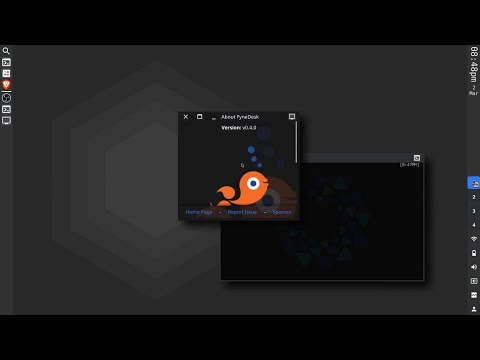
You can also run the window manager components in an embedded X window for testing.
You will need the Xephyr tool installed for your platform (often installed as part of Xorg).
Once it is present you can use the following command from the same directory as above:
make embed
It should look like this:
If you run the command when there is a window manager running, or on an operating system that does not support window managers (Windows or macOS) then the app will start in UI test mode. When loaded in this way you can run all of the features except the controlling of windows - they will load on your main desktop.
Runner
A desktop needs to be rock solid, and whilst we are working hard to get there,
any alpha or beta software can run into unexpected issues.
For that reason, we have included a tyde_runner utility that can help
manage unexpected events. If you start the desktop using the runner, then
if a crash occurs, it will normally recover where it left off with no loss
of data in your applications.
Using standard Go tools you can install the runner using:
go install fyshos.com/tyde/cmd/tyde_runner@develop
From then on execute that instead of the tyde command for a more
resilient desktop when testing out pre-release builds.
Design
Design concepts, and the abstract wallpapers have been contributed by Jost Grant.
Shipping Tyde
If you are installing Tyde by default on a distribution, or making it available as a standard option, you should consider the following points. You do not need to ship the library or any dependencies, but it is recommended to add the following apps as well:
| app | go install | description |
|---|---|---|
| fin | github.com/fyshos/fin | A display manager app that matches the look and feel of Tyde |
Please do let us know if you package Tyde for your system, so we can include a link from here :).

puter
HeyPuter·TypeScript
一个可自托管的开源云端桌面环境,把文件存储、应用和界面搬到浏览器里,相当于自己搭一个私有网盘加在线操作系统。
云桌面+4桌面环境 / 窗口管理器
44123+234.2k26.112026-11-10 09:33 UTC
serenity
SerenityOS·C++
从零手写的类 Unix 桌面操作系统,自带内核、浏览器和桌面环境,适合想深入理解操作系统底层实现的人阅读和动手改造。
操作系统+4桌面环境 / 窗口管理器
33957+103.5k2026-11-09 12:47 UTC

daedalOS
DustinBrett·JavaScript
在浏览器里跑起一套完整的桌面环境,窗口、任务栏、文件系统一应俱全,适合做 Web 版桌面演示或在线工作台。
浏览器桌面+3桌面环境 / 窗口管理器
13101+31.2k2026-10-22 03:46 UTC

serpantinum
ilyamiro·QML
基于 QML 和 Quickshell 打造的 Wayland 桌面 Shell,为 Hyprland、Niri、Sway 等合成器提供统一的面板、启动器与桌面组件。
Wayland+4桌面环境 / 窗口管理器
7659+24358v2.5.02026-11-09 23:37 UTC