Debian/Ubuntu 需先装 dconf-cli 和 uuid-runtime,Arch 需装 dconf 和 util-linux,否则脚本无法应用配色;Linux 与 macOS 的一行安装命令分别用 wget 和 curl,混用可能失败;在 Fish 或 NuShell 中需用嵌套 bash -c 的方式执行安装命令

Gogh
Gogh-Co活跃维护一套终端配色方案合集,一条命令就能给 Gnome Terminal、Tilix、XFCE4、iTerm 等终端换主题,省去手动调色。
Gogh is a collection of color schemes for various terminal emulators, including Gnome Terminal, Pantheon Terminal, Tilix, and XFCE4 Terminal also compatible with iTerm on macOS. (https://gogh-co.github.io/Gogh/)
v1251发布于 2026-10-23 14:29 UTC10,358star +2 / 7 天635fork同步于 2026-11-10 11:29 UTC
sudo apt-get install dconf-cli uuid-runtime
bash -c "$(wget -qO- https://gogh.website/gogh)" 硬件要求按 README 说明
README 未说明,仅需在 Linux、macOS 或 Windows 的 Cygwin/Mintty 终端环境运行
支持 Apple Silicon
给各种终端模拟器一键换配色方案的工具,让终端更好看、对比更清晰
一套终端配色方案合集,一条命令就能给 Gnome Terminal、Tilix、XFCE4、iTerm 等终端换主题,省去手动调色。
核心能力
- 一条命令交互式选择并应用主题
- 支持指定主题名直接安装单个配色
- 提供非交互模式供脚本和 CI 批量部署
- 覆盖 Gnome、Tilix、Kitty、Alacritty 等众多终端
- 主题数据以静态 JSON 文件发布可直接拉取
容易踩的坑
内容由模型根据 README 生成,可能不完整或不准确,以官方文档为准。看原文 README
- v1251Themes 1251最新正式版2026-10-23 · 2026-10-23 14:29 UTC
Release with 1251 files in the 'themes' directory.
- v1250Themes 12502026-10-01 · 2026-10-01 13:26 UTC
查看更新说明
Release with 1250 files in the 'themes' directory.
- v1249Themes 12492026-10-01 · 2026-10-01 13:26 UTC
查看更新说明
Release with 1249 files in the 'themes' directory.
- v1248Themes 12482026-09-30 · 2026-09-30 19:49 UTC
查看更新说明
Release with 1248 files in the 'themes' directory.
- v1247Themes 12472026-09-22 · 2026-09-22 15:25 UTC
查看更新说明
Release with 1247 files in the 'themes' directory.
用户点评
登录用户的真实使用记录,可按版本和硬件筛选共 0 条
还没有人点评。第一个说出真实体验的人最有价值。
Color Scheme Implementer for Terminals
Gogh is a collection of color schemes for terminal emulators across Linux and macOS (plus Cygwin/Mintty on Windows) — see the Terminal Support table below for the full list. These schemes are designed to make your terminal more visually appealing and improve readability with better contrast and color differentiation.
The inspiration for Gogh came from the clean and minimalistic design of Elementary OS, but the project has since grown to include a variety of unique and beautiful options across platforms.
Run:
bash -c "$(curl -fsSL https://gogh.website/gogh)"

Index:
Getting Started
Themes & Data
Help & Contributing
Project

⚙️ Pre-Install
In your terminal, type:
For Debian/Ubuntu:
sudo apt-get install dconf-cli uuid-runtime
For Arch Linux:
sudo pacman -S dconf util-linux
You can now install Gogh interactively (easiest), install a specific theme directly in one line, or install non-interactively (ideal for scripting).
⚙️ Install
1. Run the one-line install command:
Linux
bash -c "$(wget -qO- https://gogh.website/gogh)"
macOS
bash -c "$(curl -fsSL https://gogh.website/gogh)"
Fish or NuShell
bash -c 'bash -c "$(wget -qO- https://gogh.website/gogh)"'
2. Select your theme from the interactive list.
DEMO:
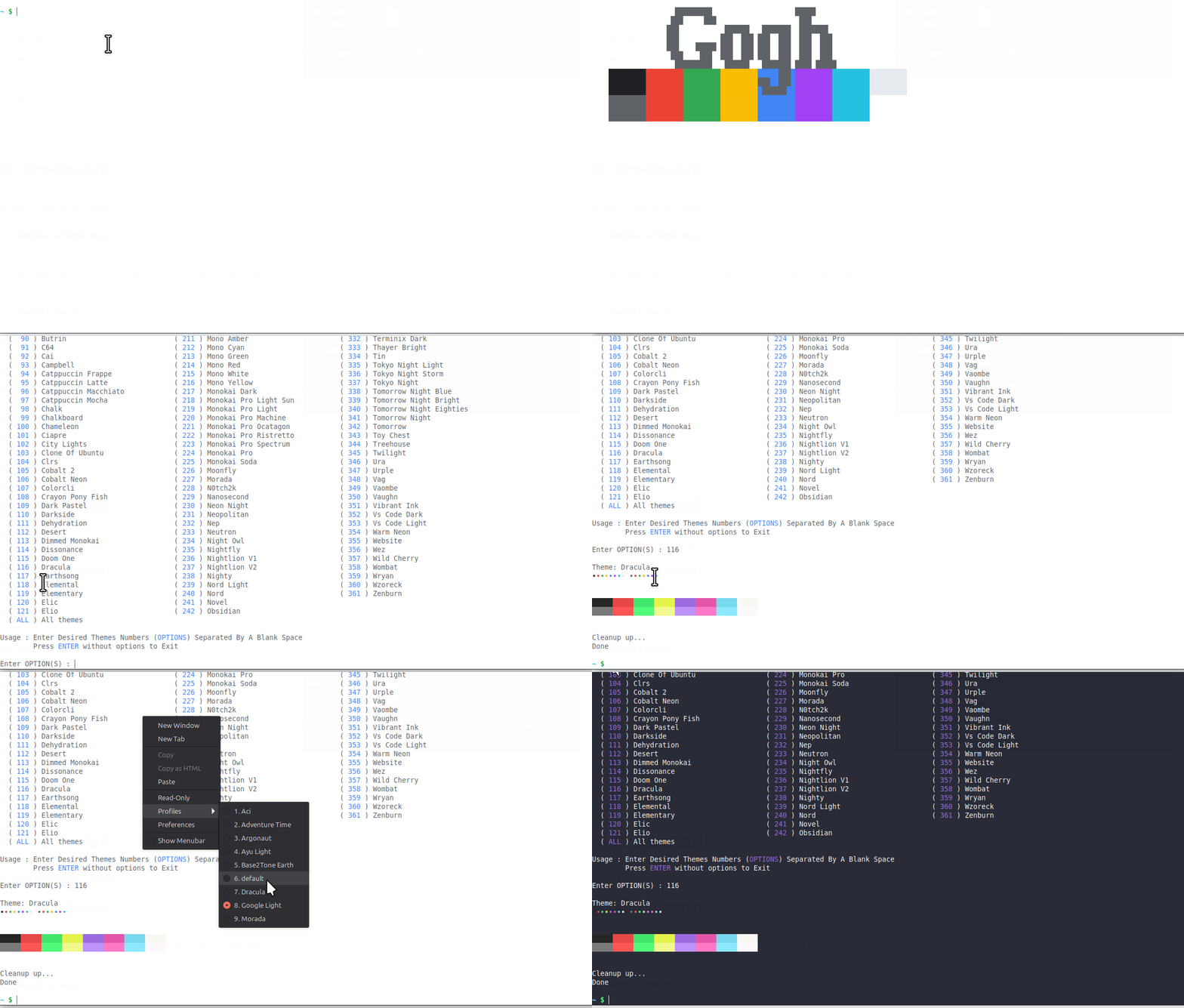
⚡ Install a Specific Theme
Already know which theme you want? Skip the interactive list and pass its name after --:
bash -c "$(wget -qO- https://gogh.website/gogh)" -- "Aci"
⚙️ Install (Non-Interactive Mode)
For scripting, dotfiles, provisioning tools, CI, or container images.
- Non-Interactive Install Guide — both install methods (clone the repo, or download just the required files), selecting themes by name/slug as CLI arguments, and the full environment variable reference (
TERMINAL,GOGH_NONINTERACTIVE,GOGH_USE_NEW_THEME, and theGOGH_*_SCRIPTpath overrides).
💻 Terminal Support
Here are some terminals that Gogh is supported with:
| Terminal | Web | Implementation | Docker test |
|---|---|---|---|
| Alacritty | Web | apply_alacritty() | ✅ |
| Cygwin | Web | apply_cygwin() | ✅ |
| Foot | Web | apply_foot() | ✅ |
| Ghostty | Web | apply_ghostty() | ✅ |
| Gnome | Web | apply_gtk() | ✅ |
| Guake | Web | apply_guake() | ✅ |
| iTerm | Web | apply_darwin() | |
| Kitty | Web | apply_kitty() | ✅ |
| kmscon | Web | apply_kmscon() | ✅ |
| Konsole | Web | apply_konsole() | ✅ |
| linux (Linux virtual terminal) | Web | apply_linux_vt() | ✅ |
| Mate | Web | apply_gtk() | ✅ |
| Mintty | Web | apply_cygwin() | ✅ |
| Pantheon / Elementary | Web | apply_elementary() | |
| Termux | Web | apply_termux() | ✅ |
| Tilix | Web | apply_gtk() / apply_tilixschemes() | ✅ |
| Wezterm | Web | apply_wezterm() | |
| XFCE4 | Web | apply_xfce4-terminal() | ✅ |
| Terminator | Web | apply_terminator() | ✅ |
- Request a terminal — don't see your terminal on this list? Open a support request.
🎨 Themes
We have lots of themes in stock!
- Browse themes — the full catalog.
🔌 API
Theme data is also published as plain files, for scripting or pulling into your own tools — not a dedicated API, just static content, no authentication needed:
- json: https://raw.githubusercontent.com/Gogh-Co/Gogh/master/data/themes.json
- json min: https://raw.githubusercontent.com/Gogh-Co/Gogh/master/data/themes-min.json
- csv: https://raw.githubusercontent.com/Gogh-Co/Gogh/master/data/themes.csv
To fetch the same files through GitHub's actual REST API instead (e.g. for conditional requests via ETag, or commit history on a file) use the Contents API:
curl -s https://api.github.com/repos/Gogh-Co/Gogh/contents/data/themes.json \
  -H "Accept: application/vnd.github.raw+json"
That path is rate-limited like the rest of GitHub's REST API: 60 requests/hour unauthenticated. Add a personal access token (no special scopes needed for a public repo) to raise that to 5,000/hour:
curl -s https://api.github.com/repos/Gogh-Co/Gogh/contents/data/themes.json \
  -H "Accept: application/vnd.github.raw+json" \
  -H "Authorization: Bearer YOUR_GITHUB_TOKEN"
The raw files above aren't rate-limited this way — no token needed for those.
🔑 Color Hash
- Color Hash — how the
hash/hash_bgfields inthemes.jsonare computed, for comparing and validating palettes across themes.
👀 WCAG - Accessibility Contrast
- Web — the WCAG contrast report.
- wcag: https://raw.githubusercontent.com/Gogh-Co/Gogh/master/data/wcag.json
- wcag min: https://raw.githubusercontent.com/Gogh-Co/Gogh/master/data/wcag-min.json
- More information — WebAIM's contrast checker.
❓ HELP
- Issue Policy — how issues are triaged and when they're closed.
- Troubleshooting — common installation problems by platform (Arch, Debian, Elementary OS, Fedora, Termux, Ubuntu) with the fixes that worked for other users.
🖼️ Create your Own Theme!
- Contributing Guide — the single source of truth for adding a theme: the
.ymltemplate, the field-by-field reference, the rules a theme PR needs to follow, and how to check it locally withtask validatebefore opening the PR.
🤖 Work with Agents
master does not track agent-context files — AGENTS.md and the memory/ folder
(architecture decisions + current project status) live on a dedicated orphan branch,
meta/agents-master, so the project's own history stays focused on Gogh itself.
If you want to work on this repo with an AI coding agent, bring those files into your working copy:
git restore --source meta/agents-master -- AGENTS.md
git restore --source meta/agents-master -- memory/
That gives you:
AGENTS.md— the entry-point pointer any agent should read first.memory/STATUS.md— the real, current state of the project (what's in progress, what's uncommitted).memory/decisions/— Architecture Decision Records (ADRs) for choices already made, with their rationale, so an agent doesn't re-propose something already settled.
Note: tool-specific folders such as .agents/ and .claude/ (agent skills) are
intentionally left out of this — there isn't an established, tool-agnostic standard
yet for how skills should be structured or shared, so for now they stay local/
untracked rather than committed to either branch.
🌱 First commit:
Nov 18, 2013 - aa9871e
:heart: Credits:
- Credits — the full theme-by-theme author list.
:heart: Contributors:
Many thanks to all who have participated in this project.
🧠 Author (contributor)
I cannot claim to be the only author of this project. Without the help of the people who have contributed, this would not have been possible. Therefore, that's why all contributors are listed first in this document. While I am listed as the author, the true authors are all those who are mentioned in the document. I would like to express my gratitude to all of them, as well as to future contributors.
- Miguel D. Quintero - Lanet.co


🖌️ Why Gogh?
There is no blue without yellow and without orange.
-- Vincent Van Gogh --
📣 Mentions
- Mentions — the full list of blogs, forums, videos, and comparison sites that have mentioned Gogh.
📜 License
Gogh is dual-licensed under either the MIT license or the Apache License, Version 2.0, at your option.
🌟 Star History
terminal
microsoft·C++
微软官方的新版 Windows Terminal 终端模拟器,同时包含原版 Windows 控制台宿主,支持多标签、GPU 加速渲染和 WSL,替代老旧的 cmd 窗口。
终端模拟器+4终端模拟器
105363+289.7kv1.25.2733.02026-11-09 23:18 UTC

tabby
Eugeny·TypeScript
一款基于 TypeScript 的现代终端模拟器,支持 SSH、Telnet、串口连接,提供插件扩展和主题定制,适合替代传统终端工具。
终端模拟器+4终端模拟器
75362+444.3kv1.0.2382026-11-06 04:03 UTC
alacritty
alacritty·Rust
用 Rust 写的跨平台 GPU 加速终端模拟器,基于 OpenGL 渲染,主打高帧率和低延迟,适合嫌普通终端卡顿、想要更顺滑操作体验的开发者。
终端模拟器+4终端模拟器
66149+253.7kv0.17.02026-11-06 21:34 UTC

termux-app
termux·Java
在 Android 手机上提供完整的 Linux 终端环境,通过安装各类软件包把手机变成便携开发机。
终端模拟器+3终端模拟器
64538+2428.3kv0.118.32026-11-05 09:38 UTC