从源码编译需要 Qt 6 和 CMake;macOS 下载后需执行 xattr -d com.apple.quarantine /Applications/YUView.app 解除隔离;构建单元测试需先初始化 GoogleTest 子模块并加 -DYUVIEW_BUILD_TESTS=ON
YUView
IENT活跃维护跨平台 YUV 原始视频查看器,支持 H.265/HEVC 等编码分析,内置 ffmpeg 解码与高级统计工具,方便调试视频编码和画质。
The Free and Open Source Cross Platform YUV Viewer with an advanced analytics toolset
v2.15发布于 2026-11-06 14:01 UTC2,319star +1 / 7 天435fork同步于 2026-11-10 11:44 UTC
跨平台 YUV 播放与分析工具,支持多种格式和 HEVC 码流内部可视化
跨平台 YUV 原始视频查看器,支持 H.265/HEVC 等编码分析,内置 ffmpeg 解码与高级统计工具,方便调试视频编码和画质。
核心能力
- 支持多种子采样和位深的 YUV 格式播放
- 直接解码 h.265/HEVC 裸码流并可视化预测模式与运动向量
- 通过 FFmpeg 打开几乎任意格式文件
- 并排与对比视图做图像比较并计算 YUV/RGB 差异
- 用统计数据显示叠加在视频上并支持播放列表存取
容易踩的坑
内容由模型根据 README 生成,可能不完整或不准确,以官方文档为准。看原文 README
- v2.15YUView 2.15最新正式版2026-11-06 · 2026-11-06 14:01 UTC
Finally, after ... I don't want to talk about it, there is a new release.
The list of things that were fixed, merged and changed is just too long so I won't bother. Unfortunately, some of the things that I was hoping for for a new release (FFmpeg support for all versions using libffmpeg) did not make it but those will be up next.
Options for installation
Windows
There are 2 options (installer or standalone ZIP file) for 2 platforms (x86 and arm).
- YUViewSetup-windows-2022.exe x86 Installer
- YUViewSetup-windows-11-vs2026-arm.exe ARM Installer
- YUView-windows-2022.zip x86 Standalone
- YUView-windows-11-vs2026-arm.zip ARM Standalone
Macos
- YUView-macos-26.zip Apple silicone
- YUView-macos-26-intel.zip Intel
Linux
For Linux we have a prebuild Appimage you can download here. But you can also just install using flatpak:
flatpak install flathub de.rwth_aachen.ient.YUView - v2.14YUView 2.142023-09-21 · 2023-09-21 13:19 UTC
查看更新说明
Again it is time:
- many smaller bugs were fixed
- New ffmpeg versions supported
- VVC parsing ...
- v2.13YUView 2.132022-04-29 · 2022-04-29 15:19 UTC
查看更新说明
It is time for another release with the following things:
- The FFmpeg code was refactored and we now have support for FFmpeg 5.0
- The color mapping dialogs were updated a bit and now support saving / loading of custom colormaps.
- Some bugs fixed (e.g. Large y4m files) and smaller things improved.
- v2.12.1YUView 2.12.12021-11-26 · 2021-11-26 13:48 UTC
查看更新说明
Hotfix release for YUView with 2 fixes:
- Selection of components (Y/U/V) was broken
- Plotting of bitrate in AV1 streams was broken
- v2.11.1YUView 2.11.12021-06-18 · 2021-06-18 16:42 UTC
查看更新说明
Again many smaller issues were fixed and features added. Most notable:
We now use the new vvdec C interface which was recently added. Support for TNG images Many many smaller things. Take a look through the history to find out more.
用户点评
登录用户的真实使用记录,可按版本和硬件筛选共 0 条
还没有人点评。第一个说出真实体验的人最有价值。
YUView
YUView is a QT based, cross-platform YUV player with an advanced analytic toolset.
Build Status

Description
At its core, YUView is a YUV player and analysis tool. However, it can do so much more:
- simple navigation/zooming in the video
- support for a wide variety of YUV formats using various subsamplings and bit depts
- support for raw RGB files, image files and image sequences
- direct decoding of raw h.265/HEVC bitstreams with visualization of internals like prediction modes and motion vectors and many more
- interface with visualization for the reference software decoders HM and JEM
- support for opening almost any file using FFmpeg
- image comparison using side-by-side and comparison view
- calculation and display of differences (in YUV or RGB colorspace)
- save and load playlists
- overlay the video with statistics data
- ... and many more
Further details of the features can be found either here or in the wiki.
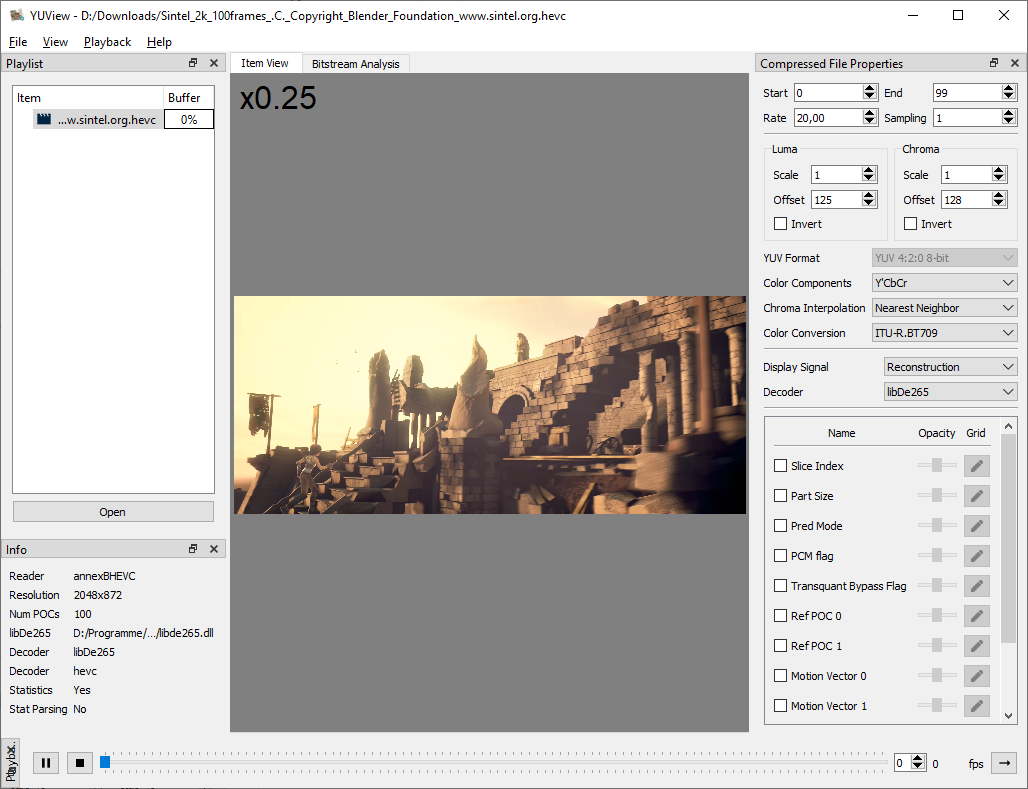
Screenshot of YUView:
Download
You can download precompiled binaries for Windows and MAC from the release site which are all compiled on Github Actions. On the release page you can find:
- Windows installer
- Windows zip
- Mac OS Application
- Linux Appimage
On MacOS, just extract the zip file to your Application folder and remove it from quarantine:
xattr -d com.apple.quarantine /Applications/YUView.app
If you have Ubuntu 22.04 or newer, you can get YUView from the official repo: sudo apt install yuview. For other Linux based platforms we are also on flathub. More information on YUView on Linux can be found in out wiki page "YUView on Linux".
If none of these apply to you, you can easily build YUView yourself.
Building
Compiling YUView from source requires Qt 6 and CMake. Configure and build the application with:
cmake -S . -B build
cmake --build build --parallel
To also build the unit tests, initialize the GoogleTest submodule and enable the test option:
git submodule update --init --recursive
cmake -S . -B build -DYUVIEW_BUILD_TESTS=ON
cmake --build build --parallel
ctest --test-dir build --output-on-failure
More help on building YUView can be found in the wiki.

iina
iina·Swift
macOS 上基于 mpv 的现代视频播放器,用 Swift 编写,界面原生美观,支持几乎所有视频格式,适合替代 QuickTime 日常看片。
视频播放器+4视频播放器
47074+393.0kv1.5.12026-11-10 03:26 UTC
video.js
videojs·TypeScript
开源媒体播放器框架,支持 HTML 和 React,统一处理 HLS、DASH 等流媒体格式,帮你在网页里快速搭出稳定可定制的视频播放器。
视频播放器+4视频播放器
40145+387.5k[email protected]2026-11-10 01:09 UTC
mpv
mpv-player·C
轻量级命令行视频播放器,基于 FFmpeg 解码,支持硬件加速、字幕渲染和脚本扩展,适合在终端或嵌入其他应用中播放音视频。
命令行播放器+4视频播放器
38040+1043.6kv0.42.02026-11-10 10:46 UTC

peach
peach-mitao·Python
本地优先的视频元数据刮削与媒体库管理工具,自动整理影片信息并支持自托管播放,适合搭建个人影音库。
媒体库管理+4视频播放器
14795+1141.7kv0.57.02026-11-10 05:46 UTC