本仓库不含也不安装任何软件包,需先自行装好 Hyprland 等依赖;使用 FISH shell 时不要用 curl 自动安装命令,应克隆 Distro-Hyprland 后运行 install.sh;upgrade.sh 依赖 rsync,且需已有可运行的 KooL 配置。
Hyprland-Dots
JaKooLitGPL-3.0更新放缓一套开箱即用的 Hyprland 桌面配置(dotfiles),配套安装脚本,帮你快速把 Wayland 平铺桌面装好并调成好看的样子。
Hyprland configuration files or dotfiles - This repo is used as main repo for all my Distro-Hyprland Install Scripts. See the readme
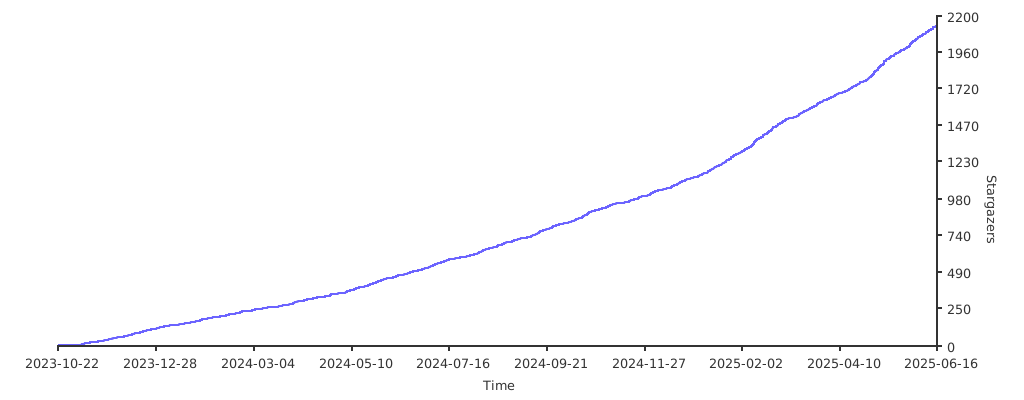
Hyprland-Dots-v2.3.20发布于 2026-01-24 22:55 UTC3,603star +7 / 7 天340fork同步于 2026-11-10 23:41 UTC
git clone --depth=1 https://github.com/JaKooLit/Hyprland-Dots.git
cd Hyprland-Dots
chmod +x copy.sh
./copy.sh 硬件要求按 README 说明
README 未说明具体硬件要求,仅提及默认针对 2K(1440p)无缩放显示调校;NVIDIA 用户需修改 ENVariables.conf。
Hyprland 桌面预配置 dotfiles,省去从零手写配置的麻烦
一套开箱即用的 Hyprland 桌面配置(dotfiles),配套安装脚本,帮你快速把 Wayland 平铺桌面装好并调成好看的样子。
核心能力
- 提供预配置的 Hyprland 窗口管理器 dotfiles
- 配套各发行版自动安装脚本,可选拉取本配置
- copy.sh 自动备份并复制配置到 ~/.config
- upgrade.sh 借助 rsync 升级已有配置
- 默认按 2K 1440p 无缩放调校
容易踩的坑
内容由模型根据 README 生成,可能不完整或不准确,以官方文档为准。看原文 README
- Hyprland-Dots-v2.3.20最新正式版2026-01-24 · 2026-01-24 22:55 UTC
24 January 2026
v2.3.20
- Bugfix release
- Fixed issue with express-update
- It bypassed the code to remove duplicates in system vs. user
- Now checks for dups in version <= 2.3.19
- Improved the checking code for better matching system vs. User
- Merged
tak0danupdate toTak0-Autodispatch.shscript - Removed stale
nvimconfig. It was never copied but not needed
- v2.3.19Hyprland-Dots-v2.3.192026-01-21 · 2026-01-21 22:07 UTC
查看更新说明
🚀 **Current Release **
📅 Updated: January 21st, 2026
v2.3.19
-
2026-01-20
-
Fixed CSS to format the
custom/nightlightmodule -
Fixed padding on some CSS files
-
2026-01-19
-
Removed "Set wallpaper SDDM prompt"
-
When changing wallpaper there is no longer a prompt to set it on SDDM
-
It's now a menu option under Quick Settings menu
SUPER SHIFT + E -
Fixed
Glassstyle sheets -
2026-01-16
-
Added
Rainbow Borders sub memu- Code provided by brunoorsolon
- There are now mulitple modes for the Rainbow Borders feature
Disabled,Wallust Color,Rainbow,Gradient flow- Thank you for the submission
-
Disabled
RainbowBorders.shby default -
Use the quick setings menu
SUPERSHIFT + Eto enable, select mode -
2026-01-15
-
Created waybar configs for ML4W Glass style
-
TOP & Bottom Summit - glass -
Default Laptop - Glass -
Everforest - Glass -
Fixed menu for express-update
-
Fixed
Toggle Rainbowchecked for wrong file -
2026-01-13
-
Added
Toggle Rainbow bordersoption to settings menu -
SUPERSHIFT+Esearch forRainbow -
It will toggle the current state and run
Refresh.shto start or stop- Thanks to @Arkboi for suggesting it.
- Later if there are more settings like this I will create a new menu
-
2026-01-11
- Improved
ML4W Glasstheme- Now has proper 3d gradient look
- Theme based nightlight color
copy.shis now more modular- Helper scripts in
scriptsdir per function - Making
copy.shsmaller (1200 lines to 800 so far) - Easier to maintain going forward
- Helper scripts in
- Improved
-
2026-01-09
- Fixed: Keybind parser latency
- Changed the parsing login to python instead of bash
- Also fixed duplicates when you unmap, then remap keybinds
- Ex. Change keybind for
file manger- Both the old and new keybind were show in keybind menu
- Ex. Change keybind for
- Added:
--express-updatetocopy.sh./copy.sh --express-update- This will bypass some of the questions
- Updating SDDM wallpaper
- Downloading wallpaper from repo
- Mostly like that was done at install time or previous upgrade
- Restoring User configs :
Weather.shandWeather.shRofibeats.sh- etc.
- Automatically trims the backed up directories leaving just latest backup
- This dramatically reduces the time/effort to update dotfiles
- Most users don't restore these custom files on upgrades
- Fixed: Keybind parser latency
-
2026-01-08
-
Fixed: MPRIS artwork in Sway notification center only 10 pixels
- Adjusted to 96 pixels
- Thank you @godlyfas for fixing this
-
Fixing scripts
TouchPad.shnever expands$TOUCHPAD_ENABLED(and doesn’t source the file that defines it)Volume.shhas multiple microphone-control bugs (badpamixerarguments, typoed function name, invalid notification payloads) that break mic toggling and volume feedback.DarkLight.shwipes the Qt theme paths each run because theqt5ct/qt6ctpalette variables are commented out.KooLsDotsUpdate.shcontains a malformednotify-sendstring that crashes the script when no local version is detected.Distro_update.shrunssudo apt upgradeoutside the kitty window, so the Debian/Ubuntu flow never finishes inside the terminal.Hypridle.shnow launcheshypridlein the background (& disown) when enabling the daemon, preventing the toggle command from hanging Waybar.RofiSearch.shverifies thatjqis available, captures the user’s query explicitly, URL-encodes it viajq@uri,- opens the configured search engine with the encoded query instead of dropping the term.
Sounds.shnow triespw-play, thenpaplay, thenaplay, emitting a clear error if none are installed, so the script no longer calls the non-existent pa-play.Tak0-Per-Window-Switch.shnow records the listener PID in `~/.cache/kb_layout_
-
- Hyprland-Dots-2.6.18v2.3.182025-12-11 · 2025-12-11 17:47 UTC
查看更新说明
December 2025
FIXES:
- Fixed: Opacity for
vscodeconfigured multiple times - Fixed: Quickshell
overviewnot working, error "Quickshell or AGS not installed"- If
shell.qmlexists in~/.config/quickshellthat blocks overview - That file isn't configured for overview
- Without that file, it will look in the
overviewdirectory and load the QML code
- If
- Fixed: Waybar Modules, locale not included in clock format
- Always showed US-EN
- Thanks to albersonmiranda for finding and fixing it
- Fixed: Not all waybars had
custom/nightlight - Fixed:
Weather.pycache wasn't updating when UNITS changed from C to F - Fixed: Wallpapers with periods in names truncated
- https://github.com/JaKooLit/Hyprland-Dots/pull/873
- Thanks to @godlyfast for the fix.
- Fixed: Overview Toggle keyind SUPER + A now properly detects QuickShell
- If QS
overviewfails, or is not installed, AGSoverviewwill be started instead
- If QS
- Fixed:
Super J/Kcycle next/prev weren't working in both master / dwindle - Fixed:
Weather.pyone-off run - Removed:
Hyprsunsetfrom status group.- Credit: Alberson Miranda
- Added: more application icons for waybars
Weather.pybasically rewritten to improve look and functionality- Credit: Prabin Panta
- The Jak team also heavily contributed to the rewrite
- Fixed: Waybar
- Changing the waybar config
SUPERALT + Bwould sometimes need to be done twice - Cause: options were incorrect annotated with "👉 ${name}"
- Changing the waybar config
- Fixed:
GameMode.shto function consistently - Updated:
WalllustSwww.shwallpaper path - Corrected: Typo in Show Open Apps
- GameMode.sh / Refresh.sh
- Enabling / Disabling repeatedly would result in multiple waybars
- Added additional
sleepcommands inGameMode.shandRefresh.sh - Resolves Issue 870
CHANGES:
-
ChangeLayout.sh continues to rebind dynamically when layouts are toggled.
- Credits: Suresh Thagunna
- For identifying the mismatch and proposing an auto-alignment approach.
-
Startup config order:
- load System Defaults Startup_Apps and WindowRules first
- Then user overlays, restoring baseline autostarts while keeping user additions.
-
Lock screen:
- Clock now horizontal and smaller
- Adjust spacing margines of the various fields
- Small changes to color variables Trying to balance colors
- Fixed both 1080 and 2K+ configurations
-
UserConfigs/Startup_App.confis now sourced inhyprland.conf- It was being sourced twice
-
Some scripts weren't executable
scripts/Battery.shscripts/ComposeHyprConfigs.shscripts/OverviewToggle.shscripts/sddm_wallpaper.sh
-
Updated: SWWW to v0.11.2
- Fixes numerous issues
- Portrait monitors especially
- SWWW isn't being maintained In future will switch to AWWWW
-
Added: A message before installing wallpapers that some are AI generated or enhanced
-
Changed:
/usr/bin/bashto/usr/bin/evn bashfor better portability -
Adjusted: Small change to
DropDownterminal.sh- Increased top margin % to center it more
- Widened it.
- These options are settable in the script.
FEATURES:
- Hyprsunset retains last state on/off
- Credit: Alberson Miranda
- Fastfetch now displays the version of the Jak Dotfiles
ChangeLayout.sh- Dynamically binds SUPER J/K based on current layout
- Previously only worked in Master Layout
- Credit: Suresh Thagunna
- Along with that
KeybindsLayoutInitscript reads current default layout - Then it adjusts the SUPER J/K keybindings appropriately
- RofiBeats dynamic music system added
- Binds now include descriptions.
- Switched from
bindtobindd - Improves usability of keybind search
- Switched from
- Add new laptop gesture for zoom system.
Thanks to everyone that contributed, or reported issues.
Contributors:
Alberson Miranda TheAhumMaitra
- Fixed: Opacity for
- v2.3.172025-10-14 · 2025-10-14 00:09 UTC
查看更新说明
Changelog — JAK's Hyprland Dotfiles
October 2025
🐛 Fixes
- Correct
windowrulesyntax error. - Ensure wallpaper selector applies wallpaper to SDDM.
- Update theme colors when a new wallpaper is selected.
🌦️ Weather.py
- ♻️ Substantial rewrite.
- ✅ Launches properly in Waybar.
- 📍 Improved location detection; overridable variables exposed.
- 🌐 Switched to Open-Meteo for weather data with fallback providers.
🖥️ Support for debian and ubuntu installs
- Providing they are using Hyprland 0.51.1 or greater
🖥️ Drop-down terminal
- 🔧 Start on login via
TerminalDropDown.shso first invocation works. - 🐱 Use Kitty explicitly instead of
$TERMfor consistent behavior.
🌇 HyprSunset
- 🔧 Availble from waybar or
SUPER + N
🖱️ Gestures
- 🔧 Updated to accommodate Hyprland 0.5x changes.
👥 Contributors
If you have any questions, feel free to contact via GitHub Discussions or Through Discord Server
- Correct
- v2.3.162025-07-25 · 2025-07-25 12:48 UTC
查看更新说明
Hey Hey Hey! It has been 2 months since I released a new version.
Well, most users knew I was at work and I have been extremely busy
But I am very thankful to the community for submitting Merge Request, submit a bug report, etc etc.
Biggest change for this release was maybe using Quick Shell for Desktop Overview. Sorry Debian and Ubuntu, I am still trying to figure out how to install quickshell to all Debian Based Distro like Ubunt and Kali.
Huge thanks to @SherLock707, original author of AGS Desktop Overview and I was happy that he shared quickshell overview
In any case, enjoy. Please go through the Whats New and Changes as per below
What's new? & changes
- introduction of quickshell (alternative to AGS overview)
- adjusted copy.sh to for new quickshell
- disabled explicit_sync by default
- Added battery info on Hyprlock (only for laptop)
- Added hyprpicker in waybar. However, not planning to add hyprpicker in the packages to install
- Improved response for monitor brightness script
- adjusted copy.sh to work with simple_sddm_2
- integrated wallust color for SDDM theme simple_sddm_2
- improved rofi theme selector (added preview)
- improved rofi waybar style and configs selector script. 👉 this sign means it is style or config which is currently symlinked and in use
MR's
- added hyprlock battery information to hyprlock. Thanks to @aditya-an1l MR #705
- quickshell config. Huge Thanks to Kiran @SherLock707 MR #737
- improved drop down terminal to behave like pyprland. Huge Thanks to Kira @SherLock707 MR #723
- Added Romanian, Russian and Ukrainian translation for Readme file. Thanks to @CristianSw MR #729
- Added hyprpicker in waybar. Thanks to @IT-ess MR #675
- Improve monitor brightness control response?. Thanks to @lonerOrz MR #750
- Improve rofi theme selector, adding preview. Huge thanks to @tnfru MR #741
- Improved Waybar Style and Layout scripts. Thanks to @jteijema MR #771
Thanks to these beautiful people for donating / sponsoring for the 3 months
- zotrix (Kofi)
- EdvardMajakari (Kofi)
- ThreeFatPandas (Kofi)
- mayf (Kofi)
- Josh Mc (Kofi)
- Vitalij (Kofi)
- Scott G (Kofi)
- Joel (Buymecoffee)
- Bruno Correia(Buymecoffee)
- Chris Paine (Buymecoffee)
- Wang.w (Buymecoffee)
What's Changed
- feat: Display battery level and power status on lock screen by @aditya-an1l in https://github.com/JaKooLit/Hyprland-Dots/pull/705
- Remove trailing whitespace from WindowRules.conf by @Humblemonk in https://github.com/JaKooLit/Hyprland-Dots/pull/715
- Improved Dropdown terminal by @SherLock707 in https://github.com/JaKooLit/Hyprland-Dots/pull/713
- Dropdown terminal improvements - Round 2 by @SherLock707 in https://github.com/JaKooLit/Hyprland-Dots/pull/717
- Revert "Dropdown terminal improvements - Round 2" by @JaKooLit in https://github.com/JaKooLit/Hyprland-Dots/pull/720
- Revert "Revert "Dropdown terminal improvements - Round 2"" by @JaKooLit in https://github.com/JaKooLit/Hyprland-Dots/pull/721
- Fixed drop down terminal focus by @SherLock707 in https://github.com/JaKooLit/Hyprland-Dots/pull/724
- SwayNC DND bypass for volume and brightness notification by @SherLock707 in https://github.com/JaKooLit/Hyprland-Dots/pull/725
- Update Polkit.sh by @JaKooLit in https://github.com/JaKooLit/Hyprland-Dots/pull/730
- Updated for new SDDM theme by @JaKooLit in https://github.com/JaKooLit/Hyprland-Dots/pull/733
- main to development by @JaKooLit in https://github.com/JaKooLit/Hyprland-Dots/pull/734
- Added Romanian, Russian and Ukr
用户点评
登录用户的真实使用记录,可按版本和硬件筛选共 0 条
还没有人点评。第一个说出真实体验的人最有价值。


IMPORTANT! Beginning of March 2026, This project will be archived and it will be maintained by Dwilliams



https://github.com/user-attachments/assets/49bc12b2-abaf-45de-a21c-67aacd9bb872
📹 A video walkthroughs
- at the bottom
🚩 🏁 Auto Distro-Hyprland install scripts cloning and starting 🇵🇭
[!CAUTION] If you are using FISH SHELL, DO NOT use this function. Clone the Distro-Hyprland and ran install.sh instead
- NOTE: you need package
curlfor this to work
sh <(curl -L https://raw.githubusercontent.com/JaKooLit/Hyprland-Dots/main/Distro-Hyprland.sh)
- You can use the above command to automatically clone the
Distro-Hyprlandinstall scripts - It will clone the install script and start the
install.sh😎
👁️🗨️ My Hyprland install Scripts 👁️🗨️
-
Automated Hyprland Scripts for Distro of choice which will pull this dotfiles if opted to install these configurations
🪧 Attention 🪧
- This repo does NOT contain or will NOT install any packages. These are only pre-configured-hyprland configs or dotfiles
- refer to install scripts what packages needed to install... but at least, Hyprland packages are required
- This repo will be pulled by the Distro-Hyprland install scripts above if you opt to download pre-configured dots
👀 Screenshots 👀
- All screenshots are collected here Screenshots
📦 Whats new?
- To easily track changes, I will be updating the CHANGELOGS Screenshots will be included if worth mentioning the changes!
[!NOTE] Kindly note that by default, Kools Dots are adjusted / configured for 2k (1440p) display without scaling.
💥 Copying / Installation / Update instructions 💥
-
[!Note] The auto copy script
copy.shwill create backups of intended directories to be copied. However, it's still a good idea to manually backup just incase script fails to backup your configuration. If you already have a hyprland configuration, uninstall it first, or create a new user, and install it with that user -
Clone this repo by using
git. -
Change directory, i.e.
cd Arch-Hyprland -
Make
install.shexecutablechmod +x ./install.sh -
Run the script
./install.sh
To download from Master branch Note: Ubuntu is exception, it has version specific branches
git clone --depth=1 https://github.com/JaKooLit/Hyprland-Dots.git
cd Hyprland-Dots
to download from Development branch (development and testing) Not recommeded for non-testing systems
git clone --depth=1 https://github.com/JaKooLit/Hyprland-Dots.git -b development
cd Hyprland-Dots
- automatic copy/install of pre-configured dots (recommended for updating)
chmod +x copy.sh
./copy.sh
- to copy/install from releases (stable) (note this is 1 version older than in main)
chmod +x release.sh
./release.sh
- UPGRADE.sh function
[!IMPORTANT] You need rsync for it to work you should have already up and running KooL's Hyprland before using this function
chmod +x upgrade.sh
./upgrade.sh
❗❗❗ DEBIAN AND UBUNTU!
-
Debian 13
- Now builds Hyprland 0.51.1 from source using the
install.shscript - So the current version of Hyprland-Dots is compatible only in those cases.
- Now builds Hyprland 0.51.1 from source using the
-
Ubuntu 24.04/25.10
- We are now using a PPA to get more current versions of Hyprland.
- So the current version of these Dotfiles are compatible if you updated to the PPA based configuration.
⚠️⚠️⚠️ ATTENTION - BACKUPS CREATED by SCRIPT
[!CAUTION]
copy.sh,release.shand evenupgrade.shcreates a backup! Kindly investigate manually contents on your$HOME/.configDelete manually any backups which you dont want.
🛎️ a small note on wallpapers
- by default, only few wallpapers will be copied (1 each dark and light plus 3 more). You will be offered to download more wallpapers. You can preview/check the additional wallpapers from
THISLink
⚠️⚠️⚠️ A MUST! after copying / Installing these dots
-
Press
SUPER Wand set a wallpaper. This is also to initiate wallust for waybar, kitty (tty) and rofi themes. -
However, If you use the
copy.shor therelease.sh, there will be a preset initial Wallpaper and you dont have to do this -
Nvidia Owners. Make sure to edit your
~/.config/hypr/UserConfigs/ENVariables.conf(highly recommended).
- NVIDIA users / owners, after installation, check
THIS
- If you have already set your own keybinds, monitors, etc.... Just copy over from backup created before log-out or reboot. (recommended)
📖 Known issues and possible solutions
- check out this page FAQ and UNSOLVED ISSUES
🙋 QUESTIONS ?!?! ⁉️
- FAQ! Yes you can use these dotfiles to other distro! Just ensure to install proper packages first! If it makes you feel better, I use same config on my Gentoo:)
- QUICK HINT! Click the HINT! Waybar module (note only available in Waybar default and Simple-L [TOP] layout). Can be launched by Keybind
SUPER H - More question? click here browse through this WIKI
- If you want the old configs, it is collected on my "Archive" repo. See HERE
⌨ Keybinds
- Keybinds
CLICK
🙏 Special request
- If you have improvements on the dotfiles or configuration, feel free to submit a PR for improvement.
- I always welcome improvements as I am also just learning just like you guys!
✍️ Contributing
- Want to contribute? Click
HEREfor a guide how to contribute
Thanks to all who have contributed code, or support on the Discord server. You efforts are greatly appreciated
🤷♂️ TO DO!
- Tweak dots - 🚧 in constant progress
🔮 Discord Server
- kindly join my Discord
💖 Support
-
a Star on my Github repos would be nice 🌟
-
Subscribe to my Youtube Channel YouTube
-
you can also give support through coffee's or btc 😊

or

Or you can donate cryto on my btc wallet :)
1N3MeV2dsX6gQB42HXU6MF2hAix1mqjo8i
🫰 Thank you for the stars 🩷
Document translations
ohmyzsh
ohmyzsh·Shell
一套社区维护的 zsh 配置管理框架,内置 300+ 插件和 140+ 主题,帮你快速搭好顺手的终端环境并自动更新。
zsh 配置+4桌面美化 / 主题
190435+9927k2026-11-09 12:36 UTC
warp
warpdotdev·Rust
基于 Rust 打造的智能体开发环境,从终端演化而来,把 AI 代理能力直接融入命令行,让写代码、跑命令和调试更顺手。
终端模拟器+4桌面美化 / 主题进阶
65967+665.8kv0.2026.06.09.19.54.dev_002026-11-10 22:48 UTC
NvChad
NvChad·Lua
基于 Lua 的 Neovim 配置框架,开箱即用,自带合理默认设置和漂亮界面,省去从零折腾配置的麻烦。
Neovim 配置+3桌面美化 / 主题
28542+102.2kv2.52026-10-24 22:01 UTC

.tmux
gpakosz·Shell
一套开箱即用的 tmux 配置,自带主题、状态栏和常用快捷键,省去自己写 .tmux.conf 的麻烦,让终端多窗口操作更顺手。
tmux 配置+4桌面美化 / 主题
25471+33.6k2026-10-21 15:47 UTC