默认 SSH 端口为 22,非标准端口需用 -p 指定;编辑文件需先按 Enter 加载内容再按 e;需自备可用的 SSH 凭据(用户名、私钥或 OpenSSH 证书)
brew install jayanaxhf/taps/filessh
cargo install --locked filessh 硬件要求按 README 说明
README 未说明
在终端里浏览和管理远程 SSH 服务器文件的 TUI 工具,支持就地编辑与并行递归下载
用 Rust 写的终端界面文件浏览器,通过 SSH/SFTP 连远程服务器,像本地文件管理器一样浏览、管理远端文件,比敲命令快得多。
核心能力
- 用三栏 TUI 浏览远程文件列表、元数据与文件内容
- 按 e 调用 $EDITOR 就地编辑远程文件
- 并行遍历目录实现递归下载
- Ctrl+o 直接在当前目录打开 SSH 会话
- 支持重命名、删除、新建文件与目录及按名过滤
容易踩的坑
内容由模型根据 README 生成,可能不完整或不准确,以官方文档为准。看原文 README
- v0.4.4最新正式版2026-07-25 · 2026-07-25 10:59 UTC
Features
- (tui) Title the new file and folder prompts
Bug Fixes
- (ssh_config) Apply the settings a matching wildcard block supplies
- (cli) Fall back like ssh when a Host omits keywords
- (ssh_config) Parse the configs people actually have
- (tui) End the prefix on keys only, and let Esc clear the input mode
- (tui) End the
nprefix on the next key, whatever it is - (ssh) Serve the second connect from a decrypted-key cache
- (ssh) Ask for the passphrase instead of panicking on encrypted keys
Documentation
- (tui) Put quit on the existing hint line instead of a new one
- Document the keybindings, starting with how to quit
- v0.4.32026-07-25 · 2026-07-25 10:47 UTC
查看更新说明
Documentation
- Add homebrew formula
Performance
- Streamlined build.rs
- v0.4.22026-01-25 · 2026-01-25 11:23 UTC
查看更新说明
[0.4.2] - 2025-12-28
Bug Fixes
- Resolve clippy warnings (#32)
New Contributors
- @kn0sys made their first contribution in https://github.com/JayanAXHF/filessh/pull/32
Full Changelog: https://github.com/JayanAXHF/filessh/compare/v0.4.1...v0.4.2
- v0.4.12025-12-26 · 2025-12-26 17:27 UTC
查看更新说明
Other
- Removed unnecessary dependencies
Performance
- Removed unnecessary cloning and used
CoWinstead ofStringin some places
- v0.4.02025-12-26 · 2025-12-26 14:48 UTC
查看更新说明
Features
- [breaking] Add SSH Config parsing to use hosts defined there (#29)
Miscellaneous Tasks
- Release issues
Features
- [breaking] Add SSH Config parsing to use hosts defined there (#29) (by @JayanAXHF) - #29
Styling
- (CHANGELOG) Revamped Changelog style (by @JayanAXHF)
用户点评
登录用户的真实使用记录,可按版本和硬件筛选共 0 条
还没有人点评。第一个说出真实体验的人最有价值。
FileSSH



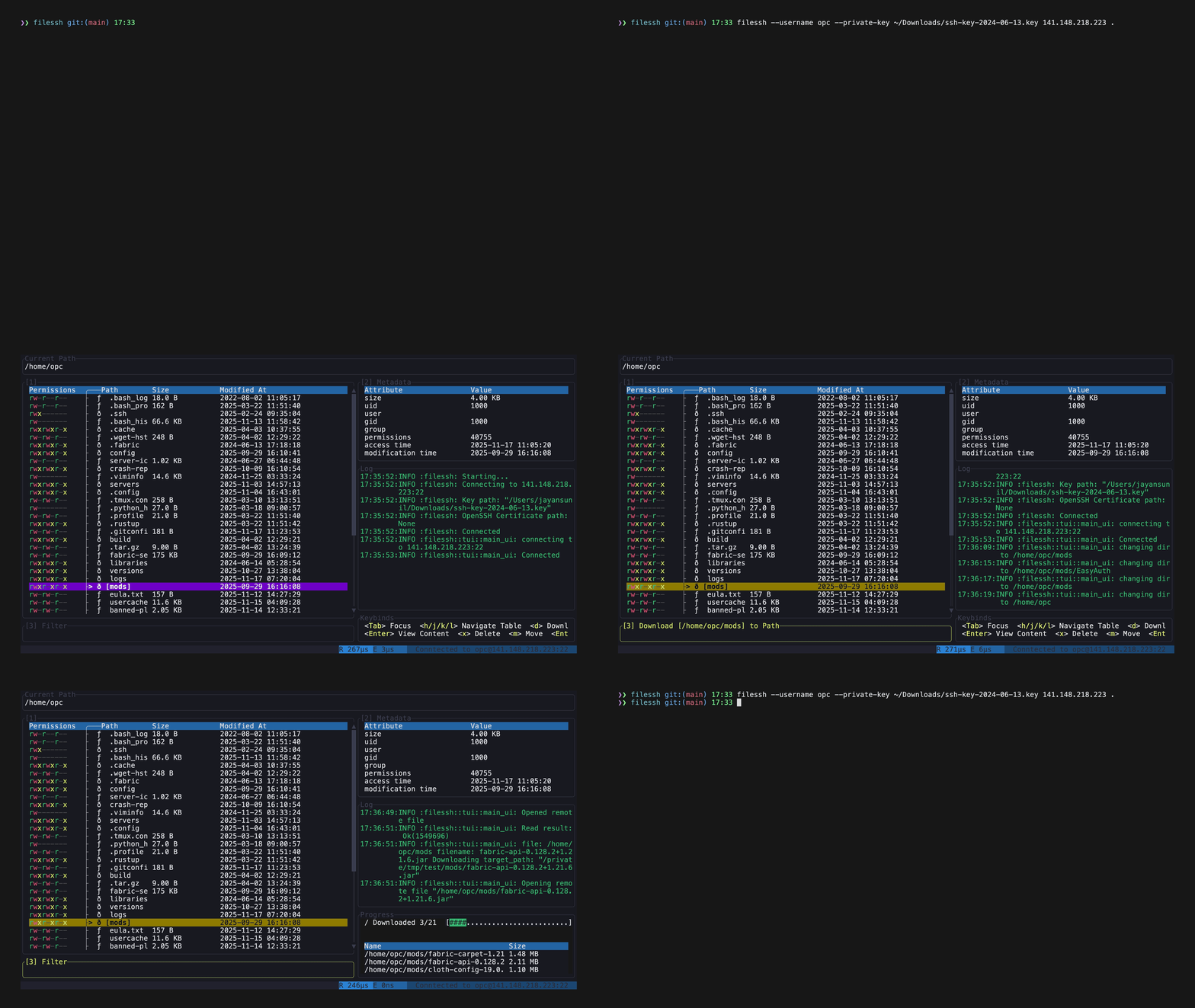
A TUI-based file explorer for SSH servers, which allows you to browse and manage files on a remote server, edit them in-place, and recursively download directories with parallel directory traversal. It also has the ability to quickly spawn SSH sessions to paths on the remote server.
Dual-licensed under MIT or the UNLICENSE.
Installation
homebrew (macOS)
brew install jayanaxhf/taps/filessh
Cargo
cargo install --locked filessh
Build from source
- Ensure you have Rust and Cargo installed. You can find installation instructions at rust-lang.org.
- Clone the repository:
git clone https://github.com/your-username/filessh.git cd filessh - Build the project:
The executable will be located atcargo build --releasetarget/release/filessh.
Todo
- Add support for rsync and scp
- Iron out bugs
Usage
filessh [OPTIONS] <HOST> <PATH>
Features
- Modify, delete and browse files on a remote server
- Recursively download directories with parallel directory traversal
- Quickly open SSH sessions to directories.
Usage
filessh [OPTIONS] [HOST] [PATH]
filessh <COMMAND>

Commands:
  connect              Connect explicitly (same as default command)
  install-man-pages    Install man pages into the system
  install-completions  Generate shell completion scripts

Arguments:
  [HOST]  The remote host to connect to (e.g., 'example.com' or '192.168.1.100')
  [PATH]  Initial directory path to open on the remote host

Options:
  -p, --port <PORT>
          The port number to use for the SSH connection [default: 22]
  -u, --username <USERNAME>
          The username for logging into the remote host
  -k, --private-key <PRIVATE_KEY>
          Path to the private key file for public key authentication
  -o, --openssh-certificate <OPENSSH_CERTIFICATE>
          Optional path to an OpenSSH certificate
  -h, --help
          Print help
  -V, --version
          Print version
Example
./target/release/filessh \
    --username myuser \
    --private-key ~/.ssh/id_rsa \
    example.com \
    /home/myuser
Keybindings
To quit, press Ctrl+q.
The interface has three panes: the file list, the metadata and file content pane, and the input box that prompts appear in.
| Key | Action |
|---|---|
| Ctrl+q | Quit |
| Tab / Shift+Tab | Move focus between the panes |
| 1 / 2 / 3 | Focus the file list, the content pane, or the input box |
| Esc | Return to the file list, clearing any prompt or filter |
In the file list:
| Key | Action |
|---|---|
| j / k, ↓ / ↑ | Move the selection |
| l / → | Enter the selected directory |
| h / ← | Go to the parent directory |
| Enter | Show the selected file's contents in the content pane |
| e | Edit the file in $EDITOR, after Enter has loaded it |
| d | Download the selection, prompting for a local path |
| f | Filter the list by name, as you type |
| m | Rename or move the selection |
| x | Delete the selection, confirming with y |
| n f | Create a file |
| n d | Create a directory |
| . | Hide dotfiles, which are shown by default |
| Ctrl+o | Open an SSH session in the current directory |
At a prompt, Enter accepts and Esc cancels.
Files
files-community·C#
一款面向 Windows 的现代文件管理器,用多标签页、双栏浏览和 Fluent 设计改进资源管理器的使用体验,方便整理文件和文件夹。
文件管理器+4文件管理
46578+643.0kv4.32026-11-10 15:05 UTC

yazi
sxyazi·Rust
用 Rust 写的终端文件管理器,基于异步 I/O 实现极快的目录浏览和文件操作,适合习惯命令行的开发者日常管理文件。
终端文件管理器+4文件管理
43334+631.1kv26.9.12026-11-10 07:28 UTC

spacedrive
spacedriveapp·Rust
用 Rust 写的跨平台开源文件管理器,底层是虚拟分布式文件系统,能把多台设备上的文件统一管理,像访问本地一样浏览和整理。
文件管理器+4文件管理
39480+311.4k0.4.32026-11-06 11:49 UTC
filebrowser
filebrowser·Go
File Browser provides a file managing interface within a specified directory and it can be used to upload, delete, preview and edit your files.
文件管理
358704.2k2026-07-31 10:06 UTC