开发需 Node.js 和 Git,Node 版本以仓库 .nvmrc 为准;Linux 上需额外安装 libfontconfig-dev(Ubuntu/Debian)或 libcurl-devel(Fedora);Git Sync 等属于付费功能,多数功能需注册账号,仅 Scratch Pad 可免账号本地使用
insomnia
KongApache-2.0活跃维护跨平台开源 API 客户端,支持 GraphQL、REST、WebSocket、SSE 和 gRPC 调试,提供云端、本地和 Git 三种存储方式,方便团队协作管理接口。
The open-source, cross-platform API client for GraphQL, REST, WebSockets, SSE and gRPC. With Cloud, Local and Git storage.
npm i
npm run dev 硬件要求按 README 说明
README 未说明硬件要求;作为桌面应用提供 Mac、Windows、Linux 版本,从官网下载安装
开源跨平台 API 客户端,调试、设计、测试 GraphQL、REST、WebSocket、SSE 和 gRPC 接口
跨平台开源 API 客户端,支持 GraphQL、REST、WebSocket、SSE 和 gRPC 调试,提供云端、本地和 Git 三种存储方式,方便团队协作管理接口。
核心能力
- 支持 GraphQL、REST、WebSocket、SSE、gRPC 等多种协议调试
- 内置 OpenAPI 编辑器与可视化预览,可直接设计 API
- 提供原生测试套件与集合运行器做接口测试
- 支持 Local Vault、Git Sync、Cloud Sync 三种存储方式
- 附带 Insomnia CLI,可在 CI/CD 中做 lint 与测试
容易踩的坑
内容由模型根据 README 生成,可能不完整或不准确,以官方文档为准。看原文 README
What's Changed
- fix(INS-3850): revalidate a project's old organization cache when it moves parents by @yaoweiprc in https://github.com/Kong/insomnia/pull/10513
- fix(INS-3850): re-check Konnect organization visibility before restoring it on cold start by @yaoweiprc in https://github.com/Kong/insomnia/pull/10518
- fix: One line editor can enter new line issue by @cwangsmv in https://github.com/Kong/insomnia/pull/10514
- fix(INS-3836): show the Konnect-moved notice only after a migration conflict is resolved by @yaoweiprc in https://github.com/Kong/insomnia/pull/10521
- fix: Both spec and collection should allow import test suites in git sync by @cwangsmv in https://github.com/Kong/insomnia/pull/10524
- Fix: Do not flush on blur on one-line-editor if it is read-only by @cwangsmv in https://github.com/Kong/insomnia/pull/10534
- fix(sidebar): don't crash the collection filter on non-string doc fields by @ZxBing0066 in https://github.com/Kong/insomnia/pull/10525
- fix(event-stream): only read event shaped lines from the event log by @ZxBing0066 in https://github.com/Kong/insomnia/pull/10522
- chore(sandbox): disable quick.js sandbox temporarily by @ihexxa in https://github.com/Kong/insomnia/pull/10536
- Fix: Add loading indicator and avoid unmount editor to update tag for tag editor by @cwangsmv in https://github.com/Kong/insomnia/pull/10537
- fix(mcp): correct Add/Delete Item for nested object params by @CurryYangxx in https://github.com/Kong/insomnia/pull/10546
- Chore: bump vault plugin version by @cwangsmv in https://github.com/Kong/insomnia/pull/10547
- fix(environment-editor): treat empty JSON content as invalid JSON by @ZxBing0066 in https://github.com/Kong/insomnia/pull/10540
- fix(INS-3507): restrict git-sync and legacy-folder writes to canSync model types by @kwburns-kong in https://github.com/Kong/insomnia/pull/10531
- Change Konnect migration wording. by @yaoweiprc in https://github.com/Kong/insomnia/pull/10550
- feat(export): add Export OpenAPI Spec to the collection context menu by @ZxBing0066 in https://github.com/Kong/insomnia/pull/10538
- fix(insomnia): run plugin yarn info in a controlled temp dir by @Tyagiquamar in https://github.com/Kong/insomnia/pull/10505
- fix(script): use liquid sync method in render - INS-3789 by @ihexxa in https://github.com/Kong/insomnia/pull/10523
- chore(ci): make the cycle check runnable on Windows and report drift honestly [INS-3904] by @yaoweiprc in https://github.com/Kong/insomnia/pull/10548
- refactor(sidebar): own the project shell in one layout route [INS-3903] by @yaoweiprc in https://github.com/Kong/insomnia/pull/10541
- chore: bump app version to 13.3.0 by @insomnia-infra in https://github.com/Kong/insomnia/pull/10552
- ci(ksai): add KSAI through the public mirror by @bartsmykla in https://github.com/Kong/insomnia/pull/10551
- fix: constrain file template tag by @kwburns-kong in https://github.com/Kong/insomnia/pull/10528
- fix: parse quoted CSV fields in collection runner data by @ZxBing0066 in https://github.com/Kong/insomnia/pull/10557
- fix: de-flake import deep-link cURL auto-scan smoke test by @ZxBing0066 in https://github.com/Kong/insomnia/pull/10555
- fix(toast): stop toast animations from swallowing clicks by @ZxBing0066 in https://github.com/Kong/insomnia/pull/10553
- fix(key-value-editor): stop ListBox typeahead from swallowing typed spaces by @ZxBing0066 in https://github.com/Kong/insomnia/pull/10563
- feat: Add base model schema and deep strict utility by @cwangsmv in https://github.com/Kong/insomnia/pull/10515
- feat: Unify and migrate environment model to use Zod schema and infer type by @cwangsmv in https://github.com/Kong/insomnia/pull/10516
- chore: bump @faker-js/[email protected] to 10.6.0 by @kwburns-kong in https://github.com/Kong/insomnia/pull/10569
- ci(ksai): start a KSAI run only for people who can write to the repository by @bartsmykla in https://github.com/Kong/insomnia/pull/10578
- fix: Environment schema git export order issue by @cwangsmv in https
查看更新说明
What's Changed
- fix(ci): work around macOS stapling issue in release build by @notjaywu in https://github.com/Kong/insomnia/pull/10647
- Chore: Add unite test for MCP streamable http request by @cwangsmv in https://github.com/Kong/insomnia/pull/10648
- fix: attribute project environment page sources to the project by @ZxBing0066 in https://github.com/Kong/insomnia/pull/10649
- fix: Loose the id meta check for certain request models by @cwangsmv in https://github.com/Kong/insomnia/pull/10656
- fix: keep variable source tooltip interactive in the environments modal by @ZxBing0066 in https://github.com/Kong/insomnia/pull/10650
- fix: MCP primitive UI issue when returning item with same name by @cwangsmv in https://github.com/Kong/insomnia/pull/10655
- fix: closing modal when deleting workspace by @ihexxa in https://github.com/Kong/insomnia/pull/10657
- fix: Hashcorp vault form to support the new credential pattern by @cwangsmv in https://github.com/Kong/insomnia/pull/10658
Full Changelog: https://github.com/Kong/insomnia/compare/[email protected]@13.4.0-beta.1
查看更新说明
What's Changed
- fix(INS-3850): revalidate a project's old organization cache when it moves parents by @yaoweiprc in https://github.com/Kong/insomnia/pull/10513
- fix(INS-3850): re-check Konnect organization visibility before restoring it on cold start by @yaoweiprc in https://github.com/Kong/insomnia/pull/10518
- fix: One line editor can enter new line issue by @cwangsmv in https://github.com/Kong/insomnia/pull/10514
- fix(INS-3836): show the Konnect-moved notice only after a migration conflict is resolved by @yaoweiprc in https://github.com/Kong/insomnia/pull/10521
- fix: Both spec and collection should allow import test suites in git sync by @cwangsmv in https://github.com/Kong/insomnia/pull/10524
- Fix: Do not flush on blur on one-line-editor if it is read-only by @cwangsmv in https://github.com/Kong/insomnia/pull/10534
- fix(sidebar): don't crash the collection filter on non-string doc fields by @ZxBing0066 in https://github.com/Kong/insomnia/pull/10525
- fix(event-stream): only read event shaped lines from the event log by @ZxBing0066 in https://github.com/Kong/insomnia/pull/10522
- chore(sandbox): disable quick.js sandbox temporarily by @ihexxa in https://github.com/Kong/insomnia/pull/10536
- Fix: Add loading indicator and avoid unmount editor to update tag for tag editor by @cwangsmv in https://github.com/Kong/insomnia/pull/10537
- fix(mcp): correct Add/Delete Item for nested object params by @CurryYangxx in https://github.com/Kong/insomnia/pull/10546
- Chore: bump vault plugin version by @cwangsmv in https://github.com/Kong/insomnia/pull/10547
- fix(environment-editor): treat empty JSON content as invalid JSON by @ZxBing0066 in https://github.com/Kong/insomnia/pull/10540
- fix(INS-3507): restrict git-sync and legacy-folder writes to canSync model types by @kwburns-kong in https://github.com/Kong/insomnia/pull/10531
- Change Konnect migration wording. by @yaoweiprc in https://github.com/Kong/insomnia/pull/10550
- feat(export): add Export OpenAPI Spec to the collection context menu by @ZxBing0066 in https://github.com/Kong/insomnia/pull/10538
- fix(insomnia): run plugin yarn info in a controlled temp dir by @Tyagiquamar in https://github.com/Kong/insomnia/pull/10505
- fix(script): use liquid sync method in render - INS-3789 by @ihexxa in https://github.com/Kong/insomnia/pull/10523
- chore(ci): make the cycle check runnable on Windows and report drift honestly [INS-3904] by @yaoweiprc in https://github.com/Kong/insomnia/pull/10548
- refactor(sidebar): own the project shell in one layout route [INS-3903] by @yaoweiprc in https://github.com/Kong/insomnia/pull/10541
- chore: bump app version to 13.3.0 by @insomnia-infra in https://github.com/Kong/insomnia/pull/10552
- ci(ksai): add KSAI through the public mirror by @bartsmykla in https://github.com/Kong/insomnia/pull/10551
- fix: constrain file template tag by @kwburns-kong in https://github.com/Kong/insomnia/pull/10528
- fix: parse quoted CSV fields in collection runner data by @ZxBing0066 in https://github.com/Kong/insomnia/pull/10557
- fix: de-flake import deep-link cURL auto-scan smoke test by @ZxBing0066 in https://github.com/Kong/insomnia/pull/10555
- fix(toast): stop toast animations from swallowing clicks by @ZxBing0066 in https://github.com/Kong/insomnia/pull/10553
- fix(key-value-editor): stop ListBox typeahead from swallowing typed spaces by @ZxBing0066 in https://github.com/Kong/insomnia/pull/10563
- feat: Add base model schema and deep strict utility by @cwangsmv in https://github.com/Kong/insomnia/pull/10515
- feat: Unify and migrate environment model to use Zod schema and infer type by @cwangsmv in https://github.com/Kong/insomnia/pull/10516
- chore: bump @faker-js/[email protected] to 10.6.0 by @kwburns-kong in https://github.com/Kong/insomnia/pull/10569
- ci(ksai): start a KSAI run only for people who can write to the repository by @bartsmykla in https://github.com/Kong/insomnia/pull/10578
- fix: Environment schema git export order issue by @cwangsmv in https
查看更新说明
查看更新说明
用户点评
登录用户的真实使用记录,可按版本和硬件筛选共 0 条
还没有人点评。第一个说出真实体验的人最有价值。
Insomnia API Client






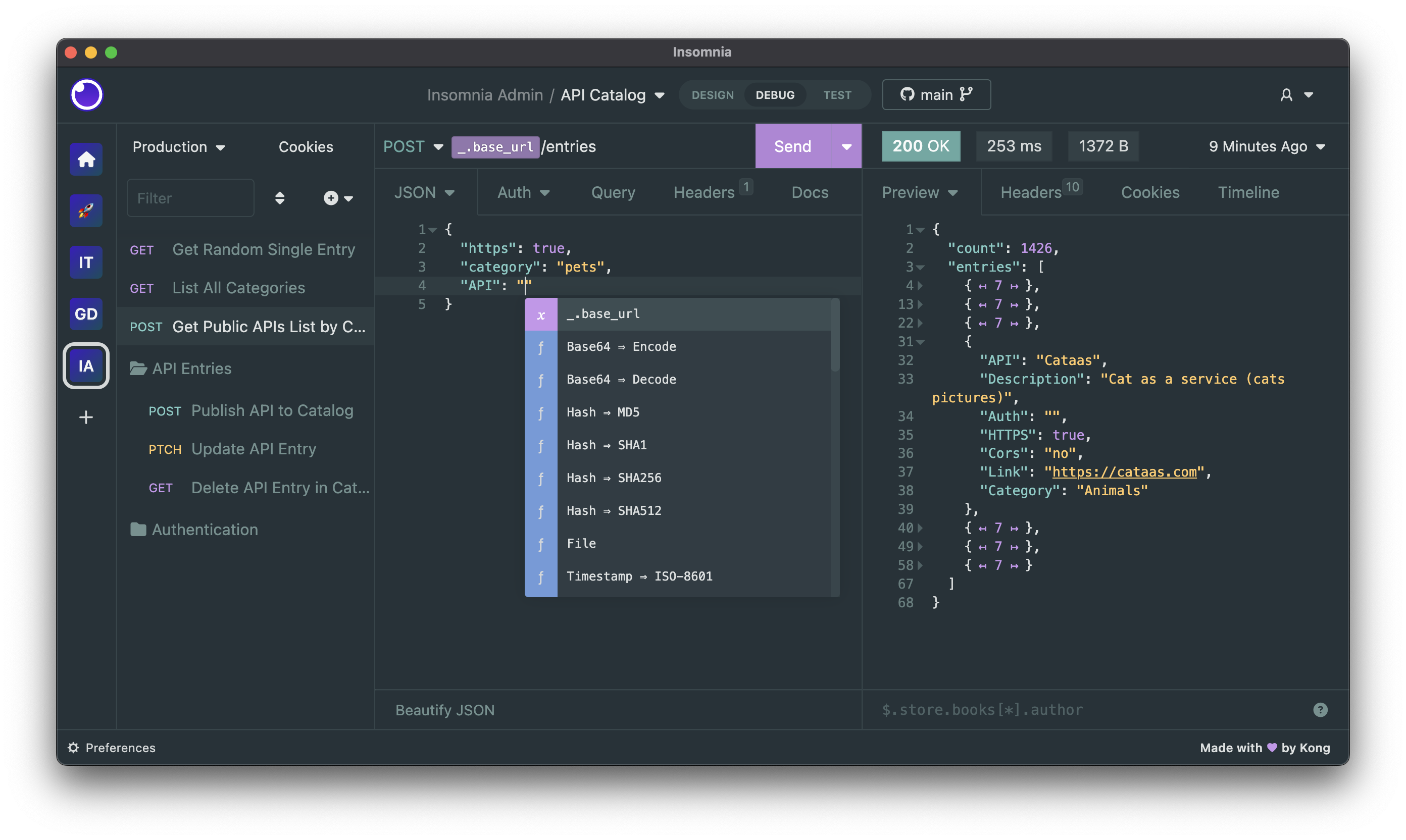
Insomnia is an open-source, cross-platform API client for GraphQL, REST, WebSockets, Server-Sent Events (SSE), gRPC and any other HTTP compatible protocol.
With Insomnia you can:
- Debug APIs using the most popular protocols and formats.
- Design APIs using the native OpenAPI editor and visual preview.
- Test APIs using native test suites and collection runner.
- Mock APIs using a cloud or self-hosted mocking server.
- Build CI/CD pipelines using the native Insomnia CLI for linting and testing.
- Collaborate with others using the many collaboration features.
- And more including the ability to use 3rd party plugins.
The following storage options are supported for your Insomnia projects, collections, design specs and all other resources:
- Local Vault: for 100% local storage of collections, design specs and every other resource.
- Git Sync: for Git storage using any 3rd party Git repository, without going through the cloud.
- Cloud Sync: for cloud collaboration, optionally end-to-end encrypted (E2EE) in the cloud.
Get started for free
Insomnia is available for Mac, Windows, and Linux and can be downloaded from the website:
Account & Subscriptions
You can use Insomnia without an account with the local Scratch Pad, or you can create an account for free to get access to the full capabilities of the product.
Even with an account, Insomnia only stores your projects and files accordingly to the storage backend that you have selected, which can be Local Vault, Cloud Sync, Git Sync or any combination of them. As such - for example - you have the freedom to choose to store sensitive projects 100% locally or in a Git repository, while still being able to collaborate on others in the cloud. It's the best of both worlds.
For added security, Insomnia also offers a Private Environments feature, where your environments configuration is always stored locally and never in the cloud, independently from the storage option that you have chosen for your project.
Premium features and support
Insomnia has a very generous free plan that will be satisfactory for most users, but if you need to get access to premium capabilities like unlimited collaboration, the Git Sync feature, the ability to create organizations for your projects, using a 3rd party IDP for logins (SAML, OIDC) and many other features, then you can explore the other subscription plans.
You can compare all subscription plans and get started for free.
Why does Insomnia require an account?
Insomnia does not require an account if you decide to use the local Scratch Pad, but to access most capabilities of the product we require an account. Your account data is securely stored in compliance with ISO27001, SOC 2 Type II, ISO27018, Gold CSA STAR regulations and in accordance with our terms of service and privacy policy.
We require an account to sustainably build and improve the product, and to make sure we can continue to offer the many core capabilities in a free and open-source distribution. While open source software is free to use, it is unfortunately not free to build, and our ability to continue working on Insomnia is dependent on our ability to convert a subset of free users (that need premium features) to become paying customers of our product.
If you are a user that cannot share API data like collections and design specifications to the cloud, this is still possible by selecting "Local Vault" as the storage of your Insomnia projects: having an Insomnia account is not tied to how you wish to store your sensitive API data (which can be stored 100% locally via Local Vault, on a 3rd party Git repository without any cloud storage via Git Sync, or in the cloud for ease of collaboration via Cloud Sync).
Bugs and Feature Requests
Have a bug or a feature request? First, read the issue guidelines and search for existing and closed issues. If your problem or idea is not addressed yet, please open a new issue.
For more generic product questions and feedback, join the Slack Team.
Contributing
Please read through our contributing guidelines and code of conduct. Included are directions for opening issues, coding standards, and notes on development.
Documentation
Check out our official Insomnia Documentation.
Develop Insomnia
Development on Insomnia can be done on Mac, Windows, or Linux as long as you have Node.js and Git. See the .nvmrc file located in the project for the correct Node version.
This repository is structured as a monorepo and contains many Node.JS packages. Each package has its own set of commands, but the most common commands are available from the root package.json and can be accessed using the npm run … command. Here are the only three commands you should need to start developing on the app.
# Install and Link Dependencies
npm i

# Run Lint
npm run lint

# Run type checking
npm run type-check

# Run Tests
npm test

# Start App with Live Reload
npm run dev

# Start App with both renderer process live reload and main process auto restart
npm run dev:autoRestart
Linux
If you are on Linux, you may need to install the following supporting packages:
# Update library
sudo apt-get update

# Install font configuration library & support
sudo apt-get install libfontconfig-dev
# Install libcurl for node-libcurl
sudo dnf install libcurl-devel
Also on Linux, if Electron is failing during the install process, run the following
# Clear Electron install conflicts
rm -rf ~/.cache/electron
Windows
If you are on Windows and have problems, you may need to install Windows Build Tools
You can use any editor you'd like, but make sure to have support/plugins for the following tools:
- ESLint - For catching syntax problems and common errors
- JSX Syntax - For React components
Develop Inso CLI
npm i- Start the compiler in watch mode:
npm run inso-start - Run:
./packages/insomnia-inso/bin/inso -v
Plugins
Search for, discover, and install plugins from the Insomnia Plugin Hub!
Community Projects
- Insomnia Documenter - Generate beautiful API documentation pages using the documenter plugin or your Insomnia export file.
- GitHub API Spec Importer - A complete set of GitHub REST API route specifications that can be imported straight into Insomnia.
- Swaggymnia - Generate Swagger documentation for your existing API in Insomnia.
License
open-webui
open-webui·Svelte
自托管的大模型对话界面,兼容 Ollama、OpenAI API 等后端,内置 RAG 与 MCP 支持,让团队快速搭建私有 AI 聊天入口。
大模型界面+4API 开发与调试
158285+31323kv0.13.32026-11-10 08:23 UTC
hoppscotch
hoppscotch·TypeScript
轻量级开源 API 开发调试工具,支持 REST、GraphQL、WebSocket 等协议,提供 Web、桌面和 CLI 多端使用,可离线部署,是 Postman 和 Insomnia 的开源替代品。
API 调试+4API 开发与调试
80770+76.2k2026.10.12026-11-05 08:16 UTC

bruno
usebruno·JavaScript
轻量级开源 API 调试 IDE,支持 REST、GraphQL 和 OpenAPI,用 Git 管理接口集合,可替代 Postman/Insomnia。
API 调试+4API 开发与调试
48317+603.1kv4.3.02026-11-09 17:13 UTC
full-stack-fastapi-template
fastapi·TypeScript
用 FastAPI + React + PostgreSQL 搭好的全栈项目脚手架,自带 JWT 登录、Docker Compose 和 CI 配置,省去从零搭建后端接口、前端页面和部署流程的麻烦。
全栈模板+4API 开发与调试
46218+359.2k0.12.02026-11-03 13:46 UTC