spotatui

LargeModGamesMIT活跃维护

用 Rust 写的终端音乐播放器,能直接串流 Spotify,也支持本地文件、Subsonic、电台、Qobuz 和 YouTube 等多种音源。

A fast, standalone terminal music player in Rust: native Spotify streaming plus local, Subsonic, radio, Qobuz and Youtube sources

v0.48.0发布于 2026-11-07 19:04 UTC1,817star +5 / 7 天226fork同步于 2026-11-10 11:46 UTC

怎么上手

README 里没有找到可直接复制的安装命令

README 里没有找到可直接复制的安装命令,请到 README 或官方文档查看安装方式。

硬件要求

README 没有说明硬件要求。

下载:源码 zip·GitHub Releases(安装包)本站不镜像安装包

项目说明

这个项目的说明还在生成中,先参考下面「最近发版」和 README。

最近发版

5 个版本v0.48.0
  1. v0.48.0最新正式版2026-11-07 · 2026-11-07 19:04 UTC

    Install: curl -fsSL https://spotatui.com/install.sh | bash on macOS and Linux, or irm https://spotatui.com/install.ps1 | iex on Windows. Already installed? Run spotatui update --install, or update with your package manager.

    Terminal app

    Download
    Windows 10/1164-bit .zip
    macOSApple Silicon · Intel
    Linuxx86_64 · ARM64 (Raspberry Pi 4/5)
    Debian, Ubuntu.deb amd64 · .deb arm64

    Desktop app (preview)

    Download
    Windows 10/11Installer .exe
    macOSApple Silicon .dmg · Intel .dmg
    Linux x86_64AppImage · .deb · .rpm
    Linux ARM64AppImage · .deb · .rpm

    The Windows installer, the macOS app and the AppImage update themselves. A .deb or .rpm install updates with a new download from this page. Linux needs glibc 2.39 and WebKitGTK 4.1 (Ubuntu 24.04+, Debian 13, Fedora 40+, Arch).

    • Windows: the installer is not signed yet, so SmartScreen warns. Click More info, then Run anyway.
    • macOS: the app is not notarized, so macOS blocks the first launch. Close the dialog, open System Settings > Privacy & Security, click Open Anyway next to the spotatui message, and confirm.

    Both apps play Spotify (Premium), Local Files, Subsonic, Internet Radio, YouTube and Qobuz, plus Apple Music on macOS. YouTube needs yt-dlp (ffmpeg recommended).

    Verify a download: checksums.txt has the SHA-256 of every file: sha256sum -c --ignore-missing checksums.txt.

    Full changelog · Code signing policy

    What's Changed

  2. v0.47.02026-10-25 · 2026-10-25 20:17 UTC
    查看更新说明

    Install: curl -fsSL https://spotatui.com/install.sh | bash on macOS and Linux, or irm https://spotatui.com/install.ps1 | iex on Windows. Already installed? Run spotatui update --install, or update with your package manager.

    Terminal app

    Download
    Windows 10/1164-bit .zip
    macOSApple Silicon · Intel
    Linuxx86_64 · ARM64 (Raspberry Pi 4/5)
    Debian, Ubuntu.deb amd64 · .deb arm64

    Desktop app (preview)

    Download
    Windows 10/11Installer .exe
    macOSApple Silicon .dmg · Intel .dmg
    Linux x86_64AppImage · .deb · .rpm
    Linux ARM64AppImage · .deb · .rpm

    The Windows installer, the macOS app and the AppImage update themselves. A .deb or .rpm install updates with a new download from this page. Linux needs glibc 2.39 and WebKitGTK 4.1 (Ubuntu 24.04+, Debian 13, Fedora 40+, Arch).

    • Windows: the installer is not signed yet, so SmartScreen warns. Click More info, then Run anyway.
    • macOS: the app is not notarized, so macOS blocks the first launch. Close the dialog, open System Settings > Privacy & Security, click Open Anyway next to the spotatui message, and confirm.

    Both apps play Spotify (Premium), Local Files, Subsonic, Internet Radio, YouTube and Qobuz, plus Apple Music on macOS. YouTube needs yt-dlp (ffmpeg recommended).

    Verify a download: checksums.txt has the SHA-256 of every file: sha256sum -c --ignore-missing checksums.txt.

    Full changelog · Code signing policy

    What's Changed

  3. v0.46.02026-10-14 · 2026-10-14 17:35 UTC
    查看更新说明

    Install: curl -fsSL https://spotatui.com/install.sh | bash on macOS and Linux, or irm https://spotatui.com/install.ps1 | iex on Windows. Already installed? Run spotatui update --install, or update with your package manager.

    Terminal app

    Download
    Windows 10/1164-bit .zip
    macOSApple Silicon · Intel
    Linuxx86_64 · ARM64 (Raspberry Pi 4/5)
    Debian, Ubuntu.deb amd64 · .deb arm64

    Desktop app (preview)

    Download
    Windows 10/11Installer .exe
    macOSApple Silicon .dmg · Intel .dmg
    Linux x86_64AppImage · .deb · .rpm
    Linux ARM64AppImage · .deb · .rpm

    The Windows installer, the macOS app and the AppImage update themselves. A .deb or .rpm install updates with a new download from this page. Linux needs glibc 2.39 and WebKitGTK 4.1 (Ubuntu 24.04+, Debian 13, Fedora 40+, Arch).

    • Windows: the installer is not signed yet, so SmartScreen warns. Click More info, then Run anyway.
    • macOS: the app is not notarized, so macOS blocks the first launch. Close the dialog, open System Settings > Privacy & Security, click Open Anyway next to the spotatui message, and confirm.

    Both apps play Spotify (Premium), Local Files, Subsonic, Internet Radio, YouTube and Qobuz, plus Apple Music on macOS. YouTube needs yt-dlp (ffmpeg recommended).

    Verify a download: checksums.txt has the SHA-256 of every file: sha256sum -c --ignore-missing checksums.txt.

    Full changelog · Code signing policy

    What's Changed

  4. v0.45.02026-10-12 · 2026-10-12 14:49 UTC
    查看更新说明

    Downloads

    Or just run the one-line installer: curl -fsSL https://spotatui.com/install.sh | bash (macOS/Linux) or irm https://spotatui.com/install.ps1 | iex (Windows).

    Checksums (.sha256) are optional and only needed if you want to verify the download.

    The Linux, macOS, and Windows builds include the extra music sources (Local Files, Subsonic, Internet Radio, YouTube, Qobuz). The YouTube source needs yt-dlp installed (ffmpeg recommended).

    To update use "spotatui update --install" or use your package manager of choice.

    Desktop app (preview, unsigned)

    spotatui in its own window, with the same player, login and settings as the terminal app. The preview plays Spotify (Premium) only. Its installers are added to this release a few minutes after it is published. The Windows installer, the macOS app and the AppImage update themselves from then on; a .deb or .rpm install updates with a new download from this page.

    • Windows 10/11 (64-bit) → spotatui-desktop_*_x64-setup.exe. The installer is not signed, so SmartScreen warns: click More info, then Run anyway.
    • macOS → spotatui_*_aarch64.dmg (Apple Silicon) or spotatui_*_x64.dmg (Intel). Drag spotatui to Applications and open it. The app is not notarized, so macOS refuses the first launch: close that dialog, open System Settings > Privacy & Security, click Open Anyway next to the spotatui message, and confirm.
    • Linux (amd64, arm64) → .deb (Debian/Ubuntu), .rpm (Fedora) or .AppImage. Needs glibc 2.39 and WebKitGTK 4.1: Ubuntu 24.04+, Debian 13, Fedora 40+, Arch.

    What's Changed

  5. v0.44.02026-10-11 · 2026-10-11 23:22 UTC
    查看更新说明

    Downloads

    Or just run the one-line installer: curl -fsSL https://spotatui.com/install.sh | bash (macOS/Linux) or irm https://spotatui.com/install.ps1 | iex (Windows).

    Checksums (.sha256) are optional and only needed if you want to verify the download.

    The Linux, macOS, and Windows builds include the extra music sources (Local Files, Subsonic, Internet Radio, YouTube, Qobuz). The YouTube source needs yt-dlp installed (ffmpeg recommended).

    To update use "spotatui update --install" or use your package manager of choice.

    What's Changed

用户点评

登录用户的真实使用记录,可按版本和硬件筛选
共 0 条

    还没有人点评。第一个说出真实体验的人最有价值。

    README 原文

    未翻译

    Crates.io Discord Songs played using spotatui spotatui Contributors

    Demo

    Table of Contents

    About

    spotatui is a music player for the terminal, with a desktop app in preview. Spotify is optional: it is one of seven sources.

    • Synced lyrics, and a real-time audio visualizer.
    • A play queue that mixes tracks from different sources.
    • Playlist sync: mirror one playlist onto Spotify, Qobuz, Subsonic or YouTube.
    • Lua plugins for commands, keys, popups and themes.
    • An AI DJ inside the app, or your coding agent as the DJ over MCP.
    • A local listening history with stats and a shareable recap.
    • A CLI for playback, search and playlists.

    Spotify needs Premium. spotatui logs in with its own built-in client, so you need no developer app and no client ID.

    spotatui started as a fork of spotify-tui and has since grown its own player, sources and desktop app.

    Installation

    Spotify is optional: every other source works without an account.

    SystemCommand
    macOS, Linux, WSLcurl -fsSL https://spotatui.com/install.sh | bash
    Windowsirm https://spotatui.com/install.ps1 | iex or winget install spotatui
    Arch Linuxyay -S spotatui-bin
    With Rustcargo install --locked spotatui

    Homebrew, Nix, Void, .deb packages and building from source are in the installation guide.

    • Desktop app: download the installer for your system from the latest release. See Desktop app.
    • Features per build: the prebuilt terminal binaries include every source, the MCP server and the AI DJ. cargo install builds Spotify only unless you add the features, and the Nix flake builds Spotify only.
    • Updates: the terminal app updates itself. If a package manager installed it, set behavior.disable_auto_update: true. See Updating.

    Quickstart

    Run spotatui. The first launch asks which sources you want. Pick Spotify to log in: spotatui shows a code and opens Spotify's pairing page, where you confirm it.

    Then:

    • ? lists every key.
    • / searches. Choose the Songs panel with the arrow keys, press Enter to go into it, and Enter again to play a track.
    • d switches the source and the device.
    • z queues a track, and Shift+Q opens the queue.
    • spotatui --help shows the CLI.

    Sources

    SourceYou need
    SpotifyA Premium account
    Local FilesA music folder
    Subsonic / NavidromeA server account
    Internet RadioNothing (30k+ stations from radio-browser.info)
    YouTubeyt-dlp on your PATH
    QobuzA paid Qobuz account
    Apple MusicmacOS and the Music app

    Local Files, Subsonic, Internet Radio, YouTube and Qobuz play through spotatui's own audio engine. Apple Music plays in the Music app, and spotatui is its remote. The setup of each source is in Configuration.

    Spotify plays in spotatui itself, on any Spotify Connect device, or on Cast and Connect speakers on your network. See Where Spotify plays. For lossless audio, or an account that native streaming cannot play, spotatui can run Spotify's own player: see Soloist.

    Learn more

    You want toRead
    Install another way, or build from sourceInstallation
    Change settings, keys or the themeConfiguration, Keybindings, Themes
    Control spotatui from your shellCLI
    Write or install a Lua pluginPLUGINS.md, Scripting API
    Let an AI pick the musicAI DJ, MCP setup
    Report a bugNew issue, with a spotatui --debug log
    Everything elseAll docs

    Contributing

    spotatui is built by a small team and a growing group of contributors, and you do not need to write code to help. Start with CONTRIBUTING.md, or pick a good first issue.

    Native playback and Spotify Connect run on our librespot fork, spotatui-librespot. It is part of the project: a merged PR there counts as a spotatui contribution. See Contributing to the librespot fork.

    Song History
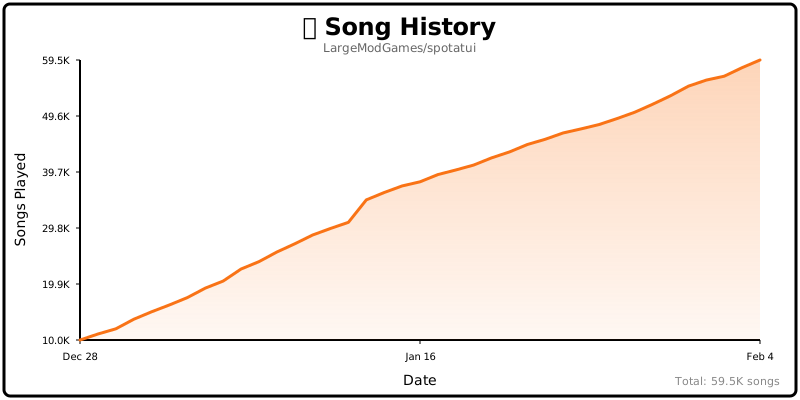
    Song History

    Star History

    Maintainers

    Originally forked from spotify-tui by Alexander Keliris. The spotify-tui contributors and the libraries spotatui uses are in CREDITS.md.

    Code signing policy

    Free code signing provided by SignPath.io, certificate by SignPath Foundation.

    The Windows release files are built from this repository by the release workflow on GitHub-hosted runners. Each signing request is approved by hand.

    Privacy: see the privacy policy for the data spotatui sends and how to turn each part off.

    spotatui Contributors

    Everyone who helped, with code or without. To get on this list, see Recognition.

    This project follows the all-contributors specification. Contributions of any kind welcome!