README 未给出从源码构建的依赖与步骤,需自行参考官方下载页或发行版包;插件需手动放到 ~/.config/sunflower/user_plugins/<plugin_name> 目录;Ubuntu PPA 版本通常落后一两个版本
Sunflower
MeanEYEGPL-3.0活跃维护Linux 上的轻量双面板文件管理器,界面高度可定制,支持插件扩展,适合习惯 Norton Commander 式操作的用户。
Small and highly customizable twin-panel file manager for Linux with support for plugins.
0.6-64发布于 2026-10-22 10:47 UTC450star +1 / 7 天45fork同步于 2026-11-10 18:00 UTC
Linux 上的双面板文件管理器,小巧且高度可定制,支持插件并原生兼容 Wayland
Linux 上的轻量双面板文件管理器,界面高度可定制,支持插件扩展,适合习惯 Norton Commander 式操作的用户。
核心能力
- 双面板布局,便于两目录间复制移动文件
- 支持插件扩展,可装社区插件增强功能
- 高度可定制,可调整界面与行为
- 原生兼容 Wayland 合成器
- 无缝集成 GNOME 桌面,但不限于 GNOME
容易踩的坑
内容由模型根据 README 生成,可能不完整或不准确,以官方文档为准。看原文 README
- 0.6-64Version 0.6最新正式版2026-10-22 · 2026-10-22 10:47 UTC
Sunflower 0.6-64: a long-overdue release, and a first look at GTK 4
It has been more than four years since Sunflower 0.5-63 came out in February 2022. Development never actually stopped in that time, but it moved in bursts: a handful of contributor fixes in 2022 and 2023, a round of file-list work at the start of 2024, a cleanup of providers and mounts in early 2025, and finally a sustained push this summer that brought the GTK 4 port far enough to ship behind a switch and reworked how packages get built. The 64 commits between the two tags come from nine people, and this release is the first time all of that lands in a package you can install.
What you will notice first
The most visible addition is small but very much in the spirit of the program. The command bar at the bottom of the window, the row of buttons for copy, move, create directory and so on, can now show the keyboard shortcut for each action right on the button. When an action has more than one binding, the function key wins, so the labels read the way they did on Norton Commander and every two-panel manager since. The option is off by default; turn it on under Preferences, Display, with "Show keyboard shortcuts on command bar buttons". Thanks to Lee Braiden for the contribution.
The location menu also got smarter about what it lists. Previously Sunflower only knew about mounts that had a volume behind them, which is true for a USB stick or a partition but not for most remote locations. A share mounted through GVFS, for example, has a mount but no volume, and it simply did not appear. The mount manager now tracks both kinds, keeps the list in sync as mounts come and go, and the breadcrumb bar shows a fitting icon and a readable name when you are browsing the root of one of them instead of a bare path.
Under the hood of the file list
Most of the work in this release is in the file list plugin, and much of it is about the GIO provider. The local provider, which talks to the filesystem through plain
oscalls, is now deprecated. The GIO-backed provider has become the default for local paths, which means the same code path handles your home directory and a remote share. Getting there required a series of fixes: file operations through GIO had several defects, moving a path did not do the right thing, and the provider reported the wrong root path. All three are fixed.Two race conditions while loading directories are gone too. One could crash the program when an item was updated while the list was still being populated; the other produced inconsistent listings when a directory changed under the loader. Both were reported by users on large or busy directories and were among the more annoying bugs of the previous release.
A long list of smaller corrections rounds this out. Owner and group IDs are stored as 64-bit integers, so systems with large UIDs no longer trip the column type (Arseniy Krasnov). PyGObject 3.52.2 changed a signal signature that broke restoring tabs at launch and the context menu on directories; both are fixed, thanks to madmaid. File names with unusual encodings no longer confuse the associations manager. The advanced rename extension's regular expression mode uses the correct format again. A locale format string error is patched, clicking a contributor's email or page in the About dialog works, the menu entry for advanced rename finally has the right label instead of a copy of "Find files" (tobealive), and the desktop file points at an icon that exists (Leonid Znamenok and Alexander Burmatov).
GTK 4, experimentally
The headline for anyone following the project is that this release contains a GTK 4 version of the interface. It is not the default and it is not finished. GTK 3 remains what the packages start, and nothing changes for you unless you ask for it. To try the port, set an environment variable before launching:
SUNFLOWER_GTK=4 sunflowerIn that mode the application starts, both panels browse,
- 0.5-63Version 0.52022-02-28 · 2022-02-28 03:24 UTC
查看更新说明
Another long time coming release. Further work on improving GTK3 port has been done. Many interfaces have been remade to look better and more consistent with the rest of the system. Popup menu for items have been completely redesigned with new emblems mechanism in place.
This version also fixed numerous issues with distribution specific packages, most notably RPM.
- 0.4-62Version 0.42020-05-17 · 2020-05-17 19:29 UTC
查看更新说明
After many years of development and many troubles version 0.4 is finally here.
This version brings new interface based on GTK3. We've switched to Python3 for easier future development. Interface changes and code rewrites resulted in big performance gain.
There are many issues with this new version, most obvious ones being related to keyboard shortcuts, but I didn't wish to spend more months and keep people in the dark. Should you run into new issues, please report them here on GitHub or GitLab.
This version also brings standalone executable. File provided for download here (ending with
.standalone.zip) can be downloaded and just marked as executable by enteringchmod +x sunflower-0.4.62.standalone.zip. Some dependencies might need to be installed for it to work but on most Gnome desktop environments it should work just fine. This version is ideal for trying Sunflower out as it doesn't require any installation.Please test and let me know if you run into any issues or have any comments on interface changes and similar.
- 0.3-61Sunflower 0.3 (hotfix #1)2016-01-30 · 2016-01-30 19:18 UTC
查看更新说明
Here's a hotfix release. This version fixes issue people were having with removing files when confirmation dialog is disabled.
- 0.3-60Sunflower 0.32016-01-18 · 2016-01-18 08:20 UTC
查看更新说明
After long wait, it's finally here. There were many changes under the hood, some new features, lot's of bug fixes. This is also the last GTK2 release. If there's a higher demand, I might maintain separate branch for GTK2, but we'll see.
So here's the change log:
- Ability to find text inside remote directories.
- Add MTP, Gphoto2 and GIO Provider to handle Android phones and other multimedia devices.
- Add context menu items to copy path or file name of selected item.
- Add option to support second level extension.
- Add support for GVFS archive mounts.
- Added 'skip all' option to operation dialogs.
- Added keyboard shortcuts for menus.
- Added ability to lock session.
- Added option to avoid following symlinks in operations.
- Added support for calculating directory usage.
- Added viewer word wrap option.
- Check collisions on changed accelerators.
- Custom dialog for confirming removal.
- Enabled mnemonics in bookmark list.
- Hide files listed in .hidden file.
- Initial archive support.
- Initial support for trash.
- List of paths to be treated as always visible.
- Main window: Add %P,%M and %U variables in commands.
- Make viewer try to detect character encoding of file in order to better handle none ASCII/UTF-8 cases.
- Operation queue implemented.
- Option to turn on network path completion.
- Properly handle system signals.
- Properly support symbolic links.
- Set 'sunflower' as process name if setproctitle module available.
- Single instance support through DBus and fnctl.
- Support for horizontal split.
- Support for multiple patterns when matching items in find files tool.
- Support for saving previously used patterns in find files tool.
- Support link emblems though emblem manager.
- Switched to GitHub API for version check.
- Show extensions tabs first in viewer.
- Set buffer size from system block size to improve performance in operations.
- Selecting "open file list" will open current terminal path instead of initial.
- Select first item when selected item is parent directory.
- Scroll to item after applying sort function.
- Improved path entry dialog.
- Fixed some issues with making hard links.
- Fixed setting emblems on expanded directories.
- Fixed issues with overwriting files in multiple rename tool.
- Fix issues with threads on some systems.
- Fix issues with opening files and setting current working directory.
- Changed the way application imports plugins.
- Change operations to work with expanded directories.
- Always show tree expanders when option is turned on.
用户点评
登录用户的真实使用记录,可按版本和硬件筛选共 0 条
还没有人点评。第一个说出真实体验的人最有价值。
Note: Preferred repository hosting is GitLab. If you don't have an account there and don't wish to make one interacting with one on GitHub is fine.
Sunflower
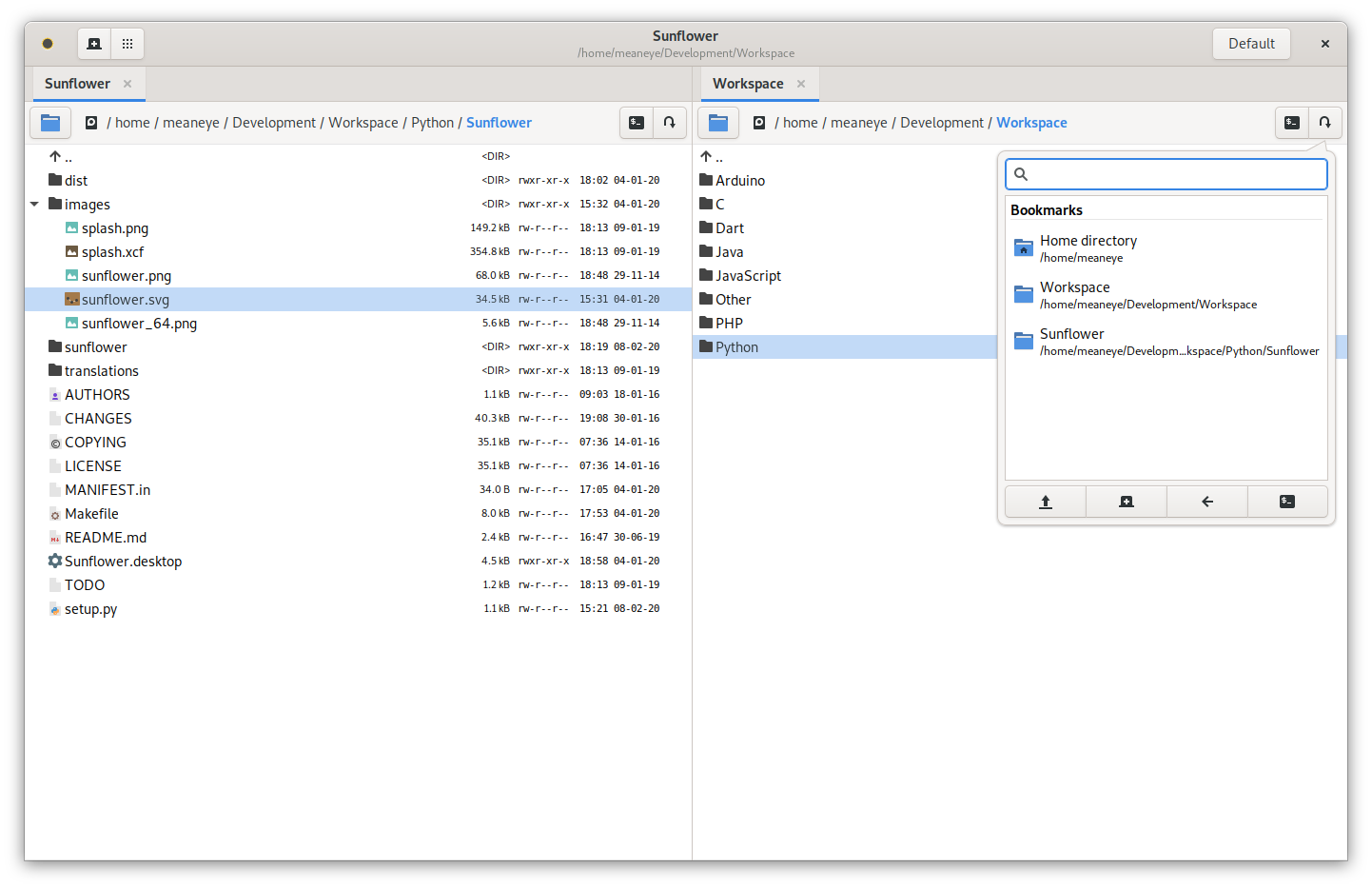
Sunflower is a small and highly customizable twin-panel file manager for Linux with support for plugins. It is intended to be an easy-to-use and powerful file manager that seamlessly integrates into the GNOME desktop environment (but not limited to). Fully compatible and native to Wayland compositors.

Packages
Sunflower package can be downloaded from following locations:
- Arch Linux AUR
- Ubuntu PPA (usually late by a version or two)
- Gentoo
Installation:
emerge --ask x11-misc/sunflower
Official packages can be downloaded from here or releases page above.
Plugins
Check some of the plugins made by community:
Plugins can be installed locally to: ~/.config/sunflower/user_plugins/<plugin_name>
How to contribute
You can be a part of this project in many ways. We suggest posting on our mailing list or visiting our IRC channel #sunflower on Libera chat and we'll try to help you get started.
And as usual testers are more than welcome. If you wish to help translate program to your language please join translation team(s) on Transifex.
Staying in touch
Preferred way of getting in touch with us is through mailing list.
I like talking to people a lot so please feel free to contact me any time. We also have IRC channel, #sunflower on libera.chat.
Screenshots
Check out screenshots.
Please note that screen shots and videos are months old, but they will help you know a little bit more what you are getting with this program.
Files
files-community·C#
一款面向 Windows 的现代文件管理器,用多标签页、双栏浏览和 Fluent 设计改进资源管理器的使用体验,方便整理文件和文件夹。
文件管理器+4文件管理
46578+643.0kv4.32026-11-10 15:05 UTC

yazi
sxyazi·Rust
用 Rust 写的终端文件管理器,基于异步 I/O 实现极快的目录浏览和文件操作,适合习惯命令行的开发者日常管理文件。
终端文件管理器+4文件管理
43334+631.1kv26.9.12026-11-10 07:28 UTC

spacedrive
spacedriveapp·Rust
用 Rust 写的跨平台开源文件管理器,底层是虚拟分布式文件系统,能把多台设备上的文件统一管理,像访问本地一样浏览和整理。
文件管理器+4文件管理
39480+311.4k0.4.32026-11-06 11:49 UTC
filebrowser
filebrowser·Go
File Browser provides a file managing interface within a specified directory and it can be used to upload, delete, preview and edit your files.
文件管理
358704.2k2026-07-31 10:06 UTC