Linux 用户需先安装 xsel 或 xclip 才能使用剪贴板功能;CRAN 版本已过时且存在已修复的 bug,建议从 R Universe 安装;tribble_paste 对合并单元格、多行列标题等不规则表格以及引号内含逗号的 CSV 解析不可靠。
install.packages("datapasta", repos = c(mm = "https://milesmcbain.r-universe.dev", getOption("repos"))) 硬件要求按 README 说明
README 未说明;纯 R 包,无 GPU 或显存要求。
R 语言剪贴板数据粘贴工具,把表格和文本直接转成 tribble、vector 或 data.frame 代码
RStudio 插件,把剪贴板里的表格数据(Excel、网页表格等)直接粘贴成 R 的 data.frame 或 tibble,省去手动整理格式的麻烦。
核心能力
- 用 tribble_paste 把剪贴板表格粘贴为 tibble::tribble() 调用
- 用 vector_paste 把分隔文本粘贴为 c() 向量定义
- 用 df_paste 和 dt_paste 生成 data.frame 与 data.table 定义
- 用 Fiddle Selection 重排和对齐编辑器中的数据结构
- 用 dpasta 和 dmdclip 把 R 对象导出为可粘贴的格式化文本
容易踩的坑
内容由模型根据 README 生成,可能不完整或不准确,以官方文档为准。看原文 README
- 3.1.0CRAN Release 3.1.0 'Leave to Simmer'最新正式版2020-01-24 · 2020-01-24 04:27 UTC
这个版本没有写更新说明。
- v3.0.0CRAN 3.0.0 Release 'Colander Helmet'2018-02-16 · 2018-02-16 06:16 UTC
这个版本没有写更新说明。
- v2.0.0CRAN 2.0.0 Release 'Fusilli Jerry'2017-03-27 · 2017-03-27 11:10 UTC
这个版本没有写更新说明。
- v1.1.0CRAN 1.1.0 Release 'CopyPesto'2017-01-16 · 2017-01-16 21:18 UTC
这个版本没有写更新说明。
- v1.0.0First release to CRAN2016-11-29 · 2016-11-29 08:13 UTC
这个版本没有写更新说明。
用户点评
登录用户的真实使用记录,可按版本和硬件筛选共 0 条
还没有人点评。第一个说出真实体验的人最有价值。
datapasta 3.2.2 'Leave to Simmer'
The Goods
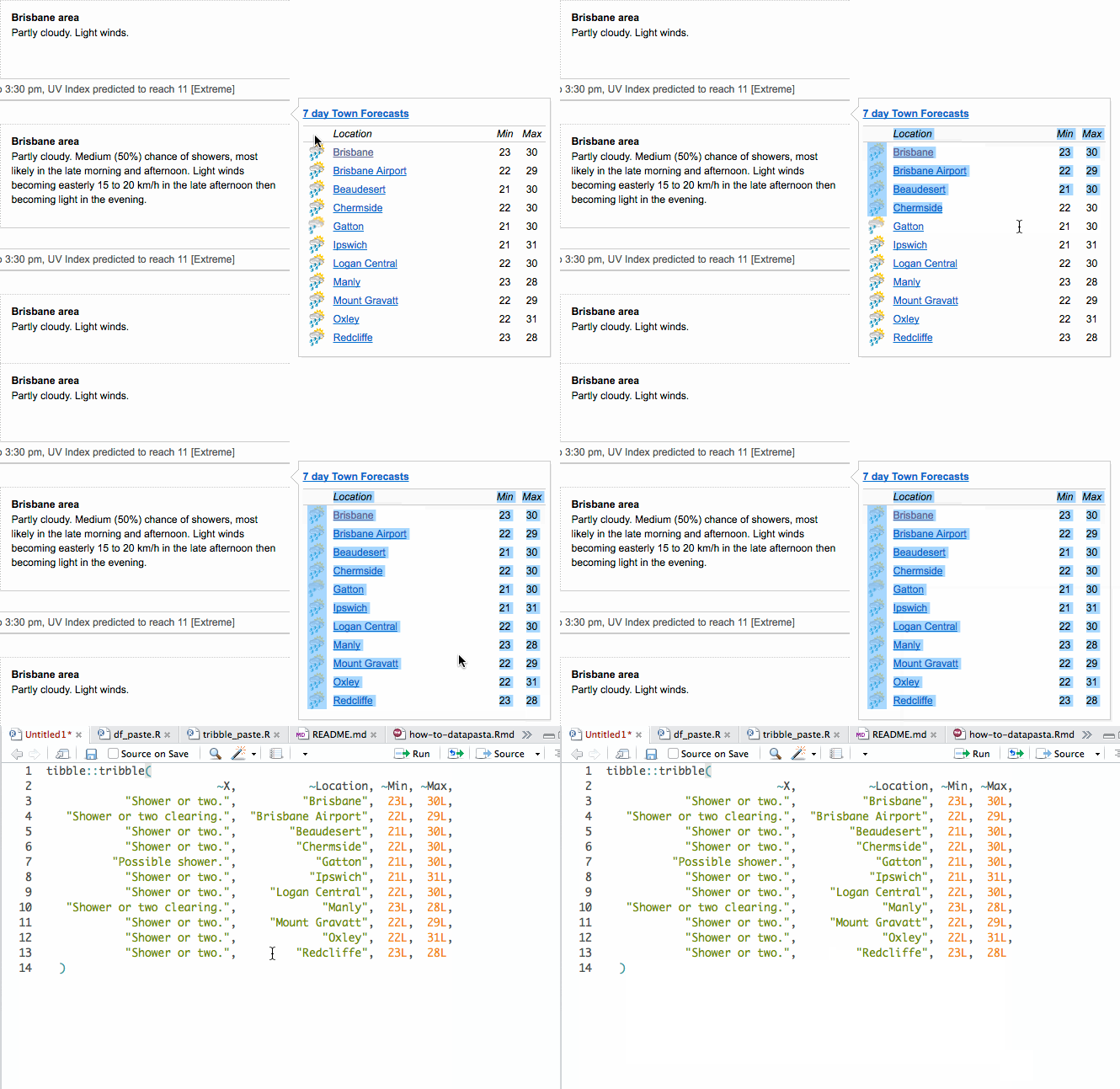
Introducing datapasta
datapasta is about reducing resistance associated with copying and pasting data to and from R. It is a response to the realisation that I often found myself using intermediate programs like Sublime to munge text into suitable formats. Addins and functions in datapasta support a wide variety of input and output situations, so it (probably) "just works". Hopefully tools in this package will remove such intermediate steps and associated frustrations from our data slinging workflows.
Prerequisites
- Linux users will need to install either
xselorxclip. These applications provide an interface to X selections (clipboard-like).- For example:
sudo apt-get install xsel- it's 72kb...
- For example:
- Windows and MacOS have nothing extra to do.
Installation
R Universe (preferred)
- install with R universe repo:
install.packages(
   "datapasta",
   repos = c(mm = "https://milesmcbain.r-universe.dev", getOption("repos")))
- Set the keyboard shortcuts using Tools -> Addins -> Browse Addins, then click Keyboard Shortcuts...
CRAN (outdated)
For now, no further versions of datapasta will be going to CRAN. There are some known bugs in the CRAN version that have been fixed in 3.1.1.
install.packages("datapasta")
Usage
Use with RStudio
Getting data into source
At the moment this package contains these RStudio addins that paste data to the cursor:
tribble_pastewhich pastes a table as a nicely formatted call totibble::tribble()- Recommend Ctrl + Shift + t as shortcut.
- Table can be delimited with tab, comma, pipe or semicolon.
vector_pastewhich will paste delimited data as a vector definition, e.g.c("a", "b")etc.- Recommend Ctrl + Alt + Shift + v as shortcut.
vector_paste_verticalwhich will paste delimited data as a vertically formatted vector definition.- Recommend Ctrl + Shift + v as shortcut
- example output:
c("Mint",
  "Fedora",
  "Debian",
  "Ubuntu",
  "OpenSUSE")
df_pastewhich pastes a table on the clipboard as a standarddata.framedefinition rather than atribblecall. This has certain advantages in the context of reproducible examples and educational posts. Many thanks to Jonathan Carroll for getting this rolling and coding the bulk of the feature.- Recommend Ctrl + Alt + Shift + d as shortcut.
dt_pastewhich is the same asdf_paste, but fordata.table.
Massaging data in source
There are two Addins that can help with creating and aligning data in your editor:
-
Fiddle Selectionwill perform magic on a selection. It can be used to:- Turn raw data delimited by any combination of commas, spaces, and newlines into a
c()expression - Pivot a
c()expr between horizontal and vertical layout. - Reflow messy
tribble()anddata.frame()exprs. - Recommend Ctrl +Shift + f as shortcut.
- Turn raw data delimited by any combination of commas, spaces, and newlines into a
-
Toggle Vector Quoteswill toggle ac()expr between all elements wrapped in""and all bare unquoted form. Handy in combination with above to save mucho keystrokes.- Recommend Ctrl +Shift + q as shortcut.
Getting Data out of an R session
There are two R functions available that accept R objects and output formatted text for pasting to a reprex or other application:
-
dpastaaccepts tibbles, data.frames, and vectors. Data is output in a format that matches in input class. Formatted text is pasted at the cursor. -
dmdclipaccepts the same inputs asdpastabut inserts the formatted text onto the clipboard, preceded by 4 spaces so that is can be as pasted as a preformatted block to Github, Stackoverflow etc.
Use with other editors
The only hard dependency of datapasta is readr for type guessing. All the above *paste functions can be called directly instead of as an addin, and will fall back to console output if the rstudioapi is not available.
On system without access to the clipboard (or without clipr installed) datapasta can still be used to output R objects from an R session. dpasta is probably the only function you care about in this scenario.
Custom Installation
datapasta imports clipr and rstudioapi so as to make installation smooth and easy for most users. If you wish to avoid installing an rstudioapi you will never use you can use:
install.packages("datapasta", dependencies = "Depends").- Followed by
install.packages("clipr")to enable clipboard features.
Pitfalls
tribble_pasteworks well with CSVs, excel files, and html tables, but is currently brittle with respect to irregular table structures like merged cells or multi-line column headings. For some reason Wikipedia seems chock full of these. :(- Quoted csv data, where the quotes contain commas will not be parsed correctly.
- Nested list columns have limited support with
tribble_paste()/dpasta(). Nested lists of length 1 fail unless all are length 1 - It's complicated. You still get some output so it might be viable to fix and reflow withFiddle Selection. Tread with caution.
Prior art
This package is made possible by mdlincon's clipr, and Hadley's packages tibble and readr (for data-type guessing). I especially appreciate clipr's thoughtful approach to the clipboard on Linux, which pretty much every other R clipboard package just nope'd out on.
Future developments
I am interested in expanding the types of objects supported by the output functions dpasta. I would also like to eventually have Fiddle Selection to pivot function calls and named vectors. Feel free to contribute your ideas to the open issues.
Bonus
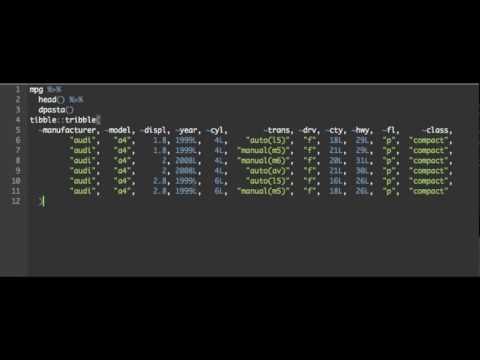
0 to datapasta in 64 seconds via a video vignette:
CopyQ
hluk·C++
跨平台剪贴板管理器,能保存历史记录、搜索和编辑内容,还支持脚本自动化,解决复制粘贴内容容易丢失、难以复用的问题。
剪贴板管理+4剪贴板 / 启动器
12627+19630v17.0.02026-11-09 20:39 UTC

Clipy
Clipy·Swift
macOS 上的剪贴板历史管理工具,能记录复制过的内容并快速检索、粘贴,弥补系统剪贴板只能存一条的限制。
剪贴板管理+3剪贴板 / 启动器
8971+68431.4.12026-11-10 14:48 UTC

EcoPaste
EcoPasteHub·Rust
跨平台剪贴板管理工具,支持 Windows、macOS 和 Linux,帮你保存和检索复制过的历史内容,告别反复复制粘贴。
剪贴板管理+4剪贴板 / 启动器
7577+6411v1.1.02026-08-13 00:29 UTC
Ditto
sabrogden·C
Windows 剪贴板增强工具,把每次复制的内容存进数据库,之后随时翻出来重新粘贴,不用再反复复制。
剪贴板管理+3剪贴板 / 启动器
7449+94913.25.113.02026-10-01 01:28 UTC