翻译硬编码在前端/后端源码中,无法在界面里切换语言;翻译出错可能导致 Trilium 功能异常,使用前务必备份数据;自行编译需改 settings.py 中的路径配置,且脚本含 rm -rf 命令需谨慎。
trilium-translation
NriverAGPL-3.0活跃维护为 Trilium Notes 提供中文翻译和体验优化,附带 Docker、AUR、Scoop 等安装方式,方便中文用户自建笔记服务。
Translation for Trilium Notes. Trilium Notes 中文适配, 体验优化
v0.64.1_20261106发布于 2026-11-06 06:54 UTC2,855star +1 / 7 天310fork同步于 2026-11-10 23:43 UTC
docker-compose up -d 硬件要求按 README 说明
README 未说明显存或 GPU 要求;服务端程序实测约占用 150MB 内存,1G 内存的廉价 VPS 即可运行。
支持 Apple Silicon
Trilium Notes 的中文汉化与体验优化分支,直接下载即用中文界面
为 Trilium Notes 提供中文翻译和体验优化,附带 Docker、AUR、Scoop 等安装方式,方便中文用户自建笔记服务。
核心能力
- 从官方 Release 提取资源文件并用正则替换界面文本
- 提供 Windows、Linux、macOS 各平台汉化安装包
- 提供 Docker 镜像 nriver/trilium-cn 一键部署服务端
- 附带自制 Nier 主题与画布、数学公式等界面优化
- 翻译脚本可复用,支持自行扩展待翻译文本
容易踩的坑
内容由模型根据 README 生成,可能不完整或不准确,以官方文档为准。看原文 README
- v0.64.1_202611060.64.1 中文 20261106最新正式版2026-11-06 · 2026-11-06 06:54 UTC
Trilium Plus 0.64.1 发行说明
变更范围:
v0.64.0 (b2575b9)→v0.64.1 (7aa2d28),共 14 个提交。
版本号:0.64.0→0.64.1,应用版本显示为0.64.1 Plus。重点更新
Bug 修复
- 修复 Electron 升级导致的剪贴板功能失效问题。涉及功能:
- 笔记树右键点击复制/克隆。
- CKEditor 菜单从剪贴板导入 Markdown 文本。
- 链接右键菜单复制链接地址。
- 修复 Express 升级导致的图片上传显示问题:上传图片后会闪一下不显示,但实际上图片已经正常上传。现在图片可以正常显示。
体验优化
- 访问桌面端的
http://127.0.0.1:37840会自动跳转到登录页。 - 关于页面:
- 数据库路径改为绝对路径显示。
- 点击数据库路径可直接打开所在文件夹;Web 端访问时点击可复制数据库路径。
- 构建版本号显示为前 7 个字符,链接仍指向完整提交。
- 备份页面:
- 显示当前数据库大小。
- 备份列表以表格展示,包含路径、备份时间、文件大小和操作,按时间倒序排列。
- 支持删除单个备份,删除前会弹出确认对话框。
- 点击备份路径可在桌面端打开所在文件夹,或在 Web 端复制完整路径。
- 新增
GET /api/database/info和DELETE /api/database/backups/:fileName接口。
性能优化
- 将
jsdom、turndown、joplin-turndown-plugin-gfm、archiver、jimp、html2plaintext等较重模块改为首次使用时才加载,降低启动时间和内存占用。
升级提示
- 本次发布未变更数据库版本或同步协议版本。
- 正常原地升级即可。
- 无需手动迁移。
- 修复 Electron 升级导致的剪贴板功能失效问题。涉及功能:
- v0.64.0_20261030v0.64.0 中文 202610302026-10-30 · 2026-10-30 08:47 UTC
查看更新说明
看到这个信息的你,请站起来活动一下,伸个懒腰 : )
我给 Trilium 0.63.7 做了安全更新, 相关源码放在这个项目里了 https://github.com/Nriver/trilium-plus/ 这个版本以后我称为 Trilium Plus 版
以下是更新说明
Trilium Plus 0.64.0 发行说明
变更范围:
v0.63.7 (51939b1)→0ce0f9d,共 49 个提交。
版本号:0.63.7→0.64.0,应用版本显示为0.64.0 Plus。重点更新
安全加固
- 同步认证增加防暴力破解与防重放保护:
- 同步登录接口限制失败次数(15 分钟内最多 10 次)
- 使用常量时间比较认证哈希
- 登录令牌 5 分钟内仅可使用一次
- 登录成功后重新生成会话
- 升级
proxy-addr至 2.0.8,修复 IP 伪造漏洞。 - 移除未使用的
electron-rebuild,修复tar相关漏洞。 - 移除未使用的
request依赖。 - 修复异步路由被事务包裹的问题,涉及同步、导入等接口。
依赖与运行时升级
- Node.js 构建环境升级至
24.14.1。 - Electron 升级至
45.0.0,better-sqlite3升级至13.0.3。 - 升级 Express、Helmet、express-rate-limit、Mermaid、KaTeX、Marked、jsdom、Excalidraw 等主要依赖。
- ESLint 迁移至 9.x 配置。
- 服务端与桌面端统一使用共享的 N-API
better-sqlite3构建。
功能与体验优化
- 支持并正确加载 Excalidraw 0.18。
- 优化 Excalidraw 构建启动速度。
- 优化笔记树展开/折叠性能,限制展开深度并仅更新需要变更的分支。
- 使用内置简单防抖实现替代
debounce依赖。 - 修复 SVG 图片类型检测兼容问题。
- 修复 Mermaid 打包问题。
- 增加
/sw.js和 Chrome DevTools well-known 路由,减少无意义的 404 日志。
构建与发布
- 仓库迁移并更新为
nriver/trilium-plus,同步更新文档、Wiki 与脚本链接。 - 新增 Linux ARM64 服务端打包。
- 新增 Debian
.deb安装包。 - Windows 发布包改为仅提供
.7z,不再提供.zip。 - 裁剪 Linux、macOS、Windows 的 Chromium 多语言资源,减小安装包体积。
- 优化服务端与桌面端包体积,构建失败时立即中断。
- 增加 Node/Electron 下载缓存与 Webpack 缓存。
- 构建脚本支持非交互式 Shell,发布构建时间统一使用 UTC。
升级提示
- 源码构建推荐使用 Node.js 24。
- Windows 用户请下载
.7z发布包。 - 源码仓库地址已变更为
https://github.com/nriver/trilium-plus。 - 本次范围未变更数据库版本与同步协议版本,正常升级即可。
- 同步认证增加防暴力破解与防重放保护:
- v0.63.7_20240530v0.63.7 中文 202405302024-05-30 · 2024-05-30 07:09 UTC
查看更新说明
看到这个信息的你,请站起来活动一下,伸个懒腰 : ) 提前祝各位儿童节快乐~
已经满的qq群就不要加了,谢谢。
ChatGPT翻译的原版更新信息:
- 修复了失败的 0.63.6 版本构建(Windows 二进制文件已恢复)
- 回溯移植了 Excalidraw 升级到 0.17.3
- 一些小修复
- v0.63.5_20240401v0.63.5 中文 202404012024-04-01 · 2024-04-01 01:39 UTC
查看更新说明
看到这个信息的你,请站起来活动一下,伸个懒腰 : ) 愚人节快乐~
这里推荐一个刚出的主题,叫Lightpad,移动端用这个主题能极大提升使用体验,推荐尝试 https://github.com/ohmstance/trilium-lightpad-theme/ tip: 客户端和网页端可以同时使用不同的主题。
加群请优先加TG群或QQ的2群。一直有收到1群的入群请求,群已经满了哦,别加了。
ChatGPT翻译的原版更新信息:
- 修复在非根路径上的数学渲染,关闭#4713
- 允许通过escape取消提及的UI,修复#4692,#4684
- 修复浏览器中的复制链接,关闭#4682
- 允许将文件附件转换为文件注释
- 修复:不可见的未选中待办事项,由@st3iny贡献
- v0.63.3_20240312v0.63.3 中文 202403122024-03-12 · 2024-03-12 01:56 UTC
查看更新说明
看到这个信息的你,请站起来活动一下,伸个懒腰 : ) 最近尝试睡觉前喝杯热牛奶,睡得更香一点。
- 0.63.3的黑暗主题有个勾选框的样式bug,本来打算跳过这个版本,但是很多朋友想要我更新,我尝试手动打上对应的补丁,中文版现在已经修复了这个问题。
- CKeditor有小更新,多了一个输入特殊符号的功能。
- 这个版本有数据库的变动,最好先备份一下,以防万一。
- 用Web端访问如果加载不出界面,请尝试Ctrl+F5强制刷新页面缓存,加载最新版的界面。
ChatGPT翻译的原版更新信息:
- 添加 API 方法以擦除修订版本号 #4662
- 修复在全文字符串中使用正则表达式字符高亮显示搜索结果,关闭 #4665
- 改进了脚本 bin/copy-trilium.sh、bin/build-linux-x64.sh #4671
- 修复使用标签搜索全文的问题,关闭 #4661
- 来自 WantToLearnJapanese/WantToLearnJapanese-patch-unhoist-bookmark 的 #4635
- 修复 JSDoc,关闭 #4633
- 在 start-docker.sh 中使用的 groupmod 命令中添加 -o 选项 #4632
- PWA 清单修复用于额外身份验证,修复 #4611
- 删除笔记时激活父笔记,#4600
- 添加了切换右侧面板的键盘快捷键,关闭 #4552
- 修复固定按钮阴影,关闭 #4595
- CKEditor 41.0.0
- synx 修复
0.60.4之前的版本请先升级到0.60.4再向上升级。其它升级注意事项请参考0.61.13发布的信息。
用户点评
登录用户的真实使用记录,可按版本和硬件筛选共 0 条
还没有人点评。第一个说出真实体验的人最有价值。
🌏 Trilium Translation



The translation code for Trilium by Zadam has been saved to this fork: https://github.com/Nriver/trilium-translation/tree/zadam-version
This repository will now focus on developing a modified version of Trilium.
Star this repo if you like it, thx :)
📱 Recommendation for Android Users:
If you use Trilium on your phone or tablet, I strongly recommend trying Pocket Trilium — an Android client I developed specifically optimized for mobile devices.
If you have old data, PLEASE BACK UP YOUR DATA BEFORE USE.
🦮 Table of Contents
- 🌏 Trilium Translation
- 🦮 Table of Contents
- 📸 Screenshots
- 📚 How to use
- 🐳 How to run server with docker
- 🌐 How to translate
- 🛑 Limitations
- 🤔 Common questions
- ⏳ Stargazers over time
- 💰 Donation
- 🙏 Thanks
📸 Screenshots
Original dark theme

Original light theme

Nier theme made by me :)

Canvas Note

Math formular

📚 How to use
- Download from the latest Release that suit your computer system.
- Unzip and execute(trilium for Linux, trilium.sh for Linux server, trilium.exe for Windows, trilium.app for macOS).
- Enjoy :)
🐳 How to run server with docker
For Trilium Notes server, you can download my docker-compose.yml Then run it with docker simply by executing:
docker-compose up -d
It will download the Chinese version of Trilium I built on Docker Hub.
Open http://127.0.0.1:8080 in your browser to access the server page.
Your note data will be in the same directory of the docker-compose.yml file.
🌐 How to translate
If you would like to check the code (my codes comes with Chinese and English comments, check it) and compile it by yourself. Here is some information may be useful.
WARNING! The scripts I wrote includes some 'rm -rf' commands, modify and use codes with care!
🌐 How does the translation work
It extracts the resource files from the latest Trilium Notes official release and use regular expression to replace UI text for each file. Then pack the translated files back into the package. Done.
💻 Compile Environment Requirement
My environment is Manjaro(Linux) based, but you can make some change to work on other platform. You need to change some path configuration in my code to work on your machine.
Python3 with module
pip3 install requests --user
Nodejs with module
npm install -g asar webpack webpack-cli
npm install webpack --save-dev
7z if you want to make release
🔍 Translate Process
- Modify configurations in
settings.pyby the comments. - Do translate in
translations.py. (Seetranslations_cn.py. There are over 1000 lines to translate, be patient :) ) - Run
python3 init.pyto download latest Trilium Notes. - Run
python3 trans.pyto make a translation patch. - Run
python3 make_release.pyto apply patch to releases for all platforms.
Note: In translations.py there are some texts begin or ends with quotes were made on purpose for regex match, do not
remove them in your translation. There are some text like '${xxxx}' in the translation, these are the placeholder in the
original Trilium Notes source code, do not modify them unless you know what you are doing.
📝 More text to translate
If you'd like to translate more text, mark each text in the file that you want to translate with double brackets{{}}
like I did in trans.py.
Put everything between double brackets into the dict in translations.py and translate to the language you like. (Some
text were ended with }. Try to avoid triple brackets by change from ${xxx}}}' to something like ${xxx}'}} )
🛑 Limitations
The translation is hard-coded in the frontend/backend source code, so you can not switch between languages. If there were some mistakes in the translation, Trilium Notes may not function correctly. Therefore, please back up your data before use.
If you break Trilium Notes somehow, you need to redownload everything with init.py.
🤔 Common questions
The following are some representative questions that I feel are frequently asked by users, so I'll summarize them.
Which VPS provider are you using to run the Trilium Notes server?
I'm using Racknerd now. It's insainly cheap. And very suitable to host Trilium Server.
Racknerd's promotions seem to be ongoing, and you can always purchase them. If you're interested, you might want to give it a try. The links include an affiliate code, which you can remove if you prefer.
I've tested Trilium's server program, and it typically consumes around 150MB of memory. So, the cheapest level would be sufficient, which costs only $10 per year. If you find the storage is not enough for you, you can try the slightly more expensive option, which is usually less than $20 per year and can provide you with about 30GB of SSD storage.
| Promotion | RAM | CPU | SSD | Bandwidth | Price | Purchase |
|---|---|---|---|---|---|---|
| 2025 Black Friday | 1G | 1 Core | 25G | 2T/Month | $10.60/Year | Link |
| 2025 Black Friday | 2.5G | 2 Core | 45G | 3T/Month | $18.66/Year | Link |
| (expired) 2025's 11.11 | 1G | 1 Core | 20G | 3T/Month | $10.76/Year | Link |
| (expired) 2025's 11.11 | 2G | 2 Core | 35G | 5T/Month | $17.66/Year | Link |
| (expired) 2025 New Year | 1G | 1 Core | 24G | 2T/Month | $11.49/Year | Link |
| (expired) 2025 New Year | 2G | 1 Core | 40G | 3.5T/Month | $17.38/Year | Link |
| (expired) 2024 Black Friday | 1G | 1 Core | 20G | 1.5T/Month | $10.99/Year | Link |
| (expired) 2024 Black Friday | 2G | 2 Core | 40G | 3T/Month | $18.93/Year | Link |
| (expired) 2024's 11.11 | 1G | 1 Core | 14G | 2T/Month | $11.11/Year | Link |
| (expired) 2024's 11.11 | 2G | 1 Core | 25G | 3T/Month | $17.98/Year | Link |
| (expired) 2024 Dragon Boat Festival | 1.25G | 1 Core | 20G | 2TB/month | $12.88/year | Link |
| (expired) 2024 Dragon Boat Festival | 2G | 2 Cores | 30G | 4TB/month | $19.88/year | Link |
| (expired) 2024 Chinese New Year | 1G | 1 Core | 15G | 2T/Month | $10.99/Year | Link |
| (expired) 2024 Chinese New Year | 1.5G | 1 Core | 25G | 4T/Month | $16.88/Year | Link |
| (expired) 2024 New Year | 768M | 1 Core | 21G | 1T/Month | $11.49/Year | Link |
| (expired) 2024 New Year | 2G | 1 Core | 35G | 2.5T/Month | $17.38/Year | Link |
| (expired) 2023 Black Friday | 768M | 1 Core | 15G | 1T/Month | $10.18/Year | Link |
| (expired) 2023 Black Friday | 2G | 1 Core | 30G | 2.5T/Month | $16.98/Year | Link |
I’ve been using this VPS provider for several years, and it has always been stable with an unchanged renewal price.

I used to have the 2022's 11.11 plan, which cost $11.11 per year. Now I’ve switched to the 2025's 11.11 plan, where the storage has increased from 11.11 GB to 20 GB — much better for running a Trilium Notes server. Previously, due to limited disk space, I had to disable the note backup feature. With the extra space now, I can finally turn backups back on without worry.
You can also choose other VPS providers, but remember to back up your data. Data is priceless. Make sure to perform backups just in case, and keep it in mind.
Some Questions Regarding Domain Names
How to Enable HTTPS Encryption?
In general, HTTP requests accessed through ports are plaintext. If you need to use HTTPS encryption, it must be used in conjunction with the domain.
Where Did You Purchase Your Domain?
I purchased my domain from Namesilo, and the prices are quite reasonable. Feel free to give it a try if you're
interested. Below is the link with an affiliate tag; you can remove it if you prefer. Additionally, there is a coupon
code nriver that can save you $1 on your first domain purchase.
How to Apply for a Website Certificate?
As for website certificates, you can use the free acme.sh tool. For specific instructions, you can refer to
the acme.sh documentation on certificate issuance.
Why my translation is not working?
If you have run the original version of the Trilium program and there is a cache of the English version in your system, please follow these steps:
- Close Trilium.
- On Windows, delete the directory
C:\Users\Username\AppData\Roaming\Trilium Notes. - On Linux, delete the directory
~/.config/Trilium Notes/. - Restart Trilium, and it will be in your translated language.
Where is the Note Database?
Default Paths for Client Databases
- Windows: C:\Users\Username\AppData\Roaming\trilium-data
- Linux: /home/Username/.local/share/trilium-data
- Mac: /Users/Username/Library/ApplicationSupport/trilium-data
Default Path for Server Database
- Linux Server: /home/Username/trilium-data
- Docker: In the
trilium-datafolder in the same directory as docker-compose.yml
How to Change the Database Location?
You can refer to the client's built-in trilium-portable.sh or trilium-portable.bat to run it in a portable manner.
To change the database location, simply modify the database path in the file.
If you want to experience the latest original features, it is recommended to use this method.
How to Clip Web Pages to Trilium? The Trilium Web Clipper Extension for Chrome Is No Longer Available
Trilium Web Clipper is a browser extension that allows you to save web content directly to Trilium Notes. However, the
original version of the extension has not been maintained for a long time and no longer complies with Chrome's latest
Manifest V3 standard. As a result, it is no longer available for download from the Chrome Web Store.
To address this, I forked the original project and updated it for Manifest V3 compatibility. I also added support for the Chinese interface and fixed several bugs. You can find more details on the project page: Trilium Web Clipper Plus.
How to escape from the code block?

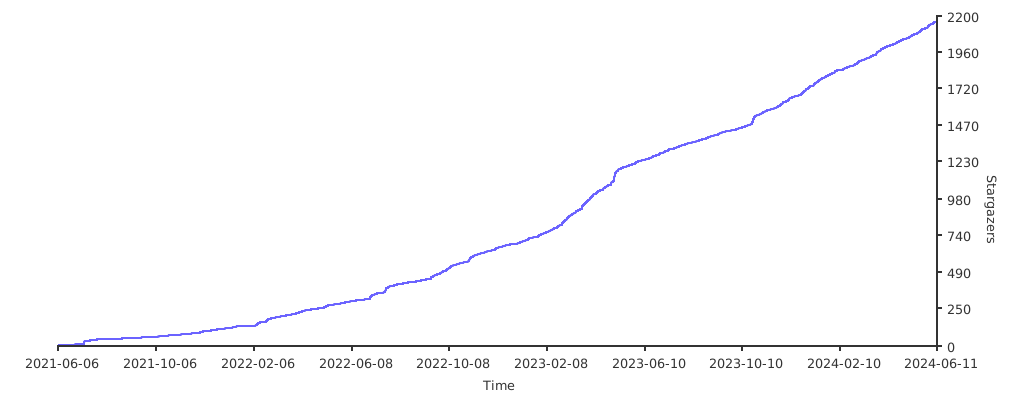
⏳ Stargazers over time
Generated by caarlos0/starcharts.
💰 Donation
Hello! If you appreciate my creations, kindly consider backing me. Your support is greatly appreciated. Thank you!
Alipay:

Wechat Pay:

Ko-fi:

🙏 Thanks
Thanks t**e for donating 20 CNY!
Thanks 1*0 for donating 8 CNY! Memo: 蜜雪冰城
Thanks **钧 for donating 38 CNY! Memo: 咖啡
Thanks *风 for donating 25 CNY!
Thanks **进 for donating 25 CNY!
Thanks *军 for donating 18 CNY! Memo: 七分甜
Thanks **逸 for donating 10 CNY!
Thanks **恩 for donating 30 CNY!
Thanks *记 for donating 10 CNY! Memo: 多谢大佬的辛勤付出
Thanks *建 for donating 200 CNY! Memo: trilium
Thanks *称 for donating 10 CNY!
Thanks **逸 for donating 10 CNY! Memo: 大佬牛逼
Thanks *斌 for donating 10 CNY!
Thanks *僧 for donating 30 CNY! Memo: 加油,老哥!
Thanks *天 for donating 9 CNY!
Thanks *均 for donating 30 CNY! Memo: 翻译辛苦了,喝杯咖啡
Thanks A*s for donating 30 CNY!
Thanks **逸 for donating 20 CNY!
Thanks *臾 for donating 30 CNY!
Thanks *冰 for donating 10 CNY!
Thanks *遥 for donating 10 CNY! Memo: 感谢群主的翻译
Thanks **庆 for donating 10 CNY!
Thanks **逸 for donating 50 CNY!
Thanks **聪 for donating 10 CNY! Memo: 很大的帮助翻译家!爱来自中国
Thanks **奇 for donating 20 CNY!
Thanks *磊 for donating 10 CNY!
Thanks *姆 for donating 5 CNY!
Thanks **锐 for donating 20 CNY! Memo: 感谢您的工作,请您喝杯咖啡
Thanks **行 for donating 10 CNY! Memo: 小葱白贡献绵薄之力
Thanks 鞠*M for donating 10 CNY! Memo: 感谢大佬,请喝水
Thanks *🐈 for donating 10 CNY!
Thanks *白 for donating 10 CNY! Memo: 小葱白献上
Thanks *白 for donating 5 CNY! Memo: 小葱白献上
Thanks *杜 for donating 20 CNY! Memo: 谢谢您的翻译
Thanks *伟 for donating 20 CNY!
Thanks *淼 for donating 10 CNY! Memo: 今天第一天下载使用,感觉发现新大陆,谢谢!(希望入群交流)
Thanks *落 for donating 10 CNY! Memo: 感谢长期的坚持♥
Thanks *F for donating 99 CNY! Memo: 感谢分享 希望深度合作 长期学习交流
Thanks *F for donating 200 CNY! Memo: Best wishes
Thanks F*g for donating 10 CNY!
Thanks **逸 for donating 30 CNY! Memo: 来杯奶茶,哈皮一下
Thanks *绿 for donating 20 CNY! Memo: 多谢,学生能力有限,尽一份心意
Thanks *户 for donating 20 CNY!
Thanks *孤 for donating 20 CNY! Memo: 请群主大大喝杯奶茶
Thanks X*H for donating 10 CNY!
Thanks **辉 for donating 20 CNY! Memo: 感谢大佬,辛苦了
Thanks *卫 for donating 50 CNY! Memo: 希望能保持更新
Thanks **鄂 for donating 10 CNY!
Thanks **幻 for donating 10 CNY!
Thanks C*W for donating 50 CNY!
Thanks *超 for donating 10 CNY!
Thanks *磊 for donating 30 CNY!
Thanks **龙 for donating 200 CNY!
Thanks *平 for donating 20 CNY!
Thanks *燃 for donating 66 CNY!
Thanks **喜 for donating 10 CNY!
Thanks *君 for donating 28 CNY!
Thanks S*o for donating 38 CNY! Memo: 群主辛苦,请喝杯咖啡
Thanks **厅 for donating 10 CNY! Memo: 沉浸在知识的整理,特别感谢中文版
Thanks **泳 for donating 30 CNY!
Thanks **宣 for donating 99 CNY!
Thanks R*r for donating 10 CNY! Memo: Thanks for copy code for trilium!
Thanks *衣 for donating 6 CNY! Memo: 感谢大佬
Thanks **辰 for donating 0.88 CNY!
Thanks *舟 for donating 6 CNY! Memo: 帮了很大忙,浅表谢意
Thanks *零 for donating 15 CNY!
Thanks *杰 for donating 1 CNY!
Thanks **泳 for donating 20 CNY!
Thanks C*x for donating 50 CNY!
Thanks *洲 for donating 30 CNY! Memo: 新年好!已经决定从ob转到trilium了
Thanks *口 for donating 50 CNY! Memo: 辛苦了,多运动,注意身体
Thanks *乐 for donating 25 CNY! Memo: 一杯咖啡 at trilium
Thanks *唯 for donating 10 CNY! Memo: 大佬厉害
Thanks **玲 for donating 16 CNY!
Thanks *六 for donating 10 CNY!
Thanks *林 for donating 1.14 CNY!
Thanks *林 for donating 5.14 CNY!
Thanks *建 for donating 20 CNY! Memo: 感谢维护trilium
Thanks **行 for donating 0.5 CNY!
Thanks **建 for donating 25 CNY!
Thanks K*l for donating 2 CNY! Memo: trilium很好用,感谢大佬的付出
Thanks *欢 for donating 30 CNY! Memo: 感谢大佬
Thanks * ༼ for donating 2 CNY!
Thanks Ko-fi Supporter for donating 5 USD!
Thanks *宇 for donating 10 CNY! Memo: 瑞一杯,加油!
Thanks *婧 for donating 100 CNY! Memo: 感谢大佬的付出
Thanks **舟 for donating 66 CNY!
Thanks Roel for donating 5 USD! Memo: Thanks SO very much for reviving the Trillium Web Clipper. With ADDED options!
Thanks Ko-fi Supporter for donating 5 CNY! Memo: I love the solution, as this will open up incredible interoperability. Containers provide feature parity and in general better scalability. Thanks for pushing into a scalable future!
Thanks *夏 for donating 18.8 CNY!
Thanks *辉 for donating 36 CNY! Memo: 感谢维护trilium那么多库-新奥尔良烤乳猪
Thanks 123 for donating 5 USD!
Thanks Supporter for donating 5 USD!
Thanks *欢 for donating 30 CNY!
Thanks for the greate IDE Pycharm from Jetbrains.

joplin
laurent22·TypeScript
跨平台开源笔记应用,支持端到端加密和 WebDAV、Dropbox、Nextcloud 等多端同步,可导入 Evernote 数据,注重隐私保护。
笔记应用+4笔记工具进阶
57130+636.4kv3.7.222026-11-10 13:17 UTC

siyuan
siyuan-note·TypeScript
开源、隐私优先、可自托管的知识工作空间,用 Markdown 管理笔记与知识库,并支持人与 AI 智能体在同一空间协作。
知识库+4笔记工具进阶
47165+503.1kv3.8.102026-11-10 19:35 UTC
logseq
logseq·Clojure
本地优先的开源知识管理平台,用 Markdown 或 Org-mode 记笔记并自动构建知识图谱,数据存在本地、隐私可控。
知识管理+4笔记工具进阶
45544+362.9k2.0.22026-11-10 17:28 UTC
open-notebook
lfnovo·TypeScript
开源自托管的 Notebook LM 替代品,能上传资料让 AI 帮你整理笔记、生成摘要和问答,比原版更灵活、功能更多。
笔记工具+4笔记工具进阶
41834+1214.8kv1.15.12026-11-08 21:47 UTC