仅支持 32 位 foobar2000 1.4 及以上版本,64 位组件不兼容;需先安装 Columns UI 组件,否则界面选项里没有它;可视化依赖 Shpeck,可能不稳定甚至导致 foobar 崩溃,需手动指定 plugins\winamp 目录并选择 Milkdrop
Eole-foobar-theme
Ottodix活跃维护给 foobar2000 换上一套清爽优雅的界面皮肤,用 JavaScript 实现,让这款老牌播放器看起来更现代、更好用。
Eole blows gently into your ear his nicest melodies.
v1.2.3b25发布于 2024-12-07 15:46 UTC1,724star94fork同步于 2026-11-07 07:34 UTC
将仓库中各文件夹复制到 foobar 配置目录(user-components、themes、plugins),启动后在 File > Preferences > Display > Columns UI 中 Import 主题文件 themes\eole\columnsUI_eole.fcl 硬件要求按 README 说明
README 未说明
给 foobar2000 换上一套精致的 Eole 皮肤,让本地音乐播放界面更好看、更好用
给 foobar2000 换上一套清爽优雅的界面皮肤,用 JavaScript 实现,让这款老牌播放器看起来更现代、更好用。
核心能力
- 基于 Columns UI 与 Spider Monkey Panel 构建整套界面
- 内置封面缓存,按专辑艺术家与专辑标签逐步建立
- 库浏览面板可在启动时预载全部封面,浏览无需等待
- 可视化标签页由 Shpeck 驱动,可加载 Milkdrop 插件
- 面板支持右键设置菜单,按住 Shift 右键可查看脚本配置
容易踩的坑
内容由模型根据 README 生成,可能不完整或不准确,以官方文档为准。看原文 README
- v1.2.3b25v1.2.3b25 - updated Biography panel最新正式版2024-12-07 · 2024-12-07 15:46 UTC
这个版本没有写更新说明。
- v1.2.3b24v1.2.3b24 - Multi-Item support & Custom group headers & various bug fixes2024-10-20 · 2024-10-20 08:39 UTC
查看更新说明
Multi-Item support in the filters was something requested many times. Thanks to JadeTank who did those Improvements
- v1.2.3b23v1.2.3b23 - new compact title bar & various bug fixes2024-03-26 · 2024-03-26 18:14 UTC
查看更新说明
New compact title bar design (right click over the title bar, settings, Compact title bar - big, yes paradoxal name ^^). Plus, various improvements & bug fixes proposed by JadeTank
- v1.2.3b22v1.2.3b22 - updated Biography panel & various bug fixes2024-01-18 · 2024-01-18 09:49 UTC
查看更新说明
Thanks to JadeTank who did those changes
- v1.2.3b21v1.2.3b21 - updated ESLyrics to 0.5.2.11202022-07-30 · 2022-07-30 16:03 UTC
用户点评
登录用户的真实使用记录,可按版本和硬件筛选共 0 条
还没有人点评。第一个说出真实体验的人最有价值。
Eole Foobar theme
This is a skin for the foobar2000 audio player. This theme requires Foobar2000 32bit, version 1.4 or newer. Follow the instructions below to install it properly.
[!WARNING] The components required for this theme do not work with foobar 64bit
Contribute to the theme
If you've got some knowledge in Javascript, feel free to suggest code performance improvements, report bugs, or submit fixes. Just open an issue ticket, share the code, or create a pull request.
Preview
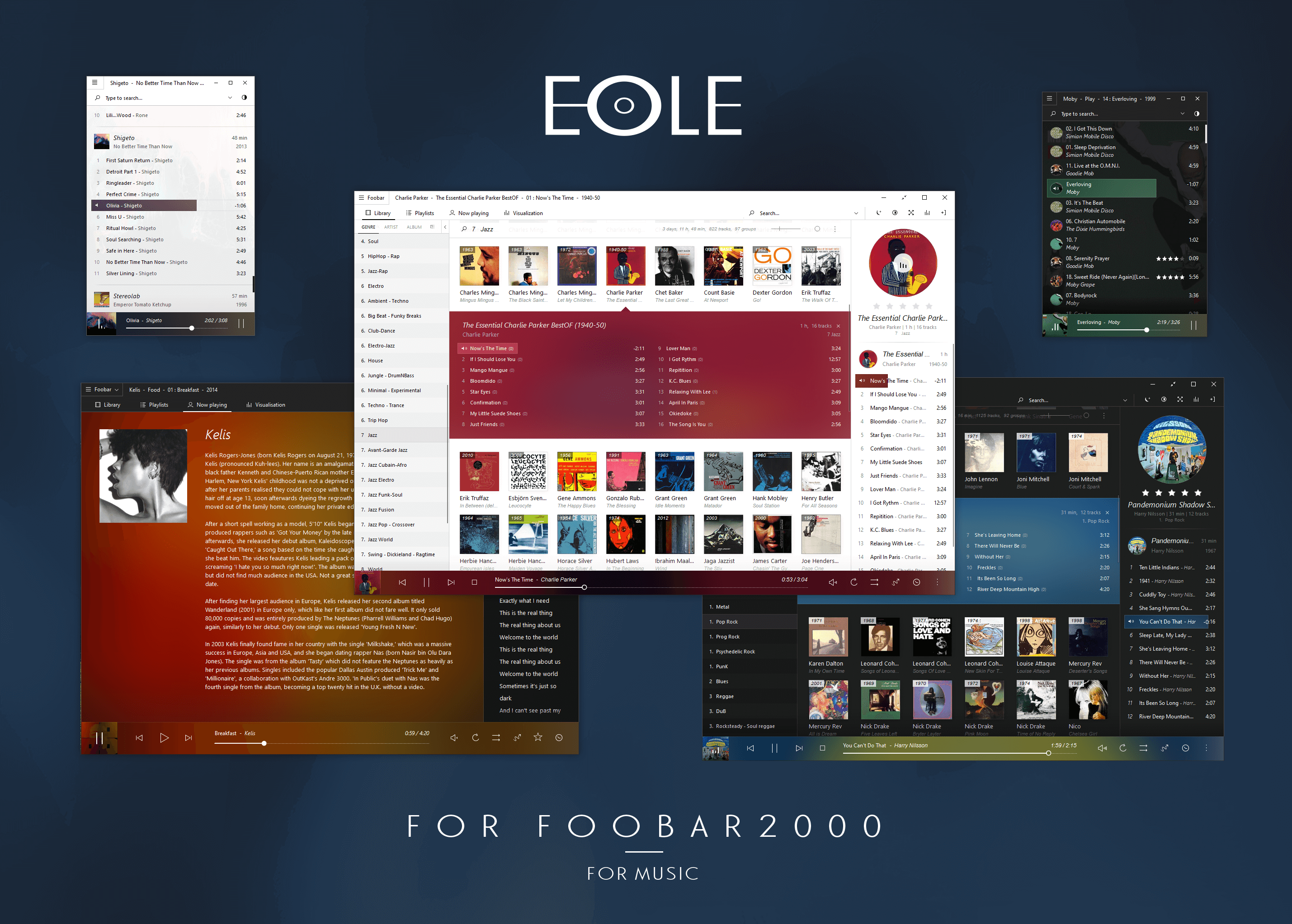
Installation
-
Close foobar.
-
Download this github repository and copy each folder into your foobar profile directory (
user-components,themes, andplugins).- STANDARD foobar2000 installation: your foobar profile directory is in here:
%AppData%\foobar2000or%AppData%\foobar2000-v2 - PORTABLE foobar2000 installation: your foobar profile directory is in a folder named "
profile" inside your installation directory.
- STANDARD foobar2000 installation: your foobar profile directory is in here:
-
Run foobar, choose
Columns UIas user interface (from the prompt, or inFile>Preferences>Display).- If
Columns UIis not present Download and install Columns UI component, restart foobar. SelectColumns UIfrom the user interface prompt.
- If
-
From the Columns UI settings in
File>Preferences>Display>Columns UI, click onImport, and select the following file:[FOOBAR_PROFILE_DIRECTORY]\themes\eole\columnsUI_eole.fcl. -
Configure the Winamp directory in Shpeck for the visualisations, it's at the bottom of the preferences window: Click the
Foobarbutton in the top left and navigate toFile>Preferences>Visualisations>Shpeck. Click on the...button in the top right to browse and select the directory[FOOBAR_PROFILE_DIRECTORY]\plugins\winamp. Validate, close the preferences, and go to theVisualizationtab of the skin. Right click and selectMilkdropin theAutostart Pluginsubmenu.
Optional
If you want some extra polish you can change the systray icon: Click the Foobar button in the top left and navigate to File > Preferences > Display > Columns UI. Go to the Notification area tab and tick Use custom icon, then click Select icon... and select the file [FOOBAR_PROFILE_DIRECTORY]\themes\eole\img\systray icons\white\uniEC4F.ico (or any of the alternative icons in this folder).
That's it! Enjoy your music!
[!WARNING] The visualization tab is powered by Shpeck, which can be unstable. So if it doesn't work or it makes foobar crash on your computer, you'll have to figure what's wrong yourself. You can try to find the lastest informations at the end of the discussion topic of Shpeck here http://tinyurl.com/hr2ybp2, or completely remove the visualisations (you will need to edit the theme a little bit for that: right click the
Visualizationtab at the top and selectSettings. CheckHide visualization panel. Remove the Shpeck component at the bottom of the panel list inFile>Preferences>Display>Columns UI>Layout).
Useful to know
-
Eole uses a cover cache. The cover cache is built little by little: when a cover is displayed, if it isn't stored yet in the cache, it will be added to it. So on first display of any cover, it will be a little bit slow, but it will be a lot faster on subeequent displays. This cache is based on the
%album artist%and%album%tags. After updating an existing cover, you must manually refresh it in foobar. Just right click on the cover needing to be refreshed and clickRefresh this image. -
The library browser panel has an option to load every cover from the image cache at startup, which is enabled by default and allows to browse your library without waiting for the covers to load. Foobar memory usage is higher when this option is enabled, because all the covers are loaded into memory. This option has an effect only once the image cache is already built, which is done little by little: when a cover is displayed, if it isn't stored yet in the cache, it will be added to the cache.
-
Most panels have a settings menu which can be accessed with a right click. You can also look for the hamburger (3 dots) menu icons. And if you want to get your hands dirty and edit a panel, press
SHIFTwhen right clicking and clickConfigureto see which files contain the related scripts.
Credits
- TheQwertiest: Spider Monkey Panel, which powers most of this theme foo_spider_monkey_panel
- marc2003: original foo_jscript_panel
- T.P. Wang: original WSH Panel Mod.
- Br3tt aka Falstaff: original code for most of the panels
- WilB: original code of the library tree panel, and biography panel

lx-music-desktop
lyswhut·TypeScript
基于 Electron 的跨平台桌面音乐播放器,聚合多源在线音乐搜索与播放,界面清爽,适合日常听歌。
音乐播放器+4音乐播放器
55236+1047.1kv2.12.62026-11-10 04:44 UTC
spotube
team-spotube·Kotlin
开源跨平台音乐播放器,桌面和手机都能用,通过 Spotify 和 YouTube 等公开来源获取歌曲,无需付费订阅即可播放。
音乐播放器+4音乐播放器
50711+752.4kv6.0.0-beta.02026-11-10 08:05 UTC
pear-desktop
pear-devs·TypeScript
基于 Electron 的跨平台桌面音乐播放器,为 YouTube Music 等流媒体服务提供增强扩展,支持 Windows、macOS 和 Linux。
音乐播放器+4音乐播放器
34013+172.0kv3.12.02026-11-08 01:55 UTC

YesPlayMusic
qier222·Vue
基于 Electron 和 Vue 的第三方网易云音乐播放器,界面精致,支持 Windows、macOS、Linux 以及 PWA,让你在桌面端也能获得流畅的在线听歌体验。
网易云音乐+4音乐播放器
33616+194.7kv0.4.112026-10-10 11:05 UTC