直接粘贴和顺序粘贴栈需在系统设置中开启“辅助功能”权限;首次安装需在“安全性与隐私”中允许已知开发者应用;历史默认保留 30 天,到期自动清理未收藏内容。
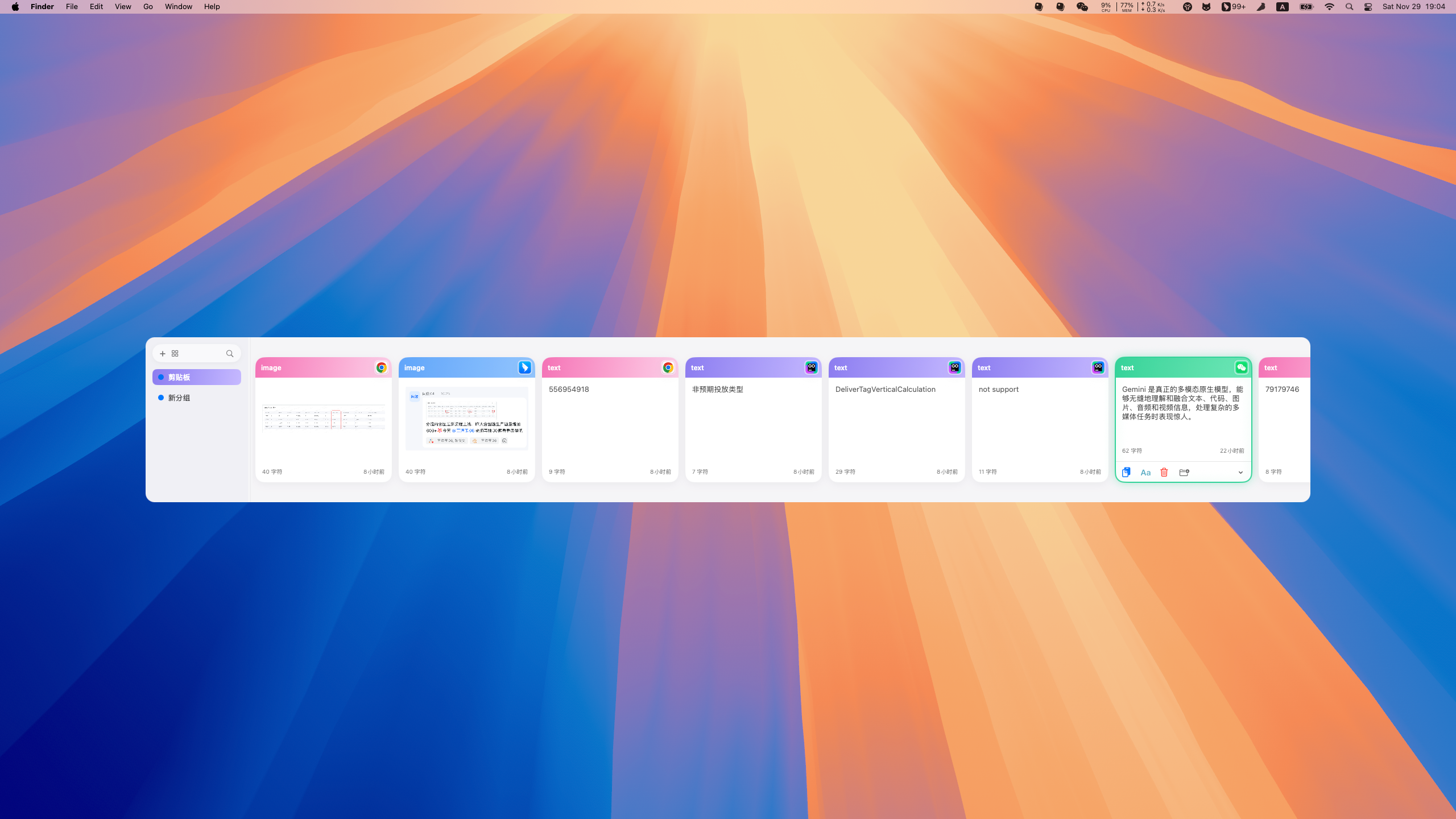
从 Releases 下载最新 .dmg,打开后将 Mini Clipboard.app 拖入 Applications 文件夹;源码构建可执行 make build 或 make app 硬件要求按 README 说明
仅支持 macOS 12+,Apple Silicon 原生;README 未说明 Intel 机型兼容性。
支持 Apple Silicon
macOS 上轻量好看的剪贴板管理器,帮你快速找回并跨应用粘贴历史内容
一款开源 macOS 剪贴板管理工具,主打简洁美观的界面和顺滑的操作体验,帮你在 Mac 上高效管理复制历史。
核心能力
- 自动采集文本、链接、图片、文件、颜色等剪贴板历史
- 时间线支持横向、纵向、网格三种布局,可预览与重命名
- 用 Pinboards 收藏分组,历史与收藏独立管理
- 双击直接粘贴,支持纯文本粘贴与顺序粘贴栈
- 关键词加类型、来源应用过滤,输入即搜
容易踩的坑
内容由模型根据 README 生成,可能不完整或不准确,以官方文档为准。看原文 README
- v1.0.3Dark Mode, Direct Paste & Quick Paste Shortcuts最新正式版2025-12-13 · 2025-12-13 16:44 UTC
Features
- Add direct paste functionality and a configurable default paste action
- Add appearance mode selection and dark theme support
- Initialize a Next.js-based landing website for Mini Clipboard
- Add localized strings for selection panel actions (English/Chinese)
- Implement quick paste via
cmd+<number>shortcut - Add checkerboard background for image placeholders/loading states
- Make panel dimensions and corner radius customizable
- Enhance file preview with image display and metadata
- Add rich text copy and color detection support
Improvements
- Improve wheel scroll handling in
HistoryTimelineViewfor smoother navigation - Adjust panel width and layout when sidebar is collapsed
No breaking changes were introduced; existing workflows continue to function with added customization and paste options.
- v1.0.2Multi-selection, New layout2025-12-02 · 2025-12-02 13:22 UTC
查看更新说明
-
Multi-selection for history items
- Toggle selection mode, range-select with Shift, add/remove with Command.
- Bulk actions: copy as plain text, add to board, delete with confirmation.
-
New history layout: Vertical
- Switch between
Horizontal,Grid, andVerticallayouts.
- Switch between
-
Customizable panel position
- Horizontal layout: adjust vertical position; Vertical layout: adjust horizontal position.
-
Improved horizontal scrolling
- Intercepts mouse wheel to scroll horizontally in timeline view for smoother navigation.
-
Preview positioning and anchors
- Preview placement adapts to current layout and selected item; supports top/bottom/left/right center.
-
Accessibility updates
- Added accessibility entitlement; guided prompt to enable permission in System Settings.
-
- v1.0.1Mini Clipboard v1.0.12025-11-29 · 2025-11-29 09:56 UTC
查看更新说明
- Highlights
- Clipboard history capture for text, links, images, files, and colors
- Timeline browsing with horizontal list and grid layouts, quick preview, and rename
- Pinboards for favorites with create/rename/color tagging; history and favorites separated
- Direct Paste writes to system clipboard and sends
⌘+V, with plain-text paste option - Sequential Paste Stack delivers copied items in order, ideal for cross‑app content moving
- Instant search and filtering by keyword, type, and source application
- Settings and hotkeys for retention period, ignored apps, layout, and key mappings
- Compatibility
- macOS 12+ (Apple Silicon native)
- Permissions
- Accessibility permission required for Direct Paste and Sequential Paste Stack; prompted on first run
- Default Hotkey
- Panel:
⇧+⌘+P
- Panel:
- Installation
- Download the DMG from release assets, open it, and drag “Mini Clipboard.app” to Applications
- Build (for developers)
make appoutputsdist/Mini Clipboard.appmake dmg-unsignedoutputsdist/Mini-Clipboard.dmg
- Data
- Local data directory:
~/Library/Application Support/MiniClipboard/
- Local data directory:
- License
- Apache License 2.0 (see
LICENSE)
- Apache License 2.0 (see
- Highlights
用户点评
登录用户的真实使用记录,可按版本和硬件筛选共 0 条
还没有人点评。第一个说出真实体验的人最有价值。
Mini Clipboard(macOS)
轻量、好看的 macOS 剪贴板管理器:采集历史、时间线浏览、收藏分组、直接粘贴、快速粘贴、即时搜索等能力,帮助你更快地跨应用粘贴内容。
功能特性
- 历史采集:自动捕获文本、链接、图片、文件、颜色等类型
- 时间线浏览:横向列表、纵向列表、网格三种布局,可快速预览与重命名
- 收藏分组:Pinboards 创建/重命名/颜色标记,历史与收藏独立
- 直接粘贴:双击快速复制,写入系统剪贴板,支持纯文本粘贴
- 搜索与过滤:关键词 + 类型/来源应用过滤,输入即搜
- 设置与快捷键:历史保留周期、布局切换、快捷键映射、面板位置调节
按键
- 面板:
⇧+⌘+P(可设置修改) - 直接粘贴:双击或回车键
- 快速预览:空格键
- 移动:方向键
- 搜索:任意键
- 多选:
Shift或Command键 + 鼠标点击
界面预览

 查看演示视频:👇

安装指南
- 从 Releases 下载最新版本的
.dmg。 - 打开下载的文件,将
Mini Clipboard.app拖入Applications文件夹。 - 首次安装时,需要开启允许已知开发者的应用。
- 打开“系统偏好设置” → “安全性与隐私” → “安全”
- 点击“已知开发者”,确认允许
Mini Clipboard安装。
- 从“应用程序”文件夹启动
Mini Clipboard。
环境要求
- macOS 12+(Apple Silicon 原生)
- Xcode 15+,Swift 5.9+
快速开始
使用 Xcode
- 打开
MiniClipboard.xcodeproj,选择mini-clipboardScheme,直接运行。
使用 Makefile
- 构建 Debug:
make build
- 生成可分发的
.app:make app→ 输出到dist/Mini Clipboard.app
- 生成未签名 DMG:
make dmg-unsigned→ 输出到dist/Mini-Clipboard.dmg
- 全流程签名与公证(需开发者证书/账号):
- 配置
DEVELOPER_ID、TEAM_ID、APPLE_ID、APP_PASSWORD或NOTARY_PROFILE make package-signed
- 配置
- 清理:
make clean
应用图标(可选)
- 在
public/放置源图logo.png后可一键生成 iconset 与logo.icns:make icon
- 若系统安装了 ImageMagick,将自动生成圆角矩形;否则使用方形。
权限与隐私
- 直接粘贴和顺序粘贴栈需要启用“辅助功能”权限。首次运行会弹窗引导打开系统设置。
- 历史保留期默认 30 天,可在设置中调整;到期自动清理未收藏的历史。
默认快捷键(可在设置中修改)
- 面板:
⇧+⌘+P
目录结构
App/:应用入口、委托与面板窗口控制Services/:剪贴板监听、快捷键、粘贴、搜索、隐私规则Storage/:历史索引与设置持久化UI/:面板根视图、历史时间线、设置页与控件Models/:数据模型与枚举dist/:构建产物(.app与.dmg)public/:应用图标资源docs/:需求与技术设计文档
开发者提示
- 本地数据目录:
~/Library/Application Support/MiniClipboard/(索引与持久内容)。 - 重要模块:
- 剪贴板监听(
Services/ClipboardMonitor.swift) - 直接/栈式粘贴(
Services/PasteService.swift) - 快捷键注册(
Services/HotkeyService.swift) - 历史索引与清理(
Storage/IndexStore.swift) - 时间线 UI(
UI/HistoryTimelineView.swift)
- 剪贴板监听(
许可协议
- 开源协议:Apache License 2.0(见
LICENSE)。
CopyQ
hluk·C++
跨平台剪贴板管理器,能保存历史记录、搜索和编辑内容,还支持脚本自动化,解决复制粘贴内容容易丢失、难以复用的问题。
剪贴板管理+4剪贴板 / 启动器进阶
12627+18630v17.0.02026-11-09 20:39 UTC

Clipy
Clipy·Swift
macOS 上的剪贴板历史管理工具,能记录复制过的内容并快速检索、粘贴,弥补系统剪贴板只能存一条的限制。
剪贴板管理+3剪贴板 / 启动器
8971+88431.4.12026-11-10 14:48 UTC

EcoPaste
EcoPasteHub·Rust
跨平台剪贴板管理工具,支持 Windows、macOS 和 Linux,帮你保存和检索复制过的历史内容,告别反复复制粘贴。
剪贴板管理+4剪贴板 / 启动器
7577+8411v1.1.02026-08-13 00:29 UTC
Ditto
sabrogden·C
Windows 剪贴板增强工具,把每次复制的内容存进数据库,之后随时翻出来重新粘贴,不用再反复复制。
剪贴板管理+3剪贴板 / 启动器
7449+114913.25.113.02026-10-01 01:28 UTC