NPM 安装需 Node.js 22 及以上;安装后需重启终端使环境变量生效;守护进程默认监听 127.0.0.1:4170 且无鉴权,共享主机需设 QWEN_SERVER_TOKEN 并加 --require-auth。
curl -fsSL https://qwen-code-assets.oss-cn-hangzhou.aliyuncs.com/installation/install-qwen-standalone.sh | bash
npm install -g @qwen-code/qwen-code@latest 硬件要求按 README 说明
README 未说明显存或 GPU 要求;可通过 Ollama、vLLM 接入本地模型,但未列出具体型号。
开源终端 AI 编码代理,支持多模型协议与多端接入
跑在终端里的开源 AI 编码 Agent,能理解代码库、执行命令并自动完成改代码、修 bug 等开发任务。
核心能力
- 内置 SubAgents、Agent Teams 与动态工作流
- 支持 OpenAI、Anthropic、Gemini、Qwen 及本地模型运行时切换
- 提供 Auto-Memory、Auto-Skills、Hooks 与内置 Skills
- 可用 qwen serve 启动守护进程,多客户端共享会话
- 提供 VS Code、JetBrains、Zed 插件与 IM 渠道集成
容易踩的坑
内容由模型根据 README 生成,可能不完整或不准确,以官方文档为准。看原文 README
- sdk-typescript-v0.1.31SDK TypeScript Release v0.1.312026-11-09 · 2026-11-09 14:50 UTC
查看更新说明
Bundled CLI Version
This SDK release bundles CLI version: 0.27.1
Source: CLI built from source (same branch/ref as SDK)
Bundled CLI Version
This SDK release bundles CLI version: 0.27.0
Source: CLI built from source (same branch/ref as SDK)
See commit history for changes.
- desktop-v0.27.1Qwen Code Desktop v0.27.12026-11-09 · 2026-11-09 14:24 UTC
查看更新说明
What's Changed
- docs(providers): document Wally under OpenAI-compatible providers by @sanchitmonga22 in https://github.com/QwenLM/qwen-code/pull/16529
- fix(core): share one gh runner and name an unusable view directory by @wenshao in https://github.com/QwenLM/qwen-code/pull/16545
- fix(telemetry): report OpenAI cache_write_tokens as cache creation by @2SinceJuly in https://github.com/QwenLM/qwen-code/pull/16454
- feat(core): name the active shell in the startup context by @2SinceJuly in https://github.com/QwenLM/qwen-code/pull/16491
- docs(daemon): document session-scoped permission vote for channel auto-approve by @yiliang114 in https://github.com/QwenLM/qwen-code/pull/16541
- test(cli): stop a flaky A2A approval poll from failing the whole shard by @wenshao in https://github.com/QwenLM/qwen-code/pull/16555
- fix(ci): route external PR CI directly to disposable runners by @yiliang114 in https://github.com/QwenLM/qwen-code/pull/16551
- feat(qqbot): add opt-in forwardBotMessages for bot-authored messages by @Eric-GoodBoy-Tech in https://github.com/QwenLM/qwen-code/pull/15904
- fix(channels): skip memory extraction and follow-up suggestions on channel turns by @wenshao in https://github.com/QwenLM/qwen-code/pull/16565
- fix(ci): report timed-out main CI runs instead of letting cancelled hide them by @yiliang114 in https://github.com/QwenLM/qwen-code/pull/16280
- fix(web-shell): refresh standalone sessions after allocation by @ZedingZhang in https://github.com/QwenLM/qwen-code/pull/15311
- fix(batch): report provider-specific output budgets in readiness checks by @Jun516 in https://github.com/QwenLM/qwen-code/pull/15181
- fix(core): share compression cache for equivalent model selectors by @xxwtiancai in https://github.com/QwenLM/qwen-code/pull/15318
- fix(desktop): restore saved web previews by @zonemeen in https://github.com/QwenLM/qwen-code/pull/14597
- fix(managed-agent): create a never-attached Session for its first automation verb (#14548) by @xxwtiancai in https://github.com/QwenLM/qwen-code/pull/14561
- fix(memory): report why a background memory agent stopped by @everyoneexe in https://github.com/QwenLM/qwen-code/pull/13466
- fix(web-shell): do not persist rejected daemon URL credentials by @lorenzozanee in https://github.com/QwenLM/qwen-code/pull/12285
- fix(core): base web terminal backpressure on pending input by @dakjdakd in https://github.com/QwenLM/qwen-code/pull/14313
- fix(cli): emit headless results before draining memory by @xxwtiancai in https://github.com/QwenLM/qwen-code/pull/13885
- fix(lsp): Attribute diagnostics to explicit extension owners by @loglapa in https://github.com/QwenLM/qwen-code/pull/14117
- fix(cli): settle Live call stops after failure by @GoldArowana in https://github.com/QwenLM/qwen-code/pull/13835
- fix(cli): remove dead REPLACE mergeStrategy declarations for modelProviders and providerProtocol by @liwenjie200543 in https://github.com/QwenLM/qwen-code/pull/12613
- fix(ci): run the failure patrol on ECS and time its sandbox image pull separately by @wenshao in https://github.com/QwenLM/qwen-code/pull/16462
- refactor(serve): share the prompt admission with in-process callers by @wenshao in https://github.com/QwenLM/qwen-code/pull/16543
- fix(managed-agent): let --check read the configuration the server reads by @wenshao in https://github.com/QwenLM/qwen-code/pull/16364
- fix(ci): keep sdk-java resolver bookkeeping and in-house jars out of the host cache (#15281) by @qwen-code-dev-bot in https://github.com/QwenLM/qwen-code/pull/15286
- fix(web-shell): narrow sidebarless live-state polling to displayed workspaces by @yiliang114 in https://github.com/QwenLM/qwen-code/pull/16550
- fix(cli): warn about Node 24/25 Wasm memory spikes without disabling AST checks by @Willam2004 in https://github.com/QwenLM/qwen-code/pull/15321
- feat(agents): make default background executi
- v0.27.1Release v0.27.1最新正式版2026-11-09 · 2026-11-09 13:30 UTC
Highlights
See the complete change list below.
Breaking Changes
No known breaking changes.
Complete Change List
Features
- feat(core): name the active shell in the startup context (#16491) by @2SinceJuly
- feat(qqbot): add opt-in forwardBotMessages for bot-authored messages (#15904) by @Eric-GoodBoy-Tech
- feat(agents): make default background execution configurable (#15178) by @ZedingZhang
- feat(cli): enable LSP through a user-scoped setting and env pair (#14613) by @BigDaddy1337
- feat(channels): give bound sessions role guidance without operator templates (#16576) by @wenshao
- feat(ci): switch review runner day pool to a numeric count over hz runners (#16544) by @yiliang114
- feat(ci): support HTTP proxy in ephemeral runner containers (#16592) by @yiliang114
- feat(serve): add the daemon PR watch store foundation (#16590) by @wenshao
- feat(acp-bridge): expose replay projection watermark (#16538) by @chiga0
- feat(web-shell): expose Channel delivery targets in Scheduled Tasks (#16524) by @jkxiao
- feat(web-shell): add workspace collapse controls and drag sorting (#16197) by @ytahdn
- feat(web-shell): label rendered artifact cards Preview and strengthen the details UI-language prompt (#16587) by @wenshao
- feat(daemon): expose last user prompt time and session sorting (#14654) by @samuelhsin
- feat(serve): observe bound PRs and detect state transitions behind an off switch (#16611) by @wenshao
- feat(managed-agent): add Session resource and agent-trace diagnostics (#16640) by @doudouOUC
- feat(ci): give the autofix address agent failed-check evidence (#16659) by @wenshao
- feat(serve): drain bound-PR watch pending transitions behind an off switch (#16656) by @wenshao
- feat(managed-agent): persist Session model statistics and request context (#16641) by @doudouOUC
- feat(managed-agent): add archive and MCP self-service installation (#16500) by @doudouOUC
- feat(channels): protect the GitHub mention lane from watch budget spend (#16701) by @wenshao
- feat(managed-agent): persist Session execution diagnostics (#16642) by @doudouOUC
- feat(channels): deliver bound-PR comments to every session that did not post them (#16602) by @wenshao
- feat(web-shell): show scheduled task workspace when the picker is hidden (#16630) by @jkxiao
- feat(mods): run the prompts a Mod submits in the OpenTUI terminal (#16426) by @qqqys
- feat(web-shell): add sidebar multi-select with bulk pin and archive (#16702) by @deggs7
- feat(managed-agent): add opt-in personal memory backed by Mem0 (#16488) by @doudouOUC
Bug Fixes
- fix(core): share one gh runner and name an unusable view directory ([#16545](https://github.co
- sdk-typescript-v0.1.29SDK TypeScript Release v0.1.292026-11-09 · 2026-11-09 02:08 UTC
查看更新说明
Backfilled release for npm-published version 0.1.29 (original workflow run 42249484215 failed at the release-branch push step after npm publish succeeded; see #16490).
Bundled CLI Version
This SDK release bundles CLI version: 0.26.9
Source: CLI built from source (same branch/ref as SDK)
Bundled CLI Version
This SDK release bundles CLI version: 0.26.8
Source: CLI built from source (same branch/ref as SDK)
Bundled CLI Version
This SDK release bundles CLI version: 0.26.6
Source: CLI built from source (same branch/ref as SDK)
Bundled CLI Version
This SDK release bundles CLI version: 0.26.4
Source: CLI built from source (same branch/ref as SDK)
Bundled CLI Version
This SDK release bundles CLI version: 0.26.3
Source: CLI built from source (same branch/ref as SDK)
Bundled CLI Version
This SDK release bundles CLI version: 0.26.2
Source: CLI built from source (same branch/ref as SDK)
Bundled CLI Version
This SDK release bundles CLI version: 0.26.1
Source: CLI built from source (same branch/ref as SDK)
Bundled CLI Version
This SDK release bundles CLI version: 0.26.0
Source: CLI built from source (same branch/ref as SDK)
Bundled CLI Version
This SDK release bundles CLI version: 0.25.3
Source: CLI built from source (same branch/ref as SDK)
Bundled CLI Version
This SDK release bundles CLI version: 0.25.2
Source: CLI built from source (same branch/ref as SDK)
Bundled CLI Version
This SDK release bundles CLI version: 0.25.1
Source: CLI built from source (same branch/ref as SDK)
Bundled CLI Version
This SDK release bundles CLI version: 0.25.0
Source: CLI built from source (same branch/ref as SDK)
Bundled CLI Version
This SDK release bundles CLI version: 0.24.7
Source: CLI built from source (same branch/ref as SDK)
Bundled CLI Version
This SDK release bundles CLI version: 0.24.6
Source: CLI built from source (same branch/ref as SDK)
Bundled CLI Version
This SDK release bundles CLI version: 0.24.5
Source: CLI built from source (same branch/ref as SDK)
Bundled CLI Version
This SDK release bundles CLI version: 0.24.3
Source: CLI built from source (same branch/ref as SDK)
Bundled CLI Version
This SDK release bundles CLI version: 0.24.1
Source: CLI built from source (same branch/ref as SDK)
Bundled CLI Version
This SDK release bundles CLI version: 0.23.3
Source: CLI built from source (same branch/ref as SDK)
Bundled CLI Version
This SDK release bundles CLI version: 0.23.2
Source: CLI built from source (same branch/ref as SDK)
Bundled CLI Version
This SDK release bundles CLI version: 0.23.1
Source: CLI built from source (same branch/ref as SDK)
Highlights
The bundled CLI 0.23.0 includes two fixes requested in #11022:
- Managed memory availability now respects the
memory.enableManagedAutoMemorysetting (#6941). Hosts that disable managed auto memory no longer see remember/dream requests admitted or managed-memory instructions in the system prompt; local patches can be removed. - Size-triggered microcompaction now clears old tool results toward a low watermark (#8464), so it no longer rewrites another part of the conversation prefix on every subsequent turn. Provider prompt-cache reuse is preserved across long tool-heavy sessions, reducing cached-input cost.
Bundled CLI Version
This SDK release bundles CLI version: 0.23.0
Source: latest stable CLI from npm
Bundled CLI Version
This SDK release bundles CLI version: 0.19.10
Source: latest stable CLI from npm
Bundled CLI Version
This SDK release bundles CLI version: 0.15.3
Source: latest stable CLI from npm
Bundled CLI Version
This SDK release bundles CLI version: 0.13.1
Source: latest stable CLI from npm
Backfilled release for npm-published version 0.1.5 (original workflow failed before GitHub release creation).
What's Changed
- Managed memory availability now respects the
- v0.26.9-nightly.20261107.65e1f1aeaaRelease v0.26.9-nightly.20261107.65e1f1aeaapre-release2026-11-08 · 2026-11-08 01:39 UTC
查看更新说明
What's Changed
- docs(providers): document Wally under OpenAI-compatible providers by @sanchitmonga22 in https://github.com/QwenLM/qwen-code/pull/16529
- fix(core): share one gh runner and name an unusable view directory by @wenshao in https://github.com/QwenLM/qwen-code/pull/16545
- fix(telemetry): report OpenAI cache_write_tokens as cache creation by @2SinceJuly in https://github.com/QwenLM/qwen-code/pull/16454
- feat(core): name the active shell in the startup context by @2SinceJuly in https://github.com/QwenLM/qwen-code/pull/16491
- docs(daemon): document session-scoped permission vote for channel auto-approve by @yiliang114 in https://github.com/QwenLM/qwen-code/pull/16541
- test(cli): stop a flaky A2A approval poll from failing the whole shard by @wenshao in https://github.com/QwenLM/qwen-code/pull/16555
- fix(ci): route external PR CI directly to disposable runners by @yiliang114 in https://github.com/QwenLM/qwen-code/pull/16551
New Contributors
- @sanchitmonga22 made their first contribution in https://github.com/QwenLM/qwen-code/pull/16529
Full Changelog: https://github.com/QwenLM/qwen-code/compare/v0.27.0...v0.26.9-nightly.20261107.65e1f1aeaa
用户点评
登录用户的真实使用记录,可按版本和硬件筛选共 0 条
还没有人点评。第一个说出真实体验的人最有价值。


The open-source AI coding agent for your terminal, editor, desktop, browser, and chat.
中文 | Deutsch | français | 日本語 | Русский | Português (Brasil) | 한국어
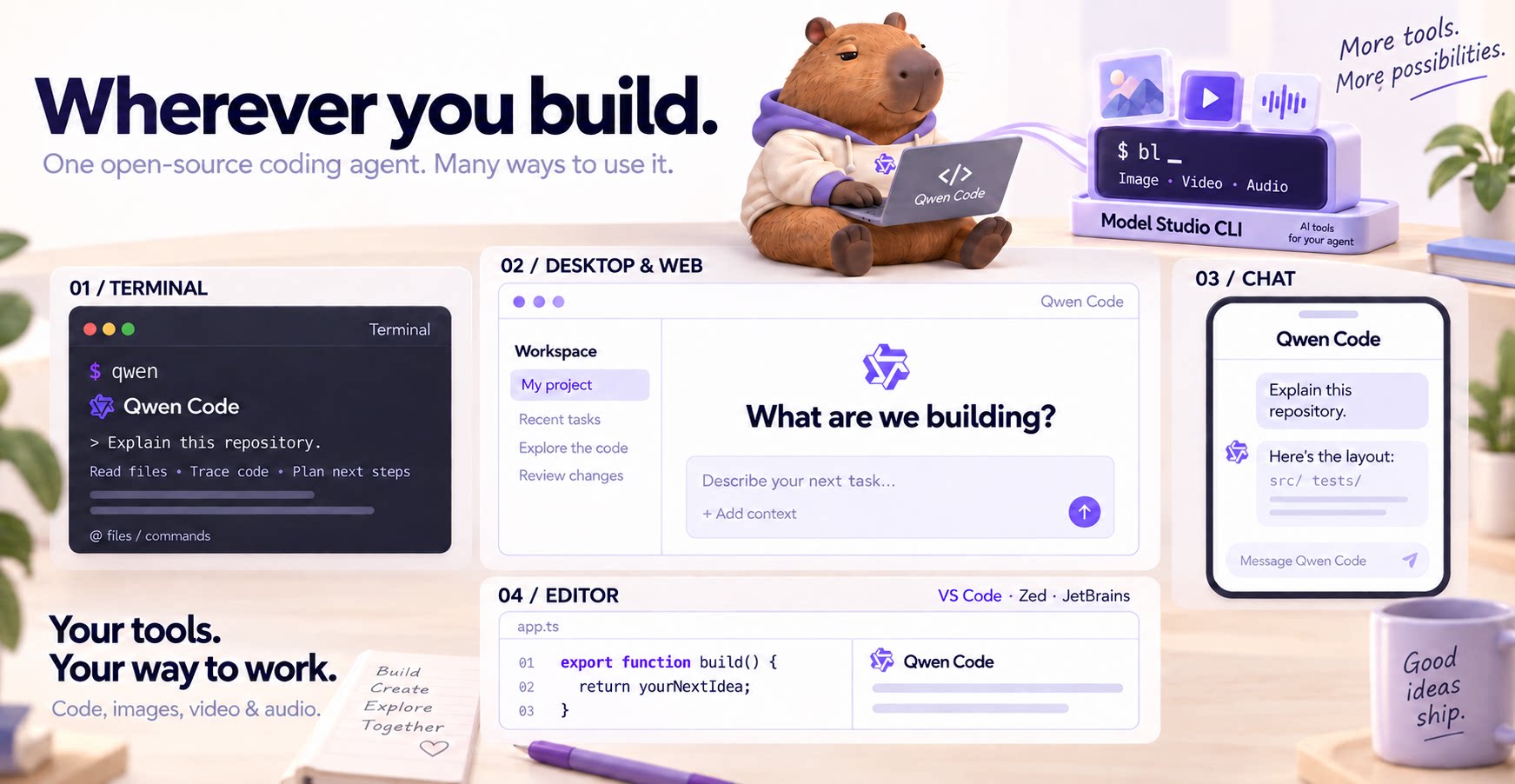
Why Qwen Code?
- Agentic out of the box — Auto-Memory, Auto-Skills, SubAgents, Agent Teams, and MCP. Dynamic workflows, zero setup.
- Open-source, inside and out — The framework and the Qwen models are open-source. They evolve together. No vendor lock-in.
- Multi-protocol — Supports OpenAI, Anthropic, Gemini, and Qwen APIs. Any third-party provider or local model (Ollama / vLLM). Switch at runtime.
- Beyond the terminal — IDE plugins, Desktop app, Web UI, SDKs, and chat integrations (Telegram / DingTalk / WeChat / Feishu).
[!TIP] Qwen Code is actively iterating on itself — using its own agent and models to file issues, submit PRs, review code, and run tests. Powered by the community, driven by AI.
Installation
Linux / macOS:
curl -fsSL https://qwen-code-assets.oss-cn-hangzhou.aliyuncs.com/installation/install-qwen-standalone.sh | bash
Windows:
irm https://qwen-code-assets.oss-cn-hangzhou.aliyuncs.com/installation/install-qwen-standalone.ps1 | iex
Restart your terminal after installation to ensure environment variables take effect.
NPM (requires Node.js 22+):
npm install -g @qwen-code/qwen-code@latest
Homebrew (macOS / Linux):
brew install qwen-code
Quick Start
Open a terminal in your project and start Qwen Code:
cd /path/to/your-project
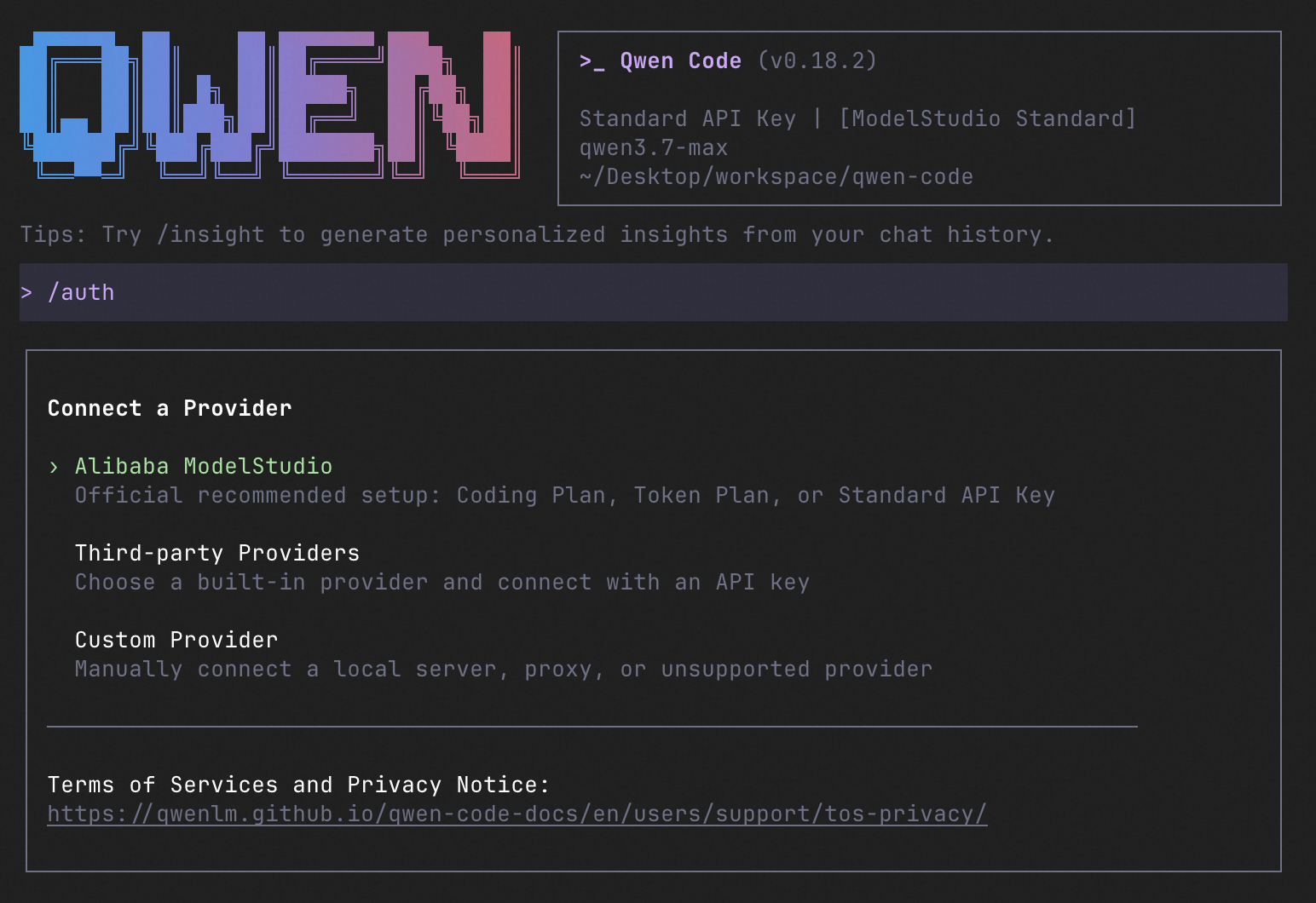
qwen
Inside the session, run /auth and choose Qwen Account with Subscription to sign in with your Plus or Pro subscription, or configure a provider with an API key. Then try:
Explain this repository and show me where to start.
See the Authentication Guide and Settings Reference for detailed setup.
How to Use Qwen Code
Choose the interface that fits your workflow:
| Interface | Get started |
|---|---|
| Terminal | Run qwen in your project — see Quick Start. |
| Desktop | Download Qwen Code Desktop for macOS, Windows, and Linux. |
| Web | Run qwen serve --open to open the Web UI in your browser. (experimental) |
| Editor | Set up VS Code, Zed, or JetBrains. |
| Chat | Connect Telegram, DingTalk, WeChat, or Feishu, then run qwen channel start. |
For automation and custom integrations:
- Headless — Run
qwen -p "..."in scripts, CI/CD, or batch jobs. - SDKs — Build with TypeScript, Python, or Java.
- Daemon — Run
qwen serveto connect clients over HTTP + SSE (ACP). (experimental) Daemon guide. - Computer Use — Set up native MCP tools or Node REPL + SDK in Qwen Code, Claude Code, or Codex.
import asyncio

from qwen_code_sdk import is_sdk_result_message, query


async def main() -> None:
    result = query(
        "Summarize the repository layout.",
        {
            "cwd": "/path/to/project",
            "path_to_qwen_executable": "qwen",
        },
    )

    async for message in result:
        if is_sdk_result_message(message):
            print(message["result"])


asyncio.run(main())
Daemon Mode
Run Qwen Code as a long-lived service when you want browser, editor, SDK, and automation clients to share agent sessions without each starting a separate process. The daemon provides the built-in Web Shell and an HTTP + SSE API, supports multiple workspaces, and lets clients reconnect to active sessions.
Start it in the foreground and open the Web Shell:
qwen serve --open
The default address is http://127.0.0.1:4170. To run and manage it in the background instead:
qwen daemon start
qwen daemon status
qwen daemon logs -f
qwen daemon stop
By default, the daemon listens on loopback without bearer authentication; any local process that can reach it can use the full API, including code execution. On shared or untrusted hosts, set QWEN_SERVER_TOKEN and use --require-auth. See the Daemon guide for workspaces, authentication, remote access, and the API.
Capabilities
If you know Claude Code, you already know Qwen Code — and then some. We've put significant effort into bringing Qwen Code to feature parity with Claude Code, improving both breadth and reliability across the board.
| Feature | Qwen Code | Claude Code |
|---|---|---|
| SubAgents, Agent Teams, Dynamic Workflows | ✓ | ✓ |
| Auto-Memory, Auto-Skills, Hooks | ✓ | ✓ |
| Built-in Skills (/review, /batch, /loop, /bugfix…) | ✓ | ✓ |
| MCP, Plan Mode, LSP Integration | ✓ | ✓ |
| Auto Mode, Sandbox, Git Worktrees | ✓ | ✓ |
| Computer Use (desktop automation) | ✓ | ✓ |
| IDE Plugins (VS Code / JetBrains / Zed) | ✓ | ✓ |
| SDK | ✓ | ✓ |
| Headless Mode, Session Management | ✓ | ✓ |
| Open-source — model and framework | ✓ | — |
| Multi-protocol (OpenAI / Anthropic / Gemini / Qwen + any provider) | ✓ | — |
| Agent Arena (multi-model head-to-head on same task) | ✓ | — |
Daemon Mode — qwen serve (multi-client shared agent) | ✓ | — |
| IM Channels (Telegram / DingTalk / WeChat / Feishu) | ✓ | — |
Qwen Code Evaluation
On SWE-bench Verified, seven Qwen Code versions scored 76.40%–77.80% on average using the same Qwen 3.7 Max model (500 tasks, three trials per version).

Full results and evaluation configuration →
Ecosystem
-
Qwen Code Desktop — Official desktop app for macOS, Windows, and Linux
-
AionUi — A modern GUI for command-line AI tools including Qwen Code
-
Gemini CLI Desktop — A cross-platform desktop/web/mobile UI for Qwen Code
-
qwen-audio-agent — Realtime full-duplex voice frontend for Qwen Code over ACP — talk hands-free with barge-in and a local wake word
-
🦞 Qwen Code Claw — Let other agents (Claude, Codex, etc.) delegate coding tasks to Qwen Code via ACP. Paste this prompt into your agent:
Use Qwen Code as a coding agent. First, fetch and read this skill reference:
https://raw.githubusercontent.com/QwenLM/qwen-code/refs/heads/main/.qwen/skills/qwen-code-claw/SKILL.md
Then follow the instructions inside to install, authenticate, and use Qwen Code via acpx for all coding tasks.
- Aliyun Model Studio CLI — Official CLI for Aliyun's AI platform (
bailian-cli). Extends Qwen Code with image/video generation, knowledge retrieval, app orchestration, and model deployment
Privacy
See the Terms of Service and Privacy Notice, including Chrome extension and Browser Use data handling.
Contributing
Contributions are welcome! See CONTRIBUTING.md for guidelines.
Acknowledgments
This project was originally based on Google Gemini CLI v0.8.2. We gratefully acknowledge the Gemini CLI team's excellent work. Starting from Qwen Code v0.1, we stopped syncing with upstream and began independent development as a multi-protocol, multi-platform agent framework with deep integrations for Qwen models and beyond.
claude-code
anthropics·TypeScript
终端里的智能编码助手,能理解你的代码库,用自然语言帮你执行日常任务、解释复杂代码、处理 git 工作流,让写代码更快。
编码助手+4编码 Agent
155154+32725kv2.1.3212026-11-10 08:39 UTC
cc-switch
farion1231·Rust
跨平台桌面客户端,把 Claude Code、Codex、OpenCode、DeepSeek Harness 等多个 AI 编程助手集中到一个界面里统一管理和切换,省去来回折腾配置。
AI 编程助手+4编码 Agent
153244+78810kv4.0.282026-11-10 02:19 UTC
caveman
JuliusBrussee·Go
给编码 Agent 用的代理和技能,让模型用「原始人式」极简表达回答,砍掉约 65% 的 token 消耗。
token 压缩+4编码 Agent
118770+7196.9kv4.1.02026-11-09 01:48 UTC

OpenHands
OpenHands·TypeScript
一个能自主写代码、改 bug、跑命令的 AI 开发代理,把大模型接入真实开发环境,让编码任务从对话直接落到执行。
编码代理+4编码 Agent
93107+25412kv1.37.02026-11-10 10:48 UTC