目前仅 Debian 有打包支持,其他发行版需手动装依赖;需使用 AwesomeWM 的 git 版本而非发行版自带版本;安装脚本已不再提供,需按通用说明手动配置
在 releases 页面下载最新版本(当前 0.3.0-1 仅支持 Debian);其他发行版需自行安装 AwesomeWM git 版及 DEBIAN/control 中 Depends 行对应的依赖包 硬件要求按 README 说明
README 未说明
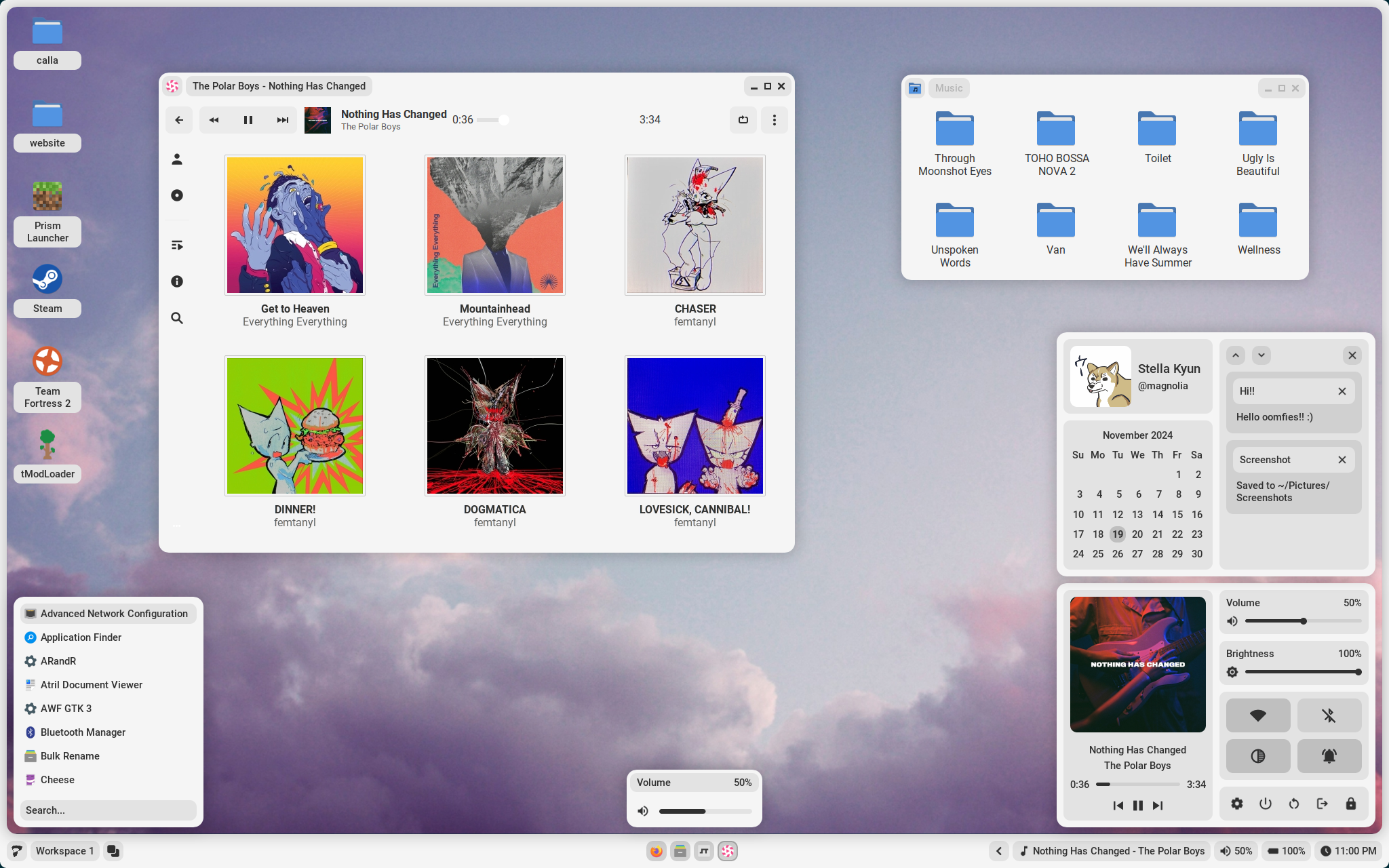
基于 AwesomeWM 的 Linux 桌面环境,带图形设置面板,免手改配置文件
基于 AwesomeWM 的 Linux 桌面环境配置,用 Lua 编写,开箱即用地提供窗口管理、状态栏和主题,省去从零搭建 dotfiles 的麻烦。
核心能力
- 基于 AwesomeWM 构建的完整桌面环境
- 内置设置应用,可图形化配置终端、字体、壁纸等
- 支持主题配色方案与 picom 合成器阴影设置
- 提供启动器、标签预览、音量亮度弹窗与锁屏
- 截图、电池、关机重启命令均可在设置中指定
容易踩的坑
内容由模型根据 README 生成,可能不完整或不准确,以官方文档为准。看原文 README
- v0.3.0-4Release v0.3.0最新正式版2025-01-04 · 2025-01-04 22:38 UTC
Here lies the first package release of Calla, exclusively for Debian. More distros may be supported in the future. To install, download the deb packages and run the following, changing paths according to your system:
sudo apt install /path/to/liblua-pam.deb
sudo apt install /path/to/awesome-git.deb
sudo apt install /path/to/calla.deb
New features
- Control center (contains):
- Music player with wide support due to playerctl backend
- Volume and brightness sliders
- Toggles for wifi, bluetooth, compositing, and notifications
- Options for screen locking, powering off, exiting session, etc.
- Profile with pretty user name, hostname, and profile picture
- Calendar
- Notification center
Changes
- Updated padding and margins in many areas
- Moved panel widgets for better balance and cohesion
- Removed wallpaper from preview widget due to performance issues
- Moved from using an icon font to svg's
- Probably more that I've forgotten!
- Control center (contains):
用户点评
登录用户的真实使用记录,可按版本和硬件筛选共 0 条
还没有人点评。第一个说出真实体验的人最有价值。

Install
Read Before Installing
In my previous work, I have provided scripts to make it much easier for the average user to install. However, I have found that these scripts are a massive pain to maintain for a variety of distributions, so this time I have provided universal instructions instead. These instructions have been written based on my Debian installation, so you may find that you have additional steps. If you have any questions, see contact.
Under Construction
Installation instructions are currently being revised as Calla is packaged for major distros. As of version 0.3.0-1, only Debian is supported. If you are attempting to install Calla on Debian, find the newest release in the releases tab. If you are attempting to install on other distros, make sure you have the following installed:
- AwesomeWM git
- Your distribution's package equivalents for line 4 of
DEBIAN/control(the line that starts withDepends:)
Usage
Calla contains a settings app to configure itself without editing any files. It can be opened through the settings icon in the control center, or by pressing Mod+Shift+C.
General
- Terminal - The terminal to run on
Mod+Enter - Shutdown/Reboot - The commands to use to shutdown and reboot the system
- Fallback Password - The password Calla will use if it cannot use your user's password
- Font(s) - Fonts used throughout the desktop environment
- Battery - The name of your system's battery (found in
/sys/class/power_supply/ - Wallpaper - If you would like to overwrite the theme's default wallpaper
- Screenshot Directory - The directory that screenshots are saved to
Theme
- Color Scheme - The theme Calla will use
- Colors - The colors the theme will use, in base8
- Compositor Settings - Settings for the shadow picom sets
- Gui/Icon Theme - The names of the gui and icon themes the theme should use
Gallery
Apps

Launcher

Tag Preview

Volume/Brightness Popup

Lock Screen

Credit
Thanks
- Ardox for refactoring and adding proper packaging for Arch.
- Sammy for help understanding and adding live reloading.
- Crylia for massive amounts of help learning awesomewm.
- Jimmy and Petrolblue for help with color schemes and lots of support.
- And the support of many more!
Historical Contributions
- AloneERO for help adding support for Void, Fedora, OpenSUSE, and Alpine!
- Frankfut for help adding support for Void and lots of help with debugging.
- Qwickdom for help adding support for Arch.
- Reverse for help adding support for Debian.
- Alyssa for help adding support for Gentoo.
References
Projects
Contact
You can find my contact information on my website. I also have a discord server with help available and updates for when new features are added.
Stars

ohmyzsh
ohmyzsh·Shell
一套社区维护的 zsh 配置管理框架,内置 300+ 插件和 140+ 主题,帮你快速搭好顺手的终端环境并自动更新。
zsh 配置+4桌面美化 / 主题
190428+9227k2026-11-09 12:36 UTC
warp
warpdotdev·Rust
基于 Rust 打造的智能体开发环境,从终端演化而来,把 AI 代理能力直接融入命令行,让写代码、跑命令和调试更顺手。
终端模拟器+4桌面美化 / 主题
65960+595.8kv0.2026.06.09.19.54.dev_002026-11-10 17:13 UTC
NvChad
NvChad·Lua
基于 Lua 的 Neovim 配置框架,开箱即用,自带合理默认设置和漂亮界面,省去从零折腾配置的麻烦。
Neovim 配置+3桌面美化 / 主题
28541+92.2kv2.52026-10-24 22:01 UTC

.tmux
gpakosz·Shell
一套开箱即用的 tmux 配置,自带主题、状态栏和常用快捷键,省去自己写 .tmux.conf 的麻烦,让终端多窗口操作更顺手。
tmux 配置+4桌面美化 / 主题
25471+33.6k2026-10-21 15:47 UTC