默认开发服务器监听 http://localhost:3141,需确认端口未被占用;示例用 openai("gpt-4o-mini"),需自备对应厂商 API Key;持久记忆需额外引入 @voltagent/libsql 并指定数据库文件路径
voltagent
VoltAgentMIT活跃维护基于 TypeScript 的开源 AI Agent 框架与工程平台,帮开发者快速搭建、编排和观测 LLM 智能体应用。
AI Agent Engineering Platform built on an Open Source TypeScript AI Agent Framework
@voltagent/[email protected]发布于 2026-11-04 16:38 UTC10,937star +6 / 7 天1,196fork同步于 2026-11-10 05:29 UTC
npm create voltagent-app@latest
npm run dev 硬件要求按 README 说明
README 未说明
基于 TypeScript 的开源 AI Agent 框架,带可观测与运维控制台,帮你把 Agent 从代码写到上线
基于 TypeScript 的开源 AI Agent 框架与工程平台,帮开发者快速搭建、编排和观测 LLM 智能体应用。
核心能力
- 用 @voltagent/core 统一定义 Agent 的角色、工具、记忆与模型
- 声明式 Workflow 引擎支持挂起/恢复的人机协同流程
- Supervisor 调度多个子 Agent 分工协作
- Zod 类型化工具注册表并可直接接入 MCP 服务器
- 切换 OpenAI、Anthropic、Google 等模型只改配置不改逻辑
容易踩的坑
内容由模型根据 README 生成,可能不完整或不准确,以官方文档为准。看原文 README
Patch Changes
-
#1481
e481624Thanks @Arnavkar! - fix(core): upgrade the Amazon Bedrock and Google Vertex providers to their AI SDK v6 releases@ai-sdk/amazon-bedrockand@ai-sdk/google-vertexmove from3.xto^4.0.0. These upgrades move both providers from@ai-sdk/provider-utils@3to@ai-sdk/provider-utils@4, aligning them with core's AI SDK v6 dependencies.Downstream impact, only for
amazon-bedrock/*andgoogle-vertex/*models:- For Gemini models, if
GOOGLE_VERTEX_API_KEYis set, Vertex now uses express mode and ignoresGOOGLE_VERTEX_PROJECT,GOOGLE_VERTEX_LOCATIONandGOOGLE_APPLICATION_CREDENTIALS. Unset it if you rely on project credentials. - Bedrock clamps a
temperaturebelow0to0and above1to1, returning a warning in either case.
Known issue: Ollama remains on
[email protected]. Its upgrade is deferred until the upstream streamed-error-handling bug is fixed. We plan to bump it in a follow-up PR. - For Gemini models, if
-
- @voltagent/[email protected]2026-09-28 · 2026-09-28 02:04 UTC
查看更新说明
Minor Changes
- #1423
316538aThanks @jiangjiang248! - Allow custom workspace sandboxes to receive the original execute_command command and args by disabling toolkit command normalization. Fixes #1422.
- #1423
- @voltagent/[email protected]2026-08-27 · 2026-08-27 15:42 UTC
查看更新说明
Patch Changes
- #1350
80827c3Thanks @nuthalapativarun! - Add README documentation
- #1350
- @voltagent/[email protected]2026-08-27 · 2026-08-27 15:42 UTC
查看更新说明
Minor Changes
9aedd49Thanks @omeraplak! - Add type-safe MCP annotations and metadata to tools and forward them through the MCP server adapter.
- @voltagent/[email protected]2026-08-27 · 2026-08-27 15:42 UTC
查看更新说明
Patch Changes
- #1349
1c98550Thanks @nuthalapativarun! - Add README documentation
- #1349
用户点评
登录用户的真实使用记录,可按版本和硬件筛选共 0 条
还没有人点评。第一个说出真实体验的人最有价值。



VoltAgent is an end-to-end AI Agent Engineering Platform that consists of two main parts:
- Open-Source TypeScript Framework – Memory, RAG, Guardrails, Tools, MCP, Voice, Workflow, and more.
- VoltOps Console
CloudSelf-Hosted– Observability, Automation, Deployment, Evals, Guardrails, Prompts, and more.
Build agents with full code control and ship them with production-ready visibility and operations.
With the open-source framework, you can build intelligent agents with memory, tools, and multi-step workflows while connecting to any AI provider. Create sophisticated multi-agent systems where specialized agents work together under supervisor coordination.
- Core Runtime (
@voltagent/core): Define agents with typed roles, tools, memory, and model providers in one place so everything stays organized. - Workflow Engine: Describe multi-step automations declaratively rather than stitching together custom control flow.
- Supervisors & Sub-Agents: Run teams of specialized agents under a supervisor runtime that routes tasks and keeps them in sync.
- Tool Registry & MCP: Ship Zod-typed tools with lifecycle hooks and cancellation, and connect to Model Context Protocol servers without extra glue code.
- LLM Compatibility: Swap between OpenAI, Anthropic, Google, or other providers by changing config, not rewriting agent logic.
- Memory: Attach durable memory adapters so agents remember important context across runs.
- Resumable Streaming: Let clients reconnect to in-flight streams after refresh and continue receiving the same response.
- Retrieval & RAG: Plug in retriever agents to pull facts from your data sources and ground responses (RAG) before the model answers.
- VoltAgent Knowledge Base: Use the managed RAG service for document ingestion, chunking, embeddings, and search.
- Voice: Add text-to-speech and speech-to-text capabilities with OpenAI, ElevenLabs, or custom voice providers.
- Guardrails: Intercept and validate agent input or output at runtime to enforce content policies and safety rules.
- Evals: Run agent eval suites alongside your workflows to measure and improve agent behavior.
MCP Server (@voltagent/mcp-docs-server)
You can use the MCP server @voltagent/mcp-docs-server to teach your LLM how to use VoltAgent for AI-powered coding assistants like Claude, Cursor, or Windsurf. This allows AI assistants to access VoltAgent documentation, examples, and changelogs directly while you code.
📖 How to setup MCP docs server
💛 Sponsors
| TestMu AI (formerly LambdaTest) is an AI-native testing cloud platform built for modern engineering teams. Covering everything from autonomous test creation and fast execution to testing AI agents, chatbots and voice assistants. |
⚡ Quick Start
Create a new VoltAgent project in seconds using the create-voltagent-app CLI tool:
npm create voltagent-app@latest
This command guides you through setup.
You'll see the starter code in src/index.ts, which now registers both an agent and a comprehensive workflow example found in src/workflows/index.ts.
import { VoltAgent, Agent, Memory } from "@voltagent/core";
import { LibSQLMemoryAdapter } from "@voltagent/libsql";
import { createPinoLogger } from "@voltagent/logger";
import { honoServer } from "@voltagent/server-hono";
import { openai } from "@ai-sdk/openai";
import { expenseApprovalWorkflow } from "./workflows";
import { weatherTool } from "./tools";

// Create a logger instance
const logger = createPinoLogger({
  name: "my-agent-app",
  level: "info",
});

// Optional persistent memory (remove to use default in-memory)
const memory = new Memory({
  storage: new LibSQLMemoryAdapter({ url: "file:./.voltagent/memory.db" }),
});

// A simple, general-purpose agent for the project.
const agent = new Agent({
  name: "my-agent",
  instructions: "A helpful assistant that can check weather and help with various tasks",
  model: openai("gpt-4o-mini"),
  tools: [weatherTool],
  memory,
});

// Initialize VoltAgent with your agent(s) and workflow(s)
new VoltAgent({
  agents: {
    agent,
  },
  workflows: {
    expenseApprovalWorkflow,
  },
  server: honoServer(),
  logger,
});
Afterwards, navigate to your project and run:
npm run dev
When you run the dev command, tsx will compile and run your code. You should see the VoltAgent server startup message in your terminal:
══════════════════════════════════════════════════
VOLTAGENT SERVER STARTED SUCCESSFULLY
══════════════════════════════════════════════════
✓ HTTP Server: http://localhost:3141

Test your agents with VoltOps Console: https://console.voltagent.dev
══════════════════════════════════════════════════
Your agent is now running! To interact with it:
- Open the Console: Click the VoltOps LLM Observability Platform link in your terminal output (or copy-paste it into your browser).
- Find Your Agent: On the VoltOps LLM Observability Platform page, you should see your agent listed (e.g., "my-agent").
- Open Agent Details: Click on your agent's name.
- Start Chatting: On the agent detail page, click the chat icon in the bottom right corner to open the chat window.
- Send a Message: Type a message like "Hello" and press Enter.

Running Your First Workflow
Your new project also includes a powerful workflow engine.
The expense approval workflow demonstrates human-in-the-loop automation with suspend/resume capabilities:
import { createWorkflowChain } from "@voltagent/core";
import { z } from "zod";

export const expenseApprovalWorkflow = createWorkflowChain({
  id: "expense-approval",
  name: "Expense Approval Workflow",
  purpose: "Process expense reports with manager approval for high amounts",

  input: z.object({
    employeeId: z.string(),
    amount: z.number(),
    category: z.string(),
    description: z.string(),
  }),
  result: z.object({
    status: z.enum(["approved", "rejected"]),
    approvedBy: z.string(),
    finalAmount: z.number(),
  }),
})
  // Step 1: Validate expense and check if approval needed
  .andThen({
    id: "check-approval-needed",
    resumeSchema: z.object({
      approved: z.boolean(),
      managerId: z.string(),
      comments: z.string().optional(),
      adjustedAmount: z.number().optional(),
    }),
    execute: async ({ data, suspend, resumeData }) => {
      // If we're resuming with manager's decision
      if (resumeData) {
        return {
          ...data,
          approved: resumeData.approved,
          approvedBy: resumeData.managerId,
          finalAmount: resumeData.adjustedAmount || data.amount,
        };
      }

      // Check if manager approval is needed (expenses over $500)
      if (data.amount > 500) {
        await suspend("Manager approval required", {
          employeeId: data.employeeId,
          requestedAmount: data.amount,
        });
      }

      // Auto-approve small expenses
      return {
        ...data,
        approved: true,
        approvedBy: "system",
        finalAmount: data.amount,
      };
    },
  })
  // Step 2: Process the final decision
  .andThen({
    id: "process-decision",
    execute: async ({ data }) => {
      return {
        status: data.approved ? "approved" : "rejected",
        approvedBy: data.approvedBy,
        finalAmount: data.finalAmount,
      };
    },
  });
You can test the pre-built expenseApprovalWorkflow directly from the VoltOps console:
- Go to the Workflows Page: After starting your server, go directly to the Workflows page.
- Select Your Project: Use the project selector to choose your project (e.g., "my-agent-app").
- Find and Run: You will see "Expense Approval Workflow" listed. Click it, then click the "Run" button.
- Provide Input: The workflow expects a JSON object with expense details. Try a small expense for automatic approval:
{ "employeeId": "EMP-123", "amount": 250, "category": "office-supplies", "description": "New laptop mouse and keyboard" } - View the Results: After execution, you can inspect the detailed logs for each step and see the final output directly in the console.
Examples
For more examples, visit our examples repository.
- Airtable Agent - React to new records and write updates back into Airtable with VoltOps actions.
- Slack Agent - Respond to channel messages and reply via VoltOps Slack actions.
- ChatGPT App With VoltAgent - Deploy VoltAgent over MCP and connect to ChatGPT Apps.
- WhatsApp Order Agent - Build a WhatsApp chatbot that handles food orders through natural conversation. (Source)
- YouTube to Blog Agent - Convert YouTube videos into Markdown blog posts using a supervisor agent with MCP tools. (Source)
- AI Ads Generator Agent - Generate Instagram ads using BrowserBase Stagehand and Google Gemini AI. (Source)
- AI Recipe Generator Agent - Create personalized cooking suggestions based on ingredients and preferences. (Source | Video)
- AI Research Assistant Agent - Multi-agent research workflow for generating comprehensive reports. (Source | Video)
VoltOps Console is the platform side of VoltAgent, providing observability, automation, and deployment so you can monitor and debug agents in production with real-time execution traces, performance metrics, and visual dashboards.
Observability & Tracing
Deep dive into agent execution flow with detailed traces and performance metrics.
Dashboard
Get a comprehensive overview of all your agents, workflows, and system performance metrics.
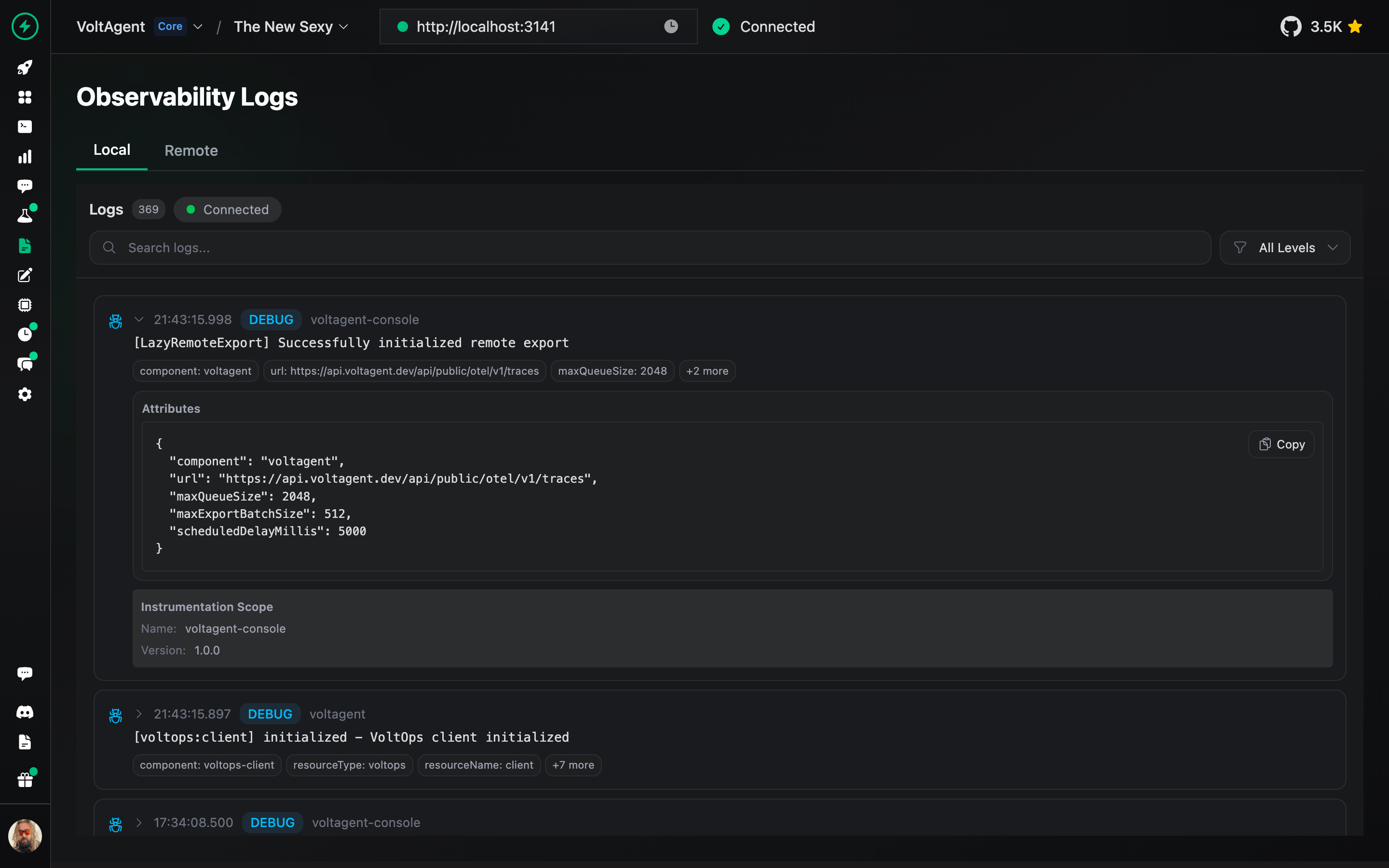
Logs
Track detailed execution logs for every agent interaction and workflow step.
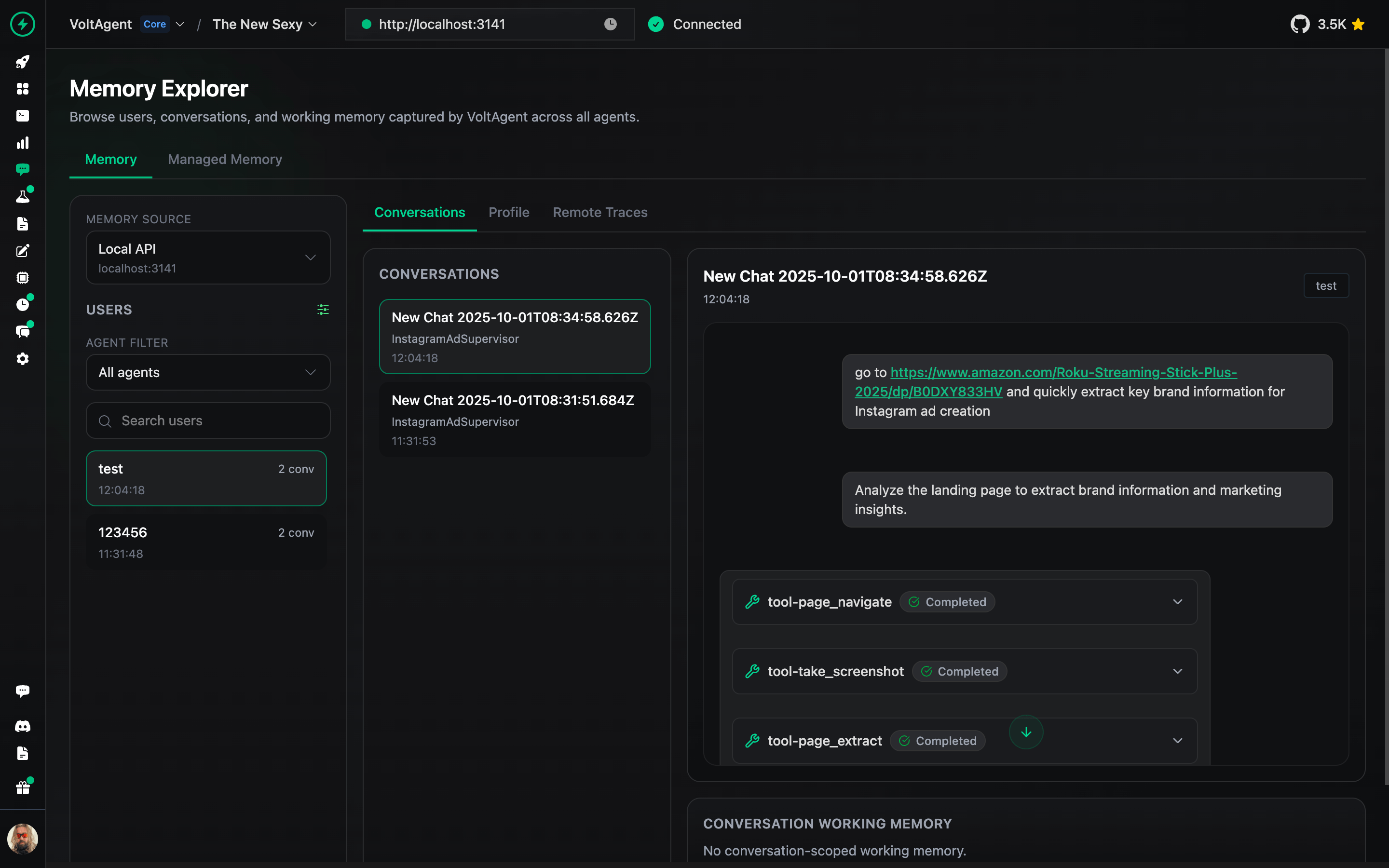
Memory Management
Inspect and manage agent memory, context, and conversation history.
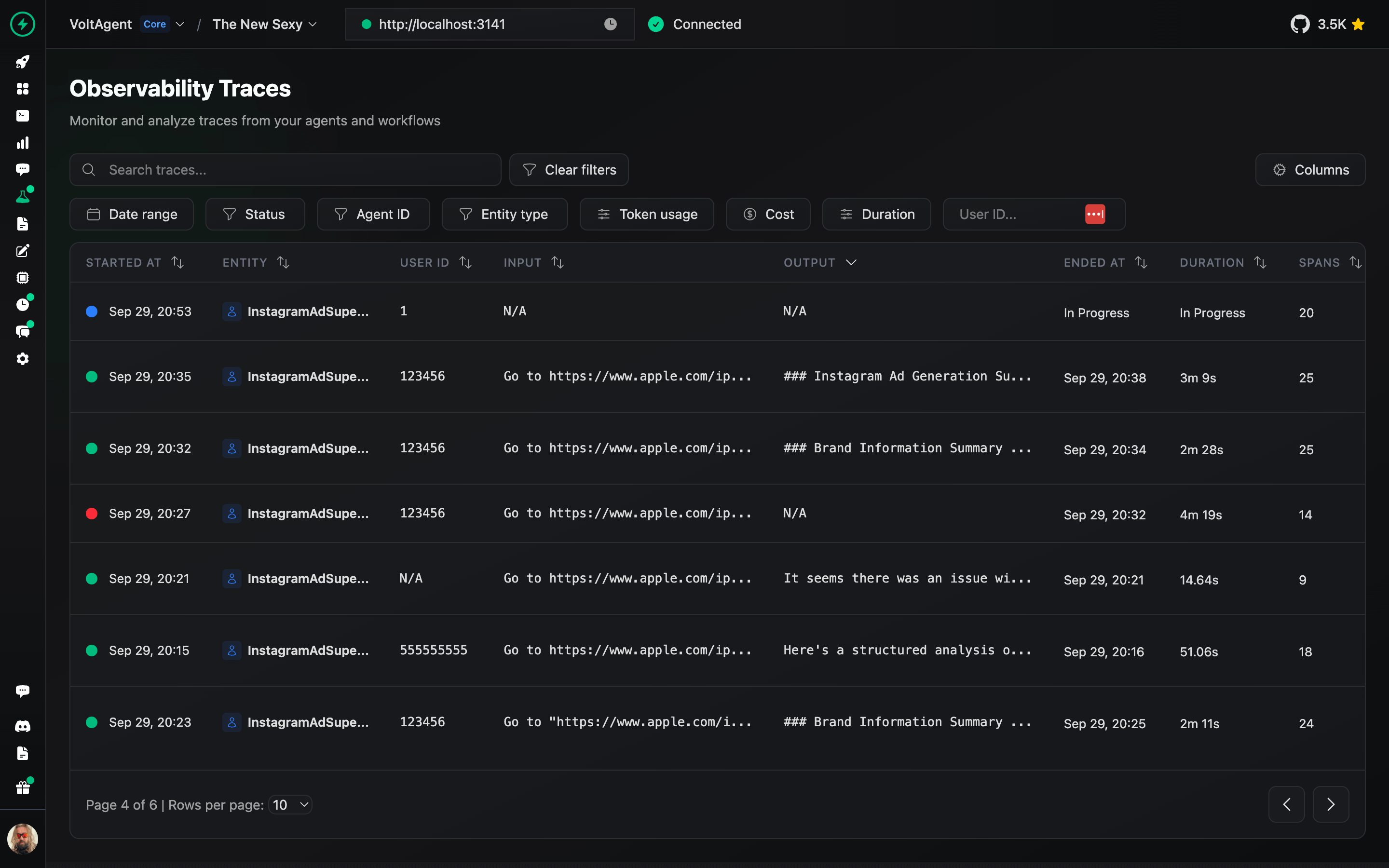
Traces
Analyze complete execution traces to understand agent behavior and optimize performance.
Prompt Builder
Design, test, and refine prompts directly in the console.
Deployment
Deploy your agents to production with one-click GitHub integration and managed infrastructure.
📖 VoltOps Deploy Documentation
Triggers & Actions
Automate agent workflows with webhooks, schedules, and custom triggers to react to external events.
Monitoring
Monitor agent health, performance metrics, and resource usage across your entire system.
Guardrails
Set up safety boundaries and content filters to ensure agents operate within defined parameters.
Evals
Run evaluation suites to test agent behavior, accuracy, and performance against benchmarks.
RAG (Knowledge Base)
Connect your agents to knowledge sources with built-in retrieval-augmented generation capabilities.
Learning VoltAgent
- Start with interactive tutorial to learn the fundamentals building AI Agents.
- Documentation: Dive into guides, concepts, and tutorials.
- Examples: Explore practical implementations.
- Blog: Read more about technical insights, and best practices.
Contribution
We welcome contributions! Please refer to our contribution guidelines. Join our Discord server for questions and discussions.
Contributor ♥️ Thanks
Big thanks to everyone who's been part of the VoltAgent journey, whether you've built a plugin, opened an issue, dropped a pull request, or just helped someone out on Discord or GitHub Discussions.
VoltAgent is a community effort, and it keeps getting better because of people like you.
License
Licensed under the MIT License, Copyright © 2026-present VoltAgent.