修改 better-comments.tags 后需重启 VS Code 才生效;标签必须是注释分隔符后的首个非空文本,块注释中须位于行首;纯文本文件默认不识别标签,需开启 better-comments.highlightPlainText
better-comments
aaron-bondMIT活跃维护给 VS Code 里的注释加上颜色和样式标记,让 TODO、FIXME、警告等关键注释一眼就能看见,方便快速定位代码里的待办和问题。
v3.2.0发布于 2026-11-03 14:45 UTC957star +1 / 7 天190fork同步于 2026-11-10 17:54 UTC
在 VS Code 扩展市场搜索 Better Comments 并安装 硬件要求按 README 说明
README 未说明,这是 VS Code 扩展,无需 GPU 或显存
VS Code 扩展,用标签给注释分类着色,让告警、疑问和待办一眼可辨
给 VS Code 里的注释加上颜色和样式标记,让 TODO、FIXME、警告等关键注释一眼就能看见,方便快速定位代码里的待办和问题。
核心能力
- 按 ! ? todo * 等标签给注释上色分类
- 支持自定义标签的颜色、背景色、粗体、斜体、下划线和删除线
- 可把注释掉的代码加删除线,提示不该保留
- 可配置是否对多行注释和纯文本文件应用标签样式
- 覆盖 C、Python、Go、Rust、TypeScript 等大量语言
容易踩的坑
内容由模型根据 README 生成,可能不完整或不准确,以官方文档为准。看原文 README
- v3.2.03.2.0最新正式版2026-11-03 · 2026-11-03 14:45 UTC
Features
- Tag settings now have a schema, so
settings.jsonoffers completion, descriptions and warnings for each tag's fields, and a colour picker for hex colours (#567). A tag with notag, or an empty one, is underlined - Theme colours such as
{ "id": "editorError.foreground" }are now documented and supported for a tag'scolorandbackgroundColor - The README now explains where a tag goes: first after the delimiter in a line comment, or at the start of a line inside a block comment (#414)
Bug Fixes
- Comments on the first line of a file are now highlighted in every language, including Python and notebook cells, and a shebang (
#!/bin/bash) is never highlighted as a comment. Closes #141, #166, #205, #214, #246, #322, #364, #370, #407, #419, #461, #514, #531, #542 and #570 - Fixing tags being matched anywhere in a line in Makefiles on recent VS Code versions, such as
//inhttp://(#566) - Better Comments no longer fails to start when a tag in the settings has no
tag, or another extension's language list is malformed. Invalid entries are skipped. Closes #552
Install from the Visual Studio Marketplace, or download the VSIX below.
- Tag settings now have a schema, so
用户点评
登录用户的真实使用记录,可按版本和硬件筛选共 0 条
还没有人点评。第一个说出真实体验的人最有价值。
Better Comments
The Better Comments extension will help you create more human-friendly comments in your code.
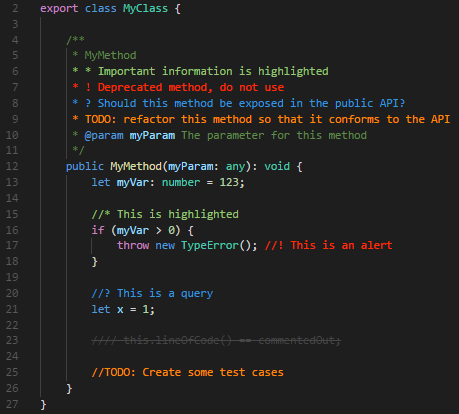
With this extension, you will be able to categorise your annotations into:
- Alerts
- Queries
- TODOs
- Highlights
- Commented out code can also be styled to make it clear the code shouldn't be there
- Any other comment styles you'd like can be specified in the settings

Configuration
This extension can be configured in User Settings or Workspace settings.
"better-comments.multilineComments": true
This setting will control whether multiline comments are styled using the annotation tags.
When false, multiline comments will be presented without decoration.
"better-comments.highlightPlainText": false
This setting will control whether comments in a plain text file are styled using the annotation tags.
When true, a tag (defaults: ! * ? // todo) is detected in a plain text file if it's the first non-blank character on a line, since plain text has no comment delimiter.
better-comments.tags
The tags are the characters or sequences used to mark a comment for decoration.
In a line comment, a tag must be the first non-blank text after the delimiter, as in // ! alert or # TODO: later. In a block comment, it must start a line inside the block (after the leading * in a /** … */ comment), not follow the opening /* on the same line.
The default 5 can be modified to change the colors, and more can be added. Changes need a restart of VS Code to take effect.
Each tag has these settings:
tag(required): the characters or word, such as!ortodo. Case doesn't matter.colorandbackgroundColor: a hex colour such as#FF2D00, any other CSS colour such astransparentorrgba(255, 0, 0, 0.5), or a colour from your theme, such as{ "id": "editorError.foreground" }. Hex colours get a colour picker insettings.json.strikethrough,underline,boldanditalic:trueorfalse.
A tag without a tag is ignored.
"better-comments.tags": [
  {
    "tag": "!",
    "color": "#FF2D00",
    "strikethrough": false,
    "underline": false,
    "backgroundColor": "transparent",
    "bold": false,
    "italic": false
  },
  {
    "tag": "?",
    "color": "#3498DB",
    "strikethrough": false,
    "underline": false,
    "backgroundColor": "transparent",
    "bold": false,
    "italic": false
  },
  {
    "tag": "//",
    "color": "#474747",
    "strikethrough": true,
    "underline": false,
    "backgroundColor": "transparent",
    "bold": false,
    "italic": false
  },
  {
    "tag": "todo",
    "color": "#FF8C00",
    "strikethrough": false,
    "underline": false,
    "backgroundColor": "transparent",
    "bold": false,
    "italic": false
  },
  {
    "tag": "*",
    "color": "#98C379",
    "strikethrough": false,
    "underline": false,
    "backgroundColor": "transparent",
    "bold": false,
    "italic": false
  }
]
Supported Languages
- Ada
- AL
- Apex
- AsciiDoc
- BrightScript
- C
- C#
- C++
- ColdFusion
- Clojure
- COBOL
- CoffeeScript
- CSS
- Dart
- Dockerfile
- Elixir
- Elm
- Erlang
- F#
- Fortran
- gdscript
- GenStat
- Go
- GraphQL
- Groovy
- Haskell
- Haxe
- HiveQL
- HTML
- Java
- JavaScript
- JavaScript React
- JSON with comments
- Julia
- Kotlin
- LaTex (inlc. Bibtex/Biblatex)
- Less
- Lisp
- Lua
- Makefile
- Markdown
- Nim
- MATLAB
- Objective-C
- Objective-C++
- Pascal
- Perl
- Perl 6
- PHP
- Pig
- PlantUML
- PL/SQL
- PowerShell
- Puppet
- Python
- R
- Racket
- Ruby
- Rust
- SAS
- Sass
- Scala
- SCSS
- ShaderLab
- ShellScript
- SQL
- STATA
- Stylus
- Svelte
- Swift
- Tcl
- Terraform
- Twig
- TypeScript
- TypeScript React
- Verilog
- Visual Basic
- Vue.js
- XML
- YAML
vscode
microsoft·TypeScript
微软开源的跨平台代码编辑器,基于 Electron 和 TypeScript 构建,支持插件扩展、调试和 Git 集成,适合日常开发写代码。
代码编辑器+4编辑器 / IDE
195262+17844k1.145.22026-11-10 17:16 UTC
neovim
neovim·Vim Script
Vim 的分支版本,用 Lua 做配置和插件开发,内置 LSP 与异步 API,让终端编辑器更好扩展、更好用。
文本编辑器+4编辑器 / IDE
103547+857.4kv0.12.62026-11-10 16:22 UTC
zed
zed-industries·Rust
用 Rust 打造的高性能多人协作代码编辑器,由 Atom 和 Tree-sitter 作者开发,主打低延迟编辑与实时协同编码。
代码编辑器+4编辑器 / IDE
94661+80912kv1.27.02026-11-10 16:11 UTC

AFFiNE
toeverything·TypeScript
把文档、白板、表格融为一体的开源知识库,可离线使用、支持多人实时协作,是 Notion 和 Miro 的替代方案。
知识库+4编辑器 / IDE
74421+1345.5kv2026.11.9-canary.9072026-11-10 16:20 UTC