export_presets.cfg 必须提交到版本库且不能写进 .gitignore;导出预设名称要与 CI 脚本中的名称大小写完全一致;Mono/C# 项目需改用 mono-VERSION 镜像标签并调整 Setup 步骤路径;Itch.io 部署需配置 BUTLER_API_KEY 等变量,GitLab 下要关闭 protected 标记
godot-ci
abarichelloMIT活跃维护用 Docker 镜像把 Godot 游戏一键导出,并配好 GitLab CI 和 GitHub Actions 模板,直接发布到 Pages 或 Itch.io。
Docker image to export Godot Engine games. Templates for Gitlab CI and GitHub Actions to deploy to GitLab Pages/GitHub Pages/Itch.io.
4.7.2-stable发布于 2026-08-18 23:46 UTC1,157star +4 / 7 天169fork同步于 2026-11-10 23:51 UTC
docker pull barichello/godot-ci:VERSION 硬件要求按 README 说明
README 未说明硬件要求,仅说明以 Docker 镜像方式运行在 CI 环境中
用 Docker 镜像在 CI 里自动导出 Godot 游戏并部署到 Pages 或 Itch.io
用 Docker 镜像把 Godot 游戏一键导出,并配好 GitLab CI 和 GitHub Actions 模板,直接发布到 Pages 或 Itch.io。
核心能力
- 提供 GitLab CI 与 GitHub Actions 模板任务
- 用 Docker 镜像内置 Godot 导出模板
- 支持导出到 GitHub Pages、GitLab Pages 和 Itch.io
- 通过 Butler 上传并发布到 Itch.io
- Mono/C# 项目可切换到 mono 镜像标签
容易踩的坑
内容由模型根据 README 生成,可能不完整或不准确,以官方文档为准。看原文 README
- 4.7.2-stable最新正式版2026-08-18 · 2026-08-18 23:46 UTC
Godot 4.7.2 is a maintenance release addressing stability and usability issues, and fixing all sorts of bugs. Maintenance releases are compatible with previous releases and are recommended for adoption.
Report bugs on GitHub after checking that they haven't been reported:
- Download (GitHub): Expand Assets below
- 4.7.1-stable2026-07-15 · 2026-07-15 00:49 UTC
查看更新说明
Godot 4.7.1 is a maintenance release addressing stability and usability issues, and fixing all sorts of bugs. Maintenance releases are compatible with previous releases and are recommended for adoption.
Report bugs on GitHub after checking that they haven't been reported:
- Download (GitHub): Expand Assets below
- 4.7-stable2026-06-19 · 2026-06-19 02:16 UTC
查看更新说明
Godot 4.7 is a feature release improving upon the previous version in many aspects, such as usability and performance. Feature releases also contain new features, but preserve compatibility with previous releases.
Report bugs on GitHub after checking that they haven't been reported:
- Download (GitHub): Expand Assets below
- 4.6.3-stable2026-05-21 · 2026-05-21 01:30 UTC
查看更新说明
Godot 4.6.3 is a maintenance release addressing stability and usability issues, and fixing all sorts of bugs. Maintenance releases are compatible with previous releases and are recommended for adoption.
Report bugs on GitHub after checking that they haven't been reported:
- Download (GitHub): Expand Assets below
- 4.6.2-stable2026-04-01 · 2026-04-01 23:56 UTC
查看更新说明
Godot 4.6.2 is a maintenance release addressing stability and usability issues, and fixing all sorts of bugs. Maintenance releases are compatible with previous releases and are recommended for adoption.
Report bugs on GitHub after checking that they haven't been reported:
- Download (GitHub): Expand Assets below
用户点评
登录用户的真实使用记录,可按版本和硬件筛选共 0 条
还没有人点评。第一个说出真实体验的人最有价值。
godot-ci
Docker image to export Godot Engine games and deploy to GitLab/GitHub Pages and Itch.io using GitLab CI and GitHub Actions.
Docker Hub
https://hub.docker.com/r/barichello/godot-ci/
How To Use
.gitlab-ci.yml and .github/workflows/godot-ci.yml are included in this project as reference.
For live projects, examples and tutorials using this template check the list below:
- Video tutorial by Kyle Luce
- Video tutorial series by David Snopek
- Repository examples: test-project | game-off.
- Test deploys using this tool: GitHub Pages | GitLab Pages | Itch.io.
Mono/C#
To build a Godot project with Mono (C#) enabled, you must do two things for each job:
- Change the container's
imagetag frombarichello/godot-ci:VERSIONtobarichello/godot-ci:mono-VERSIONin.gitlab-ci.yml(Gitlab) orgodot-ci.yml(Github). (e.g.barichello/godot-ci:mono-3.2.1). - You will also need to change your "Setup" step's run commands (looks like
run: mv /root/.local ...) from ending with...${GODOT_VERSION}.stableto ending with...${GODOT_VERSION}.stable.mono. You will need to do this for both directories in the command.
mv /root/.local/share/godot/export_templates/${GODOT_VERSION}.stable ~/.local/share/godot/export_templates/${GODOT_VERSION}.stable
becomes:
mv /root/.local/share/godot/export_templates/${GODOT_VERSION}.stable.mono ~/.local/share/godot/export_templates/${GODOT_VERSION}.stable.mono
Android
To build a debug release (debug.keystore), use the android_debug job example in the gitlab-ci.yml file.
If you want to export for Android with your own keystore, you can do this with the following steps:
- Take your generated keystore and convert it to Base64:
Linux & macOS:
base64 release.keystore -w 0Windows:certutil -encodehex -f release.keystore encoded.txt 0x40000001 - Go to GitLab Project > Settings > CI/CD > Variables and copy the Base64-encoded keystore value in a new variable
SECRET_RELEASE_KEYSTORE_BASE64as type variable. - Create a second variable SECRET_RELEASE_KEYSTORE_USER as type variable with the alias of your keystore as value.
- Create a third variable SECRET_RELEASE_KEYSTORE_PASSWORD as type variable with the password of your keystore as value.
- Use the
androidjob example in thegitlab-ci.ymlfile.
GDNative/C++
See this repository for automating GDNative C++ compilation, which is based off this repository.
Modules
You have to compile Godot with the modules included first. See this excellent repository by Calinou for automating Godot builds.
After that, you would use the custom build to export your project as usual. See this guide by Greenfox on how to use a custom Godot build for automated exports.
iOS
Not available yet. Automating Xcode projects is doable but not trivial, and macOS runners only recently became available for GitHub actions, so it will happen eventually.
Platforms
Here's a mapping between each supported CI service, the template jobs and a live example.
| CI | Template | Example |
|---|---|---|
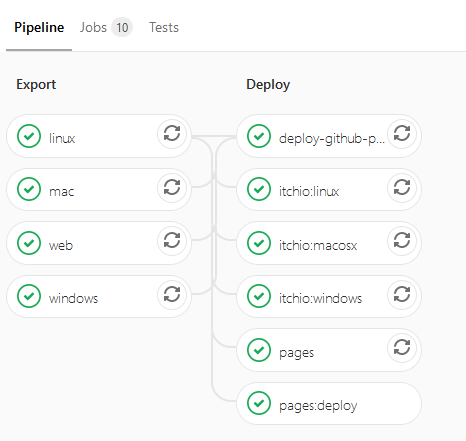
| GitLab CI | Godot Exports / GitHub Pages / GitLab Pages / Itch.io | GitLab CI Pipelines |
| GitHub Actions | Godot Exports | GitHub Actions running |
Environment configuration
First you need to remove unused jobs/stages from the .yml file you are using as a template(.gitlab-ci.yml or .github/workflows/godot-ci.yml).
Then you have to add these environments to a configuration panel depending on the chosen CI and jobs:
- GitHub:
https://github.com/<username>/<project-name>/settings/secrets - GitLab:
https://gitlab.com/<username>/<repo-name>/settings/ci_cd
GitHub Pages
Secrets needed for a GitHub Pages deploy via GitLab CI:
| Variable | Description | Example |
|---|---|---|
| REMOTE_URL | The git remote where the web export will be hosted (in this case GitHub), it should contain your deploy/personal access token | https://<github username>:<deploy token>@github.com/<username>/<repository>.git |
| GIT_EMAIL | Git email of the account that will commit to the gh-pages branch. | [email protected] |
| GIT_USERNAME | Username of the account that will commit to the gh-pages branch. | username |
Others variables are set automatically by the gitlab-runner, see the documentation for predefined variables.
Itch.io
Deployment to Itch.io is done via Butler. Secrets needed for a Itch.io deploy via GitLab CI:
| Variable | Description | Example |
|---|---|---|
| ITCHIO_USERNAME | Your username on Itch.io, as in your personal page will be at https://<username>.itch.io | username |
| ITCHIO_GAME | the name of your game on Itchio, as in your game will be available at https://<username>.itch.io/<game> | game |
| BUTLER_API_KEY | An Itch.io API key is necessary for Butler so that the CI can authenticate on Itch.io on your behalf. Make that API key Masked(GitLab CI) to keep it secret | xxxxxxxxxxxxxxxxxxxxxxxxxxxxxx |
Troubleshoot
Problems while exporting
- Check that the export presets file (
export_presets.cfg) is committed to version control. In other words,export_presets.cfgmust not be in.gitignore.- Make sure you don't accidentally commit Android release keystore or Windows codesigning credentials. These credentials cannot be revoked if they are leaked!
- Check that the export names on
export_presets.cfgmatch the ones used in your CI script (case-sensitive). Export preset names that contain spaces must be written within quotes (single or double). - Check the paths used in your CI script. Some commands may be running in the wrong place if you are keeping the project in a folder (like the
test-projecttemplate) or not.
Authentication errors with Butler
- If using GitLab, check that the 'protected' tag is disabled in the CI/CD variables panel.

act
nektos·Go
在本地直接跑 GitHub Actions 工作流,不用每次改完都推到远端等 CI,调试 workflow 和排查失败步骤快很多。
GitHub Actions+4CI / CD进阶
72634+612.1kv0.2.972026-11-04 16:29 UTC
shannon
KeygraphHQ·TypeScript
Shannon 是一款 AI 渗透测试工具,能分析 Web 应用和 API 的源码、定位攻击面,并在上线前实际执行漏洞利用来验证风险。
渗透测试+4CI / CD进阶
51652+2966.0kv3.5.02026-11-10 04:39 UTC
harness
harness·Go
一套开源的端到端开发者平台,把代码托管、CI/CD 流水线、云端开发环境和制品仓库整合在一起,省去拼装多套工具的麻烦。
CI/CD+4CI / CD进阶
38883+323.5kv2.28.22026-11-10 13:05 UTC
gitleaks
gitleaks·Go
扫描 Git 仓库和提交历史,自动找出硬编码的密钥、令牌等敏感信息,帮你在 CI/CD 流程里提前拦截泄露风险。
密钥扫描+4CI / CD进阶
30878+1182.4kv8.30.12026-10-28 04:14 UTC