自定义 ID 有系统最低长度限制:Win10/11 为 6 位、Win7/8 为 7 位、Server 为 8 位,过短会被 RustDesk 拒绝并随机分配;切回 Public 服务器时,含字母的 ID 可能被拒并改成数字 ID;Private 服务器需先配置或导入过才有备份可恢复

RustDesk-ID-Server-Changer
abdullah-erturk活跃维护批量修改 RustDesk 远程桌面客户端 ID 的小工具,解决多台设备 ID 重复或需要固定 ID 的问题。
RustDesk ID Changer
暂无版本258star73fork同步于 2026-11-10 18:03 UTC
下载 https://github.com/abdullah-erturk/RustDesk-ID-Server-Changer/archive/refs/heads/main.zip 后运行脚本 硬件要求按 README 说明
README 未说明;脚本运行在 Windows 上,需已安装 RustDesk(支持便携版),未提及 GPU 或显存要求
用 PowerShell 脚本改 RustDesk 的 ID 和服务器配置,批量部署后 ID 重复的问题一次解决
批量修改 RustDesk 远程桌面客户端 ID 的小工具,解决多台设备 ID 重复或需要固定 ID 的问题。
核心能力
- 按计算机名、9 位随机数或自定义值设置 RustDesk ID
- 切换 Public 与 Private 服务器并备份、恢复自定义配置
- 导入 RustDesk 导出的完整配置串,写入服务与用户两份 config
- 每次改动后用 rustdesk.exe --get-id 校验并写时间戳日志
- 改配置前停掉所有会话的 RustDesk 进程,避免 GUI 覆盖
容易踩的坑
内容由模型根据 README 生成,可能不完整或不准确,以官方文档为准。看原文 README
暂无 release 数据(可能没有发版,或尚未同步)。
用户点评
登录用户的真实使用记录,可按版本和硬件筛选共 0 条
还没有人点评。第一个说出真实体验的人最有价值。
RustDesk ID & Server Changer v4
Download Link:

RustDesk Github: https://github.com/rustdesk/rustdesk
Bu betik ile RustDesk ID bilgilerinizi ve Sunucu yapılandırmalarınızı dilediğiniz gibi değiştirebilirsiniz. Betik, işletim sisteminizin dilini otomatik algılayıp arayüzünü ona göre (Türkçe veya İngilizce) ayarlar, taşınabilir (portable) RustDesk sürümleriyle uyumludur ve kurulum dizinini Windows Kayıt Defteri üzerinden dinamik olarak tespit eder.
Menü açıldığında üst kısımda mevcut ID ve aktif sunucu (Public / Private + adres) anlık olarak gösterilir. Her işlemin ardından değişiklik rustdesk.exe --get-id ile doğrulanır ve yapılan işlemler zaman damgasıyla bir log dosyasına yazılır.
Betiğin sunduğu seçenekler:
1. "RustDesk ID'sini bilgisayar adıyla değiştir" RustDesk ID'si otomatik olarak bilgisayarın adına dönüşür. Özellikle bilgisayar laboratuvarı gibi ortamlarda imaj atıldıktan sonra ID'lerin aynı kalması sorununu çözer. Yeniden başlatma gerekmez. Bilgisayar adı, işletim sisteminin gerektirdiği minimum ID uzunluğundan kısaysa (bkz. 3. seçenek), işlem yapılmadan önce kullanıcı uyarılır.
2. "RustDesk ID'sini 9 haneli rastgele sayılarla değiştir" ID, 9 haneli rastgele bir değere dönüştürülür. Bu seçenek RustDesk'in doğal ID formatıyla birebir uyumlu olduğu için tüm işletim sistemlerinde güvenilir biçimde çalışır. Yeniden başlatma gerekmez.
3. "RustDesk ID'sini belirttiğiniz değere ayarlayın" ID tamamen sizin belirlediğiniz bir değere dönüştürülür. Minimum uzunluk işletim sistemine göre otomatik belirlenir: Windows 10/11 → 6, Windows 7/8.x → 7, Windows Server → 8 karakter. (RustDesk bu alt sınırdan kısa özel ID'leri reddedip rastgele bir ID atar.) Bu seçenek artık tüm Windows sürümlerinde kullanılabilir.
4. "Public Sunucuya Geç (Private Sunucu Bilgisini Temizle)" Aktif özel sunucu yapılandırmanız varsa güvenli biçimde yedekler ve varsayılan Public sunuculara geçer. Zaten Public'teyseniz işlem yapmaz. Not: Mevcut ID harf/özel karakter içeriyorsa, Public sunucunun bu ID'yi kabul etmeyip numerik bir ID atayabileceği konusunda uyarır.
5. "Private Sunucuya Geç (Yedeklenen Private Sunucu Bilgisini Uygula)" Daha önce yedeklenmiş özel sunucu ayarlarınızı bulup geri yükler. Yedek yoksa önce ayarları girmeniz gerektiğini bildirir.
6. "Yeni Private Sunucu Tanımla" Sunucu IP/Host adresini ve Key bilgisini isteyip özel sunucu yapılandırmasını oluşturur.
7. "Tam Yapılandırmayı İçe Aktar (Config String)" RustDesk'in dışa aktardığı tam yapılandırma dizesini (ID/Relay/API sunucu + Key) tek seferde içe aktarır. Dize betik tarafından çözümlenip hem servis hem kullanıcı config dosyasına yazılır.
8. "Kalıcı Şifre Ayarla" RustDesk kalıcı erişim şifresini (en az 6 karakter) ayarlar.
9. "Son ID Değişikliğini Geri Al (Undo)" ID değiştirilmeden önce alınan yedeği kullanarak önceki ID'ye geri döner.
P. "Ayarlar Kilit PIN'ini Sıfırla"
RustDesk ayarlarını koruyan kilit PIN'ini (unlock_pin), mevcut PIN'i bilmenize gerek kalmadan kaldırır. Sonrasında yeni PIN'i RustDesk arayüzünden belirleyebilirsiniz.
0. "Private Sunucu Yedeklerini Sil" Saklanmış özel sunucu yedek dosyalarını temizler.
Tüm işlemler, config dosyası düzenlenirken tüm RustDesk süreçlerini (tüm oturumlardaki) durdurur; bu sayede RDP/çoklu oturum (örn. Windows Server) ortamlarında çalışan bir GUI'nin değişikliği ezmesi engellenir. İşlem sonrası kullanıcı oturumundaki GUI yeniden başlatılarak yeni ID/sunucu anında yansıtılır (servis süreci korunur).
Güncelleme (v3.1): #13 referans alınarak uzak bağlantı kopma sorunları çözülmüş; servis kapatma işlemleri konfigürasyon sonrasına taşınmıştır.
Güncelleme (v3.2): #15 referans alınarak kurulum dizini Windows Kayıt Defteri üzerinden dinamik tespit edilmeye başlanmış; Windows 7 / PowerShell 2.0 uyumluluk sorunları giderilmiştir.
Güncelleme (v3.3): #17 referans alınarak, scriptin farklı sürücülerden (USB vb.) çalıştırıldığında hata vermesine neden olan dizin değiştirme sorunu çözülmüştür.
Güncelleme (v4):
- Durum göstergesi: Menü başlığında mevcut ID ve aktif sunucu (Public/Private + adres) anlık gösterilir.
- Doğrulama & log: Her işlem sonrası
rustdesk.exe --get-idile doğrulama ve zaman damgalı log kaydı. - Yeni seçenekler: Tam yapılandırma içe aktarma (7), kalıcı şifre ayarlama (8), son ID değişikliğini geri alma (9), ayarlar kilit PIN'ini sıfırlama (P).
- RustDesk 1.5 uyumu:
enc_idyapısıyla uyumlu ID değişimi; değişiklik hem servis hem kullanıcı config dosyasına uygulanır. - OS'a göre minimum ID uzunluğu: Win10/11 → 6, Win7/8 → 7, Server → 8 karakter; bilgisayar adı kısaysa ön uyarı.
- Çoklu oturum düzeltmesi: Config düzenlenirken tüm RustDesk süreçleri durdurularak Windows Server/RDP ortamlarındaki "ID geri dönüyor" sorunu giderildi.
- Güvenli girdi: Kullanıcı girdileri PowerShell'e ortam değişkenleriyle aktarılır.
- Diğer: Registry'den dinamik kurulum yolu tespiti ve işlem sonrası GUI otomatik yenileme.
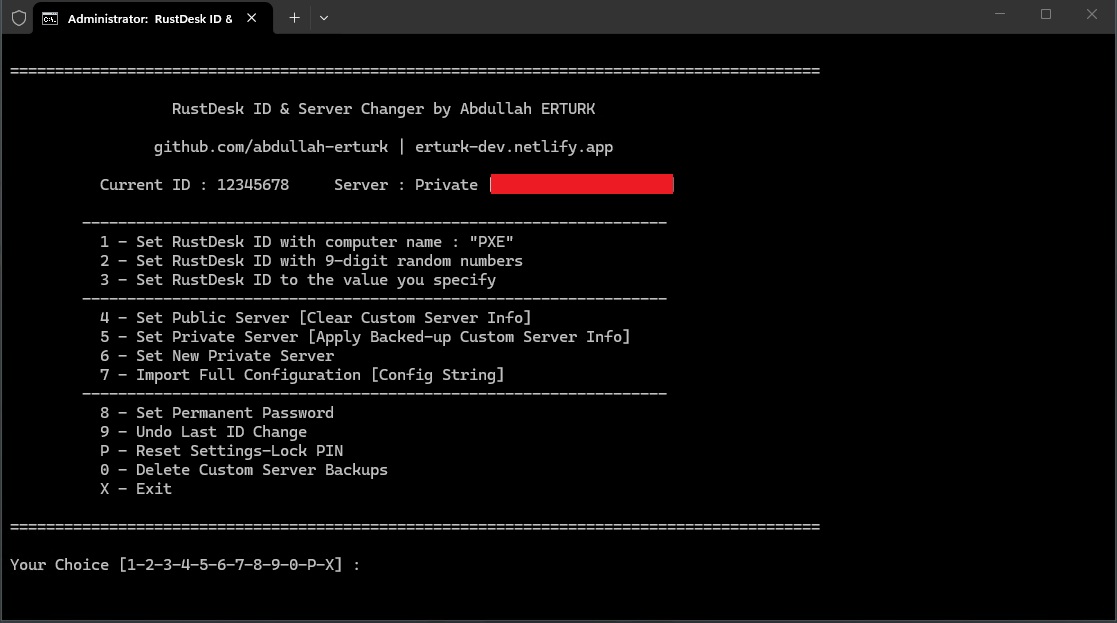
This script lets you change your RustDesk ID and Server configuration as you wish. It auto-detects your OS display language (Turkish or English), works with portable RustDesk builds, and detects the install directory dynamically via the Windows Registry.
When the menu opens, the header shows the current ID and the active server (Public / Private + address) in real time. After each operation the change is verified with rustdesk.exe --get-id, and every operation is written with a timestamp to a log file.
Options:
1. "Set RustDesk ID with computer name" The ID becomes the computer's name automatically. Useful in lab/imaged environments where IDs stay identical after deployment. No reboot needed. If the computer name is shorter than the OS-required minimum ID length (see option 3), the user is warned before any action is taken.
2. "Set RustDesk ID with 9-digit random numbers" The ID becomes a random 9-digit value. Because this matches RustDesk's native ID format, it works reliably on every Windows version. No reboot needed.
3. "Set RustDesk ID to the value you specify" The ID becomes a value you choose. The minimum length is set automatically by OS: Windows 10/11 → 6, Windows 7/8.x → 7, Windows Server → 8 characters. (RustDesk rejects shorter custom IDs and assigns a random one.) This option now works on all Windows versions.
4. "Set Public Server (Clear Custom Server Info)" Backs up any active custom server config and switches to the default Public servers. Does nothing if already on Public. Note: if the current ID contains letters/custom characters, it warns that the Public server may reject it and assign a numeric ID.
5. "Set Private Server (Apply Backed-up Custom Server Info)" Finds and restores a previously backed-up custom server config. If no backup exists, it prompts you to configure the server first.
6. "Set New Private Server" Asks for the server IP/Host and Key, then writes the custom server configuration.
7. "Import Full Configuration (Config String)" Imports the full configuration string exported from RustDesk (ID/Relay/API server + Key) in one step. The string is decoded by the script and written to both the service and user config files.
8. "Set Permanent Password" Sets the RustDesk permanent access password (at least 6 characters).
9. "Undo Last ID Change" Restores the previous ID using the backup taken before the last change.
P. "Reset Settings-Lock PIN"
Removes the PIN (unlock_pin) that protects RustDesk settings — without needing to know the current PIN. You can then set a new PIN from the RustDesk interface.
0. "Delete Custom Server Backups" Clears the stored custom-server backup files.
While editing config files, all operations stop every RustDesk process (across all sessions), so a GUI running in an RDP/multi-session environment (e.g. Windows Server) cannot overwrite the change. Afterwards the user-session GUI is restarted so the new ID/server shows instantly (the service process is preserved).
Update (v3.1): Thanks to #13, remote-connection drop issues were fixed; service termination now runs after configuration is applied.
Update (v3.2): Thanks to #15, the install directory is detected dynamically via the Windows Registry; Windows 7 / PowerShell 2.0 compatibility issues were resolved.
Update (v3.3): Thanks to #17, a directory-change bug that caused errors when running from other drives (USB, etc.) was fixed.
Update (v4):
- Status indicator: Current ID and active server (Public/Private + address) shown live in the menu header.
- Verification & logging: Each operation is verified with
rustdesk.exe --get-idand written to a timestamped log. - New options: Import full configuration (7), set permanent password (8), undo last ID change (9), reset settings-lock PIN (P).
- RustDesk 1.5 compatibility:
enc_id-aware ID change, applied to both the service and user config files. - OS-based minimum ID length: Win10/11 → 6, Win7/8 → 7, Server → 8 characters; pre-warning when the computer name is too short.
- Multi-session fix: All RustDesk processes are stopped while editing config, fixing the "ID reverts" problem on Windows Server/RDP.
- Safer input: User input is passed to PowerShell via environment variables.
- Other: Dynamic registry path detection and GUI auto-restart after each operation.
Sample preview:

rustdesk
rustdesk·Rust
开源自托管的远程桌面控制软件,可替代 TeamViewer,支持自建中继服务器,跨 Android、iOS、Linux、macOS 等平台使用。
远程桌面+4远程桌面 / 控制
128899+40621k1.5.12026-11-10 12:37 UTC

Sunshine
LizardByte·C++
自建的游戏串流主机端,配合 Moonlight 客户端把 PC 游戏低延迟推流到电视、手机等设备,替代 NVIDIA GameStream。
游戏串流+4远程桌面 / 控制
43234+1472.4kv2026.914.2336132026-11-10 16:14 UTC

neko
m1k1o·Go
在 Docker 里跑的自托管虚拟浏览器,通过 WebRTC 把画面实时推给多人,用来远程共享浏览和协作操作。
虚拟浏览器+4远程桌面 / 控制
22656+421.7kv3.2.02026-11-07 10:39 UTC

Termix
Termix-SSH·TypeScript
自托管的插件式服务器管理平台,把 SSH 终端、SFTP 文件传输、RDP/VNC 远程桌面集中到一个网页界面里,方便统一管理多台服务器和家庭实验室设备。
服务器管理+4远程桌面 / 控制
15923+46775v26.11.12026-11-10 15:05 UTC