Docker 部署前需把 config.sample.toml 复制为 config.toml 并按需修改;启动后必须执行 --set-system-user-password 设置 System 用户密码才能登录;默认访问端口为 9000,登录用户名是 System。

libredesk
abhinavxdAGPL-3.0活跃维护单二进制部署的开源自助客服工单系统,集在线聊天、帮助中心与知识库于一体,可替代 Intercom、Zendesk 等商业客服平台。
Open-source, self-hosted customer support desk in a single binary. A lightweight alternative to Intercom, Zendesk, Chatwoot.
v2.9.2发布于 2026-10-31 19:47 UTC3,140star +10 / 7 天332fork同步于 2026-11-10 17:43 UTC
curl -LO https://github.com/abhinavxd/libredesk/raw/main/docker-compose.yml
curl -LO https://github.com/abhinavxd/libredesk/raw/main/config.sample.toml
cp config.sample.toml config.toml
docker compose up -d
docker exec -it libredesk_app ./libredesk --set-system-user-password 硬件要求按 README 说明
README 未说明硬件要求;Docker 部署需要 Postgres 和 Redis,Railway 一键部署会自动创建这两项。
有 Docker 镜像
单二进制自托管的客服工单系统,统一处理邮件、在线聊天和 WhatsApp,可替代 Intercom 和 Zendesk
单二进制部署的开源自助客服工单系统,集在线聊天、帮助中心与知识库于一体,可替代 Intercom、Zendesk 等商业客服平台。
核心能力
- 在共享收件箱中统一处理邮件、在线聊天和 WhatsApp 会话
- 提供网站实时聊天组件,并通过 Meta Cloud API 接入 WhatsApp
- 内置可搜索的多语言帮助中心,AI 助手基于知识库回答聊天问题
- 用规则自动化打标签、分配和路由会话,并支持宏一键回复
- 按坐席容量自动分配会话,设置 SLA 响应目标并在超时前提醒
容易踩的坑
内容由模型根据 README 生成,可能不完整或不准确,以官方文档为准。看原文 README
- v2.9.2最新正式版2026-10-31 · 2026-10-31 19:47 UTC
Changelog
- dcd62c9c Merge pull request #783 from abhinavxd/fix/release-trigger-tag
- b2204515 use the triggering tag for release builds
What's Changed
- fix line breaks in outgoing email subjects by @abhinavxd in https://github.com/abhinavxd/libredesk/pull/778
- use the triggering tag for release builds by @abhinavxd in https://github.com/abhinavxd/libredesk/pull/783
Upgrade notes
- Always take a database backup before upgrading.
- Follow the steps here.
Full Changelog: https://github.com/abhinavxd/libredesk/compare/v2.9.1...v2.9.2
- v2.9.2-rc.1pre-release2026-10-30 · 2026-10-30 08:46 UTC
查看更新说明
Changelog
- 67c55958 Merge pull request #778 from abhinavxd/fix/email-subject-newlines
- 3d88ac3b add regression tests for continuity email subjects
- 07466c06 fix line breaks in outgoing email subjects
What's Changed
- fix line breaks in outgoing email subjects by @abhinavxd in https://github.com/abhinavxd/libredesk/pull/778
Full Changelog: https://github.com/abhinavxd/libredesk/compare/v2.9.1...v2.9.2-rc.1
- v2.9.12026-10-28 · 2026-10-28 07:16 UTC
查看更新说明
Railway
If you use Railway.com, read this announcement about moving PostgreSQL data to a volume.
What's fixed
- Prevented template execution in reply content, unwanted session creation, forced logout, and unauthorized contact messages.
- Health checks now verify PostgreSQL and return HTTP 503 when the database is unavailable.
- Email subjects and sender names in Windows 1252 and other legacy encodings now display correctly.
- The AI agent now answers customer messages received while it was composing its previous reply.
- Automatic assignment skips agents who went away, became unavailable, or left the team.
- Opening the widget through its launcher now shows the visible proactive message.
- Link custom attributes open in another tab correctly.
- Many other quality of life fixes and improvements.
Upgrade notes
- Always take a database backup before upgrading.
- Railway deployments created before 1 October 2026 need PostgreSQL data moved to a volume. Follow this announcement.
- API users creating conversations with
initiatorset tocontactneed theSend messages as contactpermission. - Logout integrations must use
POST /api/v1/auth/logoutwith the session CSRF token. - Follow the steps here.
Changelog
- 41bcf70f Merge pull request #764 from abhinavxd/fix/automation-help-alignment
- 9afee26a align automation help with the send reply control
What's Changed (Auto generated)
- health: report unhealthy when the database does not answer by @maximilize in https://github.com/abhinavxd/libredesk/pull/719
- fix decoding of email subjects and sender names by @abhinavxd in https://github.com/abhinavxd/libredesk/pull/727
- fix month navigation in date filters by @abhinavxd in https://github.com/abhinavxd/libredesk/pull/738
- show the update banner on release candidate builds by @abhinavxd in https://github.com/abhinavxd/libredesk/pull/736
- scan IMAP mailbox immediately on inbox start by @maximilize in https://github.com/abhinavxd/libredesk/pull/695
- Update vulnerable dependencies and Go by @abhinavxd in https://github.com/abhinavxd/libredesk/pull/742
- Remove unsupported Windows ARM build targets by @abhinavxd in https://github.com/abhinavxd/libredesk/pull/744
- answer customer messages sent while the AI is replying by @abhinavxd in https://github.com/abhinavxd/libredesk/pull/741
- skip agents who went away since the last auto-assign pool reload by @abhinavxd in https://github.com/abhinavxd/libredesk/pull/720
- Open visible proactive messages from the widget launcher by @abhinavxd in https://github.com/abhinavxd/libredesk/pull/746
- fix log levels and add missing logs by @abhinavxd in https://github.com/abhinavxd/libredesk/pull/747
- Sec audit fixes by @abhinavxd in https://github.com/abhinavxd/libredesk/pull/733
- Make custom attribute links clickable by @abhinavxd in https://github.com/abhinavxd/libredesk/pull/753
- Align automation help with Send reply by @abhinavxd in https://github.com/abhinavxd/libredesk/pull/764
Full Changelog: https://github.com/abhinavxd/libredesk/compare/v2.9.0...v2.9.1
- v2.9.1-rc.1pre-release2026-10-26 · 2026-10-26 18:51 UTC
查看更新说明
What's Changed
- health: report unhealthy when the database does not answer by @maximilize in https://github.com/abhinavxd/libredesk/pull/719
- fix decoding of email subjects and sender names by @abhinavxd in https://github.com/abhinavxd/libredesk/pull/727
- fix month navigation in date filters by @abhinavxd in https://github.com/abhinavxd/libredesk/pull/738
- show the update banner on release candidate builds by @abhinavxd in https://github.com/abhinavxd/libredesk/pull/736
- scan IMAP mailbox immediately on inbox start by @maximilize in https://github.com/abhinavxd/libredesk/pull/695
- Update vulnerable dependencies and Go by @abhinavxd in https://github.com/abhinavxd/libredesk/pull/742
- Remove unsupported Windows ARM build targets by @abhinavxd in https://github.com/abhinavxd/libredesk/pull/744
- answer customer messages sent while the AI is replying by @abhinavxd in https://github.com/abhinavxd/libredesk/pull/741
- skip agents who went away since the last auto-assign pool reload by @abhinavxd in https://github.com/abhinavxd/libredesk/pull/720
- Open visible proactive messages from the widget launcher by @abhinavxd in https://github.com/abhinavxd/libredesk/pull/746
- fix log levels and add missing logs by @abhinavxd in https://github.com/abhinavxd/libredesk/pull/747
- Sec audit fixes by @abhinavxd in https://github.com/abhinavxd/libredesk/pull/733
- Make custom attribute links clickable by @abhinavxd in https://github.com/abhinavxd/libredesk/pull/753
Full Changelog: https://github.com/abhinavxd/libredesk/compare/v2.9.0...v2.9.1-rc.1
- v2.9.02026-10-22 · 2026-10-22 11:50 UTC
查看更新说明
Railway
If you are using Railway.com please read this important announcement about moving postgres data to volume.
What's new
WhatsApp channel
- WhatsApp inbox - connect a WhatsApp Business number through the Meta Cloud API, with templates.
Live chat widget
-
Proactive messages - message visitors first based on the page they are on, their device, business hours or time on the page.
-
Help center in the widget - visitors can browse help center articles inside the widget.
-
Widget language from the host page - set
languagein the widget settings or callLibredesk.setLanguage()to switch it.Set the inbox language to automatic detection, then add
languageto your existing widget settings:<script> window.LibredeskSettings = { baseURL: 'https://support.example.com', inboxID: 'YOUR_INBOX_UUID', language: 'de-DE' }; </script> <script async src="https://support.example.com/widget.js"></script>After the widget initializes, switch languages when the visitor changes your website's language:
window.Libredesk.setLanguage('fr-FR');
Email
-
Email aliases - an inbox can receive mail at several addresses, and agents pick the reply From address.
-
Earlier messages in email templates - use
{{ .PreviousMessages }}in outgoing email templates to quote messages the contact already saw.{{ if .PreviousMessages }} <div style="margin-top: 28px; padding-top: 20px; border-top: 1px solid #ddd;"> <div style="margin-bottom: 16px; font-size: 13px; color: #888;">Previous messages</div> {{ range .PreviousMessages }} <blockquote style="margin: 0 0 20px; padding: 0 0 0 14px; border-left: 2px solid #ddd;"> <div style="margin-bottom: 6px; font-size: 12px; line-height: 20px; color: #888;"> On {{ .CreatedAt.Format "02 Jan 2006 at 15:04 MST" }}, {{ if .SenderName }}{{ .SenderName }}{{ else }}{{ .SenderEmail }}{{ end }} wrote: </div> <div style="font-size: 14px; line-height: 24px; color: #444; overflow-wrap: anywhere;"> {{ .Content }} </div> </blockquote> {{ end }} </div> {{ end }} -
Recipient filter in automation rules - match rules on the
Toaddresses of new email conversations.
Agent dashboard
- AI tools in copilot - copilot and generate reply can call custom AI tools, with agent approval.
- Notification preferences - agents choose which notifications they get in the app, by email and as browser push.
- Install as an app - install libredesk on desktop or phone and get push notifications.
- Command palette - jump to any page, find conversations and contacts, and assign, tag or change status in bulk.
- Search filters - filter, sort and page conversation search results.
Help center
- Dark mode - show the help center in light, dark or the visitor's system setting.
- Linked translations - link an article to another as its translation.
What's fixed
- Much lower memory and CPU use. An instance with about 5,000 conversations a day and 500 agents logged in stays between 300 MB and 560 MB of memory over the day.
- Uploaded SVG files can no longer run scripts.
- Agent sessions now end when the password changes or the account is disabled.
- Replies in long email threads are no longer rejected by SMTP servers.
- AI tool calls with Gemini 3 models no longer fail.
- Many other quality of life fixes and improvements.
Upgrade notes
- Always take a database backup before upgrading.
- If you deployed with the Railway template before
用户点评
登录用户的真实使用记录,可按版本和硬件筛选共 0 条
还没有人点评。第一个说出真实体验的人最有价值。
Open source, self-hosted customer support software for email, live chat, and WhatsApp. Distributed as a single binary.
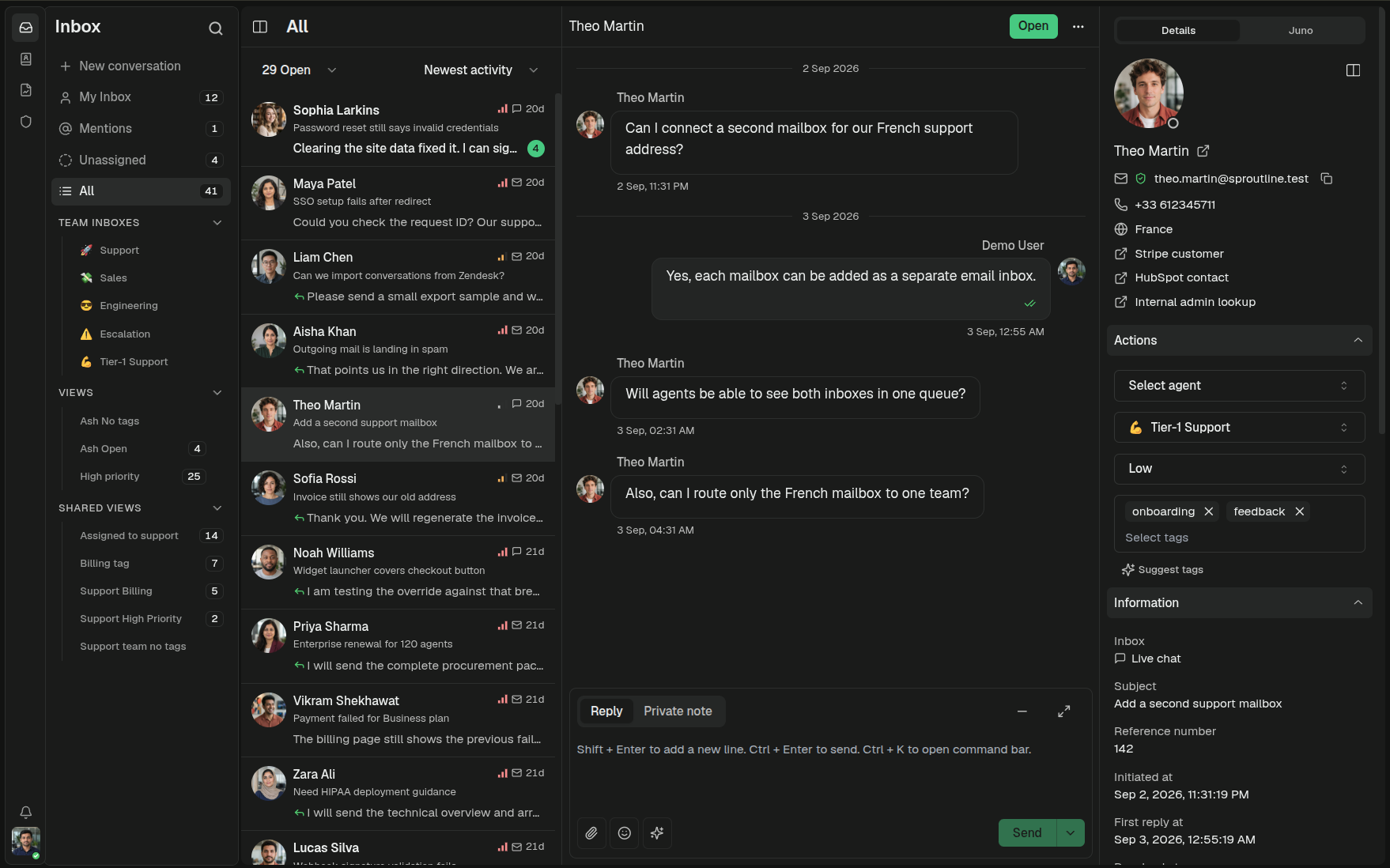
Visit libredesk.io for more info. Check out the live demo.
Features
Inbox and channels
- Shared inbox: Handle email, live chat, and WhatsApp conversations in one place.
- Live chat: Add a real-time chat widget to your website.
- WhatsApp: Connect a number through the Meta Cloud API.
- Inbox organization: Use teams, tags, custom statuses, custom attributes, snoozing, and search.
Help center and AI
- Help center: Publish a searchable, multilingual knowledge base.
- AI assistant: Answer live chat questions using your knowledge base and hand conversations to an agent when needed.
- Agent copilot: Draft replies, summarize conversations, and find answers without leaving the inbox.
Workflow and reporting
- Automations: Tag, assign, and route conversations using rules you define.
- Macros: Send saved replies and apply conversation actions in one step.
- Auto assignment: Distribute incoming conversations by agent capacity or your own criteria.
- SLA management: Set response targets and get notified about conversations at risk of breaching them.
- CSAT and analytics: Collect customer ratings and track response times, resolution rates, and agent activity.
Administration and integrations
- Permissions and SSO: Create roles with per-action permissions and sign in through Google, Microsoft, or another OIDC provider.
- Activity logs: Review actions performed by agents and admins.
- API and webhooks: Connect LibreDesk to other systems and workflows.
See libredesk.io for the full feature set, or try the live demo.
Installation
Railway (1-click deploy)
The fastest way to get a libredesk instance running. Railway provisions the app, Postgres, and Redis for you.

Docker
The latest image is available on DockerHub at libredesk/libredesk:latest
# Download the compose file and sample config file in the current directory.
curl -LO https://github.com/abhinavxd/libredesk/raw/main/docker-compose.yml
curl -LO https://github.com/abhinavxd/libredesk/raw/main/config.sample.toml

# Copy the config.sample.toml to config.toml and edit it as needed.
cp config.sample.toml config.toml

# Run the services in the background.
docker compose up -d

# Setting System user password.
docker exec -it libredesk_app ./libredesk --set-system-user-password
Go to http://localhost:9000 and login with username System and the password you set using the --set-system-user-password command.
Binary
- Download the latest release and extract the libredesk binary.
- Edit config.toml as needed.
./libredesk --installto setup the Postgres DB.- Run
./libredesk --set-system-user-passwordto set the password for the System user. - Run
./libredeskand visithttp://localhost:9000and login with emailSystemand the password you set using the --set-system-user-password command.
Developers
- If you are interested in contributing, please read CONTRIBUTING.md first.
- For local development and setup, refer to the developer setup.
- For planned features and project direction, see ROADMAP.md.
The backend is written in Go and the frontend is Vue.js 3 with Shadcn UI.
Translators
You can help translate libredesk into your language on Crowdin.

prompts.chat
f·MDX
社区共建的提示词分享与发现平台,可自托管部署,让团队在完全私密的环境里收集和管理 ChatGPT、Claude、Gemini 等模型的提示词。
提示词库+4知识库
176827+72223k2026-11-10 14:05 UTC
generative-ai-for-beginners
microsoft·Jupyter Notebook
微软出品的 21 节生成式 AI 入门课程,用 Jupyter Notebook 带你从零理解大模型、提示工程和 ChatGPT 应用开发。
生成式AI+3知识库
123300+21666k2026-11-05 03:43 UTC
Understand-Anything
Egonex-AI·TypeScript
把任意代码库转成可交互的知识图谱,支持浏览、搜索和提问,兼容 Claude Code、Cursor、Copilot 等主流 AI 编程工具。
知识图谱+4知识库
91856+7097.8kv2.9.02026-11-09 17:56 UTC

llm-course
mlabonne
一套系统的大语言模型入门课程,用学习路线图和可直接运行的 Colab 笔记本,带你从零掌握 LLM 的原理与实战。
大语言模型+4知识库
85029+909.9k2026-02-05 13:09 UTC