从源码构建依赖较多(GTK4、libadwaita、evolution 等),需按发行版先装齐开发包;云端同步需自行准备 Todoist 账号或 Nextcloud/CalDAV 服务器;仅面向 Linux/GNOME 桌面,非 Linux 平台无法直接运行

planify
alainm23GPL-3.0活跃维护面向 GNOME 桌面的任务管理工具,可同步 Todoist、Nextcloud 和 CalDAV 待办,适合用 GTD 方式集中管理日常任务。
Task manager with Todoist, Nextcloud & CalDAV support designed for GNOME
v4.20.0发布于 2026-09-10 18:06 UTC5,793star +3 / 7 天351fork同步于 2026-11-10 11:35 UTC
flatpak install flathub io.github.alainm23.planify 硬件要求按 README 说明
README 说明需支持 GTK4 的 Linux 发行版,最低 2GB 内存、500MB 磁盘空间;未提及 GPU 或显存要求。
GNOME 桌面上的任务管理器,支持 Todoist、Nextcloud 和 CalDAV 同步,帮你统一管理待办事项
面向 GNOME 桌面的任务管理工具,可同步 Todoist、Nextcloud 和 CalDAV 待办,适合用 GTD 方式集中管理日常任务。
核心能力
- 拖拽整理任务与项目,按分区组织工作流
- 支持 Todoist、Nextcloud、CalDAV 云端同步
- 离线可用,联网后自动同步数据
- 每个任务可设多个提醒与循环重复规则
- 日历视图、标签过滤与生产力统计
容易踩的坑
内容由模型根据 README 生成,可能不完整或不准确,以官方文档为准。看原文 README
- v4.20.0Planify 4.20.0最新正式版2026-09-10 · 2026-09-10 18:06 UTC
Planify 4.20.0 is a big release with Nextcloud Deck integration, CalDAV reminder sync, productivity goals, GNOME Online Accounts detection, and many features, fixes and performance improvements. Update now and enjoy a smoother experience.
New Features:
- Added Nextcloud Deck integration — boards, stacks and cards sync two-way as projects, sections and tasks, with labels, archive, drag and drop between stacks and boards, and order preservation.
- Added a productivity goals system — daily and weekly targets (fixed or dynamic), a mini progress widget in the app menu, and an 8-week activity heatmap in the productivity report.
- Added "Repeat from completion date" — recurring tasks can repeat from the day they are completed instead of their due date, per task, matching how apps like Tasks.org behave (local and Todoist).
- Added detection and import of CalDAV accounts from GNOME Online Accounts — a subtle link under the account list imports Nextcloud/ownCloud (via Login Flow v2) or generic CalDAV accounts with the server URL prefilled.
- Added a completed tasks section to the Today view, toggleable from the view settings.
- Added a project filter to the Completed view and sort/filter controls to the All Tasks view, matching the project views.
- Added All Tasks and Labels as Home View options in Preferences.
- Added a calendar sources preferences page to choose which calendars are shown.
- Added quick date shortcuts to the Deadline picker (Tomorrow, In 3 days, Next week, In 2 weeks, In a month), matching the Date picker.
- Added keyboard shortcuts to jump to projects (Ctrl+1–Ctrl+9) and cycle through them (Ctrl+Page Down / Ctrl+Page Up).
- Improved the date picker with natural-language search (via Chrono), suggestion chips, and pre-selection of the item's existing due date.
- Improved QuickFind — searches task descriptions, shows the parent project name for sections, adds a result count footer, and highlights a snippet when the match is in the description.
- Improved the PDF export — long titles wrap (with character breaking for URLs), task descriptions and colored labels are included, and text renders via Pango so emoji show in color. The export toast gains an "Open" button.
- Added drag-and-drop and context-menu task creation on Scheduled section headers, pre-filling the date in Quick Add.
CalDAV & Sync:
- Added bidirectional reminder sync with CalDAV servers (Nextcloud, Radicale) and compatible apps (Tasks.org, Thunderbird) via VALARM.
- Added the CREATED property to VTODO output, fixing a NOT NULL constraint error when syncing with DAVx5/jtx via Nextcloud.
Bug Fixes:
- Fixed a crash on startup caused by CalDAV tasks with invalid dates (e.g. year 1).
- Fixed tasks reappearing after closing the app soon after deleting them — pending deletes now persist across restarts.
- Fixed the --background flag exiting immediately instead of keeping the app running.
- Fixed date order to follow the system locale (LC_TIME) — day-month vs month-day now matches your region across tasks, deadlines, events and the heatmap.
- Allowed editing the description of completed tasks.
- Fixed fenced code blocks losing their backticks in the markdown editor.
- Fixed low contrast of links and code in the markdown editor on dark themes.
- Fixed the (No Section) column in Board view not hiding when empty.
- Fixed the Label view not updating items in real time.
- Fixed CLI due-time being truncated/ignored and exposed the due date in JSON output.
- Added automatic backup retention — a "Backups to Keep" setting prunes old backups (default 30, zero keeps all), the backup list is now paginated, and the backup location is shown as a row with an Open button.
- Fixed recurrence being lost when rescheduling an overdue task, and the missing "No Date" button on scheduled items.
- Changed the Unpin button to use the pin icon and show only on hover, reducing confusion and visual noise.
- Added placeholder states for Board and List views and improved section-order manag
- v4.19.5Planify 4.19.52026-07-17 · 2026-07-17 16:18 UTC
查看更新说明
Planify 4.19.5 is a maintenance release focused on bug fixes, reliability improvements, and new features.
Bug Fixes:
- Fixed missed automatic backup on startup — if Planify was closed at midnight, the scheduled backup was silently skipped. Now, if automatic backup is enabled and no backup has run today, one is triggered immediately on startup.
- Fixed completing a recurring task from a notification — it was marking the task as fully completed instead of advancing to the next occurrence. Now correctly calls update_next_recurrency() as the UI does.
- Fixed keyboard navigation UX — Tab in EditableTextView now moves focus to the next widget instead of inserting spaces, and pressing Enter on a focused checkbox now completes the task.
- Fixed attachment file_size integer overflow — file_size is now treated as a string throughout, preventing unhandled overflow errors for values ≥ 2^63.
- Fixed drag and drop reliability and visual feedback in ReorderChild — softer background, subtle border, and rounder corners using the accent color.
- Fixed CalDAV related-to parsing — uses the already known related-id from libical and checks the reltype param to determine if a task is a parent.
- Fixed reading X-PINNED and X-APPLE-SORT-ORDER from CalDAV — replaced ICal.PropertyKind.from_string() with iteration over X_PROPERTY kind and matching by get_x_name(), fixing pin status and sort order persistence with Radicale and other servers.
New Features:
- Added "Date Modified" sort option — available in Project, Today, and Scheduled views. Falls back to added_datetime for items that have never been edited.
- Added subtitle support for context menu items — displays text below the primary label with caption and dimmed styling. The "Change History" item now shows "Updated: " or "Created: " as subtitle.
- Added toast notification when automatic backup fails — notifies on backup creation failure or copy-to-extra-folder failure. Successful backups remain silent.
- Added last day of month recurrency support — new checkbox in the repeat config for monthly tasks, correctly handles Feb 28/29 on leap years.
- Improved Todoist recurring tasks integration — generates NL string in English for recurring task creation and update, uses item_close as Todoist recommends, and now parses recurrence strings from Todoist using chrono to generate equivalent recurring tasks in Planify.
- Fixed zombie tasks with reminders created while offline — added ON DELETE CASCADE to tables and improved queue logic to retry on temp_id failures.
- v4.19.4Planify 4.19.42026-05-20 · 2026-05-20 09:41 UTC
查看更新说明
Planify 4.19.4 is a maintenance release focused on bug fixes.
Bug Fixes:
- Fixed a crash when updating a task with no priority set on Mailbox.org and Open-Xchange servers.
- Fixed completed tasks generating an ambiguous local timestamp in the VTODO — now uses UTC with the Z suffix, fixing sync errors with DAVx5 on Android.
- Fixed inconsistent accent colors across the app — accent color logic is now centralized and correctly follows the system accent color setting.
- v4.19.3Planify 4.19.32026-05-18 · 2026-05-18 15:32 UTC
查看更新说明
Planify 4.19.3 is a maintenance release focused on bug fixes.
Bug Fixes:
- Fixed CalDAV sync with Mailbox (Open-Xchange) — calendar data wrapped in CDATA is now parsed correctly, and tasks are no longer skipped when the content-type lacks the component parameter.
- Fixed cursor jumping to the end of the text when editing task titles or descriptions in Today and Scheduled views.
- Fixed long text expanding the sidebar beyond its intended width in HeaderItem.
- v4.19.2Planify 4.19.22026-05-14 · 2026-05-14 11:19 UTC
查看更新说明
Planify 4.19.2 brings new features, CalDAV improvements, and several bug fixes.
New Features:
- Added automatic daily backup with support for extra backup folder locations.
- Added support for system accent color — Planify now follows your GNOME accent color setting.
- Added CalDAV section support via VTODO List prefix — create, rename and delete sections that sync bidirectionally with other CalDAV clients.
- Added past date selection in the date picker — past days are shown dimmed with a Today button to return to the current month.
- Added Export as .ics option in the context menu for CalDAV tasks.
- Improved change history — added DEADLINE and PARENT tracking, infinite scroll, and expandable/chip display patterns.
CalDAV Improvements:
- Fixed HTTP 200 being treated as an error on Horde and similar servers when creating or updating tasks.
- Fixed subtasks appearing as main tasks when Horde sends multiple VTODOs in a single .ics file.
Bug Fixes:
- Fixed calendar events not updating when Planify is kept open past midnight.
- Fixed labels not being removed when deselected in the multi-select toolbar.
- Fixed label picker incorrectly assigning labels from one task to others when closing without changes in multi-select mode.
- Fixed inaccurate section task counts in Board view after drag and drop.
- Fixed inbox section visibility and UX in Board view — now auto-hides when empty.
- Fixed moving tasks between different sources (e.g. CalDAV → Local).
- Fixed double sync triggered when adding a new source.
用户点评
登录用户的真实使用记录,可按版本和硬件筛选共 0 条
还没有人点评。第一个说出真实体验的人最有价值。


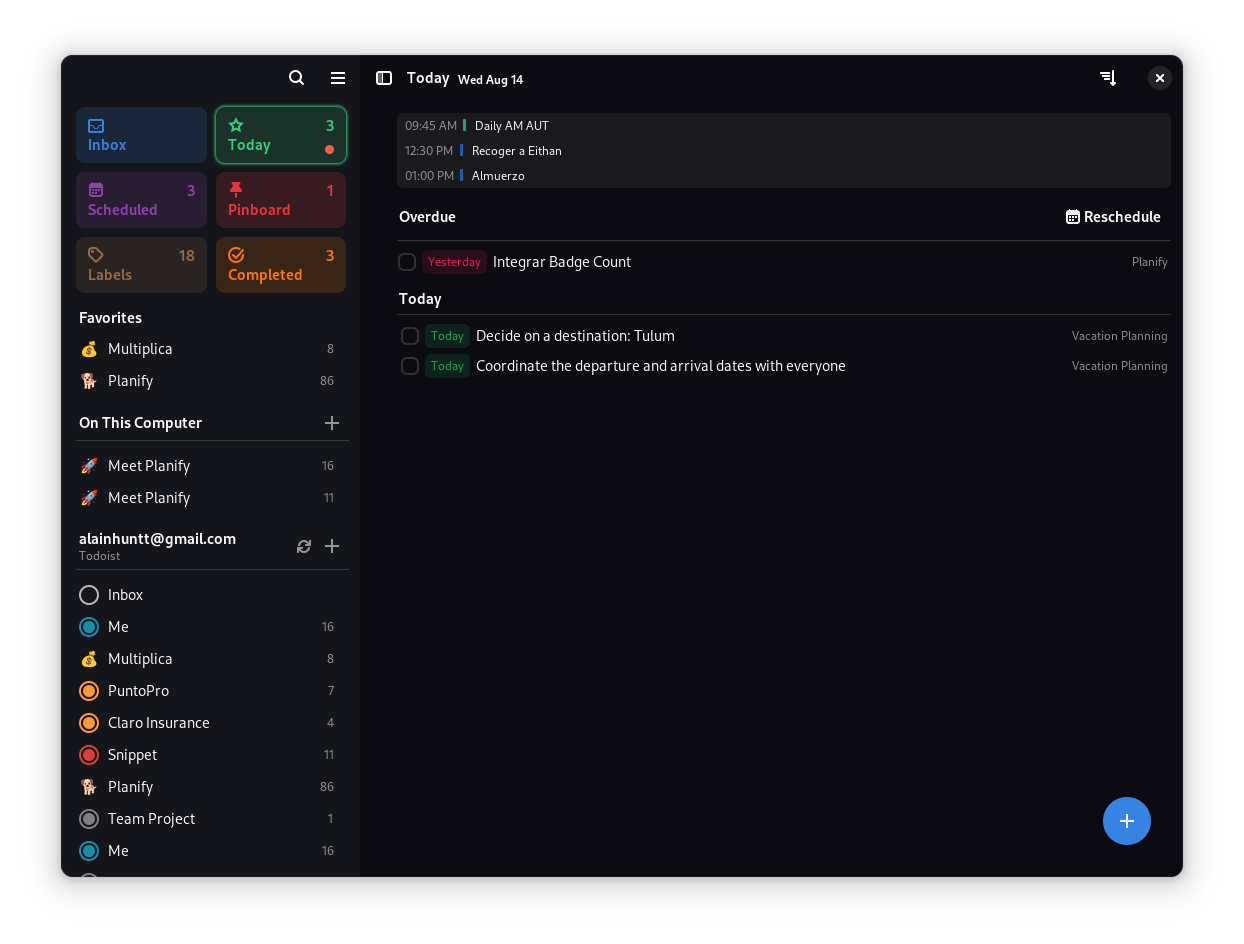
✨ Features
🎯 Core Functionality
- 🚀 Modern Interface: Clean, intuitive design that gets out of your way
- 🤚 Drag & Drop: Effortlessly organize tasks and projects with natural gestures
- 💯 Progress Tracking: Visual indicators show completion status at a glance
- 📂 Smart Organization: Group tasks into sections for better workflow management
- 📅 Calendar Integration: Visualize your schedule and plan your day effectively
- ⏰ Flexible Reminders: Set multiple reminders per task - never miss a deadline
- 🌙 Dark Mode: Seamless integration with system themes
- 🔍 Quick Search: Find anything instantly with powerful search capabilities
☁️ Cloud Synchronization
- Todoist Integration: Full sync with your existing Todoist account
- Nextcloud Support: Keep your data private with self-hosted solutions
- Offline Mode: Work without internet - sync when you're back online
- Cross-Platform: Access your tasks from anywhere
Note: Planify is not created by, affiliated with, or supported by Doist
💎 Advanced Features
- 🔔 Smart Notifications: Never miss important tasks
- 🔁 Recurring Tasks: Set up repeating schedules with flexible patterns
- 📊 Analytics: Track your productivity over time
- 🏷️ Labels & Filters: Organize and find tasks with custom labels
- 📎 Attachments: Add files and links to your tasks
- 🎨 Customization: Personalize colors and themes
📥 Installation
🏪 Official Distribution
🛠 Build from Source
Minimum Requirements:
- Linux distribution with GTK4 support
- 2GB RAM
- 500MB disk space
Build Dependencies:
| Package | Version |
|---|---|
| meson | ≥ 0.56 |
| valac | ≥ 0.48 |
| gio-2.0 | ≥ 2.80.3 |
| glib-2.0 | ≥ 2.80.3 |
| gee-0.8 | ≥ 0.20.6 |
| gtk4 | ≥ 4.14.4 |
| libsoup-3.0 | ≥ 3.4.4 |
| sqlite3 | ≥ 3.45.1 |
| libadwaita-1 | ≥ 1.5.3 |
| json-glib-1.0 | ≥ 1.8.0 |
| libecal-2.0 | ≥ 3.52.4 |
| libedataserver-1.2 | ≥ 3.52.4 |
| libportal | ≥ 0.7.1 |
| libportal-gtk4 | ≥ 0.7.1 |
| libsecret-1 | ≥ 0.21.4 |
| libspelling-dev | latest |
| gtksourceview-5 | 5.12.1 |
| libicu-dev | ≥ 76.1 |
Install Dependencies:
Fedora/RHEL:
sudo dnf install vala meson ninja-build gtk4-devel libadwaita-devel libgee-devel libsoup3-devel libportal-devel libportal-gtk4-devel evolution-devel libspelling-devel gtksourceview5-devel libicu-devel
Ubuntu/Debian:
sudo apt install valac meson ninja-build libgtk-4-dev libadwaita-1-dev libgee-0.8-dev libjson-glib-dev libecal2.0-dev libsoup-3.0-dev libportal-dev libportal-gtk4-dev libspelling-1-dev libgtksourceview-5-dev libicu-dev
Build Instructions:
# Clone the repository
git clone https://github.com/alainm23/planify.git
cd planify

# Configure build
meson build --prefix=/usr

# Compile
cd build
ninja

# Install
sudo ninja install

# Run
io.github.alainm23.planify
🏗️ Development Setup
Using GNOME Builder:
- Install GNOME Builder
- Clone this repository
- Open the project in GNOME Builder
- Click "Run" to build and test
🤝 Contributing
We welcome contributions! Here's how you can help:
🐛 Bug Reports & Feature Requests
- Check existing issues first
- Use our issue templates for better communication
- Include system information and steps to reproduce
💻 Code Contributions
- Read our Architecture Guide
- Review our AI Policy for guidelines on AI-assisted contributions
- Fork the repository and create a feature branch
- Follow our coding standards and commit message format
- Submit a pull request with a clear description
🌍 Translations
Help make Planify available in your language:
- Weblate (Recommended): Join our translation project
- Manual: Check our Translation Guide
📋 Code of Conduct
Planify follows the GNOME Code of Conduct. We are committed to providing a welcoming and inclusive environment for all contributors.
Our Principles:
- Be friendly - Use welcoming and inclusive language
- Be empathetic - Respect differing viewpoints and experiences
- Be respectful - Disagree politely and constructively
- Be considerate - Remember that decisions often involve competing priorities
- Be patient - Help others learn and grow
- Be concise - Read discussions before commenting
💝 Support the Project
If you find Planify useful, consider supporting its development:



super-productivity
super-productivity·TypeScript
带时间盒和时间追踪的高级待办应用,可对接 Jira、GitLab、GitHub 等平台,适合想把任务管理和工时记录合在一起的人。
待办清单+4任务 / 待办
23573+762.3kv20.0.02026-11-10 00:34 UTC

taskbook
klaudiosinani·JavaScript
在终端里管理任务、看板和笔记的命令行工具,用纯文本文件存储数据,适合习惯键盘操作、不想离开命令行的开发者。
命令行+4任务 / 待办
9346+1394v0.3.02025-11-03 15:32 UTC

todo.txt-cli
todotxt·Shell
用纯 Shell 脚本管理 todo.txt 纯文本待办文件,支持增删改查、过滤和扩展,适合喜欢命令行和纯文本工作流的用户。
待办管理+4任务 / 待办
6198732v2.14.02026-11-06 18:49 UTC
taskwarrior
GothenburgBitFactory·C++
命令行任务管理工具,用纯文本存储待办事项,支持 GTD 工作流、标签、优先级和自定义报告,适合习惯终端操作的人高效管理任务。
命令行任务管理+4任务 / 待办
6159+2424v3.5.02026-11-10 00:19 UTC