项目必须是使用 Gradle 的 Android Studio 工程,否则工作流无法构建;工作流需放在 .github/workflows/ 目录下才会被 GitHub 识别;默认 JDK 版本为 17,与项目 Gradle 配置不匹配时需自行调整
automated-build-android-app-with-github-action
amirisbackApache-2.0活跃维护用 GitHub Actions 自动构建 Android App Bundle 和 APK,省去手动打包和配置 CI 的麻烦,适合想快速给安卓项目接入持续集成的开发者。
CI/CD Automated Build Android App Bundle / APK With Github Action
2.2.7发布于 2026-04-06 23:38 UTC350star64fork同步于 2026-11-07 07:32 UTC
mkdir -p .github/workflows && cp generate-apk-aab-debug-release.yml .github/workflows/ 硬件要求按 README 说明
README 未说明;构建在 GitHub 托管的 ubuntu-latest runner 上执行,本地运行需 Android Studio Gradle 项目
用 GitHub Actions 自动构建 Android APK 和 AAB 的现成工作流模板
用 GitHub Actions 自动构建 Android App Bundle 和 APK,省去手动打包和配置 CI 的麻烦,适合想快速给安卓项目接入持续集成的开发者。
核心能力
- 用 GitHub Actions 工作流自动构建 release AAB 与 debug/release APK
- 用 upload-artifact 上传构建产物并支持下载 Artifact
- 按日期、仓库名、Play Store 名自动命名产物
- 构建产物可提交并推送回 GitHub 仓库
- 附带 Detekt 静态扫描工作流
容易踩的坑
内容由模型根据 README 生成,可能不完整或不准确,以官方文档为准。看原文 README
- 2.2.7最新正式版2026-04-06 · 2026-04-06 23:38 UTC
What's Changed
- Add GitHub Actions workflows for automated Android builds and sync by @amirisback in https://github.com/amirisback/automated-build-android-app-with-github-action/pull/26
- Add cross-platform build scripts and update documentation for workflows by @amirisback in https://github.com/amirisback/automated-build-android-app-with-github-action/pull/27
Full Changelog: https://github.com/amirisback/automated-build-android-app-with-github-action/compare/2.2.6...2.2.7
- 2.2.62025-11-17 · 2025-11-17 04:34 UTC
查看更新说明
What's Changed
- Release/2.2.6 by @amirisback in https://github.com/amirisback/automated-build-android-app-with-github-action/pull/25
Full Changelog: https://github.com/amirisback/automated-build-android-app-with-github-action/compare/2.2.5...2.2.6
What's New??
* Update Target SDK 36 * * Update Action Script * * Update Android Studio Latest Version * * Update Gradle Latest Version * * Update Kotlin Latest Version * - 2.2.5Release v2.2.52024-11-16 · 2024-11-16 04:30 UTC
查看更新说明
What's Changed
- build(deps): bump actions/download-artifact from 3 to 4.1.7 in /.github/workflows by @dependabot in https://github.com/amirisback/automated-build-android-app-with-github-action/pull/24
New Contributors
- @dependabot made their first contribution in https://github.com/amirisback/automated-build-android-app-with-github-action/pull/24
Full Changelog: https://github.com/amirisback/automated-build-android-app-with-github-action/compare/2.2.4...2.2.5
* Update Target SDK 35 * * Update Action Script * * Update Android Studio Latest Version * * Update Gradle Latest Version * * Update Kotlin Latest Version * * Update Java Version From 11 to 17 * * Update Java Action version to 3 * * Update Android SDK Tools * * Add Bundletool.jar for workflow github action * * Add .run configuration * * Update To Libs.Version.Toml * - 2.2.4Release v2.2.42024-03-28 · 2024-03-28 13:41 UTC
查看更新说明
Release Note
- Create Local Configuration
- You Can Learn Below
.run Configuration (Alternative if you don't have github action)
- Run on your local machine
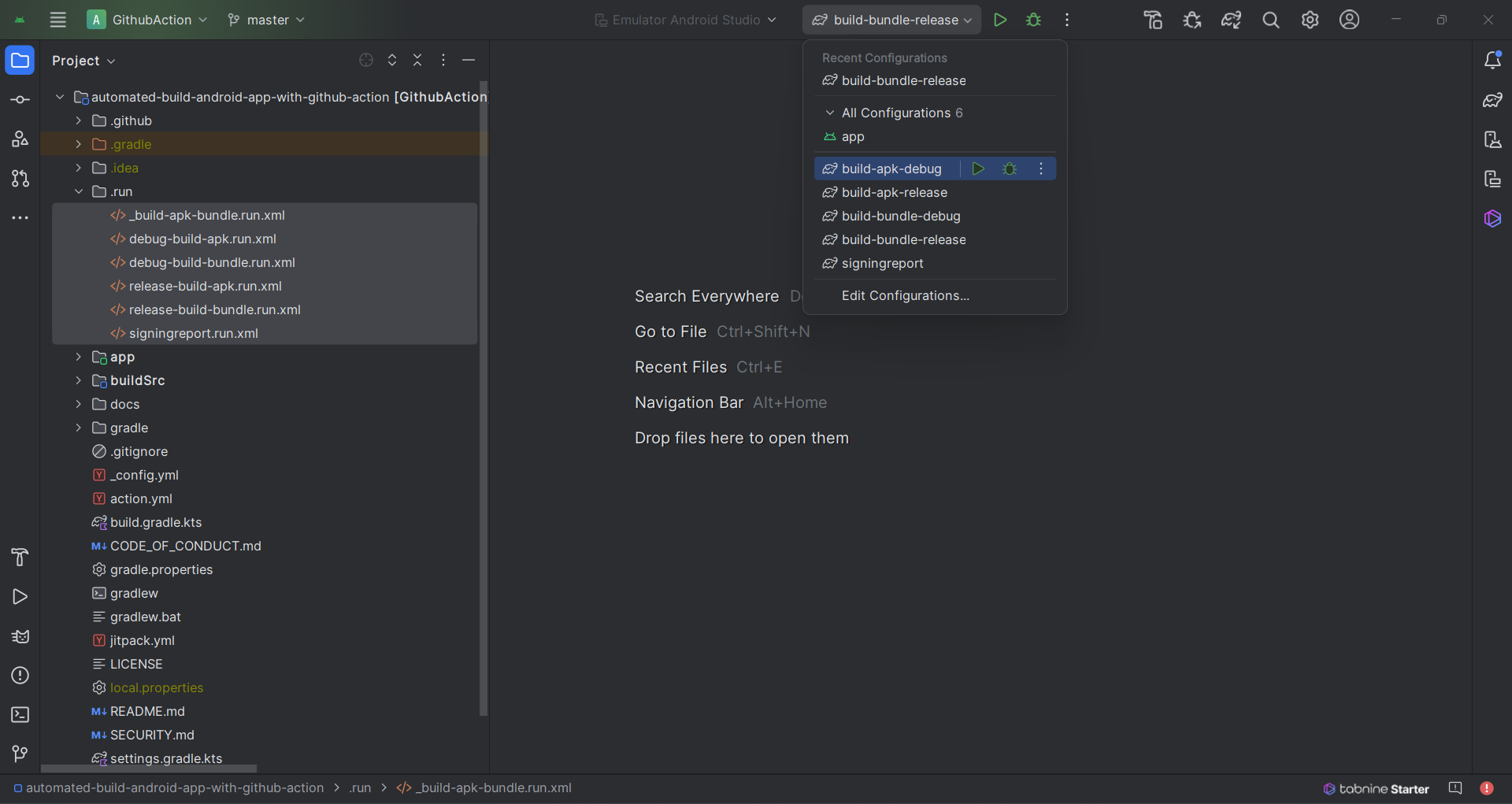
Step 1: Create Folder .run on Root Project Directory
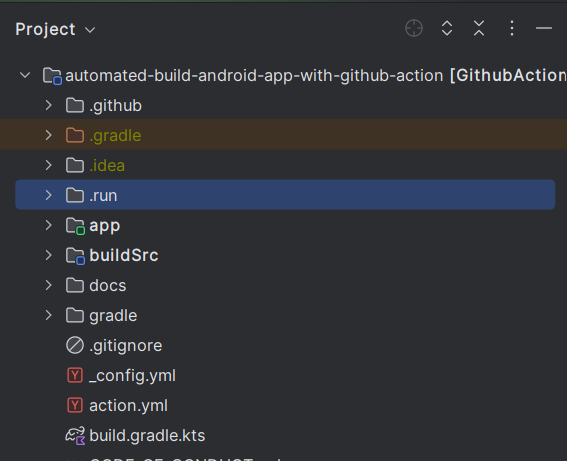
Step 2: Create File [name-config].run.xml
<component name="ProjectRunConfigurationManager"> <!-- Add Name Configuration Here --> <configuration default="false" name="${your-config-name}" type="GradleRunConfiguration" factoryName="Gradle"> <ExternalSystemSettings> <option name="executionName" /> <option name="externalProjectPath" value="$PROJECT_DIR$" /> <option name="externalSystemIdString" value="GRADLE" /> <option name="scriptParameters" value="" /> <option name="taskDescriptions"> <list /> </option> <option name="taskNames"> <list> <!-- TODO : add your task here --> <option value=":app:assembleDebug" /> </list> </option> <option name="vmOptions" /> </ExternalSystemSettings> <ExternalSystemDebugServerProcess>true</ExternalSystemDebugServerProcess> <ExternalSystemReattachDebugProcess>true</ExternalSystemReattachDebugProcess> <DebugAllEnabled>false</DebugAllEnabled> <RunAsTest>false</RunAsTest> <method v="2" /> </configuration> </component>- Note : if you confuse you can use this feature

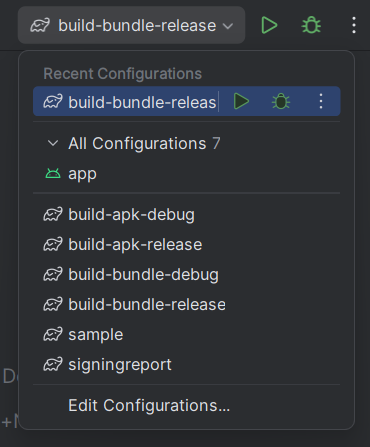
Step 3: Your Configuration Will Appears on this Menu
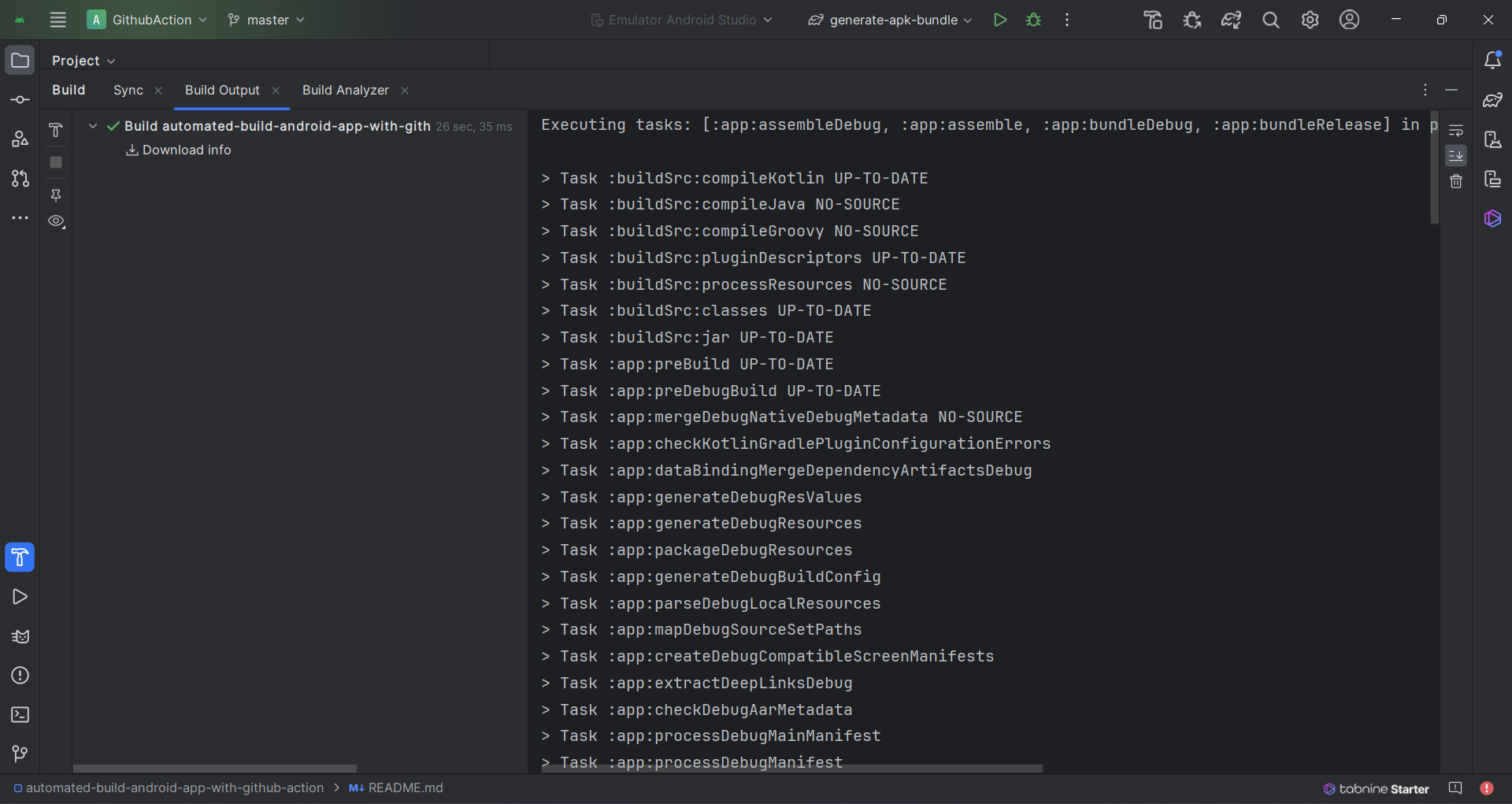
Step 4: Result run multiple task
Sample Configuration (signingreport)
<component name="ProjectRunConfigurationManager">
  <configuration default="false" name="signingreport" type="GradleRunConfiguration" factoryName="Gradle">
    <ExternalSystemSettings>
      <option name="executionName" />
      <option name="externalProjectPath" value="$PROJECT_DIR$" />
      <option name="externalSystemIdString" value="GRADLE" />
      <option name="scriptParameters" value="" />
      <option name="taskDescriptions">
        <list />
      </option>
      <option name="taskNames">
        <list>
          <option value="signingreport" />
        </list>
      </option>
      <option name="vmOptions" />
    </ExternalSystemSettings>
    <ExternalSystemDebugServerProcess>true</ExternalSystemDebugServerProcess>
    <ExternalSystemReattachDebugProcess>true</ExternalSystemReattachDebugProcess>
    <DebugAllEnabled>false</DebugAllEnabled>
    <RunAsTest>false</RunAsTest>
    <method v="2" />
  </configuration>
</component>
What's Changed
- UPDATE :: Fixing README.md by @amirisback in https://github.com/amirisback/automated-build-android-app-with-github-action/pull/20
Full Changelog: https://github.com/amirisback/automated-build-android-app-with-github-action/compare/2.2.3...2.2.4
- 2.2.3Release v2.2.32023-07-03 · 2023-07-03 04:45 UTC
用户点评
登录用户的真实使用记录,可按版本和硬件筛选共 0 条
还没有人点评。第一个说出真实体验的人最有价值。
Automated Build Android Using Github Action


- Available on Google Dev Library Click Here
- Project Github Action Script YAML
- Using Github Workflows
- Automated Build AAB (release)
- Automated Build APK (release and debug)
- Have Bundle Tool
- Download Artifact
- Upload Artifact
- Clear (Artifact naming)
- Sample Naming : ${date_today} - ${repository_name} - ${playstore_name} - APK(s) release generated
- Private Repository Tested (Passed Build App bundle(s) and APK generated successfully)
- Local Run With .run configuration in Local Machine
- Full Code For Github Action Workflows Click Here
Version Release
This Is Latest Release
$version_release = 2.2.7
What's New??
* Update Target SDK 36 *
* Update Action Script *
* Update Android Studio Latest Version *
* Update Gradle Latest Version *
* Update Kotlin Latest Version *
* Update Github Action Script *
* Add Bash and Bat Script *
Article Sources
- How To Securely Build and Sign Your Android App With GitHub Actions
- How to Use GitHub Actions to Automate Android App Development
- Update Java Checkout Version CI
Guide Sources (Github Action)
Run Using Github Action and Push Commit Result
How To Use Workflows
Step 1. Upload Your Project on Github
- Project must be android studio project using gradle
Step 2. Create files github workflows
- Create Files with name generate-apk-aab-debug-release.yml inside folder .github/workflows/
- .github/workflows/generate-apk-aab-debug-release.yml this is position files
Step 3. Create Code
name: Generated APK AAB (Push Github - Create Artifact To Github Action)

env:
  # The name of the main module repository
  main_project_module: app

  # The name of the Play Store
  playstore_name: Frogobox ID

  # The output folder for build results
  build_output_path: buildActionResult

on:

  push:
    branches:
      - 'release/**'

  # Allows you to run this workflow manually from the Actions tab
  workflow_dispatch:

jobs:
  build:

    runs-on: ubuntu-latest

    steps:
      - uses: actions/checkout@v4

      # Set Current Date As Env Variable
      - name: Set current date as env variable
        run: echo "date_today=$(date +'%Y-%m-%d')" >> $GITHUB_ENV

      # Set Repository Name As Env Variable
      - name: Set repository name as env variable
        run: echo "repository_name=$(echo '${{ github.repository }}' | awk -F '/' '{print $2}')" >> $GITHUB_ENV

      - name: Set Up JDK
        uses: actions/setup-java@v4
        with:
          distribution: 'zulu' # See 'Supported distributions' for available options
          java-version: '17'
          cache: 'gradle'

      - name: Change wrapper permissions
        run: chmod +x ./gradlew

      # Run Tests Build
      - name: Run gradle tests
        run: ./gradlew test

      # Run Build Project
      - name: Build gradle project
        run: ./gradlew build

      # Create APK Debug
      - name: Build apk debug project (APK) - ${{ env.main_project_module }} module
        run: ./gradlew assembleDebug

      # Create APK Release
      - name: Build apk release project (APK) - ${{ env.main_project_module }} module
        run: ./gradlew assemble

      # Create Bundle AAB Release
      # Noted for main module build [main_project_module]:bundleRelease
      - name: Build app bundle release (AAB) - ${{ env.main_project_module }} module
        run: ./gradlew ${{ env.main_project_module }}:bundleRelease

      # Upload Artifact Build
      # Noted For Output [main_project_module]/build/outputs/apk/debug/
      - name: Upload APK Debug - ${{ env.repository_name }}
        uses: actions/upload-artifact@v4
        with:
          name: ${{ env.date_today }} - ${{ env.playstore_name }} - ${{ env.repository_name }} - APK(s) debug generated
          path: ${{ env.main_project_module }}/build/outputs/apk/debug/

      # Noted For Output [main_project_module]/build/outputs/apk/release/
      - name: Upload APK Release - ${{ env.repository_name }}
        uses: actions/upload-artifact@v4
        with:
          name: ${{ env.date_today }} - ${{ env.playstore_name }} - ${{ env.repository_name }} - APK(s) release generated
          path: ${{ env.main_project_module }}/build/outputs/apk/release/

      # Noted For Output [main_project_module]/build/outputs/bundle/release/
      - name: Upload AAB (App Bundle) Release - ${{ env.repository_name }}
        uses: actions/upload-artifact@v4
        with:
          name: ${{ env.date_today }} - ${{ env.playstore_name }} - ${{ env.repository_name }} - App bundle(s) AAB release generated
          path: ${{ env.main_project_module }}/build/outputs/bundle/release/

      # ======================================================
      # Copy Build Outputs & Push to GitHub
      # ======================================================

      # Delete build/outputs directory if it already exists
      - name: Clean up build/outputs directory
        run: rm -rf ${{ env.build_output_path }}

      # Create build/outputs directory if it doesn't exist
      - name: Create build/outputs directory
        run: mkdir -p ${{ env.build_output_path }}

      # Copy APK Debug to build/outputs
      - name: Copy APK Debug to build/outputs
        run: |
          cp -r ${{ env.main_project_module }}/build/outputs/apk/debug/* ${{ env.build_output_path }}/ 2>/dev/null || echo "No APK debug files found"

      # Copy APK Release to build/outputs
      - name: Copy APK Release to build/outputs
        run: |
          cp -r ${{ env.main_project_module }}/build/outputs/apk/release/* ${{ env.build_output_path }}/ 2>/dev/null || echo "No APK release files found"

      # Copy AAB Release to build/outputs
      - name: Copy AAB Release to build/outputs
        run: |
          cp -r ${{ env.main_project_module }}/build/outputs/bundle/release/* ${{ env.build_output_path }}/ 2>/dev/null || echo "No AAB release files found"

      # List copied files for verification
      - name: List build/outputs contents
        run: ls -la ${{ env.build_output_path }}/

      # Commit and Push to GitHub
      - name: Commit & Push build outputs to GitHub
        run: |
          git config user.name '${{ github.actor }}'
          git config user.email '${{ github.actor }}@users.noreply.github.com'
          git add ${{ env.build_output_path }}/ -f
          git diff --cached --quiet && echo "No changes to commit" || (git commit -m "ci: upload build outputs - ${{ env.date_today }} [skip ci]" && git push)
Result Generated from Github Action (Private Repository Successfully Build Proven)

Run Using Github Action
How To Use Workflows
Step 1. Upload Your Project on Github
- Project must be android studio project using gradle
Step 2. Create files github workflows
- Create Files with name generate-apk-aab-debug-release.yml inside folder .github/workflows/
- .github/workflows/generate-apk-aab-debug-release.yml this is position files
Step 3. Create Code
name: Generated APK AAB (Upload - Create Artifact To Github Action)

env:
  # The name of the main module repository
  main_project_module: app

  # The name of the Play Store
  playstore_name: Frogobox ID

on:

  push:
    branches:
      - 'release/**'

  # Allows you to run this workflow manually from the Actions tab
  workflow_dispatch:

jobs:
  build:

    runs-on: ubuntu-latest

    steps:
      - uses: actions/checkout@v4

      # Set Current Date As Env Variable
      - name: Set current date as env variable
        run: echo "date_today=$(date +'%Y-%m-%d')" >> $GITHUB_ENV

      # Set Repository Name As Env Variable
      - name: Set repository name as env variable
        run: echo "repository_name=$(echo '${{ github.repository }}' | awk -F '/' '{print $2}')" >> $GITHUB_ENV

      - name: Set Up JDK
        uses: actions/setup-java@v4
        with:
          distribution: 'zulu' # See 'Supported distributions' for available options
          java-version: '17'
          cache: 'gradle'

      - name: Change wrapper permissions
        run: chmod +x ./gradlew

      # Run Tests Build
      - name: Run gradle tests
        run: ./gradlew test

      # Run Build Project
      - name: Build gradle project
        run: ./gradlew build

      # Create APK Debug
      - name: Build apk debug project (APK) - ${{ env.main_project_module }} module
        run: ./gradlew assembleDebug

      # Create APK Release
      - name: Build apk release project (APK) - ${{ env.main_project_module }} module
        run: ./gradlew assemble

      # Create Bundle AAB Release
      # Noted for main module build [main_project_module]:bundleRelease
      - name: Build app bundle release (AAB) - ${{ env.main_project_module }} module
        run: ./gradlew ${{ env.main_project_module }}:bundleRelease

      # Upload Artifact Build
      # Noted For Output [main_project_module]/build/outputs/apk/debug/
      - name: Upload APK Debug - ${{ env.repository_name }}
        uses: actions/upload-artifact@v4
        with:
          name: ${{ env.date_today }} - ${{ env.playstore_name }} - ${{ env.repository_name }} - APK(s) debug generated
          path: ${{ env.main_project_module }}/build/outputs/apk/debug/

      # Noted For Output [main_project_module]/build/outputs/apk/release/
      - name: Upload APK Release - ${{ env.repository_name }}
        uses: actions/upload-artifact@v4
        with:
          name: ${{ env.date_today }} - ${{ env.playstore_name }} - ${{ env.repository_name }} - APK(s) release generated
          path: ${{ env.main_project_module }}/build/outputs/apk/release/

      # Noted For Output [main_project_module]/build/outputs/bundle/release/
      - name: Upload AAB (App Bundle) Release - ${{ env.repository_name }}
        uses: actions/upload-artifact@v4
        with:
          name: ${{ env.date_today }} - ${{ env.playstore_name }} - ${{ env.repository_name }} - App bundle(s) AAB release generated
          path: ${{ env.main_project_module }}/build/outputs/bundle/release/
Step 4. Automated Build on Actions tab on your github repository

Step 5. Download Artifact
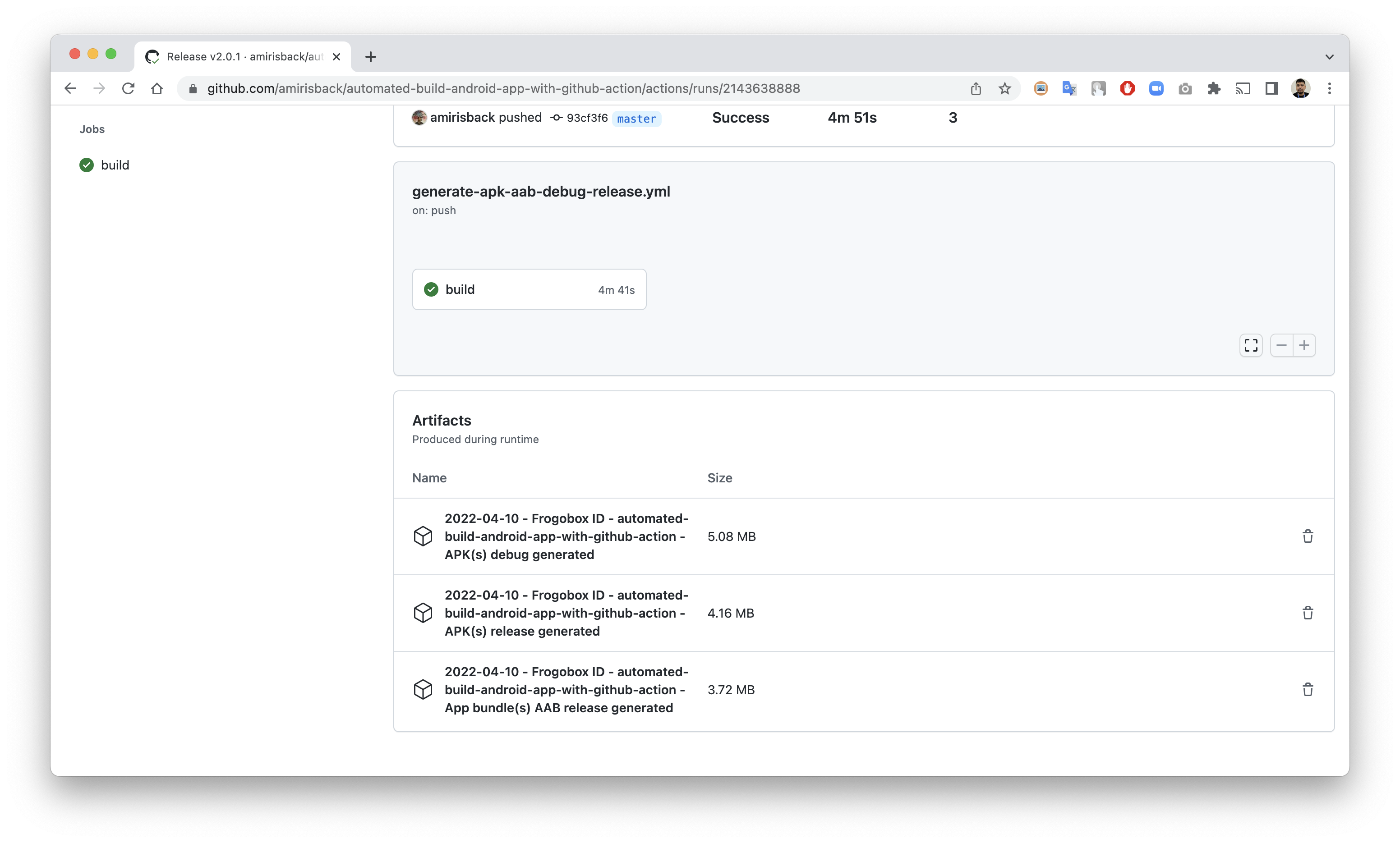
Extras (Private Repository Successfully Build Proven)
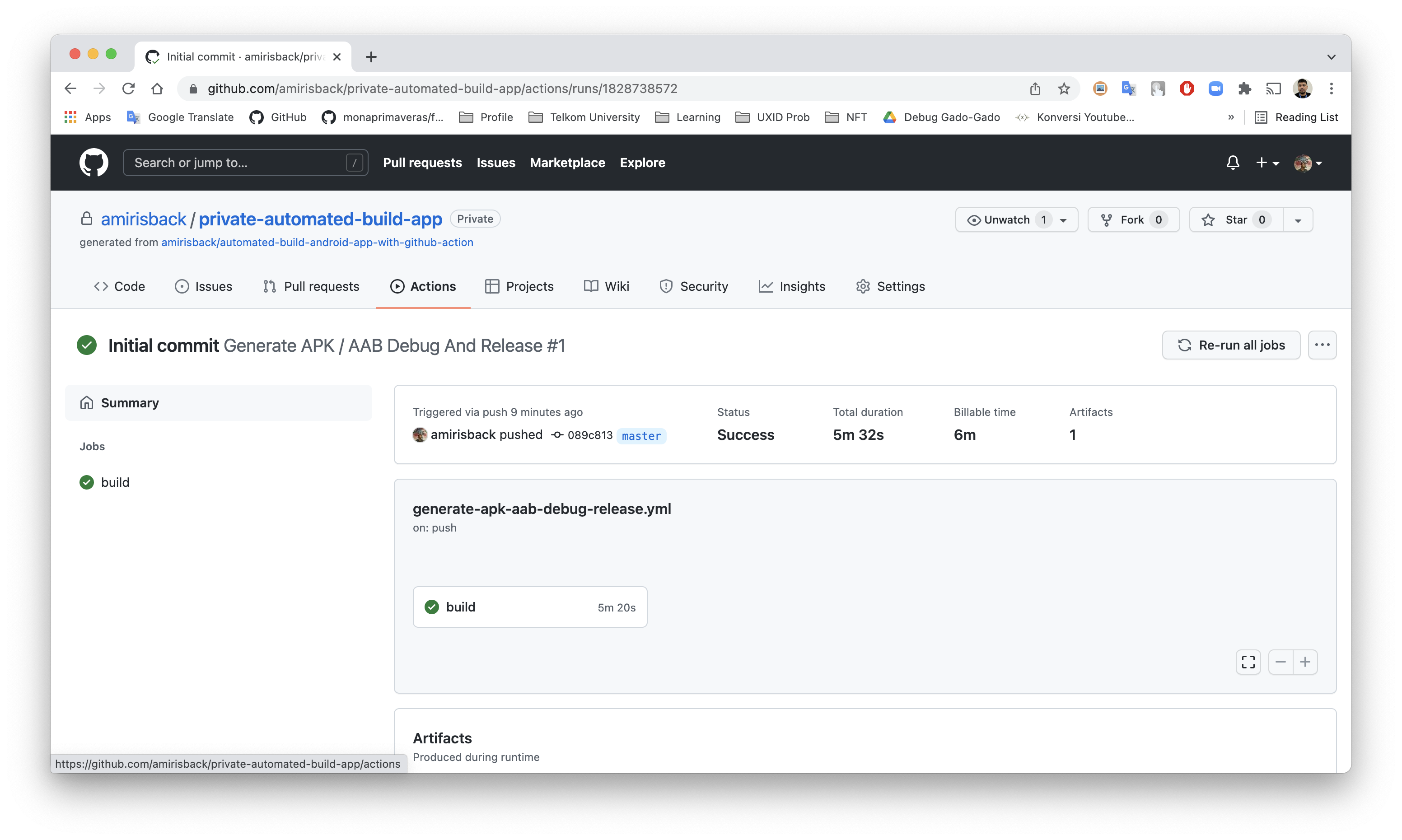
Result Generated from Github Action
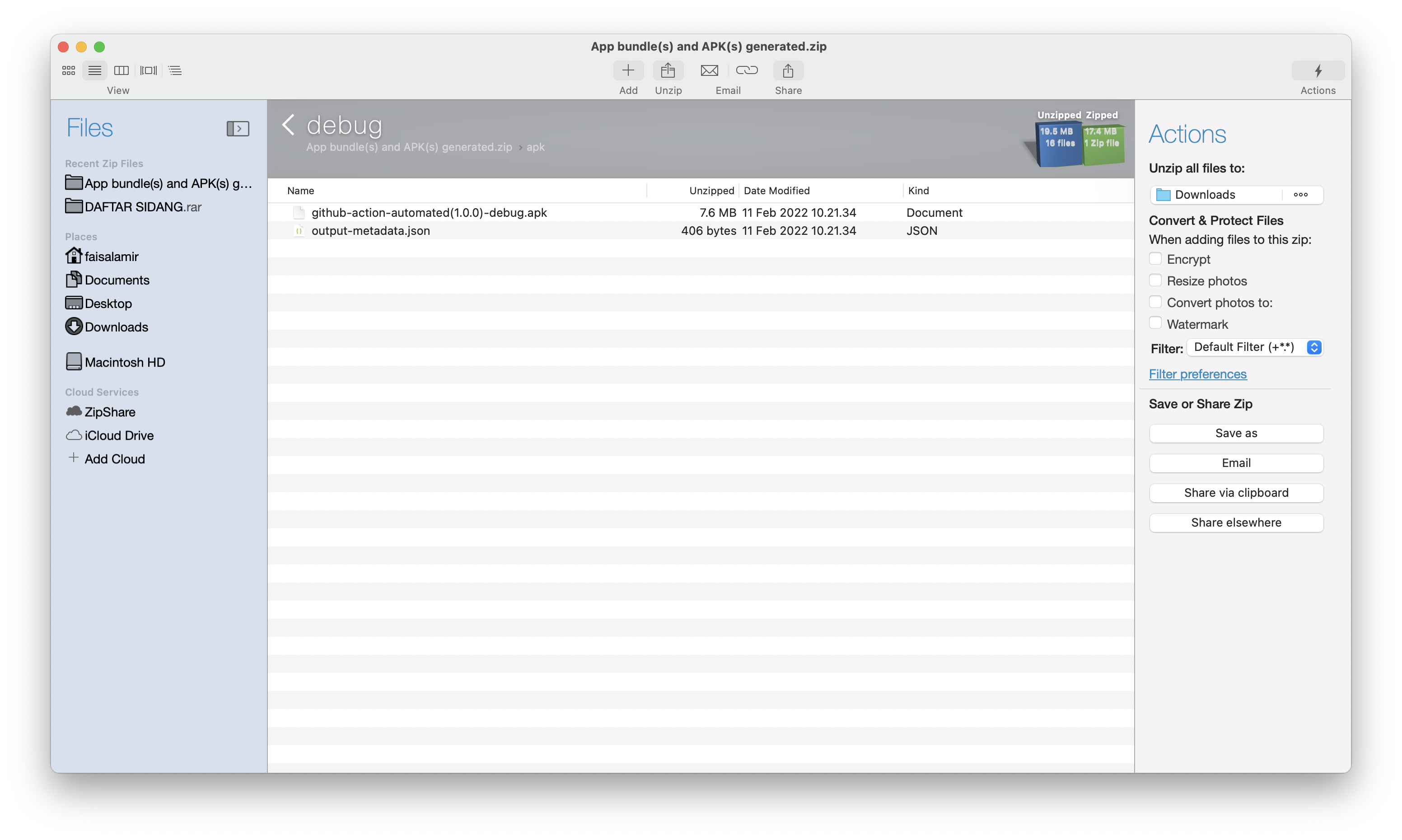
APK(s) debug generated
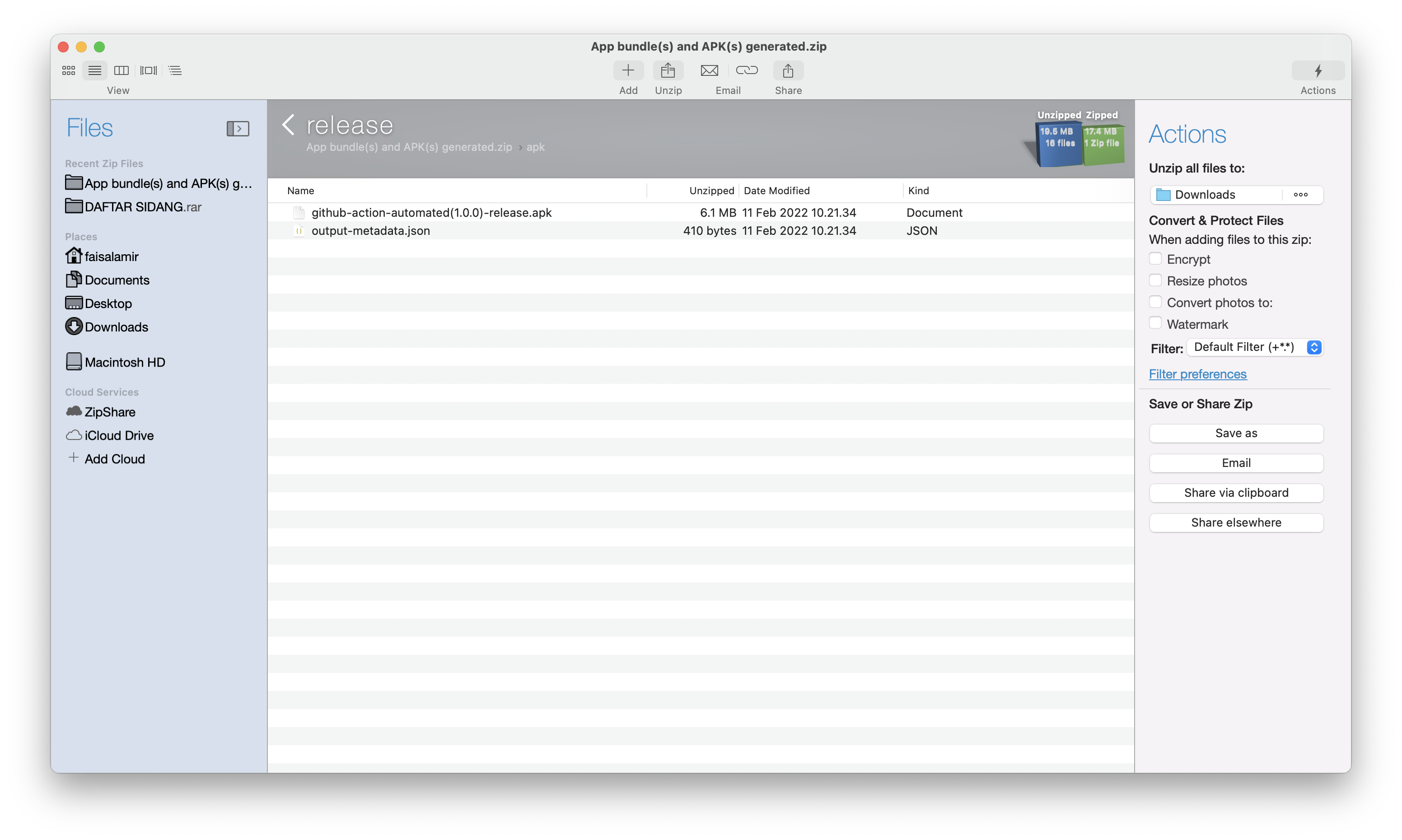
APK(s) release generated
App bundle(s) release generated
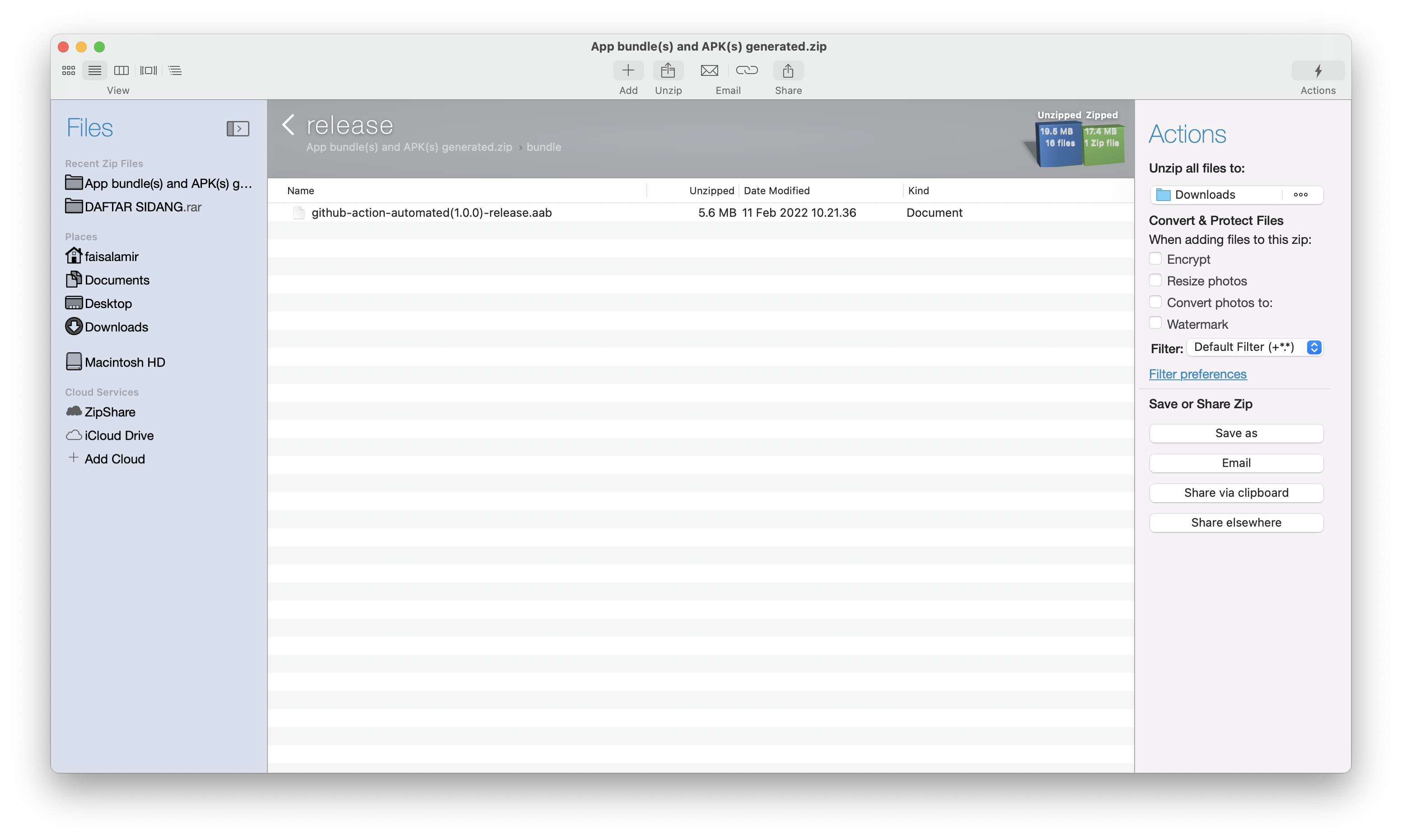
Clean Up Artifact
name: Generated APK AAB (Clean)

on:
  # Allows you to run this workflow manually from the Actions tab
  workflow_dispatch:

  schedule:
    # Every day at 1am
    - cron: '0 1 * * *'

jobs:
  remove-old-artifacts:
    runs-on: ubuntu-latest
    timeout-minutes: 10

    steps:
      - name: Clean all artifacts
        uses: c-hive/gha-remove-artifacts@v4
        with:
          age: '60 seconds' # '<number> <unit>', e.g. 5 days, 2 years, 90 seconds, parsed by Moment.js
          # Optional inputs
          # skip-tags: true
          # skip-recent: 5
Using Bundle Tool
Step 1. Prepare Bundle Tool
- Check Bundletool on (.github/lib/bundletool.jar) Download Latest
Step 2. Code Action in file android-ci-generate-apk-aab-upload-3.yml
name: Generated APK AAB 2 Bundle Tool (Upload - Create Artifact To Github Action)

env:
  # The name of the main module repository
  main_project_module: app

  # The name of the Play Store
  playstore_name: Frogobox ID

  # Keystore Path
  ks_path: frogoboxdev.jks

  # Keystore Password
  ks_store_pass: cronoclez

  # Keystore Alias
  ks_alias: frogobox

  # Keystore Alias Password
  ks_alias_pass: xeonranger

on:

  push:
    branches:
      - 'release/**'

  # Allows you to run this workflow manually from the Actions tab
  workflow_dispatch:

jobs:
  build:

    runs-on: ubuntu-latest

    steps:
      - uses: actions/checkout@v4

      # Set Current Date As Env Variable
      - name: Set current date as env variable
        run: echo "date_today=$(date +'%Y-%m-%d')" >> $GITHUB_ENV

      # Set Repository Name As Env Variable
      - name: Set repository name as env variable
        run: echo "repository_name=$(echo '${{ github.repository }}' | awk -F '/' '{print $2}')" >> $GITHUB_ENV

      - name: Set Up JDK
        uses: actions/setup-java@v4
        with:
          distribution: 'zulu' # See 'Supported distributions' for available options
          java-version: '17'
          cache: 'gradle'

      - name: Change wrapper permissions
        run: chmod +x ./gradlew

      # Run Tests Build
      - name: Run gradle tests
        run: ./gradlew test

      # Run Build Project
      - name: Build gradle project
        run: ./gradlew build

      # Create APK Debug
      - name: Build apk debug project (APK) - ${{ env.main_project_module }} module
        run: ./gradlew assembleDebug

      # Create APK Release
      - name: Build apk release project (APK) - ${{ env.main_project_module }} module
        run: ./gradlew assemble

      # Create Bundle AAB Release
      # Noted for main module build [main_project_module]:bundleRelease
      - name: Build app bundle release (AAB) - ${{ env.main_project_module }} module
        run: ./gradlew ${{ env.main_project_module }}:bundleRelease

      # - name: Build APK(s) Debug from bundle using bundletool
      #   run: java -jar ".github/lib/bundletool.jar" build-apks --bundle=${{ env.main_project_module }}/build/outputs/bundle/debug/${{ env.artifact_name }}-debug.aab --output=${{ env.main_project_module }}/build/outputs/bundle/debug/${{ env.artifact_name }}-debug.apks --mode=universal

      - name: Set Env Artifact name from generated aab
        run: |
          cd ${{ env.main_project_module }}/build/outputs/bundle/release/
          files=(*)
          echo "generated_name_aab=${files[0]%.*}" >> $GITHUB_ENV

      # Build APK From Bundle Using Bundletool
      # Noted For Output [main_project_module]/build/outputs/bundle/release/
      - name: Build APK(s) Release from bundle using bundletool (Path same with bundle output)
        run: java -jar ".github/lib/bundletool.jar" build-apks --bundle=${{ env.main_project_module }}/build/outputs/bundle/release/${{ env.generated_name_aab }}.aab --output=${{ env.main_project_module }}/build/outputs/bundle/release/${{ env.generated_name_aab }}.apks --mode=universal --ks="app/${{ env.ks_path }}" --ks-pass=pass:${{ env.ks_store_pass }} --ks-key-alias=${{ env.ks_alias }} --key-pass=pass:${{ env.ks_alias_pass }}

      # Duplicate APK(s) Release to zip file and extract
      - name: Duplicate APK(s) Release to zip file and extract
        run: |
          cd ${{ env.main_project_module }}/build/outputs/bundle/release/
          unzip -p ${{ env.generated_name_aab }}.apks universal.apk > ${{ env.generated_name_aab }}.apk

      # Upload Artifact Build
      # Noted For Output [main_project_module]/build/outputs/apk/debug/
      - name: Upload APK Debug - ${{ env.repository_name }}
        uses: actions/upload-artifact@v4
        with:
          name: ${{ env.date_today }} - ${{ env.playstore_name }} - ${{ env.repository_name }} - APK(s) debug generated
          path: ${{ env.main_project_module }}/build/outputs/apk/debug/

      # Noted For Output [main_project_module]/build/outputs/apk/release/
      - name: Upload APK Release - ${{ env.repository_name }}
        uses: actions/upload-artifact@v4
        with:
          name: ${{ env.date_today }} - ${{ env.playstore_name }} - ${{ env.repository_name }} - APK(s) release generated
          path: ${{ env.main_project_module }}/build/outputs/apk/release/

      # Noted For Output [main_project_module]/build/outputs/bundle/release/
      - name: Upload AAB (App Bundle) Release - ${{ env.repository_name }}
        uses: actions/upload-artifact@v4
        with:
          name: ${{ env.date_today }} - ${{ env.playstore_name }} - ${{ env.repository_name }} - App bundle(s) AAB release generated
          path: ${{ env.main_project_module }}/build/outputs/bundle/release/
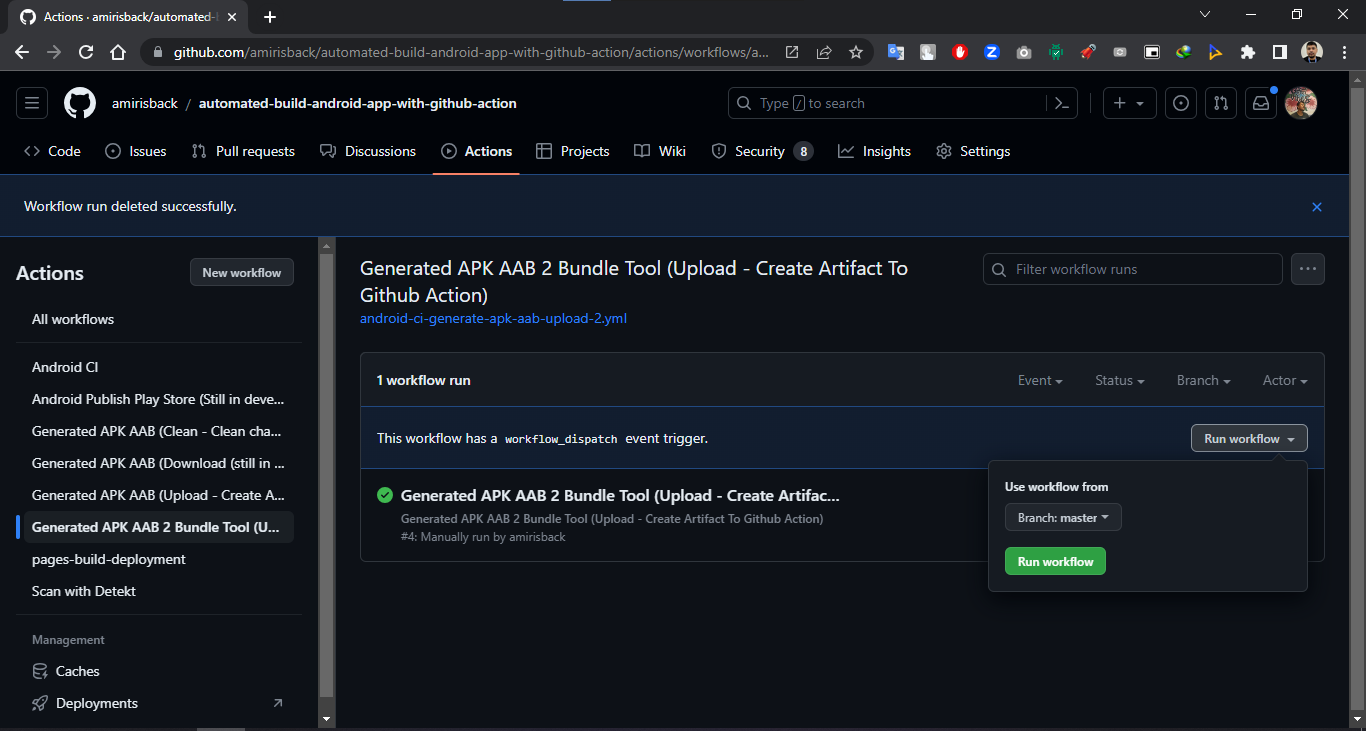
Step 3. Running Action
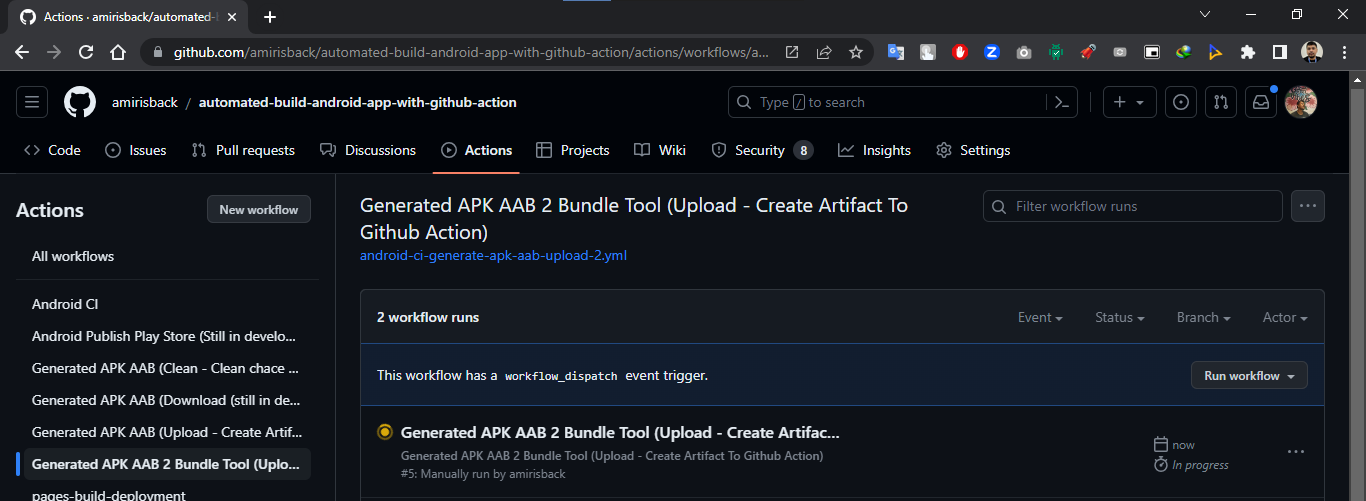
Step 4. Waiting Running Action
Waiting for running action
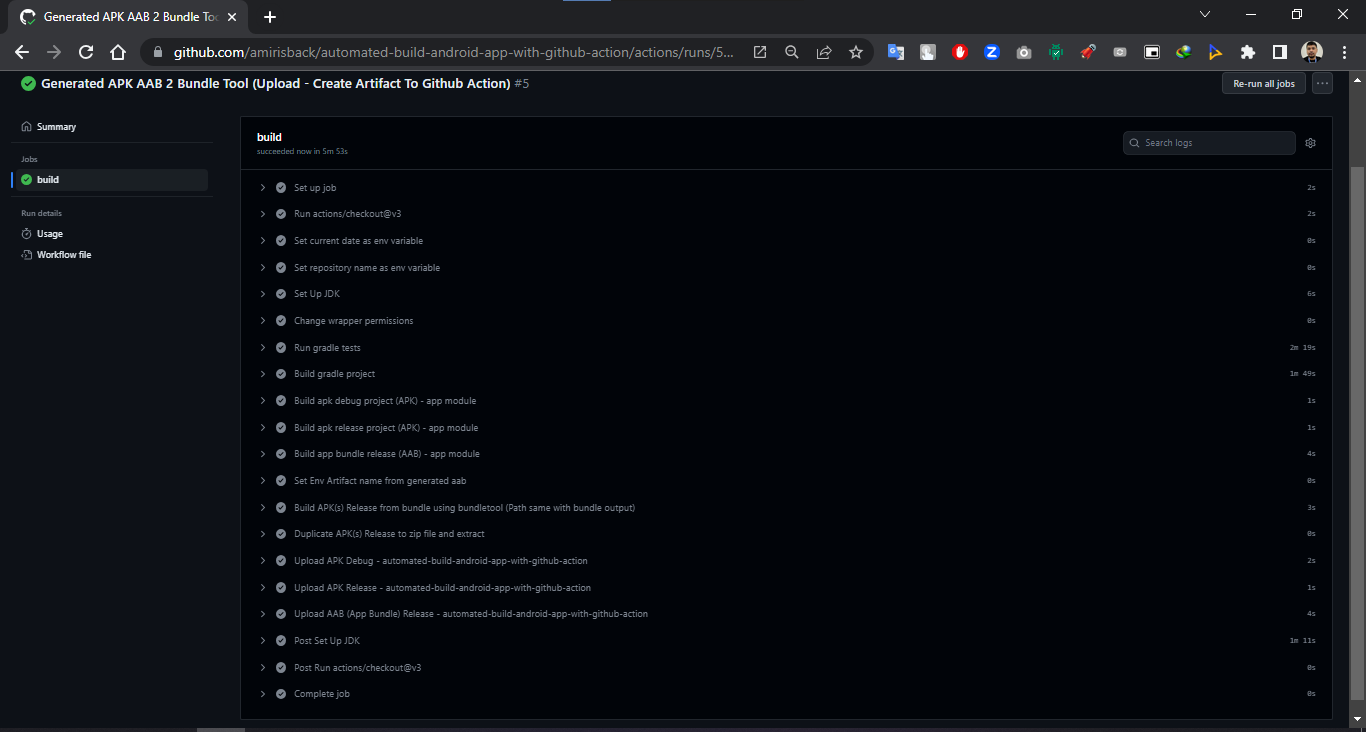
Check periodically, afraid there is an error
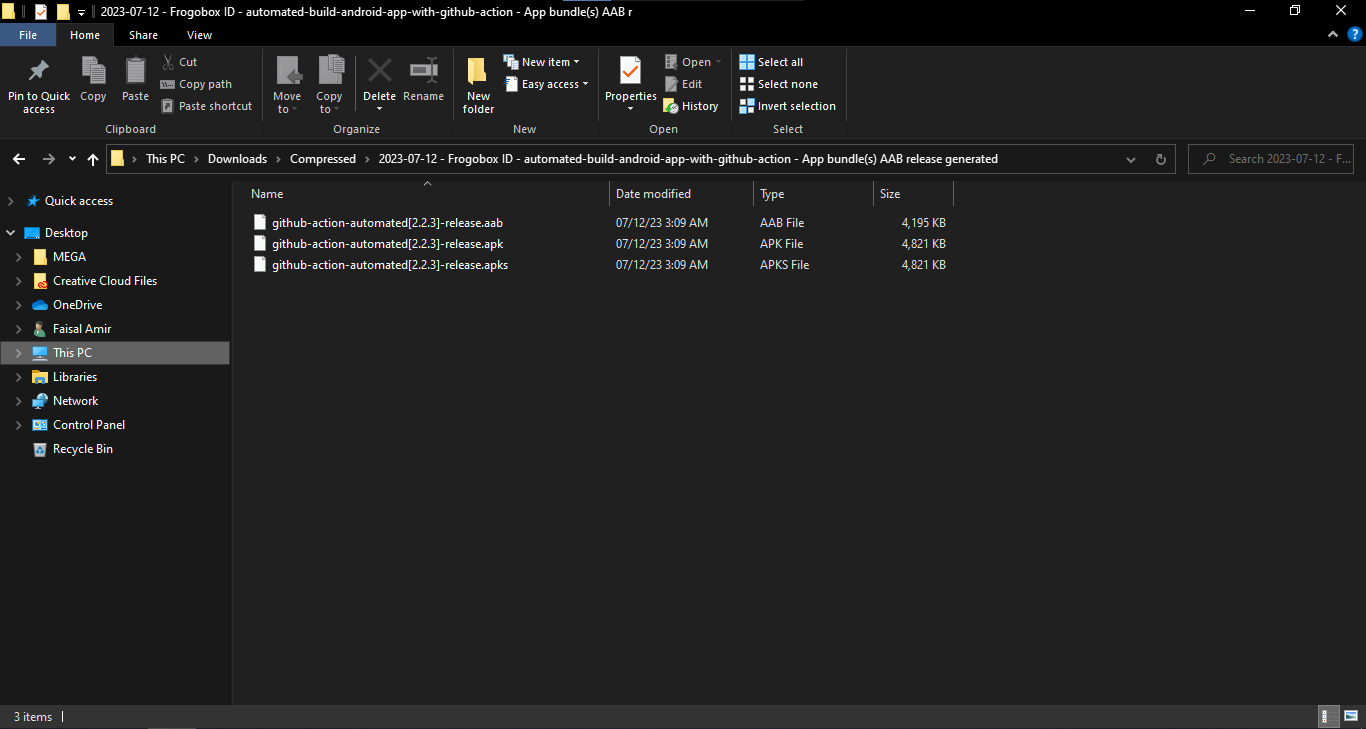
Step 5. Download Artifact and Extract it
Download Artifact (AAB Artifact)
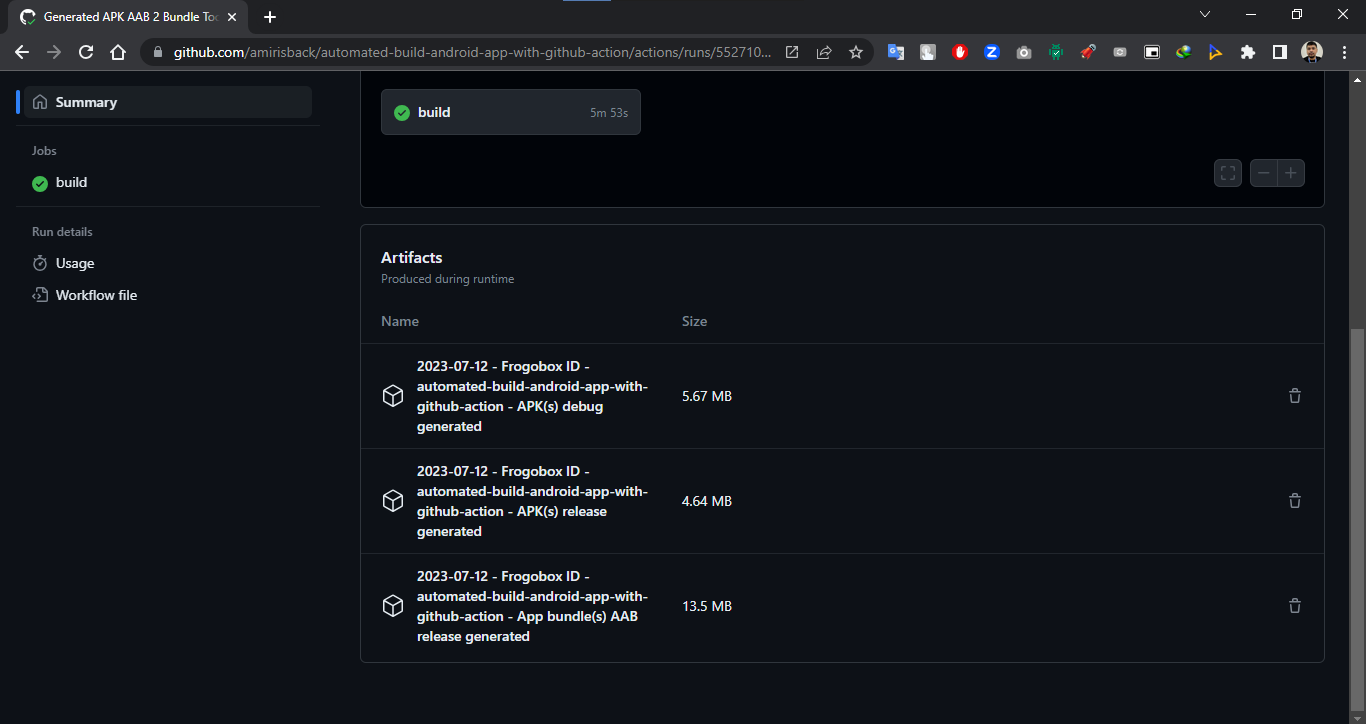
Extract it !!! Done
Run Using Gradle Configuration
.run Configuration (Alternative if you don't have github action)
- Run on your local machine
Step 1: Create Folder .run on Root Project Directory
Step 2: Create File [name-config].run.xml
<component name="ProjectRunConfigurationManager">
  <!-- Add Name Configuration Here -->
  <configuration default="false" name="${your-config-name}" type="GradleRunConfiguration" factoryName="Gradle">
    <ExternalSystemSettings>
      <option name="executionName" />
      <option name="externalProjectPath" value="$PROJECT_DIR$" />
      <option name="externalSystemIdString" value="GRADLE" />
      <option name="scriptParameters" value="" />
      <option name="taskDescriptions">
        <list />
      </option>
      <option name="taskNames">
        <list>
          <!-- TODO : add your task here -->
          <option value=":app:assembleDebug" />
        </list>
      </option>
      <option name="vmOptions" />
    </ExternalSystemSettings>
    <ExternalSystemDebugServerProcess>true</ExternalSystemDebugServerProcess>
    <ExternalSystemReattachDebugProcess>true</ExternalSystemReattachDebugProcess>
    <DebugAllEnabled>false</DebugAllEnabled>
    <RunAsTest>false</RunAsTest>
    <method v="2" />
  </configuration>
</component>
- Note : if you confuse you can use this feature
Step 3: Your Configuration Will Appears on this Menu
Step 4: Result run multiple task
Sample Configuration (signingreport)
<component name="ProjectRunConfigurationManager">
  <configuration default="false" name="signingreport" type="GradleRunConfiguration" factoryName="Gradle">
    <ExternalSystemSettings>
      <option name="executionName" />
      <option name="externalProjectPath" value="$PROJECT_DIR$" />
      <option name="externalSystemIdString" value="GRADLE" />
      <option name="scriptParameters" value="" />
      <option name="taskDescriptions">
        <list />
      </option>
      <option name="taskNames">
        <list>
          <option value="signingreport" />
        </list>
      </option>
      <option name="vmOptions" />
    </ExternalSystemSettings>
    <ExternalSystemDebugServerProcess>true</ExternalSystemDebugServerProcess>
    <ExternalSystemReattachDebugProcess>true</ExternalSystemReattachDebugProcess>
    <DebugAllEnabled>false</DebugAllEnabled>
    <RunAsTest>false</RunAsTest>
    <method v="2" />
  </configuration>
</component>
Run Using Script File
Run Using Batch File
@echo off
setlocal

:: Navigate to the project root directory
cd /d "%~dp0.."

echo ======================================
    Starting Android Build Process
echo ======================================

echo [1/6] Cleaning project...
call gradlew clean

echo [2/6] Running tests...
call gradlew test

echo [3/6] Building project...
call gradlew build

echo [4/6] Assembling Debug APK...
call gradlew assembleDebug

echo [5/6] Assembling Release APK...
call gradlew assemble

echo [6/6] Building Release App Bundle (AAB)...
call gradlew app:bundleRelease

echo ======================================
     Build completed successfully!
echo ======================================
pause
Run Using Shell Script
#!/bin/bash

echo "======================================"
echo "     Starting Android Build Process    "
echo "======================================"

echo "[1/6] Cleaning project..."
./gradlew clean

echo "[2/6] Running tests..."
./gradlew test

echo "[3/6] Building project..."
./gradlew build

echo "[4/6] Assembling Debug APK..."
./gradlew assembleDebug

echo "[5/6] Assembling Release APK..."
./gradlew assemble

echo "[6/6] Building Release App Bundle (AAB)..."
./gradlew app:bundleRelease

echo "======================================"
echo "     Build completed successfully!    "
echo "======================================"
Collaborator
Very open to anyone, I'll write your name under this, please contribute by sending an email to me
- Mail To [email protected]
- Subject : Github _ [Github-Username-Account] _ [Language] _ [Repository-Name]
- Example : Github_amirisback_kotlin_admob-helper-implementation
Names of Contributors
- Muhammad Faisal Amir
- David Mariscal Fernández
- Waiting List
Waiting for your contribution
AI Agent Skill
This project includes an AI Agent Skill designed to help AI coding assistants (like Antigravity) understand and manage the GitHub Workflows in this repository.
How to Use
If you are using an AI assistant, you can ask it to use the skill located at:
skills/github-workflows/SKILL.md
Example Commands:
- "Explain how the APK upload workflow works using the
github-workflowsskill." - "Use the
github-workflowsskill to add a new environment variable to all CI scripts." - "Help me troubleshoot a failed build using the
github-workflowsskill."
Attention !!!
- Please enjoy and don't forget fork and give a star
- Don't Forget Follow My Github Account

act
nektos·Go
在本地直接跑 GitHub Actions 工作流,不用每次改完都推到远端等 CI,调试 workflow 和排查失败步骤快很多。
GitHub Actions+4CI / CD
72626+532.1kv0.2.972026-11-04 16:29 UTC
shannon
KeygraphHQ·TypeScript
Shannon 是一款 AI 渗透测试工具,能分析 Web 应用和 API 的源码、定位攻击面,并在上线前实际执行漏洞利用来验证风险。
渗透测试+4CI / CD
51609+2536.0kv3.5.02026-11-10 04:39 UTC
harness
harness·Go
一套开源的端到端开发者平台,把代码托管、CI/CD 流水线、云端开发环境和制品仓库整合在一起,省去拼装多套工具的麻烦。
CI/CD+4CI / CD
38876+253.5kv2.28.22026-11-06 17:00 UTC
gitleaks
gitleaks·Go
扫描 Git 仓库和提交历史,自动找出硬编码的密钥、令牌等敏感信息,帮你在 CI/CD 流程里提前拦截泄露风险。
密钥扫描+4CI / CD
30853+932.4kv8.30.12026-10-28 04:14 UTC