启动前必须先把 envs/env.template 复制为 .env,否则缺少配置;MCP 客户端需填入 ApeRAG 设置中生成的有效 API Key;高级文档解析需额外启用 docray 或 docray-gpu profile,默认不启动。
ApeRAG
apecloudApache-2.0活跃维护面向生产环境的 GraphRAG 系统,支持多模态索引、AI 智能体和 MCP 协议,可在 K8s 上弹性部署,帮团队把知识图谱与检索增强真正落地。
ApeRAG: Production-ready GraphRAG with multi-modal indexing, AI agents, MCP support, and scalable K8s deployment
v0.7.0-alpha.34发布于 2026-03-11 05:33 UTC1,319star +1 / 7 天147fork同步于 2026-11-10 11:49 UTC
git clone https://github.com/apecloud/ApeRAG.git
cd ApeRAG
cp envs/env.template .env
docker-compose up -d --pull always 硬件要求按 README 说明
Docker Compose 最低要求 CPU ≥ 2 核、内存 ≥ 4 GiB;K8s 默认含 doc-ray 服务,需 4 核以上 CPU 与 8GB 以上内存,可在 values.yaml 中关闭;MinerU 高级解析可选 GPU 加速,但 README 未说明具体显存与 GPU 型号。
有 Docker 镜像
生产级 GraphRAG 平台,融合图、向量与全文检索,并内置 AI 智能体
面向生产环境的 GraphRAG 系统,支持多模态索引、AI 智能体和 MCP 协议,可在 K8s 上弹性部署,帮团队把知识图谱与检索增强真正落地。
核心能力
- 提供向量、全文、图、摘要、视觉五类索引
- 内置 AI 智能体,支持 MCP 工具与网页搜索
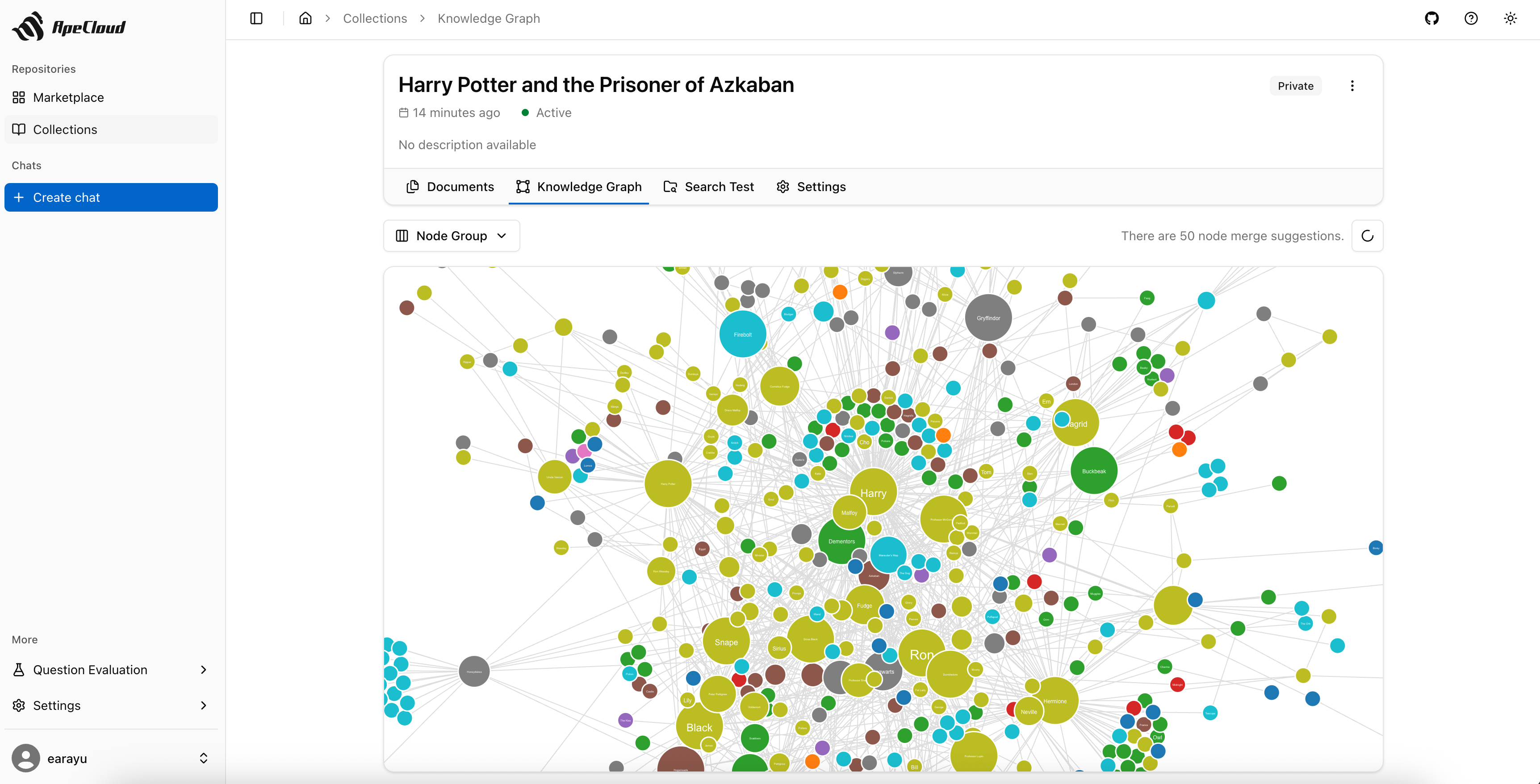
- 改进 LightRAG 并做实体归一化,生成更干净的知识图谱
- 混合检索融合图、向量、全文、摘要与视觉结果
- 集成 MinerU 解析复杂文档、表格与公式,可选 GPU 加速
容易踩的坑
内容由模型根据 README 生成,可能不完整或不准确,以官方文档为准。看原文 README
- v0.7.0-alpha.34ApeRAG v0.7.0-alpha.34pre-release最新正式版2026-03-11 · 2026-03-11 05:33 UTC
What's Changed
- feat: fix neo4j id by @earayu in https://github.com/apecloud/ApeRAG/pull/1453
Full Changelog: https://github.com/apecloud/ApeRAG/compare/v0.7.0-alpha.33...v0.7.0-alpha.34
- v0.7.0-alpha.33ApeRAG v0.7.0-alpha.33pre-release2026-03-09 · 2026-03-09 10:58 UTC
查看更新说明
What's Changed
- feat: fix by @earayu in https://github.com/apecloud/ApeRAG/pull/1452
Full Changelog: https://github.com/apecloud/ApeRAG/compare/v0.7.0-alpha.32...v0.7.0-alpha.33
- v0.7.0-alpha.32ApeRAG v0.7.0-alpha.32pre-release2026-03-09 · 2026-03-09 08:03 UTC
查看更新说明
What's Changed
- feat: support web search in collection by @earayu in https://github.com/apecloud/ApeRAG/pull/1451
Full Changelog: https://github.com/apecloud/ApeRAG/compare/v0.7.0-alpha.31...v0.7.0-alpha.32
- v0.7.0-alpha.31ApeRAG v0.7.0-alpha.31pre-release2026-03-05 · 2026-03-05 06:38 UTC
查看更新说明
What's Changed
- feat: fix by @earayu in https://github.com/apecloud/ApeRAG/pull/1450
Full Changelog: https://github.com/apecloud/ApeRAG/compare/v0.7.0-alpha.30...v0.7.0-alpha.31
- v0.7.0-alpha.30ApeRAG v0.7.0-alpha.30pre-release2026-03-05 · 2026-03-05 03:19 UTC
查看更新说明
What's Changed
- feat: update by @earayu in https://github.com/apecloud/ApeRAG/pull/1449
Full Changelog: https://github.com/apecloud/ApeRAG/compare/v0.7.0-alpha.28...v0.7.0-alpha.30
用户点评
登录用户的真实使用记录,可按版本和硬件筛选共 0 条
还没有人点评。第一个说出真实体验的人最有价值。
ApeRAG


ApeRAG is a production-ready RAG (Retrieval-Augmented Generation) platform that combines Graph RAG, vector search, and full-text search with advanced AI agents. Build sophisticated AI applications with hybrid retrieval, multimodal document processing, intelligent agents, and enterprise-grade management features.
ApeRAG is the best choice for building your own Knowledge Graph, Context Engineering, and deploying intelligent AI agents that can autonomously search and reason across your knowledge base.
- Quick Start
- Key Features
- Kubernetes Deployment (Recommended for Production)
- Development
- Build Docker Image
- Acknowledgments
- License
Quick Start
Before installing ApeRAG, make sure your machine meets the following minimum system requirements:
- CPU >= 2 Core
- RAM >= 4 GiB
- Docker & Docker Compose
The easiest way to start ApeRAG is through Docker Compose. Before running the following commands, make sure that Docker and Docker Compose are installed on your machine:
git clone https://github.com/apecloud/ApeRAG.git
cd ApeRAG
cp envs/env.template .env
docker-compose up -d --pull always
After running, you can access ApeRAG in your browser at:
- Web Interface: http://localhost:3000/web/
- API Documentation: http://localhost:8000/docs
MCP (Model Context Protocol) Support
ApeRAG supports MCP (Model Context Protocol) integration, allowing AI assistants to interact with your knowledge base directly. After starting the services, configure your MCP client with:
{
  "mcpServers": {
    "aperag-mcp": {
      "url": "http://localhost:8000/mcp/",
      "headers": {
        "Authorization": "Bearer your-api-key-here"
      }
    }
  }
}
Authentication (by priority):
- HTTP Authorization Header (Recommended):
Authorization: Bearer your-api-key - Environment Variable (Fallback):
APERAG_API_KEY=your-api-key
Important: Use your deployed API origin if not local (e.g. https://your-host/mcp/). Replace your-api-key-here with a valid API key from your ApeRAG settings.
The MCP server provides:
- Collection browsing: List and explore your knowledge collections
- Hybrid search: Search using vector, full-text, and graph methods
- Intelligent querying: Ask natural language questions about your documents
Enhanced Document Parsing
For enhanced document parsing capabilities, ApeRAG supports an advanced document parsing service powered by MinerU, which provides superior parsing for complex documents, tables, and formulas.
# Enable advanced document parsing service
DOCRAY_HOST=http://aperag-docray:8639 docker compose --profile docray up -d

# Enable advanced parsing with GPU acceleration
DOCRAY_HOST=http://aperag-docray-gpu:8639 docker compose --profile docray-gpu up -d
Or use the Makefile shortcuts (requires GNU Make):
# Enable advanced document parsing service
make compose-up WITH_DOCRAY=1

# Enable advanced parsing with GPU acceleration (recommended)
make compose-up WITH_DOCRAY=1 WITH_GPU=1
Development & Contributing
For developers interested in source code development, advanced configurations, or contributing to ApeRAG, please refer to our Development Guide for detailed setup instructions.
Key Features
1. Advanced Index Types: Five comprehensive index types for optimal retrieval: Vector, Full-text, Graph, Summary, and Vision - providing multi-dimensional document understanding and search capabilities.
2. Intelligent AI Agents: Built-in AI agents with MCP (Model Context Protocol) tool support that can automatically identify relevant collections, search content intelligently, and provide web search capabilities for comprehensive question answering.
3. Enhanced Graph RAG with Entity Normalization: Deeply modified LightRAG implementation with advanced entity normalization (entity merging) for cleaner knowledge graphs and improved relational understanding.
4. Multimodal Processing & Vision Support: Complete multimodal document processing including vision capabilities for images, charts, and visual content analysis alongside traditional text processing.
5. Hybrid Retrieval Engine: Sophisticated retrieval system combining Graph RAG, vector search, full-text search, summary-based retrieval, and vision-based search for comprehensive document understanding.
6. MinerU Integration: Advanced document parsing service powered by MinerU technology, providing superior parsing for complex documents, tables, formulas, and scientific content with optional GPU acceleration.
7. Production-Grade Deployment: Full Kubernetes support with Helm charts and KubeBlocks integration for simplified deployment of production-grade databases (PostgreSQL, Redis, Qdrant, Elasticsearch, Neo4j).
8. Enterprise Management: Built-in audit logging, LLM model management, graph visualization, comprehensive document management interface, and agent workflow management.
9. MCP Integration: Full support for Model Context Protocol (MCP), enabling seamless integration with AI assistants and tools for direct knowledge base access and intelligent querying.
10. Developer Friendly: FastAPI backend, React frontend, async task processing with Celery, extensive testing, comprehensive development guides, and agent development framework for easy contribution and customization.
Kubernetes Deployment (Recommended for Production)
Enterprise-grade deployment with high availability and scalability
Deploy ApeRAG to Kubernetes using our provided Helm chart. This approach offers high availability, scalability, and production-grade management capabilities.
Prerequisites
- Kubernetes cluster (v1.20+)
kubectlconfigured and connected to your cluster- Helm v3+ installed
Clone the Repository
First, clone the ApeRAG repository to get the deployment files:
git clone https://github.com/apecloud/ApeRAG.git
cd ApeRAG
Step 1: Deploy Database Services
ApeRAG requires PostgreSQL, Redis, Qdrant, and Elasticsearch. You have two options:
Option A: Use existing databases - If you already have these databases running in your cluster, edit deploy/aperag/values.yaml to configure your database connection details, then skip to Step 2.
Option B: Deploy databases with KubeBlocks - Use our automated database deployment (database connections are pre-configured):
# Navigate to database deployment scripts
cd deploy/databases/

# (Optional) Review configuration - defaults work for most cases
# edit 00-config.sh

# Install KubeBlocks and deploy databases
bash ./01-prepare.sh          # Installs KubeBlocks
bash ./02-install-database.sh # Deploys PostgreSQL, Redis, Qdrant, Elasticsearch

# Monitor database deployment
kubectl get pods -n default

# Return to project root for Step 2
cd ../../
Wait for all database pods to be in Running status before proceeding.
Step 2: Deploy ApeRAG Application
# If you deployed databases with KubeBlocks in Step 1, database connections are pre-configured
# If you're using existing databases, edit deploy/aperag/values.yaml with your connection details

# Deploy ApeRAG
helm install aperag ./deploy/aperag --namespace default --create-namespace

# Monitor ApeRAG deployment
kubectl get pods -n default -l app.kubernetes.io/instance=aperag
Configuration Options
Resource Requirements: By default, includes doc-ray service (requires 4+ CPU cores, 8GB+ RAM). To disable: set docray.enabled: false in values.yaml.
Advanced Settings: Review values.yaml for additional configuration options including images, resources, and Ingress settings.
Access Your Deployment
Once deployed, access ApeRAG using port forwarding:
# Forward ports for quick access
kubectl port-forward svc/aperag-frontend 3000:3000 -n default
kubectl port-forward svc/aperag-api 8000:8000 -n default

# Access in browser
# Web Interface: http://localhost:3000
# API Documentation: http://localhost:8000/docs
For production environments, configure Ingress in values.yaml for external access.
Troubleshooting
Database Issues: See deploy/databases/README.md for KubeBlocks management, credentials, and uninstall procedures.
Pod Status: Check pod logs for any deployment issues:
kubectl logs -f deployment/aperag-api -n default
kubectl logs -f deployment/aperag-frontend -n default
Acknowledgments
ApeRAG integrates and builds upon several excellent open-source projects:
LightRAG
The graph-based knowledge retrieval capabilities in ApeRAG are powered by a deeply modified version of LightRAG:
- Paper: "LightRAG: Simple and Fast Retrieval-Augmented Generation" (arXiv:2410.05779)
- Authors: Zirui Guo, Lianghao Xia, Yanhua Yu, Tu Ao, Chao Huang
- License: MIT License
We have extensively modified LightRAG to support production-grade concurrent processing, distributed task queues (Celery/Prefect), and stateless operations. See our LightRAG modifications changelog for details.
Community
Star History

License
ApeRAG is licensed under the Apache License 2.0. See the LICENSE file for details.
ragflow
infiniflow·Go
面向智能体的 RAG 检索引擎,把文档解析、知识编译和上下文管理整合成一套基础设施,帮 Agent 稳定拿到高质量检索结果。
检索增强生成+4检索增强引擎
93947+24011kv1.0.02026-11-10 11:07 UTC

LightRAG
HKUDS·Python
轻量级检索增强生成引擎,用图结构组织知识并支持增量更新,让 RAG 检索更快更省资源。
检索增强生成+4检索增强引擎
40639+495.8kv1.5.72026-11-09 16:17 UTC
graphrag
microsoft·Python
基于知识图谱的模块化检索增强生成系统,把文档抽成实体关系图,让大模型在回答复杂问题时能跨文档做全局推理。
知识图谱+4检索增强引擎
36620+303.9kv3.3.02026-11-09 07:23 UTC
AgentGuide
adongwanai·MDX
一份面向 AI Agent 开发与大模型求职的系统指南,覆盖上下文工程、高级 RAG、MCP、Agentic RL 和 LangGraph 实战,并附 1.2 万+ 面试题。
AI Agent+4检索增强引擎
11835+1111.1k2026-11-05 09:57 UTC