开发需 Node.js 20+ 与 pnpm;macOS 版未签名公证,首次启动需到隐私与安全性里点「仍要打开」;Windows 安装包无 Authenticode 签名,需在 SmartScreen 选「更多信息→仍要运行」;需自备模型提供方 API Key 或本地 ComfyUI,工具本身不含模型。
Nomi
aqm857886159AGPL-3.0活跃维护开源 AI 视频工作台,可接入任意模型或本地 ComfyUI,让 Claude Code、Codex、Cursor 通过 MCP 指挥分镜、参考图、生成和真实时间轴上的可编辑初剪,项目与密钥全部留在本地。
Open-source AI video workbench. Bring any model or your local ComfyUI, and let Claude Code / Codex / Cursor direct it over MCP — storyboard, references, generation, editable first cut on a real timeline. Local-first: projects, prompts, and keys stay on your machine. No account, no telemetry.
v0.24.1发布于 2026-11-06 19:07 UTC639star +6 / 7 天143fork同步于 2026-11-11 05:52 UTC
git clone https://github.com/aqm857886159/Nomi.git
cd Nomi
corepack enable
pnpm install
pnpm dev 硬件要求按 README 说明
README 未说明显存或 GPU 要求;发布包仅支持 macOS arm64/x64 与 Windows 10/11 x64,Linux 与 Windows arm64 暂无安装包。
支持 Apple Silicon
本地优先的开源 AI 视频工作台,接入你自己的模型,由 AI 代理编排分镜与时间线
开源 AI 视频工作台,可接入任意模型或本地 ComfyUI,让 Claude Code、Codex、Cursor 通过 MCP 指挥分镜、参考图、生成和真实时间轴上的可编辑初剪,项目与密钥全部留在本地。
核心能力
- 代理读取画布,自动拆分镜头、生成关键帧并排上时间线
- 分镜表逐镜头管理提示词、首帧、模型与时长,可锁定角色参考卡
- 同一镜头可换模型重生成,支持 Seedance、Kling、Wan 等及本地 ComfyUI
- 内置 24 个工具的 MCP 服务,让 Claude Code、Codex、Cursor 直接驱动
- 项目以普通文件夹存于本地,无需账号,遥测默认关闭
容易踩的坑
内容由模型根据 README 生成,可能不完整或不准确,以官方文档为准。看原文 README
- v0.24.1Nomi v0.24.1最新正式版2026-11-06 · 2026-11-06 19:07 UTC
Nomi v0.24.1 — 生成出错不再卡死,保存、安装和卡顿一起修
这一版不改界面样子,专修 0.24.0 发出后大家撞上的问题:批量生成出错后整张表卡住、项目一直存不上、Windows 升级删掉放在安装目录里的文件、大画布缩小后图片消失,还有中转站的视频模型接不上。跟花钱有关的几处也更稳:结果不明的单只取回、不重下,再发一次之前一定先问你。
生成与花钱
- 批量生成出错不再锁死整张表:一批里有几镜结果不明(报错了,或者服务商的回复在路上丢了)时,以前整张表卡在「生成中」,重启也不行。现在只有那一镜变成一张提示卡(不是红色报错),写明「可能已经扣费」,下面是「再发一次」和「查看任务」,其它镜照常能改、能生成。画布、列表、分镜和任务中心看到的是同一张卡。
- 再发一次之前一定先问:点「再发一次」会先弹确认卡,写明再发可能会再扣一次钱;点取消就什么都不发。分镜里如果服务商那边其实已经做好了,「免费取回」排在第一个。
- 已经被服务商收下的单,只取回、不重下:关窗、重启、或者本机一时查不了,这一笔都不会被判失败,也不会重新下单;晚到的旧结果不会盖掉你重新生成的新图。等结果的时候也不再白白占着电脑。
- 试跑模型不会下第二单:接入模型时试跑一次、结果不明,再试会接着查原来那一单;你明确要开新单时会弹确认卡,并说明上一笔结果还不确定。
- 第一次弹付费确认卡不再慢半拍:以前每次打开 Nomi 后第一次点生成,要停顿约 0.3 秒卡才出来,像没点上。
- 参考图的临时链接过期了,改传本机文件:引用一张生成不久的图时,服务商给的临时链接过期或被拦,以前会报「参数不被接受,请检查比例 / 尺寸」,点重试还是一样。现在改传你电脑上的那张图。
中转站与模型
- 中转站的视频模型接得上:让 Agent 照文档接入的中转视频模型,参数、需要几张图、请求发到哪,一次登记完整,不用再手动设置;服务商已经收下的视频,能直接取回成品文件。没说清怎么调用的视频模型,会在发请求之前停下,错误卡上的按钮带你去接入,不再显示一段英文报错加「重试」。
- 自配的网关不再整轮拒收:用自己配的 OpenAI 兼容网关时,让 Agent 把文稿拆成分镜,以前可能连续三次报「Invalid request parameters」,现在能正常拆。
- 外部 AI 读到的模型清单说实话:通过 MCP 连着 Nomi 的 AI,读模型清单时,填了 Key 但用不了的模型不再算作可用、也不再被推荐,会写明原因。
保存、项目与安装
- 项目不再一直存不上:新建还没起名的人物卡、清空人物名字、把整片画幅切回「默认」,以前会让整个项目反复保存失败。现在这些都能正常保存;真的存不上时,会说清是没有权限、文件被别的程序占用、磁盘满了,还是别的原因。
- 找不到文件夹的项目不会消失:项目文件夹被挪走或改名后,项目还留在项目库里,卡片写明「找不到这个文件夹」:可以用「打开已有文件夹」重新选它接上,也可以从项目库移除,移除后重启不会再冒出来。打开项目库时,Nomi 不会再悄悄把它们从登记里删掉。
- Windows 升级和卸载不再删你的文件:你放在 Nomi 安装目录里的文件,以前升级时可能被一起删掉。现在安装器只删它自己装进去的文件,你的文件原样留在原处。
卡顿与误操作
- 大画布缩小后不再缺图:缩到很小、一屏几十张图时,图片不再轮流消失,编组底色也不会整块不画。
- 弹窗开着时,底下不会被误操作:确认框、设置、看大图开着时,按 Delete、⌘Z、⌘A、⌘V 不会再动到被盖住的画布、时间轴或列表;Esc 只关最上面那一层。
- 列表视图里删东西不会删到画布:在列表里按 Delete 或撤销,不会再碰到藏在后面的画布;在素材盒里删文件时,还被画布或时间轴用着的不会被直接删掉。
- 诊断包写明卡在哪:「设置 › 通用 › 导出诊断包」现在会带上什么时候卡过、卡了多久、显卡型号和项目大小,方便我们查卡顿;不含文件路径和提示词。
导演台
- 预演量的是镜头里的人:预演给出的景别和运镜,按镜头里记录的人物来量,不会再把背景里的楼当成主体;复制场景或导入场景后,读数和原来一致。
反馈
- 「反馈这个问题」发得出去:以前勾选带上内容后,可能一直停在「正在发送…」,也带不上日志。现在发得出去、带得上日志;一时没发成的会先存在本机,之后自动重发,不用守着。
升级须知
- 这一版分批推送:先推给一部分用户,确认没问题再推给所有人。暂时没收到更新提示的,可以在「设置 › 关于」里点「检查更新」,或到官网下载。
- 升级后请不要再装回 0.24.0:这一版能保存没起名的人物卡这类草稿,存过这类草稿的项目,0.24.0 打不开。
已知问题
- 批量生成时,参考图会在你看到上传说明之前先传给服务商:需要把参考图传到服务商那边的模型,单张生成会先问你;批量生成的第一批目前没先问。下一版修。
- 模型能不能用,仍然取决于你自己的服务商账号、权限和额度。
What changed
Generation no longer locks up after errors, and saving, installing and canvas slowdowns are fixed.
This release keeps the same layout and fixes what people ran into after 0.24.0: a whole batch stuck after a few shots failed, projects that kept failing to save, Windows updates deleting files kept in the install folder, images vanishing on a zoomed-out canvas, and relay video models that would not connect. Spending is steadier too: an order the provider already accepted is only retrieved, never placed again, and Nomi always asks before sending again.
Generation and spending
- A failed batch no longer locks the whole table: When a few shots end with an unknown result, only those shots turn into a neutral card that says you may already have been charged, with Send again and View task. Every other shot keeps working. Canvas, list, storyboard and the task center show the same card.
- Send again always asks first: Send again opens a confirmation that says it may charge you again; Cancel sends nothing. In the storyboard, a free retrieve comes first when the provider already finished the result.
- Accepted orders are only retrieved, never re-sent: Closing the window, restarting, or a failed local lookup no longer marks the order as failed or places it again, and a late old result never overwrites a newer one. Waiting no longer keeps your computer busy for nothing.
- Trying a model never places a second order: If a test run ends with an unknown result, trying again checks the original order. Asking for a new one shows a confirmation that says the last result is still unknown.
- The first spending confirmation shows up instantly: The first one after opening Nomi used to appear about 0.3 s late.
- **Expired reference links fall back to the loc
- v0.24.0Nomi v0.24.02026-10-29 · 2026-10-29 03:06 UTC
查看更新说明
Nomi v0.24.0 — 界面换新,画布上能直接剪视频、改图、看历史版本
这一版改动多。打开就能看到界面换了:顶栏合成一条,左边多了一条窄栏,Agent 可以缩成小球、浮成小窗或停靠在右侧。常用入口有挪位置的,文末「升级须知」逐条写了以前在哪、现在在哪。画布上的节点能直接剪视频、截帧、改图、翻看历史版本;大项目打开和拖动更快;跟花钱有关的确认、取消和取回,说得更准。
从 0.23 升级:0.23 及更早的版本不会自己提示这次更新。请在 Nomi 里打开「设置 › 关于」,点「检查更新」;或者到官网下载安装包。从 0.24 起,Nomi 会自己检查更新。
界面换新
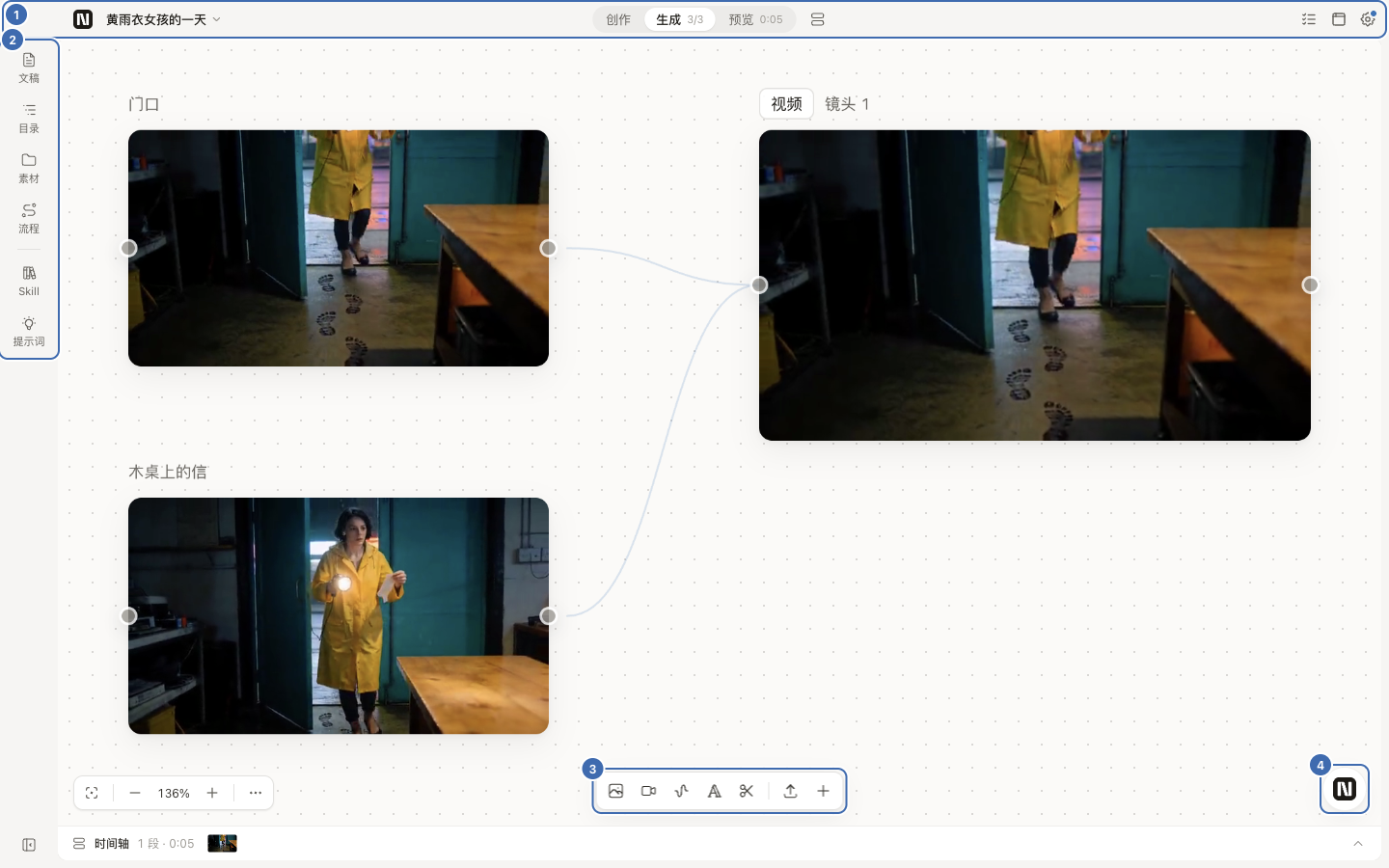
- 顶栏合成一条:左边是「项目名 ▾」,里面有最近项目、回项目库、新建项目、重命名;正中切换「创作 / 生成 / 预览」;右边是「任务」、浏览器和设置。(#1136、#1166)
- 左边多了一条窄栏:「文稿 / 目录 / 素材 / 流程」属于这个项目,「Skill / 提示词」所有项目共用。点一项,内容以抽屉浮在画布上,抽屉右缘可以拖宽;再点一次收起。(#1136)
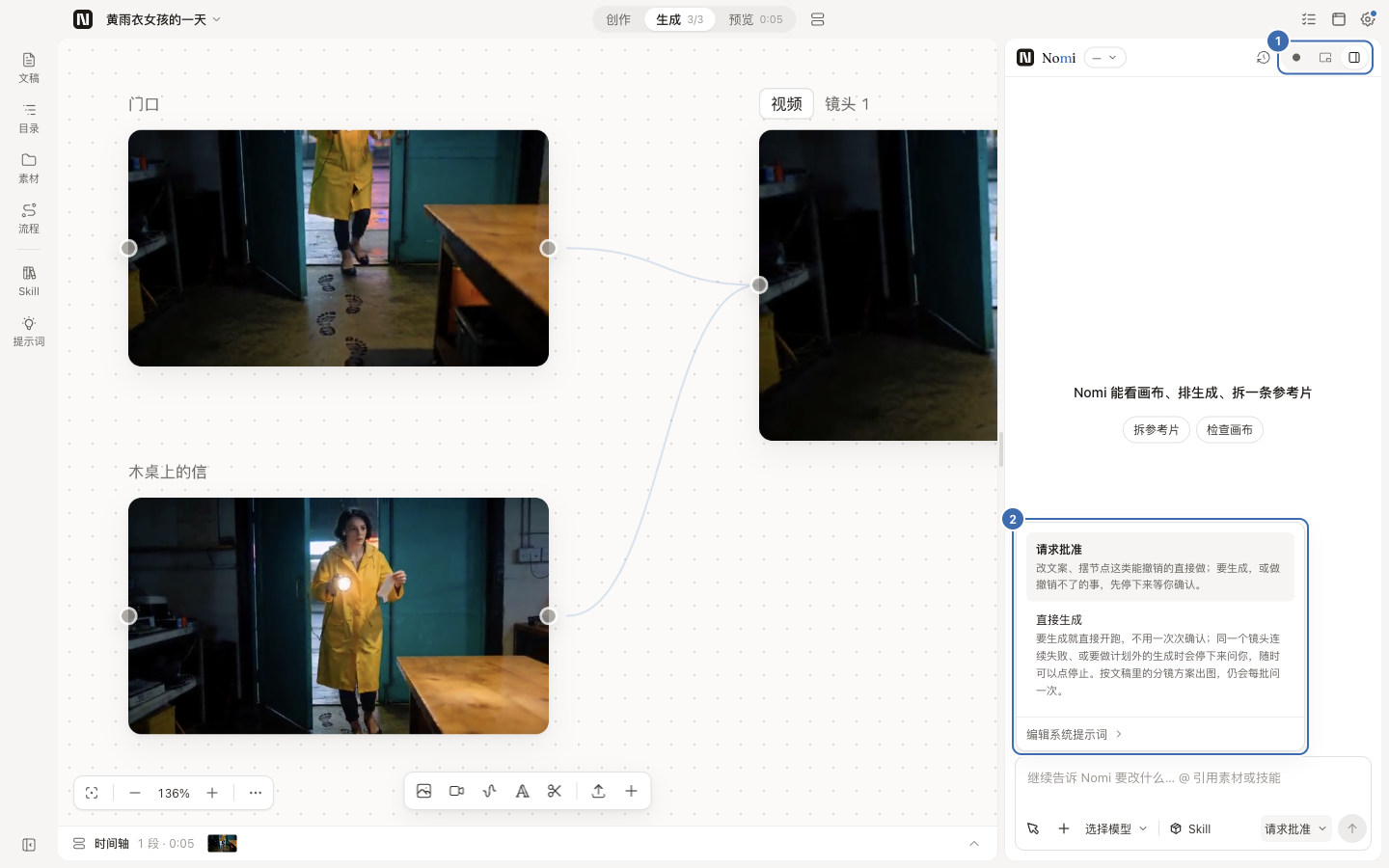
- Agent 有三种摆法:小球、浮窗、停靠,在面板头部的三个小钮之间切换,每个页面各记一份。Ctrl+J(Mac 是 ⌘J)打开并把光标放进输入框。(#1136)
- 加节点条挪到画布底部正中:「图片 / 视频 / 声音 / 文字 / 剪辑」排成一行,后面是「导入」和「+」。重置视图、小地图、整理这些收进左下角「⋯」,一个没少。(#1166)
- 看着更安静:选中节点不再套蓝框,改成深色细线;图标大小统一成四档。蓝色只留给主按钮、链接、进度和连线握把。(#1173、#1322)
画布节点能做的更多
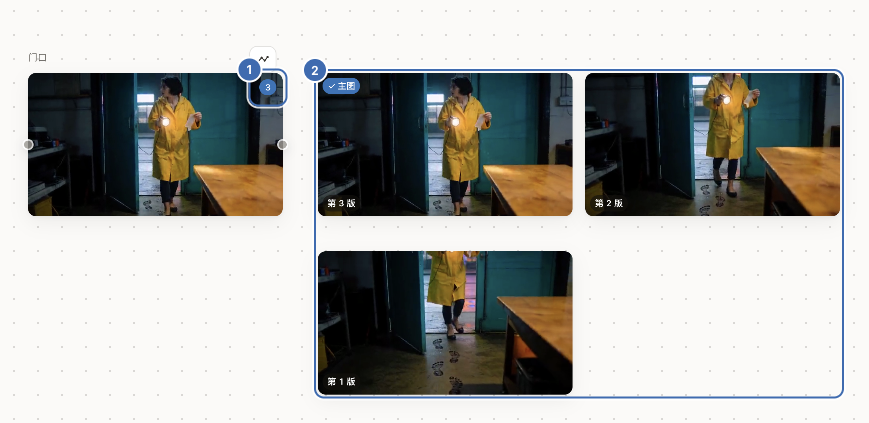
- 就地看历史版本:节点出过 2 版以上,图片右上角有一个数字角标。点它,各版本在节点旁铺成宫格;鼠标移到某一版上,可以「设为主图」、下载或删除。设为主图可以按 Ctrl/⌘+Z 撤回。(#1054、#1050)
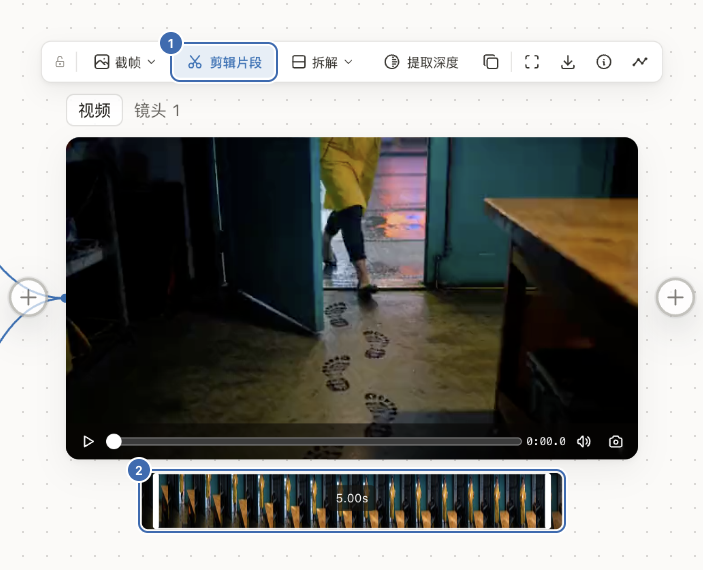
- 视频直接剪:在视频节点浮条上点「剪辑」,拖两端选出要留的一段,再点「剪辑片段」,旁边会出一张连好线的新视频卡。剪辑在你电脑上完成,不调用生成模型。(#1156、#1176)
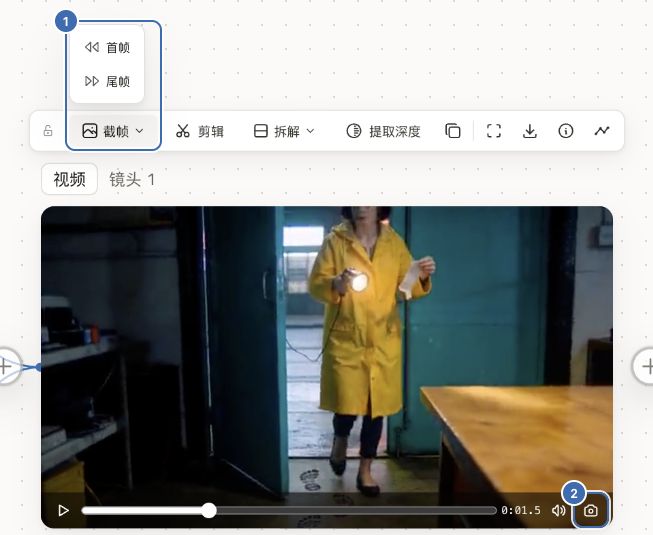
- 视频截帧:「截帧 ▾」里取首帧或尾帧;视频卡底栏的相机钮取正在播放的这一帧。截出来是一张连好线的图片卡。(#1152)
- 画板就地打开:画板不再弹出全屏窗口,在画布上原位编辑,打开就是画笔;画完的内容直接显示在节点上。(#1189、#1292、#1352)
- 开着的画板移出视野再回来仍在:刚画的笔画也保留。开发版里从卡片或图片浮条打开画板,也不会一点就关。(#1375)
- 文字节点:选中后下面是「文本加工」框,可以扩写成提示词、看图写描述、翻译、拆成多条、续写或改写。把它连到图片或视频节点,生成时这段字接在提示词后面。Agent 也能读、能改它的正文。(#1137)
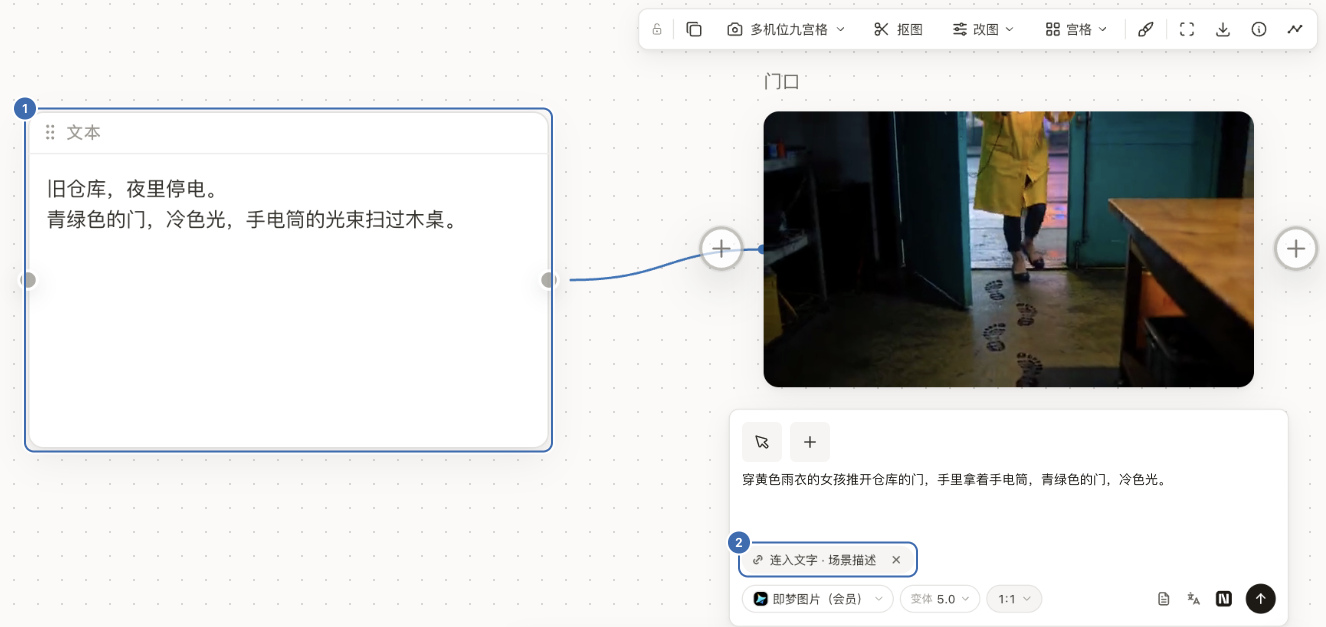
- 一键派生,不自动开跑:图片浮条上的「多机位九宫格」,以及 ▾ 里的下一刻、前一刻、三视图、剧情四宫格,点一下就在旁边建好一个连着原图的节点、填好提示词,你点 ↑ 才生成。(#1001)
- 撤销只撤你自己的编辑:按 Ctrl/⌘+Z 不会再把已经出好的图、写好的文字一起撤掉;生成进行中按撤销,节点也不会被拉回「空闲」。(#1065、#1073)
- 编组框好用了:选中编组框,上方出现组工具条,有「颜色」「排列」「生成整组」「进时间轴」;拖动组框,里面的卡跟着走。(#1048、#1174、#1170)
- 拉环只出现在用得上的一侧:选中节点后点左右的「+」圈,左边是「给它加输入」,右边是「用这个节点生成」,不用拖线。(#1133)
Agent 与花钱
- 权限只剩两档:「请求批准」是默认档:能撤销的事直接做,要生成先停下来等你确认。「直接生成」:要生成就直接开跑;同一镜连续失败,或要做计划外的生成时,会停下来问你。从「请求批准」切到「直接生成」要先确认一次。(#1203)
- 确认卡指向画布上的节点:卡上是这几镜的小卡和一行摘要(模型、比例、清晰度)。想改哪一镜,点小卡跳到画布上那个节点去改;点「生成 N 段」或「生成 N 张」,就照节点此刻的样子发出去。(#1336)
- 不再显示金额合计:扣多少钱由你的服务商说了算。确认卡和任务中心只写要生成几张、几段,不印合计。(#1339、#1345)
- 只发用得上的参考图:生成框参考行里淡显、写着「未用到」的图,不会发给模型;要用就点一下那张图。(#1269、#1279)
- 取消就是取消:确认卡上点「取消」,还没交出去的不会再交;拆解中点「取消拆解」,不会再发新的调用。已经发出去的那几次照常结算。(#1163、#1353)
- 取不回时不再叫你重新生成:已经交给服务商的任务暂时取不回,节点上写「去重新取回」。它只会再查一次、再下载一次,不会重新生成。(#1290)
- 当场返回的图片没存下来,会说清原因:服务商已答复、本机读取或保存结果失败时,节点不会误报「结果未知」并锁住这一镜。没有可再次查询的任务号时,可以点 ↑ 重新生成;这会发起新的一次生成。无法确认服务商是否收到请求的情况仍会锁住,等你核对。(#1376)
更快
以下数字都是在一台 Windows 电脑上量的。
- 320 镜的分镜方案约半秒打开:从点开到能编辑,约 14.6 秒 → 约 0.5 秒。(#1210)
- 看过分镜再切文稿不再卡:约 7.4 秒 → 不到 0.1 秒。(#1193)
- 拖动大画布更跟手:全选 180 个节点拖动,每秒 18 帧 → 45 帧;拖一个装着 60 张卡的组框,最卡的那些帧从 53 毫秒降到 15 毫秒。(#1041、#1275)
- 大项目第一张图出来得更早:300 张图的项目,点开到第一张图约 3.8 秒 → 约 2.9 秒。(#1044)
- 点卡弹生成框不再卡:画布内容很多时也一样。(#1231)
生成框
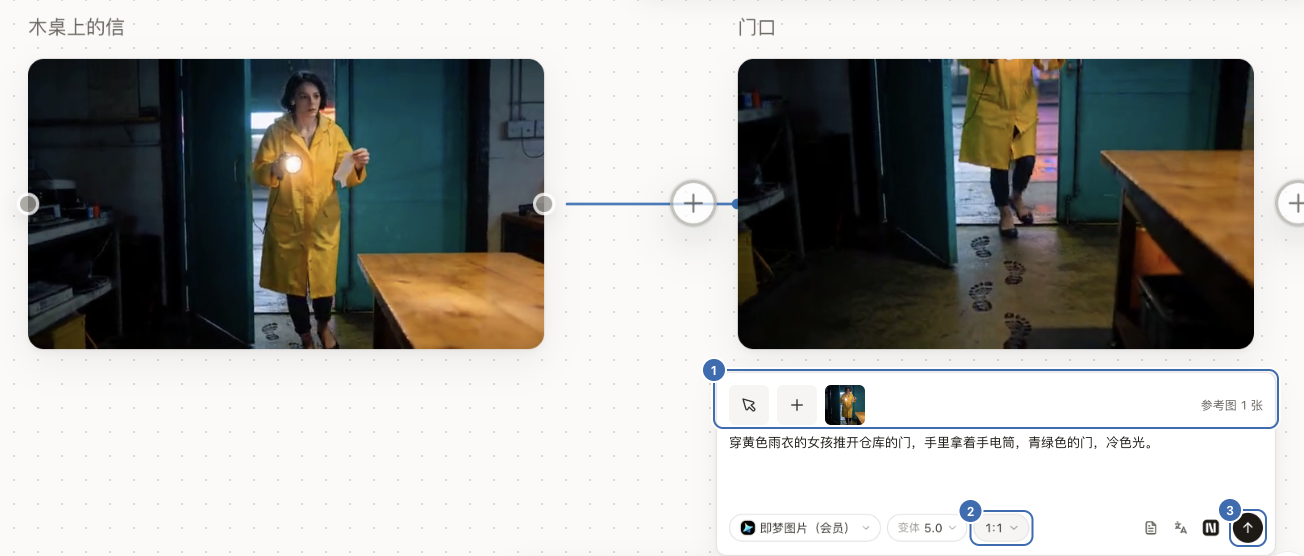
- 新排法:最上面一行放参考,「加参考」和「+」在行首;中间写提示词;底栏左边是模型和参数摘要,右边是圆形 ↑。视频的「生成方式」挪进了参数面板。(#1269)
- 「+」直接传本机文件:传完就接到这张卡上。(#1358)
- 首尾帧:模型支持时,参考行里是「首帧」「尾帧」两格,中间有一颗对调钮。(#1269)
- 「数量」:只有模型本身支持一次出多份时才出现。(#1050)
导演台
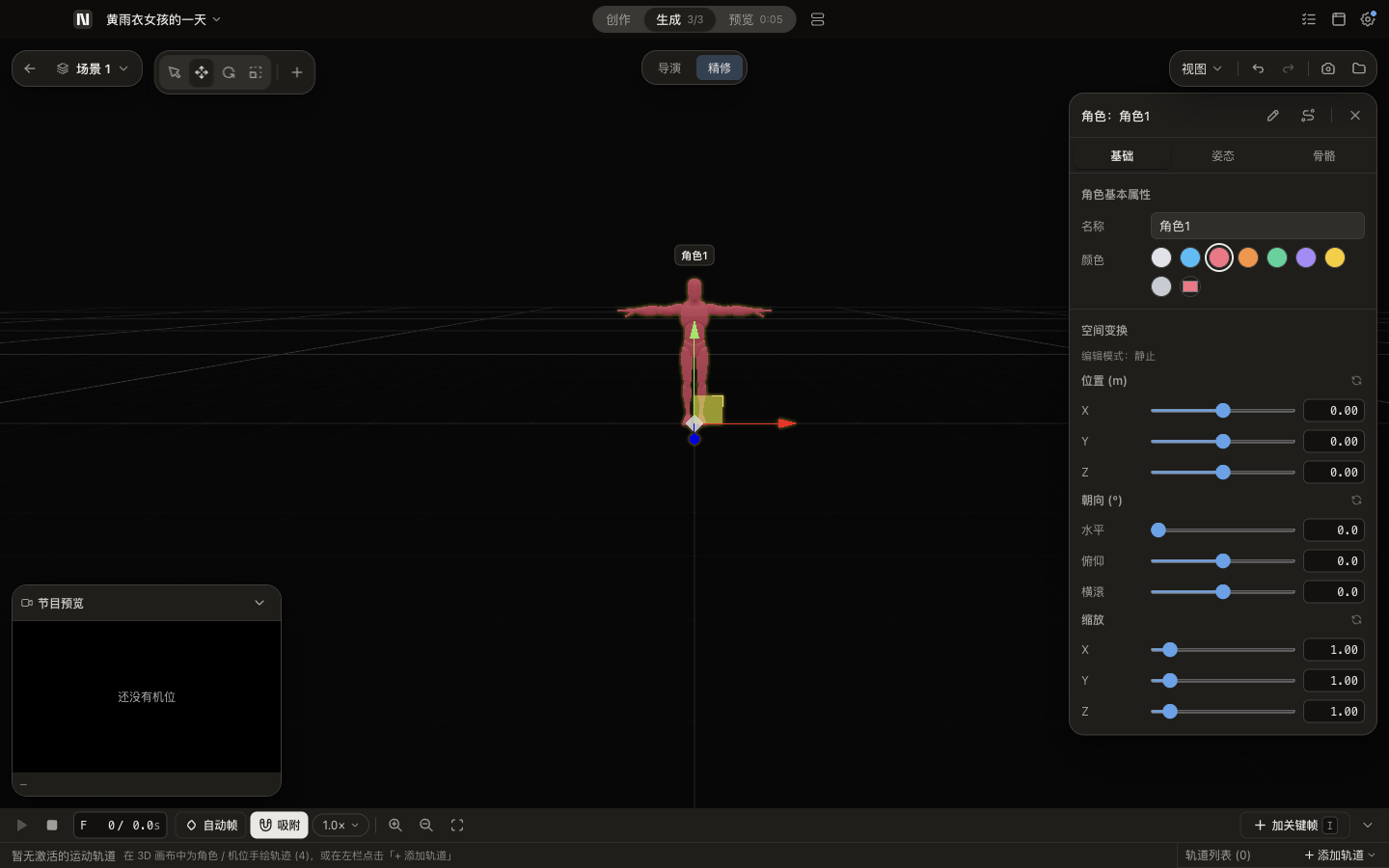
- 3D 导演台成了唯一的导演台:一句话让 Agent 搭出白盒场景、走位和多镜机位,满意后把预演当参考视频去出片。(#1221、#985)
- v0.23.2Nomi v0.23.22026-10-18 · 2026-10-18 17:13 UTC
查看更新说明
Nomi v0.23.2 — 视频取回热修
这一版是热修,处理两件事:视频在服务商那边已经做好、Nomi 却取不回来;以及让 Agent 生成视频时,偶尔点了「生成」没反应。
修了什么
- 做好的视频能取回了:以前视频在服务商那边已经出片,Nomi 却停在「任务可能已在上游完成」,点重新拉取也没用。现在会正确读到结果、落到节点上,不会再把提示里带回来的参考图当成结果。
- 取不回时说清卡在哪一步:查询失败、服务商说法对不上、拿到的文件类型不对,现在都会写明是哪一步出的问题和最后一次的原话,不再只给一句笼统的话。
- 「重新取回」只查结果,不会再扣一次钱:它只去问服务商要已经做好的结果,不会重新提交任务。
- 文件类型不对不会混进素材:存进项目前会按这个任务该出的类型(图片或视频)核对一遍,对不上就不收。
- Agent 生成视频偶尔点了没反应:常见的那种原因修好了;还生成不了的,卡片会说清是哪个参数、怎么办。
What changed
- Finished videos are retrieved: Previously a video could be finished and paid for at the provider while Nomi stayed on “the task may have finished upstream” and re-fetching did nothing. Nomi now reads the result correctly and lands it on the node, and no longer mistakes an echoed reference image for the result.
- Clear reasons when retrieval fails: A failed query, an unexpected provider reply, or a file of the wrong type now says which step failed and shows the last error, instead of one generic message.
- “Retrieve again” only checks the result and never charges again: It only asks the provider for the finished result and does not submit the task again.
- Wrong file types stay out of your assets: Before a result is saved into the project, its type is checked against what the task was meant to produce (image or video); mismatches are rejected.
- Agent-drafted video occasionally did nothing on Generate: the common cause is fixed; if a generation still can't start, the card now names the parameter and what to do.
- v0.23.1Nomi v0.23.12026-10-08 · 2026-10-08 14:19 UTC
查看更新说明
Nomi v0.23.1 — Mac 升级与退出热修
这一版是给 Mac 用户的热修,只处理三件事:升级后项目打不开、旧项目打不开、点「退出」没反应。
修了什么
-
安装更新后项目打不开:点「安装更新」时,如果退出过程被打断,之前可能出现「项目恢复失败」,之后所有项目都进不去。现在退出时的清理会等到真正退出那一刻再做;打开项目也不再要求右侧 Agent 先连上——Agent 连不上时项目照常打开,Agent 面板里会说明原因并可以重新连接。
-
旧版 Agent 记录拖住项目:从 0.22.5 升上来后,某些项目里的旧格式 Agent 回执以前会让整个项目打不开。现在会自动迁移旧格式;确实读不出的那一份会移到隔离位置,项目照常打开。
-
点「退出」没反应:以前有后台任务没及时停下时,点退出(包括 Dock 和菜单栏)会被吞掉,只能强制退出。现在退出最多等几秒,超时就直接结束。
What changed
- Projects open after an interrupted update: If clicking “Install update” interrupted the quit sequence, older builds could show “Project restore failed” and leave every project unable to open. Cleanup now waits for the real quit, and opening a project no longer requires the Agent panel to connect first — if it cannot connect, the project still opens and the panel explains why and offers to reconnect.
- Older Agent receipts no longer block a project: Projects upgraded from 0.22.5 now migrate the old receipt format automatically. If one receipt is unreadable, Nomi moves that file aside and opens the rest of the project.
- Quit no longer gets stuck: If a background task did not stop in time, Quit (including from the Dock and menu bar) could be swallowed and only Force Quit worked. Quitting now waits at most a few seconds before finishing.
-
- v0.23.0Nomi v0.23.02026-10-03 · 2026-10-03 17:21 UTC
查看更新说明
Nomi v0.23.0 — 逐张确认,说到做到
这一版主要改了生成前确认那一步:你点了什么就生成什么,停下来就真的停,拿不准的时候直说拿不准。
Agent 生成前的确认卡(#947)
- 每张单独决定。Agent 一次要生成几张时,确认卡上每张都可以选「生成这张」或「去掉这张」,也可以一键「生成剩下 N 张」。底部写「N 张 · 合计」。
- 中途点 × 就停。停下后照实告诉你「发出了 K 张,剩下 N−K 张没发」。Agent 收到的回执,和服务商实际收到的张数一致。
网络出问题时不重复提交(#962)
- 请求发出去以后连接断了,不再自动重发。 这时 Nomi 不知道服务商有没有收下,节点上会写「这一镜可能已被服务商收下,结果没法确认」,请你先去服务商后台看一眼。确认没有这一笔,再点「我核对过了,重新生成」。
- 只有确定没发出去才会自动重试,比如连都没连上。
- 提交卡住会超时。 服务商接了请求却一直不回话时,约 2 分钟后停下,同样标成「结果没法确认」,不会一直挂在「生成中」。
- 生成到一半关掉 Nomi,重启后会标成「结果没法确认」,不会永远转圈,也不会自动再发一次。
- Agent 不会自己去重试。它读到的状态会写明「不要再生成这一镜,由用户核对后决定」。
- 任务中心里,这一笔会显示服务商、模型和提交时间,方便你去后台对照。
用国内地址也能传参考图(#968)
- APIMart 改成国内接口地址后,带参考图生成时,参考图也会走你填的地址。 以前参考图上传固定走国际域名,不翻墙就传不上去,带参考图的生成会失败。
生成途中切项目(#966)
- 画布上单点生成时,切到别的项目再切回来,节点还显示「生成中」。 以前这时节点会显示成空闲,底栏还会冒出「生成全部」,点下去会再提交一次。
- 同一个节点,上一次生成还没回来时,不会再发第二次。 再点会提示「这个节点还在生成」,这一次不会发出去。
- 打开项目时,已经出完、但还没落到画布上的结果会自动补上。 以前要靠重启也不一定补得回来。
画布和制作流程不再抢同一镜(#921、#934、#940)
- 同一镜只认一个主人。 以前画布和制作流程(分镜批次、Agent 确认卡)各自判断「这一镜归谁」,有几条路会让同一镜生成两次。现在两边都问同一处。
- 制作流程停下时,原因写的是实际发生的事。 你放行以后会真的开拍;返工、续拍都按失败原因用大白话说明。
- 每个镜头的状态都有自己的标记。 没点过的镜头不会显示成「排队中」。
画布
- 节点更清爽(#953)。
- 出了 2 版以上才显示「N 版」。
- 重拍挪到了悬浮工具栏。
- 「已保存」3 秒后自己消失。
- 草稿标题按顺序编号。
- 节点工具栏一行放得下(#969)。 图片节点:裁切▾(裁剪、四视图、九宫格)、抠图、变换▾、画板;视频节点:抽帧▾(首帧、尾帧)、拆解▾(按镜头拆、拆成镜头表)。去掉了「建参考卡」和「AI 编辑」(拆解元素、改字)。参考卡上的「定妆」照旧。
- 分镜所见即所发(#939)。 每一镜发出去的,只有这一行里写着的提示词和看得见的参考图。
- 生成失败会说清楚(#938)。 写明是哪一步、因为什么失败,以及问题出在谁那边。
- 修好「正在存到你电脑上」卡住(#924)。 结果地址返回了不该收的内容时(比如错误页),以前会一直停在这一步,点停止也没用;现在会明确失败,告诉你原因。
- 图片连到视频节点,默认进参考模式(#918)。 你已经手动选了首尾帧的,不会被改掉。
Agent
- 长对话不会撞上限(#945)。 写回画布时如果位置已经变了,会直接告诉你「没有执行」,不会把后面的写入全挡住。
- 界面上不再露出服务商的原始 JSON、分类标记和内部编号(#952)。
- 附件、默认模型、分镜表各回各位(#937)。 修好了几处串位。
模型
- 同一个模型只列一次(#926)。 经不同渠道接进来的同一个模型,合并成一行,不再列好几次。默认用哪一家,不会被悄悄换掉。
- Sora 2 下线(#926)。 OpenAI 已于 2026-09-24 关停 Sora 2。旧项目里的 Sora 2 节点还能打开,点生成会提示「这个模型已经下线了」,换一个模型就能接着用。
外部 AI 工具连 Nomi(#916)
- 修好了 Windows 上的一个问题:关掉 Nomi,过半小时左右窗口又自己弹出来。 现在外部 AI 工具只是来看看 Nomi 在不在时,不会把 Nomi 打开。真要调用 Nomi 干活时,Nomi 在后台启动,不弹窗。
安全
- 带着密钥的请求不会跟着跳转走(#935)。 防止密钥被带到别的网址。
- 只有正式安装版会注册
nomi://链接(#956)。 测试版和隔离运行的实例不会抢走它。
安装包变小(#925)
之前 现在 安装包 333.8 MB 272.4 MB(−18%) 装好后占用 1.19 GB 770 MB(−35%) 文案
- 不再说保证不了的话(#957)。 「免费」「没有扣费」「未消耗」这类说法都去掉了:用的是你自己的服务商账号,扣没扣费只有服务商说了算。
已知问题
- 点 × 有时停得慢。 主进程偶尔会卡上几秒,一批只有 3 张时,可能还没停下就发完了。不会发出你没点过的。下一版修。
- 断网恢复后点「重试」,有时提示「已经重做到上限了」。 没发出去的那几次也被算进了重试次数。可以先用「我核对过了,重新生成」,或者新建一个节点。下一版修。
- 确认卡上 @ 参考图,和画布上还不完全一样。 列不出本项目画布上已有的图。下一版补齐。
- 模型能不能用,仍然取决于你自己的服务商账号、权限和额度。
用户点评
登录用户的真实使用记录,可按版本和硬件筛选共 0 条
还没有人点评。第一个说出真实体验的人最有价值。
Sponsors
Sponsors help keep Nomi free and open source. A sponsor never becomes a default or a built-in route: you connect only what you choose, with your own key, and pay them directly at their price. Want to appear here?
Why Nomi
Relays, official APIs, ComfyUI, and local models are cheap. Commercial AI video products often run the very same models and charge several times more.
Nomi gives you a pro-grade workflow on top of your own models. You pay your provider directly, at their price. Even the agent runs on the model you pick — no subscription, no markup.
Watch the film

Every screen in the film is Nomi's real UI, and every image and clip in it was generated with Nomi.
What you can do
Just ask — the agent works on your canvas
Describe the film you want. The agent reads your canvas, splits the story into shots, generates keyframes, turns them into video, and arranges the timeline. Everything it makes lands on the canvas, where you can see it and change it.
You decide how much it asks: Ask each step, Auto-edit (paid generation still asks), or Full auto.
Direct every shot
The storyboard puts each shot on one row — prompt, first frame, model, duration. Lock a reference card for a character or a place, and every shot that uses it keeps the same face.
A 3D director you can hold in your hand
Pose characters, place cameras, and use your phone as the viewfinder. The frames you capture go straight back onto the canvas.
Any model, per shot
Seedance, Kling, Wan, Hailuo, Nano Banana, GPT Image and more — through APIMart, Kie.ai, Volcengine, ModelScope, a Dreamina membership, any OpenAI-compatible relay, or your local ComfyUI. Swap the model on a single shot and generate another take.
New model today, in Nomi today
When a new model ships, click Let AI connect it for me and let Claude Code or Codex wire it in. It looks up the endpoint, parameters and model IDs, has you paste your key on Nomi's own page (the assistant never sees it), runs one real test, and lists the model once it works.
Yours
A project is a plain folder on your disk: canvas, storyboard, timeline, every generated file, and the exported film. No account. Nothing is sent by default; anonymous usage statistics are opt-in (Settings → Privacy & diagnostics) and can be turned off any time. The code is AGPL-3.0.
Next up: AI editing. Nomi is heading toward one studio for everything you make with AI — come build it with us.
Download
| System | Build | Download |
|---|---|---|
| macOS | Apple Silicon | Nomi-mac-arm64.dmg |
| macOS | Intel | Nomi-mac-intel.dmg |
| Windows | Windows 10 / 11 x64 | Nomi-windows-setup.exe |
Supported release targets are macOS arm64/x64 and Windows x64. Linux, Windows arm64, and macOS universal installers are not currently published.
The current macOS build is not Apple Developer ID signed or notarized, so macOS may block it on first launch. Only use the direct downloads above or links from the official Nomi website and GitHub repository.
- Download the matching DMG, open it, and drag Nomi onto Applications in the window.
- Open Nomi from Applications. If macOS says “Nomi” Not Opened, click Done, then open System Settings → Privacy & Security, scroll down to Security, click Open Anyway next to the Nomi message, and confirm. Since macOS 15, right-clicking the app and choosing Open no longer gets past this prompt; on macOS 14 and earlier it still works.
Only if macOS says Nomi is “damaged”, first confirm the installer came from an official Nomi link, then run:
xattr -dr com.apple.quarantine "/Applications/Nomi.app"
Do not disable Gatekeeper globally. To update, download the matching DMG, quit Nomi, then drag the new Nomi onto Applications and choose Replace.
The installer has no Authenticode signature. In the SmartScreen prompt, choose More info → Run anyway.
Quick start
- Connect a model. Pick APIMart or Kie.ai and paste one key — or add your own relay, OpenAI-compatible endpoint, or local ComfyUI. Rather not do it yourself? Hand Let your AI connect Nomi to Claude Code or Codex.
- Say what you want to make. Type it into the agent panel, or start from a story in the storyboard.
- Direct and export. Keep the takes you like, arrange the timeline, export MP4.
Disclosure: the APIMart link carries a referral code. You always pay providers directly with your own key at their price. Nomi never proxies or resells inference, and every provider can be swapped for your own endpoint.
More: quick start · connect your first model (English) · user guide · providers · CLI + MCP
Use Nomi from your own agent
Nomi ships an MCP server with 24 MCP tools, so Claude Code, Codex, or Cursor can drive it — generate, arrange, and edit — while reusing the credits that come with your agent subscription. See Let your AI connect Nomi.
Community
- Questions, workflows, what's next: GitHub Discussions
- Bugs and feature requests: GitHub Issues
- Release notes and short demos: X / Twitter · Bilibili
WeChat users can scan to join the user group (left). If the group code has expired, add the maintainer (right) at TZ857886159.
Hit a bug? The code is open — send the error and the issue-fix prompt to Claude Code or Codex, and it can often patch it for you. Anything everyone runs into, tell us and it goes into the mainline.
For Teams
Custom builds, Integrations, AGPL-compliant deployment, and Ongoing iteration for teams that want Nomi inside a real production workflow. Discuss a project — the form is public, so share only a non-confidential summary and never post credentials, private contact details, budget details, or NDA-protected information.
Developers
Requires Node.js 20+ and pnpm.
git clone https://github.com/aqm857886159/Nomi.git
cd Nomi
corepack enable
pnpm install
pnpm dev
electron/    Electron main process, local runtime, storage, and model calls
src/         React + Vite + Tailwind workbench
skills/      Skill Pack v2; see docs/skill-pack-format.md
Useful checks: pnpm run test · pnpm run typecheck · pnpm run gates
Research tooling (searching what creators say on Douyin / Xiaohongshu / Bilibili / X) reads its key only from the TIKHUB_API_KEY environment variable — see docs/research/tikhub-api-notes.md.
Contributing
Bug reports, feature proposals, documentation, and code contributions are welcome. Contributors do not need to sign a CLA; contributions are accepted under AGPL-3.0-only.
License
Current releases are licensed under AGPL-3.0-only; historical releases published under Apache-2.0 keep their original license.
See LICENSE. Paid services can include AGPL-compliant custom development, integration, deployment, training, and ongoing iteration. Nomi does not offer a closed-source distribution that withholds the corresponding source code.
stable-diffusion-webui
AUTOMATIC1111·Python
基于 Gradio 的 Stable Diffusion 网页界面,把文生图、图生图、局部重绘等能力做成可视化操作面板,不用写代码就能跑图像生成。
图像生成+4图像生成进阶
165290+4431kv1.10.12026-03-02 07:00 UTC
ComfyUI
Comfy-Org·Python
基于节点图的扩散模型图形界面与后端,支持本地快速推理和 API 调用,方便搭建和调试图像生成工作流。
扩散模型+4图像生成进阶
146237+75117kv0.45.02026-11-11 05:07 UTC

OpenMontage
OpenMontageInc·Python
把 Claude、Cursor 等 AI 编程助手变成完整视频制作工作室,内置 12 条制作流水线和 100+ 工具,覆盖脚本、配音、图像生成到剪辑全流程。
视频制作+4图像生成硬核
79488+83411k2026-11-09 06:23 UTC

OpenMontage
calesthio·Python
把 Claude、Cursor 等 AI 编程助手变成完整的视频制作工作室,内置 12 条制作流水线和 100+ 工具,覆盖从生成到剪辑的全流程。
视频制作+4图像生成硬核
7786710k2026-11-03 17:42 UTC