需先安装 Rust 和 Cargo 才能用 cargo install;内联图片依赖 Kitty 图形协议,其他终端不显示;后台自动刷新默认关闭,需在配置中开启 refresh_enabled 并设置间隔。
cargo install feedr
feedr 硬件要求按 README 说明
README 未说明具体硬件要求;作为终端 TUI 程序,需在支持终端中运行,内联图片仅在 Ghostty、Kitty、WezTerm 生效,其他终端静默跳过。
Rust 写的终端 RSS/Atom 阅读器,用 TUI 界面集中管理和阅读订阅源
用 Rust 写的终端 RSS/Atom 阅读器,带 TUI 界面,在命令行里就能订阅、聚合和阅读各类订阅源。
核心能力
- 仪表盘按时间汇总所有订阅源的最新文章
- 粘贴网页 URL 自动发现并订阅其 RSS/Atom 源
- 支持分类树视图、星标收藏与已读状态持久化
- 按分类、时间、作者、已读、星标、内容长度过滤文章
- 用 Mozilla Readability 抓取全文,Kitty 协议内联显示缩略图
容易踩的坑
内容由模型根据 README 生成,可能不完整或不准确,以官方文档为准。看原文 README
- v0.8.0Feedr v0.8.0最新正式版2026-05-15 · 2026-05-15 16:59 UTC
[0.8.0] - 2026-05-15
🚀 Features
- (detail): In-article find with smart-case matching (#44) (cc896aa)
- Add external-command hooks (pipe-to, exec_on_new, macros) (#39) (4585381)
- Full-text article extraction via Mozilla Readability (#43) (3715058)
🐛 Bug Fixes
📚 Documentation
- Bring README in sync with v0.7.0 features (6a333e1)
⚙️ Miscellaneous Tasks
[0.7.0] - 2026-03-31
🚀 Features
- Auto-discover RSS/Atom feeds from HTML pages (#35) (bd45c88)
- Add help overlay, mark-all-read, tree view, mouse, and configurable keybindings (#36) (9b7d019)
🐛 Bug Fixes
- (config): Seed bookmarks from default_feeds on first launch (fa5d237)
- (dashboard): Use filtered item list for navigation and actions (efad75b)
- (dashboard): Use active item list for 'o' key and remove dead code (afed8a9)
📚 Documentation
- Update README and CLAUDE.md for v0.5.0 features (b441281)
⚙️ Miscellaneous Tasks
- Bump version to 0.7.0 (a9d0ca0)
[0.5.0] - 2026-03-06
🚀 Features
- (config): Add CLI subcommand for configuration management (b22d700)
- Add back-navigation, authenticated feeds, and compact mode (7277bd4)
[0.4.0] - 2026-03-04
🚀 Features
- Add live search with real-time filtering (29e1348)
- Add "What's New" session summary view (e6d8563)
- Add article preview pane in dashboard (2a7716e)
- Add starred/saved articles with dedicated view and filtering (5642fb8)
🐛 Bug Fixes
- v0.7.0Feedr v0.7.02026-03-31 · 2026-03-31 09:49 UTC
查看更新说明
[0.7.0] - 2026-03-31
🚀 Features
- Auto-discover RSS/Atom feeds from HTML pages (#35) (bd45c88)
- Add help overlay, mark-all-read, tree view, mouse, and configurable keybindings (#36) (9b7d019)
🐛 Bug Fixes
- (config): Seed bookmarks from default_feeds on first launch (fa5d237)
- (dashboard): Use filtered item list for navigation and actions (efad75b)
- (dashboard): Use active item list for 'o' key and remove dead code (afed8a9)
📚 Documentation
- Update README and CLAUDE.md for v0.5.0 features (b441281)
⚙️ Miscellaneous Tasks
- Bump version to 0.7.0 (a9d0ca0)
[0.5.0] - 2026-03-06
🚀 Features
- (config): Add CLI subcommand for configuration management (b22d700)
- Add back-navigation, authenticated feeds, and compact mode (7277bd4)
[0.4.0] - 2026-03-04
🚀 Features
- Add live search with real-time filtering (29e1348)
- Add "What's New" session summary view (e6d8563)
- Add article preview pane in dashboard (2a7716e)
- Add starred/saved articles with dedicated view and filtering (5642fb8)
🐛 Bug Fixes
- (add-feed-cursor): Zellij compatibility (11c160c)
- Use user-created categories for filtering instead of hardcoded values (877fb12)
- Consume keypress when dismissing error popup (0db7ec3)
- Correct input modal cursor for SearchMode and non-ASCII input (f80f33f)
- Defer feed loading for instant TUI startup (b1bb367)
📚 Documentation
- Add AUR installation option to README (3e986f1)
- Update README with new features and keyboard shortcuts (4c8a1d7)
⚡ Performance
- Optimize hot paths for filtering, rendering, and searching (1f546eb)
[0.3.0] - 2025-10-17
🚀 Features
- (cli): Add import feeds from opml file option (44be804)
- Add comprehensive TOML configuration file support (becc4a9)
- Add background refresh with per-domain rate limiting ([000dea1](https://github.com/bahdotsh/feedr/commit/000dea14fda0f7cf27b354ee9
- v0.5.0Feedr v0.5.02026-03-06 · 2026-03-06 07:18 UTC
查看更新说明
[0.5.0] - 2026-03-06
🚀 Features
- (config): Add CLI subcommand for configuration management (b22d700)
- Add back-navigation, authenticated feeds, and compact mode (7277bd4)
[0.4.0] - 2026-03-04
🚀 Features
- Add live search with real-time filtering (29e1348)
- Add "What's New" session summary view (e6d8563)
- Add article preview pane in dashboard (2a7716e)
- Add starred/saved articles with dedicated view and filtering (5642fb8)
🐛 Bug Fixes
- (add-feed-cursor): Zellij compatibility (11c160c)
- Use user-created categories for filtering instead of hardcoded values (877fb12)
- Consume keypress when dismissing error popup (0db7ec3)
- Correct input modal cursor for SearchMode and non-ASCII input (f80f33f)
- Defer feed loading for instant TUI startup (b1bb367)
📚 Documentation
- Add AUR installation option to README (3e986f1)
- Update README with new features and keyboard shortcuts (4c8a1d7)
⚡ Performance
- Optimize hot paths for filtering, rendering, and searching (1f546eb)
[0.3.0] - 2025-10-17
🚀 Features
- (cli): Add import feeds from opml file option (44be804)
- Add comprehensive TOML configuration file support (becc4a9)
- Add background refresh with per-domain rate limiting (000dea1)
- Add mark as read/unread toggle with animated notifications (74f2980)
🚜 Refactor
[0.2.0] - 2025-09-26
🚀 Features
- v0.4.0Feedr v0.4.02026-03-04 · 2026-03-04 19:24 UTC
查看更新说明
[0.4.0] - 2026-03-04
🚀 Features
- Add live search with real-time filtering (29e1348)
- Add "What's New" session summary view (e6d8563)
- Add article preview pane in dashboard (2a7716e)
- Add starred/saved articles with dedicated view and filtering (5642fb8)
🐛 Bug Fixes
- (add-feed-cursor): Zellij compatibility (11c160c)
- Use user-created categories for filtering instead of hardcoded values (877fb12)
- Consume keypress when dismissing error popup (0db7ec3)
- Correct input modal cursor for SearchMode and non-ASCII input (f80f33f)
- Defer feed loading for instant TUI startup (b1bb367)
📚 Documentation
- Add AUR installation option to README (3e986f1)
- Update README with new features and keyboard shortcuts (4c8a1d7)
⚡ Performance
- Optimize hot paths for filtering, rendering, and searching (1f546eb)
[0.3.0] - 2025-10-17
🚀 Features
- (cli): Add import feeds from opml file option (44be804)
- Add comprehensive TOML configuration file support (becc4a9)
- Add background refresh with per-domain rate limiting (000dea1)
- Add mark as read/unread toggle with animated notifications (74f2980)
🚜 Refactor
[0.2.0] - 2025-09-26
🚀 Features
- v0.3.0Feedr v0.3.02025-10-17 · 2025-10-17 13:22 UTC
查看更新说明
[0.3.0] - 2025-10-17
🚀 Features
- (cli): Add import feeds from opml file option (44be804)
- Add comprehensive TOML configuration file support (becc4a9)
- Add background refresh with per-domain rate limiting (000dea1)
- Add mark as read/unread toggle with animated notifications (74f2980)
🚜 Refactor
[0.2.0] - 2025-09-26
🚀 Features
用户点评
登录用户的真实使用记录,可按版本和硬件筛选共 0 条
还没有人点评。第一个说出真实体验的人最有价值。
Feedr - Terminal RSS Feed Reader 📰
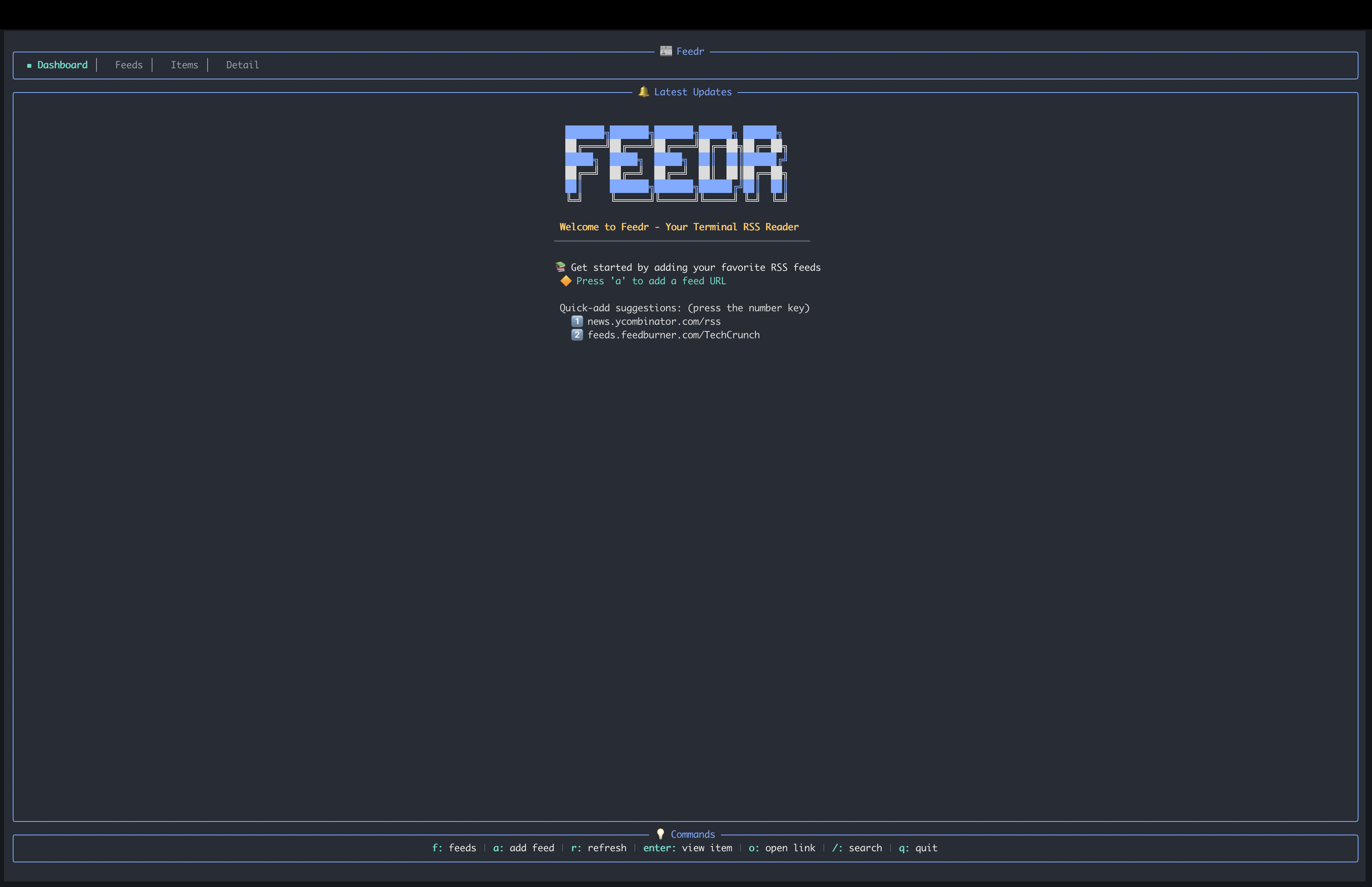
Feedr is a feature-rich terminal-based RSS feed reader written in Rust. It provides a clean, intuitive TUI interface for managing and reading RSS feeds with elegant visuals and smooth keyboard navigation.

Demo

Features
- Dashboard View: See the latest articles across all your feeds, sorted chronologically
- Feed Management: Subscribe to and organize multiple RSS/Atom feeds
- Feed Auto-Discovery: Paste any webpage URL and Feedr will detect and offer to subscribe to its RSS/Atom feeds
- Starred Articles: Save articles for later with a dedicated starred view
- Categories: Organize feeds into custom categories with create, rename, and delete support
- Tree View: Browse feeds in a hierarchical tree grouped by category
- Advanced Filtering: Filter articles by category, age, author, read status, starred status, and content length
- Dual Themes: Switch between a dark cyberpunk theme and a light zen theme with
t - Live Search: Instantly search across all feed titles and article content
- Summary View: "What's New" screen shows articles added since your last session with per-feed stats
- Read/Unread Tracking: Persistent read state tracking across sessions
- Mark All Read: Quickly mark all visible items as read with
m - Article Preview: Toggle an inline preview pane in the dashboard view, or have it open at launch with
show_preview = true - Link Extraction: Extract and browse all links from an article with
l - Full-Text Extraction: Strip away summaries and read the actual article content inline via Mozilla Readability — manual on
Shift+F, or auto-extract on refresh per feed withfulltext = true - Inline Images: When an article has a
<media:thumbnail>(e.g. YouTube channel feeds, web-comic RSS), Feedr renders it inline in the detail view via the Kitty graphics protocol. Auto-detected on Ghostty, Kitty, and WezTerm; silently no-ops elsewhere. Images are fetched in the background — read or open in browser without waiting. - Help Overlay: Press
?for a scrollable keybinding reference overlay - OPML Import: Bulk import feeds from OPML files via
feedr --import <file.opml> - Browser Integration: Open articles in your default browser
- Mouse Support: Click to select items and scroll with the mouse wheel
- Background Refresh: Automatic feed updates with configurable intervals and smart rate limiting
- Rate Limiting: Per-domain request throttling prevents "too many requests" errors (ideal for Reddit feeds)
- Vim-Style Navigation: Use
j/kalongside arrow keys for navigation - Rich Content Display: HTML-to-text conversion with clean article formatting
- Authenticated Feeds: Support for custom HTTP headers per feed (e.g.,
Authorization: Bearer ...) for private/authenticated RSS feeds - Compact Mode: Automatic compact layout for small terminals (≤30 rows), with manual
always/neveroverride in config - CLI Config Management: Get, set, and list configuration from the command line (
feedr config), or use the interactive TUI config editor (feedr config --tui) - Configurable Keybindings: Remap any key action via the
[keybindings]section inconfig.toml - External-Command Hooks: Newsboat-style macros (
pipe-to,exec) bound to keys, plusexec_on_newnotifications fired per new item — all with shell-free argument templating - Configurable: Customize timeouts, themes, UI behavior, and default feeds via TOML config
- XDG Compliant: Follows standard directory specifications for configuration and data storage
Installation
Prerequisites
- Rust and Cargo (install from https://rustup.rs/)
Using Cargo Install (Recommended)
cargo install feedr
Arch Linux (AUR)
Feedr is available on the AUR. Install it using your preferred AUR helper:
paru -S feedr
# or
yay -S feedr
Build from Source
git clone https://github.com/bahdotsh/feedr.git
cd feedr
cargo build --release
The binary will be available at target/release/feedr.
Usage
Run the application:
feedr
OPML Import
Import feeds from an OPML file:
feedr --import feeds.opml
Configuration Management
View and modify settings from the command line:
feedr config list                      # List all settings with current values
feedr config get ui.theme              # Get a single value
feedr config set ui.theme light        # Set a value (with validation)
feedr config --tui                     # Open interactive TUI config editor
Available config keys use dot-notation (e.g. general.max_dashboard_items, network.http_timeout, ui.theme, ui.compact_mode). Run feedr config list to see all keys. Feed management (default_feeds) is only available through the TUI editor.
Quick Start
- When you open Feedr for the first time, press
ato add a feed - Enter a valid RSS feed URL (e.g.,
https://news.ycombinator.com/rss) - You can also press
1,2, or3to quickly add Hacker News, TechCrunch, or BBC News - Use arrow keys (or
j/k) to navigate andEnterto view items - Press
oto open the current article in your browser - Press
tto toggle between dark and light themes
Keyboard Controls
All keybindings below show their defaults. You can remap any action via the [keybindings] section in your config file — see Configurable Keybindings.
General Navigation
| Key | Action |
|---|---|
Tab | Cycle forward through views |
Shift+Tab | Cycle backward through views |
q | Go back (quit from Dashboard) |
h / Esc / Backspace | Go back one view |
Home | Return to Dashboard |
Ctrl+Q | Quit from any view |
r | Refresh all feeds |
t | Toggle dark/light theme |
/ | Search mode |
? | Help overlay (scrollable keybinding reference) |
Dashboard View
| Key | Action |
|---|---|
↑/↓ or k/j | Navigate items |
g / G or End | Jump to top / bottom |
Enter | View selected item |
f | Filter articles |
c | Cycle category filter |
Ctrl+C | Open category management |
a | Add a new feed |
s | Toggle starred |
Space | Toggle read/unread |
m | Mark all items as read |
p | Toggle preview pane |
Shift+J / Shift+K | Scroll preview down / up |
o | Open link in browser |
1/2/3 | Quick-add demo feeds (HN, TechCrunch, BBC) |
Feed List View
| Key | Action |
|---|---|
q / h / Esc | Go to dashboard |
↑/↓ or k/j | Navigate feeds |
Enter | View feed items |
Space | Expand/collapse category (tree view) |
a | Add a new feed |
d | Delete selected feed |
c | Assign category to feed |
Feed Items View
| Key | Action |
|---|---|
q / h / Esc / Backspace | Back to feeds list |
Home | Go to dashboard |
↑/↓ or k/j | Navigate items |
g / G or End | Jump to top / bottom |
Enter | View item details |
s | Toggle starred |
Space | Toggle read/unread |
m | Mark all items as read |
o | Open item in browser |
Item Detail View
| Key | Action |
|---|---|
q / h / Esc / Backspace | Back to feed items |
↑/↓ or k/j | Scroll content |
Ctrl+U / Ctrl+D | Scroll content (page) |
Page Up / Page Down | Scroll content (page) |
g | Jump to top |
G / End | Jump to bottom |
s | Toggle starred |
o | Open item in browser |
l | Extract and show all links |
Shift+F | Toggle/fetch full-text (Readability) |
Starred View
| Key | Action |
|---|---|
↑/↓ or k/j | Navigate items |
Enter | View item details |
s | Remove from starred |
o | Open item in browser |
Categories View
| Key | Action |
|---|---|
n | Create new category |
e | Rename category |
d | Delete category |
Space | Expand/collapse category |
Enter | Select category |
r | Refresh |
? | Help |
h / Esc / q | Back |
Filter Mode (press f on Dashboard)
| Key | Action |
|---|---|
c | Filter by category |
t | Filter by time/age |
a | Filter by author |
r | Filter by read status |
s | Filter by starred status |
l | Filter by content length |
x | Clear all filters |
Mouse Support
| Action | Effect |
|---|---|
| Left click | Select item |
| Scroll up/down | Navigate items |
Configuration
Feedr supports customization through a TOML configuration file that follows XDG Base Directory specifications. You can edit the file directly, use feedr config get/set from the command line, or use feedr config --tui for an interactive editor.
Configuration File Location
- Linux/macOS:
~/.config/feedr/config.toml - Windows:
%APPDATA%\feedr\config.toml
The configuration file is automatically generated with default values on first run if it doesn't exist.
Available Settings
# Feedr Configuration File

[general]
max_dashboard_items = 100           # Maximum number of items shown on dashboard
auto_refresh_interval = 0           # Auto-refresh interval in seconds (0 = disabled)
refresh_enabled = false             # Enable automatic background refresh
refresh_rate_limit_delay = 2000     # Delay in milliseconds between requests to same domain

[network]
http_timeout = 15              # HTTP request timeout in seconds
user_agent = "Mozilla/5.0 (compatible; Feedr/1.0; +https://github.com/bahdotsh/feedr)"

[ui]
tick_rate = 100                # UI update rate in milliseconds
error_display_timeout = 3000   # Error message duration in milliseconds
theme = "dark"                 # Theme: "dark" (cyberpunk) or "light" (zen)
compact_mode = "auto"          # Compact layout: "auto", "always", or "never"
show_preview = false           # Start with the dashboard preview pane open

# Optional: Define default feeds to load on first run
[[default_feeds]]
url = "https://example.com/feed.xml"
category = "News"

# Authenticated feed with custom HTTP headers
[[default_feeds]]
url = "https://private.example.com/feed.xml"
[default_feeds.headers]
Authorization = "Bearer your_token_here"
Configuration Options Explained
General Settings
- max_dashboard_items: Controls how many items are displayed on the dashboard (default: 100)
- auto_refresh_interval: Automatically refresh feeds at specified interval in seconds (0 disables auto-refresh)
- refresh_enabled: Master switch to enable/disable automatic background refresh (default: false)
- refresh_rate_limit_delay: Delay in milliseconds between requests to the same domain to prevent "too many requests" errors (default: 2000ms). This is especially useful for Reddit feeds and other rate-limited services.
Network Settings
- http_timeout: Timeout for HTTP requests when fetching feeds (useful for slow connections)
- user_agent: Custom User-Agent string for HTTP requests
UI Settings
- tick_rate: How frequently the UI updates in milliseconds (lower = more responsive, higher = less CPU usage)
- error_display_timeout: How long error messages are displayed in milliseconds
- theme: Choose between
"dark"(cyberpunk aesthetic with neon colors) or"light"(zen minimalist with organic colors). Can also be toggled at runtime witht. - compact_mode: Controls the compact layout for small terminals.
"auto"(default) enables compact mode when terminal height is ≤30 rows,"always"forces compact mode, and"never"disables it. Compact mode uses single-line items, a minimal title bar, and an abbreviated help bar to maximize screen real estate. - show_preview: When
true, the dashboard preview pane is open at launch (default:false). Thepkey still toggles it at runtime. Note that the preview pane is always hidden while compact mode is active.
Background Refresh Example
To enable automatic refresh every 5 minutes with rate limiting:
[general]
refresh_enabled = true
auto_refresh_interval = 300  # 5 minutes
refresh_rate_limit_delay = 2000  # 2 seconds between requests to same domain
Note: Rate limiting groups feeds by domain and staggers requests to prevent hitting API limits. For example, if you have multiple Reddit feeds, they will be fetched with a 2-second delay between each request to avoid getting blocked.
Default Feeds
You can define feeds to be automatically loaded on first run:
[[default_feeds]]
url = "https://news.ycombinator.com/rss"
category = "Tech"

[[default_feeds]]
url = "https://example.com/feed.xml"
category = "News"

# Optional per-feed refresh threshold (seconds). When this elapses since
# the last refresh, the next auto-refresh tick is triggered — currently
# all feeds are refreshed together (no true selective per-feed refresh).
# Requires `general.refresh_enabled = true`.
[[default_feeds]]
url = "https://example.com/fast-feed.xml"
refresh_interval = 60
Authenticated Feeds
Some RSS feeds require authentication or custom HTTP headers. You can configure per-feed headers:
[[default_feeds]]
url = "https://private.example.com/feed.xml"
[default_feeds.headers]
Authorization = "Bearer your_api_token"

[[default_feeds]]
url = "https://another-api.example.com/rss"
[default_feeds.headers]
X-API-Key = "your_api_key"
Cookie = "session=abc123"
Headers are sent with every request for that feed, including refreshes.
Full-Text Extraction
Most RSS feeds ship only short summaries. Feedr can fetch the linked article URL and run Mozilla Readability (via the dom_smoothie crate) to extract the actual article body and render it inline.
- Manual: in the article detail view, press
Shift+Fto extract the focused article. PressShift+Fagain to toggle back to the original summary, or after a failure to retry. - Auto on refresh: set
fulltext = trueon a feed and Feedr will auto-extract newly-seen items on each refresh (same "no firehose" rule asexec_on_new— the first observation of a feed seeds silently).
[[default_feeds]]
url = "https://example.com/summary-only-feed.xml"
fulltext = true
Notes:
- Extracted content is in-memory only — it is not persisted to disk. A restart re-extracts on demand.
- Per-feed auth headers are not sent to the article URL (article URLs are typically third-party hosts; forwarding
Authorizationwould leak credentials). - Pages with very short extracted bodies (likely JS-rendered or behind a wall) fail gracefully and fall back to showing the original summary.
External-Command Hooks
Feedr supports newsboat-style external commands for two workflows: macros (key-triggered chains that act on the focused article) and exec_on_new (a notification hook fired per newly-seen item after each refresh).
Commands are not run through a shell. Templates are tokenized once at config load, and %X placeholders are substituted into individual argv tokens — feed content can never break out of an argument. For pipes, redirection, or globbing, write a small shell script and invoke that.
Template Variables
Expanded in every argv token of macro and hook commands:
| Variable | Expands to |
|---|---|
%t | Article title |
%u | Article URL |
%a | Author |
%d | Formatted publish date |
%f | Feed title |
%F | Feed URL |
%m | Primary media URL (<media:content>, <enclosure>, or Atom <content src>) |
%M | MIME type of the primary media |
%i | First <media:thumbnail> URL on the item |
%% | Literal % |
%m/%M/%i expand to the empty string when an item has no media — they're orthogonal to %u (no fallback). For YouTube channel feeds the watch-page URL is %u; the in-feed video URL is %m. For RSS podcasts the episode page is %u; the audio file is %m.
Macros
A macro binds a key to an ordered chain of steps. Trigger with <prefix><key> (default prefix is ,). Steps are separated by ;. An optional trailing -- "description" overrides the help-overlay label.
[macros]
y = 'open-in-browser ; pipe-to "yt-dlp %u"'
w = 'pipe-to "wallabag-cli add %u" -- "Save to Wallabag"'
n = 'pipe-to "tee /tmp/out.txt" stdin=metadata'

# Media-rich feeds (YouTube channels, web comics, podcasts):
v = 'exec "mpv %u" -- "Play in mpv"'         # YouTube: mpv resolves the watch URL via yt-dlp
d = 'exec "yt-dlp -o ~/Videos/%(title)s.%(ext)s %u" -- "Download with yt-dlp"'
p = 'exec "mpv %m" -- "Play media file"'     # Podcasts: direct .mp3 URL is %m
i = 'exec "feh %i" -- "View thumbnail"'      # Web comics / YT thumbnails

[macro_options]
prefix = ","                  # the macro-prefix key
pipe_default_stdin = "body"   # body | title | url | metadata | none
Step kinds:
<action>— invoke a built-in action. Supported in macros:open-in-browser,toggle-star,toggle-read,mark-all-read,refresh,toggle-theme,extract-links,fetch-full-text,help.pipe-to "cmd %u" [stdin=…]— suspend the TUI, run the command, and pipe article content to its stdin.stdinis one ofbody(default),title,url,metadata, ornone.exec "cmd %u"— spawn the command detached (no stdin, no terminal takeover).
Chains halt on the first step error. Press Esc after the prefix to cancel; an unbound follow-up surfaces a "No macro bound" error. Macros are also rendered in the help overlay (?).
exec_on_new Notifications
Fire a command once per newly-seen item after each refresh. The first successful fetch of each feed seeds the seen-set silently — you do not get a firehose on initial load or first run.
[hooks]
exec_on_new = 'notify-send "New: %t" "%f"'
Children are spawned detached so the TUI never blocks on them. Crash semantics are at-most-once: feedr persists the seen-set before spawning, so a kill mid-fire loses a notification rather than re-firing on the next launch. Prefer idempotent commands (e.g. wallabag-cli add is safe; mail-me is not).
Security Notes
- The shell is never invoked, so feed content in
%t/%a/ etc. cannot escape an argument. - Do not wrap your command in
sh -c "... %t ..."— that reintroduces shell injection through item titles. Write a script file and invoke it instead. ~/$HOME/$VARare not expanded — use absolute paths.- If a macro's command template has unbalanced quotes or names an unknown action, feedr surfaces a startup warning rather than failing silently at trigger time.
Configurable Keybindings
Remap any action by adding a [keybindings] section to your config file. Each action can be bound to a single key string or an array of keys:
[keybindings]
quit = "x"                          # Single key
move_up = ["Up", "k", "w"]         # Multiple keys
force_quit = "Ctrl+x"              # Modifier keys
toggle_theme = "F5"                # Function keys
Available actions:
| Action | Default | Description |
|---|---|---|
quit | q | Go back / quit from Dashboard |
force_quit | Ctrl+q | Quit from any view |
back | h, Esc, Backspace | Go back one view |
home | Home | Return to Dashboard |
toggle_theme | t | Switch dark/light theme |
refresh | r | Refresh all feeds |
help | ? | Show help overlay |
open_search | / | Enter search mode |
move_up | Up, k | Navigate up |
move_down | Down, j | Navigate down |
page_up | PageUp, Ctrl+u | Page up |
page_down | PageDown, Ctrl+d | Page down |
jump_top | g | Jump to top |
jump_bottom | G, End | Jump to bottom |
select | Enter | Select / open |
add_feed | a | Add new feed |
delete_feed | d | Delete selected feed |
toggle_read | Space | Toggle read/unread |
toggle_star | s | Toggle starred |
mark_all_read | m | Mark all items as read |
open_in_browser | o | Open in browser |
toggle_preview | p | Toggle preview pane |
open_filter | f | Open filter mode |
cycle_category | c | Cycle category filter |
open_category_management | Ctrl+c | Category management |
assign_category | c | Assign category to feed |
extract_links | l | Extract links from article |
fetch_full_text | Shift+F | Toggle/fetch full-text (Readability) |
scroll_preview_up | Shift+K, Shift+Up | Scroll preview up |
scroll_preview_down | Shift+J, Shift+Down | Scroll preview down |
toggle_expand | Space | Expand/collapse in tree view |
next_tab | Tab | Next view |
prev_tab | Shift+Tab | Previous view |
Supported key formats: Single characters (q, ?, /), special keys (Enter, Space, Tab, Esc, Backspace, Up, Down, Left, Right, Home, End, PageUp, PageDown, Delete, F1–F5), and modifier combos (Ctrl+q, Shift+Tab, Alt+x).
Data Storage
Feedr stores your bookmarks, categories, read/unread state, and starred articles in:
- Linux/macOS:
~/.local/share/feedr/feedr_data.json - Windows:
%LOCALAPPDATA%\feedr\feedr_data.json
Backwards Compatibility
Feedr automatically migrates data from older versions to the new XDG-compliant locations. Your existing data will be preserved and automatically moved to the correct location on first run.
Dependencies
- ratatui: Terminal UI framework
- crossterm: Terminal manipulation
- reqwest: HTTP client (with gzip/deflate/brotli support)
- feed-rs: RSS and Atom feed parsing
- html2text: HTML to text conversion
- chrono: Date and time handling
- serde: Serialization/deserialization
- clap: Command-line argument parsing
- opml: OPML import support
- toml: Configuration file parsing
- scraper: HTML parsing for feed auto-discovery
- url: URL parsing and manipulation
- dom_smoothie: Mozilla Readability port for full-text extraction
- encoding_rs: Charset detection for non-UTF-8 article pages
- shlex: Shell-style tokenization for macro/hook command templates
License
MIT
Contributing
Contributions are welcome! Please feel free to submit a Pull Request.
- Fork the repository
- Create your feature branch (
git checkout -b feature/amazing-feature) - Commit your changes (
git commit -m 'Add some amazing feature') - Push to the branch (
git push origin feature/amazing-feature) - Open a Pull Request

Folo
RSSNext·TypeScript
AI 加持的 RSS 阅读器,用智能方式聚合和筛选订阅内容,帮你从海量信息流里快速抓到真正想看的文章。
RSS阅读器+3RSS / 阅读
39266+272.2kmobile/v0.6.22026-11-10 16:50 UTC

glance
glanceapp·Go
自托管的个人仪表盘,把 RSS、Reddit、监控状态等各种信息源聚合到一个页面,适合家庭实验室和服务器运维场景。
自托管仪表盘+4RSS / 阅读
38131+731.5kv0.8.82026-11-07 15:59 UTC

FreshRSS
FreshRSS·PHP
自托管的 RSS 新闻聚合器,把多个订阅源集中到一个网页阅读界面,支持 WebSub 实时推送,适合想自己掌控阅读数据的人。
RSS 阅读器+4RSS / 阅读
16551+241.3k1.30.42026-11-10 08:04 UTC
NetNewsWire
Ranchero-Software·Swift
macOS 和 iOS 上的原生 RSS 阅读器,用 Swift 编写,支持 RSS、JSON Feed 等订阅格式,适合想要干净、无广告阅读体验的苹果用户。
RSS阅读器+4RSS / 阅读
10521+11789mac-7.3b62026-11-10 16:12 UTC