默认不设置 SECRET_KEY_BASE 时每次启动都会重新生成,导致已有会话全部失效;容器内端口是 80,映射到主机其他端口需用 -p 3000:80 这类写法;挂载卷时可能出现宿主机与容器权限不一致,需用 --user 指定 UID:GID;升级前要先读升级指南,新版本可能有破坏性变更。
docker run -p 80:80 ghcr.io/blackcandy-org/blackcandy:latest 硬件要求按 README 说明
README 未说明硬件要求,只要求能运行 Docker;开发环境需要 Ruby 4.0、Node.js 20、libvips 和 FFmpeg。
有 Docker 镜像
自托管的个人音乐流媒体服务器,用 Docker 一条命令就能把音乐库变成可在线播放的私人音乐中心
自托管的音乐流媒体服务器,把本地音乐库变成可在线播放的私人音乐服务,支持浏览器和移动端随时听歌。
核心能力
- 用 Docker 镜像一键部署,默认监听容器内 80 端口
- 挂载本地媒体目录并用 MEDIA_PATH 指定音乐路径
- 默认用 SQLite,可切换 PostgreSQL 作为数据库
- 提供 iOS、Android、F-Droid 官方移动客户端
- 可通过 Discogs API 获取艺人和专辑封面图
容易踩的坑
内容由模型根据 README 生成,可能不完整或不准确,以官方文档为准。看原文 README
- v3.2.1最新正式版2026-08-26 · 2026-08-26 07:39 UTC
What's Changed
Fixed
Fix: unload html5 audio nodes when switching songs by @aidewoode in https://github.com/blackcandy-org/blackcandy/pull/502
Full Changelog: https://github.com/blackcandy-org/blackcandy/compare/v3.2.0...v3.2.1
- v3.2.02026-05-07 · 2026-05-07 11:29 UTC
查看更新说明
What's Changed
[!IMPORTANT] Please check the v3.1-v3.2 upgrade guide when you do upgrade.
Black Candy v3.2.0 requires the mobile app v2.0 or above. Please upgrade your mobile app after upgrading the server.
Breaking change:
- The working directory inside the Docker container has changed from
/appto/rails. You need to update your volume mount path for persistent storage data after upgrading.
New
- Add simple volume slider by @maunzCache in https://github.com/blackcandy-org/blackcandy/pull/435
- Enhance volume control of player by @aidewoode in https://github.com/blackcandy-org/blackcandy/pull/436
- Add commit hash to versioning and enhance version link display by @aidewoode in https://github.com/blackcandy-org/blackcandy/pull/441
- Migrate to Hotwire Native bridge by @aidewoode in https://github.com/blackcandy-org/blackcandy/pull/462
- Add minimum app version support by @aidewoode in https://github.com/blackcandy-org/blackcandy/pull/466
- Add ONCE compatibility via storage directory symlink by @aidewoode in https://github.com/blackcandy-org/blackcandy/pull/468
Improved
- Rename entrypoint script to match Rails default by @aidewoode in https://github.com/blackcandy-org/blackcandy/pull/438
- Enable jemalloc for improved memory usage and latency by @aidewoode in https://github.com/blackcandy-org/blackcandy/pull/439
- Separate lint and test jobs in CI by @aidewoode in https://github.com/blackcandy-org/blackcandy/pull/440
- Replace OpenStruct with custom error class for JSON error responses by @aidewoode in https://github.com/blackcandy-org/blackcandy/pull/444
- Upgrade Ruby to 3.4 by @aidewoode in https://github.com/blackcandy-org/blackcandy/pull/445
- Upgrade Rails to 8.0 by @aidewoode in https://github.com/blackcandy-org/blackcandy/pull/443
- Update to Kamal 2 by @aidewoode in https://github.com/blackcandy-org/blackcandy/pull/447
- Add linux/arm/v7 platform support in release builds by @aidewoode in https://github.com/blackcandy-org/blackcandy/pull/452
- Upgrade Rails to 8.1 by @aidewoode in https://github.com/blackcandy-org/blackcandy/pull/455
- Update Dockerfile to use default Rails storage path by @aidewoode in https://github.com/blackcandy-org/blackcandy/pull/469
- Upgrade Ruby to 4.0.2 and update dependencies by @aidewoode in https://github.com/blackcandy-org/blackcandy/pull/471
Fixed
- Fix Thruster sendfile not working by @aidewoode in https://github.com/blackcandy-org/blackcandy/pull/465
- Remove stale asset path from deploy configuration by @aidewoode in https://github.com/blackcandy-org/blackcandy/pull/467
- Fix permissions error when creating SQLite db for the first time by @aidewoode in https://github.com/blackcandy-org/blackcandy/pull/470
- Use MediaSyncAllJob when media path is changed by @aidewoode in https://github.com/blackcandy-org/blackcandy/pull/473
New Contributors
- @maunzCache made their first contribution in https://github.com/blackcandy-org/blackcandy/pull/435
Full Changelog: https://github.com/blackcandy-org/blackcandy/compare/v3.1.0...v3.2.0
- The working directory inside the Docker container has changed from
- v3.1.02025-06-18 · 2025-06-18 11:05 UTC
查看更新说明
What's Changed
[!IMPORTANT] Please check the v3.0-v3.1 upgrade guide when you do upgrade.
Breaking change:
- The default export port changed from 3000 to 80. You need to remap your port after upgrading.
New
- Parallel media sync by @aidewoode in https://github.com/blackcandy-org/blackcandy/pull/389
Improved
- Upgrade wahwah to 1.6 by @aidewoode in https://github.com/blackcandy-org/blackcandy/pull/384
- Upgrade Rails to 7.2 by @aidewoode in https://github.com/blackcandy-org/blackcandy/pull/392
- Replace Nginx with Thruster to send file by @aidewoode in https://github.com/blackcandy-org/blackcandy/pull/398
Fixed
- Fix volume permissions by @aidewoode in https://github.com/blackcandy-org/blackcandy/pull/431
Full Changelog: https://github.com/blackcandy-org/blackcandy/compare/v3.0.0...v3.1.0
- v3.0.02024-05-31 · 2024-05-31 15:01 UTC
查看更新说明
Hi, It's been a long time since the last stable release. Thank you to everyone who tried and gave feedback on the edge version of Black Candy. You helped a lot with this release.
There are a lot of improvements since v2. Most importantly, the official Black Candy mobile apps are finally released with Black Candy v3. You can go to the README to see download options.
If you upgrade from v2 release, please check V3 upgrade guide to upgrade.
If you upgrade from edge release, please check Edge upgrade guide to upgrade to stable v3.
Full Changelog: https://github.com/blackcandy-org/blackcandy/compare/v2.1.1...v3.0.0
- v2.1.12022-08-09 · 2022-08-09 06:32 UTC
查看更新说明
What's Changed
Improved
- Replace postcss to sass by @aidewoode in https://github.com/blackcandy-org/black_candy/pull/181
- Add dev container by @aidewoode in https://github.com/blackcandy-org/black_candy/pull/183
Fixed
- Fix docker compose file for v2 by @gemmaro in https://github.com/blackcandy-org/black_candy/pull/185
- Fix can not persist cookies on non-HTTPS environment
New Contributors
- @gemmaro made their first contribution in https://github.com/blackcandy-org/black_candy/pull/185
Full Changelog: https://github.com/blackcandy-org/black_candy/compare/v2.1.0...v2.1.1
用户点评
登录用户的真实使用记录,可按版本和硬件筛选共 0 条
还没有人点评。第一个说出真实体验的人最有价值。
Black Candy


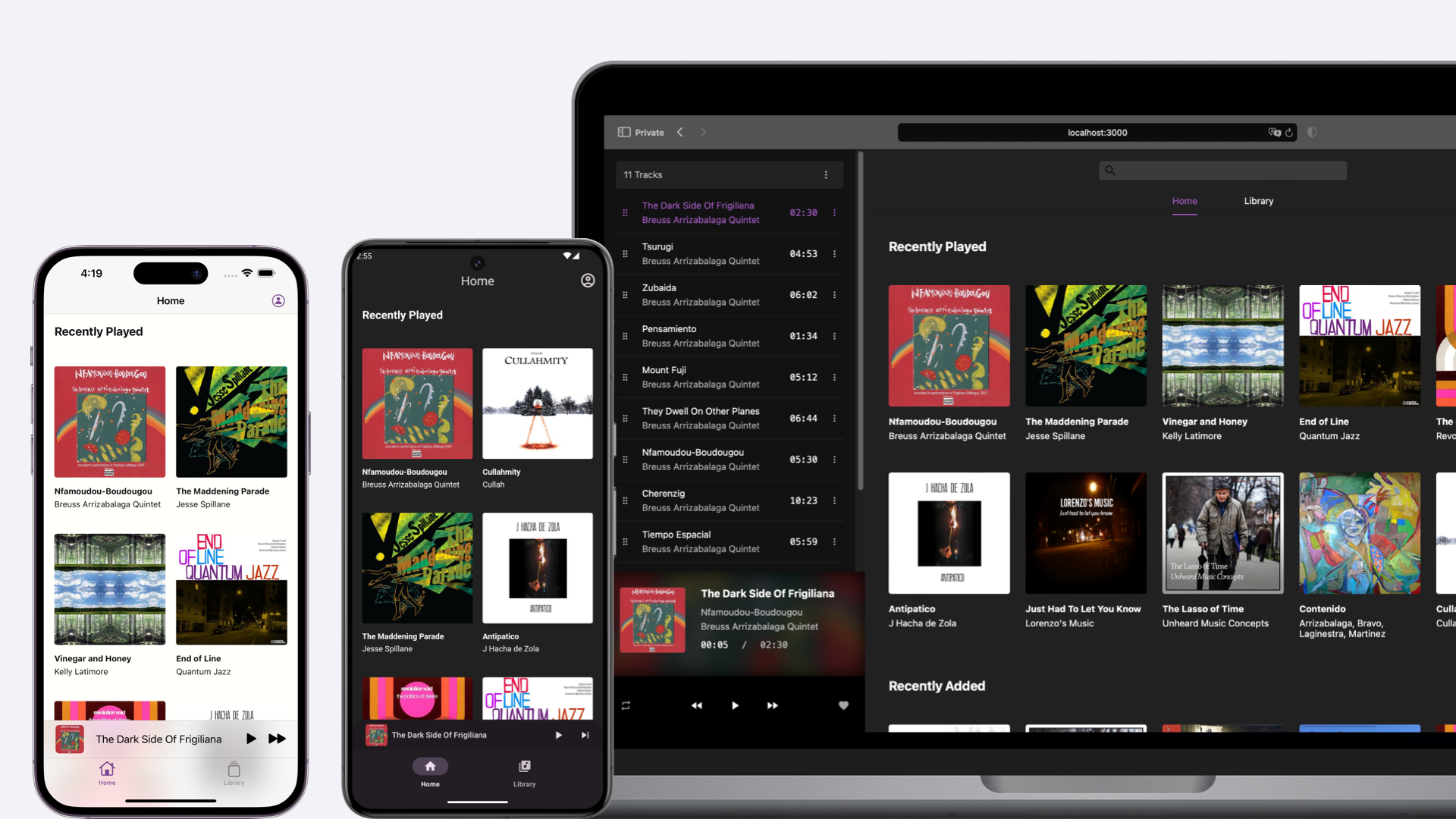
Black Candy is a self-hosted music streaming server, your personal music center.
Try The Demo
Please visit https://demo.blackcandy.org and use demo user (email: [email protected], password: foobar) to log in. And feel free to try it.
[!NOTE] This demo user does not have administrator privileges. So you cannot experience all the features in Black Candy. And all music in the demo are from Free Music Archive. You can check their licenses.
Installation
Black Candy uses docker image to install easily. You can run Black Candy like this.
docker run -p 80:80 ghcr.io/blackcandy-org/blackcandy:latest

# Or pull from Docker Hub.
docker run -p 80:80 blackcandy/blackcandy:latest
That's all. Now, you can access either http://localhost or http://host-ip in a browser, and use initial admin user to log in (email: [email protected], password: foobar).
Upgrade
[!IMPORTANT] If you upgrade to a new version, you need to read the upgrade guide carefully before upgrade. Because there are may some breaking changes in a new version.
Please Check the Upgrade Guide for upgrading to a new version
Upgrade Black Candy is pull new image from remote. Then remove an old container and create a new one.
docker stop <your_blackcandy_container>
docker rm <your_blackcandy_container>
docker pull ghcr.io/blackcandy-org/blackcandy:latest
docker run <OPTIONS> ghcr.io/blackcandy-org/blackcandy:latest
With docker compose, you can upgrade Black Candy like this:
docker-compose down
docker pull ghcr.io/blackcandy-org/blackcandy:latest
docker-compose up
Mobile Apps
Black Candy mobile apps are available in the following app stores:
For Android app, you can also download APK from GitHub Release
Configuration
Port Mapping
Black Candy exports the 80 port. If you want to be able to access it from the host, you can use the -p option to map the port.
docker run -p 3000:80 ghcr.io/blackcandy-org/blackcandy:latest
Media Files Mounts
You can mount media files from host to container and use MEDIA_PATH environment variable to set the media path for black candy.
docker run -v /media_data:/media_data -e MEDIA_PATH=/media_data ghcr.io/blackcandy-org/blackcandy:latest
Use PostgreSQL As Database
Black Candy use SQLite as database by default. Because SQLite can simplify the process of installation, and it's an ideal choice for self-hosted small server. If you think SQLite is not enough, or you are using some cloud service like heroku to host Black Candy, you can also use PostgreSQL as database.
docker run -e DB_ADAPTER=postgresql -e DB_URL=postgresql://yourdatabaseurl ghcr.io/blackcandy-org/blackcandy:latest
How to Persist Data
All the data that need to persist in Black Candy are stored in /rails/storage, So you can mount this directory to host to persist data.
mkdir storage_data

docker run -v ./storage_data:/rails/storage ghcr.io/blackcandy-org/blackcandy:latest
Running as an Arbitrary User
When mounting volumes, you may encounter permission issues between the host and the Docker container. To resolve this issue, pass the UID and GID with the --user to set the same UID and GID as your host user.
docker run --user 2000:2000 -v ./storage_data:/rails/storage ghcr.io/blackcandy-org/blackcandy:latest
Logging
Black Candy logs to STDOUT by default. So if you want to control the log, Docker already supports a lot of options to handle the log in the container. See: https://docs.docker.com/config/containers/logging/configure/.
Secret Key Base
Black Candy uses cryptography to protect sessions and other security-sensitive data, and needs a secret value as the basis of those secrets. This value can be anything, but it should be unguessable, and specific to your instance.
You can use any long random string for this. One way to generate one is with openssl:
openssl rand -hex 64
Once you have one, set it in the SECRET_KEY_BASE environment variable:
docker run -e SECRET_KEY_BASE=your_generated_secret ghcr.io/blackcandy-org/blackcandy:latest
If SECRET_KEY_BASE is not set, Black Candy will generate a new one on each startup, which will invalidate all existing sessions.
Example
And if you would like to use docker compose to run Black Candy. Here is an example docker-compose.yml file.
services:
  app:
    image: ghcr.io/blackcandy-org/blackcandy:latest
    restart: unless-stopped
    ports:
      - "3000:80"
    volumes:
      - storage_data:/app/storage
      - ./media_data:/media_data
    environment:
      SECRET_KEY_BASE: fake_secret_key
      MEDIA_PATH: /media_data

volumes:
  storage_data:
Environment Variables
| Name | Default | Description |
|---|---|---|
| DB_URL | The URL of PostgreSQL database. You must set this environment variable if you use PostgreSQL as database. | |
| CABLE_DB_URL | The URL of Pub/Sub database. You must set this environment variable if you use PostgreSQL as database. | |
| QUEUE_DB_URL | The URL of background job database. You must set this environment variable if you use PostgreSQL as database. | |
| CACHE_DB_URL | The URL of cache database. You must set this environment variable if you use PostgreSQL as database. | |
| MEDIA_PATH | You can use this environment variable to set media path for Black Candy, otherwise you can set media path in settings page. | |
| DB_ADAPTER | "sqlite" | There are two adapters are supported, "sqlite" and "postgresql". |
| SECRET_KEY_BASE | When the SECRET_KEY_BASE environment variable is not set, Black candy will generate SECRET_KEY_BASE environment variable every time when service start up. This will cause old sessions invalid, You can set your own SECRET_KEY_BASE environment variable on docker service to avoid it. | |
| FORCE_SSL | false | Force all access to the app over SSL. |
| DEMO_MODE | false | Whether to enable demo mode, when demo mode is on, all users cannot access administrator privileges, even user is admin. And also users cannot change their profile. |
| HTTP_PORT | 80 | The port that Black Candy listens on inside the container. Useful when you want to run Black Candy on a port other than 80. |
Edge Version
The edge version of Black Candy base on master branch, which means it's not stable, you may encounter data loss or other issues. However, I don't recommend normal user using an edge version. But if you are a developer who wants to test or contribute to Black Candy, you can use the edge version.
docker pull ghcr.io/blackcandy-org/blackcandy:edge
Development
Requirements
- Ruby 4.0
- Node.js 20
- libvips
- FFmpeg
Make sure you have installed all those dependencies.
Install gem dependencies
bundle install
Install JavaScript dependencies
npm install
Database Configuration
rails db:prepare
rails db:seed
Start all services
After you’ve set up everything, now you can run ./bin/dev to start all services you need to develop.
Then visit http://localhost:3000 use initial admin user to log in (email: [email protected], password: foobar).
Running tests
# Running all test
$ rails test:all

# Running lint
$ rails lint:all
Integrations
Black Candy support get artist and album image from Discogs API. You can create an API token from Discogs and set Discogs token on Setting page to enable it.
Sponsorship
This project is supported by:

lx-music-desktop
lyswhut·TypeScript
基于 Electron 的跨平台桌面音乐播放器,聚合多源在线音乐搜索与播放,界面清爽,适合日常听歌。
音乐播放器+4音乐播放器
55236+1047.1kv2.12.62026-11-10 04:44 UTC
spotube
team-spotube·Kotlin
开源跨平台音乐播放器,桌面和手机都能用,通过 Spotify 和 YouTube 等公开来源获取歌曲,无需付费订阅即可播放。
音乐播放器+4音乐播放器
50711+752.4kv6.0.0-beta.02026-11-10 08:05 UTC
pear-desktop
pear-devs·TypeScript
基于 Electron 的跨平台桌面音乐播放器,为 YouTube Music 等流媒体服务提供增强扩展,支持 Windows、macOS 和 Linux。
音乐播放器+4音乐播放器
34013+172.0kv3.12.02026-11-08 01:55 UTC

YesPlayMusic
qier222·Vue
基于 Electron 和 Vue 的第三方网易云音乐播放器,界面精致,支持 Windows、macOS、Linux 以及 PWA,让你在桌面端也能获得流畅的在线听歌体验。
网易云音乐+4音乐播放器
33616+194.7kv0.4.112026-10-10 11:05 UTC