链接长度受平台限制,Twitter 约 4088 字符、Slack 约 4000 字符,超长内容可能发不出去;数据只存在链接里,链接丢失即无法找回,也无法从服务端删除;Mac 上 base64 需去掉 -w0 参数,Windows 需改用 xz --format=lzma

nopaste
bokubMIT长期未更新纯浏览器端运行的粘贴板服务,文本只留在本地,不上传服务器,适合安全分享代码片段和临时文本。
:clipboard: Client-side paste service
暂无版本454star145fork同步于 2026-11-07 07:33 UTC
echo -n 'Hello World' | lzma | base64 -w0 | xargs -0 printf "https://nopaste.boris.sh/#%s\n" 硬件要求按 README 说明
README 未说明,纯浏览器端静态页面,无需 GPU 或特定硬件
把代码压缩进链接的无后端粘贴服务,数据只存在 URL 片段里
纯浏览器端运行的粘贴板服务,文本只留在本地,不上传服务器,适合安全分享代码片段和临时文本。
核心能力
- 用 LZMA 压缩并 Base64 编码后写入 URL 的 # 片段
- 纯静态前端,无数据库无后端代码,服务器读不到内容
- 支持语法高亮、行号、多光标与常用快捷键编辑
- 可生成 iframe 嵌入代码把片段插进自己网站
- 首次访问后缓存到浏览器,断网也能打开链接
容易踩的坑
内容由模型根据 README 生成,可能不完整或不准确,以官方文档为准。看原文 README
暂无 release 数据(可能没有发版,或尚未同步)。
用户点评
登录用户的真实使用记录,可按版本和硬件筛选共 0 条
还没有人点评。第一个说出真实体验的人最有价值。

What is NoPaste?
NoPaste is an open-source website similar to Pastebin where you can store any piece of code, and generate links for easy sharing
However, what makes NoPaste special is that it works with no database, and no back-end code. Instead, the data is compressed and stored entirely in the link that you share, nowhere else!
Because of this design:
- 🗑️ Your data cannot be deleted from NoPaste
- 🔞 Your data cannot be censored
- 👁️ The server hosting NoPaste (or any clone of it) cannot read or access your data
- ⏳ Your data will be accessible forever (as long as you have the link)
- 🔀 You can access your data on every NoPaste clone, including your own
- 🔍 Google will not index your data, even if your link is public
Note: This project is a copy of Topaz's paste service, with a reworked design and a few additional features (syntax highlighting, line numbers, offline usage, embedding...)
How it works
When you click on "Generate Link", NoPaste compresses the whole text using the
LZMA algorithm, encodes it in
Base64, and puts it in the optional URL fragment, after the first # symbol: nopaste.boris.sh/#<your data goes here>
When you open a link, NoPaste reads, decodes, and decompresses whatever is after the #, and displays the result in the editor.
This process is done entirely in your browser, and the web server hosting NoPaste never has access to the fragment
For example, this is the CSS code used by NoPaste
Other features
Embedded NoPaste snippets
You can include NoPaste code snippets into your own website by clicking the Embed button and using the generated HTML code.
Here is an example of generated code and how it looks (click on the screenshot to see the interactive version)
<iframe
    width="100%"
    height="243"
    frameborder="0"
    src="https://nopaste.boris.sh/?l=py#XQAAAQAbAQAAAAAAAAA0m0pnuFI8c+qagMoNTEcTIfyUWbZjtjmBYcmJSzoNwS5iVMWHzvowv3IPM0vOG5cjrtDRTSVP/0biTIrrahfmbkuMQBBeSiSGpaJOqYJiKmUDYn2Gp1RtWE6gm8fLHMB4eyZ3+rEbUQwWyMcmWqvZ7m96RUeFyZdYbE85JGvhghqF8cyPB0ZjV0OQWsDxn5O5ysMrIcL+pKPk89EtLjAHhA1LZL9F3hzAtTx7I+GlyrxhhXGxAN//CvtaAA=="
></iframe>
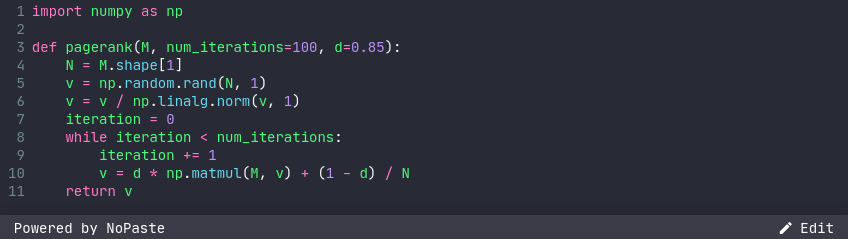
Feel free to edit the height and width attributes, so they suit your needs
Offline usage
When you visit NoPaste for the first time, its code is saved in your browser cache. After that, every NoPaste link you open will load really quick, even if your internet connection is slow.
What if you have no internet connexion at all? No problem, NoPaste will still work perfectly!
Editor features
- Syntax highlighting (use the language selector)
- Enable / disable line wrapping (use the button next to the language selector)
- Delete line (
Ctrl+D) - Multiple cursors (
Ctrl+Click) - Usual keyboard shortuts (
Ctrl+A,Ctrl+Z,Ctrl+Y...)
Maximum sizes for links
NoPaste is great for sharing code snippets on various platforms.
These are the maximum link lengths on some apps and browsers.
| App | Max length |
|---|---|
| 10,000 | |
| 4,088 | |
| Slack | 4,000 |
| QR Code | 2,610 |
| Bitly | 2,048 |
| TinyURL | 32,000 |
| Browser | Max length | Notes |
|---|---|---|
| Google Chrome | (win) 32,779 (mac) 10,000 | Will not display, but larger links work |
| Firefox | >64,000 | |
| Microsoft IE 11 | 4,043 | Will not show more than 2,083 |
| Microsoft Edge | 2,083 | Anything over 2083 will fail |
| Android | 8,192 | |
| Safari | Lots |
Generate NoPaste links
NoPaste links can be created easily from your system's command line:
# Linux
echo -n 'Hello World' | lzma | base64 -w0 | xargs -0 printf "https://nopaste.boris.sh/#%s\n"

# Mac
echo -n 'Hello World' | lzma | base64 | xargs -0 printf "https://nopaste.boris.sh/#%s\n"

# Windows / WSL / Linux
echo -n 'Hello World' | xz --format=lzma | base64 -w0 | printf "https://nopaste.boris.sh/#%s\n" "$(cat -)"
Deploy your own version of NoPaste
NoPaste is just a bunch of static files, making it really easy to deploy on any kind of file server.
Read the wiki to see how you can deploy your own version of NoPaste for free using Github Pages
CopyQ
hluk·C++
跨平台剪贴板管理器,能保存历史记录、搜索和编辑内容,还支持脚本自动化,解决复制粘贴内容容易丢失、难以复用的问题。
剪贴板管理+4剪贴板 / 启动器
12627+18630v17.0.02026-11-09 20:39 UTC

Clipy
Clipy·Swift
macOS 上的剪贴板历史管理工具,能记录复制过的内容并快速检索、粘贴,弥补系统剪贴板只能存一条的限制。
剪贴板管理+3剪贴板 / 启动器
8971+88431.4.12026-11-10 14:48 UTC

EcoPaste
EcoPasteHub·Rust
跨平台剪贴板管理工具,支持 Windows、macOS 和 Linux,帮你保存和检索复制过的历史内容,告别反复复制粘贴。
剪贴板管理+4剪贴板 / 启动器
7577+8411v1.1.02026-08-13 00:29 UTC
Ditto
sabrogden·C
Windows 剪贴板增强工具,把每次复制的内容存进数据库,之后随时翻出来重新粘贴,不用再反复复制。
剪贴板管理+3剪贴板 / 启动器
7449+114913.25.113.02026-10-01 01:28 UTC