开发或本地构建需 Node.js >= 22.5.0,低版本会因缺少 node:sqlite 失败;explain_sql 和 health_check 是可选工具,默认不加载;多数据库需另写 dbhub.toml 配置,不能只靠单条 --dsn
dbhub
bytebaseMIT活跃维护面向 Postgres、MySQL、SQL Server、Oracle 等数据库的 MCP 服务器,让 Claude、Cursor 等 AI 编程助手能直接查询数据库,并控制上下文 token 消耗。
Token conscious database MCP server for Postgres, MySQL, SQL Server, Oracle, MariaDB, SQLite.
v1.6.0发布于 2026-11-07 08:02 UTC3,820star +17 / 7 天337fork同步于 2026-11-10 05:39 UTC
npx @bytebase/dbhub@latest --transport http --port 8080 --dsn "postgres://user:password@localhost:5432/dbname?sslmode=disable" 硬件要求按 README 说明
README 未说明硬件要求;开发需 Node.js >= 22.5.0(依赖内置 node:sqlite 模块)
轻量级数据库 MCP 服务器,让 Claude 等客户端用极省 token 的方式连多种数据库
面向 Postgres、MySQL、SQL Server、Oracle 等数据库的 MCP 服务器,让 Claude、Cursor 等 AI 编程助手能直接查询数据库,并控制上下文 token 消耗。
核心能力
- 默认只加载 execute_sql 和 search_objects 两个工具,约 1.4k token
- 用单一接口连接 PostgreSQL、MySQL、MariaDB、SQL Server、Oracle、SQLite
- 通过 TOML 配置同时连接多个数据库
- 提供只读模式、行数限制和查询超时等保护措施
- 支持 SSH 隧道与 SSL/TLS 加密访问
容易踩的坑
内容由模型根据 README 生成,可能不完整或不准确,以官方文档为准。看原文 README
- v1.6.0最新正式版2026-11-07 · 2026-11-07 08:02 UTC
What's Changed
- feat(oracle): support PEM wallets and server certificate DN for mTLS by @albertopasqualetto in https://github.com/bytebase/dbhub/pull/491
- fix(config): reject TOML sources that reference unset env vars by @albertopasqualetto in https://github.com/bytebase/dbhub/pull/490
- fix(oracle): close the wallet option gaps flagged in the #491 review by @tianzhou in https://github.com/bytebase/dbhub/pull/492
- feat(mysql,postgres): add per-source [sources.session] settings by @takamasa-loves-mcdonalds in https://github.com/bytebase/dbhub/pull/487
- fix(config): close the [sources.session] gaps flagged in the #487 review by @tianzhou in https://github.com/bytebase/dbhub/pull/493
- fix(mysql,mariadb): stop DDL escaping the read-only backstop by @tianzhou in https://github.com/bytebase/dbhub/pull/494
New Contributors
- @albertopasqualetto made their first contribution in https://github.com/bytebase/dbhub/pull/491
- @takamasa-loves-mcdonalds made their first contribution in https://github.com/bytebase/dbhub/pull/487
Full Changelog: https://github.com/bytebase/dbhub/compare/v1.5.1...v1.6.0
- v1.5.12026-11-03 · 2026-11-03 06:59 UTC
查看更新说明
What's Changed
- fix(sqlite): run multi-statement batches in source order by @vishalhabib99 in https://github.com/bytebase/dbhub/pull/470
- fix(http): raise keep-alive timeout above proxy idle timeouts by @tianzhou in https://github.com/bytebase/dbhub/pull/473
- fix(http): refuse subscriptions/listen instead of holding it open by @tianzhou in https://github.com/bytebase/dbhub/pull/475
- fix(postgres): keep the process alive when the server drops a checked-out connection by @tianzhou in https://github.com/bytebase/dbhub/pull/480
- fix(sqlite): include generated columns in schema discovery by @zwk110 in https://github.com/bytebase/dbhub/pull/481
- fix: keep every column when a result has repeated column names by @tianzhou in https://github.com/bytebase/dbhub/pull/485
- fix(dsn): parse bracketed IPv6 hosts without splitting address colons by @as992949791 in https://github.com/bytebase/dbhub/pull/483
- fix(dsn): keep IPv6 brackets when obfuscating a DSN password by @tianzhou in https://github.com/bytebase/dbhub/pull/486
New Contributors
- @vishalhabib99 made their first contribution in https://github.com/bytebase/dbhub/pull/470
- @zwk110 made their first contribution in https://github.com/bytebase/dbhub/pull/481
- @as992949791 made their first contribution in https://github.com/bytebase/dbhub/pull/483
Full Changelog: https://github.com/bytebase/dbhub/compare/v1.5.0...v1.5.1
- v1.5.02026-10-09 · 2026-10-09 09:30 UTC
查看更新说明
What's Changed
- docs: point CLAUDE.md at src/connectors/interface.ts by @roli-lpci in https://github.com/bytebase/dbhub/pull/447
- fix(config): reject empty TOML sslmode before DSN fallback by @tsiakoulias in https://github.com/bytebase/dbhub/pull/451
- fix(sqlserver): support verify-full TLS mode by @tsiakoulias in https://github.com/bytebase/dbhub/pull/443
- feat(ssh): support SSH agent authentication by @JonLaliberte in https://github.com/bytebase/dbhub/pull/457
- fix(ssh): address review findings on SSH agent support by @tianzhou in https://github.com/bytebase/dbhub/pull/458
- fix: authenticate PostgreSQL IAM connections on demand by @deinspanjer in https://github.com/bytebase/dbhub/pull/421
- docs/test: trim PostgreSQL IAM follow-ups from #421 by @tianzhou in https://github.com/bytebase/dbhub/pull/459
- test: trim duplicated tests across unit and integration suites by @tianzhou in https://github.com/bytebase/dbhub/pull/460
- fix: reload TOML config per source instead of reconnecting every source by @tianzhou in https://github.com/bytebase/dbhub/pull/461
- fix(sqlserver): max_rows TOP rewrite breaks DISTINCT/TOP (n)/OFFSET and misses PERCENT, WITH TIES, batches by @tianzhou in https://github.com/bytebase/dbhub/pull/462
- fix(postgres): re-read sslcert/sslkey/sslrootcert per connection so rotated certificates take effect by @tianzhou in https://github.com/bytebase/dbhub/pull/463
- fix(postgres): deny set_config() in readonly mode by @tianzhou in https://github.com/bytebase/dbhub/pull/464
- fix(timeout): server-side query_timeout on MySQL and one client-side fallback for PostgreSQL, MySQL, MariaDB by @tianzhou in https://github.com/bytebase/dbhub/pull/465
- test: stop integration suites failing on container teardown timeout by @tianzhou in https://github.com/bytebase/dbhub/pull/466
- refactor(connectors): split PEM and EXPLAIN code out of connector index files by @tianzhou in https://github.com/bytebase/dbhub/pull/467
- refactor(connectors): share MySQL/MariaDB schema introspection by @tianzhou in https://github.com/bytebase/dbhub/pull/468
New Contributors
- @roli-lpci made their first contribution in https://github.com/bytebase/dbhub/pull/447
- @tsiakoulias made their first contribution in https://github.com/bytebase/dbhub/pull/451
- @JonLaliberte made their first contribution in https://github.com/bytebase/dbhub/pull/457
Full Changelog: https://github.com/bytebase/dbhub/compare/v1.4.0...v1.5.0
- v1.4.02026-09-28 · 2026-09-28 16:24 UTC
查看更新说明
What's Changed
- Add glama.json to enable claiming the Glama listing by @adela-bytebase in https://github.com/bytebase/dbhub/pull/440
- Support sslcert/sslkey client certificate authentication for PostgreSQL by @tianzhou in https://github.com/bytebase/dbhub/pull/441
- Reject sslrootcert and unknown sslmode values in PostgreSQL DSNs by @tianzhou in https://github.com/bytebase/dbhub/pull/442
New Contributors
- @adela-bytebase made their first contribution in https://github.com/bytebase/dbhub/pull/440
Full Changelog: https://github.com/bytebase/dbhub/compare/v1.3.1...v1.4.0
- v1.3.12026-09-21 · 2026-09-21 08:08 UTC
查看更新说明
What's Changed
- fix: reload AWS credentials from disk on every RDS IAM token refresh by @tianzhou in https://github.com/bytebase/dbhub/pull/438
Full Changelog: https://github.com/bytebase/dbhub/compare/v1.3.0...v1.3.1
用户点评
登录用户的真实使用记录,可按版本和硬件筛选共 0 条
还没有人点评。第一个说出真实体验的人最有价值。
[!NOTE]
If you need an enterprise-level database MCP server with built-in guardrails like approval flow, access control, data masking, and audit logging beyond what DBHub offers, check out Bytebase.
            +------------------+    +--------------+    +------------------+
            |                  |    |              |    |                  |
            |  Claude Desktop  +--->+              +--->+    PostgreSQL    |
            |                  |    |              |    |                  |
            |  Claude Code     +--->+              +--->+    SQL Server    |
            |                  |    |              |    |                  |
            |  Cursor          +--->+    DBHub     +--->+    Oracle        |
            |                  |    |              |    |                  |
            |  VS Code         +--->+              +--->+    SQLite        |
            |                  |    |              |    |                  |
            |  Copilot CLI     +--->+              +--->+    MySQL         |
            |                  |    |              |    |                  |
            |                  |    |              +--->+    MariaDB       |
            |                  |    |              |    |                  |
            +------------------+    +--------------+    +------------------+
                 MCP Clients           MCP Server             Databases
DBHub is a minimal MCP server: token-efficient, zero-dependency, and just two tools by default with opt-in extras. This lightweight gateway allows MCP-compatible clients to connect to and explore different databases:
- Minimal: Zero dependency, token efficient with a minimal set of MCP tools to maximize context window
- Multi-Database: PostgreSQL, MySQL, MariaDB, SQL Server, Oracle, and SQLite through a single interface
- Multi-Connection: Connect to multiple databases simultaneously with TOML configuration
- Guardrails: Read-only mode, row limiting, and query timeout to prevent runaway operations
- Secure Access: SSH tunneling and SSL/TLS encryption
DBHub is the official example in the Claude Code docs for connecting to PostgreSQL via MCP.
Token Efficiency
DBHub loads just 2 tools by default at 1.4k tokens — 13-14x fewer than alternatives — keeping the context window open for your actual work.
| MCP Server | Default Config | Default Tools |
|---|---|---|
| DBHub | 1.4k | 2 (execute_sql, search_objects) |
| MCP Toolbox | 19.0k | 28 |
| Supabase MCP | 19.3k | all |
Use Cases
- Local Development: Schema exploration, query validation, and data debugging with Claude Code, VS Code, Cursor, etc.
- Non-Technical Access: Expose curated, read-only views to non-technical staff via Claude Desktop, VS Code, Cursor, etc.
- Multi-Database Consolidation: Replace separate MCP servers for each database with a single DBHub process
- Production Troubleshooting: Read-only diagnostics with guardrails against runaway queries
Supported Databases
PostgreSQL, MySQL, SQL Server, MariaDB, Oracle, and SQLite.
MCP Tools
DBHub implements MCP tools for database operations:
- execute_sql: Execute SQL queries with transaction support and safety controls
- search_objects: Search and explore database schemas, tables, columns, indexes, and procedures with progressive disclosure
- explain_sql (opt-in): Show a query's execution plan without running it
- health_check (opt-in): Report connection pool state and buffer cache hit ratio
- Custom Tools: Define reusable, parameterized SQL operations in your
dbhub.tomlconfiguration file
Workbench
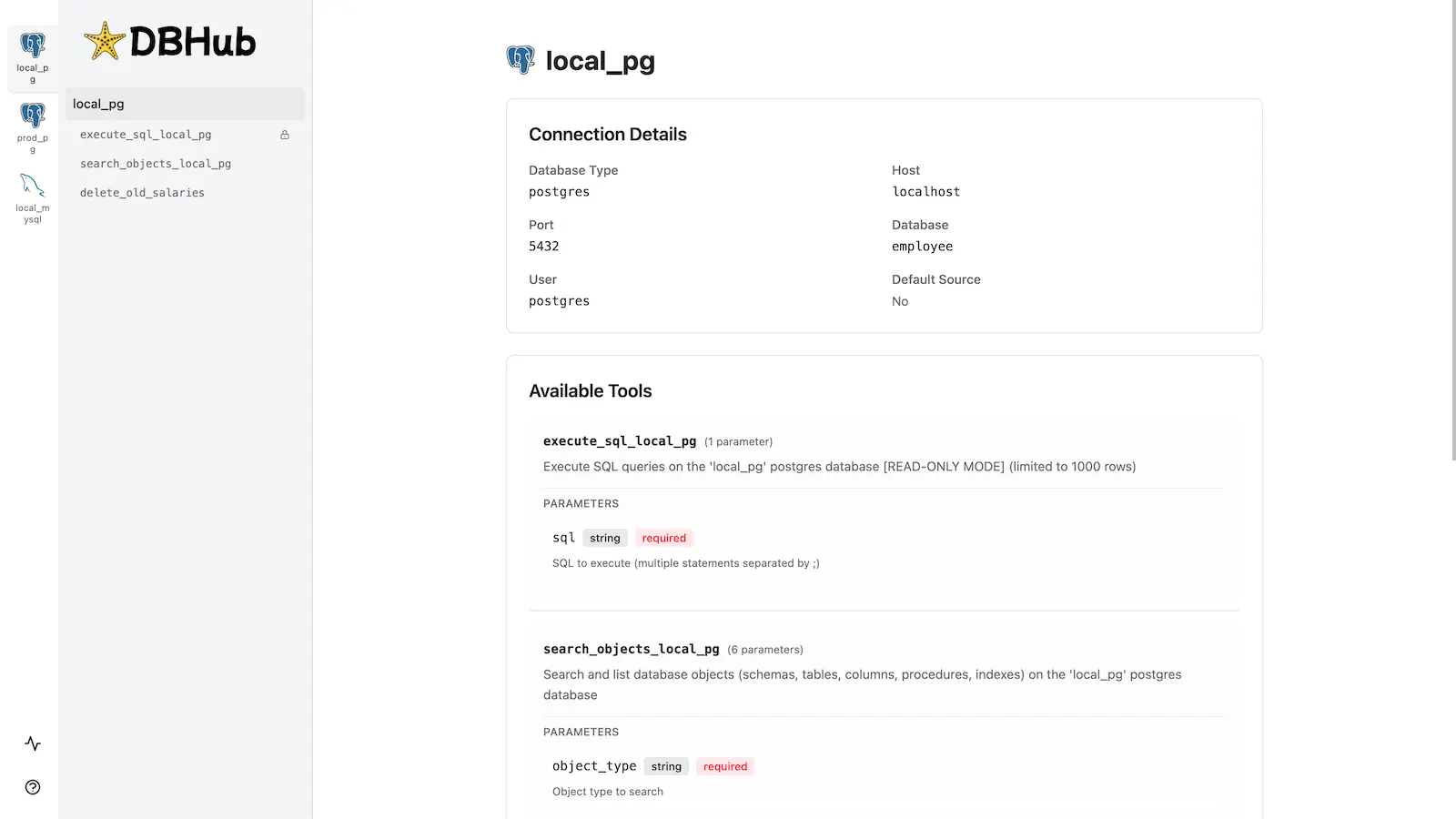
DBHub includes a built-in web interface for interacting with your database tools. It provides a visual way to execute queries, run custom tools, and view request traces without requiring an MCP client.
Installation
npx @bytebase/dbhub@latest --transport http --port 8080 --dsn "postgres://user:password@localhost:5432/dbname?sslmode=disable"
Also available as:
- Docker image
- MCP Bundle (one-click install, read-only)
- Claude Code plugin
See the Installation Guide for all options, Command-Line Options for parameters, and Multi-Database Configuration for connecting several databases at once.
Development
Requires Node.js >= 22.5.0 (DBHub uses the built-in node:sqlite module).
# Install dependencies
pnpm install

# Run in development mode
pnpm dev

# Build and run for production
pnpm build && pnpm start --transport stdio --dsn "postgres://user:password@localhost:5432/dbname"