源码构建需先装齐 glib、gtk4、libadwaita、mpv 等开发依赖,版本不够会直接失败;mpv.conf 必须在偏好设置的 MPV Configuration 里指定并启用才生效;部分 mpv 用户脚本的按键会与 Celluloid 冲突,需自行用 input.conf 重绑。
flatpak remote-add --if-not-exists flathub https://flathub.org/repo/flathub.flatpakrepo
flatpak install flathub io.github.celluloid_player.Celluloid 硬件要求按 README 说明
README 未说明显存或 GPU 型号要求;依赖 GTK 4.16、libadwaita 1.8.0 和 mpv 0.32 以上,属于桌面图形程序,未提及纯 CPU 运行方式。
给 mpv 套上 GTK+ 图形界面的轻量播放器,不用记命令行也能用 mpv 的播放能力
基于 GTK 的 mpv 图形前端,界面简洁,把 mpv 强大的播放能力包装成易用的桌面视频播放器。
核心能力
- 通过 libmpv 客户端 API 调用 mpv 播放内核
- 支持命令行传参、文件对话框、URI 和拖放四种打开方式
- 播放列表默认隐藏,按 F9 显示并支持拖放排序
- 可直接加载 mpv 用户脚本,冲突按键用 input.conf 重定义
- 偏好设置里可指定 mpv.conf 或追加额外 mpv 选项
容易踩的坑
内容由模型根据 README 生成,可能不完整或不准确,以官方文档为准。看原文 README
- v0.30最新正式版2026-03-29 · 2026-03-29 03:26 UTC
This release contains the following changes:
- Fix the file chooser not remembering the location of last opened file.
- Prevent the seek bar and playback buttons from becoming reversed under RTL locales.
- Updated the shortcuts dialog to use libadwaita.
- Fix the timestamp popover that appears when hovering the seek bar not appearing at the right location.
- Fix Blu-ray discs not being detected.
- Add Cornish translation by Flynn.
- Add Kazakh translation by Baurzhan Muftakhidinov.
- Add Uzbek translation by Bilolbek Normuminov.
This listing is incomplete. See git log for full list of changes.
- v0.292025-05-17 · 2025-05-17 18:24 UTC
查看更新说明
This release contains the following changes:
- Fix an issue that can cause flickering or black screens with Nvidia GPU.
- Fix preferences dialog not saving configuration files.
- Fix controls not re-appearing after being hidden.
- Fix main menu popover not appearing at the right location when toggled with keyboard shortcut.
- Make displaying file durations in the playlist optional.
- Fix controls being off-center in some configurations.
This listing is incomplete. See git log for full list of changes.
- v0.282025-04-04 · 2025-04-04 02:44 UTC
查看更新说明
This release contains the following changes:
- Add the standard F10 key binding for activating the main menu button.
- Implement GUI redesign by @jannuary.
- Update some of the deprecated GTK API usage.
- Fix a crash that occurs on exit with GTK 4.17.
- Add support for loading Lua modules from
script-modules. - File durations are now displayed in the playlist when available.
- Make next/previous buttons control playlist position by default.
- Add Irish translation by Aindriú Mac Giolla Eoin.
- Drop Autotools.
This listing is incomplete. See git log for full list of changes.
Users with Nvidia GPUs may experience black screens or flickering when playing videos. Apply this patch and this patch to fix.
Due to a bug, Celluloid will not save changes to
mpv configuration fileandmpv input configuration filein the Preferences dialog. Apply this patch to fix. - v0.272024-06-24 · 2024-06-24 03:21 UTC
查看更新说明
This release contains the following changes:
- Add a loading screen that gets displayed during initialization and buffering.
- Reduce the time it takes for the main window to get displayed after launching.
- Opening and closing the preferences dialog will no longer trigger an mpv reset unless options that require it are changed.
- Update the look for controls and header bar in floating mode.
- Update some of the deprecated GTK API usage.
- Add support for multi-file user scripts.
This listing is incomplete. See git log for full list of changes.
- v0.262023-09-16 · 2023-09-16 15:04 UTC
查看更新说明
This release contains the following changes:
- Fix a bug where the header bar keeps hiding even when a menu is open.
- Use toasts instead of dialog to report mpv errors.
- Change default screenshot format to PNG.
- Fix crash that happens when the
mpv-config-filekey in GSettings contains a path rather than a URI. - Expose the
PositionMPRIS property. - Use the
numericstyle class for the time/duration label, which stops it from jumping around as it changes.
This listing is incomplete. See git log for complete changelog.
用户点评
登录用户的真实使用记录,可按版本和硬件筛选共 0 条
还没有人点评。第一个说出真实体验的人最有价值。
Celluloid
Celluloid (formerly GNOME MPV) is a simple GTK+ frontend for mpv. Celluloid interacts with mpv via the client API exported by libmpv, allowing access to mpv's powerful playback capabilities.
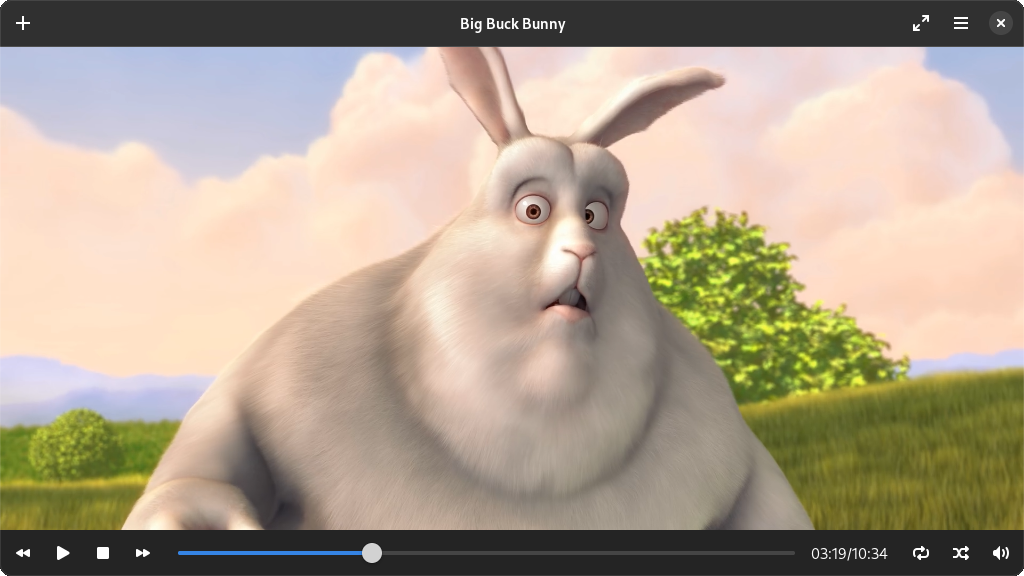
Repository Mirror: https://codeberg.org/celluloid-player/celluloid
Dependencies
- appstream (build)
- pkg-config (build)
- gcc (build)
- glib >= 2.68
- gtk >= 4.16
- gdk-pixbuf >= 2.30
- libadwaita >= 1.8.0
- mpv >= 0.32
- epoxy
- lua (optional)
- youtube-dl (optional)
Installation
Packages
Ubuntu users can use this PPA to get more up-to-date versions of Celluloid.
Flatpak
Flatpak packages support multiple distributions and are sandboxed. Flatpak 0.9.5+ is recommended for best integration.
Stable releases are hosted on Flathub:
flatpak remote-add --if-not-exists flathub https://flathub.org/repo/flathub.flatpakrepo
flatpak install flathub io.github.celluloid_player.Celluloid
Snap
Stable releases are hosted on Snapcraft:
sudo snap install celluloid
Source code
Run the following command in the source code directory to build and install:
meson setup build && cd build && ninja && sudo ninja install
Usage
Opening files
There are 4 ways to open files in Celluloid.
- Passing files and/or URIs as command line arguments.
- Using the file chooser dialog box, accessible via the "Open" menu item.
- Typing URI into the "Open Location" dialog box, accessible via the menu item with the same name.
- Dragging and dropping files or URIs onto Celluloid.
Manipulating playlist
The playlist is hidden by default. To show the playlist, click the "Playlist" menu item or press F9. Files can be added by dragging and dropping files or URIs onto the playlist. Dropping files or URIs onto the video area will replace the content of the playlist. Playlist files or online playlists (eg. YouTube's playlist) will be automatically expanded into individual items when loaded.
Items in the playlist can be reordered via drag-and-drop. To remove items from the playlist, select the item by clicking on it then press the delete button on your keyboard.
Configuration
Celluloid can be configured using the preferences dialog accessible through the
Preferences menu item. A number of less common options are also available in
the dconf database. You can configure these using a tool like
Dconf Editor.
mpv-specific options can be set by creating a configuration file using mpv's
mpv.conf syntax. See mpv's manual for the
full list of options. The file must be specified and enabled in the preferences
dialog under the "MPV Configuration" section for it to take effect.
It is also possible to set mpv options by putting the options as you would pass
to mpv on the command line in the Extra MPV Options text box in the
preferences dialog. If you want to set these options on the command line, you
can do so by adding mpv- prefix to the name of the option you want to set.
For example, the option --mpv-vf=flip is equivalent to --vf=flip in mpv.
User Scripts
Celluloid can use most mpv user scripts as-is. Some user scripts may define
keybindings that conflict with Celluloid, in which case you'll need to resolve
the conflict by explicitly defining new keybindings using input.conf. See
mpv's manual for
more details.
User scripts can be installed by switching to the "Plugins" tab in the preferences dialog and dropping the files there. A list of mpv user scripts can be found here.
Keybindings
Celluloid defines a set of keybindings in the macro DEFAULT_KEYBINDS, which
can be found in
src/celluloid-def.h.
The syntax used is exactly the same as mpv's input.conf. These keybindings are
applied on top of default keybindings provided by mpv.
Additional keybindings can be defined in an external file using mpv's
input.conf syntax. The file can be set in the preferences dialog under the
"Keybindings" section.
Contributing Translations

Celluloid uses Weblate to coordinate translations. You can find Celluloid's page here.
While translating, you will find the string translator-credits. You should not
translate this string. Instead, you should put your name, and optionally your
email address, in the following format: FirstName LastName <Email Address>.
Your name will then appear in the About dialog when your translation is active.
AI-Generated Code
Due to the lack of clarity around its copyright status, AI-generated code is not accepted in this project. Please do not include AI-generated code in your pull requests.
License
Celluloid is free software: you can redistribute it and/or modify it under the terms of the GNU General Public License as published by the Free Software Foundation, either version 3 of the License, or (at your option) any later version.
Celluloid is distributed in the hope that it will be useful, but WITHOUT ANY WARRANTY; without even the implied warranty of MERCHANTABILITY or FITNESS FOR A PARTICULAR PURPOSE. See the GNU General Public License for more details.
You should have received a copy of the GNU General Public License along with Celluloid. If not, see http://www.gnu.org/licenses/.

iina
iina·Swift
macOS 上基于 mpv 的现代视频播放器,用 Swift 编写,界面原生美观,支持几乎所有视频格式,适合替代 QuickTime 日常看片。
视频播放器+4视频播放器
47074+393.0kv1.5.12026-11-10 03:26 UTC
video.js
videojs·TypeScript
开源媒体播放器框架,支持 HTML 和 React,统一处理 HLS、DASH 等流媒体格式,帮你在网页里快速搭出稳定可定制的视频播放器。
视频播放器+4视频播放器
40145+387.5k[email protected]2026-11-10 01:09 UTC
mpv
mpv-player·C
轻量级命令行视频播放器,基于 FFmpeg 解码,支持硬件加速、字幕渲染和脚本扩展,适合在终端或嵌入其他应用中播放音视频。
命令行播放器+4视频播放器
38040+1043.6kv0.42.02026-11-10 10:46 UTC

peach
peach-mitao·Python
本地优先的视频元数据刮削与媒体库管理工具,自动整理影片信息并支持自托管播放,适合搭建个人影音库。
媒体库管理+4视频播放器
14795+1141.7kv0.57.02026-11-10 05:46 UTC