手动安装需先装 nautilus-python 与 python3-gobject(Ubuntu 为 python3-nautilus、python3-gi);装完必须执行 nautilus -q 重启文件管理器才能看到菜单项;复制文件内容项需在 config.json 中开启 content。

nautilus-copy-path
chr314MIT活跃维护给 GNOME 文件管理器 Nautilus 加右键菜单和快捷键,一键复制文件路径、URI、文件名或文件内容,复制格式可自定义。
Configurable extension for Nautilus to copy path, URI, name or content
1.10.3发布于 2026-02-28 21:03 UTC256star +1 / 7 天40fork同步于 2026-11-11 00:01 UTC
yay -S nautilus-copy-path
nautilus -q 硬件要求按 README 说明
README 未说明;这是 Nautilus 桌面扩展,不涉及 GPU 或显存。
给 Nautilus 文件管理器加右键菜单,一键复制文件路径、URI、名称或内容
给 GNOME 文件管理器 Nautilus 加右键菜单和快捷键,一键复制文件路径、URI、文件名或文件内容,复制格式可自定义。
核心能力
- 右键菜单复制路径、URI、文件名或文件内容
- 支持 Ctrl+Shift+C/U/D/G 四组默认快捷键
- 通过 config.json 自定义菜单项、快捷键与分隔符
- 可同时写入剪贴板与 primary 选择区
- 内置中文等二十余种界面翻译
容易踩的坑
内容由模型根据 README 生成,可能不完整或不准确,以官方文档为准。看原文 README
- 1.10.3最新正式版2026-02-28 · 2026-02-28 21:03 UTC
What's Changed
- Ukrainian translation by @4e6anenk0 in https://github.com/chr314/nautilus-copy-path/pull/43
- Better french translation by @CroissantDuNord in https://github.com/chr314/nautilus-copy-path/pull/45
- Update Italian translation by @phaerrax in https://github.com/chr314/nautilus-copy-path/pull/50
- Added Fedora dnf build by @Xarianne in https://github.com/chr314/nautilus-copy-path/pull/60
- Fix missing comma in French translation by @m-k8s in https://github.com/chr314/nautilus-copy-path/pull/61
Full Changelog: https://github.com/chr314/nautilus-copy-path/compare/1.10.2...1.10.3
- 1.10.22023-01-11 · 2023-01-11 13:41 UTC
查看更新说明
- 1.10.12022-12-16 · 2022-12-16 16:58 UTC
查看更新说明
GTK 4 shortcuts fix Full Changelog: https://github.com/chr314/nautilus-copy-path/compare/1.9.0...1.10.1
- 1.9.02022-12-16 · 2022-12-16 12:19 UTC
查看更新说明
What's Changed
- Nautilus 43 support, copy file content by @xiaohuirong in https://github.com/chr314/nautilus-copy-path/pull/41
Full Changelog: https://github.com/chr314/nautilus-copy-path/compare/1.8.0...1.9.0
- 1.8.02022-08-08 · 2022-08-08 09:38 UTC
查看更新说明
What's Changed
- Add Finnish translation by @MrHole in https://github.com/chr314/nautilus-copy-path/pull/36
- Added option
name_ignore_extension - Bug fixes
Full Changelog: https://github.com/chr314/nautilus-copy-path/compare/1.7.0...1.8.0
用户点评
登录用户的真实使用记录,可按版本和硬件筛选共 0 条
还没有人点评。第一个说出真实体验的人最有价值。
Nautilus Copy Path/Name
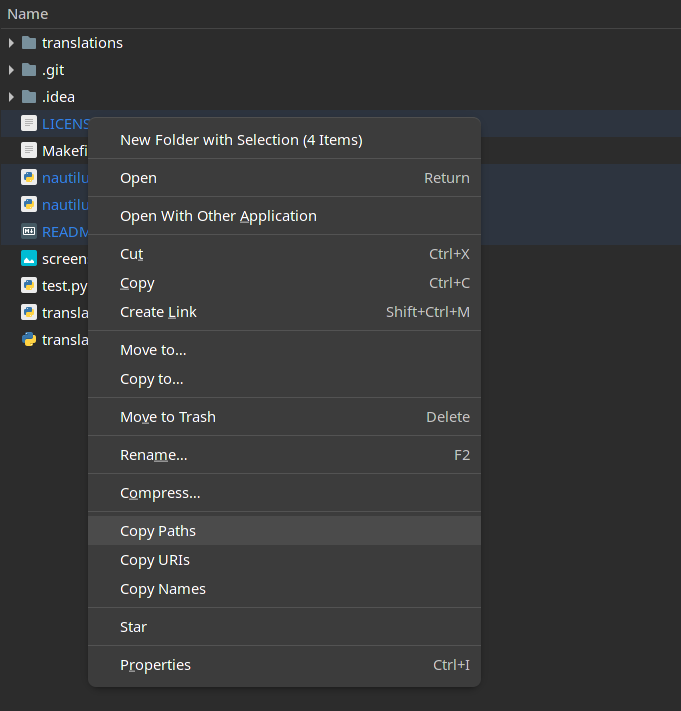
Installation
AUR
yay -S nautilus-copy-pathoryaourt -S nautilus-copy-path- Restart the Nautilus (
nautilus -q)
Fedora Copr 
- Add this repo
sudo dnf copr enable xariann/tools - Install the package
sudo dnf install nautilus-copy-path - Restart the Nautilus (
nautilus -q)
Net Install
curl -L https://raw.githubusercontent.com/chr314/nautilus-copy-path/master/net-installer.sh | bash
Manual installation
Install Dependencies
Fedora sudo dnf install nautilus-python python3-gobject
Ubuntu sudo apt install python3-nautilus python3-gi
Arch sudo pacman -S python-nautilus python-gobject
Download & Install the Extension
-
git clone https://github.com/chr314/nautilus-copy-path.git -
cd nautilus-copy-path -
make install -
Restart the Nautilus (
nautilus -q) if not seeing the options.
Uninstallation
-
cd path/to/nautilus-copy-path -
make uninstall -
Restart the Nautilus (
nautilus -q) if still seeing the options after uninstall.
Keyboard Shortcuts
Default Keyboard Shortcuts
| Action | Shortcut |
|---|---|
| Copy Paths | Ctrl + Shift + C |
| Copy URIs | Ctrl + Shift + U |
| Copy Names | Ctrl + Shift + D |
| Copy Files Content | Ctrl + Shift + G |
Configuration
configuration file: config.json
example:
{
  "items": {
    "path": true,
    "uri": true,
    "name": true,
    "content": true
  },
  "selections": {
    "clipboard": true,
    "primary": true
  },
  "shortcuts": {
    "path": "<Ctrl><Shift>C",
    "uri": "<Ctrl><Shift>U",
    "name": "<Ctrl><Shift>D",
    "content": "<Ctrl><Shift>G"
  },
  "language": "auto",
  "separator": ", ",
  "escape_value_items": false,
  "escape_value": false,
  "name_ignore_extension": false
}
Currently supported languages
- Arabic
- Chinese
- Danish
- English
- Finnish
- French
- German
- Greek
- Italian
- Japanese
- Korean
- Norwegian
- Polish
- Portuguese
- Romanian
- Russian
- Spanish
- Swedish
- Turkish
- Ukrainian
- Vietnamese
Add new translations
Translations files are in translations directory
example: English Translation
-
Copy the english translation file (
en.json), the new file name must be the new language code (e.g.es.json) -
Translate the values in the new file
-
Add information in the README in the section Currently supported languages about new language
-
Create Pull Request with the new translation
Files
files-community·C#
一款面向 Windows 的现代文件管理器,用多标签页、双栏浏览和 Fluent 设计改进资源管理器的使用体验,方便整理文件和文件夹。
文件管理器+4文件管理
46581+673.0kv4.32026-11-10 22:39 UTC

yazi
sxyazi·Rust
用 Rust 写的终端文件管理器,基于异步 I/O 实现极快的目录浏览和文件操作,适合习惯命令行的开发者日常管理文件。
终端文件管理器+4文件管理
43341+701.1kv26.9.12026-11-10 07:28 UTC

spacedrive
spacedriveapp·Rust
用 Rust 写的跨平台开源文件管理器,底层是虚拟分布式文件系统,能把多台设备上的文件统一管理,像访问本地一样浏览和整理。
文件管理器+4文件管理
39482+331.4k0.4.32026-11-06 11:49 UTC
filebrowser
filebrowser·Go
File Browser provides a file managing interface within a specified directory and it can be used to upload, delete, preview and edit your files.
文件管理
358704.2k2026-07-31 10:06 UTC