需 Python 3.10 及以上版本;示例数据集需另行用 wget 下载,或自备图片文件夹;只检测原始图像本身的问题,标签问题需改用 cleanlab 包
cleanvision
cleanlabApache-2.0更新放缓自动扫描图像数据集,找出重复、模糊、曝光异常等质量问题,帮你在训练前把数据清洗干净。
Automatically find issues in image datasets and practice data-centric computer vision.
v0.3.7发布于 2026-01-05 23:54 UTC1,212star87fork同步于 2026-11-07 07:31 UTC
pip install cleanvision 硬件要求按 README 说明
README 未说明显存或 GPU 要求,仅说明支持 Linux、macOS、Windows,需 Python 3.10+
用几行 Python 代码自动审计图像数据集,在训练模型前找出模糊、重复、过曝等脏数据
自动扫描图像数据集,找出重复、模糊、曝光异常等质量问题,帮你在训练前把数据清洗干净。
核心能力
- 用 find_issues 自动检测预定义的一整套图像问题
- 支持按 issue_types 只检查指定问题类型
- 可检测完全重复与视觉近似重复的图片
- 识别模糊、过暗过亮、低信息量、灰度图
- 检测异常长宽比与相对数据集异常尺寸
容易踩的坑
内容由模型根据 README 生成,可能不完整或不准确,以官方文档为准。看原文 README
- v0.3.7v0.3.7 -- more permissive license, better output-control最新正式版2026-01-05 · 2026-01-05 23:54 UTC
This version of CleanVision updates the License to be more permissive (Apache 2.0), and also offers better control of printed outputs/verbosity.
What's Changed
- Bumped version to 0.3.7 by @sanjanag in https://github.com/cleanlab/cleanvision/pull/253
- Reduce output/ enhance verbosity handling by @saskra in https://github.com/cleanlab/cleanvision/pull/258
- simplify readme by @jwmueller in https://github.com/cleanlab/cleanvision/pull/261
- update license by @jwmueller in https://github.com/cleanlab/cleanvision/pull/262
- documentation improvements by @jwmueller in https://github.com/cleanlab/cleanvision/pull/254; https://github.com/cleanlab/cleanvision/pull/265; https://github.com/cleanlab/cleanvision/pull/266; https://github.com/cleanlab/cleanvision/pull/268
- fix type-checker issues by @jwmueller in https://github.com/cleanlab/cleanvision/pull/267
New Contributors
- @saskra made their first contribution in https://github.com/cleanlab/cleanvision/pull/258
Full Changelog: https://github.com/cleanlab/cleanvision/compare/v0.3.6...v0.3.7
- v0.3.6v0.3.6 Improved issue type odd_size, minor bug fix and version updates2024-02-13 · 2024-02-13 19:00 UTC
查看更新说明
- Odd size issue
We use the IQR method now instead of a hard threshold to detect odd sized images compared to the rest of the dataset. According to this, an image is marked as odd sized if
size > q1 + 3 * IQRorsize < q3 - 3 * IQR, where q1 and q3 are the 25th and 75th percentiles respectively. - Statistics
imagelab.info['statistics']is now updated to provide key statistics like mean, std, min, max, 25%, 50%, and 75% for all the image properties being computed while looking for issues. - Bug fix Image was being resized to zero width/height for blurry issue check, in cases where aspect ratio was unusual.
- CI pipeline Version updates for black, flake8 docs requirements and datasets library. Added cron schedule for running tests.
Related PRs
- Bumped up version to 0.3.5 by @sanjanag in https://github.com/cleanlab/cleanvision/pull/244
- HF datasets version fix by @sanjanag in https://github.com/cleanlab/cleanvision/pull/249
- Run CI pipeline on a cron schedule by @sanjanag in https://github.com/cleanlab/cleanvision/pull/248
- Added a min size of 1 to avoid zero width/length in resize by @sanjanag in https://github.com/cleanlab/cleanvision/pull/250
- Odd size revamp by @sanjanag in https://github.com/cleanlab/cleanvision/pull/247
- Links update by @sanjanag in https://github.com/cleanlab/cleanvision/pull/251
Full Changelog: https://github.com/cleanlab/cleanvision/compare/v0.3.5...v0.3.6
- Odd size issue
We use the IQR method now instead of a hard threshold to detect odd sized images compared to the rest of the dataset. According to this, an image is marked as odd sized if
- v0.3.5v0.3.5 Improved documentation, enhanced testing, and codebase refinements2023-11-30 · 2023-11-30 15:38 UTC
查看更新说明
- Improved README, added FAQ page and updated Development guide with instructions for building docs.
- Added tests for truncating titles in visualization, updated dev requirements, and fixed type checking issue.
- Added code for raising exception on receiving duplicate files in
filepathsargument. - Added a PR template
Detailed changes
- Update version by @sanjanag in https://github.com/cleanlab/cleanvision/pull/220
- Update README text by @jwmueller in https://github.com/cleanlab/cleanvision/pull/221
- Added missing requirements for dev by @sanjanag in https://github.com/cleanlab/cleanvision/pull/225
- Added tests for truncate_titles() by @aenlemmea in https://github.com/cleanlab/cleanvision/pull/232
- Removed type ignore according to type check by @sanjanag in https://github.com/cleanlab/cleanvision/pull/234
- modify python source code example by @developer0hye in https://github.com/cleanlab/cleanvision/pull/233
- Added faq page by @sanjanag in https://github.com/cleanlab/cleanvision/pull/235
- Added instructions for building docs locally by @sanjanag in https://github.com/cleanlab/cleanvision/pull/238
- improve formatting of the quickstart tutorial by @jwmueller in https://github.com/cleanlab/cleanvision/pull/240
- Simple Clean up, .gitignore improved, PR template added by @smttsp in https://github.com/cleanlab/cleanvision/pull/227
- Raise an exception on receiving duplicate filepaths by @sanjanag in https://github.com/cleanlab/cleanvision/pull/242
New Contributors
- @aenlemmea made their first contribution in https://github.com/cleanlab/cleanvision/pull/232
- @developer0hye made their first contribution in https://github.com/cleanlab/cleanvision/pull/233
- @smttsp made their first contribution in https://github.com/cleanlab/cleanvision/pull/227
Full Changelog: https://github.com/cleanlab/cleanvision/compare/v0.3.4...v0.3.5
- v0.3.4v0.3.4 Improved time taken to find issues in large datasets.2023-09-01 · 2023-09-01 11:12 UTC
查看更新说明
Improved time taken to find issues in large datasets.
What's Changed
- Version bump to 0.3.4 by @sanjanag in https://github.com/cleanlab/cleanvision/pull/218
- Fixed a time consuming line in odd size image property by @sanjanag in https://github.com/cleanlab/cleanvision/pull/217
- Update docs sidebar by @jwmueller in https://github.com/cleanlab/cleanvision/pull/219
Full Changelog: https://github.com/cleanlab/cleanvision/compare/v0.3.3...v0.3.4
- v0.3.3v.0.3.3 Added support for cloud datasets2023-08-09 · 2023-08-09 06:00 UTC
查看更新说明
Added support for running cleanvision on datasets residing in cloud, AWS, Google storage and Azure storage.
What's Changed
- Bumped up patch version by @sanjanag in https://github.com/cleanlab/cleanvision/pull/212
- Commented bump version job by @sanjanag in https://github.com/cleanlab/cleanvision/pull/213
- Adding support for fsspec datasets by @LemurPwned in https://github.com/cleanlab/cleanvision/pull/176
- docs: put tutorials above API reference in sidebar by @jwmueller in https://github.com/cleanlab/cleanvision/pull/216
New Contributors
- @LemurPwned made their first contribution in https://github.com/cleanlab/cleanvision/pull/176
Full Changelog: https://github.com/cleanlab/cleanvision/compare/v0.3.2...v0.3.3
用户点评
登录用户的真实使用记录,可按版本和硬件筛选共 0 条
还没有人点评。第一个说出真实体验的人最有价值。
CleanVision automatically detects potential issues in image datasets like images that are: blurry, under/over-exposed, (near) duplicates, etc. This data-centric AI package is a quick first step for any computer vision project to find problems in the dataset, which you want to address before applying machine learning. CleanVision is super simple -- run the same couple lines of Python code to audit any image dataset!




Installation
pip install cleanvision
Quickstart
Download an example dataset (optional). Or just use any collection of image files you have.
wget -nc 'https://cleanlab-public.s3.amazonaws.com/CleanVision/image_files.zip'
- Run CleanVision to audit the images.
from cleanvision import Imagelab

# Specify path to folder containing the image files in your dataset
imagelab = Imagelab(data_path="FOLDER_WITH_IMAGES/")

# Automatically check for a predefined list of issues within your dataset
imagelab.find_issues()

# Produce a neat report of the issues found in your dataset
imagelab.report()
- CleanVision diagnoses many types of issues, but you can also check for only specific issues.
issue_types = {"dark": {}, "blurry": {}}

imagelab.find_issues(issue_types=issue_types)

# Produce a report with only the specified issue_types
imagelab.report(issue_types=issue_types)
More resources
- Tutorial
- Documentation
- Blog
- Run CleanVision on a HuggingFace dataset
- Run CleanVision on a Torchvision dataset
- Example script that can be run with:
python examples/run.py --path <FOLDER_WITH_IMAGES> - Additional example notebooks
- FAQ
Clean your data for better Computer Vision
The quality of machine learning models hinges on the quality of the data used to train them, but it is hard to manually identify all of the low-quality data in a big dataset. CleanVision helps you automatically identify common types of data issues lurking in image datasets.
This package currently detects issues in the raw images themselves, making it a useful tool for any computer vision task such as: classification, segmentation, object detection, pose estimation, keypoint detection, generative modeling, etc. To detect issues in the labels of your image data, you can instead use the cleanlab package.
In any collection of image files (most formats supported), CleanVision can detect the following types of issues:
| Issue Type | Description | Issue Key | Example | |
|---|---|---|---|---|
| 1 | Exact Duplicates | Images that are identical to each other | exact_duplicates | 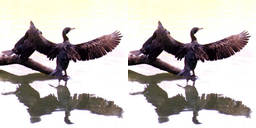 |
| 2 | Near Duplicates | Images that are visually almost identical | near_duplicates | 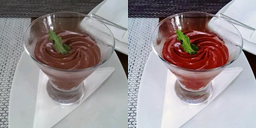 |
| 3 | Blurry | Images where details are fuzzy (out of focus) | blurry | 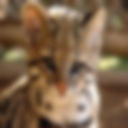 |
| 4 | Low Information | Images lacking content (little entropy in pixel values) | low_information |  |
| 5 | Dark | Irregularly dark images (underexposed) | dark | 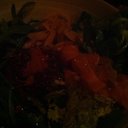 |
| 6 | Light | Irregularly bright images (overexposed) | light | 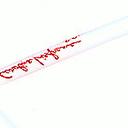 |
| 7 | Grayscale | Images lacking color | grayscale |  |
| 8 | Odd Aspect Ratio | Images with an unusual aspect ratio (overly skinny/wide) | odd_aspect_ratio |  |
| 9 | Odd Size | Images that are abnormally large or small compared to the rest of the dataset | odd_size |
CleanVision supports Linux, macOS, and Windows and runs on Python 3.10+. Learn more from our blog.
Have a question?
Search the resources listed above and existing GitHub Issues, or submit a new Issue.

Made-With-ML
GokuMohandas·Jupyter Notebook
一套从数据工程、模型训练到部署迭代的完整教程,帮你把机器学习项目做成可上线的生产级应用。
MLOps+4数据质量
49981+297.8kv1.1.02026-03-04 23:44 UTC
react-jsonschema-form
rjsf-team·TypeScript
用 JSON Schema 自动生成 React 表单,省去手写表单和校验逻辑,适合配置化、动态表单场景。
JSON Schema+4数据质量
15938+32.4kv6.11.12026-11-10 09:46 UTC
OpenMetadata
open-metadata·TypeScript
OpenMetadata 是开源的数据目录与元数据平台,统一管理数据发现、血缘、质量、契约和治理,为人和 AI 助手提供可信的数据上下文与业务语义。
数据目录+4数据质量
15731+202.5k2.0.7-release2026-11-10 10:57 UTC
great_expectations
fivetran·Python
用声明式规则给数据加单元测试,校验数据质量、做数据剖析,让脏数据在进入下游前就被发现。
数据质量+4数据质量
11923+41.9k1.24.12026-11-10 11:20 UTC