AI 功能需自行配置 AI 提供商和模型才能使用;云同步需额外配置 GitHub、S3、WebDAV 等服务,默认仅本地存储;Android 为 Alpha 且仅支持 ARM64,iOS 需通过 TestFlight 安装
note-gen
codexuGPL-3.0活跃维护本地优先的 Markdown 笔记应用,先随手记录再靠 AI 整理,把零散片段自动归拢成结构清晰的笔记。
Capture first. Organize later. A local-first Markdown app that turns scattered records into clear notes with AI.
note-gen-v0.39.2发布于 2026-11-01 09:20 UTC12,996star +7 / 7 天986fork同步于 2026-11-10 05:28 UTC
从 https://notegen.top/en/download 下载对应平台安装包;或从 https://github.com/codexu/note-gen/releases/latest 获取 GitHub Release 硬件要求按 README 说明
README 未说明硬件要求,仅提供 Windows、macOS、Linux、Android(ARM64)和 iOS 的下载版本
支持 Apple Silicon
本地优先的 Markdown 笔记应用,先随手记录碎片信息,再用 AI 整理成结构化笔记
本地优先的 Markdown 笔记应用,先随手记录再靠 AI 整理,把零散片段自动归拢成结构清晰的笔记。
核心能力
- 先记录后整理,支持文字、语音、截图、链接、文件、待办
- 把选中的记录按模板或描述整理成 Markdown 笔记
- 笔记以普通 Markdown 文件保存在自选工作区
- 结合语义检索与本地文本搜索构建知识库
- 支持 MCP 服务器、Skills 和 Agent 模式处理长任务
容易踩的坑
内容由模型根据 README 生成,可能不完整或不准确,以官方文档为准。看原文 README
- note-gen-v0.39.2NoteGen v0.39.2最新正式版2026-11-01 · 2026-11-01 09:20 UTC
- 自托管同步:新增合并、保留本地和使用远端三种切换方式,支持差异预览、切换前备份与失败恢复;完善工作区发现、名称同步和移动端冲突处理,协同编辑显示成员名称;凭据改用系统安全存储,修复同步重试、授权恢复及旧内容闪现等问题。
- 统一内置聊天模型入口,简化模型选择,自动迁移旧版内置模型设置。
- 语言插件:内置简体中文和英文,繁体中文、日语、葡萄牙语和德语改由语言插件提供,可在桌面端语言设置中发现并安装。
- 修复编辑器接收外部内容更新时,光标和滚动位置跳动的问题。
- 修复行内代码与其他文字格式叠加时,可视化解析失败的问题。
- 修复移动端从设置返回后,“我的”面板恢复异常的问题。
- note-gen-v0.39.1NoteGen v0.39.12026-10-28 · 2026-10-28 03:36 UTC
这个版本没有写更新说明。
- note-gen-v0.39.0NoteGen v0.39.02026-10-25 · 2026-10-25 03:55 UTC
查看更新说明
本次更新新增截图标注、标题折叠和彩色文字,优化长文档编辑和同步体验。
新功能
- 桌面截图与贴图:支持快捷键截图,使用箭头、画笔、文字、马赛克等工具标注,可复制、保存到记录或固定到桌面。
- 标题折叠:支持折叠章节内容,也可通过快捷键全部折叠或展开。
- 彩色文字与高亮:选中文字后,可设置字体颜色和多种高亮颜色。
- 左侧栏大纲:可在设置中选择将大纲显示在编辑器内或左侧栏。
- 正文与标题转换:选中文字后,可在工具栏中切换正文或一级至六级标题。
- 记录时新建标签:创建记录时可直接新增标签,快捷记录窗口也会同步更新。
体验改进
- 长文档打开和编辑更流畅。
- 切换同步平台前可查看文件差异、处理冲突,切换过程中可查看进度、取消或重试,中断后可继续恢复。
- 优化工作区与同步仓库的绑定操作和状态提示。
- 优化底部工具栏,方便查看当前文档的同步状态并进行上传、下载。
- 优化表格工具栏,增删行列更方便,宽表格可通过悬浮滚动条横向浏览。
- 完善文件删除时的进度提示。
- 赞助模型额度支持显示剩余百分比。
问题修复
- 修复文件重命名、移动后远端未正确同步,以及断网后恢复同步异常的问题。
- 修复同步冲突误报、重复上传、启动时误报同步不可用,以及失败提示无法自动关闭的问题。
- 修复 Gitee 空文件同步异常,以及部分 WebDAV 地址连接失败的问题。
- 修复大纲高亮与正文位置不一致、章节跳转不准确,以及重启时大纲闪烁的问题。
- 修复表格单元格换行保存后丢失,以及宽表格超出编辑区域的问题。
- 修复撤销、重做快捷键失效,以及内容块拖拽和操作按钮位置异常。
- 修复 AI 编辑预览格式丢失、公式不显示,以及 Mermaid 源码复制异常。
- 修复窄窗口下记录区域不可见、打开文件夹目录异常,以及启动后无法正确恢复页面的问题。
- 修复异常对话图片可能访问无关本地文件的问题。
- note-gen-v0.38.3NoteGen v0.38.32026-10-18 · 2026-10-18 02:50 UTC
查看更新说明
新功能
- 桌面端支持按需安装 12 种代码块预览插件:PlantUML、Graphviz、Vega、WaveDrom、Markmap、D2、ECharts、DBML、BPMN、Excalidraw、ABC 乐谱和 Nomnoml。
- 图表默认显示预览,可切换源码编辑,支持单张导出 PNG、SVG、JPEG。
- 未找到代码块渲染插件时,可直接搜索对应插件。
- AI 对话支持引用笔记文件夹。
- 文件目录右键菜单支持批量展开和折叠。
问题修复
- 修复切换笔记、分节后,异步回调访问旧编辑器导致的异常。
- 修复 AI 生成列表后,回车确认及继续换行异常。
- 修复 / 菜单方向键失效、跨列选择错位。
- 修复图片上传占位残留及插入位置偏移。
- 修复搜索打开笔记后未定位目录的问题。
- 修复删除同步文件后远程列表未更新,以及 GitLab、极狐连接相关问题。
- 修复 Windows 窗口激活后输入焦点未恢复、升级后残留旧安装登记的问题。
- 修复移动端原生复制粘贴菜单被拦截的问题。
- note-gen-v0.38.2NoteGen v0.38.22026-10-09 · 2026-10-09 15:25 UTC
查看更新说明
- 修复 macOS 无法获取麦克风录音权限的问题
- 修复 macOS 截图记录未请求屏幕录制权限的问题
- 修复 Android 顶部工具栏和底部导航被系统栏遮挡的问题
用户点评
登录用户的真实使用记录,可按版本和硬件筛选共 0 条
还没有人点评。第一个说出真实体验的人最有价值。
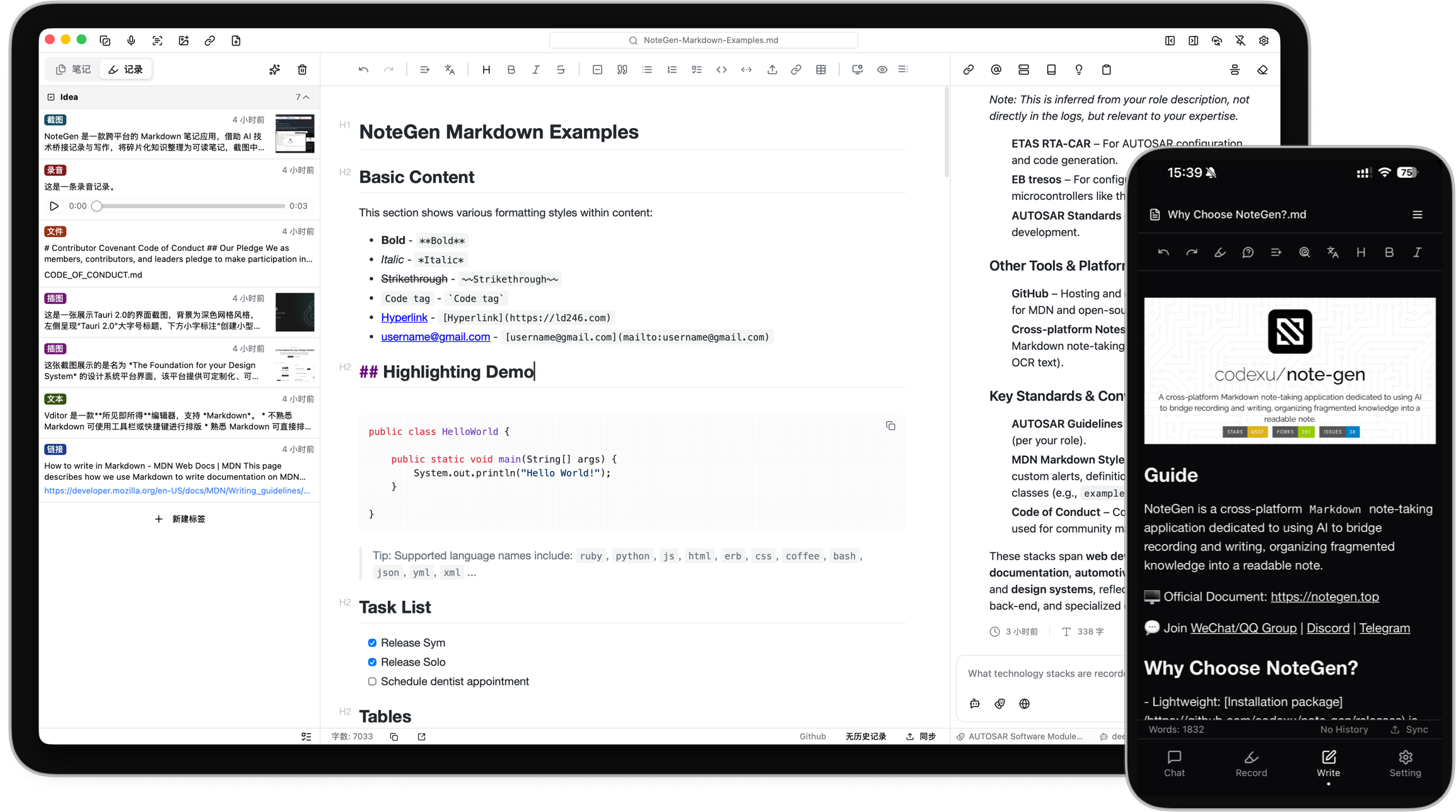
NoteGen
Capture first. Organize later.
A local-first Markdown app that helps you collect scattered information and organize it into clear notes with AI.
❤️ Sponsor
| Name | Description |
|---|---|
| SiliconFlow | Provides model service support for the project. |
| AIHubMix | Sponsors model services for the project. |
| PackyCode | Unified API access to leading AI models, with dedicated Codex and Claude Code routes. |
| Infistar.cc | OpenAI-compatible model services supporting NoteGen, with multimodal and knowledge base capabilities. |
| 讯度云 | High-bandwidth cloud servers in Hong Kong. |
Capture without interrupting your thoughts
An idea may begin as a sentence, a voice recording, a screenshot, or a link you do not have time to read yet. You should not have to choose a title, folder, and structure before saving it.
NoteGen separates capturing from organizing.
Save information as it appears. Later, select the records that belong together and organize them into a structured Markdown note. You can then review the result, add your own thinking, and continue writing.
The goal is not to let AI write everything for you. It is to make sure useful fragments do not disappear before you have time to turn them into something complete.
How it works
-
Capture what happened
Save a thought, voice recording, screenshot, image, link, file, or todo while it is still fresh.
-
Choose the material
Filter records by tag, time, or type, then select the items that belong together.
-
Organize the records
Choose a template or describe what you want to write. NoteGen can organize the selected material into a summary, report, article, or another Markdown structure.
-
Keep writing
Review the draft in the editor, change the structure, add details, and continue writing in your own words.
What this looks like in practice
- Record parts of a meeting, add two screenshots, and organize them into meeting notes afterward.
- Save links and reading fragments during the week, then organize them into a research note.
- Filter recent records by tag and prepare a weekly report without searching through several apps.
- Collect images and documents for a topic, then ask questions using those materials as context.
Built around Markdown files
Your written notes remain ordinary Markdown files in the workspace you choose.
You can edit them with NoteGen, open them with another Markdown editor, keep them in Git, or move them without exporting from a proprietary format. NoteGen adds recording, AI, search, and organization around those files instead of replacing them.
The editor supports:
- Tables, task lists, code blocks, math, diagrams, and document outlines
- Markdown source mode and visual editing
- Search and replace
- Images, attachments, links, and file references
- Export and printing tools
- File history and workspace management
AI when it is useful
NoteGen connects to the AI providers and models you configure. You can use different models for chat, writing, embeddings, image recognition, OCR, and audio.
AI can help you:
- Organize selected records into a structured note
- Continue, shorten, expand, rewrite, or translate existing text
- Ask questions about notes, records, images, and knowledge base content
- Search local material before answering
- Generate diagrams and charts from your notes
- Work through longer tasks with Agent mode
AI is part of the workflow, but the result remains editable. You decide what to keep.
Search and reuse your own material
A note should remain useful after you finish writing it.
NoteGen can build a searchable knowledge base from your files and combine semantic retrieval with local text search. You can use a note, a group of records, or the knowledge base as context in a conversation instead of copying everything into a new prompt.
For advanced workflows, NoteGen also supports:
- Vector indexing and hybrid retrieval
- Configurable embedding and reranking models
- Long-term memories and reusable prompts
- MCP servers
- Installable Skills
- Agent tools for working with notes and files
More than a document editor
NoteGen includes a canvas workspace for material that is easier to understand visually.
You can create and edit:
- Flowcharts
- Mind maps
- Timelines
- Freehand drawings
- Data charts
- Diagrams generated from note content
Canvas elements remain editable after they are created, including content suggested by AI.
Sync on your terms
Notes are stored locally first. When you need them on another device, you can sync through services you already use.
Supported options include:
- GitHub
- GitLab
- Gitee
- Gitea
- S3-compatible storage
- WebDAV
You can also keep local backups without enabling cloud sync.
Download
| Platform | Status | Download |
|---|---|---|
| Windows | Beta | Download for Windows |
| macOS | Beta | Download for Apple Silicon or Intel |
| Linux | Beta | AppImage, DEB, or RPM |
| Android | Alpha · ARM64 | Download APK |
| iOS | Alpha | Join TestFlight |
GitHub Releases are also available as a fallback mirror:
View the latest GitHub Release
Get started
- Download NoteGen for your platform.
- Choose a workspace for your Markdown files.
- Add your first record or create a note directly.
- Configure an AI provider when you want to use AI features.
- Read the documentation for sync, knowledge base, MCP, Skills, and advanced settings.
You do not need to configure every feature before writing your first note.
Related repositories
| Repository | Purpose |
|---|---|
| note-gen-docs | Official website, bilingual documentation, and download pages. |
| note-gen-server | Sync service and account management, with support for self-hosting. |
| note-gen-clipper | Browser extension for saving selected text, images, and page links to NoteGen. |
| note-gen-plugin-sdk | TypeScript API, project scaffolding, CLI, and test tools for developing NoteGen plugins. |
| note-gen-plugins | Official plugin source code and plugin marketplace publishing tools. |
Contributing
NoteGen is open source and contributions are welcome.
Before opening a pull request, read the contribution guide.
You can also:
Contributors
Thanks to everyone who has reported a problem, proposed an idea, improved a translation, written documentation, or contributed code.
Recognition
Acknowledgements
NoteGen is tested with BrowserStack.
We also appreciate the service support provided by:
License
NoteGen is released under the GNU General Public License v3.0.

prompts.chat
f·MDX
社区共建的提示词分享与发现平台,可自托管部署,让团队在完全私密的环境里收集和管理 ChatGPT、Claude、Gemini 等模型的提示词。
提示词库+4知识库
176772+66723k2026-11-10 03:12 UTC
generative-ai-for-beginners
microsoft·Jupyter Notebook
微软出品的 21 节生成式 AI 入门课程,用 Jupyter Notebook 带你从零理解大模型、提示工程和 ChatGPT 应用开发。
生成式AI+3知识库
123262+17866k2026-11-05 03:43 UTC
Understand-Anything
Egonex-AI·TypeScript
把任意代码库转成可交互的知识图谱,支持浏览、搜索和提问,兼容 Claude Code、Cursor、Copilot 等主流 AI 编程工具。
知识图谱+4知识库
91783+6367.8kv2.9.02026-11-09 17:56 UTC

llm-course
mlabonne
一套系统的大语言模型入门课程,用学习路线图和可直接运行的 Colab 笔记本,带你从零掌握 LLM 的原理与实战。
大语言模型+4知识库
85016+779.9k2026-02-05 13:09 UTC