Posting 3 仍处于 beta,Homebrew 需用带 @beta 的 formula;用 go install 方式需 Go 1.25.5 或更新版本;从 Posting 2 升级虽兼容原有集合与配置,但行为有变化需看迁移文档
posting
darrenburnsApache-2.0活跃维护在终端里调试和调用 REST API 的现代化客户端,支持 SSH 远程使用,适合喜欢命令行工作流的开发者替代 Postman。
The modern API client that lives in your terminal.
2.11.2发布于 2026-10-05 20:51 UTC12,617star +8 / 7 天296fork同步于 2026-11-10 17:28 UTC
brew install darrenburns/homebrew/posting@beta
posting 硬件要求按 README 说明
README 未说明;作为终端 TUI 应用可通过 SSH 使用,安装包覆盖 macOS、Linux 和 Windows
终端里的现代 HTTP 客户端,用键盘高效发请求,请求存成 YAML 便于版本控制
在终端里调试和调用 REST API 的现代化客户端,支持 SSH 远程使用,适合喜欢命令行工作流的开发者替代 Postman。
核心能力
- 请求以简单 YAML 文件本地存储,便于阅读和版本控制
- 支持请求标签页、jump mode 跳转与命令面板
- 分层环境与变量,带变量界面和自动补全
- 支持 HTTP、GraphQL、gRPC 及流式与 SSE 事件日志
- 响应可搜索、折叠 JSON 树并用 JSONPath 过滤
容易踩的坑
内容由模型根据 README 生成,可能不完整或不准确,以官方文档为准。看原文 README
- v3.0.0-beta.1pre-release2026-10-15 · 2026-10-15 23:03 UTC
查看更新说明
See the changelog for what's in this release.
- v3.0.0-beta.0pre-release2026-10-15 · 2026-10-15 22:56 UTC
查看更新说明
See the changelog for what's in this release.
- 2.11.22.11.2 - Client certificate fixes最新正式版2026-10-05 · 2026-10-05 20:51 UTC
Fixed
- Send configured client certificates when using a custom CA bundle file or directory (#325).
- Load password-protected combined PEM client certificates without a separate key file.
Upgrade:
uv tool upgrade posting, orpipx upgrade posting - 2.11.12.11.1 - Security fix for request YAML loading2026-10-05 · 2026-10-05 14:12 UTC
查看更新说明
Security
Posting 2.11.1 fixes a code-execution vulnerability. Upgrading is recommended for everyone.
Older versions loaded request files (
.posting.yaml) with a YAML loader that constructs Python objects. A crafted request file could run arbitrary commands as soon as Posting loaded the collection containing it, for example after cloning a repository or opening a shared collection.- Request files are now loaded with YAML's safe loader, and Python object tags are rejected (reported in #348 and #383).
- Theme files are now loaded with the safe loader too.
Request files that Posting saved itself are unaffected and load as before.
Upgrade:
uv tool upgrade posting, orpipx upgrade posting - 2.11.02.11.0 - History, variables, and environments2026-09-26 · 2026-09-26 22:13 UTC
查看更新说明
Here's a selection of some of the changes in Posting v2.11.0:
Request and response history
Posting now remembers recent requests and responses in a new History tab beside Requests. Pick an exchange and press
Enterto load both panes, including the original request body, headers, options, and script references. Loading doesn't send anything or run scripts, so you can inspect an old response, tweak the request, and send it when you're ready.History stays on your machine, separately for each collection, and survives restarting Posting. It keeps up to 100 exchanges within a 50 MiB limit. You can delete individual entries, clear the list, or turn recording off with
history.enabled: false.If you're using jump mode,
ctrl+o, then3takes you to Requests,4to History, andhjumps into a visible History list.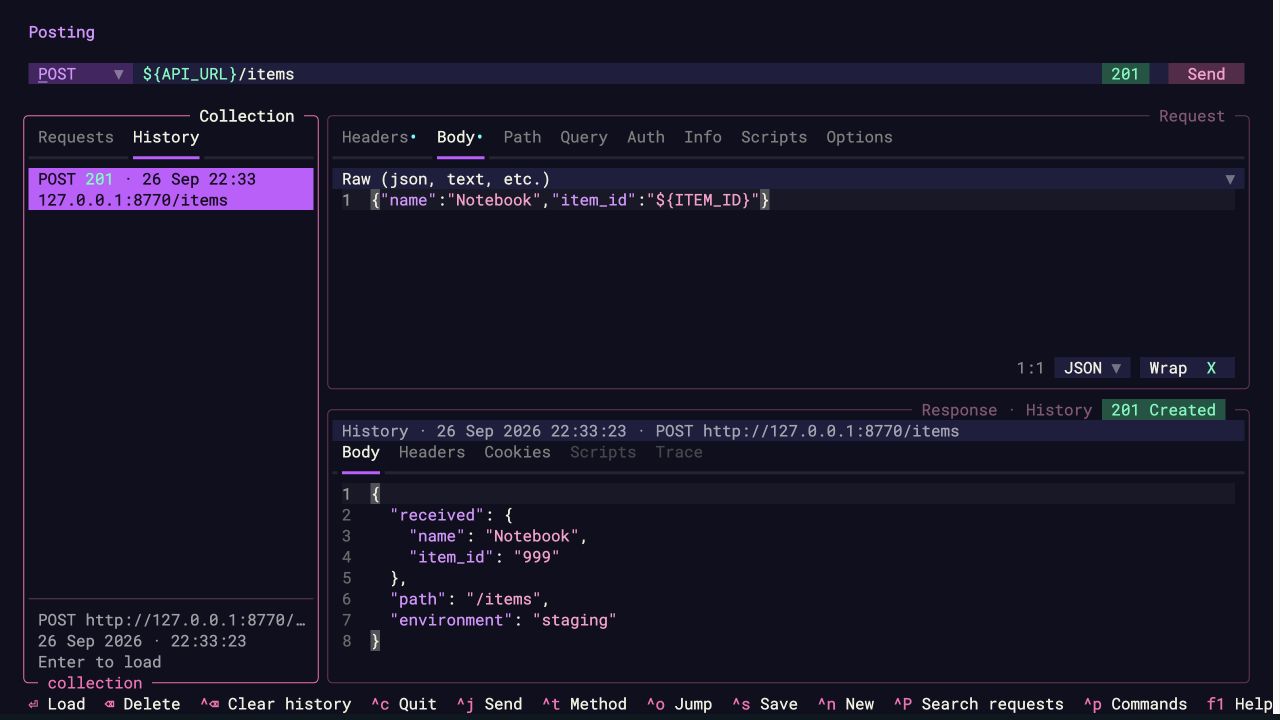
History can contain credentials and other request/response data, and isn't encrypted. It saves variable expressions and script paths; future sends use your current variables and scripts.
See and edit your variables
There's a new variables screen for those moments when you're wondering where a value came from, or why it hasn't changed. Open variables: Show variables in the command palette, or press
ctrl+shift+vwhere your terminal supports it.You can filter the list, add or edit session values, copy values or
$NAMEreferences, and undo or redo changes. Session overrides are labelled, and token/password-like names are masked by default. Your.envfiles aren't modified.Thanks to @andreisuslov for the original variables-screen contribution, which this builds on!
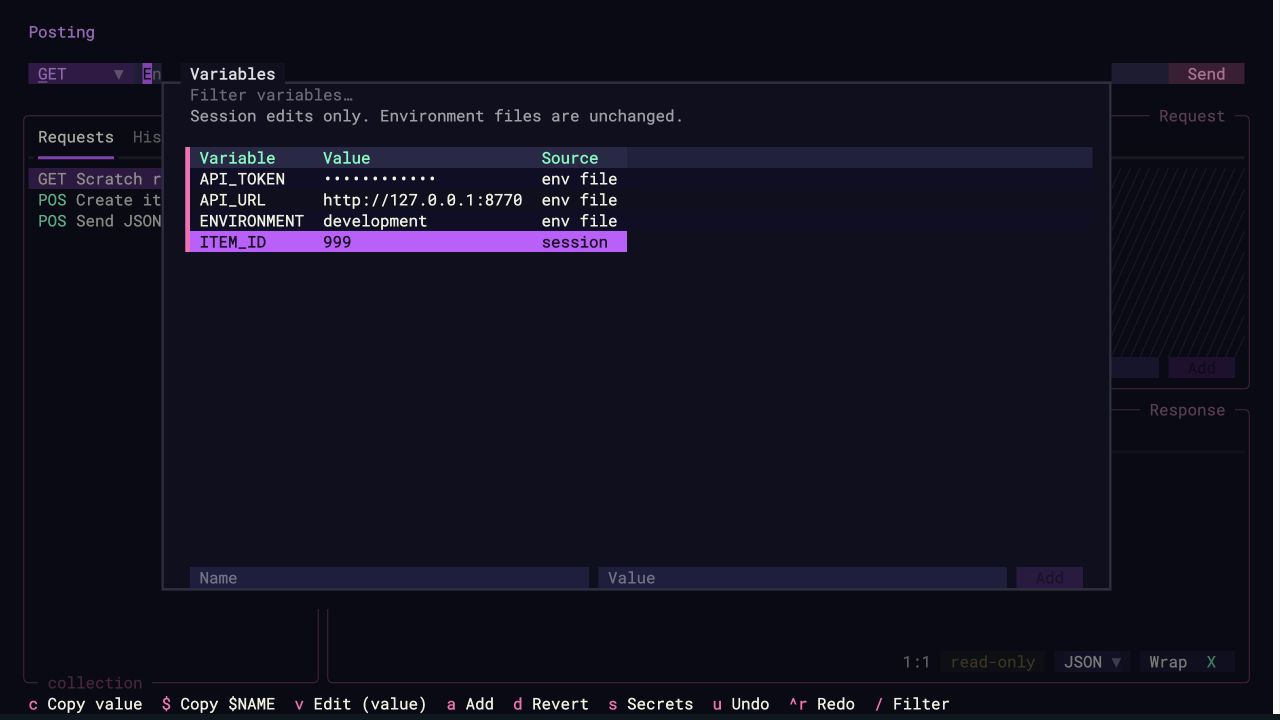
Switch environments without restarting
The command palette now has an environment: Switch environment submenu. Pick a discovered
.envfile, return to a previously loaded environment, clear the loaded files, or browse for another file. Session overrides stay in place when you switch.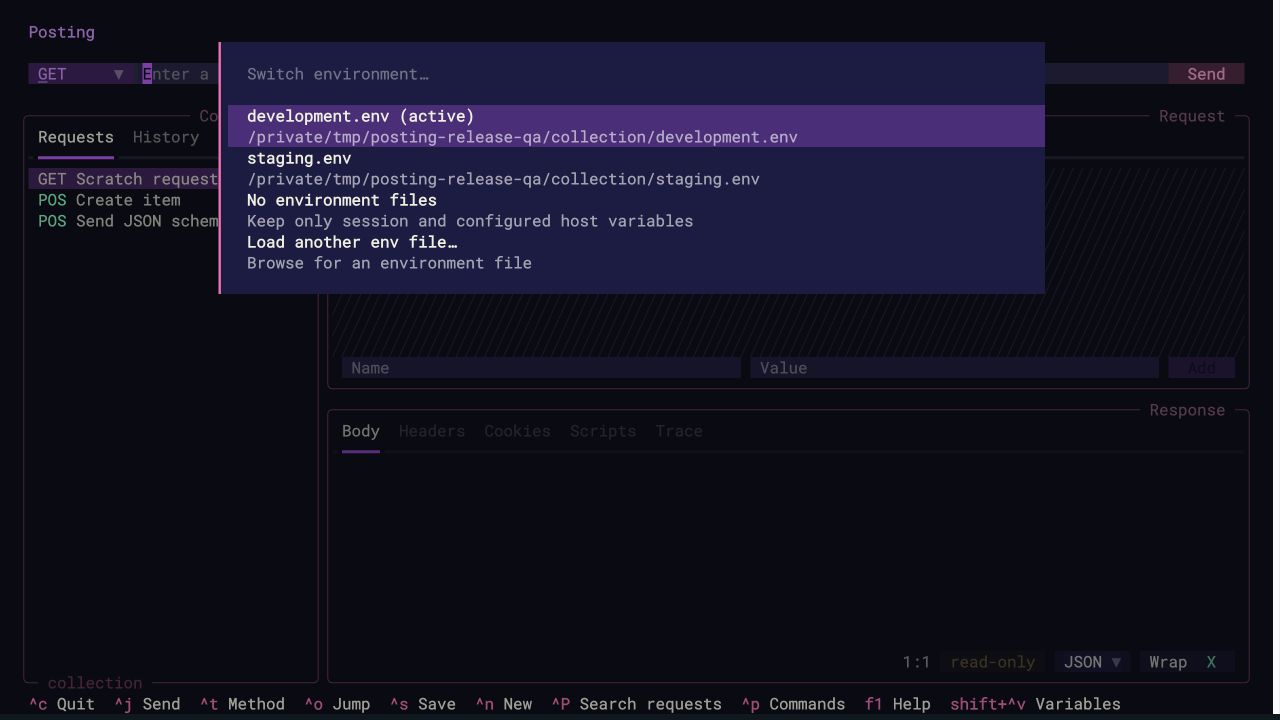
Complete variables in request text
Variable completion now works in request bodies and descriptions too. Type
$or${, use the arrow keys to choose a variable, and pressEnterorTabto insert it.Escapedismisses the suggestions.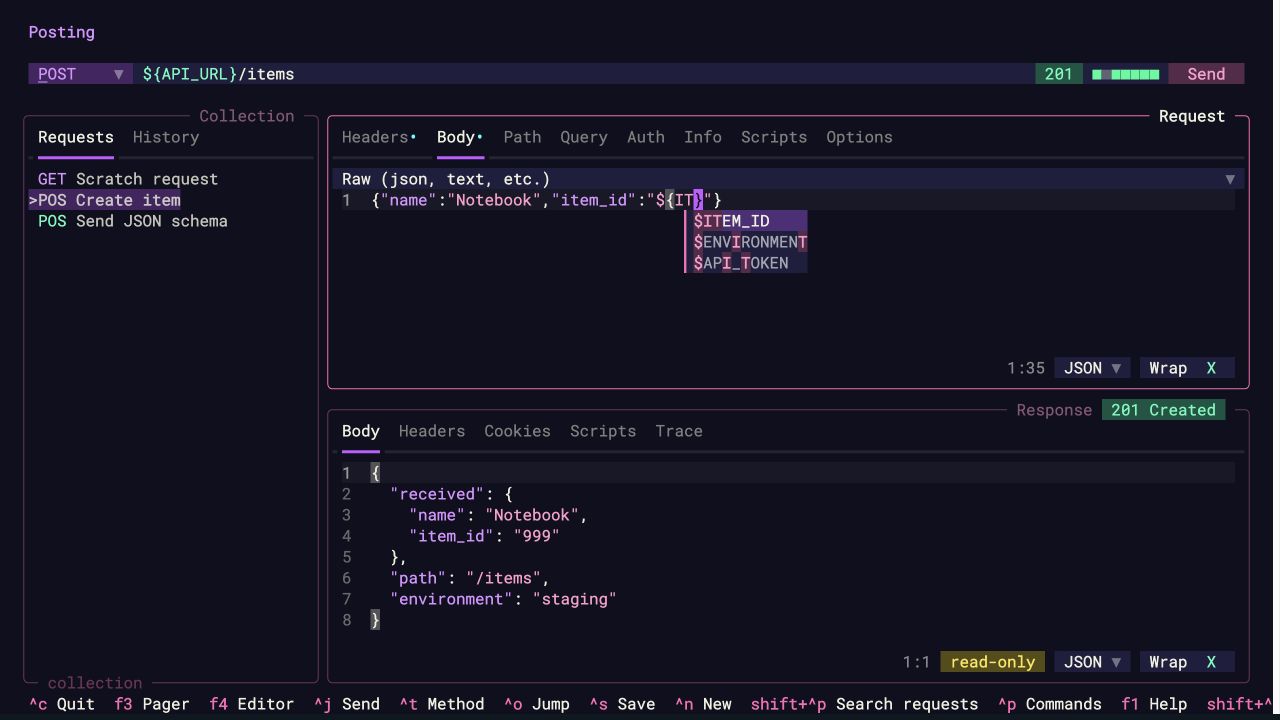
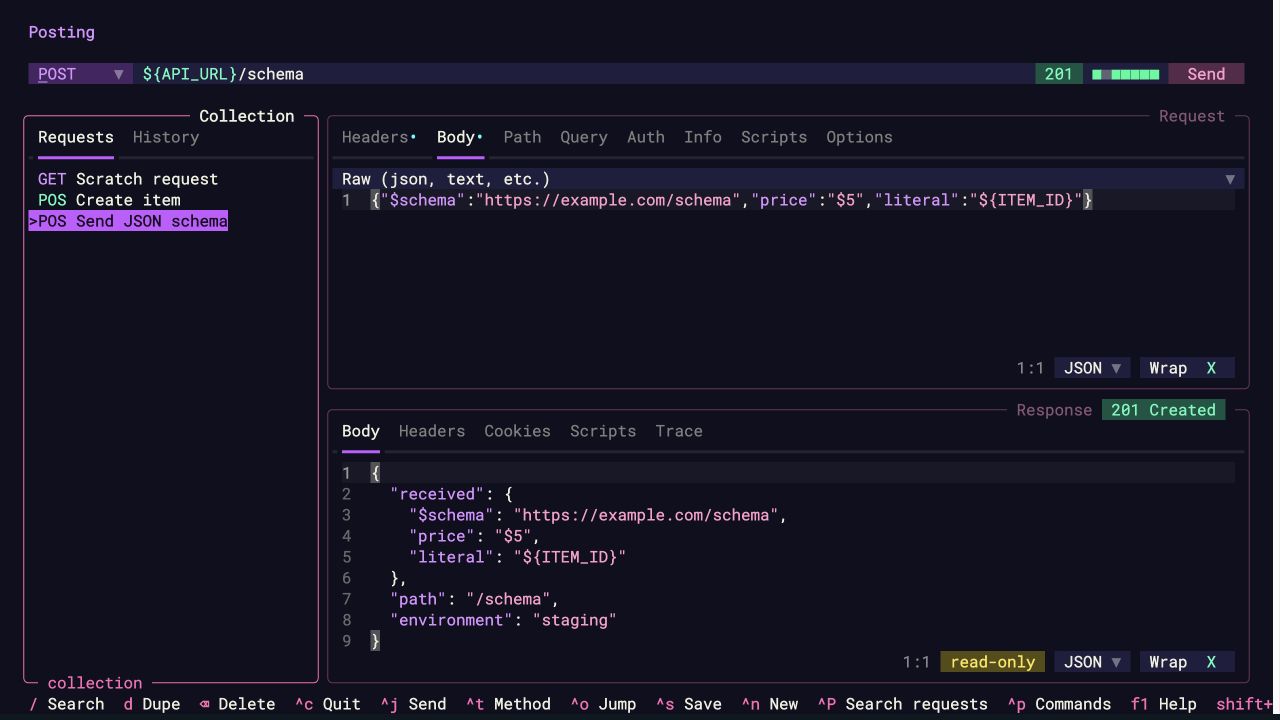
Sometimes a dollar sign is just a dollar sign
JSON schemas use
$schema. Other APIs have fields like$filter, and sometimes you just want to send$5.There's now a per-request Substitute body variables option in the Options tab. Turn it off to send raw or form bodies literally, including
${name}and$$. Variables in URLs, headers, and authentication continue to work as usual. Existing requests keep substitution enabled.Body substitution is on by default, so choosing a variable from the dropdown means it will resolve when you send. If you turn substitution off, variable suggestions in raw and form bodies are hidden too.
A few more improvements
- Requests in the search palette now have coloured HTTP method tags. Thanks @vinitpayal!
- Query parameters in the URL and Query tab stay in sync, including duplicates and disabled rows. Thanks @DSeaStar for the original c
用户点评
登录用户的真实使用记录,可按版本和硬件筛选共 0 条
还没有人点评。第一个说出真实体验的人最有价值。
Some notable features include:
- request tabs, so you can work on several requests at once
- "jump mode" navigation
- layered environments and variables, with a variables screen and autocompletion
- header autocompletion and collection search
- syntax highlighting
- response search, a collapsible JSON tree, and JSONPath filtering
- HTTP, GraphQL, and gRPC, including streaming
- server-sent events (SSE), with a live event log and JSON payload inspection
- request timing, and a persistent history of responses
- customizable keybindings and extensive configuration
- 37 built-in themes, plus user-defined themes
- open in $EDITOR/$PAGER
- import curl commands by pasting them into the URL bar, and export requests as curl commands
- import from OpenAPI, Postman and Bruno
- a command palette for quickly accessing functionality
posting remote, so coding agents like Claude Code and Codex can send requests through the Posting you have open while you watch
Jump mode
Press a shortcut, type a label, and jump straight to any part of the interface.
Mouse support
Click, scroll, select text, and drag to resize panels.
Explore your responses
Search response text, explore JSON as a collapsible tree, and filter it with JSONPath.
gRPC and GraphQL
Send GraphQL queries and work with gRPC services, including interactive streaming.
Installation
Posting 3 is in beta. It's a single binary written in Go. Install it with Homebrew:
brew install darrenburns/homebrew/posting@beta
Or download an archive for macOS, Linux or Windows from the releases page. Or, with Go 1.25.5 or newer installed, run:
go install github.com/darrenburns/posting/v3/cmd/posting@latest
Now you can run Posting via the command line:
posting
Coming from Posting 2? Posting 3 reads the same collections, configuration and .env files.
See Coming from Posting 2 for what's changed.
Contributing
Contributions are welcome! See CONTRIBUTING.md for guidelines. To build Posting 3 from a clone of this repository, run go build ./cmd/posting, and run the tests with go test ./....
Try gRPC locally with the example server and collection, including an interactive bidirectional streaming walkthrough.
Posting 3 is built with Terma. Posting 2 was built with Textual.
open-webui
open-webui·Svelte
自托管的大模型对话界面,兼容 Ollama、OpenAI API 等后端,内置 RAG 与 MCP 支持,让团队快速搭建私有 AI 聊天入口。
大模型界面+4API 开发与调试
158303+33123kv0.13.32026-11-10 14:59 UTC
hoppscotch
hoppscotch·TypeScript
轻量级开源 API 开发调试工具,支持 REST、GraphQL、WebSocket 等协议,提供 Web、桌面和 CLI 多端使用,可离线部署,是 Postman 和 Insomnia 的开源替代品。
API 调试+4API 开发与调试
80773+106.2k2026.10.12026-11-05 08:16 UTC

bruno
usebruno·JavaScript
轻量级开源 API 调试 IDE,支持 REST、GraphQL 和 OpenAPI,用 Git 管理接口集合,可替代 Postman/Insomnia。
API 调试+4API 开发与调试
48321+643.1kv4.3.02026-11-09 17:13 UTC
full-stack-fastapi-template
fastapi·TypeScript
用 FastAPI + React + PostgreSQL 搭好的全栈项目脚手架,自带 JWT 登录、Docker Compose 和 CI 配置,省去从零搭建后端接口、前端页面和部署流程的麻烦。
全栈模板+4API 开发与调试
46218+359.2k0.12.02026-11-03 13:46 UTC