示例需要 Azure OpenAI API key 与 endpoint URL,未配置时多数 LLM 连接会失败;config.yaml 必须放在 ~/.syftr/ 或当前工作目录,否则无法运行;还需自行准备 study 文件(如 studies/example-dr-docs.yaml),默认用 SQLite 存储、分布式场景需另配 Postgres。
syftr
datarobotMIT更新放缓在预算约束下自动搜索最优 Agent 工作流,用多目标优化和帕累托前沿帮你权衡成本与效果,省去手工调参。
syftr is an agent optimizer that helps you find the best agentic workflows for your budget.
v0.4.0发布于 2026-01-27 19:17 UTC346star34fork同步于 2026-11-07 07:29 UTC
curl -LsSf https://astral.sh/uv/install.sh | sh
uv venv --python 3.12.7
source .venv/bin/activate
uv sync --extra dev
uv pip install -e . 硬件要求按 README 说明
README 未说明具体显存或 GPU 型号要求;搜索通过 Ray 分发到 CPU 和 GPU 集群,本地可用 SQLite 运行,分布式负载建议用 Postgres。
用多目标贝叶斯优化在预算内搜索最优 agentic 工作流,输出精度与成本、延迟的帕累托前沿
在预算约束下自动搜索最优 Agent 工作流,用多目标优化和帕累托前沿帮你权衡成本与效果,省去手工调参。
核心能力
- 用多目标贝叶斯优化采样 agentic 与非 agentic 流程的搜索空间
- 用领域专用的 Pareto Pruner 剪枝,高效逼近帕累托前沿
- 在精度与成本、延迟、吞吐等竞争目标间给出最优权衡曲线
- 基于 LlamaIndex 组合 RAG 与 agent 流程,用 Ray 分布式扩展搜索
- 用 Trace 优化工作流内的提示词等文本组件
容易踩的坑
内容由模型根据 README 生成,可能不完整或不准确,以官方文档为准。看原文 README
- v0.4.0Latest update最新正式版2026-01-27 · 2026-01-27 19:17 UTC
这个版本没有写更新说明。
- v0.3.0Configuration improvements and expanded search space2025-08-18 · 2025-08-18 15:23 UTC
查看更新说明
What's Changed
- Update config.yaml sample model configs by @alex-dr in https://github.com/datarobot/syftr/pull/162
- Removing unnecessary information that is causing issues by @shackmann in https://github.com/datarobot/syftr/pull/161
- Cerebras experiments by @shackmann in https://github.com/datarobot/syftr/pull/163
- Second round of silver bullet experiments by @shackmann in https://github.com/datarobot/syftr/pull/158
- Multi-prompt optimization by @nvdv in https://github.com/datarobot/syftr/pull/137
- Actually filter jobs list by name by @alex-dr in https://github.com/datarobot/syftr/pull/170
- Seeding Experiments by @shackmann in https://github.com/datarobot/syftr/pull/168
- Adding silver bullet results by @shackmann in https://github.com/datarobot/syftr/pull/182
- Adding LLM parameters to the search space by @shackmann in https://github.com/datarobot/syftr/pull/181
Full Changelog: https://github.com/datarobot/syftr/compare/v0.2.2...v0.3.0
- v0.2.22025-07-01 · 2025-07-01 12:12 UTC
查看更新说明
Bug fixes
- Fix dependencies for insights
Full Changelog: https://github.com/datarobot/syftr/compare/v0.2.1...v0.2.2
- v0.2.1Bugfix release2025-06-26 · 2025-06-26 14:27 UTC
查看更新说明
The release contains various new features and bugfixes, most notably:
features:
- configurable judge prompts
- chain of abstraction agent
bugfixes:
- removing asyncio package
- v0.2.02025-06-13 · 2025-06-13 19:55 UTC
查看更新说明
Backwards Compatibility Broken
IMPORTANT: This update changes LLM configuration in
config.yaml. Please review the updated documentation for LLM provider configuration and update yourconfig.yamlaccordingly.What's Changed
- IRT Analysis Notebook by @alex-dr in https://github.com/datarobot/syftr/pull/118
- Use SQLite instead of postgres for initialization test by @shackmann in https://github.com/datarobot/syftr/pull/88
- syftr with Python >= 3.11.1 by @shackmann in https://github.com/datarobot/syftr/pull/128
- Refactor LLM configuration to be more consistent by @alex-dr in https://github.com/datarobot/syftr/pull/124
Full Changelog: https://github.com/datarobot/syftr/compare/v0.1.3...v0.2.0
用户点评
登录用户的真实使用记录,可按版本和硬件筛选共 0 条
还没有人点评。第一个说出真实体验的人最有价值。
Efficient Search for Pareto-optimal Flows
syftr is an agent optimizer that helps you find the best agentic workflows for a given budget. You bring your own dataset, compose the search space from models and components, and syftr finds the best combination of parameters for your budget. It uses advances in multi-objective Bayesian Optimization and a novel domain-specific "Pareto Pruner" to efficiently sample a search space of agentic and non-agentic flows to estimate a Pareto-frontier (optimal trade-off curve) between accuracy and objectives that compete like cost, latency, throughput.
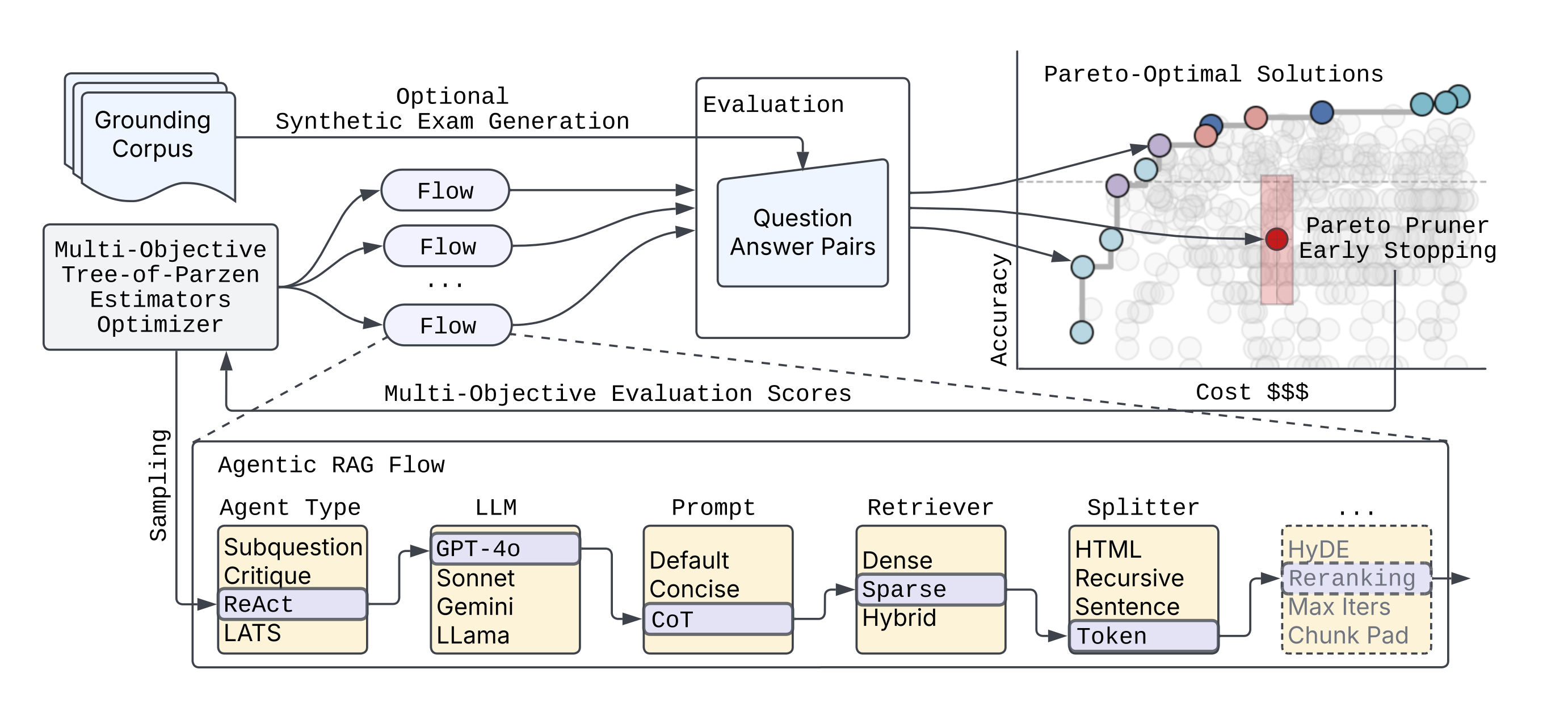
Please read more details in our blogpost and full technical paper.
We are excited for what you will discover using syftr!
Libraries and frameworks used
syftr builds on a number of powerful open source projects:
-
Ray for distributing and scaling search over large clusters of CPUs and GPUs
-
Optuna for its flexible define-by-run interface (similar to PyTorch’s eager execution) and support for state-of-the-art multi-objective optimization algorithms
-
LlamaIndex for building sophisticated agentic and non-agentic RAG workflows
-
HuggingFace Datasets for fast, collaborative, and uniform dataset interface
-
Trace for optimizing textual components within workflows, such as prompts
Installation
Please clone the syftr repo and run:
curl -LsSf https://astral.sh/uv/install.sh | sh
uv venv --python 3.12.7
source .venv/bin/activate
uv sync --extra dev
uv pip install -e .
or to use syftr as a library, install directly from PyPi:
pip install syftr
NOTE: syftr works as a library, but still needs easy access to config.yaml and study files you intend to run. Config file should be present as ~/.syftr/config.yaml, or in your current working directory.
You can download sample config file to your ~/.syftr directory with this command
curl -L https://raw.githubusercontent.com/datarobot/syftr/main/config.yaml.sample \
     -o ~/.syftr/config.yaml
You also need studies to run syftr. You can write your own or download our example study with this command to current working directory
curl -L https://raw.githubusercontent.com/datarobot/syftr/main/studies/example-dr-docs.yaml > example-dr-docs.yaml
Required Credentials
syftr's examples require the following credentials:
- Azure OpenAI API key
- Azure OpenAI endpoint URL (
api_url) - PostgreSQL server dsn (if no dsn is provided, will use local SQLite)
To enter these credentials, copy config.yaml.sample to config.yaml and edit the required portions.
Additional Configuration Options
syftr uses many components including Ray for job scheduling and PostgreSQL for storing results. In this section we describe how to configure them to run syftr successfully.
- The main config file of syftr is
config.yaml. You can specify paths, logging, database and Ray parameters and many others. For detailed instructions and examples, please refer to config.yaml.sample. You can rename this file toconfig.yamland fill in all necessary details according to your infrastructure. - You can also configure syftr with environment variables:
export SYFTR_PATHS__ROOT_DIR=/foo/bar - When the configuration is correct, you should be able to run
examples/1-welcome.ipynbwithout any problems. - syftr uses SQLite by default for Optuna storage. The
database.dsnconfiguration field can be used to configure any Optuna-supported relational database storage. We recommend Postgres for distributed workloads.
Quickstart
First, run syftr check to validate your credentials and configuration.
Note that most LLM connections are likely to fail if you have not provided configuration for them.
Next, try the example Jupyter notebooks located in the examples directory.
Or directly run a syftr study using the CLI syftr run studies/example-dr-docs.yaml --follow or with the API:
from syftr import api

s = api.Study.from_file("studies/example-dr-docs.yaml")
s.run()
Obtaining the results after the study is complete:
s.wait_for_completion()
print(s.pareto_flows)
[{'metrics': {'accuracy': 0.7, 'llm_cost_mean': 0.000258675},
  'params': {'response_synthesizer_llm': 'gpt-4o-mini',
   'rag_mode': 'no_rag',
   'template_name': 'default',
   'enforce_full_evaluation': True}},
   ...
]
LLM Configuration
syftr can be configured to use a wide variety of LLMs from a variety of LLM providers.
These are configured using the generative_models section of config.yaml.
Each LLM provider has some different configuration options as well as some common ones.
Let's look at an example using gpt-4.5-preview hosted in Azure OpenAI:
generative_models:
  # azure_openai Provider Example
  azure_gpt_45_preview:
    provider: azure_openai

    temperature: 0.0
    max_retries: 0

    # Provider-specific configurations
    deployment_name: "gpt-4.5-preview"
    api_version: "2024-12-01-preview"
    additional_kwargs:
      user: syftr

    # Cost example - options are the same for all models (required)
    cost:
      type: tokens                      # tokens, characters, or hourly
      input: 75
      output: 150.00
      # rate: 12.00

    # LLamaIndex LLMetadata Example - keys and defaults are the same for all models
    metadata:
      model_name: gpt-4.5-preview
      context_window: 100000
      num_output: 2048
      is_chat_model: true
      is_function_calling_model: true
      system_role: SYSTEM
Provider-specific options
All LLM configurations defined under generative_models: share a common set of options inherited from the base LLMConfig:
cost: (Object, Required) Defines the cost structure for the LLM.type: (String, Required) Type of cost calculation:tokens,characters, orhourly.input: (Float, Required) Cost for input (e.g., per million tokens/characters).output: (Float, Required iftypeistokensorcharacters) Cost for output.rate: (Float, Required iftypeishourly) Average cost per hour.
metadata: (Object, Required) Contains essential metadata about the LLM.model_name: (String, Required) The specific model identifier (e.g., "gpt-4o-mini", "gemini-1.5-pro-001").context_window: (Integer, Optional) The maximum context window size. Defaults to3900.num_output: (Integer, Optional) Default number of output tokens the model is expected to generate. Defaults to256.is_chat_model: (Boolean, Optional) Indicates if the model is a chat-based model. Defaults tofalse.is_function_calling_model: (Boolean, Optional) Indicates if the model supports function calling. Defaults tofalse.system_role: (String, Optional) The expected role name for system prompts (e.g.,SYSTEM,USER). Defaults toSYSTEM.
temperature: (Float, Optional) The sampling temperature for generation. Defaults to0.0.
See LLM provider-specific configuration to configure each supported provider.
Embedding models
You may also enable additional embedding model endpoints:
local_models:
...
  embedding:
    - model_name: "BAAI/bge-small-en-v1.5"
      api_base: "http://vllmhost:8001/v1"
      api_key: "non-default-value"
      additional_kwargs:
        extra_body:
          truncate_prompt_tokens: 512
    - model_name: "thenlper/gte-large"
      api_base: "http://vllmhost:8001/v1"
      additional_kwargs:
        extra_body:
          truncate_prompt_tokens: 512
Models added in the config.yaml will be automatically added to the default search space, or you can enable them manually for specific flow components.
Adding Custom Datasets
See detailed instructions here.
Adding Custom Flows
To add your own flow class, follow the guide here.
Citation
If you use this code in your research please cite the following publication.
@article{syftr2025,
  title={syftr: Pareto-Optimal Generative AI},
  author={Conway, Alexander and Dey, Debadeepta and Hackmann, Stefan and Hausknecht, Matthew and Schmidt, Michael and Steadman, Mark and Volynets, Nick},
  booktitle={Proceedings of the International Conference on Automated Machine Learning (AutoML)},
  year={2025},
}
Contributing
Please read our contributing guide for details on how to contribute to the project. We welcome contributions in the form of bug reports, feature requests, and pull requests.
Please note we have a code of conduct, please follow it in all your interactions with the project.