必须先有可用的 Miniflux 服务器,并准备服务器 URL 与 API Token 或用户名密码;仅支持 Miniflux API,不支持 Fever 或 Google Reader API;主要面向桌面端,移动端体验不如原生 RSS 应用
docker run -d --name nextflux -p 3000:3000 --restart unless-stopped electh/nextflux:latest 硬件要求按 README 说明
README 未说明,仅需浏览器访问;Docker 部署暴露 3000 端口
有 Docker 镜像
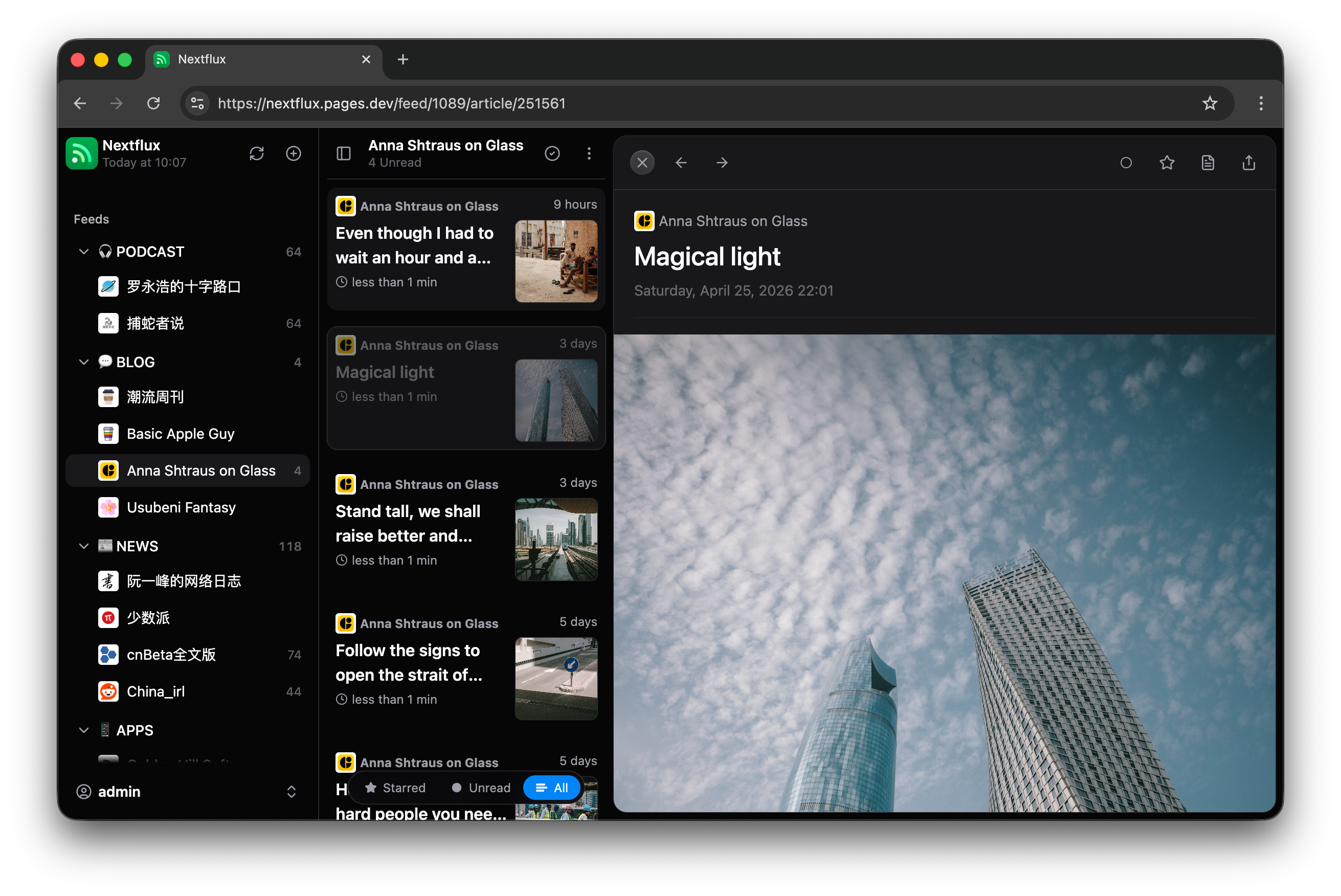
给 Miniflux 用的现代 Web 前端,React + Vite 写的 RSS 阅读器客户端
Miniflux 的网页版前端,界面更现代,用来替代原生界面阅读 RSS 订阅。
核心能力
- 连接 Miniflux 服务器,支持多账号分别缓存切换
- 后台按可配置间隔自动同步订阅
- PWA 支持,移动端可用
- 滚动自动标记已读,支持键盘快捷键
- OPML 导入导出与设置备份恢复
容易踩的坑
内容由模型根据 README 生成,可能不完整或不准确,以官方文档为准。看原文 README
暂无 release 数据(可能没有发版,或尚未同步)。
用户点评
登录用户的真实使用记录,可按版本和硬件筛选共 0 条
还没有人点评。第一个说出真实体验的人最有价值。
Nextflux
A modern RSS reader client for Miniflux built with React + Vite.


✨ Features
- 🚀 Fast and responsive UI built with HeroUI (Previously NextUI)
- 🌐 Connect to your Miniflux server
- 👥 Save multiple Miniflux accounts and switch between them with separate caches
- 🔄 Automatic background sync with configurable intervals
- 📱 Mobile-friendly with PWA support
- 🌙 Light/Dark mode with multiple theme options
- 🌍 i18n support (English & Chinese & Turkish & French)
- 👀 Mark as read on scroll
- 🎯 Rich reading experience
- Custom font settings
- Image gallery with touch gestures support
- Save article to 3rd party services
- ⌨️ Keyboard shortcuts
- 📊 Feed management
- OPML import
- OPML export and settings backup/restore
- Category organization
- Feed hiding
- Feed discovery and search
- Advanced options for feed management
🚀 Deployment
Docker Deployment (standalone)
Run with Docker using the following command:
docker run -d --name nextflux -p 3000:3000 --restart unless-stopped electh/nextflux:latest
Cloudflare Pages Deployment (standalone)
- Fork this repository to your GitHub account
- Create a new project in Cloudflare Pages
- Select your forked repository
- Select Framework preset:
React(Vite) - Set build command:
npm run build - Set build output directory:
dist - Deploy and access through the Cloudflare-assigned domain
Docker Compose Deployment (with Miniflux)
To deploy with Miniflux, copy docker compose file and replace the passwords, then run:
docker compose up -d
📝 Configuration
The app requires a Miniflux server to function. You'll need to provide:
- Server URL
- API Token / Username and Password
Multiple accounts
Open the account menu at the bottom of the sidebar and choose Add account. Sign in to additional accounts in the dialog that opens. Each account can use a username/password or API token, on the same server or different servers. Choose a saved account in this menu to switch; the app reloads at the home page, and other open tabs follow the selected account.
Articles, feeds, icons and sync progress are cached separately for each account. Appearance and app preferences are shared. Existing logins and their cached data are migrated automatically. Logging out removes only the current account's saved credentials and local cache, then selects another saved account if available.
🌍 Browser Support
- Chrome (recommended)
- Firefox
- Safari
- Edge
📱 Mobile Support
The app is primarily designed for desktop use. While it works on mobile devices, a native RSS reader app will provide a much better experience on the go.
💡 Tip: For a better native experience on mobile, consider using dedicated RSS reader apps like Reeder, Unread or Capy Reader.
🤝 Contributing
Contributions are welcome! Please feel free to submit a Pull Request.
📄 License
Do whatever the heck you want with it—just don’t come crying to me if it messes up your stuff. Just kidding (or not), but seriously, it’s all yours.
📚 FAQ
1. My scrollbar looks like shit in Windows—how do I fix this?
If you’re using Microsoft Edge, head over to the edge://flags page and enable the Fluent overlay scrollbars option.
Chrome might have something similar lurking around.
2. Are there any plans to support Fever or Google Reader APIs?
Nope, sorry folks. For now, I’m all in on the Miniflux API—gotta pick my battles.
3. Why does it resemble Reeder so much?
Reeder is a fantastic RSS reader. Since my design skills are about as good as a potato's, I took some "inspiration" from its UI style, slapped it on, and called it a day.
🌍 Translation
Contributor
-
🇹🇷 Turkish: @TaylanTatli
-
🇫🇷 French: @quent1-fr

Folo
RSSNext·TypeScript
AI 加持的 RSS 阅读器,用智能方式聚合和筛选订阅内容,帮你从海量信息流里快速抓到真正想看的文章。
RSS阅读器+3RSS / 阅读
39263+242.2kmobile/v0.6.22026-11-09 02:09 UTC

glance
glanceapp·Go
自托管的个人仪表盘,把 RSS、Reddit、监控状态等各种信息源聚合到一个页面,适合家庭实验室和服务器运维场景。
自托管仪表盘+4RSS / 阅读
38126+681.5kv0.8.82026-11-07 15:59 UTC

FreshRSS
FreshRSS·PHP
自托管的 RSS 新闻聚合器,把多个订阅源集中到一个网页阅读界面,支持 WebSub 实时推送,适合想自己掌控阅读数据的人。
RSS 阅读器+4RSS / 阅读
16547+201.3k1.30.42026-11-10 08:04 UTC
NetNewsWire
Ranchero-Software·Swift
macOS 和 iOS 上的原生 RSS 阅读器,用 Swift 编写,支持 RSS、JSON Feed 等订阅格式,适合想要干净、无广告阅读体验的苹果用户。
RSS阅读器+4RSS / 阅读
10519+9789mac-7.3b62026-11-10 05:39 UTC