首次启动需在网页上创建初始管理员用户;务必持久化 /var/www/metadata,否则自动生成的令牌密钥会丢失;uploads 建议绑定到专用子目录而非大型媒体共享根目录;启用文件夹加密后 WebDAV、分享、ZIP 和 OnlyOffice 会被自动禁用。
FileRise
error311MIT活跃维护轻量级自托管文件管理与存储中心,支持细粒度 ACL、断点续传、加密文件夹、WebDAV 和 SSO,适合用 Docker 或 Unraid 快速搭建私有文件服务。
🗂️ FileRise – lightweight, self-hosted file manager & storage hub with granular ACLs, resumable uploads, encrypted folders, WebDAV & SSO. Fully Docker / Unraid compatible.
v3.42.0发布于 2026-11-05 09:16 UTC1,027star +1 / 7 天55fork同步于 2026-11-10 05:56 UTC
docker run -d --name filerise -p 8080:80 -e TIMEZONE="America/New_York" -e TOTAL_UPLOAD_SIZE="10G" -e SECURE="false" -v ~/filerise/uploads:/var/www/uploads -v ~/filerise/users:/var/www/users -v ~/filerise/metadata:/var/www/metadata error311/filerise-docker:latest 硬件要求按 README 说明
README 未说明显存或 GPU 要求;以 Docker 或标准 Linux PHP Web 服务器运行,无需外部数据库。
有 Docker 镜像
自托管 Web 文件管理器与存储中心,用细粒度 ACL 管好团队文件
轻量级自托管文件管理与存储中心,支持细粒度 ACL、断点续传、加密文件夹、WebDAV 和 SSO,适合用 Docker 或 Unraid 快速搭建私有文件服务。
核心能力
- 按文件夹配置查看、上传、编辑、分享等细粒度 ACL
- 分块可续传上传,断线后自动恢复进度
- 可选文件夹级静态加密,子目录继承保护
- WebDAV 挂载与网页端共用同一套 ACL 权限
- 支持 OIDC 单点登录与 TOTP 两步验证
容易踩的坑
内容由模型根据 README 生成,可能不完整或不准确,以官方文档为准。看原文 README
- v3.42.0最新正式版2026-11-05 · 2026-11-05 09:16 UTC
Changes 11/05/2026 (v3.42.0)
release(v3.42.0): harden administrator OIDC discovery testingSecurity hardening
- Limited administrator-supplied OIDC provider URLs to HTTP and HTTPS without embedded credentials, query parameters, or fragments, preventing use of other PHP stream wrappers.
- OIDC discovery responses are now capped at 1 MiB with limited redirects, and failure responses no longer expose raw PHP fetch errors, failed destination URLs, or samples from returned JSON.
- Discovery URL handling now recognizes only the exact
/.well-known/openid-configurationpath suffix instead of matching that text anywhere in the URL.
Documentation
- Documented that the administrator-only discovery test intentionally sends an outbound request from the FileRise server and supports HTTP, HTTPS, local, container-network, and private-network OIDC providers.
Upgrade notes
- Existing HTTP and private-network OIDC providers remain supported. Provider URLs containing URL credentials, query parameters, or fragments must be replaced with the provider's standard issuer URL.
- No account, OIDC identity binding, file, permission, storage, Docker volume, or configuration migration is required.
v3.42.0
Full Changelog
SHA-256 (zip)
4a178e1060529bbfe7c2640245c83a4f17c2584bab5bb679443dbf51a248c4f7 FileRise-v3.42.0.zip - v3.41.02026-11-04 · 2026-11-04 05:09 UTC
查看更新说明
Changes 11/04/2026 (v3.41.0)
release(v3.41.0): enforce portal-detail authorizationSecurity
- The authenticated Pro portal-detail endpoint now requires either administrator access or effective upload/download access to the requested portal's configured folder under both the portal policy and folder ACL.
- A user assigned only to another portal can no longer retrieve the target portal's client email, internal folder, form defaults, source, or upload policy by supplying its slug.
Documentation
- Clarified that portal authentication does not grant access to every portal on the instance. Non-admin users must have usable folder access for the specific requested portal.
Upgrade notes
- Existing administrators, dedicated portal accounts, manually managed users, and group members retain portal access when their target-folder ACL matches the portal's enabled upload or download capability.
- No account, portal, ACL, file, storage, Docker volume, or configuration migration is required.
v3.41.0
Full Changelog
SHA-256 (zip)
3984794017bf13b038c5a573bff3507af284552238b4a4173da5417b21ab08d5 FileRise-v3.41.0.zip - v3.40.02026-11-03 · 2026-11-03 07:04 UTC
查看更新说明
Changes 11/03/2026 (v3.40.0)
release(v3.40.0): bind file shares to file identitySecurity
- Individual-file share links are now bound to a random file-instance identity stored in file metadata. Deleting a shared file and later creating a different file at the same folder and name no longer transfers the old share link to the replacement.
- Share redemption fails closed when the original file identity is missing or no longer matches. New share links also require both the file and its metadata to exist.
Fixed
- WebDAV content updates now preserve additional file metadata, including the file-share identity, so a legitimate in-place edit does not invalidate an existing share link.
Upgrade notes
- Existing individual-file share links created before v3.40.0 do not contain a file identity and will return 404 after upgrading. Recreate any file-share links that must remain active.
- Folder-share links are unaffected. No account, file, folder, permission, encryption-key, or configuration migration is required.
v3.40.0
Full Changelog
SHA-256 (zip)
6a22f2c1a51598075ae97740a2cde69ed2b2887061b4770b69cf93060e4256ba FileRise-v3.40.0.zip - v3.39.02026-11-02 · 2026-11-02 07:00 UTC
查看更新说明
Changes 11/02/2026 (v3.39.0)
release(v3.39.0): clarify Edit and owner-only permissionsChanged
- Renamed the English account-permission label from Bypass Ownership to Bypass Owner-Only Checks and added help text explaining its scope. The stored
bypassOwnershipsetting and its authorization behavior are unchanged.
Documentation
- Explicitly documented that Folder Edit authorizes changing existing file contents regardless of uploader, including WebDAV
PUT, while preserving the original uploader metadata. - Clarified that creating a file requires Upload, regular upload collisions retain separate ownership protection, and the bypass flag applies only to operations with an independent owner check.
- Added this permission-model distinction to the security-reporting policy and beside the WebDAV overwrite gate to reduce false-positive ownership-bypass reports.
Upgrade notes
- No account, file, folder, permission, encryption-key, or configuration migration is required.
- Existing account flags and folder ACLs retain their current behavior.
- This release does not broaden WebDAV access or change authorization decisions.
v3.39.0
Full Changelog
SHA-256 (zip)
666c1cfd6ca3c2e5db9bdb6c6cadc82599d55a00bf08bea3e5a1e09d01f6cb64 FileRise-v3.39.0.zip - Renamed the English account-permission label from Bypass Ownership to Bypass Owner-Only Checks and added help text explaining its scope. The stored
- v3.38.02026-10-21 · 2026-10-21 21:45 UTC
查看更新说明
Changes 10/21/2026 (v3.38.0)
release(v3.38.0): refresh Docker PHP security packagesSecurity
- Docker security rebuild for the upstream PHP2Shell vulnerabilities, CVE-2026-109618 and CVE-2026-109619. Ubuntu 24.04 fixes both in PHP package revision
8.3.6-0ubuntu0.24.04.13; rebuilt images must contain that revision or a later fixed revision. See USN-8948-1. - Disabled PHP's unused session upload-progress feature as defense in depth. FileRise's browser progress indicators and resumable uploads use their own tracking and remain supported. This setting does not replace the PHP runtime update.
Documentation
- Added PHP runtime update and package-verification guidance for Docker and manual installations, including Ubuntu's backported security fixes.
Upgrade notes
- Docker: pull the v3.38.0 image and recreate the container with the same volumes, configuration, and persistent tokens key. Restarting an existing container or replacing application files alone does not update PHP.
- Manual installs: update the server's PHP runtime separately to a patched release, such as PHP 8.3.36 or a vendor package containing both fixes. Ubuntu's patched runtime can still report
8.3.6; check the complete package revision. - No account, file, folder, permission, encryption-key, or configuration migration is required.
v3.38.0
Full Changelog
SHA-256 (zip)
3ecb83a11d8cae6973da68ca649da4b34115751244b6efbaade3410ae727725a FileRise-v3.38.0.zip - Docker security rebuild for the upstream PHP2Shell vulnerabilities, CVE-2026-109618 and CVE-2026-109619. Ubuntu 24.04 fixes both in PHP package revision
用户点评
登录用户的真实使用记录,可按版本和硬件筛选共 0 条
还没有人点评。第一个说出真实体验的人最有价值。
FileRise





FileRise is a self-hosted web file manager and storage hub with WebDAV, sharing, and per-folder ACLs. Drag & drop uploads, OnlyOffice integration, and optional folder-level encryption at rest — all in one PHP app you control.
Quick links: Website • Docs • Live demo • Install • FileRise Pro
-
Built for: anyone who wants a fast, self-hosted file manager, storage hub, client portal, and AI workflow workspace on their own infrastructure.
-
Core (MIT): full open-source FileRise feature set (ACLs, folder and file sharing, uploads, tags/search, PDF previews, and more), plus multiple local roots and WebDAV sources for storage-hub workflows.
-
Pro: adds user groups, client portals, automation, additional source adapters, gateway shares, search everywhere/audit tooling, and a permissions-aware AI workspace for structured extraction, organization, approvals, and scoped copilots.
-
FileRise Pro AI Chat: Extract Invoice Fields to JSON and CSV


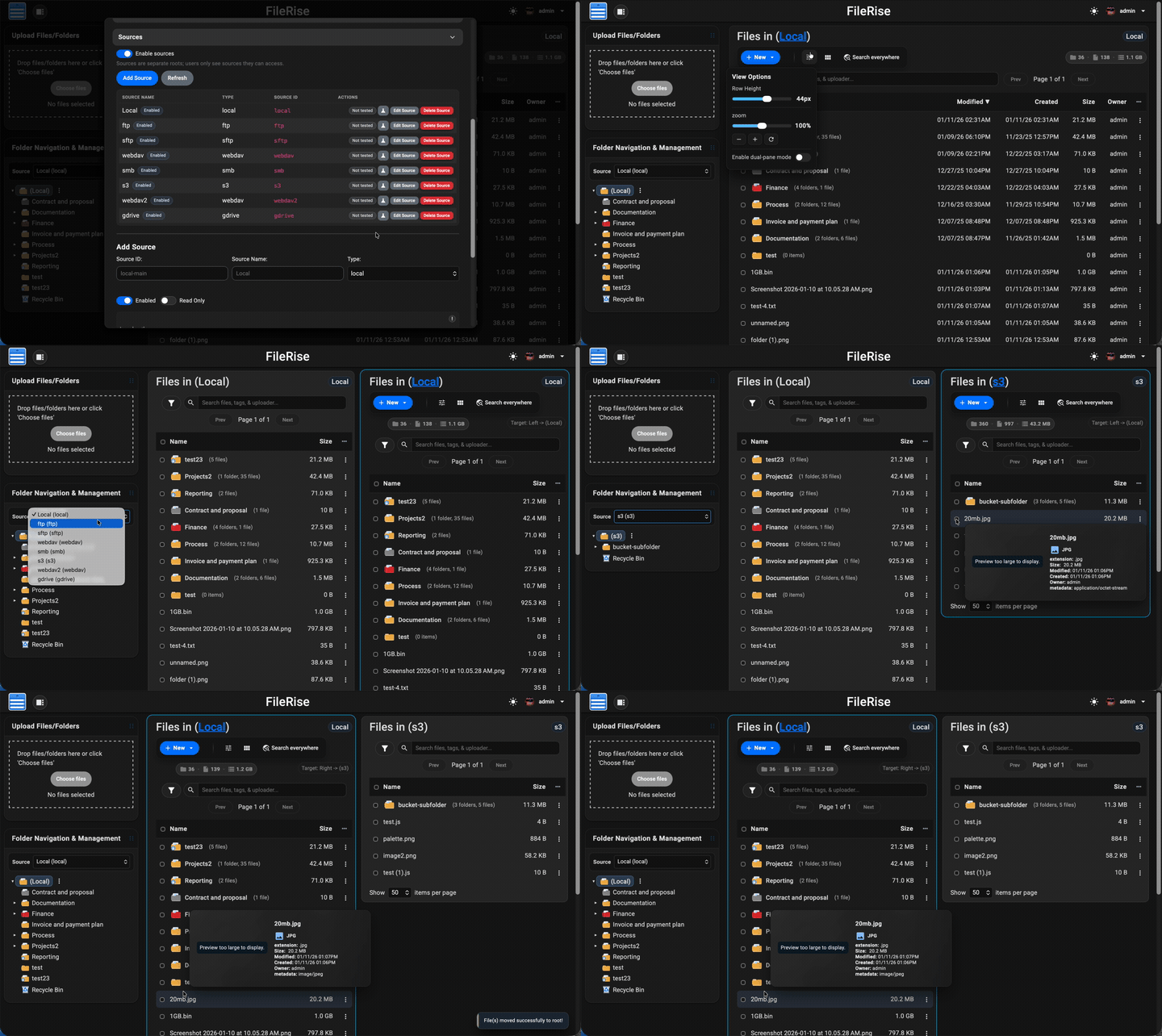
Table of contents
- Quick links
- Install (Docker – recommended)
- Manual install (PHP web server)
- After install (5 minutes)
- Data & backups
- First-run security checklist
- Optional dependencies
- WebDAV & ONLYOFFICE (optional)
- Security & updates
- Community, support & contributing
- AI Disclosure
- License & third-party code
- Press
Highlights
- 💾 Self-hosted “cloud drive” – Runs on Docker (recommended) or on a standard Linux PHP web server. No external database required.
- 🔐 Granular per-folder ACLs – Manage View (all/own), Upload, Create, Edit, Rename, Move, Copy, Delete, Extract, Share, and more — all enforced consistently across the UI, API, and WebDAV.
- 🔗 Link File (authenticated deep links) – Generate internal links to specific files, require login + ACL checks, and open directly to the target in the app.
- 🤝 Folder and file sharing – Share folders for browsing or upload-only file requests, protect links with passwords/expiration, and share individual files with generated links.
- 📥 File Request links (upload-only) – Share upload-only links so external users can submit files into a folder without browsing existing files.
- 📄 PDF viewing + optional local PDF thumbnails – View PDFs inline in the preview modal, and optionally enable first-page PDF thumbnails for gallery cards and hover previews using
pdftoppm. - 🔐 Folder-level encryption at rest (optional) – Encrypt entire folders (and all descendants) on disk using modern authenticated encryption.
- Opt-in per folder with inherited protection for subfolders
- Files are stored encrypted on disk and transparently decrypted on download
- Master key can be generated by FileRise or supplied via environment variable
- When enabled, incompatible features (WebDAV, sharing, ZIP operations, OnlyOffice) are automatically disabled for safety
- 🔄 Fast drag-and-drop uploads – Chunked, resumable uploads with pause/resume and progress tracking. If your connection drops, FileRise resumes automatically.
- 🪟 Dual-pane mode + keyboard shortcuts – Optional two-pane file browser for fast workflows (copy/move between panes, compare folders, and operate without the mouse). Shortcut overlay + hotkeys (F3 preview, F4 edit, F5 copy, F6 move, F7 new folder, Del delete,
/search). - 🌳 Scales to huge trees – Tested with 100k+ folders in the sidebar tree without choking the UI.
- 🌈 Visual organization – Color-code folders in the tree, inline list, and folder strip, plus tag files with color-coded labels for fast visual scanning.
- 👀 Hover preview “peek” cards – On desktop, hover files or folders to see thumbnails (images/video), quick metadata (size, timestamps, tags), and effective permissions. Per-user toggle stored in
localStorage. - 🎬 Smart media handling – Track per-file video watch progress with a “watched” indicator, remember last volume/mute state, and reset progress when needed.
- 🧩 OnlyOffice support (optional) – Edit DOCX/XLSX/PPTX using your own Document Server; ODT/ODS/ODP supported as well. PDFs can be viewed inline.
- 🌍 WebDAV (ACL-aware) – Mount FileRise as a drive from macOS, Windows, Linux, or Cyberduck/WinSCP. Listings, uploads, overwrites, deletes, and folder creation all honor the same ACLs as the web UI.
- 🏷️ Tags, search & trash – Tag files, search by name/tag/uploader/content via fuzzy search, and recover mistakes using a Trash with time-based retention.
- 📚 API + live docs – OpenAPI spec served at
api.php?spec=1(fromopenapi.json.dist) with a Redoc UI atapi.php(login required). - 📊 Storage / disk usage summary – CLI scanner with snapshots, total usage, and per-volume breakdowns surfaced in the admin panel.
- 🎨 Polished, responsive UI – Dark/light mode, mobile-friendly layout, in-browser previews, and a built-in code editor powered by CodeMirror.
- 🌐 Internationalization – English, Spanish, French, German, Polish, Russian, Japanese and Simplified Chinese included; community translations welcome.
- 🔑 Login + SSO – Local users, TOTP 2FA, and OIDC (Auth0 / Authentik / Keycloak / etc.) with optional auto-provisioning, IdP-driven admin role assignment, and Pro user-group mapping.
- 🛡️ ClamAV virus scanning (Core) + Pro virus log – Optional ClamAV upload scanning, with a Pro virus detection log in the admin panel and CSV export.
- 🌐 Reverse proxy & subpath aware – Designed to run cleanly behind Nginx, Traefik, Caddy, or Apache:
- Supports installs under a subpath (e.g.
https://example.com/files) - Correct URL generation for assets, APIs, portals, PWA, and share links
- If the proxy strips the prefix, set
FR_BASE_PATHor sendX-Forwarded-Prefix - Explicit “Published URL” setting for proxy / firewall environments
- Works with
X-Forwarded-*headers and Kubernetes ingress setups
- Supports installs under a subpath (e.g.
- 👥 Pro: user groups, client portals, global search, storage explorer & audit logs – Group-based ACLs, brandable client upload portals, ACL-aware global search across files, folders, users, and permissions, an ncdu-style storage explorer for identifying large folders/files and reclaiming disk space directly from the UI, and Pro Audit Logs (configurable activity logging with filters + CSV export for tracking key actions across web, WebDAV, shares, and portals).
- ⚙️ Pro: Automation (Webhooks + Jobs) – Send FileRise events to other apps/services using managed webhook endpoints with async delivery, retries, queue visibility, and job history from Admin.
- 🤖 Pro: AI workflows + workspace – Use a permissions-aware AI workspace for structured extraction, folder organization, watched-folder workflows, approval-gated bulk actions, and scoped share/portal copilots with cited answers and admin controls.
- 🌐 Sources (Core + Pro adapters) –
Turn FileRise into a storage hub by connecting multiple backends and switching between them in the UI:
- Core: Multiple local roots (additional local paths)
- Core: WebDAV sources (Nextcloud / ownCloud / FileRise)
- Pro: S3-compatible (AWS S3 / MinIO / Wasabi / Backblaze B2 S3 / etc.)
- Pro: SMB/CIFS, SFTP, FTP
- Pro: Google Drive, OneDrive, Dropbox
- Works with dual-pane so you can copy/move via drag & drop or toolbar actions between sources, with per-source Trash
- 🔌 Pro: Gateway Shares v2 (SFTP / S3 / MCP) –
Expose selected source roots through managed gateways for external clients and workflows:
- Managed start/stop/restart/status/log controls from Admin
- SFTP gateway for tools like FileZilla, WinSCP, and rclone
- S3 gateway for S3-compatible clients and automation
- Scoped MCP users/tokens mapped to FileRise user + source/root scope
- AI/tool integrations stay ACL-scoped and auditable
Full list of features: Full Feature Wiki
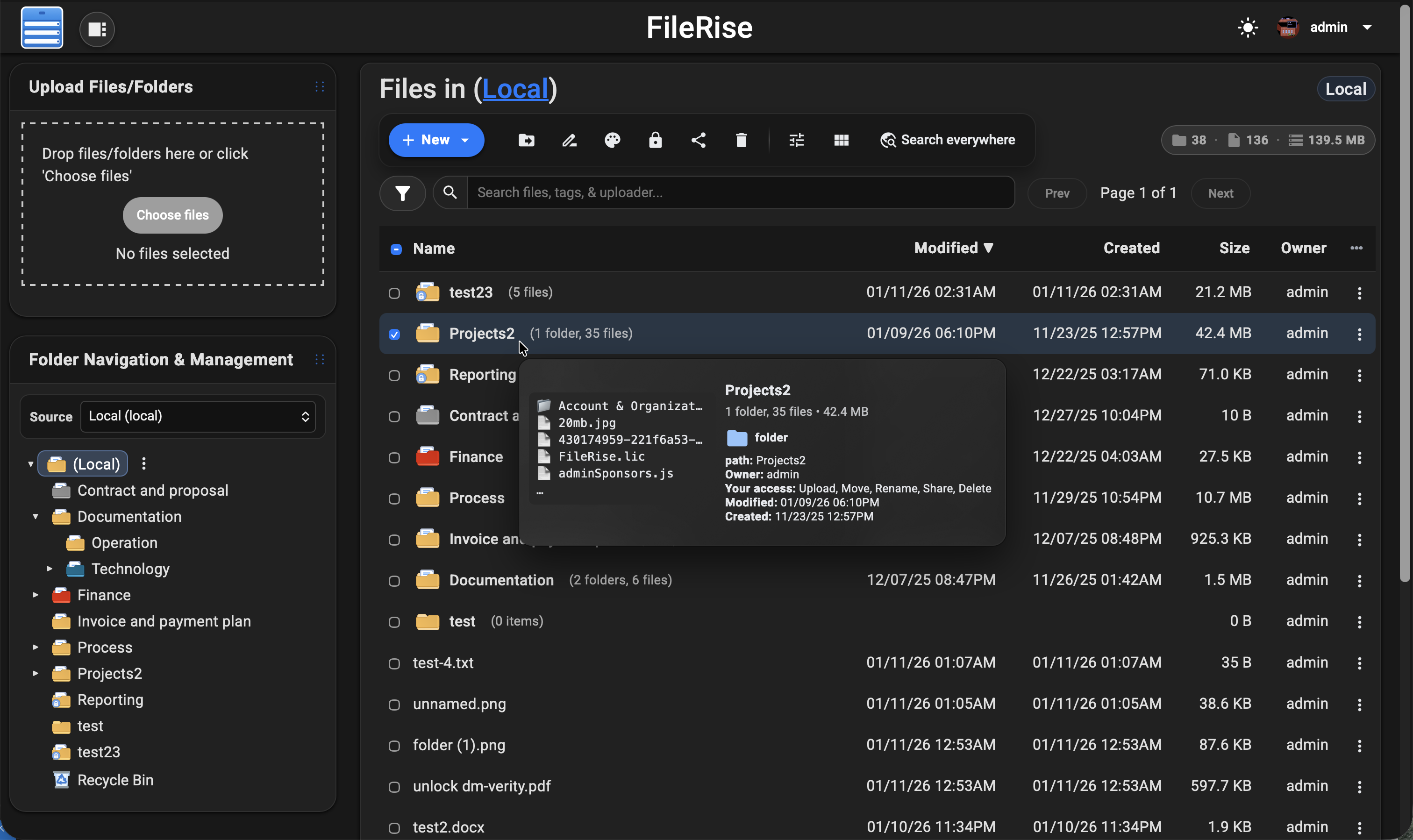
💡 Looking for FileRise Pro (brandable header, user groups, client upload portals, license handling)? Check out filerise.net – FileRise Core stays fully open-source (MIT).
Quick links
- 🚀 Live demo: Demo (username:
demo/ password:demo) - 🧩 FileRise Pro: filerise.net
- 📚 Docs & Wiki: Wiki
- Features overview
- FAQ
- Troubleshooting and common errors
- Logs and diagnostics
- Screenshots
- Installation & setup
- Common env vars
- Env vars (full reference)
- Admin Panel
- Pro MCP AI quickstart
- ACL & permissions
- ACL recipes
- WebDAV (mount)
- WebDAV via curl
- ONLYOFFICE
- OIDC & SSO
- Nginx setup
- Kubernetes / k8s
- Backup & restore
- Upgrade & migration
- Maintenance scripts
- Reverse proxy & subpath
- 🐳 Docker image:
- ⎈ Community Helm chart (unofficial): dofevine/charts/filerise (community-maintained, not maintained by FileRise core)
- 💬 Discord: Discord
- 📝 Changelog: Changelog
Support checklist (please include)
If you open an issue/discussion, please include:
- FileRise version + install method (Docker tag / release ZIP / git)
- Reverse proxy (Nginx / Traefik / Caddy) + subpath (yes/no)
- Browser console errors (if any)
- Server/container logs around the error
Install (Docker – recommended)
The easiest way to run FileRise is the official Docker image.
✅ Tip: For stability, pin a version tag (example:
error311/filerise-docker:vX.Y.Z) instead of:latest. See Releases for current versions.
Option A – Quick start (docker run)
Pristine Docker installs can omit PERSISTENT_TOKENS_KEY. FileRise will generate a unique key on first start and persist it in metadata/persistent_tokens.key.
If you prefer to manage the key yourself, set one before first start:
export PERSISTENT_TOKENS_KEY="$(openssl rand -hex 32)"
docker run -d \
  --name filerise \
  -p 8080:80 \
  -e TIMEZONE="America/New_York" \
  -e TOTAL_UPLOAD_SIZE="10G" \
  -e SECURE="false" \
  -e SCAN_ON_START="true" \
  -e CHOWN_ON_START="true" \
  -v ~/filerise/uploads:/var/www/uploads \
  -v ~/filerise/users:/var/www/users \
  -v ~/filerise/metadata:/var/www/metadata \
  error311/filerise-docker:latest
Then visit:
http://your-server-ip:8080
On first launch you’ll be guided through creating the initial admin user.
💡 After the first run, you can set
CHOWN_ON_START="false"if permissions are already correct and you don’t want a recursivechownon uploads/metadata on every start.⚠️ Uploads folder recommendation
It’s strongly recommended to bind
/var/www/uploadsto a dedicated folder (for example~/filerise/uploadsor/mnt/user/appdata/FileRise/uploads), not the root of a huge media share.🔐 Persistent tokens key note
Keep
/var/www/metadatapersistent. On a pristine install, FileRise writes the generated persistent tokens key tometadata/persistent_tokens.key. If you choose to manage the key via env instead, keep that value stable for the life of the instance.If you really want FileRise to sit “on top of” an existing share, use a subfolder (e.g.
/mnt/user/media/filerise_root) instead of the share root, so scans and permission changes stay scoped to that folder.
Option B – docker-compose.yml
services:
  filerise:
    image: error311/filerise-docker:latest
    container_name: filerise
    ports:
      - "8080:80"
    environment:
      TIMEZONE: "America/New_York"
      TOTAL_UPLOAD_SIZE: "10G"
      SECURE: "false"
      PERSISTENT_TOKENS_KEY: "${PERSISTENT_TOKENS_KEY:-}" # optional; blank = pristine installs auto-generate and persist a key in metadata
      SCAN_ON_START: "true"   # auto-index existing files on startup
      CHOWN_ON_START: "true"  # fix permissions on uploads/metadata on startup
    volumes:
      - ./uploads:/var/www/uploads
      - ./users:/var/www/users
      - ./metadata:/var/www/metadata
Bring it up with:
docker compose up -d
You can leave PERSISTENT_TOKENS_KEY blank for pristine installs, or set it in your shell / .env if you want to manage the key yourself:
export PERSISTENT_TOKENS_KEY="$(openssl rand -hex 32)"
Common environment variables
| Variable | Required | Example | What it does |
|---|---|---|---|
TIMEZONE | ✅ | America/New_York | PHP / container timezone. |
TOTAL_UPLOAD_SIZE | ✅ | 10G | Max total upload size per request; also used to set PHP/Apache upload limits. |
SECURE | ✅ | false | true when running behind HTTPS / a reverse proxy, else false. |
PERSISTENT_TOKENS_KEY | Optional | openssl rand -hex 32 | Secret used to encrypt stored secrets (tokens, permissions, admin config). If omitted on a pristine install, FileRise auto-generates and persists one in metadata/persistent_tokens.key; existing installs without an explicit key stay on the legacy compatibility path until rotated. |
SCAN_ON_START | Optional | true | If true, runs a scan once on container start to index existing files. |
CHOWN_ON_START | Optional | true | If true, recursively normalizes ownership/permissions on uploads/ + metadata/. |
PUID | Optional | 99 | If running as root, remap www-data user to this UID (e.g. Unraid’s 99). |
PGID | Optional | 100 | If running as root, remap www-data group to this GID (e.g. Unraid’s 100). |
FR_PUBLISHED_URL | Optional | https://example.com/files | Public URL when behind proxies/subpaths (share links, portals, redirects). |
FR_BASE_PATH | Optional | /files | Force a subpath when the proxy strips the prefix (overrides auto-detect). |
FR_TRUSTED_PROXIES | Optional | 127.0.0.1,10.0.0.0/8 | Comma-separated IPs/CIDRs for trusted proxies; only these can supply the client IP header or proxy-auth identity header. |
FR_IP_HEADER | Optional | X-Forwarded-For | Header to trust for the real client IP when the proxy is trusted. |
Full list of common env variables: Common Environment variables Full reference: Environment Variables (Full Reference)
Other useful env vars (optional):
FR_WEBDAV_MAX_UPLOAD_BYTES(WebDAV upload cap in bytes;0= unlimited),
FR_ENCRYPTION_MASTER_KEY(32-byte key: hex orbase64:...),
VIRUS_SCAN_ENABLED/VIRUS_SCAN_CMD/VIRUS_SCAN_EXCLUDE_DIRS/CLAMAV_AUTO_UPDATE,
LOG_STREAM(error/access/both/none),
HTTP_PORT/HTTPS_PORT/SERVER_NAME,
SHARE_URL(override share endpoint;FR_PUBLISHED_URLpreferred).🧩 Traefik + subpath note (Kubernetes): use
StripPrefixand rely onX-Forwarded-Prefix+FR_PUBLISHED_URL.
See: Deployments Wiki More deployment docs: Install Setup
Manual install (PHP web server)
Short version: FileRise expects data at /var/www/{uploads,users,metadata} and your web server must point to the public/ folder (for example DocumentRoot /var/www/filerise/public).
Docker is the recommended deployment path. Manual installs on a standard Linux PHP web server are supported, but more restrictive shared-hosting environments are best-effort and may not support every feature or background-worker workflow. Native Windows PHP server installs are not supported as a filesystem security boundary; Windows browsers and WebDAV clients remain supported.
Treat uploads/, users/, and metadata/ as trusted application storage. Only the FileRise service identity and trusted administrative or backup processes may write inside these directories. Do not expose them as a writable share or allow another untrusted application or operating-system account to create entries, links, junctions, or reparse points within them. This requirement also applies when a Docker volume is backed by host storage.
On a pristine manual install, FileRise generates a unique key on first request and persists it in metadata/persistent_tokens.key. Keep that file with your backups. Existing installs that previously used the legacy built-in key remain on the compatibility path until an administrator performs a controlled rotation.
Full guide + troubleshooting:
Installation & setup • Upgrade & migration • Reverse proxy & subpath
Requirements
- PHP 8.3+
- Linux web server (Apache / Nginx / Caddy + PHP-FPM)
- PHP extensions:
json,curl,zip(and usual defaults) - No database required
Quick start (release ZIP)
- Create data directories:
sudo mkdir -p /var/www/uploads /var/www/users /var/www/metadata
sudo chown -R www-data:www-data /var/www/uploads /var/www/users /var/www/metadata   # adjust web user if needed
sudo chmod -R 775 /var/www/uploads /var/www/users /var/www/metadata
- Download a release and extract:
cd /var/www
sudo mkdir -p filerise
sudo chown -R $USER:$USER /var/www/filerise
cd /var/www/filerise

VERSION="vX.Y.Z"  # replace with the tag you want
ASSET="FileRise-${VERSION}.zip"

curl -fsSL "https://github.com/error311/FileRise/releases/download/${VERSION}/${ASSET}" -o "${ASSET}"
unzip "${ASSET}"
- Point your web server at
/var/www/filerise/public, then visithttp://serverip/.
If you install FileRise outside /var/www/filerise, keep the data dirs in /var/www or update the paths in config/config.php.
After install (5 minutes)
- Log in and create your first admin account (prompted on first run).
- Open Admin → Users to add accounts, then Admin → Folder Access to set permissions.
- If you’re behind a reverse proxy or subpath, set
FR_PUBLISHED_URL(andFR_BASE_PATHif needed). - Optional: enable WebDAV or ONLYOFFICE in Admin and follow the wiki guides.
Data & backups
Back up these paths (Docker volumes or host directories):
/var/www/uploads(file data)/var/www/users(users, ACLs, admin config, Pro license)/var/www/metadata(indexes, tags, logs)
Notes:
- Logs live in
/var/www/metadata/logand can be rotated or pruned. - If you use the auto-generated key path, back up
/var/www/metadata/persistent_tokens.keywith the rest ofmetadata/. - If you manage the key via env, keep your
PERSISTENT_TOKENS_KEYconsistent when restoring backups.
First-run security checklist
- Persist
/var/www/metadataso the generated persistent tokens key survives container recreation. - Either set your own strong
PERSISTENT_TOKENS_KEYor let a pristine install generate one and then back upmetadata/persistent_tokens.key. - Use HTTPS and set
SECURE="true"when behind TLS/reverse proxy. - If behind a proxy, set
FR_TRUSTED_PROXIESandFR_IP_HEADER; proxy-header login also requiresFR_TRUSTED_PROXIES. - Set
FR_PUBLISHED_URL(andFR_BASE_PATHif needed) so share links are correct. - Block direct HTTP access to
/uploads(serve onlypublic/and deny access to/uploads,/users,/metadata).
Optional dependencies
- FFmpeg – video thumbnails (set
FR_FFMPEG_PATHif not on PATH). - ClamAV – upload scanning (
VIRUS_SCAN_ENABLED=true), optionalVIRUS_SCAN_EXCLUDE_DIRSpath excludes. - PHP sodium (libsodium) – required for encryption-at-rest.
- ONLYOFFICE Document Server – document editing in the browser.
WebDAV & ONLYOFFICE (optional)
WebDAV
Once enabled in the Admin panel, FileRise exposes a WebDAV endpoint (e.g. /webdav.php). Use it with:
- macOS Finder – Go → Connect to Server →
https://your-host/webdav.php/ - Windows File Explorer – Map Network Drive →
https://your-host/webdav.php/ - Linux (GVFS/Nautilus) –
dav://your-host/webdav.php/ - Clients like Cyberduck, WinSCP, etc.
WebDAV operations honor the same ACLs as the web UI.
Docs: WebDAV Wiki
ONLYOFFICE integration
If you run an ONLYOFFICE Document Server you can open/edit Office documents directly from FileRise (DOCX, XLSX, PPTX, ODT, ODS, ODP; PDFs view-only).
Configure it in Admin → ONLYOFFICE:
- Enable ONLYOFFICE
- Set your Document Server origin (e.g.
https://docs.example.com) - Configure a shared JWT secret
- Copy the suggested Content-Security-Policy header into your reverse proxy
Docs: ONLYOFFICE Wiki
Security & updates
- FileRise is actively maintained and has published security advisories.
- See SECURITY.md and GitHub Security Advisories for details.
Upgrading
- Docker: pull the new tag and recreate the container with the same volumes.
Example:
docker pull error311/filerise-docker:latest
# or pin a specific version from Releases
- Manual: replace app files with the latest release ZIP (keep
/var/www/uploads,/var/www/users,/var/www/metadata, and your config).
Please report vulnerabilities responsibly via the channels listed in SECURITY.md.
Community, support & contributing
Contributions are welcome — from bug fixes and docs to translations and UI polish.
See CONTRIBUTING.md for guidelines.
If FileRise saves you time or becomes your daily driver, a ⭐ on GitHub or sponsorship is hugely appreciated:
- ❤️ GitHub Sponsors
- ☕ Ko-Fi
AI Disclosure
FileRise is my project. I use AI like a tool for some tasks (e.g., translations/snippets), but the architecture, core code, and ongoing maintenance are mine.
License & third-party code
FileRise Core is released under the MIT License – see LICENSE.
It bundles a small set of well-known client and server libraries (Bootstrap, CodeMirror, DOMPurify, Fuse.js, Resumable.js, sabre/dav, etc.).
All third-party code remains under its original licenses.
The official Docker image includes the ClamAV antivirus scanner (GPL-2.0-only) for optional upload scanning.
See THIRD_PARTY.md and the licenses/ folder for full details.
Press
Files
files-community·C#
一款面向 Windows 的现代文件管理器,用多标签页、双栏浏览和 Fluent 设计改进资源管理器的使用体验,方便整理文件和文件夹。
文件管理器+4文件管理
46566+523.0kv4.32026-11-10 00:37 UTC

yazi
sxyazi·Rust
用 Rust 写的终端文件管理器,基于异步 I/O 实现极快的目录浏览和文件操作,适合习惯命令行的开发者日常管理文件。
终端文件管理器+4文件管理
43327+561.1kv26.9.12026-11-09 16:54 UTC

spacedrive
spacedriveapp·Rust
用 Rust 写的跨平台开源文件管理器,底层是虚拟分布式文件系统,能把多台设备上的文件统一管理,像访问本地一样浏览和整理。
文件管理器+4文件管理
39475+261.4k0.4.32026-11-06 11:49 UTC
filebrowser
filebrowser·Go
File Browser provides a file managing interface within a specified directory and it can be used to upload, delete, preview and edit your files.
文件管理
358704.2k2026-07-31 10:06 UTC