需先安装 Visual Studio Code;测试版需先卸载正式版再安装 beta 扩展;扩展仅对崩溃收集遥测,可在 VS Code 设置中关闭
vscode-front-matter
estruyfMIT活跃维护在 VS Code 里直接管理 Markdown 博客内容的 CMS 扩展,可视化编辑 front matter 字段,适配 Hugo、Jekyll、Hexo 等静态站点生成器。
Front Matter is a CMS running straight in Visual Studio Code. Can be used with static site generators like Hugo, Jekyll, Hexo, NextJs, Gatsby, and many more...
v10.13.0发布于 2026-10-12 12:13 UTC2,552star106fork同步于 2026-11-10 17:45 UTC
ext install eliostruyf.vscode-front-matter 硬件要求按 README 说明
README 未说明,作为 VS Code 扩展无需独立 GPU 或显存
在 VS Code 里直接管理静态站点内容的 CMS 扩展,支持 Hugo、Jekyll 等生成器
在 VS Code 里直接管理 Markdown 博客内容的 CMS 扩展,可视化编辑 front matter 字段,适配 Hugo、Jekyll、Hexo 等静态站点生成器。
核心能力
- 在 VS Code 内搜索、筛选、排序并新建 Markdown 内容
- 内置站点与内容预览,无需离开编辑器
- 对标题、描述、关键词做 SEO 检查
- 提供数据文件与媒体文件管理面板
- 支持多语言内容管理与自定义扩展
容易踩的坑
内容由模型根据 README 生成,可能不完整或不准确,以官方文档为准。看原文 README
- v10.13.0v10.13.0 release最新正式版2026-10-12 · 2026-10-12 12:13 UTC
🎨 Enhancements
- #1061: Added the
searchableproperty onchoicefields to show a searchable input instead of a dropdown, useful when you have many choices
🐞 Fixes
- #1062: Fix dropped characters and sluggish typing in
stringandwysiwygfields when the front matter update round trip is slower than the typing speed - #1064: Fix the extension hanging after initialization in Astro projects when the Node.js lookup fails thanks to Matt Van Horn
- #1061: Added the
- v10.12.0v10.12.0 release2026-08-21 · 2026-08-21 14:20 UTC
查看更新说明
🎨 Enhancements
- #1053: Support pasting images directly into Markdown/MDX files
- #1055: Added the
translateproperty on content type fields to define which front matter fields need to be machine translated. The title and description fields are translated by default, settranslate: falseto exclude them - The
.frontmatter/databasefiles are now stored in a human readable format with sorted keys, so that Git can merge them line by line instead of conflicting on a single line. Existing files are reformatted once, when the extension activates
🐞 Fixes
- #1043: Fix issue with last modified date in content health freshness checks
- #1054: Fix the "Could not retrieve the locale for the current file" error for multilingual content nested in subfolders (ex.
content/de/posts/2024/07/my-post/index.md). Translations are now created with the same folder structure as the source file - Show an error notification when one of the
.frontmatter/databasefiles contains invalid JSON or unresolved Git conflict markers, instead of failing silently
- v10.11.0v10.11.0 release2026-07-02 · 2026-07-02 09:04 UTC
查看更新说明
🎨 Enhancements
- Support
fieldGroupas a single value onfieldsfields - Added the new content health feature to the Front Matter panel with readability scoring, link checks, and freshness warnings (
frontMatter.contentHealth.enabled,frontMatter.contentHealth.checkExternalLinks,frontMatter.contentHealth.freshnessThreshold,frontMatter.contentHealth.minReadability) - #409: Added the ability to output multiple properties from a data file in the
dataFilefield type - #1030: Add
frontMatter.file.slugSeparatorsetting - #1033: Support freeform tags and categories in the front matter validation
- #1036: Default filter, sorting, and grouping configuration for the
contentsdashboard
🐞 Fixes
- #905: Fix Hugo framework detection for sites using
hugo.toml,hugo.yaml,hugo.yml, orhugo.json(the default config filename since Hugo v0.110) - Fix number fields not being saved to front matter when used inside block field groups
- #920: Fix
metadata.fmRelFilePathreturning an absolute path on Windows by normalizing the workspace folder path before stripping it - #963: Prevent infinite update loops for fields when using Hugo partials as values in the front matter
- #1041: Fix in image page when using page bundles
- Support
- v10.10.1v10.10.1 release2026-04-23 · 2026-04-23 13:12 UTC
查看更新说明
What's Changed
- #1023: Fix validation errors for image, file, and keywords fields
- #1024: Re-add the
frontMatter.copilot.enabledsetting to allow users to disable the GitHub Copilot integration - Fix Git detection when Git is configured via VS Code
git.pathand not installed globally on the system
- v10.10.1 by @estruyf in https://github.com/estruyf/vscode-front-matter/pull/1026
Full Changelog: https://github.com/estruyf/vscode-front-matter/compare/v10.10.0...v10.10.1
- v10.10.0v10.10.0 release2026-04-03 · 2026-04-03 08:29 UTC
查看更新说明
What's Changed - Release notes
- Removed the chatbot command and all related code and references
- #983: Removal of the
frontMatter.sponsors.ai.enabledfeatures
🎨 Enhancements
- #545: Add smart rename action to sync filename with front matter data
- #937: Dashboard "Structure" view for documentation sites WIP
- #965: Added SEO support for the keyword in the first paragraph
- #973: Support for number fields in the snippets
- #990: Schema and validation for front matter in markdown files. It can be turned off by the
frontMatter.validation.enabledsetting. - #1005: Support the integrated VSCode browser for the preview command
- #1017: Allow adding new values for custom taxonomy fields
🐞 Fixes
- #950: Fix for template is not applied to new content type when created
- #958: Fix variable frontmatter leads to error
- #964: Fix settings page for dark themes
- #969: Fix typo on welcome screen
- #972: Fix content view sorting for Modified Date not working as expected
- #979: Fix unwanted automatic updates in the publishDate field of TOML front matter
- #984: Fix in
frontMatter.global.timezoneis invalid - #1004: Fix for
mediaDB.jsoncontaining full paths on Windows instead of relative paths - #1006: Fix output channel colorizer schema to only apply to the Front Matter output channel
New Contributors
- @mvanhorn made their first contribution in https://github.com/estruyf/vscode-front-matter/pull/1015
Full Changelog: https://github.com/estruyf/vscode-front-matter/compare/v10.9.0...v10.10.0
用户点评
登录用户的真实使用记录,可按版本和硬件筛选共 0 条
还没有人点评。第一个说出真实体验的人最有价值。
📢 2026 Open Source Priorities Update
I love working with and creating open source products, but after careful evaluation and working with a coach, I've decided to focus my efforts on creating a better revenue stream. As open-source isn't providing me a sustainable income, I need to focus my time and effort more strategically on how to make my work sustainable.
Front Matter CMS will continue to be maintained as I use it daily. However, major changes will only happen if there's a personal reason, a company commitment, or significant community support. Feature requests may take longer to be addressed.
I'm shifting focus to open source projects that I can learn from or that have different outcomes, like Demo Time, which I use when presenting at conferences. If you or your company would like to sponsor my work on Front Matter CMS or other projects, I'd love to discuss how we can collaborate to make it even better!
This is not about Front Matter CMS going away, but rather about managing expectations around feature development timelines.
❓ What is Front Matter?
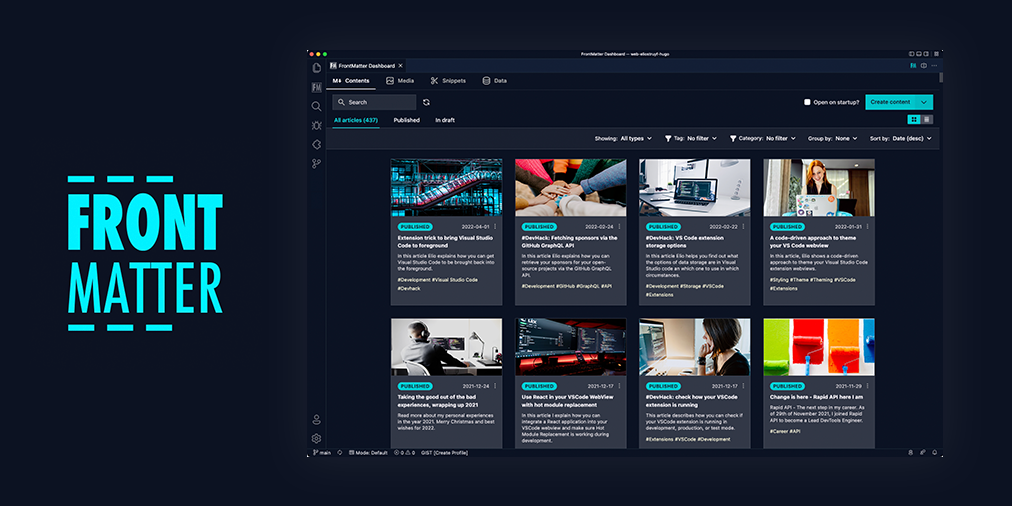
Front Matter is a CMS that runs within Visual Studio Code. It gives you the power and control of a full-blown CMS while also providing you the flexibility and speed of the static site generator of your choice. Jump right into editing and creating content with Front Matter and be able to preview it straight in VS Code.
The extension supports various static-site generators and frameworks like Hugo, Jekyll, Hexo, NextJs, Gatsby, and more.
A couple of our extension highlights that hopefully get you interested in giving Front Matter a try:
- Content, data, and media management
- Search, filter, sort, etc. all your content
- Create new content
- Supporting tools to edit content and media
- Preview your site/content straight in Visual Studio Code
- SEO checks for title, description, and keywords
- Extensibility
- As we know, we cannot support all use cases. We provide a way to extend the functionality of the extension to your needs
- and many more features ...
Missing something? Let us know by opening an issue on the GitHub repository
If you see something missing in your article creation flow, please feel free to reach out.
Version 10
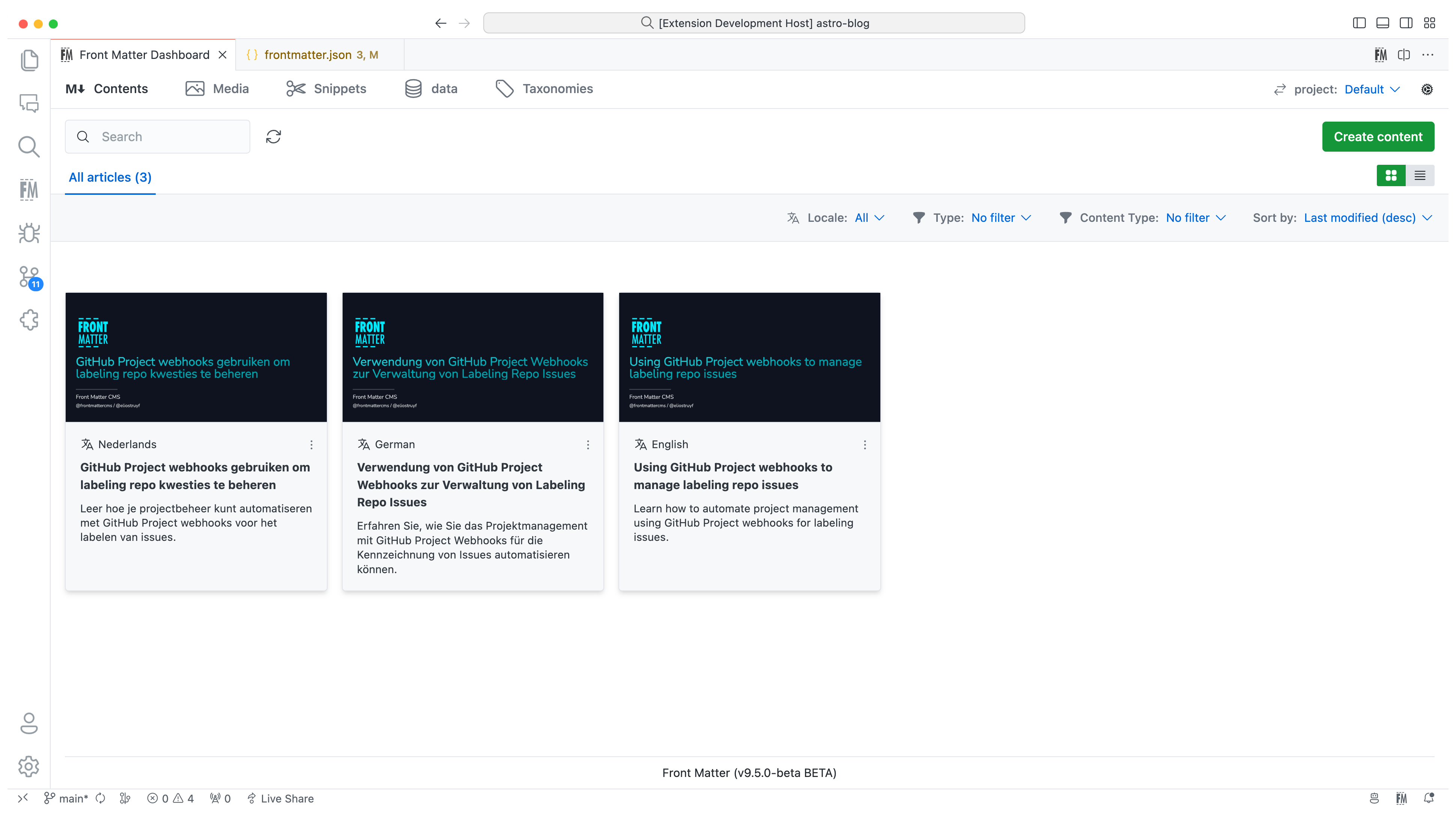
In version 10, we introduced the new i18n/multilingual support for your content. You can now manage your content in multiple languages, more information can be found in the multilingual section of our documentation.
Version 9
The extension is now available in multiple languages: English, German, and Japanese. Want to add your language? Check out the localization the extension.
Version 8
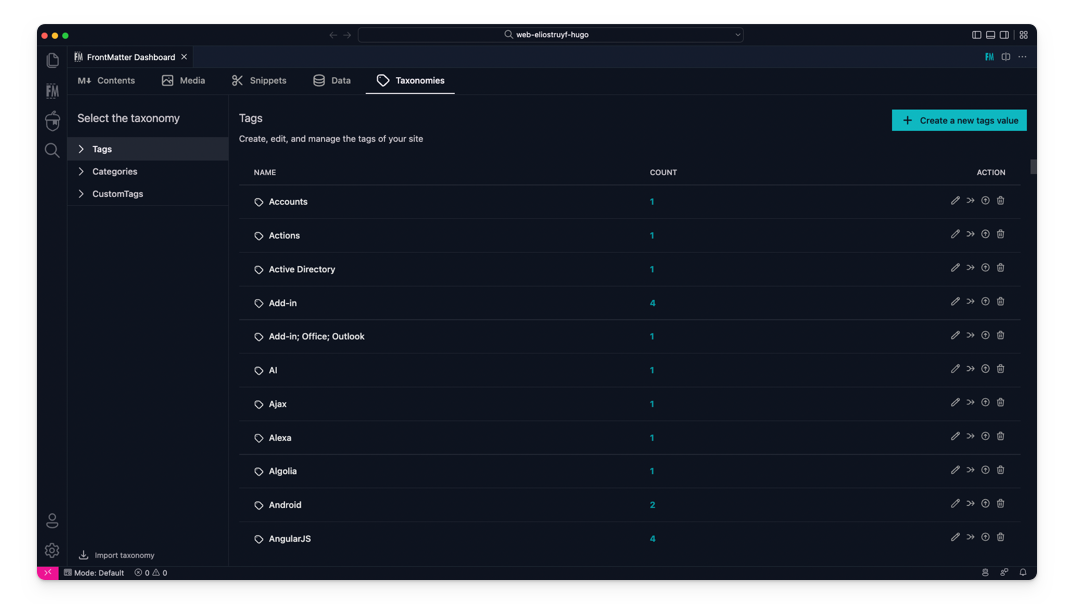
The taxonomy dashboard got introduced on which you can manage your tags, categories, and custom taxonomy.
Version 7
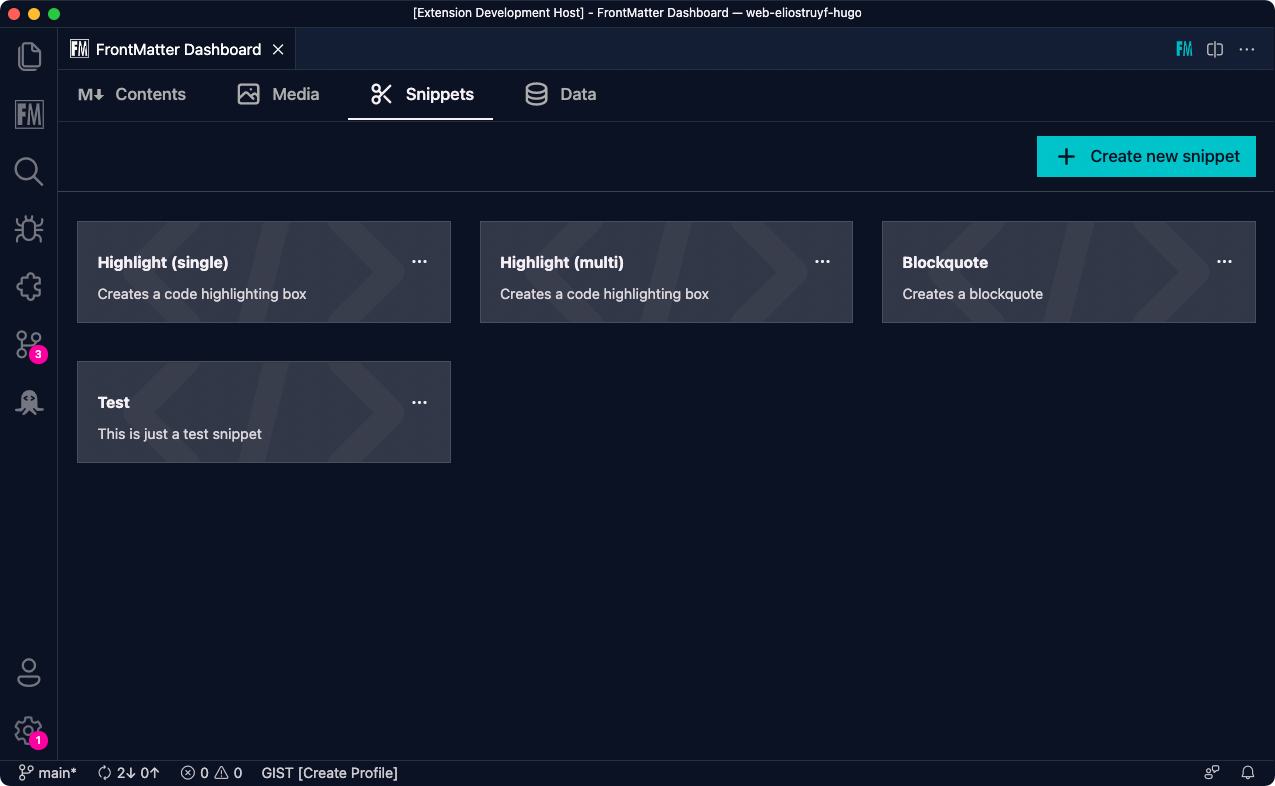
Snippets support for Front Matter has been added!
Version 6
In this version, we introduced the new data files/folders dashboard. You can find more information about the release in our v6.0.0 release notes.
Data files/folders are pieces of content that do not belong to any markdown content, but live on their own. Most of the time, these data files are used to store additional information about your project/blog/website that will be used to render the content.
Version 5
The new media dashboard redesign got introduced + support for setting metadata on media files v5.0.0 release notes.
Version 4
Support for Team level settings, content-types, and image support. Get to know more at: v4.0.0 release notes.
Version 3
In version v3 we introduced the welcome and dashboard webview. The welcome view allows to get you started using the extension, and the dashboard allows you to manage all your markdown pages in one place. This makes it easy to search, filter, sort, and more.
Version 2
In version v2 we released the re-designed sidebar panel with improved SEO support. This extension makes it the only extension to manage your Markdown pages for your static sites in Visual Studio Code.
⚙️ Installation
You can get the extension via:
- The VS Code marketplace: VS Code Marketplace - Front Matter.
- The extension CLI:
ext install eliostruyf.vscode-front-matter - Or by clicking on the following link: open extension in VS Code
Info: The docs can be found on frontmatter.codes.
🧪 Beta version
If you have the courage to test out the beta features, we made available a beta version as well. You can install this via:
- Uninstall the main Front Matter version
- Install the beta version
- VS Code marketplace: VS Code Marketplace - Front Matter BETA.
- The extension CLI:
ext install eliostruyf.vscode-front-matter-beta - Or by clicking on the following link: open extension in VS Code
Info: The BETA docs can be found on beta.frontmatter.codes.
📖 Documentation
All documentation can be found on frontmatter.codes.
Documentation repository: GitHub - Front Matter DOCs
💪 Contributing
Pull requests are welcome. Please open an issue first to discuss what you would like to change, or which problem you would like to fix. This makes it easier for us to follow-up and plan for future releases.
You can always help us improve the extension in varous ways like:
- Testing out the extension and providing feedback
- Reporting issues and bugs
- Suggesting new features
- Fixing an issue
- Updating documentation
- UI improvements
- Tutorials
- etc.
Eager to start contributing? Great 🤩, you can contribute to the following projects:
👀 Show the work you are using Front Matter
Are you using Front Matter and are you interested in showing for which websites you use it? You can show your work by opening a showcase issue.
You can open showcase issues for the following things:
- Show the website for which you use Front Matter;
- Share an article/video/webcast/... that explains how you use Front Matter;
- Got something else to share? Open an issue and we can see where it fits on our website.
👉 Contributors 🤘
💚 Backers & Sponsors 👇 🤘
📊 Telemetry
The Front Matter CMS extension only uses telemetry on application crashes. The
extension respects the telemetry.enableTelemetry setting which you can learn
more about in the
Visual Studio Code FAQ.
For crash reports in the webviews, we make use of Sentry to help us understand what went wrong. This data is only used to fix issues and improve the extension. You can find more information about the Sentry implementation in the following files:
The user ip address is not collected.
🔑 License
markitdown
microsoft·Python
把 PDF、Office 文档等各类文件转成 Markdown 的 Python 工具,方便喂给 LLM 或做文档处理。
文档转换+4Markdown 编辑器
194764+53315kv0.1.92026-11-07 00:14 UTC
memos
usememos·Go
开源可自托管的轻量笔记应用,把日常想法按时间线整理,数据完全归自己所有,可自由选择私密或分享。
自托管笔记+4Markdown 编辑器
64382+544.9k26.11.02026-11-10 14:41 UTC

marktext
marktext·TypeScript
一款简洁优雅的跨平台 Markdown 编辑器,支持实时预览、专注模式和打字机模式,适合日常写作与文档编辑。
Markdown 编辑器+3Markdown 编辑器
63830+1504.7kv0.23.02026-11-10 07:55 UTC

rich
Textualize·Python
Python 终端富文本渲染库,能在命令行里输出彩色文字、表格、进度条、Markdown 和语法高亮,让终端界面更好看、更好读。
终端渲染+4Markdown 编辑器
57777+362.5kv15.0.02026-11-07 11:26 UTC