Windows 下若 skia-python 安装不完整会缺 icudtl.dat,导致连字和复杂文字渲染异常,建议装在虚拟环境里;自定义字体需自行提供字体文件路径;从 v1.x 升级到 v2.0 布局与定位系统有破坏性变更,需按迁移指南改代码

pictex
francozanardiMIT更新放缓用 CSS Flexbox 布局语法在 Python 里生成图片,支持渐变、阴影和文字排版,适合批量出图或程序化设计。
A Python library for efficient image generation using CSS Flexbox
v2.3.0发布于 2026-04-03 22:45 UTC211star7fork同步于 2026-11-07 07:30 UTC
python -m venv .venv
pip install pictex 硬件要求按 README 说明
README 未说明,仅依赖 skia-python,未提及 GPU 或显存要求
有 Docker 镜像
用 CSS Flexbox 语法在 Python 里程序化生成高质量图片,省去浏览器渲染开销
用 CSS Flexbox 布局语法在 Python 里生成图片,支持渐变、阴影和文字排版,适合批量出图或程序化设计。
核心能力
- 用 Row/Column 嵌套组件搭建布局,支持 justify-content、align-items、flex-grow 等属性
- 基于 Taffy 布局引擎与 Skia 渲染,输出 PNG/JPEG/WebP/SVG
- 用 HarfBuzz 做文本整形,支持字距、连字、复杂文字与自动字体回退
- 支持渐变、多重阴影、圆角边框与绝对/相对定位
- 可导出 NumPy/Pillow 对象,SVG 支持字体嵌入
容易踩的坑
内容由模型根据 README 生成,可能不完整或不准确,以官方文档为准。看原文 README
- v2.3.0最新正式版2026-04-03 · 2026-04-03 22:45 UTC
Added
- Inline Spans (
Span): Introduced a newSpanbuilder for applying granular, rich formatting within a single text block.- Apply varied styles (color, font size/weight/style, decorations, gradients, stroke, shadows) to specific subsets of text.
- Spans can be nested deeply; properties cascade down and inherit naturally unless explicitly overridden.
- Fully compatible with automatic font fallbacks, complex emoji sequences, bidirectional text, and contextual character joining.
from pictex import Canvas, Text, Span, LinearGradient

gradient_color = LinearGradient(colors=["#cba6f7", "#89b4fa"])
(
    Canvas()
    .color("#cdd6f4")
    .background_color("#1e1e2e")
    .max_width(600)
    .padding(32)
    .text_align("center")
    .render(
        Text(
            "Build ",
            Span("beautiful").color(gradient_color).font_weight("bold"),
            " images with ",
            Span(
                "rich ",
                Span("inline").underline(),
                " styles",
            ).color("#a6e3a1"),
        ),
        scale_factor=2
    )
).save("example_spans.png")
- Overflow Hidden (
overflow("hidden")): Content that exceeds a node's bounds is now clipped. Mirrors the CSSoverflow: hiddenproperty.- Applies to both container nodes (
Row,Column) andTextnodes with a fixed size. - Clips to the padding box, so backgrounds and borders remain fully visible.
- When combined with
border_radius, the clip follows the rounded shape of the element. - Non-inheritable: must be set explicitly on each node.
- Applies to both container nodes (
from pictex import Canvas, Row, Column, Text

LONG_TEXT = "This text is intentionally long and will overflow its container"

def text_block(description: str, overflow: str):
   return Column(
            Text(description).font_size(12).color("gray"),
            Text(LONG_TEXT)
                .background_color("#cba6f7")
                .padding(4)
                .size(width=160, height=60)
                .overflow(overflow),
        ).gap(6)

Canvas().font_size(18).color("#1e1e2e").background_color("#eff1f5").render(
    Row(
        text_block("Overflow visible (default)", "visible"),
        text_block("Overflow hidden", "hidden"),
    ).gap(28).padding(28),
    scale_factor=4
).save("example_overflow_hidden.png")
Fixed
- Text Layout (height with wrapping): Containers with wrapped text no longer reserve excess vertical space. Previously, when Taffy queried the min-content size of a text node, the reported height was based on one word per line, causing the parent container to over-reserve height even when the final allocated width allowed for more efficient reflow.
- Font Weight and Style on default fonts:
font_weight()andfont_style()now work correctly when using the default font, which is a variable font. Note that the current built-in default font only exposes the weight axis. - Letter Spacing: The
letter_spacing()method now correctly applies spacing to clusters. Previously, spacing was added to every glyph, which caused incorrect spacing for clusters (e.g., a base character + combining mark) and multi-glyph emoji sequences. Now, spacing is only added to the last glyph in each cluster, matching browser behavior. - Letter Spacing:
letter_spacing()is now ignored for cursive scripts (e.g., Arabic) to prevent breaking character connections. This matches browser behavior, which also disables letter spacing for cursive scrip
- Inline Spans (
- v2.2.02026-03-29 · 2026-03-29 06:42 UTC
查看更新说明
Added
- Letter Spacing (
letter_spacing()): Controls the extra space between characters, mirroring the CSSletter-spacingproperty.- Accepts an absolute pixel offset (
letter_spacing(8)), a percentage of the font's space-character width (letter_spacing("10%")), or aLetterSpacinginstance for type-safe usage. - Negative values tighten character spacing.
- Pass
"normal"to restore the font's default spacing. - Inherited, so it can be set once on a
Canvasor container and applied to allTextnodes inside.
- Accepts an absolute pixel offset (
from pictex import Canvas, Column, Text

Canvas().font_size(34).color("#1e1e2e").background_color("#cdd6f4").render(
    Column(
        Text("Default spacing"),
        Text("letter_spacing(5)").letter_spacing(5),
        Text("letter_spacing(10)").letter_spacing(10),
        Text("letter_spacing('30%')").letter_spacing("30%"),
        Text("letter_spacing(-4)").letter_spacing(-4),
    ).gap(10).padding(28)
).save("example_letter_spacing.png")
- Text Box Edge (
text_box_edge()): Controls how the top and bottom edges of a text node's bounding box are calculated. Inspired by the CSStext-box-trim/text-box-edgeproperties."font"(default): Box edges are derived from the font's ascent/descent metrics - stable and content-independent."glyphs": Box edges are derived from the actual bounds of the rendered glyphs - tightly wraps visible characters, removing empty ascender/descender space.- Shorthand (
text_box_edge("glyphs")) sets both edges at once. Keyword form (text_box_edge(top="glyphs")) sets each edge independently, omitted keywords default to"font". - Inherited, so it can be set once on a
Canvasor container and applied to allTextnodes inside.
from pictex import Canvas, Row, Column, Text

Canvas().font_size(54).background_color("#eff1f5").render(
    Row(
        Column(
            Text('"font" (default)').font_size(12).color("gray"),
            Text("hello").color("#1e1e2e").background_color("#cba6f7"),
        ).gap(6).align_items("center"),
        Column(
            Text('"glyphs"').font_size(12).color("gray"),
            Text("hello").color("#1e1e2e").background_color("#a6e3a1").text_box_edge("glyphs"),
        ).gap(6).align_items("center"),
    ).gap(40).padding(28)
).save("example_text_box_edge.png")
- Per-side padding and margin: Convenience methods to set a single side without touching the others.
padding_top(),padding_right(),padding_bottom(),padding_left()padding_horizontal()(left + right),padding_vertical()(top + bottom)margin_top(),margin_right(),margin_bottom(),margin_left()margin_horizontal()(left + right),margin_vertical()(top + bottom)
# Before
Text("Hello").padding(0, 0, 0, 20)   # only left padding — positional, error-prone
Text("Hello").padding(10, 0, 10, 0)  # only vertical padding

# After
Text("Hello").padding_left(20)
Text("Hello").padding_vertical(10)
background_image()now accepts aPathobject in addition to a string, consistent withfont_family()andfont_fallbacks().
Changed
-
line_height()now takes"auto"as default value, meaning each line's vertical space is derived from the font's own metrics (ascent + descent + leading). Previously, the default was1.0 * font_size, which ignored the font's built-in spacing and was inconsistent with standard typographic behavior.*Visual change
- Letter Spacing (
- v2.1.22026-03-23 · 2026-03-23 23:33 UTC
查看更新说明
Fixed
- Contextual Shaping Across Font Runs: Scripts like Arabic and Indic that rely on contextual joining (e.g., initial/medial/final character forms) now shape correctly even when a word is split across multiple font runs due to font fallback. Previously, each run was shaped in isolation, causing characters at run boundaries to render in their disconnected (isolated) form instead of the correct joined form.
- Text Wrapping: Text nodes with first line empty were not calculating their height correctly.
- Line Height Calculation: Line height calculation is now based on the maximum metrics (ascent, descent, leading) of all fonts used in a single line. Previously, it simply used the primary font's metrics, which could result in wrong line heights when using fallback fonts or multiple fonts in the same line.
- Baseline Alignment: The text baseline within a line is now determined by the highest ascent of all fonts present in that line. Previously, the baseline was dictated solely by the primary font, causing vertical misalignment when rendering taller fallback fonts (like emojis).
- Text Decoration Positioning: The vertical position for underlines and strikethroughs now adapts to the fonts used within the line. Previously, these positions were fixed to the primary font's metrics, which caused decorations to be misaligned or cut through taller fallback characters.
- Text Direction: Fixed RTL text rendering where complex ligatures were broken and diacritics misaligned. HarfBuzz now natively processes logical text instead of pre-reversed strings, restoring OpenType GSUB/GPOS features.
- Text Layout: Corrected HarfBuzz Y-offset coordinate mapping to Skia's Y-axis, fixing vertically displaced Arabic diacritics.
Full Changelog: https://github.com/francozanardi/pictex/compare/v2.1.1...v2.1.2
- v2.1.12026-03-15 · 2026-03-15 22:07 UTC
查看更新说明
Fixed
- Text Wrapping: Fixed false word-wrapping when no width constraint is set, caused by floating-point precision mismatch between glyph advance measurement and wrapping logic.
- Text Wrapping: Fixed CJK text not wrapping within fixed-width containers. Characters from Han, Hiragana, Katakana, and Hangul scripts are now treated as individual breakable units.
Full Changelog: https://github.com/francozanardi/pictex/compare/v2.1.0...v2.1.1
- v2.1.02026-02-18 · 2026-02-18 01:51 UTC
查看更新说明
PicTex v2.1.0
What's New
Advanced Text Shaping (HarfBuzz)
PicTex has migrated from Skia to HarfBuzz for text shaping. This decision was made after facing some issues with skia-python, such as characters width calculation ("👨👩👧👦" or "ZWJ"). See #43 for more info about this.
Unicode Bidirectional Support (LTR/RTL)
PicTex now natively supports languages like Arabic and Hebrew, even when mixed with LTR text.
- Automatic Reordering: Mixed English and Arabic text now flows correctly without manual intervention.
- Text Direction API: New
.direction()method to control horizontal layout flow across containers.
New Builder Methods
width()&height(): Convenience methods for direct size control (e.g.,Text("Hello").width(200)).- Enhanced
font_weight(): Now supports CSS-style string values (e.g.,"bold","extra-bold","light"). direction(): Set layout flow to"ltr"or"rtl"at the container level.
Fixes
- Word Wrapping with multiple fonts: Word wrapping was not working correctly when a single line contained multiple fonts. That was because it was using the primary font to measure each text run, instead of using the right run font.
- Vertical Alignment: Fixed baseline inconsistencies when mixing different fonts or scripts in a single line. All text now aligns perfectly to a common baseline. The common baseline is obtained from the primary font, even when all the text in the line is using a fallback font.
Before & After Comparison
from pictex import * ( Canvas() .background_color(NamedColor.PINK) .color(NamedColor.BLUE) .font_size(100) .render("سلام -> درود") ).save("example.png")Before: Text runs are rendered LTR (no BiDi) + word wraping bug (because of font fallback for rendering).
After (v2.1.0): Correct RTL reordering + word wraping is handled correctly even when font fallbacks are used.
Full Changes: https://github.com/francozanardi/pictex/compare/v2.0.2...v2.1.0
用户点评
登录用户的真实使用记录,可按版本和硬件筛选共 0 条
还没有人点评。第一个说出真实体验的人最有价值。
PicTex


Programmatically generate high-quality images using standard CSS Flexbox layouts. Powered by Skia, Taffy and HarfBuzz.

A Python library for efficient image generation using CSS Flexbox. Build complex layouts using familiar web standards, such as justify-content, align-items, flex-grow, then render them as high-quality PNG, JPEG, WebP, or SVG. Perfect for Open Graph, social media graphics, video thumbnails, data visualizations, and automated report generation. Browser-grade layouts without the browser overhead
Features
- CSS Flexbox Layout: Built on industry-standard CSS Flexbox principles with near-complete property support. If you know CSS, you know PicTex. See the CSS Flexbox Compliance table below. Powered by Taffy layout engine (via
stretchable). - Component-Based Design: Compose complex visuals by nesting powerful layout primitives like
Row,Column, andImage. - Rich Styling: Gradients, multiple shadows, borders with rounded corners, and text decorations.
- Advanced Typography: Custom fonts, variable fonts, line height, alignment, and professional text shaping using HarfBuzz for kerning, ligatures, and complex scripts.
- Automatic Font Fallback: Seamlessly render emojis and multilingual text.
- Bidirectional Text (BiDi): Automatic Unicode BiDi algorithm for proper LTR/RTL mixed text rendering.
- Flexible Output:
- Raster: Save as PNG/JPEG/WebP, or convert to NumPy/Pillow.
- Vector: Export to a clean, scalable SVG file with font embedding.
- High-Quality Rendering: Powered by Google's Skia graphics engine (via
skia-python).
[!IMPORTANT] Upgrading from v1.x? PicTex v2.0 introduces significant changes to the layout and positioning system. Please read the Migration Guide to update your code.
Installation
It is highly recommended to install PicTex in a virtual environment to avoid conflicts with system-wide packages and potential permission issues on certain operating systems like Windows.
# 1. Create and activate a virtual environment
python -m venv .venv

# On Windows:
.\.venv\Scripts\activate

# On macOS/Linux:
# source .venv/bin/activate

# 2. Install PicTex into the active environment
pip install pictex
Quickstart
Styled text image
Creating a stylized text image is as simple as building a Canvas and calling .render().
from pictex import Canvas, Shadow, LinearGradient

# 1. Create a style template using the fluent API
canvas = (
    Canvas()
    .font_family("Poppins-Bold.ttf")
    .font_size(60)
    .color("white")
    .padding(20)
    .background_color(LinearGradient(["#2C3E50", "#FD746C"]))
    .border_radius(10)
    .text_shadows(Shadow(offset=(2, 2), blur_radius=3, color="black"))
)

# 2. Render some text using the template
image = canvas.render("Hello, World! 🎨✨")

# 3. Save or show the result
image.save("hello.png")

Composed elements
Compose elements like Row, Column, and Text to build complex visuals. PicTex's fluent API makes styling declarative and intuitive.
from pictex import *

# 1. Build your visual components
avatar = (
    Image("avatar.png")
    .border_radius("50%")
    .background_color("silver")
    .border(3, "white")
    .box_shadows(Shadow(offset=(2, 2), blur_radius=5, color="black"))
)

user_info = Column(
    Text("Alex Doe").font_size(24).font_weight(700).color("#184e77"),
    Text("Graphic Designer").color("#edf6f9").text_shadows(Shadow(offset=(1, 1), blur_radius=1, color="black")),
).align_items("center").gap(4)

# 2. Compose them in a layout container
card = (
    Column(avatar, user_info)
    .background_color(LinearGradient(["#d9ed92", "#52b69a"]))
    .border_radius(20)
    .padding(30)
    .align_items("center")
    .gap(20)
)

# 3. Render and save the final image
canvas = Canvas().font_family("NataSans.ttf")
image = canvas.render(card)
image.save("profile_card.png")
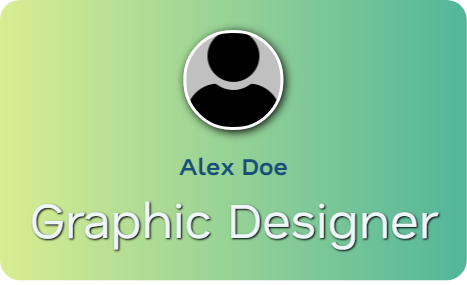
More Examples
| Preview | Description |
|---|---|
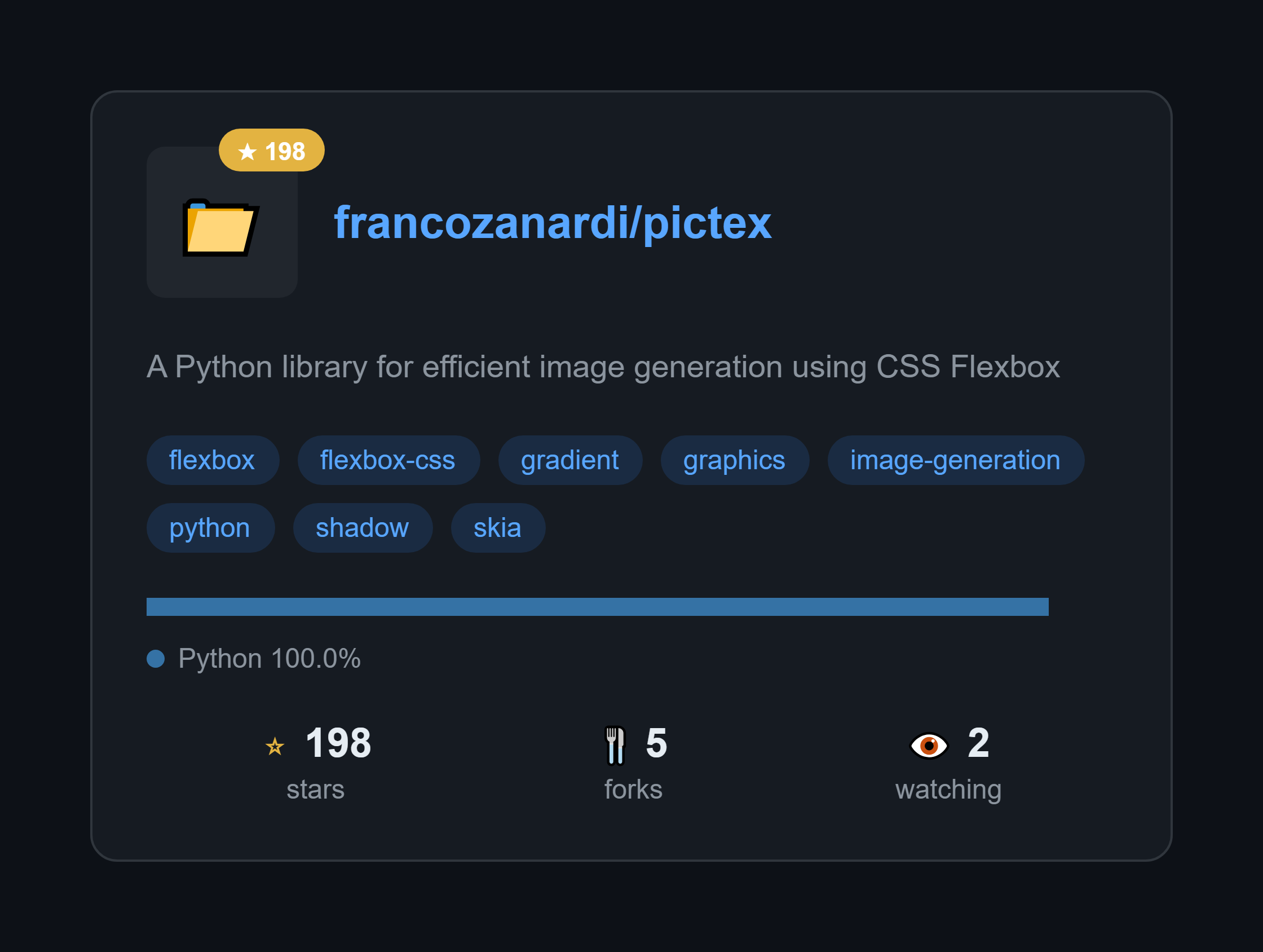 | GitHub Repository Card Generate beautiful cards for any GitHub repo. Just change the repo name and it fetches real data from the API. View Code » |
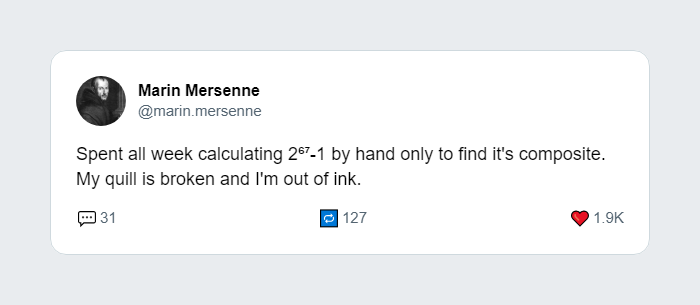 | Tweet to Image Recreate the look and feel of a tweet, perfect for sharing on other social platforms. View Code » |
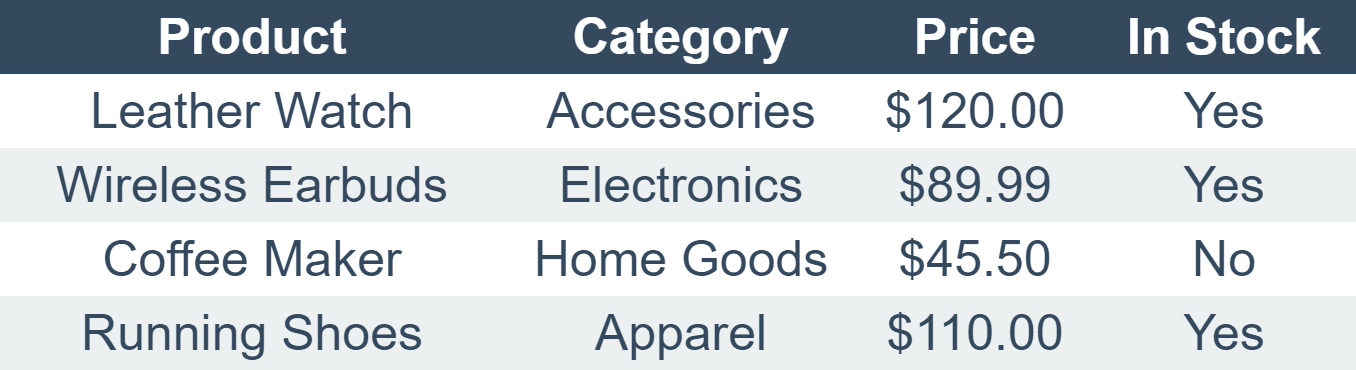 | Data Table Generate a clean, styled table from a 2D list. Includes headers, zebra-striping, and shadows. View Code » |
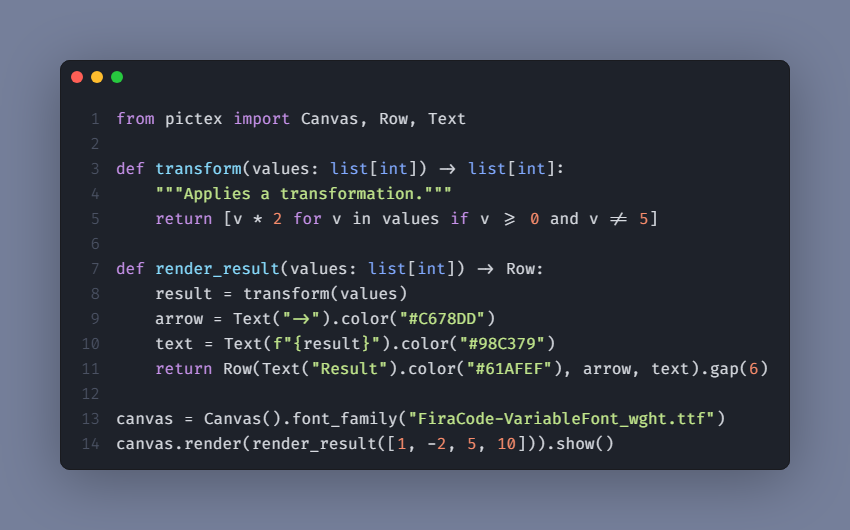 | Code Snippet Create beautifully syntax-highlighted images of your code snippets for tutorials or social media. View Code » |
Check out the full examples directory for more!
CSS Flexbox Compliance
PicTex v2.0 implements CSS Flexbox layout with high fidelity. If you're familiar with CSS, you'll feel right at home. Here's our compliance status:
Container Properties
| CSS Property | Status | PicTex Method | Notes |
|---|---|---|---|
display: flex | ✅ | Row() / Column() | Implicit in layout containers |
flex-direction | ✅ | Row() / Column() | Row = row, Column = column |
flex-wrap | ✅ | .flex_wrap() | nowrap, wrap, wrap-reverse |
flex-flow | ⚠️ | N/A | Shorthand for flex-direction + flex-wrap |
justify-content | ✅ | .justify_content() | All standard values supported |
align-items | ✅ | .align_items() | All standard values supported |
align-content | ⚠️ | Not yet | Planned for multi-line flex containers |
gap | ✅ | .gap() | Unified gap (not split into row-gap/column-gap) |
direction | ✅ | .direction() | Supports ltr and rtl with inheritance |
Item Properties
| CSS Property | Status | PicTex Method | Notes |
|---|---|---|---|
flex | ⚠️ | N/A | Shorthand for flex-grow + flex-shrink + flex-basis |
flex-grow | ✅ | .flex_grow() | Control growth behavior |
flex-shrink | ✅ | .flex_shrink() | Control shrink behavior |
flex-basis | ⚠️ | Not yet | Can use .size() as alternative |
align-self | ✅ | .align_self() | Override container alignment |
order | ❌ | Not planned | Less relevant for static image generation |
Positioning & Sizing
| CSS Property | Status | PicTex Method | Notes |
|---|---|---|---|
position | ✅ | .absolute_position() / .relative_position() | Full CSS positioning support |
top / right / bottom / left | ✅ | .absolute_position(top=, right=, ...) | CSS insets |
width / height | ✅ | .size() | Pixels, percentages, auto, fit-content |
min-width / max-width | ✅ | .min_width() / .max_width() | Prevent collapse/overflow |
min-height / max-height | ✅ | .min_height() / .max_height() | Prevent collapse/overflow |
aspect-ratio | ✅ | .aspect_ratio() | Maintain proportions |
transform: translate() | ✅ | .translate() | Post-layout transforms |
Legend: ✅ Fully supported | ⚠️ Planned | ❌ Not planned
This compliance makes PicTex an excellent choice for developers who want to apply their CSS knowledge to generate images programmatically.
📚 Dive Deeper
For a complete guide on all features, from layout and the box model to advanced styling, check out our full documentation:
- Getting Started
- Core Concepts
- Styling Guide: The Box Model
- Styling Guide: Colors & Gradients
- Styling Guide: Text & Fonts
Troubleshooting
Text rendering issues on Windows (missing ligatures, incorrect text shaping)
Symptom: You may notice that advanced typography features, such as font ligatures or complex scripts, do not render correctly on Windows.
Cause: This is typically caused by an incomplete installation of the skia-python dependency, where a crucial data file (icudtl.dat) required for advanced text shaping is missing. This often happens when pip installs the package in a user-level directory without administrator privileges.
Solutions:
-
(Recommended) Reinstall in a Virtual Environment: This is the safest and most reliable method to ensure a correct installation. A virtual environment does not require administrator rights and provides a clean slate.
# If already installed, uninstall first pip uninstall pictex skia-python # Create and activate a new virtual environment (see installation section) python -m venv .venv .\.venv\Scripts\activate # Install PicTex again pip install pictex -
Reinstall with Administrator Privileges: If you cannot use a virtual environment, running the installation from a terminal with administrator rights will allow
pipto install the package correctly.# Open PowerShell or Command Prompt as an Administrator pip install --force-reinstall pictex
Contributing
Contributions, issues, and feature requests are welcome! Feel free to check the issues page.
Running tests locally (matching CI environment)
docker build -f Dockerfile.test -t pictex-test .
docker run --rm -v "$(pwd):/app" pictex-test pytest
License
This project is licensed under the MIT License - see the LICENSE file for details.
stable-diffusion-webui
AUTOMATIC1111·Python
基于 Gradio 的 Stable Diffusion 网页界面,把文生图、图生图、局部重绘等能力做成可视化操作面板,不用写代码就能跑图像生成。
图像生成+4图像生成
165283+3731kv1.10.12026-03-02 07:00 UTC
ComfyUI
Comfy-Org·Python
基于节点图的扩散模型图形界面与后端,支持本地快速推理和 API 调用,方便搭建和调试图像生成工作流。
扩散模型+4图像生成
146144+65817kv0.44.02026-11-10 17:13 UTC

OpenMontage
OpenMontageInc·Python
把 Claude、Cursor 等 AI 编程助手变成完整视频制作工作室,内置 12 条制作流水线和 100+ 工具,覆盖脚本、配音、图像生成到剪辑全流程。
视频制作+4图像生成
79357+70311k2026-11-09 06:23 UTC

OpenMontage
calesthio·Python
把 Claude、Cursor 等 AI 编程助手变成完整的视频制作工作室,内置 12 条制作流水线和 100+ 工具,覆盖从生成到剪辑的全流程。
视频制作+4图像生成
7786710k2026-11-03 17:42 UTC