需先装好 Python 3.11+、uv 和 Node.js 三个前置依赖;本地跑 Gemini 要自备 AI Studio API Key,部署则需 Google Cloud 账号与项目;默认会向自身 GCP 项目写遥测日志,可用 AGENTS_CLI_TELEMETRY=0 或 DO_NOT_TRACK=1 关闭。
agents-cli
googleApache-2.0活跃维护把任意编码助手变成 Google Cloud 上的 AI Agent 专家,提供命令行工具和技能,覆盖 Agent 的创建、评估与部署全流程。
The CLI and skills that turn any coding assistant into an expert at creating, evaluating, and deploying AI agents on Google Cloud.
v1.13.0发布于 2026-11-04 16:19 UTC6,330star +15 / 7 天731fork同步于 2026-11-10 11:34 UTC
uvx google-agents-cli setup 硬件要求按 README 说明
README 未说明显存或 GPU 要求;本地开发需 Python 3.11+、uv 和 Node.js,可用 AI Studio API Key 在本地运行 Gemini,部署与云功能需 Google Cloud 项目。
给编码助手装上技能和命令,端到端构建、评估并部署 Google Cloud 上的 ADK 智能体
把任意编码助手变成 Google Cloud 上的 AI Agent 专家,提供命令行工具和技能,覆盖 Agent 的创建、评估与部署全流程。
核心能力
- 通过 skills 让 Claude Code、Codex 等编码助手掌握 ADK 开发流程
- 用 agents-cli create 一键生成 adk_python 模板项目
- eval 子命令覆盖推理、打分、合成数据集与失败聚类
- 支持部署到 Agent Runtime、Cloud Run、GKE 并配置 CI/CD
- 可独立于编码助手在终端直接运行全部命令
容易踩的坑
内容由模型根据 README 生成,可能不完整或不准确,以官方文档为准。看原文 README
- v1.13.0Release v1.13.0最新正式版2026-11-04 · 2026-11-04 16:19 UTC
Release v1.13.0
- Cloud Run deployments support Agent Identity.
agents-cli deploy --agent-identitydeploys a Cloud Run service with Agent Identity.- New projects default using Agent Identity for Cloud Run deployments. To migrate an old project so that it uses Agent Identity, run
agents-cli scaffold enhancewith--cloud-run-identity-type agent_identity. - To create a new project that uses a service account instead, run
agents-cli scaffold createwith--cloud-run-identity-type service_account.
agents-cli eval runandagents-cli eval gradeend with aRESULT: PASSorRESULT: FAIL (...)line, preceded on failure by the metrics and cases that failed and a next step.- Set a minimum mean score per metric with a
thresholds:map in the eval config, or for one run with--fail-under METRIC=SCORE(repeatable, one metric each). A missed threshold exits 1.pass_ratein the results is filled from the threshold when the eval service doesn't report one. - Breaking: a run where any case errored now exits 1, even without thresholds. If the errors are rate limits, lower
--qps.
- Set a minimum mean score per metric with a
agents-cli loginsigns in both the gcloud CLI and Application Default Credentials (gcloud auth login --update-adc), so commands that rungcloudwork right after login.- When only Application Default Credentials are available and gcloud has no credentials of its own, agents-cli passes an ADC access token to the
gcloudcommands it runs. GKE deploys in that setup are not covered yet. - Note: the account you sign in with also becomes gcloud's active account.
- When only Application Default Credentials are available and gcloud has no credentials of its own, agents-cli passes an ADC access token to the
- New projects record
create_params.app_nameinagents-cli-manifest.yaml: the name the server serves the agent under (/apps/{app_name}/...).run,eval,playground,deployandpublishuse it; projects without it keep using the basename ofagent_directory.eval generate --app-nameandeval run --app-namedefault to the project's app name instead ofapp.
agents-cli deploy --image <artifact-registry-uri>works for Agent Runtime. The Agent Runtime service agent needsroles/artifactregistry.readeron the repository.--build-argscan't be combined with--image, and an existing agent can't switch between a source build and--image.- Agent Runtime deploys of A2A agents register the agent card in Agent Registry, so the agent shows up as A2A-capable in Gemini Enterprise.
agents-cli deploy --dry-runalso validates a GKE deployment against Google Cloud.agents-cli extension add <name>pins a first-party extension to the latest release compatible with your agents-cli instead ofmain. Pass--ref mainto trackmain.agents-cli extension update --to <ref|:latest>moves a pin. First-party extensions installed frommainmove to the latest release on their nextupdate.
agents-cli extension add langchainandagents-cli extension add claudeinstall instead of failing with "has no agents-cli-extension.yaml".agents-cli extension addinstalls extensions from agents-cli pre-approved repositories without a trust prompt, whether given as a shorthand, anorg/reporeference or a URL.- Usage telemetry names an extension when it serves a command if the extension comes from Google.
- Extensions can share files through symlinks that stay inside their repository. These links are copied as regular files when the extension is vendored and when its skills are installed.
- A project, template, or deployment metadata that declares a language this version of agents-cli doesn't support fails with an error listing the supported languages and suggesting
uv tool upgrade google-agents-cli, instead of being treated as Python. agents-cli scaffold enhance .in a project without a manifest records the base template it rendered (adk_python,adk_go), so laterenhanceandupgraderuns work. Before, they failed with "Base template 'local_' not found". In projects already
- Cloud Run deployments support Agent Identity.
- v1.12.0Release v1.12.02026-10-27 · 2026-10-27 10:30 UTC
查看更新说明
Release v1.12.0
- ADK Go is now Generally Available. The
adk_gotemplate is out of Preview: it is stable, production-ready and supported on the same terms asadk_python. This release also brings:agents-cli create --agent <template>supports ADK Go v2 templates whosemanifest.yamldeclareslanguage: go. Templates built for other ADK Go versions are rejected. A declared language that contradicts the base template (or--base-template) fails with an error explaining how to fix it.- The server e2e tests in new ADK Go projects time out after 120s instead of 60s, so multi-step agents no longer time out.
- The Python agent template is now
adk_python, selected with--agent adk_python(or-a adk_python).adkstill works as an alias. New projects recordadk_pythoninagents-cli-manifest.yaml, and upgrading a project recorded asadkrecordsadk_pythontoo. Enhancing or upgrading these projects requires this CLI version or newer. - New experimental Claude Agent SDK extension. Create a project with
agents-cli scaffold create --agent google/agents-cli/extensions/claude/template@<version>, or migrate an existing agent withscaffold enhanceand that template. It deploys to Agent Runtime or Cloud Run over A2A, calls Claude on Gemini platform only, and comes with Cloud Trace, Cloud Logging, Cloud Monitoring, optional BigQuery Agent Analytics and Cloud SQL sessions.playground,eval dataset synthesizeandeval optimizearen't supported, andpublish geminiis refused on Agent Runtime.- On Agent Runtime, these agents also serve
:query(async_create_session) and:streamQuery(async_stream_query), so an ingress Agent Gateway can govern them (for example with Model Armor) andagents-cli run --mode adkworks.
- On Agent Runtime, these agents also serve
- The agent template directory can be a nested folder, such as
src/my_agent, both in remote templates and with--agent-directory. agents-cli scaffold enhance <template>on a project agents-cli didn't create writes the template's files ascreatewould, and moves each of your files it replaces (such aspyproject.toml,README.md,Dockerfile,.env) to.agents-cli-original/, keeping its path. Your other files stay where they are. Port what you need from the folder, then delete it; enhance won't run again while it exists. New projects'.gitignoreand.gcloudignoreexclude the folder.- Extension templates can set
settings.session_types, socreateoffers and accepts only those session types, with the first as the default. A template whose list is empty or names an unknown session type is rejected. agents-cli scaffold enhance --dry-runexits with code 2 (was 0) when combined with--force, when run with-yand no override flags, or when run without a savedagents-cli-manifest.yaml.- Cloud Run projects run their Cloud Run service on the
hashicorp/google-betaprovider, pinned to~> 8.7. Other resources keephashicorp/google ~> 7.28. Existing projects pick it up throughagents-cli scaffold upgrade; ifterraform initthen reports a lockedgoogle-betaolder than 8.7, runterraform init -upgradeonce. - The server e2e tests in new Python projects time out after 120s instead of 60s, so multi-step agents no longer time out.
agents-cli deploy --dry-runfor Agent Runtime prints the plan even when a check fails. It still exits with code 1.agents-cli deploy --dry-runfor Agent Runtime warns that it could not verify the secrets when the Secret Manager API is disabled, instead of skipping the check silently.agents-cli deploy --dry-runalso validates a Cloud Run deployment against Google Cloud.- A malformed
--env-vars,--secretsor--labelsvalue fails before the project prompt. - A failed
agents-cli publish geminireports the API's reason (for example a SERVICE_DISABLED message with the enable link) instead of a bare HTTP error. - A failed terraform step in
agents-cli infraexits with a short error naming the step and ho
- ADK Go is now Generally Available. The
- v1.11.0Release v1.11.02026-10-20 · 2026-10-20 13:03 UTC
查看更新说明
Release v1.11.0
- Breaking: The
adk@<name>shortcut has been removed. Pass the recipe's GitHub URL toagents-cli createinstead, and browse recipes at https://github.com/google/adk-recipes.- The scaffold's "Browse ADK recipes" option lists recipes from both
core/python/andcontrib/python/in google/adk-recipes. - Projects created with
adk@still upgrade. Theirbase_templateis rewritten to the recipe URL on the first applied change.
- The scaffold's "Browse ADK recipes" option lists recipes from both
- New projects use
google-adk>=2.12.0andgoogle-cloud-aiplatform>=2.2,<3. Agent Runtime projects also depend ongoogle-cloud-agentplatform, and the LangChain extension template moves togoogle-cloud-aiplatform>=2.2,<3. agents-cli deployto Agent Runtime registers the ADK artifact methods (async_save_artifact,async_load_artifact, and others).agents-cli deployto Agent Runtime shows the last 40 lines of the build log when a build fails, instead of only "Build failed".deploy --statusshows it too.- agents-cli's
uvcommands use public PyPI even when a machine-wideuvconfig points at a mirror, sodeployno longer breaks.agents-cli installwarns whenuv.lockuses a mirror and shows the command to re-lock.install --lockednow fails on such a lock. Scripts and CI jobs that runinstall --lockedmay need an update. agents-cli createfinds the agent code in any remote template, not only adk-recipes ones. When bothapp/and a folder-named package exist,app/wins; use--agent-directoryto pick the other. A top-levelagent_directoryin a template'sagents-cli-manifest.yamlis now respected.- LangChain agents are now named after your project, or the name you pass with
--root-agent-name, like ADK agents.- Template authors can list files under
render_filesin.template/templateconfig.yaml. Placeholders such as the agent name are then filled in in those files when a project is created.
- Template authors can list files under
- Traces from LangChain agents now record which conversation each request belongs to (
gen_ai.conversation.id), so you can follow a conversation across requests, as you already can for ADK agents. agents-cli run --mode a2ashows why an agent's task failed, was rejected or was canceled ([error]: <reason>) instead of "(no response content)".- ADK Go agents no longer lose replies for turns that take longer than 15 seconds on
/runor A2A. - The Cloud Build pipelines and Dockerfile in generated ADK Go projects retry Go module downloads, so a dropped connection to the Go module proxy no longer fails the build.
- ADK Go projects include only the session backend chosen at creation time.
agents-cli scaffold upgradestops instead of reporting success when it cannot build the template of the project's original version. It shows why, and suggests--forcewhen that can help.agents-cli scaffold upgradeno longer warns about a legacy eval file that an earlier, stopped upgrade already migrated.agents-cli setup --workspacelists each installed skill's folder once.- Extensions can no longer override
agents-cli info,login,setuporupdate. agents-cli --help, the docs and error hints showcreatecommands that work as written:-ito choose options in prompts,-yto accept the defaults (adktemplate,agent_runtimetarget).- Warnings print as
⚠️ Warning: <message>with a yellow prefix on stderr. Some warnings that used to go to stdout now go to stderr. Scripts that read warnings from stdout may need an update. - Errors that agents-cli logs print with the same red
❌ Error:prefix as other errors, and--debugoutput prints as dimDebug: …lines. - agents-cli no longer prints the google-auth quota-project warning or google-genai's automatic function calling advice.
eval runno longer prints "Could not obtain credentials" when it talks to the local agent server.
- Breaking: The
- v1.10.0Release v1.10.02026-10-12 · 2026-10-12 19:47 UTC
查看更新说明
Release v1.10.0
- New projects use Agent Identity by default.
agents-cli scaffold createrecordsagent_runtime_identity_default: agent_identity. Thenagents-cli deploycreates the Agent Runtime agent under its own Agent Identity principal, and the generated Terraform (infra single-project,infra cicd) does the same. To keep a service account, pass--agent-runtime-identity-default service_accounttoscaffold createorscaffold enhance. Existing projects are not changed: if the setting is missing, it reads asservice_account, andscaffold upgradedoes not migrate it.deployuses this default only when it creates a new agent. A redeploy without--agent-identityor--no-agent-identitydoes not change the identity of an existing agent.
- Extensions can ship skills. An extension declares skills in the
skills:field ofagents-cli-extension.yaml:agents-cli extension addcopies them to<project>/.agents/skills/, or to~/.agents/skills/with--global.agents-cli extension updatereplaces them with the new version's skills and lists the skills it removed.agents-cli extension removedeletes them. The new--globalflag removes the user-scope install.agents-cli installrestores the skills of every recorded extension.- A skill folder copied by an extension is managed by that extension, and manual modifications to it might be overwritten.
agents-cli extension updatekeeps the old local copy when it refuses a new version or a copy fails.- New
agents-cli deployflags for Agent Runtime and Cloud Run:--remove-labels KEY,...and--clear-labels. New aliases that matchgcloud run deploy:--update-labels,--update-secretsand--env-vars. agents-cli deploynow rejects--iap,--port,--service-accountand--cluster-nameon targets that ignored them. Before, they were silently ignored. Scripts that pass them may need an update.agents-cli runfails withAgent run failed: <reason>and a non-zero exit code when the ADK stream sends an error. Before, the run looked successful.agents-cli scaffold createshows the dependency changes, likeenhanceandupgradedo.agents-cli scaffold createkeeps the detected project in.envwhen credential checks fail, instead of writing theyour-gcp-project-idplaceholder. It also warns when--session-typeis ignored for--deployment-target none.agents-cli scaffold enhancecreates missing config and dependency files instead of skipping them.- Values in
agents-cli-manifest.yamlare now escaped, so a quote or newline in a value no longer breaks the file. Project names are limited toa-z,0-9and-. - Terminology has been adjusted in various places to use appropriate names for the Gemini ecosystem. No functional change, as old variants are kept as aliases where applicable.
- The CLI now uses
google-cloud-aiplatform2.x, andgcsfsis pinned to>=2026.10.0. The template lock files are updated. - The bundled skills list the Ambient Quality Agent (AQuA) recipe.
- New projects use Agent Identity by default.
- v1.9.0Release v1.9.02026-10-06 · 2026-10-06 14:08 UTC
查看更新说明
Release v1.9.0
- Usage telemetry is now on by default. Each command writes one log entry to your own Google Cloud project with the command name, exit code, error class, duration, and CLI, Python and OS versions, never arguments or file contents. Its purpose is to provide users with analytics regarding their tool use, process efficiency, and help diagnose potential issues. The request also sends Google the CLI, Python and OS versions, CPU architecture and command name for usage analytics; no sensitive data is sent. Opt out with
AGENTS_CLI_TELEMETRY=0orDO_NOT_TRACK=1.agents-cli infonow always shows whether telemetry is on. agents-cli deploy --keyencrypts an Agent Runtime agent with a customer-managed Cloud KMS key (CMEK), so deploys work in projects that enforceconstraints/gcp.restrictNonCmekServices. The key can only be set when the agent is created, anddeploy --listshows it in a new Encryption column.agents-cli deploy --dry-runchecks an Agent Runtime deployment against Google Cloud: enabled APIs, the target engine, IAM permissions,actAson the service account, and secrets. A definite problem exits with code 1, and a check that cannot run only warns. A dry run now makes read-only network calls. A real deploy is unchanged.agents-cli deployreports unsupported flags in one format,<flag> is only supported for <targets> deployments (current target: <target>), and names only the flags you passed. An empty value for such a flag, such as--key ""on Cloud Run, is now rejected instead of ignored. Scripts that match the old error text may need updating.- New ADK Python projects set
GOOGLE_GENAI_USE_ENTERPRISE=trueinstead of the deprecatedGOOGLE_GENAI_USE_VERTEXAI. Existing projects keep working:agents-cli deployto Agent Runtime respects whichever name your.envsets. Go projects keep the old name. - New ADK Go projects enable the
gofmtandgoimportsformatters, soagents-cli lintreports formatting issues andlint --fixfixes them. - Re-applying the Terraform generated by this release, for example with
agents-cli infra single-projectorinfra cicd, no longer replaces the BigQuery log sink tables once logs have arrived. The replacement deleted every exported log.completions_viewalso gains aservice_versioncolumn with the deployment revision. Runagents-cli scaffold upgradeto get this in an existing project. - Scaffolded ADK projects no longer append a duplicate
JSONRPC 0.3interface to the agent card on every request to.well-known/agent-card.json. - A tool that exists but cannot run, such as
uv.exeblocked by AppLocker on Windows, now fails with a clear error naming the tool and the OS reason instead of aPermissionErrortraceback. - Installed extensions no longer print a warning on every command. A notice appears only when a command overridden by an extension runs.
- Usage telemetry is now on by default. Each command writes one log entry to your own Google Cloud project with the command name, exit code, error class, duration, and CLI, Python and OS versions, never arguments or file contents. Its purpose is to provide users with analytics regarding their tool use, process efficiency, and help diagnose potential issues. The request also sends Google the CLI, Python and OS versions, CPU architecture and command name for usage analytics; no sensitive data is sent. Opt out with
用户点评
登录用户的真实使用记录,可按版本和硬件筛选共 0 条
还没有人点评。第一个说出真实体验的人最有价值。
Turn your favorite coding assistant into an expert at building and deploying agents on Google Cloud.
Agents CLI in Gemini platform (agents-cli) gives your coding agent the skills and commands to build, scale, govern, and optimize enterprise-grade agents — so you don't have to learn every CLI and service yourself.
Works seamlessly with: Antigravity CLI • Claude Code • Codex • and any other coding agent.
Get Started
Prerequisites: Python 3.11+, uv, and Node.js.
1. Install
uvx google-agents-cli setup
npx skills add google/agents-cli
2. Open your coding agent
Launch Antigravity CLI, Claude Code, Codex, or any coding agent you prefer.
3. Build your first agent
Ask your coding agent to build something — e.g. "Use agents-cli to build a caveman-style agent that compresses verbose text into terse, technical grunts"
See the full tutorial for a step-by-step walkthrough.
Browse the full documentation →
Agent Skills
| Skill | What your coding agent learns |
|---|---|
google-agents-cli-workflow | Development lifecycle, code preservation rules, model selection |
google-agents-cli-adk-code | ADK Python API — agents, tools, orchestration, callbacks, state |
google-agents-cli-scaffold | Project scaffolding — create, enhance, upgrade |
google-agents-cli-eval | Evaluation methodology — metrics, datasets, LLM-as-judge, adaptive rubrics |
google-agents-cli-deploy | Deployment — Agent Runtime in Gemini platform, Cloud Run, GKE, CI/CD, secrets |
google-agents-cli-publish | Gemini registration |
google-agents-cli-observability | Observability — Cloud Trace, logging, third-party integrations |
CLI Commands
| Command | What it does |
|---|---|
agents-cli setup | Install CLI + skills to coding agents |
agents-cli create <name> -y | Create a new agent project with defaults (adk_python template, agent_runtime target) |
agents-cli eval run | Run the agent over the eval dataset and grade the traces |
agents-cli deploy | Deploy to Google Cloud |
agents-cli publish gemini | Register with Gemini |
| Command | Description |
|---|---|
agents-cli login | Authenticate with Google Cloud or AI Studio |
agents-cli login --status | Show authentication status |
| Scaffold | |
agents-cli create <name> -y | Create a new agent project with defaults (adk_python template, agent_runtime target) |
agents-cli scaffold enhance | Add deployment or CI/CD to an existing project |
agents-cli scaffold upgrade | Upgrade project to a newer agents-cli version |
| Develop | |
agents-cli run "prompt" | Run agent with a single prompt |
agents-cli install | Install project dependencies |
agents-cli lint | Run code quality checks (Ruff) |
| Evaluate | |
agents-cli eval run | Run agent inference and grade the traces |
agents-cli eval generate | Run agent inference over eval cases |
agents-cli eval grade | Grade generated traces against metrics |
agents-cli eval dataset synthesize | Synthesize multi-turn eval scenarios for your local agent |
agents-cli eval compare | Compare two eval result files |
agents-cli eval analyze | Cluster failure modes from grade results |
agents-cli eval metric list | List available metrics |
agents-cli eval optimize | Auto-tune agent prompts using eval data |
| Deploy & Publish | |
agents-cli deploy | Deploy to Google Cloud |
agents-cli publish gemini | Register with Gemini |
agents-cli infra single-project | Provision single-project infrastructure |
agents-cli infra cicd | Set up CI/CD pipeline + staging/prod infrastructure |
| Other | |
agents-cli info | Show project config and CLI version |
agents-cli update | Force reinstall skills to all IDEs |
How it works
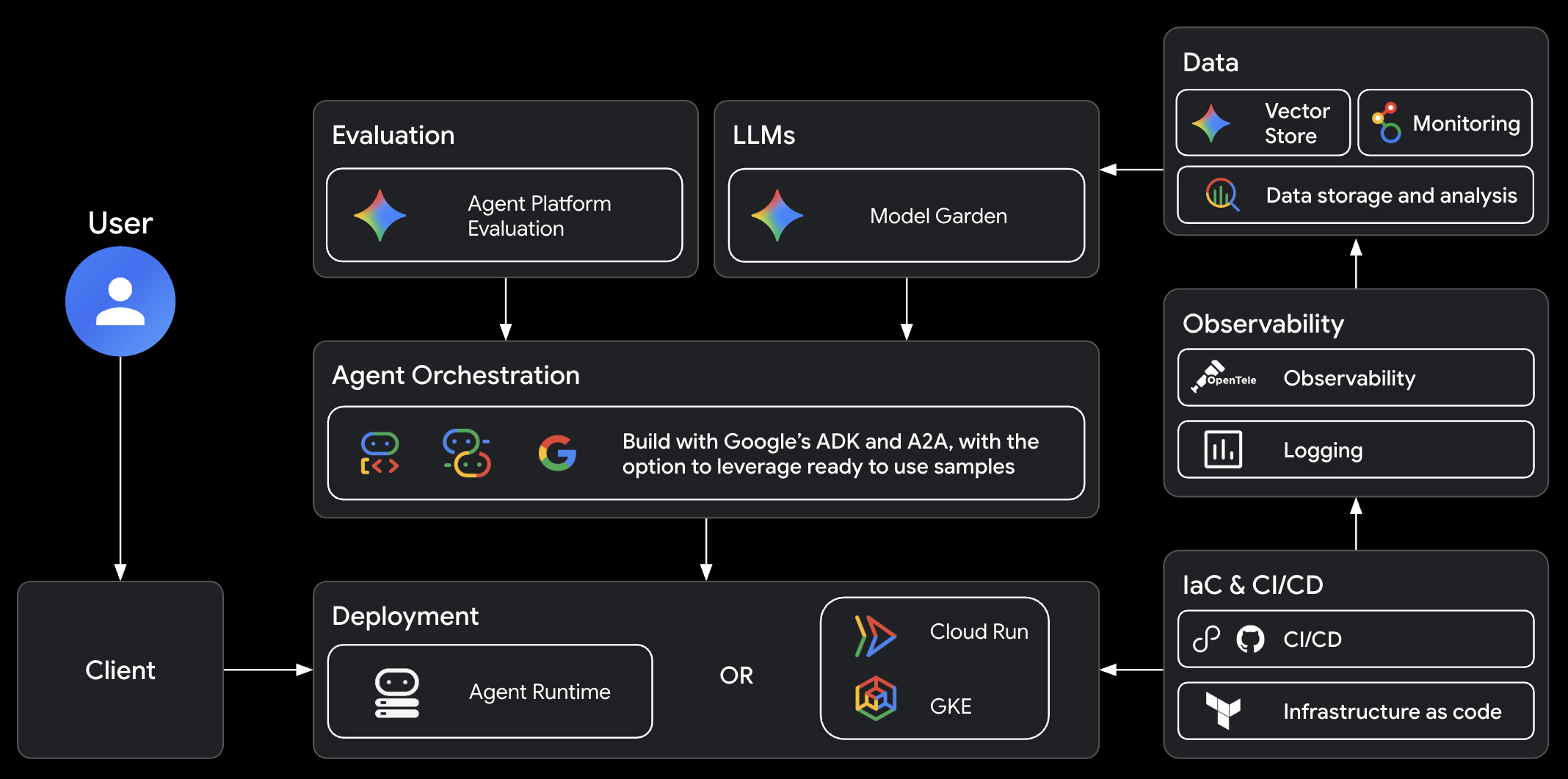
Architecture
The Google Cloud agent stack that agents-cli builds on:
FAQ
Is this an alternative to Antigravity CLI, Claude Code, or Codex?
No. agents-cli is a tool for coding agents, not a coding agent itself. It provides the CLI commands and skills that make your coding agent better at building, evaluating, and deploying ADK agents on Google Cloud.
How is this different from just using adk directly?
ADK is an agent framework. agents-cli gives your coding agent the skills and tools to build, evaluate, and deploy ADK agents end-to-end.
Do I need Google Cloud?
For local development (create, run, eval), no — you can use an AI Studio API key to run Gemini with ADK locally. For deployment and cloud features, yes.
Can I use this with an existing agent project?
Yes. agents-cli scaffold enhance adds deployment and CI/CD to existing projects.
Can I use agents-cli without a coding agent?
Yes. The CLI works standalone — you can run agents-cli scaffold, eval, deploy, and every other command directly from your terminal. The skills just make it easier for coding agents to do it for you.
How can I extend agents-cli with other skills?
agents-cli skills cover the agent-building lifecycle (scaffold, ADK code patterns, evals, deploy, publish, observability). For adjacent concerns, you could install another skill suite alongside. For example, agent-skills covers general software-engineering workflows (ideation, spec gates, planning, code review), and google/skills covers Google Cloud foundations (BigQuery, Cloud Run, Firebase, GKE). genai-factory has Terraform blueprints for enterprise GenAI infrastructure and ships as an extension: agents-cli extension add GoogleCloudPlatform/genai-factory.
Feedback
We value your input — it helps us improve agents-cli for the community.
- Bugs & feature requests: open an issue — 👍 the ones you want prioritized
- Share what you built: we'd love to hear about your projects! Reach out at [email protected] to share your agent or provide feedback
Contributing
The best way to contribute is through feedback: bug reports, feature requests, and ideas shared via issues to directly shape our roadmap.
See the contributing guide for details.
Telemetry
By default, agents-cli emits a single usage signal per command invocation to help
improve the tool and better understand how it's used. Each signal
is a structured log entry written to your own Google Cloud project:
GOOGLE_CLOUD_PROJECT, or else the default project of your Application Default
Credentials (logName=projects/<project>/logs/agents-cli), where you can query
it in Cloud Logging. It records only the metadata such as command name
(e.g. deploy, scaffold.create), exit code, error class, duration (measured
from command dispatch to exit, so it excludes CLI startup), CLI/Python versions,
and OS — never file contents, arguments, or other input. Commands added by
extensions are recorded without their names. A command an extension serves is
marked as such, and the extension is named only if it was installed from a
repository in the google GitHub organization.
The request that writes the entry also carries usage metadata in its
User-Agent and X-Goog-Api-Client headers, which Google receives for
agents-cli usage analytics: the CLI and Python versions, the OS and its release,
the CPU architecture, the command name and a random per-invocation ID. The log
entry's contents, such as the exit code, error class and duration, stay in your
project.
To opt out of sending telemetry, use one of the following environment variables:
# our cli-specific variable
# 0, false, no, or off (case-insensitive):
export AGENTS_CLI_TELEMETRY=0

# donottrack.sh standard variable
export DO_NOT_TRACK=1
Use agents-cli info to see the current telemetry state.
Terms of Service
agents-cli leverages Google Cloud APIs. When you deploy agents, you'll be deploying resources in your own Google Cloud project and will be responsible for those resources. Please review the Google Cloud Service Terms for details.
claude-code
anthropics·TypeScript
终端里的智能编码助手,能理解你的代码库,用自然语言帮你执行日常任务、解释复杂代码、处理 git 工作流,让写代码更快。
编码助手+4编码 Agent
155154+32725kv2.1.3212026-11-10 08:39 UTC
cc-switch
farion1231·Rust
跨平台桌面客户端,把 Claude Code、Codex、OpenCode、DeepSeek Harness 等多个 AI 编程助手集中到一个界面里统一管理和切换,省去来回折腾配置。
AI 编程助手+4编码 Agent
153244+78810kv4.0.282026-11-10 02:19 UTC
caveman
JuliusBrussee·Go
给编码 Agent 用的代理和技能,让模型用「原始人式」极简表达回答,砍掉约 65% 的 token 消耗。
token 压缩+4编码 Agent
118770+7196.9kv4.1.02026-11-09 01:48 UTC

OpenHands
OpenHands·TypeScript
一个能自主写代码、改 bug、跑命令的 AI 开发代理,把大模型接入真实开发环境,让编码任务从对话直接落到执行。
编码代理+4编码 Agent
93107+25412kv1.37.02026-11-10 10:48 UTC