仅装扩展不够,还需在浏览器配置 native messaging manifest 并安装 gopass-jsonapi;gopass v1.12 起 gopass-jsonapi 已拆分为独立仓库需单独下载;从源码构建的 Firefox 开发插件只能临时安装
浏览器扩展,从 gopass 命令行密码库直接填充登录凭据
浏览器扩展,把 gopass 密码库里的登录凭据直接填进网页表单,省去手动复制粘贴。
核心能力
- 支持 Firefox 与 Chrome/Edge 浏览器扩展
- 通过 native messaging 调用 gopass-jsonapi 读取密码
- 用 stdin/stdout 与本地 gopass 进程通信
- 可自定义填充快捷键
容易踩的坑
内容由模型根据 README 生成,可能不完整或不准确,以官方文档为准。看原文 README
- v2.1.1最新正式版2025-11-28 · 2025-11-28 16:59 UTC
- Specify "No data collection" for Firefox (#310)
- Maintenance updates
- v2.1.02024-11-17 · 2024-11-17 19:09 UTC
查看更新说明
- Support dark mode (#266, #270)
- v2.0.02024-10-12 · 2024-10-12 15:12 UTC
查看更新说明
- Migrate Chrome extension to Manifest V3 (#261)
- Note: Firefox extension will be migrated separately to reduce the risk in case of bugs
- Fix link to changelog from options (#260)
- Document security policy and supported versions: https://github.com/gopasspw/gopassbridge/security
- Migrate Chrome extension to Manifest V3 (#261)
- v1.0.02024-10-04 · 2024-10-04 23:12 UTC
查看更新说明
- Select first entry even if create login is shown (#223)
- Update setup error detection and installation help message (#257)
- Upgrade webextension-polyfill to v0.12.0 (#253)
- Upgrade regex-weburl.js to latest version (#255)
- Prepare for upcoming Manifest V3 changes
- v0.9.02022-04-08 · 2022-04-08 21:22 UTC
查看更新说明
- Fix a glitch in a German translation
- Add option to create new credentials against an already-saved site
- Hide password in detail view when using gopass v1.10
用户点评
登录用户的真实使用记录,可按版本和硬件筛选共 0 条
还没有人点评。第一个说出真实体验的人最有价值。


Firefox:


Chrome / Edge (via Chrome Webstore):


gopassbridge
A web extension for Firefox and Chrome to insert login credentials from gopass
Summary
Gopass is the awesome command line password manager.
This plugin enables input of login credentials from gopass.
To access gopass, a native app has to be configured in the browser in addition to installing this extension.
The native app is a wrapper that calls gopass-jsonapi to communicate via stdin/stdout.
Quick impression
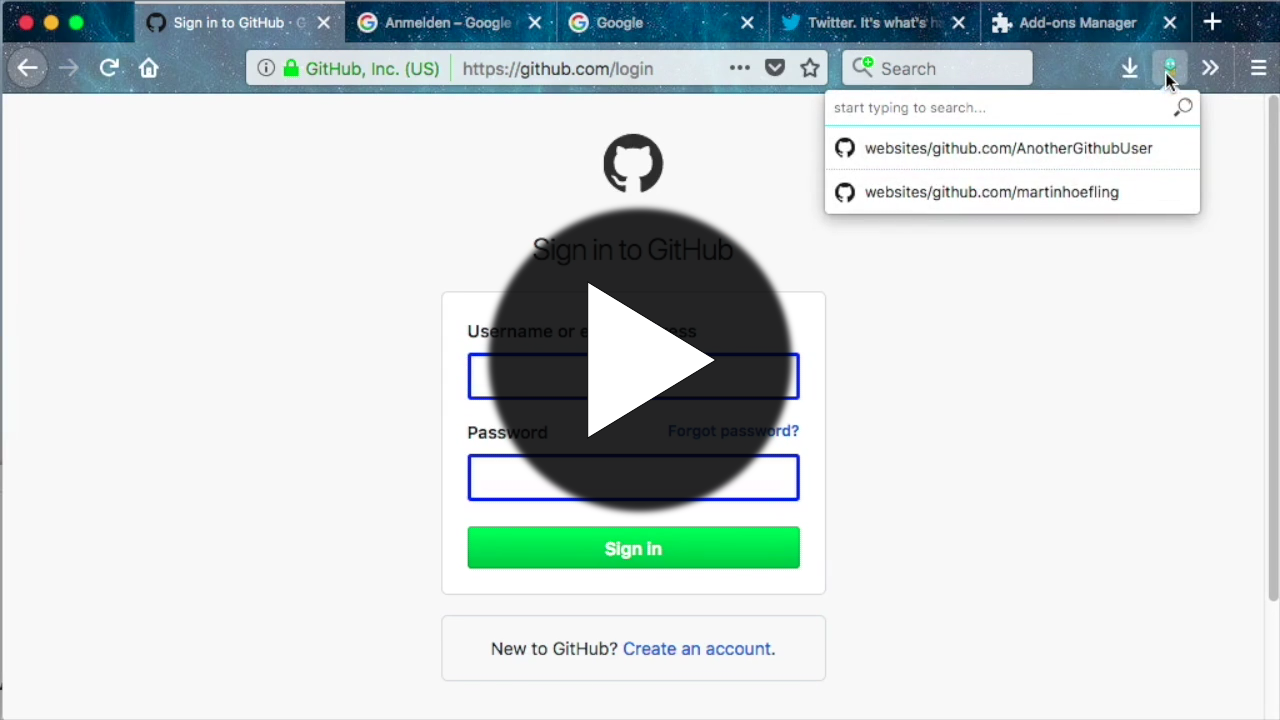
Setup
Install browser extension
Firefox Extension
https://addons.mozilla.org/en-US/firefox/addon/gopass-bridge/
Chrome / Chromium Extension
https://chrome.google.com/webstore/detail/gopass-bridge/kkhfnlkhiapbiehimabddjbimfaijdhk
Build and install browser extension from source
See Makefile release target. For Firefox, the development plugin can be installed only temporarily while for Chrome, the extracted extension can be installed permanently.
Connect to gopass
The connection to gopass is achieved via the native messaging API. For this a native messaging manifest must be configured for your browser.
Since gopass v1.12 gopass-jsonapi has moved to its own repo where the binary can be downloaded and unpacked from the
archive files on Github Releases.
It is recommended that you set up the manifests with gopass-jsonapi as described in the
gopass documentation, "filling passwords from browser".
In most cases it is enough to run gopass-jsonapi configure and follow the tutorial.
More details about Native Messaging can be found in the Chrome and MDN documentation.
Change default shortcut
On firefox, you can change the shortcut via "manage extension shortcut" in the extension menu. In Chrome under "keyboard shortcuts" in the hamburger menu in extensions.
Development
Contributions to this project are welcome!
For details on Pull Requests please read CONTRIBUTING.md.
To start with development of this extension
- clone the repo
- install latest Node.js LTS version (includes
corepack) - run
corepack enable pnpmto enable thepnpmpackage manager - run
pnpm installto install the dependencies - run
make developto setup the development directories for Firefox and Chrome - run
make packageto setup the release directories for Firefox and Chrome - run
npm testto run all unit tests, linters and auto-formatters - run
npm run test:e2eto run Playwright tests within a temporary Docker container - run
make run-firefoxto start an empty Firefox profile with the extension loaded and a debugger open

keepassxc
keepassxreboot·C++
跨平台开源密码管理器,兼容 KeePass 数据库格式,把账号密码集中加密保管,支持 YubiKey 等硬件密钥,本地存储不上云。
密码管理器+4密码管理进阶
29917+682.0k2.8.02026-11-10 19:36 UTC
clients
bitwarden·TypeScript
Bitwarden 官方客户端集合,覆盖网页、浏览器扩展、桌面和命令行,用一套 TypeScript 代码统一管理密码与凭据。
密码管理+4密码管理硬核
14203+302.2kdesktop-v2026.10.42026-11-10 23:17 UTC
keeweb
keeweb·HTML
跨平台免费密码管理器,兼容 KeePass 数据库格式,用浏览器或桌面端统一管理密码,免去多设备同步和格式迁移的麻烦。
密码管理器+4密码管理进阶
13038+41.2kv1.18.72026-05-08 03:29 UTC
KeePassDX
Kunzisoft·Kotlin
Android 上的轻量级 KeePass 密码管理器,可在单一加密文件中编辑凭据,并安全地自动填充表单,支持指纹和 Passkey。
密码管理器+4密码管理
7656+204334.5.82026-11-01 09:37 UTC