加密功能需先在设置中设置密码,且只加密文本,不加密图片和附件;应用本身不提供同步,需借助 Syncthing 等外部同步应用;加密文件在桌面端需用 jpencconverter 解密。

markor
gsantner活跃维护Android 上的纯文本编辑器,支持 Markdown、todo.txt、org-mode、AsciiDoc 等格式,并内置文件管理器,适合在手机上记笔记、列待办和管理文档。
Text editor - Notes, ToDo & Filemanager (for Android) - Markdown, todo.txt, plaintext, math, ..
v2026.10.0发布于 2026-10-25 21:23 UTC6,413star +18 / 7 天565fork同步于 2026-11-10 11:34 UTC
从 F-Droid 或 GitHub Releases 下载 APK 安装;开发构建可执行 make all install run 硬件要求按 README 说明
Android 设备;README 未说明具体系统版本要求,仅加密功能需 Android Marshmallow 或更新版本;支持在 Android TV 设备上启动。
Android 上的轻量纯文本编辑器,用 Markdown 和 todo.txt 管理笔记与待办
Android 上的纯文本编辑器,支持 Markdown、todo.txt、org-mode、AsciiDoc 等格式,并内置文件管理器,适合在手机上记笔记、列待办和管理文档。
核心能力
- 支持 Markdown、todo.txt、Zim、csv、json 等格式的语法高亮
- 完全离线工作,文件与其他纯文本软件互通
- 可将文档转换、预览并分享为 HTML 和 PDF
- Notebook、QuickNote、To-Do 三类入口管理文件
- 支持 AES256 加密文本文件,需在设置中设密码
容易踩的坑
内容由模型根据 README 生成,可能不完整或不准确,以官方文档为准。看原文 README
- v2026.10.0Markor v2026.10.0最新正式版2026-10-25 · 2026-10-25 21:23 UTC
Markor v2026.10.0
- https://github.com/gsantner/markor/issues/95#issuecomment-6403280827
- 2.16.1 - 2026.10.0
- markor:// deep link scheme, Improvements to opening external links (PR #2842 by @harshad1)
- Improve the interface of keyboard shortcuts and implement many essential shortcuts, fixes #154 fixes #2768 fixes #2613 fixes #2818 (#2733 by @guanglinn)
- Markdown: ToDo/CheckBox state ViewMode to Edit - Closes #497, #504, #997, #1320, #1506, #1926 (PR #2886 by @harshad1)
- Add options for app appearance (PR #2803 by @harshad1)
- ViewMode: Update Mermaid from 11.6.0 to 11.17.2, closes #2874 (#2882)
- Editor: Non-blinking (static) cursor settings option, closes #2525 #2790 #2792 (PR #2807 by @guanglinn)
- ViewMode: Add support for viewing link addresses (PR #2798 closes #2800 #2749 by @guanglinn)
- Fix newline indentation before nested list items (Fixes #2884, PR #2887)
- Improvements to search / replace dialog (PR #2821 by @harshad1)
- Search/Replace: Fix regex capture replacement, closes #2872 (PR #2879 by @harshad1)
- Zim (view mode): Support negative timezone offsets (PR #2852 by @bruvellu)
- WikiText/Zim: Fix multiline code block rendering (PR #2808 by Self-Perfection)
- GsFileBrowserFragment: auto-refresh on filesystem changes (FileObserver) (#2823 by @dsremo)
- Natural sort order default for filenames (PR #2779 closes #2734 by @Hill134Z)
- Show toast notification when opening a large file (PR #2778 by @lrq3000)
- Fix webview jumping + other improvements (closes #2726, PR #2736 by @harshad1)
- Allow starting on TV device, by @gsantner
- MainActivity FAB LongPress: Switch between directory and storage location instead of favorites, by @gsantner
- Fix document creation (PR #2858 by @harshad1)
- Snippets: Support extensionless snippets, closes #2875 (PR #2876 by @harshad1)
- FileManager: Fix Favourite state not in sync, closes #2786 (PR #2878 by @harshad1)
- FileManager: Allows navigation up even if the parent isn't writable, closes #2859 (PR #2877 by @harshad1)
- Markdown format: View-Mode Checkboxes toggleable temporary (drop default disabled flag) - makes it usable for holiday pack lists :) (by @gsantner)
- Disable invalid attachment save targets (PR #2799 by @harshad1)
- Fix line number misalignment when syntax highlighting is switched, closes #2810 (PR #2811 by @guanglinn)
- Due Android minSdk21 update, Remove multiDex (by default in 21+) - drop dependency androidx.multidex:multidex, remove androidx.multidex.MultiDexApplication
- Update Android minSdk to 21 (dep requires), update dependencies to recent versions, by @gsantner
- Update Markdown parser dependency flexmark 0.64.8, fix build errors due library API changes (#2407)
- Project configuration: Update to latest AGP (9.4.1), Gradle (9.6.0)
- [Android16/SDK36,GsActivityBase] Keep onBackPressed working - by default not called anymore but needs dedicated callback registration (PR #2927)
- Settings->Other: Add button to view Android storage permission settings again for Markor (by @gsantner closes #2719)
- Adjust large file toast - disable for EMBEDBINARY, lower threshold (by @gsantner #2778)
- Add Markor settings shortcut to Android system settings, by @gsantner
- Minor spelling corrections, by @gsantner based on #2806 @dvmukul
- Update translations (PR #2929, #2883, #2864, #2835, #2831, #2828, #2784)
- v2.16.1Markor v2.16.12026-03-19 · 2026-03-19 08:27 UTC
查看更新说明
v2.16 series
- v2.16.0Markor v2.16.02026-03-09 · 2026-03-09 20:03 UTC
查看更新说明
Changes:
- v2.15.22025-10-23 · 2025-10-23 02:38 UTC
- v2.15.1Markor v2.15.12025-09-20 · 2025-09-20 13:51 UTC
查看更新说明
用户点评
登录用户的真实使用记录,可按版本和硬件筛选共 0 条
还没有人点评。第一个说出真实体验的人最有价值。


Markor
Markor is a TextEditor for Android. This project aims to make an editor that is versatile, flexible, and lightweight. Markor utilizes simple markup formats like Markdown and todo.txt for note-taking and list management. It is versatile at working with text; it can also be used for keeping bookmarks, copying to clipboard, fast opening a link from text and lots more. Created files are interoperable with any other plaintext software on any platform. Markor is openly developed free software that accepts community contributions.
Features
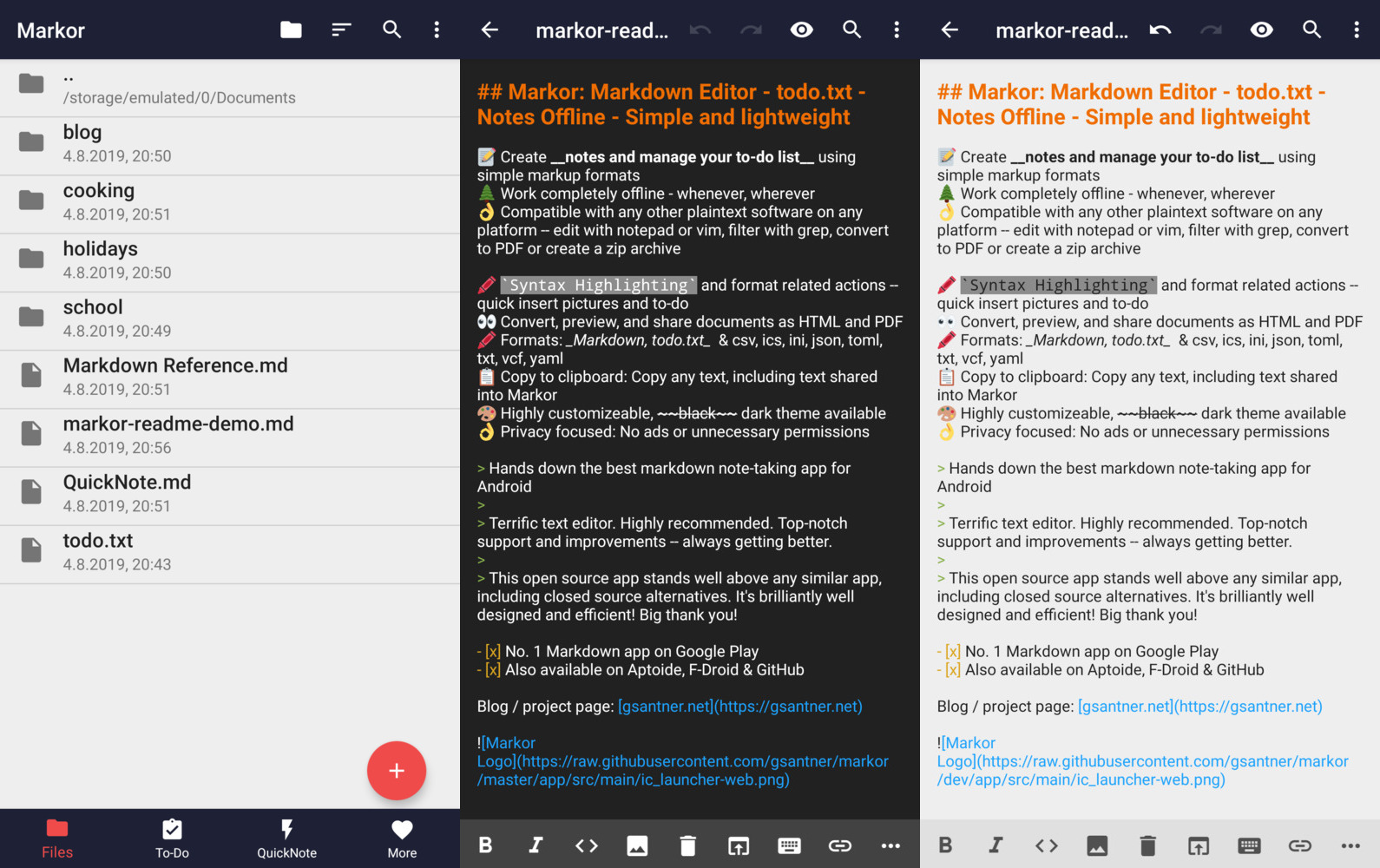
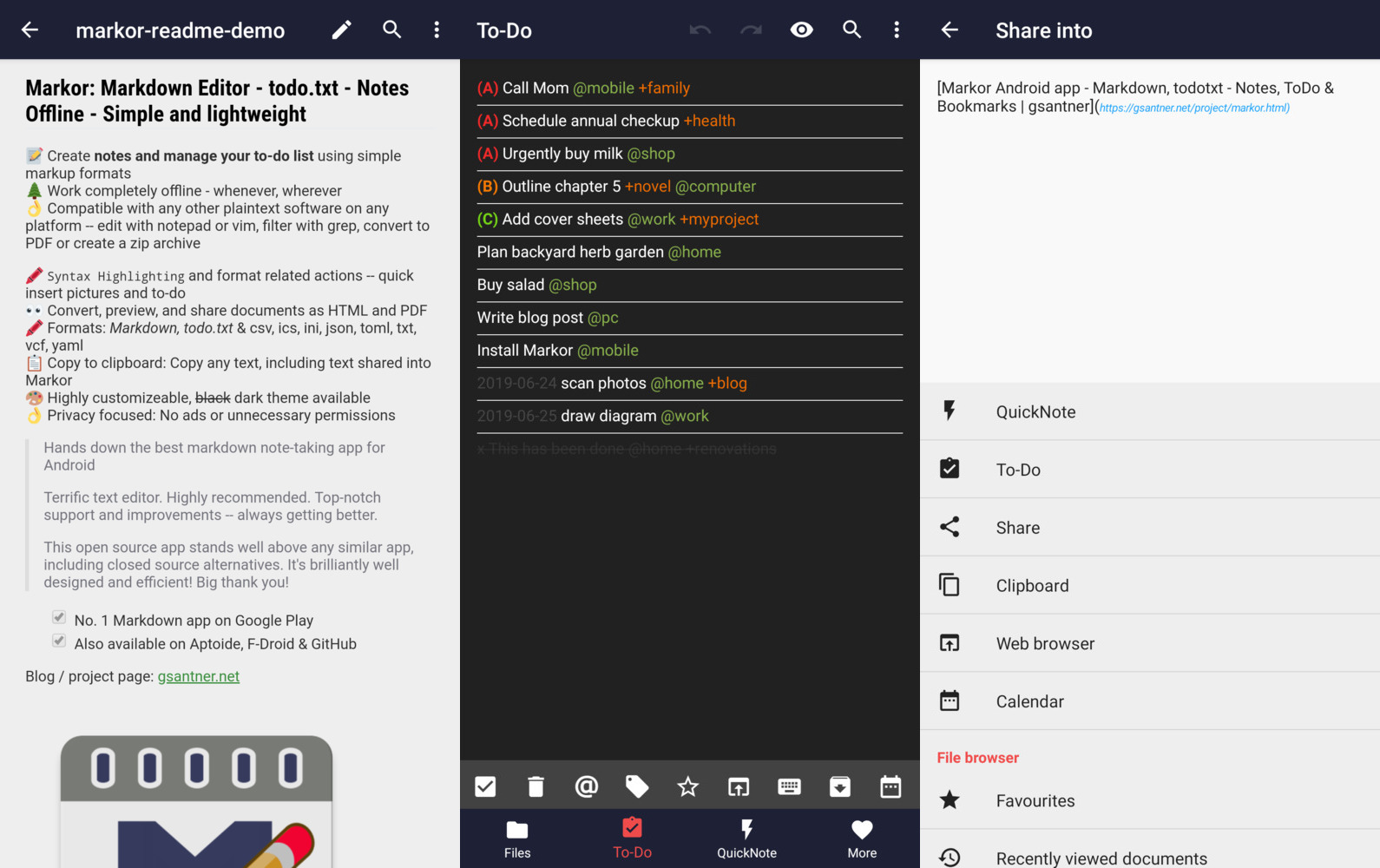
📝 Create notes and manage your to-do list using simple markup formats 🌲 Work completely offline -- whenever, wherever 👌 Compatible with any other plaintext software on any platform -- edit with notepad or vim, filter with grep, convert to PDF or create a zip archive 🖍 Syntax Highlighting and format related actions -- quickly insert pictures and to-dos 👀 Convert, preview, and share documents as HTML and PDF 📚 Notebook: Store all documents on a common filesystem folder 📓 QuickNote: Fast accessible for keeping notes ☑️ To-Do: Write down your to-do 🖍 Formats: Markdown, todo.txt, Zim/WikiText, Plaintext, csv, ics, ini, json, toml, vcf, yaml 📋 Copy to clipboard: Copy any text, including text shared into Markor 💡 Notebook is the root folder of documents and can be changed to any location on the filesystem. QuickNote and To-Do are textfiles 🎨 Highly customizable, dark theme available 💾 Auto-Save with options for undo/redo 👌 No ads or unnecessary permissions 🌎 Language selection -- use other language than on the system 🔃 Markor is an offline app. It works with sync apps, but they have to do syncing respectively. 🔒 Can encrypt your textfiles with AES256. You need to set a password at the settings and use Android device with version Marshmallow or newer. You can use jpencconverter to encrypt/decrypt on desktop. Be aware that only the text is encrypted not pictures or attachments.
New features in the latest update - Markor v2026.10 - Deep links, keyboard shortcuts, ViewMode improvements
Deep links and keyboard shortcuts
Markor now supports the markor:// deep link scheme, allowing external apps and bookmarks to directly open files or perform actions in Markor. Additionally, a comprehensive keyboard shortcut system was added, with many essential shortcuts implemented and an improved shortcuts settings interface.
Markdown ToDo/CheckBox editing in ViewMode
Markdown ToDo items and CheckBoxes can now be toggled directly in ViewMode - no longer requiring edit mode. This makes quick checklists much more convenient.
App appearance options
New settings allow customizing the app's visual appearance, giving users more control over Markor's look and feel.
Mermaid update to 11.17.2
The Mermaid diagram library was updated from 11.6.0 to 11.17.2, bringing improved rendering and new diagram types.
Editor: static cursor option
A new settings option lets users disable the blinking cursor, showing a static (non-blinking) cursor instead - useful for users who find the blink distracting.
ViewMode improvements
- Link addresses can now be viewed in ViewMode by long-pressing a link
- Newline indentation before nested list items is now fixed
- Webview jumping issues were resolved
Search & Replace enhancements
The search and replace dialog received multiple improvements, including fixes for regex capture group replacement.
File manager improvements
- Natural sort order is now the default for filenames
- File browser auto-refreshes on filesystem changes
- Favorites state sync was fixed
TV device support
Markor can now be launched on Android TV devices.
Navigation
- README
- FAQ
- More
- NEWS
- Markor v2026.10 - Deep links, keyboard shortcuts, ViewMode improvements
- Markor v2.16 - ViewMode enhancements, Search & Replace, AsciiDoc fixes
- Markor v2.11 - AsciiDoc, CSV and Org-Mode, Todo.txt advanced search
- Markor v2.10 - Custom file templates, Share Into automatically remove URL tracking parameters
- Markor v2.9 - Snippets, Templates, Graphs, Charts, Diagrams, YAML front-matter, Chemistry
- Markor v2.8 - Multi-selection for todo.txt dialogs
- Markor v2.7 - Search in content, Backup & Restore settings
- Markor v2.6 - Zim Wiki, Newline = New Paragraph, Save Format
- Markor v2.5 - Zim Wiki - Search & Replace - Zettelkasten
- Markor v2.4 - All new todo.txt - Programming language syntax highlighting
- Markor v2.3 - Table of Contents, Custom Action Order
- Markor v2.2 - Presentations, Voice notes, Markdown table editor
- Markor v2.1 - Key-Value highlighting (json/ini/yaml/csv), improved performance
- Markor v2.0 - Search, dotFiles, PDF export
- Markor v1.8 - All new file browser, favourites and faster Markdown preview
- Markor v1.7 - Custom Fonts, LinkBox with Markdown
- Markor v1.6 - DateTime dialog - Jekyll and KaTex improvements
- Markor v1.5 - Multiple windows, Markdown tasks, theming
- Markor v1.2 - Markdown with KaTex/Math - Search in current document
- Markor v1.1 - Markdown picture import from gallery and camera
- Markor v1.0 - Widget shortcuts to LinkBox, ToDo, QuickNote
- Markor v0.3 - Faster loading, LinkBox added, Open link in browser TextAction
Contribute
- Programming
The project is always open for contributions and welcomes merge requests. Take a look at our issue tracker for open issues, especially "good first issues". - Feature requests & discussions
Start a discussion here. - Bug reports
Report issues here. Please search for similar issues & requests first. If it's not a bug, please head to discussions. - Localization
Translate on Crowdin (free).
Develop
Clone the project using git. Then open the project in Android Studio (recommended), install required Android SDK dependencies where required. You may also use any other plaintext editor of your preference.
There is a Makefile in the project which makes it easy to test, lint, build, install & run the application on your device. See the Makefile for reference.
You can find binaries (.apk), logs, test results & other outputs in the dist/ directory.
Example: make all install run.
The project code style is the AOSP Java Code Style. Use the auto reformat menu option of Android Studio before commiting or before you create the pull request.
Technologies / Dependencies
- Java, Android SDK, AndroidX
- No dependency on NDK, 1 APK = all Android supported Architectures
- Editor: Advanced component based on Android EditText
- Preview: Android WebView
- Editor syntax highlighting: Custom implementation for all supported formats
- Markdown parser: flexmark-java
- Zim/WikiText parser: Custom implementation, transpiling to Markdown
- todo.txt parser: Custom implementation
- Binary support: WebView html img/audio/video with support for most common formats
- CI/CD: GitHub Actions
- Build system: Gradle, Makefile
Resources
- Project repository: Changelog | Issues | Discussions | License | GitHub Releases | Makefile
- F-Droid: Listing | Wiki | Metadata | Build log
Privacy
Markor does not use your internet connection unless your own user-generated content references external resources (for example, when you reference an external image by URL). The app works completely offline, no internet connection required! No personal data is shared with the author or any third parties. Files can be shared to other apps from inside the app by pressing the share button. Files are stored locally in a user selectable folder, defaulting to the internal storage "Documents" directory.
Android Permissions
- WRITE_EXTERNAL_STORAGE, READ_EXTERNAL_STORAGE
Read from and write files to storage. - INTERNET
In user-generated content data can be loaded from the internet. - INSTALL_SHORTCUT
Install a shortcut to launchers to open a file/folder in Markor.
License
The code of the app is licensed Apache 2.0.
Localization & translation files (string*.xml) as well samples are licensed CC0 1.0 (public domain).
Project is based on the unmaintained projects writeily and writeily-pro.
FAQ
File browser & file management
How do I save a file?
Markor automatically saves text when you leave Markor or close a file. Additionally there is save button in the top menu.
How do I save files to SD Cards?
Browse to the start folder of your SD Card and press the + button (using file browser or the menu option). Now press the plus button and follow the steps in the dialog. Afterwards Markor's file browser won't strike out filenames anymore and files are writable.

How to synchronize files?
Markor is and will stay an offline focused application. It works with sync synchronization apps, they have to do syncing respectively.
Sync clients known to work in combination include BitTorrent Sync, Dropbox, FolderSync, OwnCloud, NextCloud, Seafile, Syncthing, Syncopoli and others.
The project recommendation is Syncthing. -> Guide for Syncthing
What is Notebook?
The root folder of your files! Markor starts with this folder at the main screen and allows you to browse files. You can work at any (accessible) file & location with Markor.
What is ToDo?
Your main to-do list file in todo.txt format. You can access it by swiping once at the main screen, by selecting todo.txt at Notebook, or by using the dedicated launcher. You can also open it from Notebook or other apps! You will also have the option to create a to-do task when sharing text into Markor when the text is just one line. The location of this file is freely choosable and independent from the Notebook directory.
What is QuickNote?
The fastest and easiest way to take notes! QuickNote is a file in Markdown format with a freely choosable file location. You can access it by swiping twice at the main screen, by selecting QuickNote at Notebook, or by using the dedicated launcher. The location of this file is freely choosable and independent from the Notebook directory.
How can I encrypt my notes?
You have to set a master password in Settings/General/File encryption password and toggle "Encrypt file content" when you create a note that you want encrypted. If you want to use a different password for a different file you will have to change the master password before you create that file. Markor remembers locally only the last used password and automatically decrypts only the content of the files that use the most recent password, if you don't want markor to automatically decrypt any file you can set the master password to some random string.
Launchers
A launcher is a "start menu option" in your devices launcher (=appdrawer / start menu). When Markor is installed you have the start menu option for Markor. When the Markor settings option "Launcher (Special Documents)" is enabled, you get the additional start menu options for ToDo and QuickNote. Note that a device restart is required when you change this option.
Format: Markdown
What is Markdown?
A general purpose markup format for documents of all kinds. As Markdown gets converted to HTML prior displaying a rendered view, you can also include HTML in the text, thus you can do everything web browsers can do.
CommonMark is the specification that the markdown parser used in Markor implements.
| Resources | |
|---|---|
| CommonMark tutorial | Learn Markdown in 10 minutes |
| CommonMark help | Quick reference and interactive tutorial for learning Markdown. |
| CommonMark Spec | CommonMark Markdown Specification |
| daringfireball | Syntax documentation the Markdown creator |
Links to files that contains spaces
Most Markdown applications use URL encoding for links, so does Markor. This means replace every space with %20. This ensures that your Markdown content is compatible with most other Markdown applications.
Markor has a dedicated button for adding links and file references, which automatically applies this appropiate format. Take a look at this video to find out where the file reference button is located and how to use it.
Example: [alt](my cool file.md) ⮕ [alt](https://github.com/gsantner/markor/blob/HEAD/my%20cool%20file.md).
Can I use Markor in class to write down equations? (Math)
Yes, Markor has advanced functionalities for math! Enable the feature by checking Settings»Format»Markdown»Math.
Markor's markdown-reference.md template (available from new file dialog) showcases some examples.
Learn more about available functions and symbols here: 1, 2
Format: todo.txt
What is todo.txt?
Todo.txt is a simple text format for todo. Each line of text is a task. The idea comes from Gina Trapani.
| Resources | |
|---|---|
| Homepage | Todo.txt's home |
| Format | Syntax documentation |
| User Documentation | User documentation |


How to mark a task done?
Done tasks are marked by a x in begining of the line and can optionally be moved to a done/archive file.
What is a context (@)?
With contexts you can mark a situation or place. You may use it to categorize your todos. Context is part of todo.txt format, add @ in front of a word to create one.
Examples: @home @work
What is a project (+)?
With projects you can group tasks by a specific project. You may use it to tag your todos with recognizable meta information. Context is part of todo.txt format, add + in front of a word to create one.
Examples: +video +download +holidayPlanning
vscode
microsoft·TypeScript
微软开源的跨平台代码编辑器,基于 Electron 和 TypeScript 构建,支持插件扩展、调试和 Git 集成,适合日常开发写代码。
代码编辑器+4编辑器 / IDE
195250+16644k1.145.22026-11-10 11:10 UTC
neovim
neovim·Vim Script
Vim 的分支版本,用 Lua 做配置和插件开发,内置 LSP 与异步 API,让终端编辑器更好扩展、更好用。
文本编辑器+4编辑器 / IDE
103537+757.4kv0.12.62026-11-10 05:17 UTC
zed
zed-industries·Rust
用 Rust 打造的高性能多人协作代码编辑器,由 Atom 和 Tree-sitter 作者开发,主打低延迟编辑与实时协同编码。
代码编辑器+4编辑器 / IDE
94639+78712kv1.27.02026-11-10 11:13 UTC

AFFiNE
toeverything·TypeScript
把文档、白板、表格融为一体的开源知识库,可离线使用、支持多人实时协作,是 Notion 和 Miro 的替代方案。
知识库+4编辑器 / IDE
74415+1285.5kv2026.11.9-canary.9072026-11-10 10:49 UTC