需 Claude Code 2.1.286 或更高版本;视频和音频还需另装 ffmpeg,HTML 页面需 Chrome、Chromium 或 Playwright 浏览器,PDF 需 poppler;Warp、WezTerm、Konsole 虽支持 kitty 协议但不支持 Unicode 占位符,图片无法显示;在 tmux 或 Rex、Herdr 中需设置 CLAUDE_CODE_FORCE_TERMINAL_IMAGES=1 才显示图片。
claude-show-your-work
iamumeransariMIT活跃维护Claude Code 插件,让你不用离开终端就能查看、审阅和迭代 agent 的工作成果:直接显示图片、播放视频,并用 Playwright 录制做视觉 QA 和前后对比。
Claude Code plugin to see, review and iterate on your agent's work without leaving the terminal: show images, play videos, and run visual QA with Playwright recordings and before/after comparisons inside the Claude Code terminal. Works in any terminal that supports the kitty graphics protocol, fully cross-platform on macOS, Linux and Windows.
show-your-work--v1.1.0发布于 2026-11-05 12:04 UTC304star +5 / 7 天24fork同步于 2026-11-11 00:00 UTC
/plugin marketplace add https://github.com/iamumeransari/claude-show-your-work.git#releases
/plugin install show-your-work@iamumeransari 硬件要求按 README 说明
README 未说明显存或 GPU 要求;需在支持 kitty 图形协议的终端中运行,官方支持 Ghostty 和 kitty,系统为 macOS 与 Linux。
在 Claude Code 终端里直接看图片、播视频、做前后对比视觉验收的插件
Claude Code 插件,让你不用离开终端就能查看、审阅和迭代 agent 的工作成果:直接显示图片、播放视频,并用 Playwright 录制做视觉 QA 和前后对比。
核心能力
- 用 kitty 图形协议把图片和视频直接画进终端
- 用 Playwright 录制测试并同步并排播放改动前后
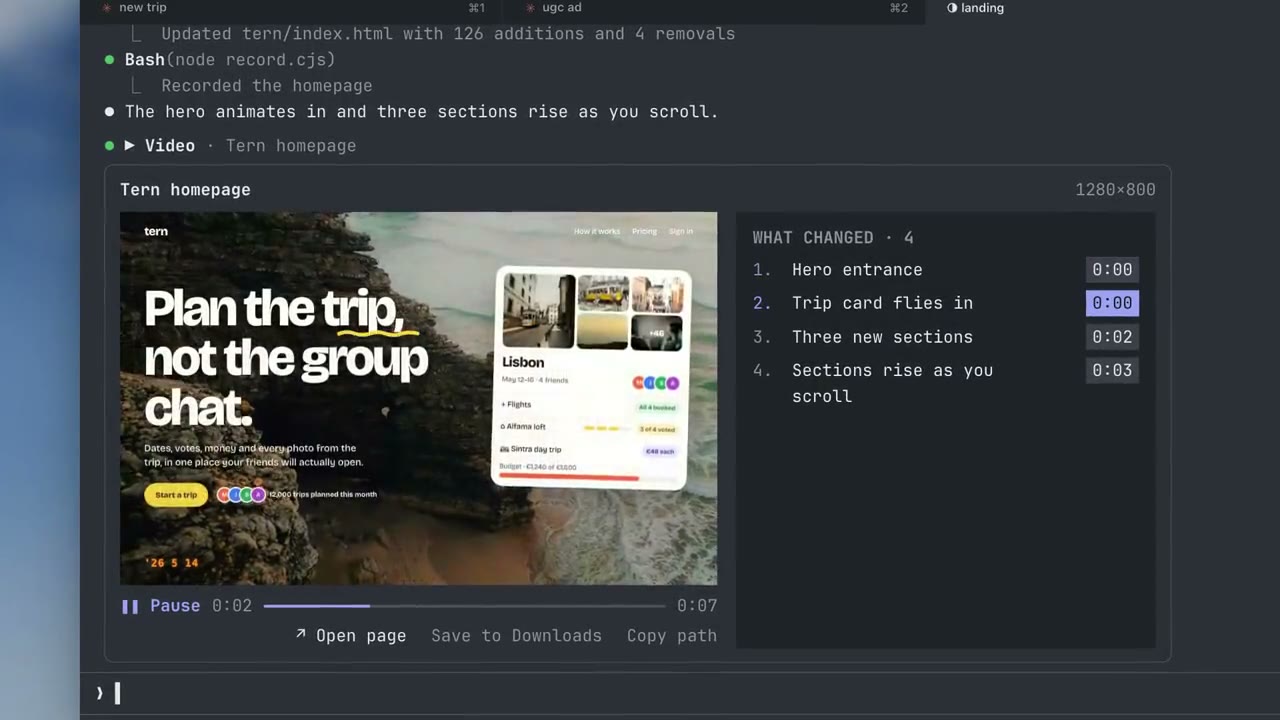
- 视频旁列出可点击的时间戳改动标记与实时检查结果
- 同一播放器保留每个版本,可回退历史或并排对比
- 图片视频不消耗 token,缓存约 1GB 后自动清理旧文件
容易踩的坑
内容由模型根据 README 生成,可能不完整或不准确,以官方文档为准。看原文 README
- show-your-work--v1.1.0v1.1.0最新正式版2026-11-05 · 2026-11-05 12:04 UTC
HTML pages, audio and documents
- show-your-work--v1.0.1v1.0.12026-11-04 · 2026-11-04 13:02 UTC
查看更新说明
Update check and tour fixes
- show-your-work--v1.0.0v1.0.02026-11-04 · 2026-11-04 09:03 UTC
查看更新说明
- Sound for videos. Videos play with their audio, in sync with the picture. Mute sits next to Play. Thanks @East-rayyy (#21).
- Much faster playback. Frames are decoded while the video plays instead of all up front, so videos start sooner, use less disk and play smoothly on a busy machine.
- More terminals. Rex and the Herdr app now show pictures and videos. The notice's Turn on pictures button sets them up in one click. Thanks @amir20 (#25) and @DXMHXR (#23).
- Background sessions show a notice with a command to reopen the chat in a normal tab. Thanks @East-rayyy (#22).
- Videos wait for Play instead of starting by themselves, and View pauses a playing video.
- show-your-work--v0.8.4v0.8.4pre-release2026-11-04 · 2026-11-04 05:06 UTC
查看更新说明
Steadier sound, Rex and Herdr app support
- show-your-work--v0.8.3v0.8.3pre-release2026-11-03 · 2026-11-03 11:38 UTC
查看更新说明
Smoother playback
用户点评
登录用户的真实使用记录,可按版本和硬件筛选共 0 条
还没有人点评。第一个说出真实体验的人最有价值。
Install
Run these two commands in Claude Code:
/plugin marketplace add https://github.com/iamumeransari/claude-show-your-work.git#releases
/plugin install show-your-work@iamumeransari
It supports Ghostty and kitty, on macOS and Linux, with Claude Code 2.1.286 or later. Videos and audio also need ffmpeg: install it with your package manager (brew install ffmpeg on macOS), or ask Claude to install it. HTML pages need Chrome, Chromium or Playwright's browser, and PDFs need poppler (brew install poppler).
When the install finishes, a short onboarding shows you around. Run /show-your-work at any time to change your settings.
Usage
Claude shows you its work in the chat whenever it builds or changes something visual. You can also ask for it directly:
- "Give me four directions for the homepage hero and show them side by side."
- "Build the sign-up form, test it, and show me the recording."
- "Fix the billing toggle and show me before and after."
Visual QA with before-and-after recordings
When Claude builds a feature or fixes a bug, it tests the change with Playwright, records the run and plays the recording in the chat, with everything you need to review the work in one place:
- Before and After: For any change, from a new feature to a bug fix, Claude records the same steps on the old version and the new one. Compare then plays both side by side, in sync.
- Change Markers: Every change Claude made is listed beside the video with its timestamp, and clicking one jumps straight to the moment it shows up.
- Live Checks: Each test check turns green or red as the video reaches it, so you can see exactly where the fix works and where something still fails.
- One Place to Review: You don't need to open a browser, rerun the tests or read through logs, because the recording and its results are right there in the chat.
Images
Whatever Claude designs, you see it right in the chat: landing pages, app screens, components, design concepts, slides, charts and generated images. Ask for a few directions and they appear side by side, then keep iterating on the one you like.
- Compare Directions: Several concepts show together, so you can pick one at a glance instead of opening files one by one.
- Every Version Kept: Each new version lands in the same player, and History lets you step back through every earlier draft.
- Before and After: Switch between the old and new design, or put them side by side, to see exactly what changed.
Video
Beyond product QA, Claude can show you a video of almost anything it works on. Building a website and want to see how it feels as you scroll from top to bottom? Just ask, and the recording plays in the chat, animations and all.
Making an ad, an animation or a launch video? Each cut plays right in the chat, in a full-featured video player:
- Video Controls: Play, pause, scrub through the timeline, and skip forward or back to the moment you want. A video with sound plays with its sound; Mute turns sound off for the session.
- Timestamps: The sidebar walks you through what happens in the video, step by step. Each step is timestamped, so one click takes you right to that moment.
- Compare Versions: When Claude makes a new version of a video, it opens in the same player. You can flip between drafts in History or play the old and new versions side by side, in sync.
- Quick Functions: Open the video in QuickTime Player for a bigger view, or save it straight to your Downloads folder in one click.
Terminals
show-your-work supports Ghostty and kitty, on macOS and Linux. Pictures work there straight away.
- Rex and the Herdr app: pictures and videos draw, but Claude Code only turns them on there when it starts with
CLAUDE_CODE_FORCE_TERMINAL_IMAGES=1. The notice's Turn on pictures button adds a line to your shell profile that sets it in that terminal only, and copies a command to reopen the chat. - Warp, WezTerm and Konsole: these support the kitty graphics protocol, but not the Unicode placeholders Claude Code draws pictures with, so pictures can't show in them yet.
- Other terminals built on Ghostty or kitty: Claude Code doesn't recognise them and leaves pictures off. Start it with
CLAUDE_CODE_FORCE_TERMINAL_IMAGES=1(the notice copies a command that does this), or addexport CLAUDE_CODE_FORCE_TERMINAL_IMAGES=1to your shell profile. - tmux: works inside Ghostty or kitty. Claude Code leaves pictures off in tmux unless it starts with
CLAUDE_CODE_FORCE_TERMINAL_IMAGES=1, so the first time, the plugin turns that on for new tmux panes and the notice copies a command that reopens the chat with it. The plugin also turns onallow-passthroughfor its own pane and passes the pictures through. Nothing in your tmux config is changed.
Versions 0.6.7 to 0.6.9 offered a Turn on pictures button in Warp, WezTerm and Konsole, which added a line to your shell profile. It made pictures draw as a grid of boxes, so the plugin now removes that line by itself.
FAQ
Yes, Claude Code can show images in the terminal with the show-your-work plugin. Once it's installed, Claude shows screenshots, designs, charts and other images right in the chat. It works in Ghostty and kitty.
Yes, Claude Code can play videos in the terminal with the show-your-work plugin. It plays screen recordings, animations, ads and launch videos inside the Claude Code chat. It comes with a feature-rich video player, with scrubbing, skip controls, clickable timestamps and side-by-side comparisons.
You can see what Claude Code built by installing the show-your-work plugin. Whenever Claude builds or changes something visual, it takes a screenshot or records it and shows you the result in the chat. You don't have to switch to a browser and find the page yourself.
Yes, Claude Code can test your app and show you a recording with the show-your-work plugin. Claude tests the features it builds with Playwright, records each run and plays the recording in the chat. The steps are listed beside the video with timestamps. Each check turns green or red as the video reaches it.
Yes, Claude Code can show you a before and after of a change or bug fix with the show-your-work plugin. Claude records the same Playwright steps on the old version and the new one. Compare plays both recordings side by side, in sync. Each test check turns green or red as the video reaches it.
Yes, show-your-work is a Claude Code plugin for visual QA. It records Claude's Playwright test runs and plays them in the chat. Each recording comes with clickable change markers and checks that turn green or red as the video plays. For a change or bug fix, it plays the before and after side by side, in sync.
The easiest way to check that Claude Code actually fixed a bug is to have it record the fix with show-your-work. Ask Claude to fix the bug and show you the before and after. The old and new versions play side by side, in sync, with the checks that now pass marked in green.
show-your-work goes beyond viewing images in the terminal. Its main strength is visual QA. It plays synced before-and-after Playwright recordings, lists the changes you can click to jump to, and turns each check green or red as the video plays. You can review a feature or a fix without leaving Claude Code.
No, show-your-work barely uses any extra tokens, because it's built from the ground up to be both token and memory efficient. Images and videos are drawn straight into your terminal with the kitty graphics protocol, without using any tokens. Videos are also decoded and streamed efficiently, so very little memory is used.
The show-your-work plugin supports Ghostty and kitty, on macOS and Linux.
Yes, show-your-work is free and open source under the MIT license.
No, you don't need to update it yourself. The plugin updates itself, so you're never left behind. You can choose between Stable and Latest releases during the onboarding, or any time with /show-your-work.
You can see the onboarding again by running /show-your-work tour. It covers recordings, before and after, version history and the settings.
No, it doesn't take up much space. It keeps recent pictures and videos so you can flip back through them, and clears out the oldest once they add up to about 1 GB.
You choose whether to share anonymous usage data. You can make that choice during the onboarding, or change it any time with /show-your-work. It never collects any sensitive data whatsoever. The details are in the Privacy policy.
Here's everything the plugin does on your computer, so you know exactly what you're installing. Your pictures and videos never leave your machine.
To get pictures and videos ready, it uses ffmpeg and ffprobe (turning a video into frames and reading its length) and, on macOS, sips (converting a picture to PNG). When you play a video with sound, ffplay (part of ffmpeg) plays its sound, and on macOS osascript reads how long your speakers or headphones take to play it, so the picture waits for the sound. When you press View, Show in Finder or Save to Downloads, it opens the file with open on macOS or xdg-open on Linux. On macOS, mdfind helps /img find an image you pasted. To show an HTML page or a Markdown or Mermaid document, it renders it in a hidden Chrome or Chromium with a throwaway profile (never your logins); for PDFs it uses poppler's pdftoppm and pdfinfo.
A few short scripts run with sh and perl. They find ffmpeg and your home folder, read the terminal's cell size so pictures fit, tidy the plugin's temp folder, open a viewer on Linux, and switch between the Stable and Latest channels. It also uses cp, mkdir, rm, cat and touch for its own temp files, and claude plugin to install its own updates from this repository, at most once a day. You can turn updates off. The updater will be turned off after the plugin moves to the Claude Code plugin directory, which keeps it up to date instead.
It keeps these files:
- Video frames and converted pictures go in a temp folder (
$TMPDIR/claude-show-your-work-<your user id>), and anything older than a week is cleaned up. - A copy of each file Claude shows you goes in
.show-your-work/in your project, so you can look back through versions. - Save to Downloads puts a copy in
~/Downloads. - If your shell profile has the line an older version's Turn on pictures added (see Terminals), it removes that one line.
- With
SHOW_YOUR_WORK_DEBUG=1, it writes adebug.login the temp folder.
Once a day it reads the plugin's latest version number from raw.githubusercontent.com.
If Usage data is set to share in /show-your-work, it sends anonymous usage counts to us.i.posthog.com. These are event names and counts, plus the plugin and Claude Code versions, your terminal, your OS and whether ffmpeg is installed, under a random install id. They never include file names, paths, prompts, anything you type or your IP address. The key in the code is PostHog's public key, which can only send events.
Inside Claude Code, it uses these hooks:
prompt.submitsends one short line with your message, telling Claude this terminal can show pictures (or why it can't). It sends it once a session, again after a compaction, and when that changes.prompt.submitcloses the settings when you send a message and remembers the names of images you paste, so/imgcan find them. Your message isn't changed.tool.callhandles the plugin's ownshow_image,show_video,show_html,show_audioandshow_documenttools. It never touches other tools.command.runruns/img,/page,/audio,/docand/show-your-work. Right after you install, it runs/show-your-work touronce to show you around.ui.renderdraws the plugin's player, notices, settings and tour.session.startandsession.endset up the temp folder and terminal at the start, and send any waiting usage counts at the end. Inside tmux they also start and stop the picture pass-through for the plugin's pane (see Terminals).
Feedback
To report a bug or suggest a change, open an issue.
For developers
The plugin gives Claude five tools: show_image, show_video, show_html (a snapshot of an HTML page), show_audio (MP3 and WAV, with a waveform) and show_document (PDF, Markdown and Mermaid, page by page). A basic call needs only a path. For a before and after, Claude also passes the old file and the test results:
{
  "path": "qa/after.webm",          // the run on the fixed version
  "compare": "qa/before.webm",      // the same steps on the old version
  "title": "Pricing page",
  "url": "http://localhost:3000/pricing",
  "changes": [                      // what changed, and the second it shows up
    { "title": "Annual toggle sets prices", "at": 3.2 },
    { "title": "Plan buttons line up", "at": 5.4 }
  ],
  "summary": [                      // the test results, at most three lines
    { "label": "Billing: toggle works", "ok": true, "passed": 1, "total": 1 },
    { "label": "Layout: plans, buttons", "ok": true, "passed": 3, "total": 3 }
  ]
}
Videos are cut into frames at up to 12 per second, at the width the window shows them (at most 2400 px), with a cap of 3,600 frames (five minutes at full rate). To open a file yourself, run /img path/to/file.png.
To work on the plugin, edit the modules in hooks/ (register.tsx is the entry) and run /reload-plugins to load your changes. Before sending a change, run claude plugin validate . and claude plugin test ..
Status
show-your-work is actively maintained. It is the first plugin to bring pictures, videos and automated visual QA with Playwright recordings into the Claude Code terminal. Its launch video has been viewed more than 275,000 times. It has since become the popular choice among developers who want to see what Claude builds without leaving the terminal. It's listed in some of the biggest Claude Code plugin catalogs and currently ranks among the top trending plugins for Claude Code.
If you want Claude Code to show you screenshots, screen recordings or before-and-after comparisons of its work without leaving the terminal, this plugin is built for exactly that.
License
MIT. Photography in the examples is from Unsplash, used under the Unsplash License. Privacy.