默认监听 8083 端口,默认账号为 admin/admin123,首次登录后应尽快修改;需要自备有效的 Calibre 数据库(metadata.db),没有的话可下载示例库;电子书转换和元数据编辑需要额外安装 Calibre 桌面程序并配置转换工具路径;Kobo 支持需要单独下载 kepubify 二进制文件。
calibre-web
janeczkuGPL-3.0活跃维护把 Calibre 书库变成网页版书架,支持在线浏览、阅读和下载电子书,方便多设备访问自己的藏书。
:books: Web app for browsing, reading and downloading eBooks stored in a Calibre database
0.6.27发布于 2026-08-08 16:09 UTC18,551star +9 / 7 天1,906fork同步于 2026-11-10 23:26 UTC
python3 -m venv calibre-web-env
source calibre-web-env/bin/activate
pip install calibreweb
cps 硬件要求按 README 说明
README 未说明具体硬件要求;需要 Python 3.7 或更新版本,封面提取需要 ImageMagick,Windows 用户可能还需 Ghostscript。
有 Docker 镜像
基于 Calibre 数据库的电子书 Web 应用,用来浏览、阅读和下载电子书
把 Calibre 书库变成网页版书架,支持在线浏览、阅读和下载电子书,方便多设备访问自己的藏书。
核心能力
- 提供响应式 Bootstrap 3 HTML5 界面和完整图形化安装向导
- 支持按用户细粒度权限管理和公开注册
- 提供 OPDS 目录供电子书阅读器应用访问
- 支持浏览器内阅读多种格式并一键推送到电子书阅读器
- 支持 Kobo 设备同步和 Calibre 自定义列
容易踩的坑
内容由模型根据 README 生成,可能不完整或不准确,以官方文档为准。看原文 README
- 0.6.27V 0.6.27 - Ludmila最新正式版2026-08-08 · 2026-08-08 16:09 UTC
!Attention! For this update nh3 has to be installed !Attention!
New features:
- MOBI files now support metadata extraction on upload
- Reverse proxy login with shared secret header implemented
Bug Fixes:
- Cover path is now selected based on the correct setting instead of the presence of
split_path(#3527) - Title sort with "l'" now works correctly in French
- Exclamation marks removed from HTML strings
- Kobo sync behind reverse proxy now works correctly:
library_syncURL is rewritten in init response - Add-to-shelves dropdown menu now renders correctly
- Kobo "Sync to last page read" popup no longer appears repeatedly due to float/int mismatch
- Kobo "Return to last page read" popup when ProgressPercent is 0 now handled correctly
- Kobo PUT
/stateresponse now includes PriorityTimestamp - Downloaded filenames now use native UTF-8 encoding for browsers that support it
- Series list view now sorts by the correct sort field, preventing incorrect article-inclusive sorting (#3583)
- natsort is now used for comic cover page detection when available
- Login failure now returns HTTP 401
- Registration and password reset emails are now sent in the recipient's language
- Crash when User-Agent header is missing is now fixed
- Infinite scroll now triggers correctly on mobile browsers (#3664)
- Case-insensitive duplicate tags are no longer created
- UNIQUE constraint crash on transliteration-identical authors is now fixed (#3403, #3170)
- Caliblur eReader toolbar dropdown overflow is now fixed
- Unauthenticated OPDS requests no longer cause an AttributeError (#3592)
- Metadata search no longer crashes when ComicVine or Douban return no results (#3606)
- Kobo API results are now correctly filtered
- kepubify path is now properly cleared when removed
- OPDS
atom:updatednow reflects the last modification date instead of date added - Staged temporary download files are now cleaned up after the response is sent
- Cover sibling files are no longer created on every book download (
--dont-save-cover) - lubimyczytać.pl metadata provider is now working correctly
- Error handling for series display and book/user table sorting is now improved
- Book conversion format validation now works correctly with HTML-based formats
- Circular import issue in format conversion is now fixed
- File upload temp folder is now instance-specific
- Reverse proxy login now shows user warning when enabled
- Rate limiter reset for reverse proxy header login is now deactivated
- Reverse proxy login now restricts IP addresses and uses shared secret header
- Dialog size of Server side file picker is now limited
- Search metadata provider selection has been improved
- GDrive file type condition error is now fixed
- OPDS error handling for unauthenticated requests is improved
** Security **
- XSS payload in book comments imported via Calibre is now sanitized before display (reported by @Nozomu Sasaki)
- External binary names (e.g. unrar) are now restricted to prevent remote command execution (CVE-2025-7404)
- ReDoS vulnerability in whitespace stripping is now fixed (CVE-2025-6998)
- Stored XSS via author names in
author.htmlis now prevented - Magic link login flow is now hardened against misuse
- SQL injection via the database path parameter is now prevented
- LDAP injection in
bind_user/get_object_detailsis now prevented - XXE injection in EPUB, FB2 and Goodreads API parsing is now prevented
- IDOR in Kobo tokens is now fixed
- OAuth account relinking by unauthorized users is now prevented
- Shelf editing is now restricted to users with appropriate permissions
- Unauthorized access to book files via
/show/is now prevented - Server credentials are no longer exposed in debug output
- Encryption key file now has restrictive file permissions (0o600)
- CSP nonce entropy increased from 32 to 128 bits
- SQL comment column names are now properly escaped
- A Format check during conversion
- 0.6.26V 0.6.26 - Ismara2026-02-06 · 2026-02-06 21:17 UTC
查看更新说明
New features:
- Enabled multi-edit of books in the book list
- Added Instapaper configuration to Kobo sync
- Renamed Google Books Metadata provider
- Renamed environment variable
CACHE_DIRtoCACHE_DIRECTORY - Improved performance during certain search operations (#3476)
- Added Books button to EPUB reader to return to Calibre-Web
- Added page count display in EPUB reader (e.g.
1/1234locations)
- Added an additional EPUB reader theme
Bug Fixes:
- Fixed compatibility with Calibre 9
- Added
certifito requirements on macOS (fixes #3385) - Fixed read status not updating when a book is archived and a custom column is used
- Fixed Caliblur theme display issues
- Added missing texts to the Caliblur theme
- Fixed language icon in Caliblur theme
- Fixed issue where the console remains open when started on Windows via console, allowing Calibre-Web to be stopped even after an in-app restart
- Fixed inability to download books from Calibre-Web OPDS in Readest 0.9.95 (iOS & macOS)
- Replaced archive icon with an open folder instead of a trashcan
- Fixed exclusion of shelves in advanced search
- Fixed support for route
kobo/auth/refresh - Fixed public registration not applying default allowed/denied tags to new users (#3522)
- Removed invalid
sort_paramGET parameter (#3447) - Generated valid session cookie paths (fixes #3459)
- Fixed mass removal of books from shelves (#3520)
** Security **
- Prevented exposure of sensitive information in
config_sql.py— API keys are no longer exported.
- 0.6.25V 0.6.25 - Sissel 2025-08-24 · 2025-08-24 08:51 UTC
查看更新说明
New features:
- Improved error handling for invalid libraries
- Enhanced dependency check and stability for the Windows EXE version
- Added binary paths support for FreeBSD
- Updated Kobo links to support "reading_service_host"
- Added tag to OPDS feed
- EPUB Reader now supports the Kepub format
- Added bulk functions: delete, archive, and mark as read in the book table
- Added Storygraph to identifier links
- Lazy loading of cover images implemented
- Added smashwords.com and ebooks.com to recognized identifiers
- Improved error handling for invalid recipient addresses in emails
- Improved generation of unique identifiers for sending emails to readers
- Logged activities now include IP addresses
- Logger output improved: file name is logged instead of responsible logger
- Modal dialog in EPUB reader can now be closed on smartphones
- Added Arabic translation
- Official Support for python 3.12
Bug Fixes:
- Version detection now works with SQLAlchemy 2.0.36.dev0 (Arch Linux)
- Fixed error 500 when uploading metadata with non-numeric series_index (#3230)
- Invisible books are no longer counted in the archived page (#3221)
- Covers and metadata are now displayed correctly when sharing a public book via WhatsApp (and other Open Graph-enabled apps)
- Amazon identifiers beside amazon_uk are now correctly converted
- Fixed layout of identifiers on the book edit page when starting with none
- Connection handling to metadata.db is now request-based, solving upload issues with multiple files at once
- Fixed typo in security settings
- Updated MIME type handling: distinct MIME types are used for download vs. upload validation (#3245, #3243)
- Permission errors when generating new folders during author rename are now handled correctly (#3261)
- Upload of AZW, MOBI, and RTF files works again (#3263)
- Fixed issue where uploaded cover images appeared too dark (#3275)
- PDF Viewer now loads correctly on Windows (MIME type issue fixed) (#3277)
- Kindle browser downloads now handle ASCII-only filenames correctly (#3266)
- Improved error handling when proxying Kobo requests (#3334)
- Fixed Kobo sync failure when “Synchronize Notebooks” was enabled
- Locale and language names are now sorted alphabetically; duplicate “English” entry removed
- Improved error output for empty author sort values
- Unhandled errors in background tasks are now logged
- UI improvements for Caliblur theme on the book edit page
- Correct check of DjVu MIME type implemented
- Fixed issue with Overdrive where returning borrowed books partially failed (#3398)
- Fixed 403 error when accessing /ajax/updateThumbnails from a session authenticated by reverse proxy
- 0.6.24V0.6.24 - Nicolette2024-11-16 · 2024-11-16 06:47 UTC
查看更新说明
New features:
- Extract metadata of audiofiles during upload (mp3, opus, ogg, ogv, aac, ac3, aiff, asf, flac, m4a, m4b)
- Updated Pdf Viewer (pdf.js)
- Upload (multiple) book formats with progress and merge the corresponding metadata into the book on book edit page (also via drag'n drop #2252)
- Add cookie prefix environment variable to config to enable storing user credentials for multiple indstances on one server
- Implementation of sorting according to shelf added (#3003)
- Improved contrast for epub reader headline in dark modes (#3145)
- Enable python3.12 compatability (Migrate from iso639)
- Integrate the advocate project to simlify installations on newer python version (>3.9) on windows
- Set number of decimals of series_index shown everywhere to 2 digits
- Changed response code to opds download forbidden to 401 instead of 404 for opds downloads (improves anonymous browsing with guest has no download permission)
- libmagic binary files are now installed automatically on windows to simplify installation on windows
Bug Fixes:
- Changed formating of float values. If value ends not with "0" tailing "0" are printed
- Fix for Kobo browser not downloading kepub files (#2990)
- Fix for cover size during kobo sync (#2523)
- Improved whitespace removal at start and end of strings for "unicode whitespaces"
- Shelf sort algorithm is now saved
- Music icon is now only visible once if more than one audio format available
- Fix for only last e-mail address is saved when specifying multiple e-reader mail addresses in user settings (#3130)
- Fix to generate thumbnails on gdrive
- Fix for metadata search results with amazon and google returning nothing
- Fix invalid database can not be saved for split library (#3131)
- Fix for Invalid cross-device link error during upload on very very(?) special drive configuration
- Fix Invalid amazon link for uk amazon store (#3151)
- Fix bookmarks button for safari browser (#3178)
- Fix Embedding metadata during convert not working on windows
- Fix Calibre convert parameters with spaces are not working (#3189)
- Import LDAP users from Microsoft Active Directory with special characters like "," and "[" is now working (#3186)
- Display error message if visiblity resticting custom column is not available and delete custom column related values on database change (#3190)
- 0.6.23V0.6.23 Teofila2024-08-05 · 2024-08-05 17:10 UTC
查看更新说明
!Attention! For this update http-Auth has to be installed !Attention!
New features:
- Epub reader themes stored locally
- Added font size switch to Epub reader
- Allow sending to multiple kindle emails at once
- Update redirect for login/logout in case of anonymous browsing enabled to keep last visible page active
- Log Forwarded for address in accesslog instead of client address for gevent
- Error message for faild tasks is displayed in UI
- Search for custom int and float values within ranges (#3109)
Bug Fixes:
-
Update to make upload of m4a and m4b files work (#3102)
-
Fixed error during debug logging on upload
-
Better error message on failed convert because of running calibre instance (#3100)
-
Updated pdf.js
-
Schedules reconnect is now working even if reconnect route is not available ( #3107)
-
Bugfix upload format with language to book without language
-
Fix wrong quotes on calibre binary call for windows during embed metada on download/email etc.
-
Fix csp Header for reader and google drive (#3108)
-
Fixed read status search with linked column in advanced search
-
Fix back function on simple search
-
Fix archiving books from calibre-web side
-
Security Fix: Cookies are no longer stored for opds basic authentication and proxy authentication
用户点评
登录用户的真实使用记录,可按版本和硬件筛选共 0 条
还没有人点评。第一个说出真实体验的人最有价值。
Calibre-Web
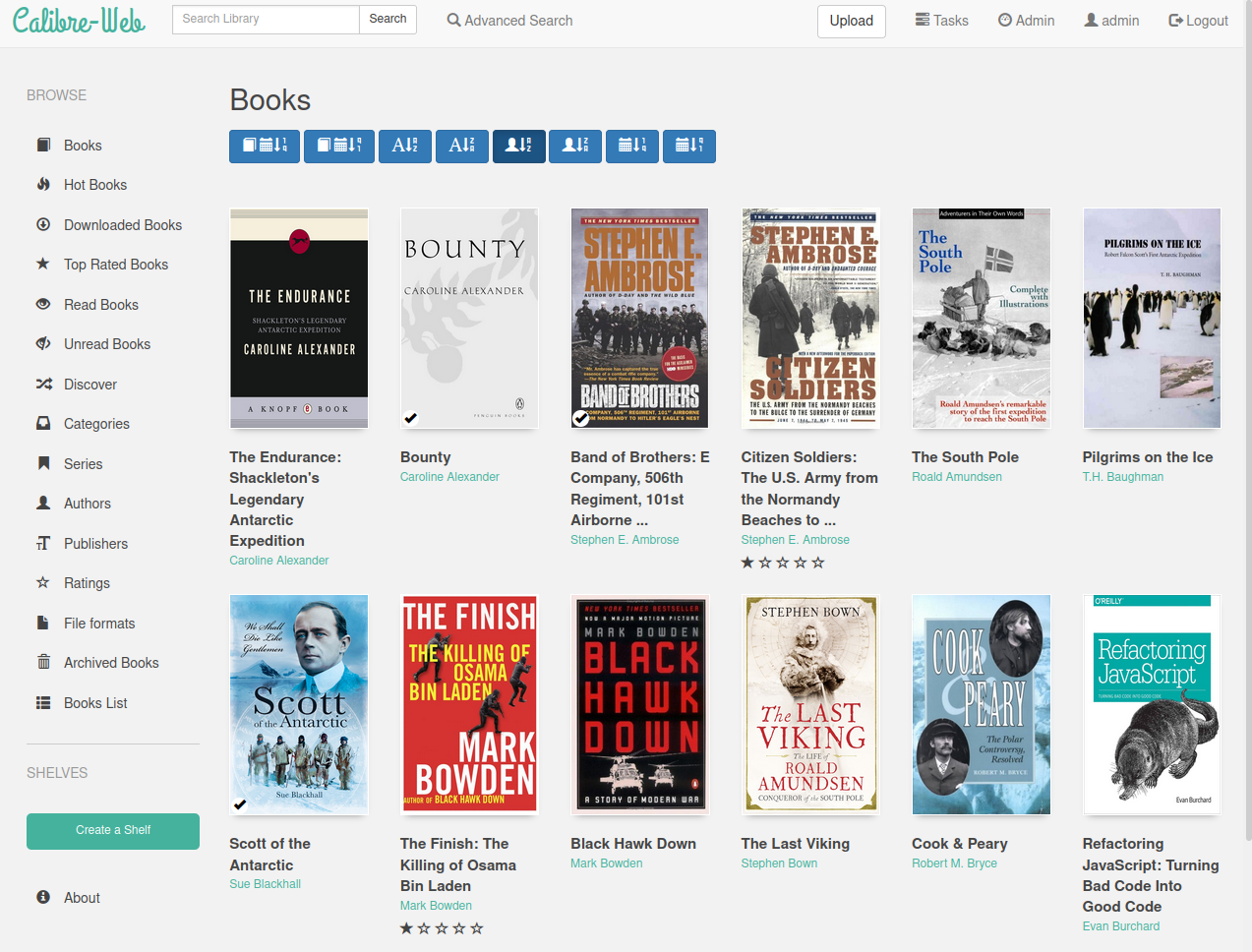
Calibre-Web is a web app that offers a clean and intuitive interface for browsing, reading, and downloading eBooks using a valid Calibre database.






- About
- Features
- Installation
- Docker Images
- Troubleshooting
- Contributor Recognition
- Contact
- Contributing to Calibre-Web
This software is a fork of library and licensed under the GPL v3 License.
Features
- Modern and responsive Bootstrap 3 HTML5 interface
- Full graphical setup
- Comprehensive user management with fine-grained per-user permissions
- Admin interface
- Multilingual user interface supporting 20+ languages (supported languages)
- OPDS feed for eBook reader apps
- Advanced search and filtering options
- Custom book collection (shelves) creation
- eBook metadata editing and deletion support
- Metadata download from various sources (extensible via plugins)
- eBook conversion through Calibre binaries
- eBook download restriction to logged-in users
- Public user registration support
- Send eBooks to E-Readers with a single click
- Sync Kobo devices with your Calibre library
- In-browser eBook reading support for multiple formats
- Upload new books in various formats, including audio formats
- Calibre Custom Columns support
- Content hiding based on categories and Custom Column content per user
- Self-update capability
- "Magic Link" login for easy access on eReaders
- LDAP, Google/GitHub OAuth, and proxy authentication support
Installation
Installation via pip (recommended)
- Create a virtual environment: It’s essential to isolate your Calibre-Web installation to avoid dependency conflicts. You can create a virtual environment by running:
python3 -m venv calibre-web-env - Activate the virtual environment:
source calibre-web-env/bin/activate - Install Calibre-Web: Use pip to install the application:
pip install calibreweb - Install optional features: For additional functionality, you may need to install optional features. Refer to this page for details on what can be installed.
- Start Calibre-Web: After installation, you can start the application with:
cps
Note: Users of Raspberry Pi OS may encounter installation issues. If you do, try upgrading pip and/or installing cargo as follows:
./venv/bin/python3 -m pip install --upgrade pip
sudo apt install cargo
Important Links
- For additional installation examples, check the following:
Quick Start
- Access Calibre-Web: Open your browser and navigate to:
or for the OPDS catalog:http://localhost:8083http://localhost:8083/opds - Log in: Use the default admin credentials:
- Username: admin
- Password: admin123
- Database Setup: If you do not have a Calibre database, download a sample from:
Move it out of the Calibre-Web folder to avoid overwriting during updates.https://github.com/janeczku/calibre-web/raw/master/library/metadata.db - Configure Calibre Database: In the admin interface, set the
Location of Calibre databaseto the path of the folder containing your Calibre library (wheremetadata.dbis located) and click "Save". - Google Drive Integration: For hosting your Calibre library on Google Drive, refer to the Google Drive integration guide.
- Admin Configuration: Configure your instance via the admin page, referring to the Basic Configuration and UI Configuration guides.
Requirements
- Python Version: Ensure you have Python 3.7 or newer.
- Imagemagick: Required for cover extraction from EPUBs. Windows users may also need to install Ghostscript for PDF cover extraction.
- Optional Tools:
- Calibre desktop program: Recommended for on-the-fly conversion and metadata editing. Set the path to Calibre’s converter tool on the setup page.
- Kepubify tool: Needed for Kobo device support. Download the tool and place the binary in
/opt/kepubifyon Linux orC:\Program Files\kepubifyon Windows.
Docker Images
Pre-built Docker images are available:
LinuxServer - x64, aarch64
- Docker Hub: linuxserver/calibre-web
- GitHub: linuxserver/docker-calibre-web
- Optional Calibre layer: linuxserver/docker-mods
To include the Calibre ebook-convert binary (x64 only), add the environment variable:
DOCKER_MODS=linuxserver/mods:universal-calibre
in your Docker run/compose file. Omit this variable for a lightweight image.
- Paths Configuration:
- Set Path to Calibre Binaries to
/usr/bin. - Set Path to Unrar to
/usr/bin/unrar.
- Set Path to Calibre Binaries to
Troubleshooting
-
Common Issues:
- If you experience issues starting the application, check the log files located in the
logsdirectory for error messages. - If eBooks fail to load, verify that the
Location of Calibre databaseis correctly set and that the database file is accessible. - You need to enable uploads under
Basic settingsfor this option to appear
- If you experience issues starting the application, check the log files located in the
-
Configuration Errors: Ensure that your Calibre database is compatible and properly formatted. Refer to the Calibre documentation for guidance on maintaining the database.
-
Performance Problems:
- If the application is slow, consider increasing the allocated resources (CPU/RAM) to your server or optimizing the Calibre database by removing duplicates and unnecessary entries.
- Regularly clear the cache in your web browser to improve loading times.
-
User Management Issues: If users are unable to log in or register, check the user permission settings in the admin interface. Ensure that registration is enabled and that users are being assigned appropriate roles.
-
Support Resources: For additional help, consider visiting the FAQ section of the wiki or posting your questions in the Discord community.
Contributor Recognition
We would like to thank all the contributors and maintainers of Calibre-Web for their valuable input and dedication to the project. Your contributions are greatly appreciated.
Contact
Join us on Discord
For more information, How To's, and FAQs, please visit the Wiki
Contributing to Calibre-Web
To contribute, please check our Contributing Guidelines. We welcome issues, feature requests, and pull requests from the community.
Reporting Bugs
If you encounter bugs or issues, please report them in the issues section of the repository. Be sure to include detailed information about your setup and the problem encountered.
Feature Requests
We welcome suggestions for new features. Please create a new issue in the repository to discuss your ideas.
Additional Resources
- Documentation: Comprehensive documentation is available on the Calibre-Web wiki.
- Community Contributions: Explore the community contributions to see ongoing work and how you can get involved.
Thank you for using Calibre-Web! We hope you enjoy managing your eBook library with our tool.
koreader
koreader·Lua
基于 LuaJIT 的电子书阅读器,支持 PDF、EPUB、DjVu、FB2 等格式,可运行在 Kindle、Kobo、PocketBook 等墨水屏设备和 Android 上。
电子书阅读器+4电子书阅读器
31023+802.0kv2026.07.12026-11-10 21:45 UTC
calibre
kovidgoyal·Python
功能完整的电子书管理工具,能整理书库、转换 EPUB、MOBI 等格式,并支持编辑元数据和推送到 Kindle 阅读。
电子书管理+4电子书阅读器
26410+332.8kv9.18.02026-11-10 15:16 UTC

readest
readest·TypeScript
一款现代跨平台电子书阅读器,支持 EPUB、MOBI、Kindle 等格式,界面直观、工具丰富,适合重度阅读用户在多设备间无缝阅读。
电子书阅读器+4电子书阅读器
26164+1171.9kv0.12.202026-11-10 18:27 UTC
anx-reader
Anxcye·Dart
基于 Flutter 的跨平台电子书阅读器,支持多种电子书格式并集成 AI 能力,让阅读更智能、更专注。
电子书阅读器+4电子书阅读器
9228+15676v1.14.02026-10-17 12:57 UTC